
OpenClaw 技能开发系列:飞书消息发送技能
开发飞书消息技能必要性
在数字化协同与智能办公深化的当下,飞书已成为企业信息流转核心枢纽,承载内部协作、客户对接、业务监控等关键沟通需求。OpenClaw 作为多场景智能体开发框架,与飞书消息能力的结合,已从“可选功能”升级为提升效率、打通业务闭环、降低协同成本的“必备技能”。对AI开发者而言,开发该技能就是为智能体搭建高效信息输出通道,无需跨平台操作,即可通过OpenClaw驱动飞书,实现客户响应、定时推送、异常预警、智能回复等场景落地,摆脱重复操作内耗,避免沟通延迟损耗。依托飞书开放平台2500+标准化API的底层支撑,结合OpenClaw便捷的技能扩展能力,无需深耕复杂接口开发,就能快速适配多场景消息推送,这也是其成为OpenClaw高频开发需求的核心原因,更是连接技术与业务、实现“技术赋能效率”的关键桥梁。
第一章:基础认知——飞书消息发送技能核心
1.1 技能定义:
OpenClaw飞书消息发送技能的核心的是,通过OpenClaw驱动飞书API,实现多场景消息推送的智能技能。
1.2 核心优势:
相较于原生飞书消息及其他开发框架,其核心价值在于简洁集成、灵活扩展,可快速适配多业务场景。
1.3 开发前提:
完成OpenClaw框架部署,以及飞书开放平台账号注册、机器人创建与配置。
1.4 核心依赖:
解析飞书消息API核心接口,明确消息类型、调用规范及所需权限,为后续开发奠定基础。
第二章:开发前置——飞书开放平台与 OpenClaw 环境配置
参考https://www.feishu.cn/content/article/7602519239445974205 完成下面四项配置
2.1 飞书开放平台操作:
创建应用、开启机器人消息发送能力,配置发送消息、通讯录等核心权限。
2.2 密钥配置:
获取tenant_access_token、app_secret,做好加密存储,规避安全风险。
2.3 OpenClaw环境适配:
配置技能目录,安装飞书SDK等依赖包,完成框架与飞书的初步对接。
2.4 连通测试:
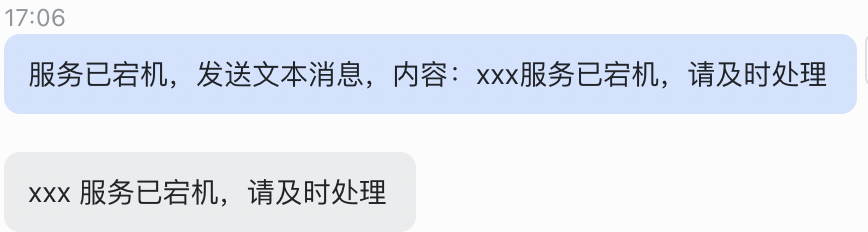
发送简单文本消息,验证环境配置正确性,确保API调用正常。
第三章:核心开发——OpenClaw 飞书消息发送技能编码实现
3.1 技能创建
1.通过init_skill.py创建feishu-messenger的技能
scripts/init_skill.py feishu-messenger --path skills/public --resources scripts,references2、SKILL.md编写
---
name: feishu-messenger
description: 飞书消息自动发送工具,支持通过自建应用 API 发送纯文本、富文本、卡片、文件、图片、视频消息。使用当需要:(1) 向个人或群聊发送通知,(2) 发送富文本或交互式卡片,(3) 上传发送文件/图片/视频,(4) 批量发送消息,(5) 定时或事件触发消息推送
---

# 飞书消息发送技能

## 前置准备

### 1. 创建飞书自建应用

1. 访问 [飞书开放平台](https://open.feishu.cn/app)
2. 点击「创建企业自建应用」
3. 填写应用名称和图标
4. 发布应用获取 `App ID` 和 `App Secret`

### 2. 配置应用权限

在「权限管理」中添加以下权限:

- `message:send_as_bot` - 以机器人身份发送消息
- `im:message` - 发送消息
- `im:chat` - 获取群组信息
- `contact:user:readonly` - 获取用户信息(可选,用于通过手机号/邮箱查找用户)

### 3. 启用机器人

- 进入「功能配置」→「机器人」
- 启用机器人功能
- 将机器人添加到需要发送消息的群聊

### 4. 配置凭证

在 `TOOLS.md` 中记录你的飞书应用凭证:

```markdown
### Feishu

- App ID: `cli_xxxxxxxxxxxxx`
- App Secret: `xxxxxxxxxxxxx`
- 默认接收人:(可选)
```

或在环境变量中设置:
- `FEISHU_APP_ID`
- `FEISHU_APP_SECRET`

## 使用方法

### 发送文本消息

```bash
python scripts/send_message.py \
  --app-id "cli_xxx" \
  --app-secret "xxx" \
  --receiver "ou_xxx" \
  --content "Hello, 飞书!" \
  --msg-type "text"
```

### 发送富文本

```bash
python scripts/send_message.py \
  --app-id "cli_xxx" \
  --app-secret "xxx" \
  --receiver "ou_xxx" \
  --content-json '{"elements": [{"tag": "text", "text": "Hello"}]}' \
  --msg-type "post"
```

### 发送卡片消息

```bash
python scripts/send_card.py \
  --app-id "cli_xxx" \
  --app-secret "xxx" \
  --receiver "ou_xxx" \
  --template "interactive" \
  --title "通知标题" \
  --content "卡片内容"
```

### 发送文件/图片/视频

```bash
# 发送图片
python scripts/send_file.py \
  --app-id "cli_xxx" \
  --app-secret "xxx" \
  --receiver "ou_xxx" \
  --file-path "/path/to/image.png" \
  --file-type "image"

# 发送文件
python scripts/send_file.py \
  --app-id "cli_xxx" \
  --app-secret "xxx" \
  --receiver "ou_xxx" \
  --file-path "/path/to/document.pdf" \
  --file-type "file"
```

## 接收人 ID 类型

飞书支持多种接收人标识:

| 类型 | 前缀 | 说明 |
|------|------|------|
| 用户 ID | `ou_` | 推荐,通过 API 获取 |
| 群聊 ID | `oc_` | 群会话 ID |
| 手机号 | `tel:` | 需开启通讯录权限 |
| 邮箱 | `email:` | 需开启通讯录权限 |
| 机器人 | `bot:` | 发送给其他机器人 |

## 消息类型说明

### text - 纯文本
简单文本消息,支持 `@` 用户(需在 content 中添加 `@user_id`)

### post - 富文本
支持标题、多语言、文本样式(加粗、链接等)

### interactive - 交互卡片
支持按钮、表单、模板等交互元素

### image - 图片
需先上传获取 `image_key`

### file - 文件
支持各种文件格式,需先上传获取 `file_key`

### share_chat - 分享群聊
分享指定群聊

### share_user - 分享名片
分享用户名片

## 脚本说明

- **scripts/send_message.py** - 通用消息发送(文本/富文本)
- **scripts/send_card.py** - 卡片消息发送(支持多种模板)
- **scripts/send_file.py** - 文件/图片/视频上传发送
- **references/api_docs.md** - 完整 API 参考文档
- **references/card_templates.md** - 卡片模板示例库

## 常见问题

### 获取用户/群聊 ID

使用飞书 API 查询:

```bash
# 获取用户 ID(通过邮箱)
curl -X GET "https://open.feishu.cn/open-apis/contact/v3/users/find_by_department?dept_name=xxx" \
  -H "Authorization: Bearer <access_token>"

# 获取群聊 ID
curl -X GET "https://open.feishu.cn/open-apis/im/v1/chats" \
  -H "Authorization: Bearer <access_token>"
```

### 权限错误

确保:
1. 应用已发布(开发版本只能发给开发者)
2. 机器人已添加到目标群聊
3. 权限已正确配置并生效

### 消息发送失败

检查:
1. access_token 是否过期(有效期 2 小时)
2. 接收人 ID 是否正确
3. 消息格式是否符合规范

## 安全提示

- 不要将 `App Secret` 提交到代码仓库
- 生产环境使用环境变量存储凭证
- 定期轮换应用密钥
- 限制应用的权限范围到最小必需
3.2 发送消息
1、文本消息
#!/usr/bin/env python3
"""
飞书消息发送脚本 - 支持文本和富文本消息
"""

import argparse
import json
import requests
import sys
from typing import Optional


def get_access_token(app_id: str, app_secret: str) -> str:
    """获取飞书 access_token"""
    url = "https://open.feishu.cn/open-apis/auth/v3/tenant_access_token/internal"
    payload = {
        "app_id": app_id,
        "app_secret": app_secret
    }

    response = requests.post(url, json=payload)
    data = response.json()

    if data.get("code") != 0:
        raise Exception(f"获取 access_token 失败:{data.get('msg', '未知错误')}")

    return data["tenant_access_token"]


def send_text_message(
    access_token: str,
    receiver: str,
    content: str,
    msg_type: str = "text",
    receive_id_type: str = "open_id",
    uuid: Optional[str] = None
) -> dict:
    """发送消息"""
    url = "https://open.feishu.cn/open-apis/im/v1/messages?receive_id_type=open_id"

    headers = {
        "Authorization": f"Bearer {access_token}",
        "Content-Type": "application/json"
    }

    # 根据消息类型构建 content
    if msg_type == "text":
        content_json = {"text": content}
    elif msg_type == "post":
        # 富文本格式
        content_json = json.loads(content) if isinstance(content, str) else content
    else:
        content_json = json.loads(content) if isinstance(content, str) else content

    payload = {
        "receive_id": receiver,
        "msg_type": msg_type,
        "content": json.dumps(content_json),
        "receive_id_type": receive_id_type
    }

    if uuid:
        payload["uuid"] = uuid

    response = requests.post(url, headers=headers, json=payload)
    data = response.json()

    return data


def main():
    parser = argparse.ArgumentParser(description="飞书消息发送工具")

    parser.add_argument("--app-id", required=True, help="飞书应用 App ID")
    parser.add_argument("--app-secret", required=True, help="飞书应用 App Secret")
    parser.add_argument("--receiver", required=True, help="接收人 ID (open_id/user_id/手机号/邮箱)")
    parser.add_argument("--content", required=True, help="消息内容")
    parser.add_argument("--msg-type", default="text",
                       choices=["text", "post", "interactive", "image", "file", "audio", "media", "sticker"],
                       help="消息类型")
    parser.add_argument("--receive-id-type", default="open_id",
                       choices=["open_id", "user_id", "union_id", "email", "chat_id"],
                       help="接收人 ID 类型")
    parser.add_argument("--uuid", help="消息唯一标识(用于去重)")
    parser.add_argument("--json-output", action="store_true", help="输出 JSON 格式结果")

    args = parser.parse_args()

    try:
        # 获取 access_token
        if not args.json_output:
            print("正在获取 access_token...")

        access_token = get_access_token(args.app_id, args.app_secret)

        # 发送消息
        if not args.json_output:
            print(f"正在发送 {args.msg_type} 消息给 {args.receiver}...")

        result = send_text_message(
            access_token=access_token,
            receiver=args.receiver,
            content=args.content,
            msg_type=args.msg_type,
            receive_id_type=args.receive_id_type,
            uuid=args.uuid
        )

        if args.json_output:
            print(json.dumps(result, ensure_ascii=False, indent=2))
        else:
            if result.get("code") == 0:
                print(f"✅ 消息发送成功!")
                print(f"消息 ID: {result.get('data', {}).get('message_id', 'N/A')}")
            else:
                print(f"❌ 消息发送失败:{result.get('msg', '未知错误')}")
                print(f"错误码:{result.get('code', 'N/A')}")
                sys.exit(1)

    except Exception as e:
        if args.json_output:
            print(json.dumps({"error": str(e)}, ensure_ascii=False))
        else:
            print(f"❌ 错误:{e}")
        sys.exit(1)


if __name__ == "__main__":
    main()
2、发送图片消息
#!/usr/bin/env python3
"""
飞书文件发送脚本 - 支持图片、文件、视频上传发送
"""

import argparse
import json
import requests
import sys
import os
from typing import Optional


def get_access_token(app_id: str, app_secret: str) -> str:
    """获取飞书 access_token"""
    url = "https://open.feishu.cn/open-apis/auth/v3/tenant_access_token/internal"
    payload = {
        "app_id": app_id,
        "app_secret": app_secret
    }

    response = requests.post(url, json=payload)
    data = response.json()

    if data.get("code") != 0:
        raise Exception(f"获取 access_token 失败:{data.get('msg', '未知错误')}")

    return data["tenant_access_token"]


def upload_file(
    access_token: str,
    file_path: str,
    file_type: str = "file"
) -> str:
    """
    上传文件到飞书
    返回 file_key 或 image_key
    """
    if not os.path.exists(file_path):
        raise FileNotFoundError(f"文件不存在:{file_path}")

    # 根据文件类型选择上传接口
    if file_type == "image":
        url = "https://open.feishu.cn/open-apis/im/v1/images"
        key_field = "image_key"
    elif file_type == "video":
        url = "https://open.feishu.cn/open-apis/im/v1/videos"
        key_field = "video_key"
    else:  # file
        url = "https://open.feishu.cn/open-apis/im/v1/files"
        key_field = "file_key"

    headers = {
        "Authorization": f"Bearer {access_token}"
    }

    with open(file_path, "rb") as f:
        files = {
            "image" if file_type == "image" else "file": f
        }
        response = requests.post(url, headers=headers, files=files)

    data = response.json()

    if data.get("code") != 0:
        raise Exception(f"上传文件失败:{data.get('msg', '未知错误')}")

    return data["data"][key_field]


def send_image_message(
    access_token: str,
    receiver: str,
    image_key: str,
    receive_id_type: str = "open_id"
) -> dict:
    """发送图片消息"""
    url = "https://open.feishu.cn/open-apis/im/v1/messages"

    headers = {
        "Authorization": f"Bearer {access_token}",
        "Content-Type": "application/json"
    }

    content = {
        "image_key": image_key
    }

    payload = {
        "receive_id": receiver,
        "msg_type": "image",
        "content": json.dumps(content),
        "receive_id_type": receive_id_type
    }

    response = requests.post(url, headers=headers, json=payload)
    return response.json()


def send_file_message(
    access_token: str,
    receiver: str,
    file_key: str,
    file_name: str,
    receive_id_type: str = "open_id"
) -> dict:
    """发送文件消息"""
    url = "https://open.feishu.cn/open-apis/im/v1/messages"

    headers = {
        "Authorization": f"Bearer {access_token}",
        "Content-Type": "application/json"
    }

    content = {
        "file_key": file_key,
        "file_name": file_name
    }

    payload = {
        "receive_id": receiver,
        "msg_type": "file",
        "content": json.dumps(content),
        "receive_id_type": receive_id_type
    }

    response = requests.post(url, headers=headers, json=payload)
    return response.json()


def send_video_message(
    access_token: str,
    receiver: str,
    video_key: str,
    receive_id_type: str = "open_id"
) -> dict:
    """发送视频消息"""
    url = "https://open.feishu.cn/open-apis/im/v1/messages"

    headers = {
        "Authorization": f"Bearer {access_token}",
        "Content-Type": "application/json"
    }

    content = {
        "video_key": video_key
    }

    payload = {
        "receive_id": receiver,
        "msg_type": "media",
        "content": json.dumps(content),
        "receive_id_type": receive_id_type
    }

    response = requests.post(url, headers=headers, json=payload)
    return response.json()


def main():
    parser = argparse.ArgumentParser(description="飞书文件发送工具")

    parser.add_argument("--app-id", required=True, help="飞书应用 App ID")
    parser.add_argument("--app-secret", required=True, help="飞书应用 App Secret")
    parser.add_argument("--receiver", required=True, help="接收人 ID")
    parser.add_argument("--file-path", required=True, help="文件路径")
    parser.add_argument("--file-type", default="file",
                       choices=["file", "image", "video"],
                       help="文件类型")
    parser.add_argument("--file-name", help="文件名(可选,默认使用原文件名)")
    parser.add_argument("--receive-id-type", default="open_id",
                       choices=["open_id", "user_id", "union_id", "email", "chat_id"],
                       help="接收人 ID 类型")
    parser.add_argument("--json-output", action="store_true", help="输出 JSON 格式结果")

    args = parser.parse_args()

    try:
        # 获取 access_token
        if not args.json_output:
            print("正在获取 access_token...")

        access_token = get_access_token(args.app_id, args.app_secret)

        # 上传文件
        if not args.json_output:
            print(f"正在上传 {args.file_type}:{args.file_path}...")

        file_key = upload_file(
            access_token=access_token,
            file_path=args.file_path,
            file_type=args.file_type
        )

        if not args.json_output:
            print(f"✅ 上传成功,key: {file_key[:20]}...")
            print(f"正在发送消息...")

        # 发送消息
        if args.file_type == "image":
            result = send_image_message(
                access_token=access_token,
                receiver=args.receiver,
                image_key=file_key,
                receive_id_type=args.receive_id_type
            )
        elif args.file_type == "video":
            result = send_video_message(
                access_token=access_token,
                receiver=args.receiver,
                video_key=file_key,
                receive_id_type=args.receive_id_type
            )
        else:  # file
            file_name = args.file_name or os.path.basename(args.file_path)
            result = send_file_message(
                access_token=access_token,
                receiver=args.receiver,
                file_key=file_key,
                file_name=file_name,
                receive_id_type=args.receive_id_type
            )

        if args.json_output:
            print(json.dumps(result, ensure_ascii=False, indent=2))
        else:
            if result.get("code") == 0:
                print(f"✅ 文件发送成功!")
                print(f"消息 ID: {result.get('data', {}).get('message_id', 'N/A')}")
            else:
                print(f"❌ 文件发送失败:{result.get('msg', '未知错误')}")
                print(f"错误码:{result.get('code', 'N/A')}")
                sys.exit(1)

    except FileNotFoundError as e:
        if args.json_output:
            print(json.dumps({"error": str(e)}, ensure_ascii=False))
        else:
            print(f"❌ 错误:{e}")
        sys.exit(1)
    except Exception as e:
        if args.json_output:
            print(json.dumps({"error": str(e)}, ensure_ascii=False))
        else:
            print(f"❌ 错误:{e}")
        sys.exit(1)


if __name__ == "__main__":
    main()
3、发送图文消息
#!/usr/bin/env python3
"""
飞书卡片消息发送脚本 - 支持交互式卡片模板
"""

import argparse
import json
import requests
import sys
from typing import Optional, Dict, Any


def get_access_token(app_id: str, app_secret: str) -> str:
    """获取飞书 access_token"""
    url = "https://open.feishu.cn/open-apis/auth/v3/tenant_access_token/internal"
    payload = {
        "app_id": app_id,
        "app_secret": app_secret
    }

    response = requests.post(url, json=payload)
    data = response.json()

    if data.get("code") != 0:
        raise Exception(f"获取 access_token 失败:{data.get('msg', '未知错误')}")

    return data["tenant_access_token"]


def build_interactive_card(
    title: str,
    content: str,
    color: str = "blue",
    buttons: Optional[list] = None
) -> Dict[str, Any]:
    """构建交互式卡片"""
    card = {
        "config": {
            "wide_screen_mode": True
        },
        "header": {
            "title": {
                "tag": "plain_text",
                "content": title
            },
            "template": color
        },
        "elements": [
            {
                "tag": "div",
                "text": {
                    "tag": "lark_md",
                    "content": content
                }
            }
        ]
    }

    if buttons:
        card["elements"].append({
            "tag": "action",
            "actions": buttons
        })

    return card


def build_notification_card(
    title: str,
    content: str,
    status: str = "info"
) -> Dict[str, Any]:
    """构建通知卡片"""
    status_colors = {
        "success": "green",
        "warning": "orange",
        "error": "red",
        "info": "blue"
    }

    status_emojis = {
        "success": "✅",
        "warning": "⚠️",
        "error": "❌",
        "info": "ℹ️"
    }

    return {
        "config": {
            "wide_screen_mode": True
        },
        "header": {
            "title": {
                "tag": "plain_text",
                "content": f"{status_emojis.get(status, 'ℹ️')} {title}"
            },
            "template": status_colors.get(status, "blue")
        },
        "elements": [
            {
                "tag": "div",
                "text": {
                    "tag": "lark_md",
                    "content": content
                }
            }
        ]
    }


def build_markdown_card(markdown_content: str) -> Dict[str, Any]:
    """构建 Markdown 卡片"""
    return {
        "config": {
            "wide_screen_mode": True
        },
        "elements": [
            {
                "tag": "markdown",
                "content": markdown_content
            }
        ]
    }


def send_card_message(
    access_token: str,
    receiver: str,
    card_content: Dict[str, Any],
    receive_id_type: str = "open_id"
) -> dict:
    """发送卡片消息"""
    url = "https://open.feishu.cn/open-apis/im/v1/messages"

    headers = {
        "Authorization": f"Bearer {access_token}",
        "Content-Type": "application/json"
    }

    payload = {
        "receive_id": receiver,
        "msg_type": "interactive",
        "content": json.dumps(card_content),
        "receive_id_type": receive_id_type
    }

    response = requests.post(url, headers=headers, json=payload)
    data = response.json()

    return data


def main():
    parser = argparse.ArgumentParser(description="飞书卡片消息发送工具")

    parser.add_argument("--app-id", required=True, help="飞书应用 App ID")
    parser.add_argument("--app-secret", required=True, help="飞书应用 App Secret")
    parser.add_argument("--receiver", required=True, help="接收人 ID")
    parser.add_argument("--template", default="interactive",
                       choices=["interactive", "notification", "markdown"],
                       help="卡片模板类型")
    parser.add_argument("--title", help="卡片标题(interactive/notification 模板)")
    parser.add_argument("--content", help="卡片内容")
    parser.add_argument("--markdown", help="Markdown 内容(markdown 模板)")
    parser.add_argument("--color", default="blue",
                       choices=["blue", "red", "orange", "green", "grey", "purple"],
                       help="卡片头部颜色")
    parser.add_argument("--status", default="info",
                       choices=["info", "success", "warning", "error"],
                       help="通知状态(notification 模板)")
    parser.add_argument("--receive-id-type", default="open_id",
                       choices=["open_id", "user_id", "union_id", "email", "chat_id"],
                       help="接收人 ID 类型")
    parser.add_argument("--json-output", action="store_true", help="输出 JSON 格式结果")

    args = parser.parse_args()

    try:
        # 获取 access_token
        if not args.json_output:
            print("正在获取 access_token...")

        access_token = get_access_token(args.app_id, args.app_secret)

        # 构建卡片内容
        if args.template == "interactive":
            if not args.title or not args.content:
                raise ValueError("interactive 模板需要 --title 和 --content 参数")

            buttons = []
            if args.json_output:
                # 从 stdin 读取按钮配置
                import sys
                try:
                    button_config = json.load(sys.stdin)
                    buttons = button_config.get("buttons", [])
                except:
                    pass

            card_content = build_interactive_card(
                title=args.title,
                content=args.content,
                color=args.color,
                buttons=buttons
            )

        elif args.template == "notification":
            if not args.title or not args.content:
                raise ValueError("notification 模板需要 --title 和 --content 参数")

            card_content = build_notification_card(
                title=args.title,
                content=args.content,
                status=args.status
            )

        elif args.template == "markdown":
            if not args.markdown:
                raise ValueError("markdown 模板需要 --markdown 参数")

            card_content = build_markdown_card(args.markdown)

        # 发送消息
        if not args.json_output:
            print(f"正在发送 {args.template} 卡片给 {args.receiver}...")

        result = send_card_message(
            access_token=access_token,
            receiver=args.receiver,
            card_content=card_content,
            receive_id_type=args.receive_id_type
        )

        if args.json_output:
            print(json.dumps(result, ensure_ascii=False, indent=2))
        else:
            if result.get("code") == 0:
                print(f"✅ 卡片发送成功!")
                print(f"消息 ID: {result.get('data', {}).get('message_id', 'N/A')}")
            else:
                print(f"❌ 卡片发送失败:{result.get('msg', '未知错误')}")
                print(f"错误码:{result.get('code', 'N/A')}")
                sys.exit(1)

    except Exception as e:
        if args.json_output:
            print(json.dumps({"error": str(e)}, ensure_ascii=False))
        else:
            print(f"❌ 错误:{e}")
        sys.exit(1)


if __name__ == "__main__":
    main()
3.3 添加references
1、api_docs.md
# 飞书 API 参考文档

## 基础信息

### API 域名
- 生产环境:`https://open.feishu.cn`
- 测试环境:`https://open.feishu.cn`

### 请求格式
- Content-Type: `application/json`
- 认证方式:`Authorization: Bearer <access_token>`

---

## 认证 API

### 获取应用 Access Token(内部应用)

**请求**
```http
POST /open-apis/auth/v3/tenant_access_token/internal
Content-Type: application/json

{
  "app_id": "cli_xxxxx",
  "app_secret": "xxxxx"
}
```

**响应**
```json
{
  "code": 0,
  "msg": "success",
  "tenant_access_token": "t-xxxxxxxxxxxx",
  "expire": 7200
}
```

**说明**
- token 有效期 2 小时
- 需要缓存,过期前刷新

---

## 消息 API

### 发送消息

**请求**
```http
POST /open-apis/im/v1/messages
Content-Type: application/json
Authorization: Bearer <access_token>

{
  "receive_id": "ou_xxxxx",
  "msg_type": "text",
  "content": "{\"text\": \"Hello\"}",
  "receive_id_type": "open_id"
}
```

**参数说明**

| 参数 | 类型 | 必填 | 说明 |
|------|------|------|------|
| receive_id | string | 是 | 接收者 ID |
| msg_type | string | 是 | 消息类型:text/post/interactive/image/file/audio/media/sticker/share_chat/share_user |
| content | string | 是 | 消息内容(JSON 字符串) |
| receive_id_type | string | 是 | ID 类型:open_id/user_id/union_id/email/chat_id |
| uuid | string | 否 | 消息唯一标识(用于去重) |

**响应**
```json
{
  "code": 0,
  "msg": "success",
  "data": {
    "message_id": "om_xxxxx"
  }
}
```

### 回复消息

**请求**
```http
POST /open-apis/im/v1/messages
Content-Type: application/json
Authorization: Bearer <access_token>

{
  "receive_id": "ou_xxxxx",
  "msg_type": "text",
  "content": "{\"text\": \"Re: Hello\"}",
  "receive_id_type": "open_id",
  "reply_id": "om_xxxxx"
}
```

---

## 消息类型格式

### text - 纯文本

```json
{
  "text": "Hello @ou_xxxxx"
}
```

支持 @ 用户,格式:`@user_id`

### post - 富文本

```json
{
  "zh_cn": {
    "title": "标题",
    "content": [
      [
        {
          "tag": "text",
          "text": "普通文本"
        },
        {
          "tag": "a",
          "text": "链接文本",
          "href": "https://example.com"
        },
        {
          "tag": "at",
          "user_id": "ou_xxxxx",
          "text": "@用户"
        }
      ],
      [
        {
          "tag": "text",
          "text": "第二行"
        }
      ]
    ]
  }
}
```

**支持的标签**
- `text` - 普通文本
- `a` - 链接(需 href)
- `at` - @用户(需 user_id)
- `img` - 图片(需 image_key)
- `media` - 媒体
- `i` - 斜体

### interactive - 交互卡片

```json
{
  "config": {
    "wide_screen_mode": true
  },
  "header": {
    "title": {
      "tag": "plain_text",
      "content": "标题"
    },
    "template": "blue"
  },
  "elements": [
    {
      "tag": "div",
      "text": {
        "tag": "lark_md",
        "content": "**加粗** _斜体_ [链接](url)"
      }
    },
    {
      "tag": "action",
      "actions": [
        {
          "tag": "button",
          "text": {
            "tag": "plain_text",
            "content": "按钮"
          },
          "type": "primary",
          "url": "https://example.com"
        }
      ]
    }
  ]
}
```

**卡片元素类型**
- `div` - 文本区域
- `markdown` - Markdown 内容
- `img` - 图片
- `action` - 按钮组
- `hr` - 分割线
- `note` - 备注

**按钮类型**
- `primary` - 主按钮
- `default` - 默认按钮
- `danger` - 危险按钮

### image - 图片

```json
{
  "image_key": "img_xxxxx"
}
```

需先上传图片获取 image_key

### file - 文件

```json
{
  "file_key": "file_xxxxx",
  "file_name": "document.pdf"
}
```

需先上传文件获取 file_key

### media - 视频

```json
{
  "video_key": "video_xxxxx"
}
```

需先上传视频获取 video_key

---

## 文件上传 API

### 上传图片

**请求**
```http
POST /open-apis/im/v1/images
Authorization: Bearer <access_token>
Content-Type: multipart/form-data

file: [图片文件]
```

**响应**
```json
{
  "code": 0,
  "msg": "success",
  "data": {
    "image_key": "img_xxxxx"
  }
}
```

### 上传文件

**请求**
```http
POST /open-apis/im/v1/files
Authorization: Bearer <access_token>
Content-Type: multipart/form-data

file: [文件]
```

**响应**
```json
{
  "code": 0,
  "msg": "success",
  "data": {
    "file_key": "file_xxxxx"
  }
}
```

### 上传视频

**请求**
```http
POST /open-apis/im/v1/videos
Authorization: Bearer <access_token>
Content-Type: multipart/form-data

file: [视频文件]
```

**响应**
```json
{
  "code": 0,
  "msg": "success",
  "data": {
    "video_key": "video_xxxxx"
  }
}
```

---

## 通讯录 API

### 获取用户 ID(通过邮箱)

**请求**
```http
GET /open-apis/contact/v3/users/find_by_department?dept_name=xxx&user_id_type=open_id
Authorization: Bearer <access_token>
```

### 获取用户信息

**请求**
```http
GET /open-apis/contact/v3/users/:user_id?user_id_type=open_id
Authorization: Bearer <access_token>
```

### 获取部门列表

**请求**
```http
GET /open-apis/contact/v3/department?user_id_type=open_id
Authorization: Bearer <access_token>
```

---

## 群聊 API

### 获取群聊列表

**请求**
```http
GET /open-apis/im/v1/chats?page_size=50
Authorization: Bearer <access_token>
```

### 获取群聊详情

**请求**
```http
GET /open-apis/im/v1/chats/:chat_id
Authorization: Bearer <access_token>
```

### 创建群聊

**请求**
```http
POST /open-apis/im/v1/chats
Content-Type: application/json
Authorization: Bearer <access_token>

{
  "name": "群名称",
  "avatar": "头像 URL",
  "owner_id": "ou_xxxxx",
  "user_ids": ["ou_xxx1", "ou_xxx2"]
}
```

---

## 错误码

| 错误码 | 说明 |
|--------|------|
| 0 | 成功 |
| 99991663 | app access token 无效 |
| 99991665 | 没有权限 |
| 10011 | 参数错误 |
| 99991661 | 应用未发布 |
| 99991668 | 用户不存在 |
| 99991669 | 消息类型不支持 |

---

## 最佳实践

### 1. Token 管理
```python
# 缓存 token,过期前刷新
token_cache = {
    "token": None,
    "expire_at": 0
}

def get_cached_token():
    if time.time() < token_cache["expire_at"] - 300:
        return token_cache["token"]

    token = fetch_new_token()
    token_cache["token"] = token
    token_cache["expire_at"] = time.time() + 7200
    return token
```

### 2. 消息去重
使用 uuid 参数防止重复发送:
```python
import uuid
message_uuid = str(uuid.uuid4())
```

### 3. 批量发送
控制频率,避免触发限流:
```python
import time
for receiver in receivers:
    send_message(receiver)
    time.sleep(0.1)  # 100ms 间隔
```

### 4. 错误处理
```python
def send_with_retry(func, max_retries=3):
    for i in range(max_retries):
        try:
            return func()
        except Exception as e:
            if i == max_retries - 1:
                raise
            time.sleep(2 ** i)  # 指数退避
```
2、card_templates.md
# 飞书卡片模板示例库

## 通知类卡片

### 成功通知

```json
{
  "config": {
    "wide_screen_mode": true
  },
  "header": {
    "title": {
      "tag": "plain_text",
      "content": "✅ 部署成功"
    },
    "template": "green"
  },
  "elements": [
    {
      "tag": "div",
      "text": {
        "tag": "lark_md",
        "content": "**服务**: user-service\n**环境**: production\n**版本**: v1.2.3\n**时间**: 2024-01-15 10:30:00"
      }
    }
  ]
}
```

### 警告通知

```json
{
  "config": {
    "wide_screen_mode": true
  },
  "header": {
    "title": {
      "tag": "plain_text",
      "content": "⚠️ 内存使用率过高"
    },
    "template": "orange"
  },
  "elements": [
    {
      "tag": "div",
      "text": {
        "tag": "lark_md",
        "content": "**服务器**: prod-01\n**当前使用**: 85%\n**阈值**: 80%\n\n请检查是否有内存泄漏或考虑扩容。"
      }
    },
    {
      "tag": "action",
      "actions": [
        {
          "tag": "button",
          "text": {
            "tag": "plain_text",
            "content": "查看监控"
          },
          "type": "default",
          "url": "https://grafana.example.com"
        }
      ]
    }
  ]
}
```

### 错误通知

```json
{
  "config": {
    "wide_screen_mode": true
  },
  "header": {
    "title": {
      "tag": "plain_text",
      "content": "❌ 服务异常"
    },
    "template": "red"
  },
  "elements": [
    {
      "tag": "div",
      "text": {
        "tag": "lark_md",
        "content": "**服务**: payment-service\n**错误**: Connection timeout\n**影响**: 支付功能不可用\n**开始时间**: 2024-01-15 10:30:00"
      }
    },
    {
      "tag": "action",
      "actions": [
        {
          "tag": "button",
          "text": {
            "tag": "plain_text",
            "content": "查看日志"
          },
          "type": "danger",
          "url": "https://logs.example.com"
        },
        {
          "tag": "button",
          "text": {
            "tag": "plain_text",
            "content": "重启服务"
          },
          "type": "primary",
          "url": "https://k8s.example.com/restart"
        }
      ]
    }
  ]
}
```

---

## 日报/周报卡片

### 日报模板

```json
{
  "config": {
    "wide_screen_mode": true
  },
  "header": {
    "title": {
      "tag": "plain_text",
      "content": "📅 工作日报 - 2024-01-15"
    },
    "template": "blue"
  },
  "elements": [
    {
      "tag": "div",
      "text": {
        "tag": "lark_md",
        "content": "**今日完成**\n• 完成用户登录功能开发\n• 修复支付接口 bug\n• Code review 3 个 PR\n\n**明日计划**\n• 开始订单模块开发\n• 参加技术分享会\n\n**问题与风险**\n• 无"
      }
    }
  ]
}
```

### 周报模板

```json
{
  "config": {
    "wide_screen_mode": true
  },
  "header": {
    "title": {
      "tag": "plain_text",
      "content": "📊 周报 - 第 3 周 (01.15-01.19)"
    },
    "template": "purple"
  },
  "elements": [
    {
      "tag": "div",
      "text": {
        "tag": "lark_md",
        "content": "**本周重点**\n1. 用户系统重构完成\n2. 性能优化:接口响应时间降低 40%\n3. 新增单元测试覆盖率 15%\n\n**数据指标**\n- 完成需求:5 个\n- 修复 bug: 12 个\n- Code review: 8 个\n\n**下周计划**\n- 订单模块开发\n- 技术文档完善"
      }
    }
  ]
}
```

---

## 审批/确认卡片

### 审批请求

```json
{
  "config": {
    "wide_screen_mode": true
  },
  "header": {
    "title": {
      "tag": "plain_text",
      "content": "📝 审批申请 - 采购申请"
    },
    "template": "blue"
  },
  "elements": [
    {
      "tag": "div",
      "text": {
        "tag": "lark_md",
        "content": "**申请人**: 张三\n**部门**: 技术部\n**金额**: ¥5,000\n**用途**: 购买开发设备\n**说明**: MacBook Pro 用于新项目开发"
      }
    },
    {
      "tag": "action",
      "actions": [
        {
          "tag": "button",
          "text": {
            "tag": "plain_text",
            "content": "同意"
          },
          "type": "primary",
          "url": "https://approval.example.com/approve/123"
        },
        {
          "tag": "button",
          "text": {
            "tag": "plain_text",
            "content": "拒绝"
          },
          "type": "danger",
          "url": "https://approval.example.com/reject/123"
        }
      ]
    }
  ]
}
```

### 会议确认

```json
{
  "config": {
    "wide_screen_mode": true
  },
  "header": {
    "title": {
      "tag": "plain_text",
      "content": "📅 会议邀请 - 项目评审会"
    },
    "template": "blue"
  },
  "elements": [
    {
      "tag": "div",
      "text": {
        "tag": "lark_md",
        "content": "**时间**: 2024-01-16 14:00-15:00\n**地点**: 会议室 A / 飞书会议\n**主持人**: 李四\n**议程**:\n1. 项目进度汇报\n2. 技术方案评审\n3. 风险讨论"
      }
    },
    {
      "tag": "action",
      "actions": [
        {
          "tag": "button",
          "text": {
            "tag": "plain_text",
            "content": "参加"
          },
          "type": "primary",
          "url": "https://meeting.feishu.cn/xxx"
        },
        {
          "tag": "button",
          "text": {
            "tag": "plain_text",
            "content": "拒绝"
          },
          "type": "default"
        }
      ]
    }
  ]
}
```

---

## Markdown 卡片

### 代码片段

```json
{
  "config": {
    "wide_screen_mode": true
  },
  "elements": [
    {
      "tag": "markdown",
      "content": "## 错误日志\n\n```python\nTraceback (most recent call last):\n  File \"main.py\", line 42, in <module>\n    result = process_data()\n  File \"utils.py\", line 15, in process_data\n    raise ConnectionError(\"Database timeout\")\n```\n\n**建议**: 检查数据库连接状态"
    }
  ]
}
```

### 数据报表

```json
{
  "config": {
    "wide_screen_mode": true
  },
  "elements": [
    {
      "tag": "markdown",
      "content": "# 今日数据概览\n\n| 指标 | 数值 | 环比 |\n|------|------|------|\n| PV | 125,432 | +5.2% |\n| UV | 45,678 | +3.1% |\n| 转化率 | 2.34% | +0.12% |\n| GMV | ¥234,567 | +8.7% |\n\n**亮点**: GMV 创历史新高 🎉"
    }
  ]
}
```

---

## 使用示例

### Python 调用

```python
from send_card import send_card_message, get_access_token, build_notification_card

# 获取 token
token = get_access_token("cli_xxx", "secret")

# 构建通知卡片
card = build_notification_card(
    title="部署成功",
    content="服务 user-service 已成功部署到 production 环境",
    status="success"
)

# 发送
result = send_card_message(
    access_token=token,
    receiver="ou_xxxxx",
    card_content=card
)
```

### 命令行调用

```bash
# 发送成功通知
python scripts/send_card.py \
  --app-id "cli_xxx" \
  --app-secret "secret" \
  --receiver "ou_xxx" \
  --template "notification" \
  --title "部署成功" \
  --content "服务已成功部署" \
  --status "success"

# 发送 Markdown 卡片
python scripts/send_card.py \
  --app-id "cli_xxx" \
  --app-secret "secret" \
  --receiver "ou_xxx" \
  --template "markdown" \
  --markdown "# 日报\n\n今日完成:\n- 功能 A\n- 功能 B"
```

---

## 模板颜色说明

| 颜色 | 用途 |
|------|------|
| blue | 普通信息、默认 |
| green | 成功、完成 |
| orange | 警告、注意 |
| red | 错误、危险 |
| grey | 中性、次要信息 |
| purple | 重要、特别通知 |
3.4 打包skill
scripts/package_skill.py skills/public/feishu-messenger3.4 配置密钥
在 TOOLS.md 中添加:
### Feishu
- App ID: `xxxx`
- App Secret: `xxxxxx`
- 默认接收人:`xxxxx`
或设置环境变量:
export FEISHU_APP_ID="cli_xxx"
export FEISHU_APP_SECRET="xxx"
export FEISHU_RECEIVER="ou_xxx"
3.5 调试
1、发送消息:通过飞书测试发送消息
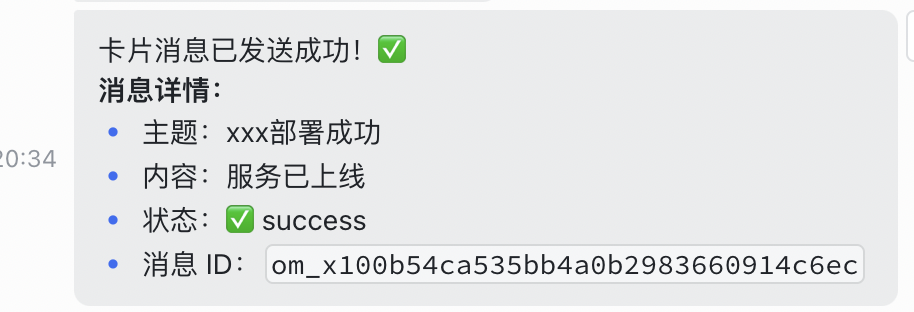
2、发送通知卡片

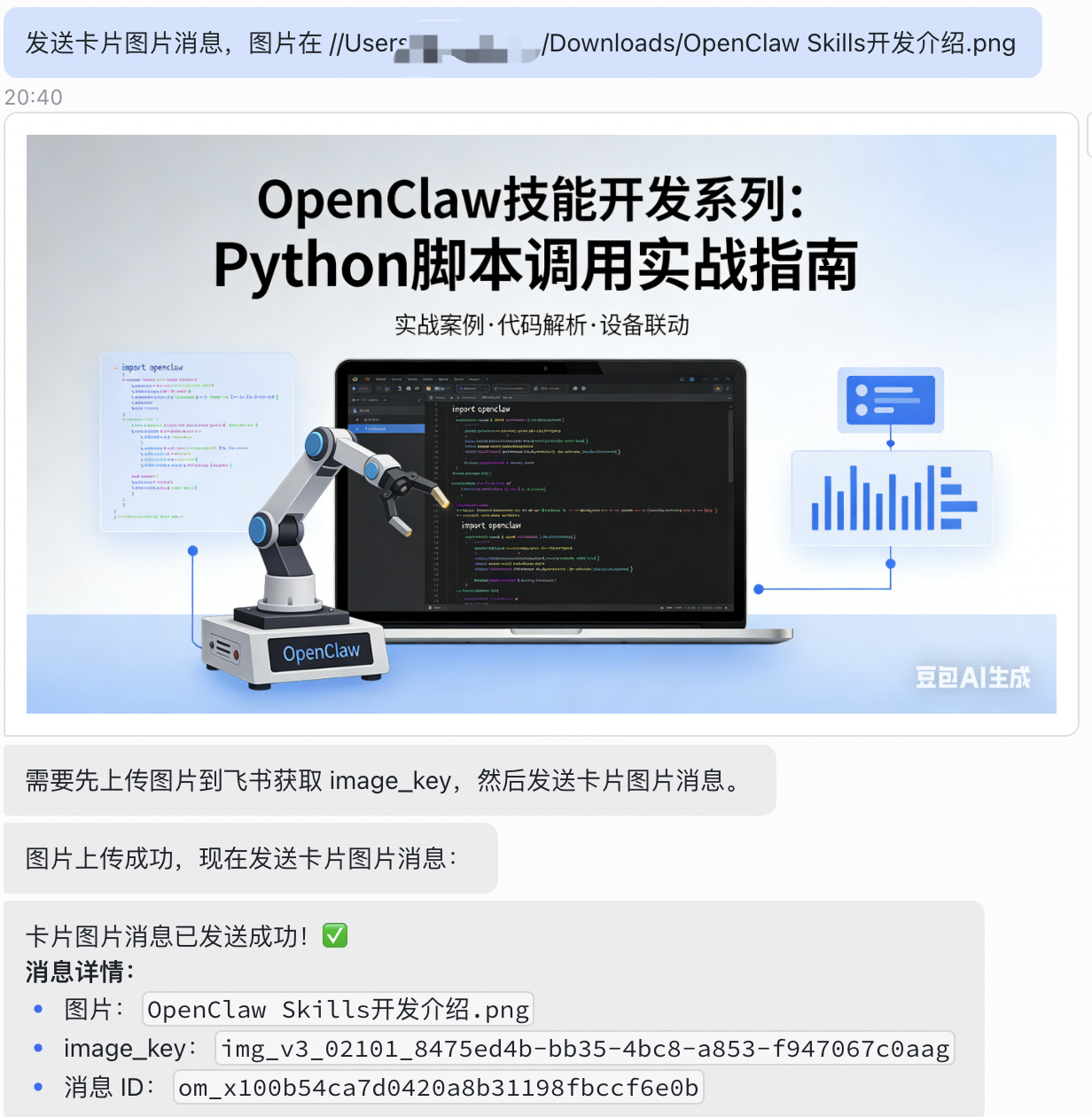
3、发送图片消息
第四章:场景落地——四大核心应用场景实操
OpenClaw飞书消息发送技能的核心价值,在于将技术能力转化为实际业务效能,以下四大场景为企业高频需求,将详细拆解应用场景、实操逻辑、核心代码片段及落地优势,帮助开发者快速将技能落地到业务中,实现“技术赋能业务”的核心目标。
4.1 场景一:客户对接场景——自动推送客户跟进提醒、业务通知
客户对接是企业核心业务环节,传统模式下,销售人员需手动记录客户跟进节点、手动发送业务通知,不仅效率低下,还易出现遗漏、延迟等问题,影响客户体验。基于OpenClaw飞书消息发送技能,可实现客户对接全流程消息自动化推送,覆盖客户跟进提醒、业务进度通知、需求反馈同步等核心场景,助力销售人员高效跟进客户,提升客户满意度。
核心应用场景包括:新客户添加后自动推送欢迎消息及业务介绍;客户跟进节点(如首次沟通、需求确认、合同签订)触发提醒,推送至对应销售人员飞书账号;客户需求反馈、投诉等信息,自动同步至销售主管及相关负责人;业务成交后,自动推送成交通知至销售团队及财务部门,打通客户对接闭环。
4.2 场景二:定时消息场景——每日/每周定时推送报表、会议提醒、工作复盘
企业日常办公中,存在大量需要定时推送的消息场景,如每日业务报表推送、每周工作复盘通知、会议提醒、考勤统计通知等,传统模式下需专人负责定时发送,耗时耗力且易出现忘记推送、推送不及时等问题。基于OpenClaw飞书消息发送技能,结合OpenClaw定时任务能力,可实现各类消息的自动化定时推送,无需人工干预,确保信息按时、准确传递,提升办公协同效率。
核心应用场景包括:每日早上9点推送前一日业务数据报表(如销售额、订单量、活跃用户数)至管理层及相关业务部门;每周一早上推送本周会议安排、每周五下午推送本周工作复盘通知至全员;每月月底推送月度业绩总结、下月工作规划至各部门;特定时间(如会议前10分钟)推送会议提醒至参会人员,避免遗漏会议。
4.3 场景三:自动回复场景——关键词触发回复、用户咨询自动响应
企业在飞书使用过程中,经常面临大量重复的咨询需求,如员工咨询考勤规则、报销流程、系统使用方法,外部客户咨询产品价格、业务办理流程等,人工回复不仅效率低下,还易出现回复不统一、不及时的问题。基于OpenClaw飞书消息发送技能,可实现关键词触发自动回复、用户咨询智能响应,快速解答高频咨询问题,减轻人工回复压力,提升咨询响应效率和体验。
核心应用场景包括:员工在飞书私聊机器人或群聊中发送关键词(如“考勤规则”“报销流程”),自动回复对应详细说明;外部客户咨询“产品价格”“办理流程”,自动推送产品介绍、价格表、办理指引;群聊中发送“会议纪要”,自动推送最新会议纪要链接;针对常见问题(如“密码重置”“系统登录问题”),自动回复解决方法,无法解决的问题自动转接至对应负责人。
4.4 场景四:监控预警场景——业务异常、系统故障实时推送预警消息
企业业务系统、服务器、数据库等核心资产的稳定运行,是业务正常开展的基础,一旦出现异常(如系统故障、数据异常、业务指标异常),若不能及时发现和处理,可能导致业务中断、数据丢失、经济损失等严重后果。基于OpenClaw飞书消息发送技能,可对接各类监控系统,实现异常情况实时推送预警消息,让相关负责人第一时间知晓异常、处理异常,降低异常带来的损失,保障业务稳定运行。
核心应用场景包括:服务器负载过高、内存溢出、宕机时,实时推送预警消息至运维人员;数据库连接异常、数据丢失、查询超时,推送预警至技术开发人员;业务指标异常(如销售额骤降、订单量异常波动、用户流失率过高),推送预警至管理层及业务负责人;系统接口调用失败、接口响应超时,推送预警至开发人员,及时排查问题。参考华住集团告警解决方案,可实现预警消息分级推送、异常闭环处理,提升监控预警效能。
第五章:总结与规划
本章总结OpenClaw飞书消息发送技能开发全流程,核心是依托OpenClaw简化飞书API集成,实现多场景消息自动化推送,落地四大核心场景。落地需规范权限与密钥管理、控制消息推送频率、适配业务迭代并做好监控复盘。后续可拓展消息接收与智能交互、飞书群聊及联系人管理技能,结合行业需求开发定制化功能,深化OpenClaw与飞书生态融合,打造更全面的智能协同解决方案。

小龙虾开发者社区是 CSDN 旗下专注 OpenClaw 生态的官方阵地,聚焦技能开发、插件实践与部署教程,为开发者提供可直接落地的方案、工具与交流平台,助力高效构建与落地 AI 应用
更多推荐

 7
7 0
0- 0


 已为社区贡献2条内容

所有评论(0)