Adding custom checkbox to WooCommerce product variation options
·
Answer a question
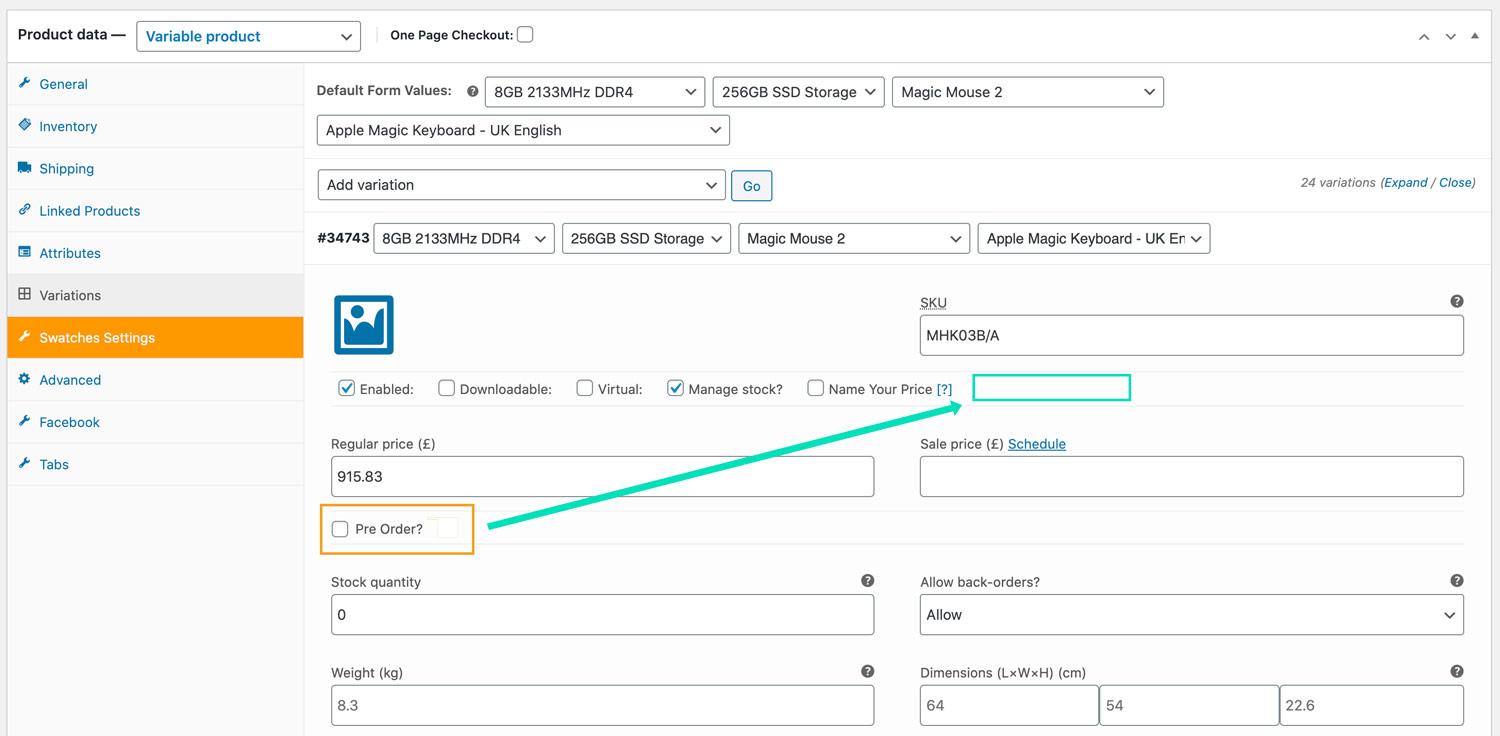
I've added a custom field to variable products in the WC admin. Using the action:
action_woocommerce_variation_options_pricing
But it's displaying in the wrong location. I'd ideally like the checkbox to display in the options section above. But i can't find the action to move it there.
I've spent ages looking through the WC docs, but can't find the correct action. Does anyone know the correct way for me to move the checkbox to this location?
Answers
You can use the woocommerce_variation_options action hook, to add a custom checkbox to the WooCommerce product variation options.
(Copied from: views/html-variation-admin.php, line 188)
<?php do_action( 'woocommerce_variation_options', $loop, $variation_data, $variation ); ?>
So you get:
// Add checkbox
function action_woocommerce_variation_options( $loop, $variation_data, $variation ) {
    $is_checked = get_post_meta( $variation->ID, '_mycheckbox', true );

    if ( $is_checked == 'yes' ) {
        $is_checked = 'checked';
    } else {
        $is_checked = '';
    }

    ?>
    <label class="tips" data-tip="<?php esc_attr_e( 'This is my data tip', 'woocommerce' ); ?>">
        <?php esc_html_e( 'Checkbox:', 'woocommerce' ); ?>
        <input type="checkbox" class="checkbox variable_checkbox" name="_mycheckbox[<?php echo esc_attr( $loop ); ?>]"<?php echo $is_checked; ?>/>
    </label>
    <?php
}
add_action( 'woocommerce_variation_options', 'action_woocommerce_variation_options', 10, 3);

// Save checkbox
function action_woocommerce_save_product_variation( $variation_id, $i ) {
    if ( ! empty( $_POST['_mycheckbox'] ) && ! empty( $_POST['_mycheckbox'][$i] ) ) {
        update_post_meta( $variation_id, '_mycheckbox', 'yes' );
    } else {
        update_post_meta( $variation_id, '_mycheckbox', 'no' );
    }
}
add_action( 'woocommerce_save_product_variation', 'action_woocommerce_save_product_variation', 10, 2 );

WooCommerce社区为您提供最前沿的新闻资讯和知识内容
更多推荐
 0
0 0
0- 0


 已为社区贡献13062条内容

所有评论(0)