如何在VUE上使用高德地图,获取当前地址与当前经纬度
如何在VUE上使用高德地图html上<el-amap vid="amapDemo" :center="center" :zoom="zoom" :plugin="plugin" class="amap-demo" style="height: 200px; width: 100%;margin-top: 50px; z-index: -1;"></el-amap>在...
·
如何在VUE上使用高德地图
html上
<el-amap vid="amapDemo" :center="center" :zoom="zoom" :plugin="plugin" class="amap-demo" style="height: 200px; width: 100%;margin-top: 50px; z-index: -1;"></el-amap>
在data上
data() {
      let self = this;
      return {
        alertShow: false, // 是否显示弹窗
        alertText: '', // 弹窗内容
        // timeHours: '', // 当前小时
        // timeM: '', // 当前分
        // timeS: '', // 当前秒
        userID: '', // 用户的会话信息
        isShow: false, // 显示打卡已成功
        addr:"", // 储存地址信息
        zoom:16, // 位置大小
        center: [121.59996, 31.197646], // 中心点
        plugin: [
          {
            pName: "Geolocation",
            events: {
              init(o) {
                // o 是高德地图定位插件实例
                o.getCurrentPosition((status, result) => {
                  // console.log(result.position.lng,result.position.lat);  //  能获取定位的所有信息
                  if (result && result.position) {
                  // 经纬度
                    self.lng = result.position.lng;
                    self.lat = result.position.lat;
                    // 地址信息
                    self.str = result.formattedAddress;
                    self.center = [self.lng, self.lat];
                    self.loaded = true;
                    self.$nextTick();
                    sessionStorage.setItem(
                      "id",
                      JSON.stringify(
                        // result.position.lng + "," + result.position.lat
                        result.formattedAddress   // 把地址信息储存的本地缓存上
                      )
                    );
                  }
                });
              }
            }
          }
        ]
      }
    },
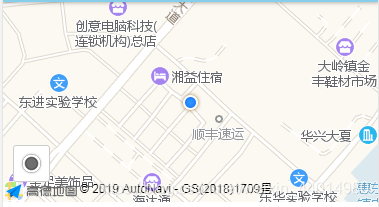
效果图:

Vue社区为您提供最前沿的新闻资讯和知识内容
更多推荐



 4
4 0
0- 0


 已为社区贡献1条内容

所有评论(0)