
openclaw配置调优
OpenClaw 配置优化摘要OpenClaw 提供多种配置优化选项:1) WebUI访问和高权限Tools模式设置,包括端口绑定、认证方式和工具权限控制;2) 模型备用方案,支持主模型不可用时自动切换备用模型;3) 上下文管理功能,支持基于TTL的剪裁和智能记忆压缩;4) 记忆优化系统,集成向量检索、索引分类和定时归档功能;5) 子代理和心跳机制配置,支持并发控制、自动归档和定期状态报告。这些配
OpenClaw 配置调优
WebUI访问+Tools(高权限模式)
{
  "gateway": {
    "port": 18789,
    "mode": "local",
    "bind": "lan",
    "controlUi": {
      "allowedOrigins": [
        "http://<your_ip>:18789"
      ],
      "allowInsecureAuth": true,
      "dangerouslyDisableDeviceAuth": true
    },
    "auth": {
      "mode": "token",
      "token": "<your_token>"
    }
  },
  "tools": {
    "profile": "full"
  },
}
- 替换
<your_ip>为你自己的ip,替换<your_token>为你的gateway_token。(注:需保证gateway_token安全。) controlUI.allowInsecureAuth:支持在非https或者localhost环境下,用token认证。controlUIdangerouslyDisableDeviceAuth:跳过设备认证。tools.profile: "full":开启agent的全部tools权限。
备用模型设置
{
  "agents": {
    "defaults": {
      "model": {
        "primary": "openai-codex/gpt-5.3-codex",
        "fallbacks": [
          "minmax/MiniMax M2.5-highspeed",
          "minmax/MiniMax M2.5",
        ]
      },
      "thinkingDefault": "high"
    }
  }
}
fallbacks:设置备用模型,当主模型不可用时,调用备用模型。thinkingDefault:开启high级别思考模式。
上下文剪裁与记忆压缩
{
  "agents": {
    "defaults": {
      "contextPruning": {
        "mode": "cache-ttl",
        "ttl": "10m"
      },
      "compaction": {
        "mode": "safeguard",
        "memoryFlush": {
          "enabled": true,
          "softThresholdTokens": 10000,
          "prompt": "Review recent context and write lasting notes to memory/YYYY-MM-DD.md. Focus on:\n1. Decisions made and why\n2. User preferences and habits\n3. Important context for future sessions\n4. Technical details worth remembering\n\nUse clear structure with timestamps and categories. Reply with ONLY NO_REPLY if nothing to store.",
          "systemPrompt": "Session is being compacted to free tokens. This is your chance to preserve important context for future conversations. Store what matters — decisions, preferences, patterns — not just raw facts. Think: 'What would future me need to know?'"
        }
      }
    }
  }
}
-
ttl: 10m:表示最近 10 分钟的上下文优先保留,超过这个时间的内容会逐步被清理。 -
softThresholdTokens: 10000:当上下文接近 10000 token 时,开始触发压缩与记忆提取。
记忆优化(向量+索引分类+定时任务)
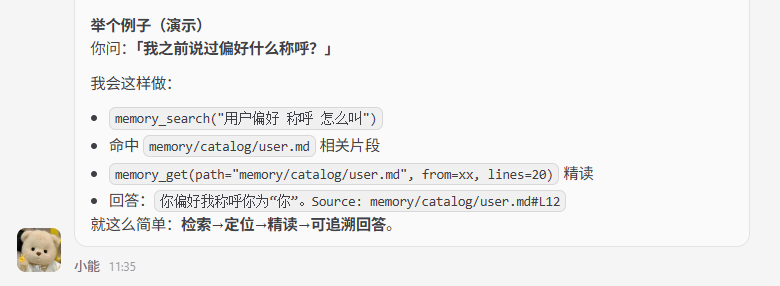
记忆查找逻辑:先通过memory_search进行向量查找做相关性排序,然后通过memory_get精确读取文件内容。
可以在AGENTS.md中制定目录结构(索引分类模式),记忆查找逻辑。
可以设置6小时定时任务,自动将daily日志提取到catalog的分类日志当中。
{
  "agents": {
    "defaults": {
      "memorySearch": {
        "provider": "local",
        "fallback": "none",
        "model": "hf:ggml-org/embeddinggemma-300M-GGUF/embeddinggemma-300M-Q8_0.gguf",
        "store": {
          "driver": "sqlite",
          "path": "/root/team/leader/memory/leader.sqlite",
          "vector": {
            "enabled": true
          }
        },
        "chunking": {
          "tokens": 512,
          "overlap": 50
        },
        "sync": {
          "watch": true
        },
        "query": {
          "maxResults": 10,
          "minScore": 0.3,
          "hybrid": {
            "enabled": true,
            "vectorWeight": 0.7,
            "textWeight": 0.3
          }
        },
        "cache": {
          "enabled": true,
          "maxEntries": 50000
        }
      }
    }
  }
-
provider: local:使用本地记忆检索能力 -
memorySearch.model:设置本地的 embeddings 模型 -
memorySearch.driver: sqlite:使用 sqlite 作为存储后端(openclaw 已集成 sqlite-vec) -
memorySearch.path:本地数据库文件路径 -
memorySearch.vector.enabled: true:启用向量检索能力 -
memorySearch.chunking.tokens:设置记忆分块大小,控制每个 chunk 的 token 数量 -
memorySearch.chunking.overlap:设置分块重叠区域,避免上下文在切片边界丢失 -
memorySearch.sync.watch: true:监听记忆文件变化,自动同步索引 -
memorySearch.query.maxResults:设置单次检索最多返回的记忆条数 -
memorySearch.query.minScore:设置记忆召回的最低相似度阈值 -
memorySearch.query.hybrid.enabled: true:启用混合检索(向量检索 + 文本检索) -
memorySearch.query.hybrid.vectorWeight:设置向量检索权重 -
memorySearch.query.hybrid.textWeight:设置文本检索权重 -
memorySearch.cache.enabled: true:启用记忆检索缓存 -
memorySearch.cache.maxEntries:设置缓存的最大条目数
注:可以对话让openclaw安装embeddings模型和sqlite。
Subagents+Heartbeat配置
{
  "agents": {
    "defaults": {
      "heartbeat": {
        "every": "55m",
        "model": "minmax/MiniMax M2.1",
        "target": "discord",
        "to": "<your_channel>",
        "suppressToolErrorWarnings": true
      },
      "subagents": {
        "maxConcurrent": 8,
        "archiveAfterMinutes": 30,
        "model": "minmax/MiniMax M2.5"
      }
    }
  }
}
-
替换
<your_channel>的频道id,推荐使用专属频道接受心跳。 -
heartbeat.every:设置心跳任务的执行周期,例如每隔55m执行一次(modelProvider他们cache可能1小时刷新一次,设置在1小时内可以减少按量计费的费用) -
heartbeat.model:设置心跳任务使用的模型,一般会选成本更低、速度更快的模型 -
heartbeat.suppressToolErrorWarnings: true:屏蔽心跳任务中的工具报错告警,避免因为非关键错误频繁打扰正常使用 -
subagents.maxConcurrent:设置子 agent 的最大并发数量,控制同一时间最多能启动多少个子任务 -
subagents.archiveAfterMinutes:设置子 agent 的归档时间,超过这个时间后会自动归档,避免会话和上下文长期堆积 -
subagents.model:设置子 agent 默认使用的模型,一般定时任务会使用subagent
多agent配置(discord方式)
创建多个discord_bot,然后
channels.discord.accounts中分别进行绑定。在
agents.list中设置多agents,并配置agents工作区与模型。在
bindings中将agents.list[].id和channels.discord.accounts中的discord id进行绑定。
{
  "channels": {
    "discord": {
      "enabled": true,
      "proxy": "http://127.0.0.1:17890",
      "groupPolicy": "allowlist",
      "streaming": "partial",
      "threadBindings": {
        "spawnAcpSessions": true
      },
      "accounts": {
        "cc-leader": {
          "name": "cc-leader",
          "enabled": true,
          "token": "<your_bot_token>",
          "groupPolicy": "allowlist"
        },
        "codex-leader": {
          "name": "codex-leader",
          "enabled": true,
          "token": "<your_bot_token>",
          "groupPolicy": "allowlist"
        }
      }
    }
  },
  "agents": {
    "list": [
      {
        "id": "codex-leader",
        "name": "codex-leader",
        "workspace": "/root/team/codex-leader",
        "agentDir": "/root/.openclaw/agents/codex-leader/agent",
        "model": {
          "primary": "openai-codex/gpt-5.3-codex-spark",
          "fallbacks": [
            "minmax/MiniMax M2.5"
          ]
        }
      },
      {
        "id": "cc-leader",
        "name": "CC Leader",
        "workspace": "/root/team/cc-leader",
        "agentDir": "/root/.openclaw/agents/cc-leader/agent",
        "model": {
          "primary": "minmax/MiniMax M2.5-highspeed",
          "fallbacks": [
            "minmax/MiniMax M2.1"
          ]
        }
      }
    ]
  },
  "bindings": [
    {
      "agentId": "cc-leader",
      "match": {
        "channel": "discord",
        "accountId": "cc-leader"
      }
    },
    {
      "agentId": "codex-leader",
      "match": {
        "channel": "discord",
        "accountId": "codex-leader"
      }
    }
  ]
}

小龙虾开发者社区是 CSDN 旗下专注 OpenClaw 生态的官方阵地,聚焦技能开发、插件实践与部署教程,为开发者提供可直接落地的方案、工具与交流平台,助力高效构建与落地 AI 应用
更多推荐
 4
4 0
0- 0


 已为社区贡献1条内容

所有评论(0)