vue-element撸前端框架之 导航
导航前言登录还没完成,先贴导航导航: 导航栏 + 面包屑 面包屑显示用户还没完成,先贴完成的部分正文实现思路 登录和404等一些页面不需要路由(参考vue-element-admin)。定义一个模板,把它挂载到你要显示导航的路由上(大概是这个意思)导航和面包屑都是由路由生成的面包屑还没有测试过三级路由路由 Layout就是通用页面import Vue from 'vue'import VueRou
·
导航
前言
登录还没完成,先贴导航导航: 导航栏 + 面包屑 面包屑显示用户还没完成,先贴完成的部分
正文
实现思路 登录和404等一些页面不需要路由(参考vue-element-admin)。定义一个模板,把它挂载到你要显示导航的路由上(大概是这个意思)导航和面包屑都是由路由生成的面包屑还没有测试过三级路由
路由 Layout就是通用页面
import Vue from 'vue'
import VueRouter from 'vue-router'
import Layout from '@/Layout'

Vue.use(VueRouter)

const routes = [
  {
    path: '/login',
    name: 'Login',
    component: () => import('@/views/Login/login')
  },

  {
    path: '/',
    component: Layout,
    redirect: '/home'
  },

  {
    path: '/home',
    component: Layout,
    name: '个人中心', // 二级路由需要有 name 属性
    meta: { title: '个人中心' },
    redirect: '/home/index',
    children: [
      {
        path: 'index',
        name: '主页',
        meta: { title: '主页' },
        component: () => import('@/views/Home/index')
      },
      {
        path: 'client',
        name: '客户',
        meta: { title: '客户' },
        component: () => import('@/views/Home/client')
      }
    ]
  },

  {
    path: '',
    component: Layout,
    // redirect: '/about/index',
    // name: 'About', // 二级路由需要有 name 属性
    children: [
      {
        path: 'about',
        name: 'About',
        meta: { title: 'About' },
        component: () => import('@/views/About.vue')
      }
    ]
  }
]

const router = new VueRouter({
  routes
})
export default router
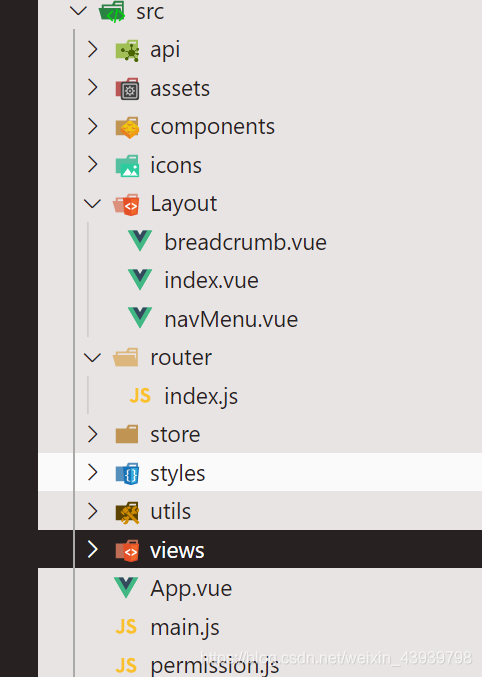
Layout
navMenu.vue 导航栏
<template>
  <el-menu
    :default-active="$route.path"
    router
    :mode="mode"
    @select="handleSelect"
    background-color="#545c64"
    text-color="#fff"
    active-text-color="#ffd04b"
  >
    <template v-for="(item, index) in navList()">
      <template v-if="item.children.length === 1">
        <el-menu-item :key="index" :index="item.path + '/' + item.children[0].path">
          {{ item.children[0].name }}
        </el-menu-item>
      </template>
      <template v-else>
        <el-submenu :key="index" :index="item.path">
          <template slot="title">
            {{ item.name }}
          </template>
          <el-menu-item v-for="(child, j) in item.children" :key="j" :index="item.path + '/' + child.path">
            {{ child.name }}
            <!-- {{ item.path + child.path }} 路由路径 不明白的可以打开查看 -->
          </el-menu-item>
        </el-submenu>
      </template>
    </template>
  </el-menu>
</template>

<script>
export default {
  name: 'NavMenu',
  props: {
    mode: { type: String, default: '' }
  },
  methods: {
    handleSelect(key, keyPath) {
      // console.log(key, keyPath)
    },
    // 得到路由列表 不明白的可以输出一下
    navList() {
      const arr = this.$router.options.routes
      const navList = []
      for (let i = 0; i < arr.length; i++) {
        if (arr[i].children != null) {
          navList.push(arr[i])
        }
      }
      // console.log(navList)
      // console.log(this.$router)
      return navList
    }
  }
}
</script>

<style lang="scss" scoped>
.el-menu {
  border-bottom: 0 !important;
}
</style>
breadcrumb.vue 面包屑不明白的把那些参数输出一下
<template>
  <el-breadcrumb class="breadcrumb" separator-class="el-icon-caret-right">
    <el-breadcrumb-item v-for="item in levelList" :key="item.path">
      <template v-if="item.meta.title">
        <router-link :to="item.redirect || item.path">{{ item.meta.title }}</router-link>
      </template>
    </el-breadcrumb-item>
  </el-breadcrumb>
</template>

<script>
export default {
  data() {
    return {
      levelList: null
    }
  },
  watch: {
    $route(to, from) {
      this.getBreadcrumb()
    }
  },
  mounted() {
    this.getBreadcrumb()
  },
  methods: {
    // 生成面包屑的方法
    getBreadcrumb() {
      let matched = this.$route.matched.filter(item => item.name)
      const first = matched[0]
      if (first && first.name !== '首页') {
        // eslint-disable-next-line prettier/prettier
        matched = [{ path: '/', meta: { title: '' }}].concat(matched)
      }
      // 去掉第一个 '/' 的路由
      this.levelList = matched.filter(item => item.path !== '/')
    }
  }
}
</script>

<style lang="scss" scoped>
.breadcrumb {
  // border: 1px solid blue;
  // background: #eaeeeb;
  background: linear-gradient(90deg, #b7f8db 0%, #50a7c2 100%);
  height: 50px;
  line-height: 50px;
  padding-left: 20px;
}
</style>
index.vueLayout主页面
<template>
  <div>
    <template v-if="flag === 1">
      <!-- 顶部导航栏 -->
      <NavMenu mode="horizontal" />
      <!-- 面包屑导航 -->
      <breadcrumb />
      <!-- 主页内容 -->
      <keep-alive>
        <router-view class="main-page-1" />
      </keep-alive>
    </template>

    <template v-else>
      <el-container class="layout2">
        <!-- 侧边栏导航 -->
        <el-aside>
          <NavMenu mode="vertical" />
        </el-aside>
        <!-- 右侧主内容 -->
        <el-container>
          <!-- 顶部面包屑导航 -->
          <el-header>
            <breadcrumb />
          </el-header>
          <!-- 主内容 -->
          <el-main>
            <keep-alive>
              <router-view />
            </keep-alive>
          </el-main>
        </el-container>
      </el-container>
    </template>
  </div>
</template>

<script>
import NavMenu from './navMenu' // 导航栏
import breadcrumb from './breadcrumb' // 面包屑
export default {
  name: 'Layout',
  components: {
    NavMenu,
    breadcrumb
  },
  data() {
    return {
      flag: 1 // 1->顶部横置d导航栏 2->侧边栏
    }
  }
}
</script>

<style lang="scss" scoped>
// 横置模式下 样式
.main-page-1 {
  padding: 10px;
}
</style>

<style lang="scss" scoped>
// 侧边栏模式下 样式
.layout2 {
  .el-aside {
    // 定义侧边栏宽度
    width: 200px !important;
    .el-menu {
      // 侧边栏右边界线
      border-right: 0;
    }
  }
  .el-container {
    // 去掉内边距
    .el-header,
    .el-main {
      padding: 0;
    }
    // 设置头部面包屑导航高度
    .el-header {
      height: 50px;
    }
  }
}
.el-submenu .el-menu-item {
  // 定义二级侧边栏宽度
  min-width: 199px !important;
}
</style>
显示效果
4-1.flag -> 1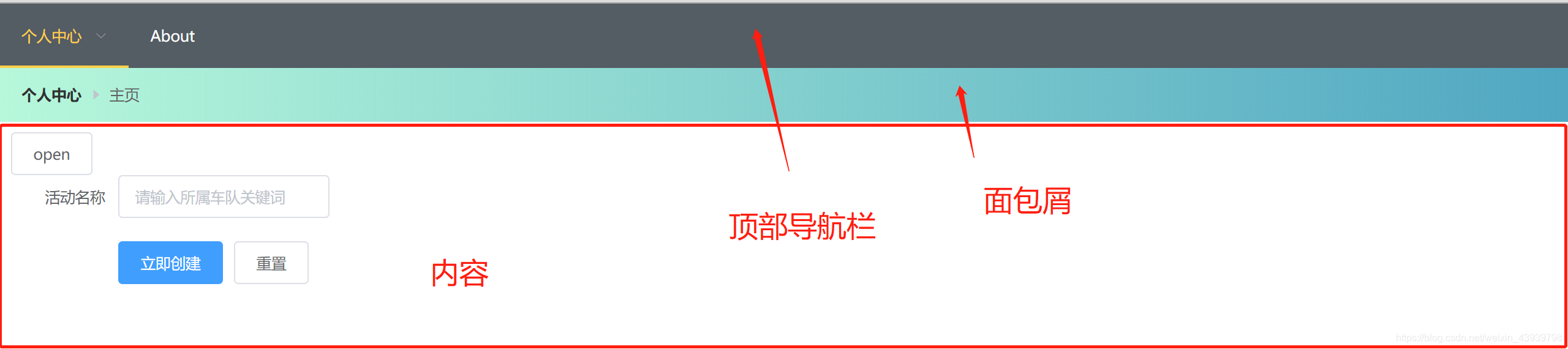
4.2flag -> 2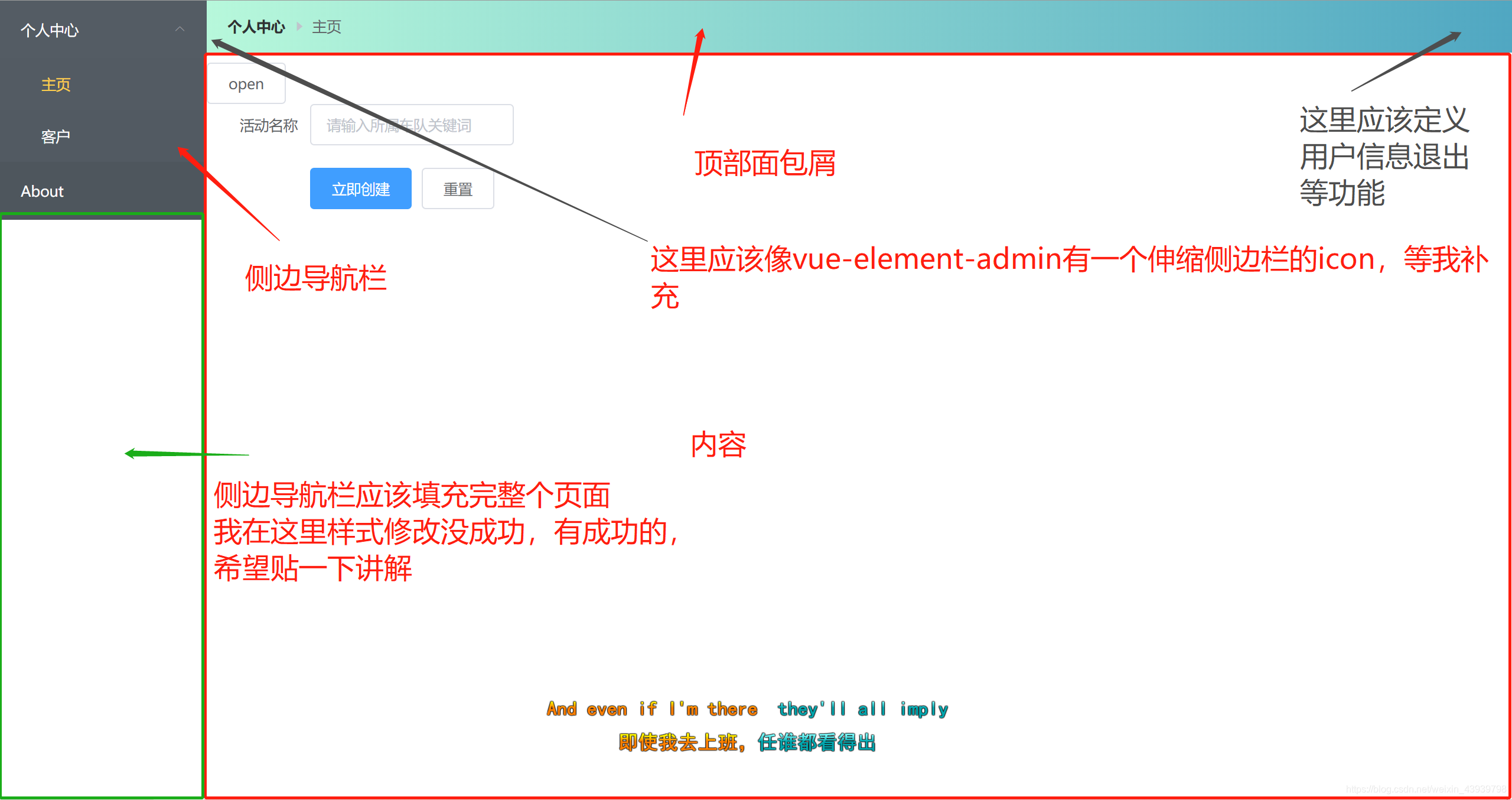

Vue社区为您提供最前沿的新闻资讯和知识内容
更多推荐



 0
0 0
0- 0


 已为社区贡献2条内容

所有评论(0)