
echarts图表formatter函数的使用
formatter 提示框浮层内容格式器,支持字符串模板和回调函数两种形式。可以通过formatter 函数 可以动态的修改 我们想要展示的数据第一种: 字符串模板 – 官网字符串模板模板变量有 {a}, {b},{c},{d},{e},分别表示系列名,数据名,数据值等。示例:formatter: '{b0}: {c0}<br />{b1}: {c1}'第二种: 回...
·
formatter 提示框浮层内容格式器,支持字符串模板和回调函数两种形式。
可以通过formatter 函数 可以动态的修改 我们想要展示的数据
第一种: 字符串模板 – 官网
字符串模板
模板变量有 {a}, {b},{c},{d},{e},分别表示系列名,数据名,数据值等。
示例:
formatter: '{b0}: {c0}<br />{b1}: {c1}'
第二种: 回调函数 – 官网
回调函数
回调函数格式:
(params: Object|Array, ticket: string, callback: (ticket: string, html: string)) => string
第一个参数 params 是 formatter 需要的数据集。格式如下: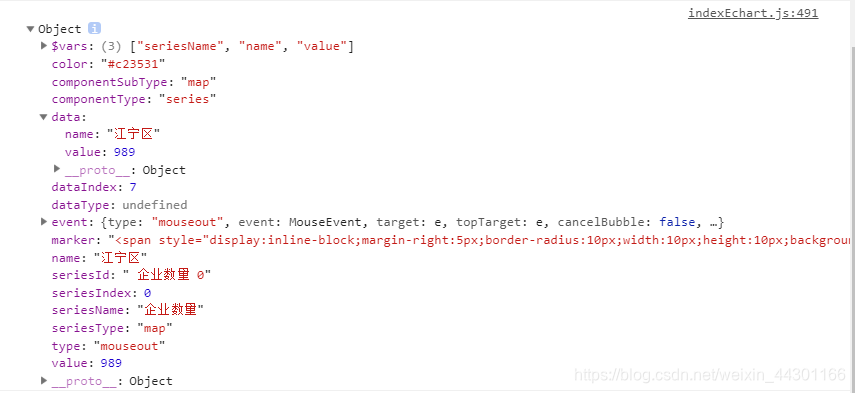
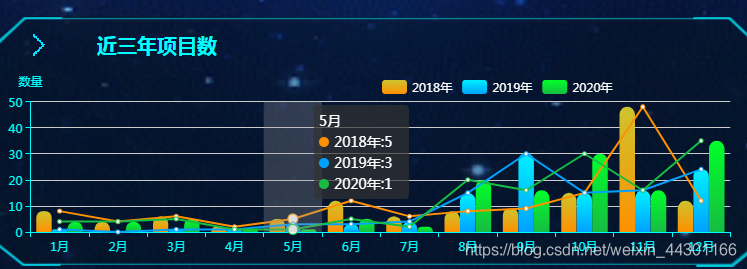
项目需求–如图 formatter函数 显示的效果
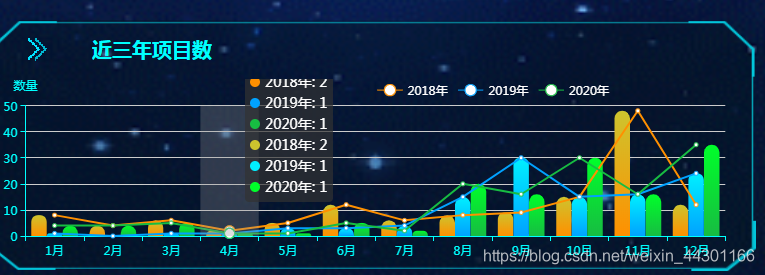
实际开发显示的效果图
显示的数据重复 ---- 可以通过 formatter 函数来去除数据重复的效果
代码如下:
tooltip: {
		trigger: 'axis',
		axisPointer: {
			type: 'shadow'
		},
		formatter: (params) => { //格式化数据的函数
			console.log('我的参数', params.slice(-3))
			var listData = params.slice(-3) // 获取对应的数据
			var list = []
			var listItem = ''
			var html = ''
			html += '<span>'+listData[0].name+'<span><br>'
			for (var i = 0; i < listData.length; i++) {
				html += '<i style="display: inline-block;width: 10px;height: 10px;background: ' +
					listData[i].color.colorStops[1].color +
					';margin-right: 5px;border-radius: 50%;}"></i><span style="width:70px; display:inline-block;">' +
					listData[i].seriesName +
					':' +
					listData[i].data +
					'</span><br>'

			}
			list.push(html)
			listItem = list.join('<br>') // 通过数组的join()方法 实现<br>换行的效果
			return '<div class="showBox">' + listItem + '</div>'
		}
	},
**
所有原码—如下
**
optionThree = {
	tooltip: {
		trigger: 'axis',
		axisPointer: {
			type: 'shadow'
		},
		formatter: (params) => { //格式化数据的函数
			var listData = params.slice(-3)
			var list = []
			var listItem = ''
			var html = ''
			html += '<span>'+listData[0].name+'<span><br>'
			for (var i = 0; i < listData.length; i++) {
				html += '<i style="display: inline-block;width: 10px;height: 10px;background: ' +
					listData[i].color.colorStops[1].color +
					';margin-right: 5px;border-radius: 50%;}"></i><span style="width:70px; display:inline-block;">' +
					listData[i].seriesName +
					':' +
					listData[i].data +
					'</span><br>'
			}
			list.push(html)
			listItem = list.join('<br>')
			return '<div class="showBox">' + listItem + '</div>'
		}
	},
	legend: {
		textStyle: {
			color: '#fff',
		},
		x: '50%',
		data: ['2018年', '2019年', '2020年'],

	},
	grid: {
		left: '2%',
		right: '4%',
		bottom: '0%',
		top: '15%',
		containLabel: true
	},
	xAxis: [{
		type: 'category',
		axisLine: { //---坐标轴 轴线
			show: true, //---是否显示
			lineStyle: {
				color: '#00FFFF',
				width: 1,
				type: 'solid',
			},
		},
		data: ['1月', '2月', '3月', '4月', '5月', '6月', '7月', '8月', '9月', '10月', '11月', '12月']
	}],
	yAxis: [{
		type: 'value',
		name: '数量',
		axisLine: { //---坐标轴 轴线
			show: true, //---是否显示
			lineStyle: {
				color: '#00FFFF',
				width: 1,
				type: 'solid',
			},
		},
		axisLabel: {
			formatter: '{value}'
		},
		splitArea: { //--网格区域
			show: false, //---是否显示,默认false
		}
	}],
	series: [{
			name: '',
			type: 'line',
			color: '#ff9000',
			data: [8,4,6,2,5,12,6,8,9,15,48,12],

		}, {
			name: '',
			type: 'line',
			color: '#00a2ff',
			data: [1,0,1,1,3,3,4,15,30,15,16,24],

		}, {
			name: '',
			type: 'line',
			color: '#17bc42',
			data: [4,4,5,1,1,5,2,20,16,30,16,35],
		},
		{
			name: '2018年',
			type: 'bar',
			data: [8,4,6,2,5,12,6,8,9,15,48,12],
			barGap: '1%', // 柱图间距
			itemStyle: {
				normal: {
					color: new echarts.graphic.LinearGradient(0, 0, 0, 1, [{
						offset: 0,
						color: '#cdc42e'
					}, {
						offset: 1,
						color: '#ff9000'
					}]),
					barBorderRadius: [15, 15, 0, 0]
				}
			},

		}, {
			name: '2019年',
			type: 'bar',
			data: [1,0,1,1,3,3,4,15,30,15,16,24],
			barGap: '1%', // 柱图间距
			itemStyle: {
				normal: {
					color: new echarts.graphic.LinearGradient(0, 0, 0, 1, [{
						offset: 0,
						color: '#00f0ff'
					}, {
						offset: 1,
						color: '#00a2ff'
					}]),
					barBorderRadius: [15, 15, 0, 0]
					// color: '#000'
				}
			},

		}, {
			name: '2020年',
			type: 'bar',
			data: [4,4,5,1,1,5,2,20,16,30,16,35],
			barGap: '1%', // 柱图间距
			itemStyle: {
				normal: {
					color: new echarts.graphic.LinearGradient(0, 0, 0, 1, [{
						offset: 0,
						color: '#00ff2a'
					}, {
						offset: 1,
						color: '#17bc42'
					}]),
					barBorderRadius: [15, 15, 0, 0]
				}
			},
		},
	]
};

基于 Vue 的企业级 UI 组件库和中后台系统解决方案,为数万开发者服务。
更多推荐


 0
0 0
0- 0


 已为社区贡献1条内容

所有评论(0)