No syntax highlighting with React Monaco Editor
Answer a question
Just installed React Monaco Editor and seems to be functioning properly except there is no syntax highlighting. I'm trying to use "python" as the language but the font stays the same gray default colour:
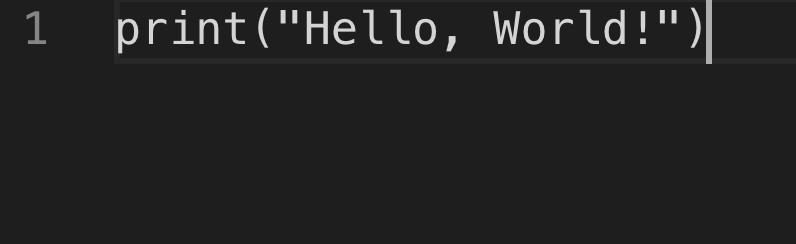
Any ideas on how to correct the issue?
Here is my Code.js where I'm running the Monaco Editor:
import React from "react";
import MonacoEditor from "react-monaco-editor";

class Code extends React.Component {
  constructor(props) {
    super(props);
    this.state = {
      code: 'print("Hello, World!")'
    };
  }
  editorDidMount(editor, monaco) {
    console.log("editorDidMount", editor);
    editor.focus();
  }
  onChange(newValue, e) {
    console.log("onChange", newValue, e);
  }
  render() {
    const code = this.state.code;
    const options = {
      selectOnLineNumbers: true,
      fontSize: 18,
      colorDecorators: true
    };
    return (
      <MonacoEditor
        width="800"
        height="600"
        language="python"
        theme="vs-dark"
        value={code}
        options={options}
        onChange={this.onChange}
        editorDidMount={this.editorDidMount}
      />
    );
  }
}

export default Code;
Also I added this code to the top of webpack.config.js:
const path = require('path');
const MonacoWebpackPlugin = require('monaco-editor-webpack-plugin');
module.exports = {
  plugins: [
    new MonacoWebpackPlugin({
      // available options are documented at https://github.com/Microsoft/monaco-editor-webpack-plugin#options
      languages: ['python']
    })
  ]
};

const APP_DIR = path.resolve(__dirname, './src');
const MONACO_DIR = path.resolve(__dirname, './node_modules/monaco-editor');

module.exports = {
  test: /\.css$/,
  include: APP_DIR,
  use: [{
    loader: 'style-loader',
  }, {
    loader: 'css-loader',
    options: {
      modules: true,
      namedExport: true,
    },
  }],
}, {
  test: /\.css$/,
  include: MONACO_DIR,
  use: ['style-loader', 'css-loader'],
}
Answers
Did you fail to configure CSS for Monaco Editor in Webpack? Perhaps that's issue since everything else looks good.
const path = require('path');
const MONACO_DIR = path.resolve(__dirname, './node_modules/monaco-editor');

{
  test: /\.css$/,
  include: MONACO_DIR,
  use: ['style-loader', 'css-loader'],
}
Solution
The Problem was nothing with the configuration but the place where it was configured. To customize webpack in your React CRA boilerplate, you must eject the app or use customize-cra if you don't want to eject, and do the configuration. OP here configured webpack inside node-modules/, That's not the right to configure your webpack, like at all. Use react-app-rewired with customize-cra.

React社区为您提供最前沿的新闻资讯和知识内容
更多推荐
 0
0 0
0- 0


 已为社区贡献29247条内容

所有评论(0)