Reload table after deleting an item from it with React
Answer a question
Using React.Js, I created a delete function to delete an item from a table. the delete is working fine but what I want to do is that after deleting I want the tables to be dynamically updated to show only the items left. Now after the delete I have to refresh manually the page or go to another page and comeback to see the items left after the delete
This is the code built so far :
import React, { Component } from "react";
import { Card, Button, Select,/* message, */ Form, Tooltip } from "antd";
import extraitMP3 from "./data";
import { arrayMove, SortableHandle } from "react-sortable-hoc";
import ContainerHeader from "components/ContainerHeader/index";
import { getExtraitMp3, hideMessageUpdate, showUpdateLoader, updateMp3Visibilite } from "appRedux/actions/Comedien";
import { deleteMp3Request } from "../../../appRedux/services/extraitMp3Service"
import { connect } from "react-redux";
import { NotificationContainer, NotificationManager } from "react-notifications";
import { userSignOut } from "appRedux/actions/Auth";
import { displayIcon } from '../../../util/Icon.js';
import CircularProgress from "components/CircularProgress";
import { Modal } from "antd";
const extraitMP32 = [extraitMP3];
const confirm = Modal.confirm;
const Option = Select.Option;
const DragHandle = SortableHandle(() =>
<span className="gx-draggable-icon gx-pt-2">
<i className="icon icon-menu" style={{ fontSize: 25 }} />
</span>);
class ListExtrait extends Component {
onSortEnd = ({ oldIndex, newIndex }) => {
this.setState({
extraitMP3: arrayMove(this.state.extraitMP3, oldIndex, newIndex),
});
};
constructor() {
super();
this.state = {
extraitMP3: extraitMP32[0],
nombreMP3: {
rechercheExtraits: 0,
recherchePossible: 0,
extraitFiche: 0,
extraitFichePossible: '',
extraitArchives: 0,
extraitArchivesPossible: '',
},
loader: false,
}
}
componentDidMount() {
this.props.getExtraitMp3();
}
componentDidUpdate() {
}
static getDerivedStateFromProps(nextProps, prevState,/* nextProps2,prevState2 */) {
if (nextProps.extraitMP3 !== prevState.extraitMP3 && nextProps.extraitMP3) {
return { extraitMP3: nextProps.extraitMP3 };
}
else return null;
}
showDeleteConfirmation(value, id, index, thisHandler) {
confirm({
title: 'Voulez vous supprimer cette audio ?',
content: '',
okText: 'Oui, je confirme',
okType: 'danger',
cancelText: 'Non',
onOk() {
deleteMp3Request(id);
const { extraitMP3 } = thisHandler.state;
Object.keys(extraitMP3).splice(index, 1);
NotificationManager.success("le fichier audio est supprimé avec succès !", "");
},
onCancel() {
},
});
}
handleSubmit = (e) => {
e.preventDefault();
this.props.form.validateFields((err, values) => {
if (!err) {
this.props.showUpdateLoader();
this.props.updateMp3Visibilite(values);
}
});
};
render() {
const { loader, extraitMP3 } = this.state;
const selectOptions = new Map([
[1, "Visible dans la recherche et sur ma fiche"],
[2, "Visible sur ma fiche uniquement"],
[3, "Masqué"],
]);
console.log('extraitMP3', extraitMP3)
function handleChangeSelect(value) {
console.log(`selected ${value}`);
}
return (
<div>
{loader ? <CircularProgress className="gx-loader-400" /> : Object.keys(extraitMP3).map((ids, index) => {
return (
<Card>
<li key={ids}>
<Card styleName="gx-card-list icon icon-data-display gx-mr-2 gx-text-blue gx-fs-xl">
<div className="gx-media-body">
{extraitMP3[ids].Typenom}
{extraitMP3[ids].TypeIcon != null &&
displayIcon(extraitMP3[ids].TypeIcon)
}
</div>
{Object.keys(extraitMP3[ids].TypeMp3List).map(idJson => {
return (
<div className="gx-main-content gx-mb-4">
<ContainerHeader match={this.props.match} />
<div className="gx-contact-item gx-dragndrop-item">
<DragHandle />
<div className="gx-col gx-job-title ">
{extraitMP3[ids].TypeMp3List[idJson].intitule}
</div>
{extraitMP3[ids].TypeMp3List[idJson].interpretation1Icon !== '' &&
<Tooltip title={extraitMP3[ids].TypeMp3List[idJson].interpretation1Nom}>
{displayIcon(extraitMP3[ids].TypeMp3List[idJson].interpretation1Icon)}
</Tooltip>
}
{extraitMP3[ids].TypeMp3List[idJson].interpretation2Icon !== '' &&
<Tooltip title={extraitMP3[ids].TypeMp3List[idJson].interpretation2Nom}>
{displayIcon(extraitMP3[ids].TypeMp3List[idJson].interpretation2Icon)}
</Tooltip>
}
{extraitMP3[ids].TypeMp3List[idJson].interpretation3Icon !== '' &&
<Tooltip title={extraitMP3[ids].TypeMp3List[idJson].interpretation3Nom}>
{displayIcon(extraitMP3[ids].TypeMp3List[idJson].interpretation3Icon)}
</Tooltip>
}
{extraitMP3[ids].TypeMp3List[idJson].langueIcon !== '' &&
<div className="gx-col gx-job-title gx-d-sm-flex gx-text-truncate gx-px-8">
<Tooltip title={extraitMP3[ids].TypeMp3List[idJson].langueNom}>
<i className={`flag flag-24 gx-mr-2 ${extraitMP3[ids].TypeMp3List[idJson].langueIcon}`} />
</Tooltip>
</div>
}
<div className="gx-col gx-job-title gx-d-sm-flex gx-text-truncate gx-px-8">
<Select
showSearch
style={{ width: '100%' }}
placeholder="Selection la choix de votre numéro de téléphone "
optionFilterProp="children"
onChange={handleChangeSelect}
defaultValue={selectOptions.get(extraitMP3[ids].TypeMp3List[idJson].visibilite)}
filterOption={(input, Option) => Option.props.children.toLowerCase().indexOf(input.toLowerCase()) >= 0}
>
{[...selectOptions].map(([value, label]) => <Option value={value}> {label} </Option>)}
</Select>
</div>
<div className="gx-col gx-job-title gx-d-sm-flex gx-text-truncate gx-px-8">
<i className="icon icon-edit gx-fs-xl gx-text-gris" />
</div>
<div className="gx-col gx-job-title gx-d-sm-flex gx-text-truncate gx-px-8">
<span className="gx-pointer">
<i className="icon icon-trash gx-pointer gx-text-danger gx-fs-xxl"
id={extraitMP3[ids].TypeMp3List[idJson].id}
onClick={e => this.showDeleteConfirmation(e.target.value, extraitMP3[ids].TypeMp3List[idJson].id, index, this)} />
</span>
</div>
</div>
</div>
)
})}
<NotificationContainer />
<Button type="primary" htmlType="submit" labelCol={{ xs: 24, sm: 5 }} wrapperCol={{ xs: 24, sm: 12 }}>
Enregistrer
</Button>
</Card>
</li>
</Card>
)
})}</div>
)
}
}
const VisibiliteFormMp3 = Form.create()(ListExtrait);
const mapStateToProps = ({ comedien }) => {
const {
extraitMP3,
alertMessageUpdate,
showMessageUpdate
} = comedien;
return {
extraitMP3,
alertMessageUpdate,
showMessageUpdate
}
};
export default connect(
mapStateToProps,
{
userSignOut,
getExtraitMp3,
hideMessageUpdate,
showUpdateLoader,
updateMp3Visibilite
})(VisibiliteFormMp3);
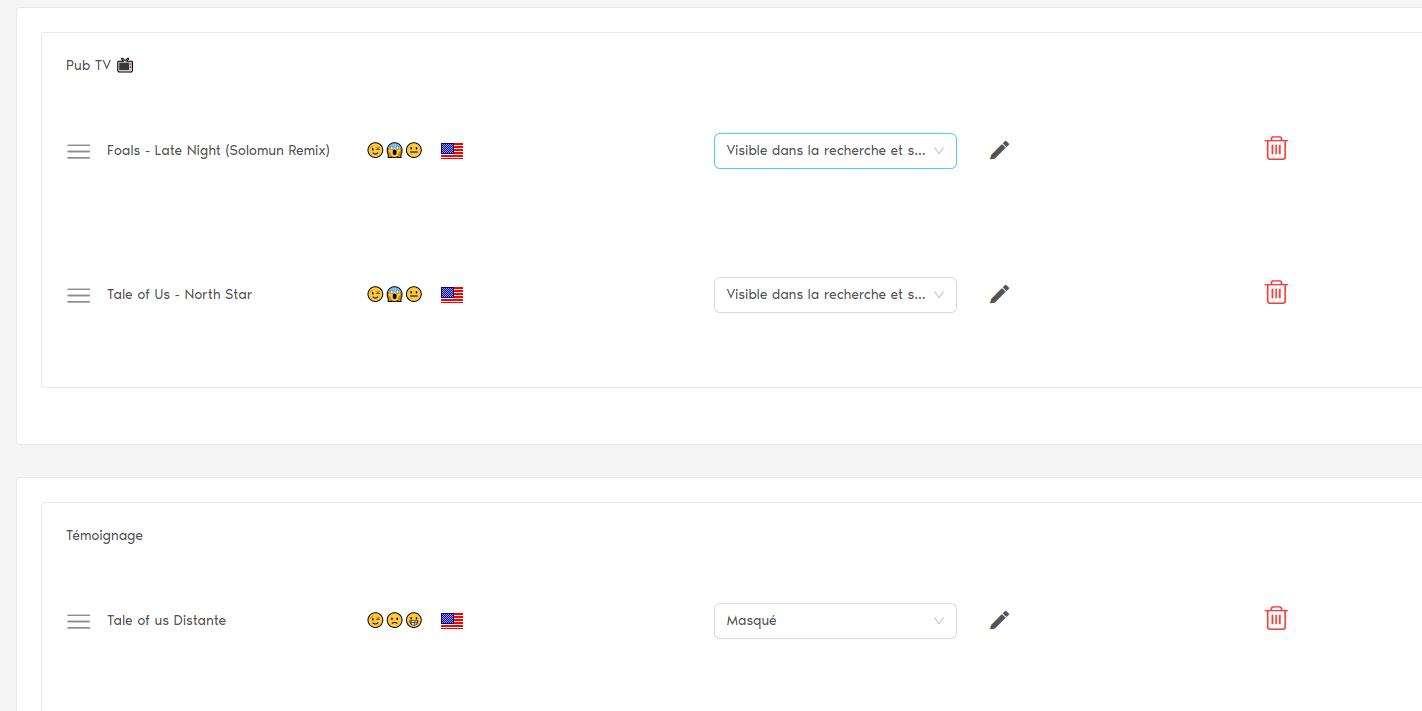
extraitMP3 is an object of objects that's why I used Object.keys(extraitMP3) I didn't know how to update the state correctly. this is the view :
Answers
You should put your data in state and then change the state. After changing the state the page automatically re-rendered and changed data of your state will be shown. So in your delete function simply delete your chosen data and give your remaining data to your state.
Hope this helps, feel free to ask questions if I couldn't explain myself clearly.

React社区为您提供最前沿的新闻资讯和知识内容
更多推荐
 0
0 0
0- 0


 已为社区贡献29247条内容

所有评论(0)