Install NextUI in React with Typescript
In this section we will install next ui in react js with typescript using vite tools. NextUI allows you to make beautiful, modern, and fast websites/applications regardless of your design experience, created with React.js and Stitches, based on React Aria and inspired by Vuesax.
Install React Js Using Vite
With NPM:
npm create vite@latest
Enter fullscreen mode Exit fullscreen mode
With Yarn:
yarn create vite
Enter fullscreen mode Exit fullscreen mode
Next, Select react js Project.
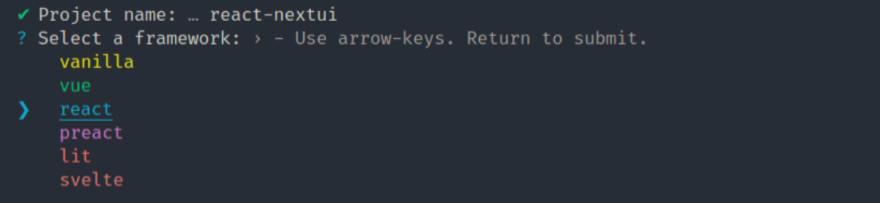
Choose Type react-ts for react with typescript.
✔ Project name: … react-nextui
✔ Select a framework: › react
? Select a variant: › - Use arrow-keys. Return to submit.
  react
❯  react-ts
Enter fullscreen mode Exit fullscreen mode
Move to project and install & run npm.
cd react-nextui
npm install
npm run dev
Enter fullscreen mode Exit fullscreen mode
Install NEXTUI in React
Inside your React project directory, install NextUI by running either of the following:
yarn add @nextui-org/react
# or
npm i @nextui-org/react
Enter fullscreen mode Exit fullscreen mode
Setup NextUI in React
For NextUI to work correctly, you need to set up the NextUIProvider at the root of your application.
src/main.tsx
import React from 'react';
import ReactDOM from 'react-dom/client';
import App from './App';
import './index.css';
import { NextUIProvider } from '@nextui-org/react';

ReactDOM.createRoot(document.getElementById('root') as HTMLElement).render(
  <React.StrictMode>
    <NextUIProvider>
      <App />
    </NextUIProvider>
  </React.StrictMode>
);
Enter fullscreen mode Exit fullscreen mode
Import nextui button in react js.
src/App.tsx
import { useState } from 'react';
import reactLogo from './assets/react.svg';
import './App.css';
import { Button } from '@nextui-org/react';

function App() {
  const [count, setCount] = useState(0);

  return (
    <div className="App">
      <div>
        <a href="https://vitejs.dev" target="_blank">
          <img src="/vite.svg" className="logo" alt="Vite logo" />
        </a>
        <a href="https://reactjs.org" target="_blank">
          <img src={reactLogo} className="logo react" alt="React logo" />
        </a>
      </div>
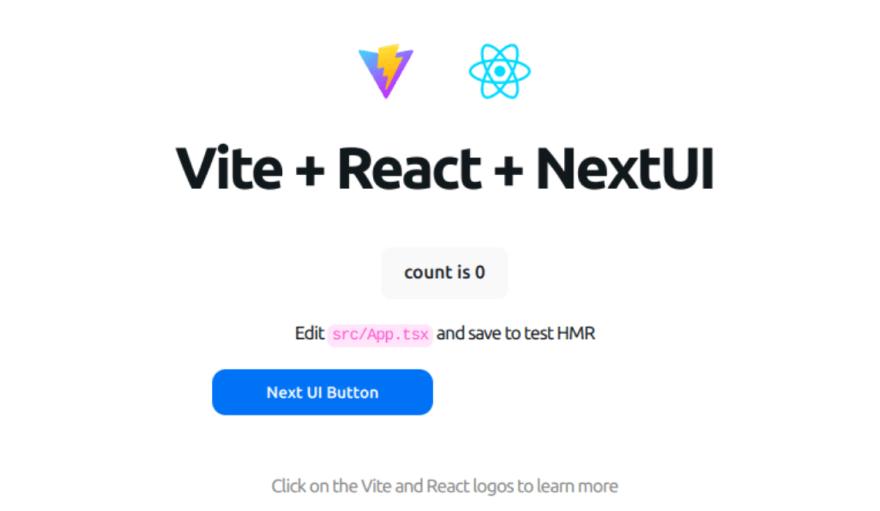
      <h1>Vite + React + NextUI</h1>
      <div className="card">
        <button onClick={() => setCount((count) => count + 1)}>
          count is {count}
        </button>
        <p>
          Edit <code>src/App.tsx</code> and save to test HMR
        </p>
        <Button>Next UI Button</Button>
      </div>
      <p className="read-the-docs">
        Click on the Vite and React logos to learn more
      </p>
    </div>
  );
}

export default App;
Enter fullscreen mode Exit fullscreen mode
Read Also
Install NextUI in NextJS with Typescript

React社区为您提供最前沿的新闻资讯和知识内容
更多推荐
 0
0 0
0- 0


 已为社区贡献29247条内容

所有评论(0)