

Introduction
Axios is a promise-based HTTP Client for node.js and the browser. Thus, it works equally well in front-end JavaScript applications and back-end Node servers.
This article shows how to use Axios in a simple React application. React is a JavaScript library for building user interfaces, so we'll use Axios here for browser-based user interfaces.
Prerequisites
To follow along, you’ll need the following:
- Node.js version 16.16.0 installed on your computer.
- A new React project set up with Create React App
- IDE or text editor of your choice, such as Sublime Text or Visual Studio Code
We will cover:
- Setting up our React project
- Installing Axios into our React application
- Sending CRUD API requests with Axios
- How to make a GET request
- How to make a POST request
- How to make a PUT request
- How to make a DELETE request
- Handling errors
- Base Instance
- How to use async and await
Setting up our React project
We will create our project following the step mentioned in step one above. Let's get started by running the following command:
npx create-react-app react-axios-tutorial
We will now navigate to the project directory by running:
cd react-axios-tutorial
I have chosen to name the project react-Axios-tutorial because we are learning how Axios works in React.
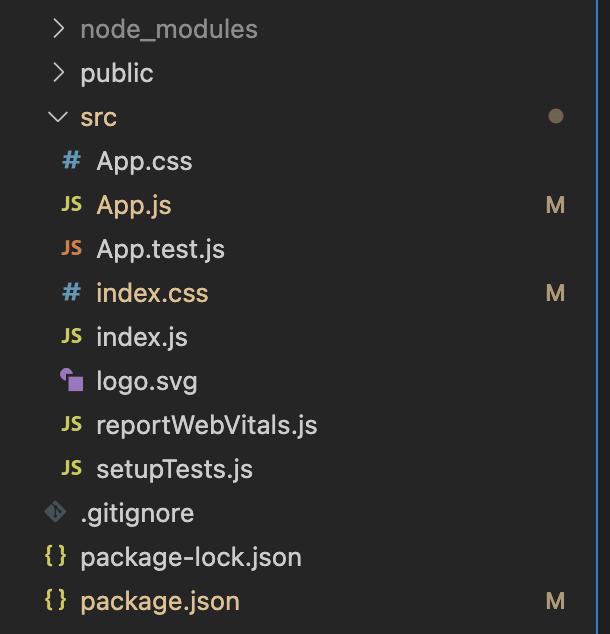
Currently, this is how my project structure looks.
Installing Axios into our React application
To install Axios, we run the following command:
npm i axios
It is important to verify the dependencies in the package.json file to confirm whether Axios has been installed.
This is the current state of my dependencies.
//...

  "dependencies": {
    "@testing-library/jest-dom": "^5.16.5",
    "@testing-library/react": "^13.3.0",
    "@testing-library/user-event": "^13.5.0",
    "axios": "^0.27.2",
    "react": "^18.2.0",
    "react-dom": "^18.2.0",
    "react-scripts": "5.0.1",
    "web-vitals": "^2.1.4"
  },

  //...
Sending CRUD API requests with Axios
In this section, we will discuss how we can send CRUD requests. We will create, retrieve, update and delete data using a publically available JSONPlaceholder
How to make a GET request
The first step is to create a component folder in our src directory to make a GET request. We navigate into the src directory and then run the code below:
mkdir Components
In this directory, we create a Users.js file and add the code below:
import React, { useEffect, useState } from "react";
import axios from "axios";

function Users() {
  const [post, setPost] = useState([]);

  useEffect(() => {
    axios.get("https://jsonplaceholder.typicode.com/users").then((data) => {
      console.log(data);
      setPost(data?.data);
    });
  }, []);

  return (
    <div>
      Users
      {post.map((item, i) => {
        return (
          <div key={i}>
            <p>{item?.name}</p>
          </div>
        );
      })}
    </div>
  );
}

export default Users;
The first thing we do is import React, useEffect , and useState hooks. We also import Axios so we can make HTTP requests. In the useEffect hooks, we use the GET method to make aGET request to our endpoint, then use the then()method to get back all of the response data we use to update our user's state.
We received an object as a response. A data array with properties address, company, email, id, name, phone, username, and website is accessed. The properties are then assigned to the user's state and made available in the component.
There are also other details about the request, like the status code under
res.statusor more details insideres.request.
Next, we add our Users component to our app.js file
import Users from "./Components/Users";

function App() {
  return (
    <div>
      <Users />
    </div>
  );
}

export default App;
The next step is to start our application with:
npm start
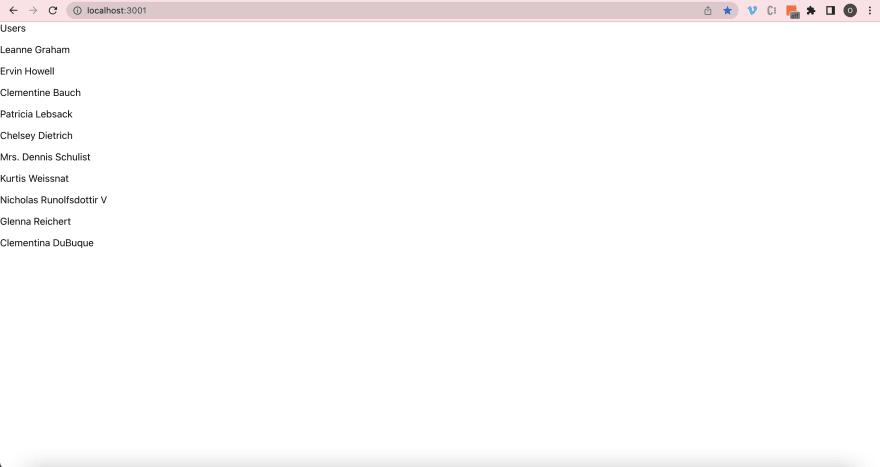
We should have something that looks like the image below.
How to make a POST request
Using Axios with POST is the next step. We will need to create a new component named AddUser.js inside our Component directory.
touch AddUser.js
The following code is added to AddUser.js to create a form that allows user input and then sends the content to an API:
import React, { useState } from "react";
import axios from "axios";

function AddUser() {
  const [name, setName] = useState({
    name: " ",
  });

  const handleChange = (e) => {
    e.preventDefault();

    setName({
      name: e.target.value,
    });
  };

  const submitForm = (e) => {
    e.preventDefault();

    axios
      .post(`https://jsonplaceholder.typicode.com/users`, { name })
      .then((res) => {
        console.log(res);
        console.log(res.data);
      });
  };

  return (
    <div>
      <p>Add Users</p>
      <div>
        <form onSubmit={submitForm}>
          <label>
            User Name:
            <input type="text" name="name" onChange={handleChange} />
          </label>
          <button type="submit">Add</button>
        </form>
      </div>
    </div>
  );
}

export default AddUser;
Using the SubmitForm function, we stop the form's default action. After that, we update the state to reflect the user input. The POST method gives us the same response object with information we can use inside the then() method.
It is necessary to capture the user input before we can complete the POST request. Next, we add the input along with the POST request, which will return a response. After that, we can console.log the response, which displays the user input.
Now, we add the component to our app.js
import AddUser from "./Components/AddUser";
import Users from "./Components/Users";

function App() {
  return (
    <div>
      <Users />
      <AddUser />
    </div>
  );
}

export default App;
How to make a put request
Using Axios with PUT method is the next step. We will need to create a new component named UpdateUser inside our Component directory.
touch UpdateUser.js
The following code is added to UpdateUser to create a form that allows user input and then update the content to an API:
import React, { useEffect, useState } from "react";
import axios from "axios";

function UpdateUser() {
  const [state, setState] = useState({
    Name: "",
    userName: "",
  });

  const handleChange = (evt) => {
    const value = evt.target.value;

    setState({
      ...state,
      [evt.target.name]: value,
    });
  };

  const submitForm = (e) => {
    e.preventDefault();
    console.log(e);
    console.log(state);

    axios
      .put(`https://jsonplaceholder.typicode.com/users/1`, { state })
      .then((res) => {
        console.log(res);
        console.log(res.data);
      });
  };

  return (
    <div>
      <p>Add Users</p>
      <div>
        <form onSubmit={submitForm}>
          <label>
            User Name:
            <input
              type="text"
              name="Name"
              placeholder="name"
              value={state.Name}
              onChange={handleChange}
            />
            <input
              type="text"
              name="userName"
              placeholder="username"
              value={state.userName}
              onChange={handleChange}
            />
          </label>
          <button type="submit">Add</button>
        </form>
      </div>
    </div>
  );
}

export default UpdateUser;
In the code above, we use the PUT method from Axios. As with the POSTmethod, we include the properties we wish to add to the updated resource.
Again, using the then() method, the data is updated in JSX.
Next, we add our UpdateUser component to our App.js file
import AddUser from "./Components/AddUser";
import UpdateUser from "./Components/UpdateUser";
import Users from "./Components/Users";

function App() {
  return (
    <div>
      <Users />
      <AddUser />
      <UpdateUser />
    </div>
  );
}

export default App;
How to make a delete request
By using the Delete method and passing a URL as a parameter, we will see how to delete items from an API. We need to create a new component called RemoveUser.js within our React project.
To delete a user, we create RemoveUser.js and add the following code:
import React, { useState } from "react";
import axios from "axios";

function RemoveUser() {
  const [state, setState] = useState(" ");

  const handleChange = (e) => {
    setState({ id: e.target.value });
  };

  const handleRemove = (evt) => {
    evt.preventDefault();

    axios
      .delete(`https://jsonplaceholder.typicode.com/users/${state.id}`)
      .then((response) => {
        console.log(response);
        console.log(response.data);
      });
  };

  return (
    <div>
      Remove User
      <div>
        <form onSubmit={handleRemove}>
          <label>
            User ID:
            <input type="number" name="id" onChange={handleChange} />
          </label>
          <button type="submit">Delete</button>
        </form>
      </div>
    </div>
  );
}

export default RemoveUser;
Again, the response object contains information about the request. After the form is submitted, we can console.log that information again.
Our app.js file should include this component:
import AddUser from "./Components/AddUser";
import RemoveUser from "./Components/RemoveUser";
import UpdateUser from "./Components/UpdateUser";
import Users from "./Components/Users";

function App() {
  return (
    <div>
      <Users />
      <AddUser />
      <UpdateUser />
      <RemoveUser />
    </div>
  );
}

export default App;
Handling errors
Is Axios capable of handling errors?
When making a request, what happens if there is an error?
There may be a problem passing along data, It may be that a wrong endpoint is requested, or there may be a network issue. To simulate an error, we'll send a request to an API endpoint that doesn't exist: /users/obmm.
This request will return a 404 status code:
To handle an error, we create Errorhandling.js and add the following code:
import axios from "axios";
import React, { useEffect, useState } from "react";

function Errorhandling() {
  const [users, setUsers] = useState([]);
  const [error, setError] = React.useState(null);

  useEffect(() => {
    axios
      .get(`https://jsonplaceholder.typicode.com/posts/obmm`)
      .then((response) => {
        setUsers(response.data);
      })
      .catch((error) => {
        setError(error);
      });
  }, []);

  if (error) return `Error: ${error?.message}`;
  if (!users) return "No user!";

  return (
    <div>
      Errorhandling
      <div>
        Users
        {users.map((item, i) => {
          return (
            <div key={i}>
              <p>{item?.name}</p>
            </div>
          );
        })}
      </div>
    </div>
  );
}

export default Errorhandling;
As a result, Axios will throw an error instead of executing the then() method.
We are using this function to alert our users about the error by taking the error data and putting it in a state. Thus, if an error occurs, an error message will appear.
A user is alerted about the error by putting the error data in the state. A message is displayed if there is an error. Upon running this code, we'll see: "Error: Request failed with status code 404".
Our app.js file should include this component:
import AddUser from "./Components/AddUser";
import Errorhandling from "./Components/Errorhandling";
import RemoveUser from "./Components/RemoveUser";
import UpdateUser from "./Components/UpdateUser";
import Users from "./Components/Users";

function App() {
  return (
    <div>
      <Users />
      <AddUser />
      <UpdateUser />
      <RemoveUser />
      <Errorhandling />
    </div>
  );
}

export default App;
Base Instance
We'll set up a base instance with a URL and other configuration elements in this section.
The first step is to create a separate file named api.js:
Let us add this code to our api.js
import axios from 'axios';


export default axios.create({
  baseURL: `http://jsonplaceholder.typicode.com/`
});
We will be using the API file in our RemoveUser.js component.
We import the new instance like this:
import React, { useState } from 'react'
import axios from 'axios';
import API from './API.js';

function RemoveUser() {

  // ...

 const handleRemove = (evt)=>{
    evt.preventDefault();

       API.delete(`users/${state.id}`)
      .then(response => {
        console.log(response);
        console.log(response.data);
      })
}

  // ...

}

export default RemoveUser
It is no longer necessary to type out the whole URL each time we want to access a different API endpoint since http://jsonplaceholder.typicode.com/ is now the base URL.
The use of async and await
This section shows how we can work with promises using async and await .
Promises are resolved using the await keyword, which returns their value. Afterwards, the value can be assigned to a variable.
import React, { useState } from 'react'
import axios from 'axios';
import API from './API.js';

function RemoveUser() {

  // ...

 const handleRemove = (evt)=>{
    evt.preventDefault();

      const response = await API.delete(`users/${this.state.id}`);

    console.log(response);
    console.log(response.data);
}

  // ...


}

export default RemoveUser
In the example above, the then method is replaced. As a result, the promise has been fulfilled, resulting in the value being stored in the response variable.
Conclusion
This tutorial demonstrated how Axios could be used inside a React application to create HTTP requests and handle responses.
Thanks for Reading 🌟🎉
It's great to see that you have enjoyed the article. Please, let me know what you think in the comment section.
I'd love to connect with you at Twitter
On to another blog, some other day, till then Femi👋.


 已为社区贡献29247条内容

所有评论(0)