使用 React 和 TypeScript 构建强类型多态组件
作者:Ohans Emmanuel✏️
在这份详细(和解释性)的指南中,我将讨论如何使用 TypeScript 构建强类型的多态 React 组件。我们将介绍以下部分:
-
多态组件的真实示例
-
*Chakra UI 的
as道具
*MUI 的component道具
-
构建简单的多态组件
-
这个简单实现的问题
*as属性可以接收无效的 HTML 元素
*可以为有效元素传递错误的属性
*无属性支持!
*为什么这样不好?
- 如何使用 TypeScript 在 React 中构建强类型多态组件
*确保as属性只接收有效的 HTML 元素字符串
*在泛型声明后加逗号
*约束泛型
-
使用 TypeScript 泛型处理有效的组件属性
-
处理默认值
as属性 -
使用其道具使组件可重用
-
严格省略通用组件道具
-
为多态类型创建可重用实用程序
-
支持多态组件中的引用
如您所见,这很长,因此请随意跳过。如果您想继续关注,请在我的 GitHub 上加注官方代码库以供参考。
多态组件的真实示例
您已经使用过多态组件的可能性非零。开源组件库通常实现某种多态组件。
让我们考虑一些您可能熟悉的:Chakra UIas道具和 MUIcomponent道具。
Chakra UI 的as道具
[ ](https://res.cloudinary.com/practicaldev/image/fetch/s--VjWjVfTt--/c_limit%2Cf_auto%2Cfl_progressive%2Cq_auto%2Cw_880/https://blog.logrocket. com/wp-content/uploads/2022/05/chakra-ui.jpeg)Chakra UI如何实现多态道具?答案是暴露一个
as道具。as属性被传递给组件以确定它最终应该呈现的容器元素。 使用
使用as道具所需要做的就是将它传递给组件,在这种情况下是Box:
<Box as='button' borderRadius='md' bg='tomato' color='white' px={4} h={8}>
  Button
</Box>
进入全屏模式 退出全屏模式
现在,该组件将呈现一个button元素。[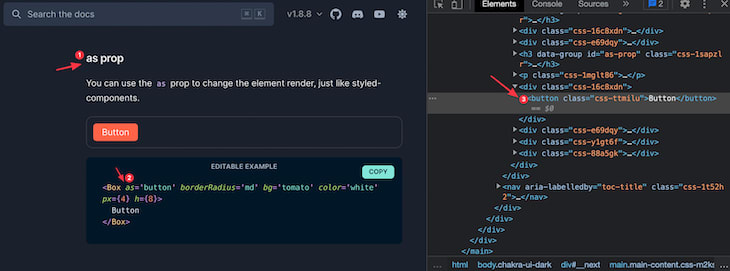 ](https://res.cloudinary.com/practicaldev/image/fetch/s--_y1k34lJ--/c_limit%2Cf_auto%2Cfl_progressive%2Cq_auto%2Cw_880/https:/ /blog.logrocket.com/wp-content/uploads/2022/05/box-component-rendered-as-button.png)如果您将
as属性更改为h1:
<Box as="h1"> Hello </Box>
进入全屏模式 退出全屏模式
现在,Box组件渲染了一个h1:[ ](https://res.cloudinary.com/practicaldev/image/fetch/s--5Gu5jnG1--/c_limit%2Cf_auto% 2Cfl_progressive%2Cq_auto%2Cw_880/https://blog.logrocket.com/wp-content/uploads/2022/05/box-component-rendered-as-h1.png)这是一个多态组件在工作!它可以被渲染成完全独特的元素,所有这些都通过传递一个道具来实现。
MUI 的component道具
[ ](https://res.cloudinary.com/practicaldev/image/fetch/s--Kc9roSbp--/c_limit%2Cf_auto%2Cfl_progressive%2Cq_auto%2Cw_880/https://blog.logrocket .com/wp-content/uploads/2022/05/MUI-component-prop.jpeg) 与 Chakra UI 类似,MUI允许称为
component的多态 prop,其实现方式类似:您将其传递给组件并声明您要呈现的元素或自定义组件。这是来自官方文档的示例:
<List component="nav">
  <ListItem button>
    <ListItemText primary="Trash" />
  </ListItem>
</List>
进入全屏模式 退出全屏模式
List被传递了一个nav的组件属性;当它被渲染时,它将渲染一个nav容器元素。
另一个用户可以使用相同的组件,但不能用于导航;相反,他们可能想要呈现一个待办事项列表:
<List component="ol">
  ...
</List>
进入全屏模式 退出全屏模式
在这种情况下,List将呈现一个有序列表ol元素。
谈论灵活性!有关多态组件,请参阅用例](https://github.com/ohansemmanuel/polymorphic-react-component/blob/master/use-cases.pdf)的[摘要。
正如您将在本文的以下部分中看到的那样,多态组件非常强大。除了接受元素类型的道具之外,它们还可以接受自定义组件作为道具。
这将在本文的下一节中讨论。现在,让我们开始构建我们的第一个多态组件!
构建简单的多态组件
与您的想法相反,构建您的第一个多态组件非常简单。这是一个基本的实现:
const MyComponent = ({ as, children }) => {
  const Component = as || "span";

  return <Component>{children}</Component>;
};
进入全屏模式 退出全屏模式
请注意,多态道具as类似于 Chakra UI。这是我们为控制多态组件的渲染元素而公开的道具。
其次,请注意as道具不是直接渲染的。以下将是错误的:
const MyComponent = ({ as, children }) => {
  // wrong render below 👇
  return <as>{children}</as>;
};
进入全屏模式 退出全屏模式
当在运行时渲染一个元素类型时,必须先将它赋给一个大写的变量,然后再渲染大写的变量。[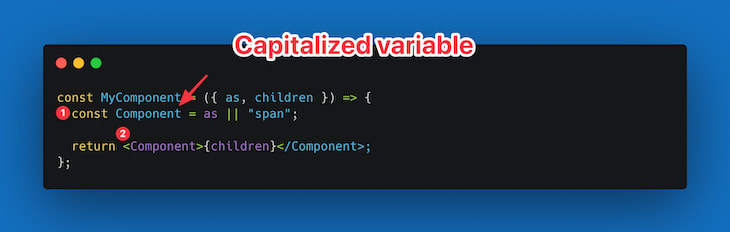 ](https://res.cloudinary.com/practicaldev/image/fetch/s--Jw_5LCUx--/c_limit%2Cf_auto%2Cfl_progressive%2Cq_auto%2Cw_880/https://blog. logrocket.com/wp-content/uploads/2022/05/using-capitalized-variable.png)现在您可以继续使用此组件,如下所示:
<MyComponent as="button">Hello Polymorphic!<MyComponent>
<MyComponent as="div">Hello Polymorphic!</MyComponent>
<MyComponent as="span">Hello Polymorphic!</MyComponent>
<MyComponent as="em">Hello Polymorphic!</MyComponent>
进入全屏模式 退出全屏模式
请注意,不同的as道具被传递给上面的渲染组件。[ ](https://res.cloudinary.com/practicaldev/image/fetch/s--aBCfOFNL--/c_limit%2Cf_auto%2Cfl_progressive%2Cq_auto%2Cw_880/https://blog. logrocket.com/wp-content/uploads/2022/05/different-rendered-elements.jpeg)
这个简单实现的问题
上一节的实现虽然很标准,但也有很多缺点。让我们来探索其中的一些。
1\。as属性可以接收无效的 HTML 元素
目前,用户可以编写以下内容:
<MyComponent as="emmanuel">Hello Wrong Element</MyComponent>
进入全屏模式 退出全屏模式
这里传递的as属性是emmanuel。Emmanuel 显然是一个错误的 HTML 元素,但是浏览器也尝试渲染这个元素。[ ](https://res.cloudinary.com/practicaldev/image/fetch/s--zm8qjrWH--/c_limit%2Cf_auto%2Cfl_progressive%2Cq_auto%2Cw_880/https:// blog.logrocket.com/wp-content/uploads/2022/05/rendering-a-wrong-html-element-type.png)理想的开发体验是在开发过程中显示某种错误。例如,用户可能会输入一个简单的拼写错误——
divv而不是div——并且不会得到任何错误提示。
2\。可以为有效元素传递错误的属性
考虑以下组件用法:
<MyComponent as="span" href="https://www.google.com">
   Hello Wrong Attribute
</MyComponent>
进入全屏模式 退出全屏模式
消费者可以将span元素传递给as道具,也可以传递href道具。
这在技术上是无效的。span元素不(也不应该)采用href属性。那是无效的 HTML 语法。但是,我们构建的组件的使用者仍然可以继续编写此代码,并且在开发过程中不会出错。
3\。无属性支持!
再次考虑简单的实现:
const MyComponent = ({ as, children }) => {
  const Component = as || "span";

  return <Component>{children}</Component>;
};
进入全屏模式 退出全屏模式
该组件接受的唯一道具是as和children,仅此而已。即使是有效的as元素道具也没有属性支持,即,如果as是锚元素a,我们也应该支持将href传递给组件。
<MyComponent as="a" href="...">A link </MyComponent>
进入全屏模式 退出全屏模式
即使在上面的示例中传递了href,组件实现也不会收到其他道具。只有as和children被解构。
您最初的想法可能是继续传播传递给组件的所有其他道具,如下所示:
const MyComponent = ({ as, children, ...rest }) => {
  const Component = as || "span";

  return <Component {...rest}>{children}</Component>;
};
进入全屏模式 退出全屏模式
这似乎是一个不错的解决方案,但现在它突出了上面提到的第二个问题。错误的属性现在也将传递给组件。
考虑以下:
<MyComponent as="span" href="https://www.google.com">
   Hello Wrong Attribute
</MyComponent>
进入全屏模式 退出全屏模式
并注意最终呈现的标记:[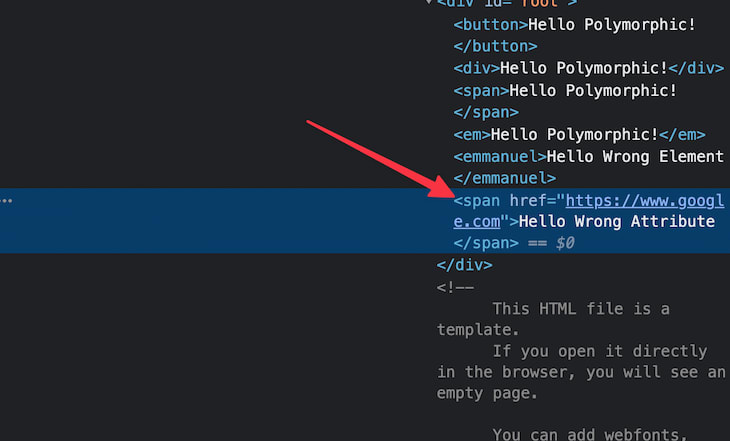 ](https://res.cloudinary.com/practicaldev/image/fetch/s--FwaC7DLx--/c_limit%2Cf_auto%2Cfl_progressive% 2Cq_auto%2Cw_880/https://blog.logrocket.com/wp-content/uploads/2022/05/span-element-with-href-attribute.png) 带有
href的span是无效的 HTML。
为什么这样不好?
回顾一下,我们简单实现的当前问题是低于标准的,因为:
-
它提供了糟糕的开发者体验
-
它不是类型安全的。错误可以(并且将会)潜入
我们如何解决这些担忧?需要明确的是,这里没有魔杖可以挥动。但是,我们将利用 TypeScript 来确保您构建强类型的多态组件。
完成后,使用您的组件的开发人员将避免上述运行时错误,而是在开发或构建期间捕获它们——这一切都归功于 TypeScript。
如何使用 TypeScript 在 React 中构建强类型多态组件
如果你正在阅读这篇文章,一个先决条件是你已经了解了一些 TypeScript——至少是基础知识。如果你不知道 TypeScript 是什么,我强烈推荐给这个文档先阅读。
在本节中,我们将使用 TypeScript 解决上述问题并构建强类型多态组件。我们将开始的前两个要求包括:
-
as道具不应接收无效的 HTML 元素字符串 -
不应该为有效元素传递错误的属性
在下一节中,我们将介绍 TypeScript 泛型,以使我们的解决方案更加健壮、对开发人员友好且具有生产价值。
确保as属性只接收有效的 HTML 元素字符串
这是我们目前的解决方案:
const MyComponent = ({ as, children }) => {
  const Component = as || "span";

  return <Component>{children}</Component>;
};
进入全屏模式 退出全屏模式
为了使本指南的下一部分变得实用,我们将组件的名称从MyComponent更改为Text,并假设我们正在构建一个多态的Text组件。
const Text = ({ as, children }) => {
  const Component = as || "span";

  return <Component>{children}</Component>;
};
进入全屏模式 退出全屏模式
现在,根据您对泛型的了解,很明显我们最好用泛型类型表示as,即基于用户传入的变量类型。[ ](https:/ /res.cloudinary.com/practicaldev/image/fetch/s--SFGyLLI3--/c_limit%2Cf_auto%2Cfl_progressive%2Cq_auto%2Cw_880/https://blog.logrocket.com/wp-content/uploads/2022/05/ as-prop.png) 让我们继续迈出第一步,如下所示:
export const Text = <C>({
  as,
  children,
}: {
  as?: C;
  children: React.ReactNode;
}) => {
  const Component = as || "span";

  return <Component>{children}</Component>;
};
进入全屏模式 退出全屏模式
注意泛型C是如何定义的,然后在 propas的类型定义中传递。
但是,如果您编写了这个看似完美的代码,您将让 TypeScript 用比您想要的更多的波浪形红线大喊出许多错误 🤷u200d♀️[ ](https://res.cloudinary .com/practicaldev/image/fetch/s--iLYgAHDe--/c_limit%2Cf_auto%2Cfl_progressive%2Cq_auto%2Cw_880/https://blog.logrocket.com/wp-content/uploads/2022/05/jsx-generic- error.png) 这里发生的是语法中的一个缺陷,用于泛型在
.tsx文件中。有两种方法可以解决这个问题。
1\。在泛型声明后添加逗号
这是声明多个泛型的语法。一旦你这样做了,TypeScript 编译器就会清楚地理解你的意图,并且错误就会被消除。
// note the comma after "C" below 👇
export const Text = <C,>({
  as,
  children,
}: {
  as?: C;
  children: React.ReactNode;
}) => {
  const Component = as || "span";

  return <Component>{children}</Component>;
};
进入全屏模式 退出全屏模式
2\。约束泛型
第二种选择是在您认为合适的情况下限制泛型。对于初学者,您可以使用unknown类型,如下所示:
// note the extends keyword below 👇
export const Text = <C extends unknown>({
  as,
  children,
}: {
  as?: C;
  children: React.ReactNode;
}) => {
  const Component = as || "span";

  return <Component>{children}</Component>;
};
进入全屏模式 退出全屏模式
现在,我将坚持第二种解决方案,因为它更接近我们的最终解决方案。不过,在大多数情况下,我使用多个通用语法并仅添加一个逗号。
但是,使用我们当前的解决方案,我们会遇到另一个 TypeScript 错误:
JSX 元素类型“组件”没有任何构造或调用签名。 ts(2604)
[ ](https://res.cloudinary.com/practicaldev/image/fetch/s--HMBn74JK--/c_limit%2Cf_auto%2Cfl_progressive%2Cq_auto%2Cw_880/https://blog .logrocket.com/wp-content/uploads/2022/05/no-construct-or-call-error.png)
这类似于我们在使用echoLength函数时遇到的错误。就像访问未知变量类型的length属性一样,这里也可以这样说:试图将任何泛型类型渲染为有效的 React 组件是没有意义的。
我们只需要约束泛型以适应有效 React 元素类型的模型。
为了实现这一点,我们将利用内部 React 类型:React.ElementType,并确保泛型被限制为适合该类型:
// look just after the extends keyword 👇
export const Text = <C extends React.ElementType>({
  as,
  children,
}: {
  as?: C;
  children: React.ReactNode;
}) => {
  const Component = as || "span";

  return <Component>{children}</Component>;
};
进入全屏模式 退出全屏模式
请注意,如果您使用的是旧版本的 React,则可能需要导入更新的 React 版本,如下所示:
import React from 'react'
进入全屏模式 退出全屏模式
有了这个,我们就没有更多的错误了!
现在,如果您继续按如下方式使用此组件,它将正常工作:
<Text as="div">Hello Text world</Text>
进入全屏模式 退出全屏模式
但是,如果你传递了一个无效的as属性,你现在会得到一个适当的 TypeScript 错误。考虑下面的例子:
<Text as="emmanuel">Hello Text world</Text>
进入全屏模式 退出全屏模式
并抛出错误:
类型 '"emmanuel"' 不可分配给类型 'ElementType |不明确的'。
[ ](https://res.cloudinary.com/practicaldev/image/fetch/s--ve3Oxhyk--/c_limit%2Cf_auto%2Cfl_progressive%2Cq_auto%2Cw_880/https:// blog.logrocket.com/wp-content/uploads/2022/05/type-emmanuel-not-assginable-error.jpeg)这太棒了!我们现在有一个解决方案,它不接受
as道具的乱码,并且还可以防止令人讨厌的拼写错误,例如divv而不是div。
这是一个更好的开发者体验!
使用 TypeScript 泛型处理有效的组件属性
在解决第二个用例时,您将体会到泛型的真正强大之处。首先,让我们了解我们在这里要完成的工作。
一旦我们收到一个通用的as类型,我们希望确保传递给我们组件的剩余道具是相关的,基于as道具。
因此,例如,如果用户传入as的as道具,我们希望href同样是有效的道具 ](https://res.cloudinary.com/practicaldev/image/fetch/s--0Amrqy4W--/c_limit%2Cf_auto%2Cfl_progressive%2Cq_auto%2Cw_880/https://blog. logrocket.com/wp-content/uploads/2022/05/as-prop-and-href.png)为了让您了解我们将如何完成此任务,请查看我们解决方案的当前状态:
export const Text = <C extends React.ElementType>({
  as,
  children,
}: {
  as?: C;
  children: React.ReactNode;
}) => {
  const Component = as || "span";

  return <Component>{children}</Component>;
};
进入全屏模式 退出全屏模式
该组件的 prop 现在由对象类型表示:
{
  as?: C;
  children: React.ReactNode;
}
进入全屏模式 退出全屏模式
在伪代码中,我们想要的是以下内容:
{
  as?: C;
  children: React.ReactNode;
} & {
  ...otherValidPropsBasedOnTheValueOfAs
}
进入全屏模式 退出全屏模式
[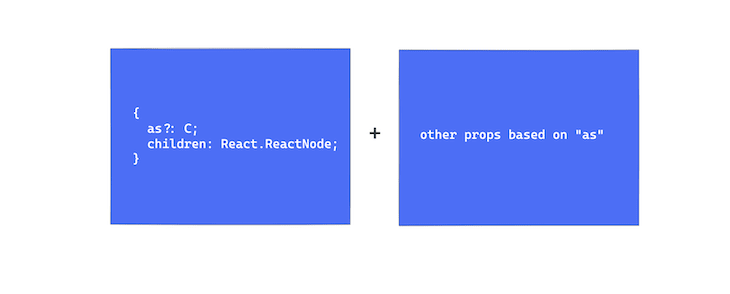 ](https://res.cloudinary.com/practicaldev/image/fetch/s--eOYdEmfy--/c_limit%2Cf_auto%2Cfl_progressive%2Cq_auto%2Cw_880/https://blog.logrocket.com /wp-content/uploads/2022/05/pseudocode.png)
这一要求足以让一个人抓住稻草。我们不可能编写一个函数来根据as的值确定合适的类型,手动列出联合类型也不明智。
那么,如果有一个来自React的提供类型充当“函数”,它将根据您传递的内容返回有效的元素类型怎么办?
在介绍解决方案之前,让我们进行一些重构。让我们将组件的 props 拉出到一个单独的类型中:
// 👇 See TextProps pulled out below
type TextProps<C extends React.ElementType> = {
  as?: C;
  children: React.ReactNode;
}

export const Text = <C extends React.ElementType>({
  as,
  children,
}: TextProps<C>) => { // 👈 see TextProps used
  const Component = as || "span";
  return <Component>{children}</Component>;
};
进入全屏模式 退出全屏模式
这里重要的是注意泛型是如何传递给TextProps<C>的。类似于 JavaScript 中的函数调用——但使用尖括号。
这里的魔杖是利用React.ComponentPropsWithoutRef类型,如下所示:
type TextProps<C extends React.ElementType> = {
  as?: C;
  children: React.ReactNode;
} & React.ComponentPropsWithoutRef<C>; // 👈 look here

export const Text = <C extends React.ElementType>({
  as,
  children,
}: TextProps<C>) => {
  const Component = as || "span";
  return <Component>{children}</Component>;
};
进入全屏模式 退出全屏模式
请注意,我们在这里引入了一个交集。本质上,我们说TextProps的类型是包含as、children和其他一些由React.ComponentPropsWithoutRef表示的类型的对象类型。[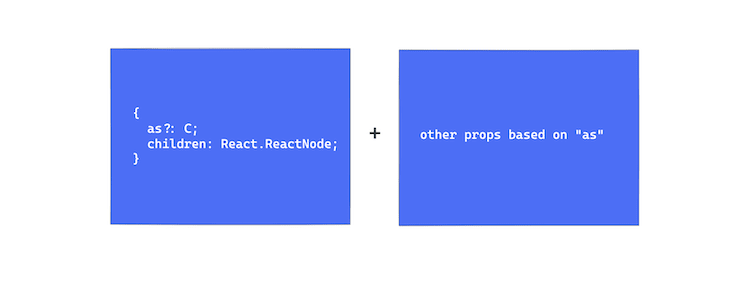 ](https://res.cloudinary.com/practicaldev/ image/fetch/s--dvqLsvKt--/c_limit%2Cf_auto%2Cfl_progressive%2Cq_auto%2Cw_880/https://blog.logrocket.com/wp-content/uploads/2022/05/react-componentpropswithoutref.png)
如果您阅读代码,可能会很明显这里发生了什么。
基于由通用C表示的as的类型,React.componentPropsWithoutRef将返回与传递给as属性的字符串属性相关的有效组件属性。
还有一点需要注意。[ ](https://res.cloudinary.com/practicaldev/image/fetch/s--SJV_Ryj6--/c_limit%2Cf_auto%2Cfl_progressive%2Cq_auto%2Cw_880/https://blog. logrocket.com/wp-content/uploads/2022/05/different-componentprops-type-variants.png)
如果您刚开始输入并依赖编辑器中的 IntelliSense,您会意识到React.ComponentProps...类型有三种变体:
1.React.ComponentProps
2.React.ComponentPropsWithRef
3.React.ComponentPropsWithoutRef
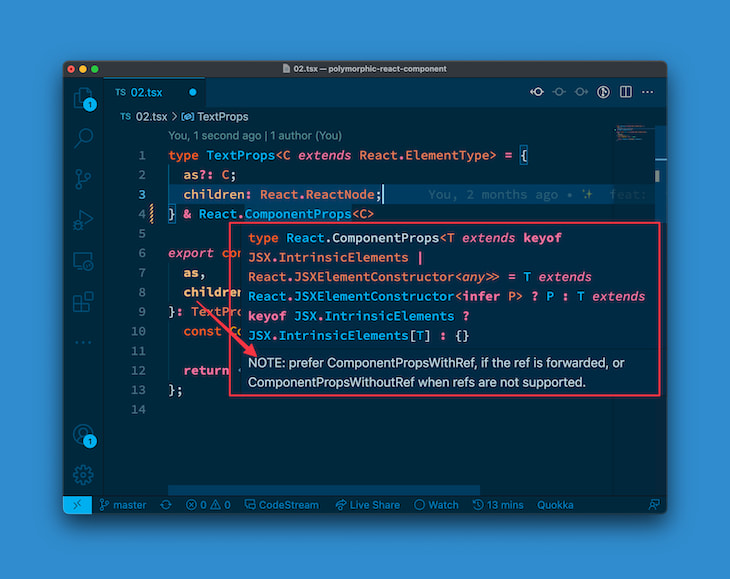
如果您尝试使用第一个ComponentProps,您会看到相关说明:
Prefer
ComponentPropsWithRef,如果ref被转发,或者ComponentPropsWithoutRef不支持 refs。
[ ](https://res.cloudinary.com/practicaldev/image/fetch/s--EP14EmtF--/c_limit%2Cf_auto%2Cfl_progressive%2Cq_auto%2Cw_880/https:// blog.logrocket.com/wp-content/uploads/2022/05/prefer-componentpropswithref-or-without.png)
这正是我们所做的。现在,我们将忽略支持ref道具的用例并坚持使用ComponentPropsWithoutRef。
现在,让我们尝试一下解决方案!
如果您继续错误地使用此组件,例如,将有效的as道具与其他不兼容的道具一起传递,您将收到错误消息。
<Text as="div" href="www.google.com">Hello Text world</Text>
进入全屏模式 退出全屏模式
div的值对as属性完全有效,但div不应具有href属性。
这是错误的,TypeScript 正确捕获了错误:Property 'href' does not exist on type ....[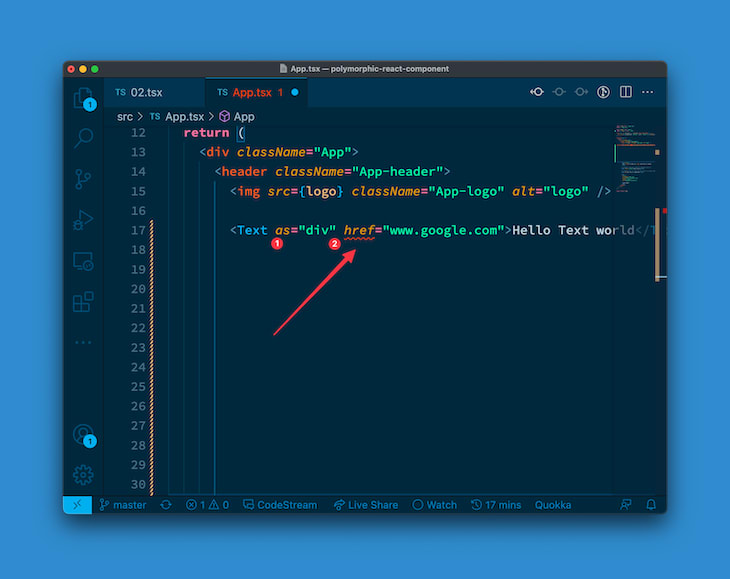 ](https://res.cloudinary.com/practicaldev/image/fetch/s--R9Pe2ddV--/ c_limit%2Cf_auto%2Cfl_progressive%2Cq_auto%2Cw_880/https://blog.logrocket.com/wp-content/uploads/2022/05/property-href-doesnt-exist-error.png)
这很棒!我们有一个更好、更强大的解决方案。
最后,确保将其他道具向下传递到渲染元素:
type TextProps<C extends React.ElementType> = {
  as?: C;
  children: React.ReactNode;
} & React.ComponentPropsWithoutRef<C>;

export const Text = <C extends React.ElementType>({
  as,
  children,
  ...restProps, // 👈 look here
}: TextProps<C>) => {
  const Component = as || "span";

  // see restProps passed 👇
  return <Component {...restProps}>{children}</Component>;
};
进入全屏模式 退出全屏模式
我们继续吧。
处理默认as属性
再次考虑我们当前的解决方案:
export const Text = <C extends React.ElementType>({
  as,
  children,
  ...restProps
}: TextProps<C>) => {
  const Component = as || "span"; // 👈 look here

  return <Component {...restProps}>{children}</Component>;
};
进入全屏模式 退出全屏模式
特别是,如果省略as属性,请注意提供默认元素的位置。
const Component = as || "span"
进入全屏模式 退出全屏模式
这在 JavaScript 世界中通过实现正确表示:如果as是可选的,它将默认为span。
问题是,当as没有通过时,TypeScript 是如何处理这种情况的?我们是否同样传递了默认类型?
好吧,答案是否定的,但下面是一个实际的例子。假设您继续使用Text组件,如下所示:
<Text>Hello Text world</Text>
进入全屏模式 退出全屏模式
请注意,我们在这里没有传递as道具。 TypeScript 会知道这个组件的有效道具吗?
让我们继续添加一个href:
<Text href="https://www.google.com">Hello Text world</Text>
进入全屏模式 退出全屏模式
如果您继续执行此操作,您将不会收到任何错误。那很糟。
span不应接收href道具/属性。虽然我们在实现中默认为span,但 TypeScript 不知道这个默认值。让我们用一个简单的通用默认赋值来解决这个问题:
type TextProps<C extends React.ElementType> = {
  as?: C;
  children: React.ReactNode;
} & React.ComponentPropsWithoutRef<C>;

/**
* See default below. TS will treat the rendered element as a
span and provide typings accordingly
*/
export const Text = <C extends React.ElementType = "span">({
  as,
  children,
  ...restProps
}: TextProps<C>) => {
  const Component = as || "span";
  return <Component {...restProps}>{children}</Component>;
};
进入全屏模式 退出全屏模式
重要的一点在下面突出显示:
<C extends React.ElementType = "span">
进入全屏模式 退出全屏模式
瞧!当您将href传递给没有as属性的Text组件时,我们之前的示例现在应该抛出错误。
错误应为:Property 'href' does not exist on type ....[ 上不存在属性 Href](https://res.cloudinary.com/practicaldev/image/fetch/s--hP6PzeaQ--/c_limit%2Cf_auto%2Cfl_progressive% 2Cq_auto%2Cw_880/https://blog.logrocket.com/wp-content/uploads/2022/05/property-href-doesnt-exist-error-1.png)
使用其道具使组件可重用
我们目前的解决方案比我们开始的解决方案要好得多。拍拍自己的后背,让自己走到这一步——它只会从这里变得更有趣。
本节中要迎合的用例在现实世界中非常适用。如果您正在构建某种组件,那么该组件很有可能也会采用该组件独有的一些特定道具。
我们当前的解决方案考虑了as、children和其他基于as属性的组件属性。但是,如果我们想让这个组件处理它自己的 props 怎么办?
让我们把它变得实用。我们将让Text组件接收color道具。此处的color将是任何彩虹色或black。
我们将继续并表示如下:
type Rainbow =
  | "red"
  | "orange"
  | "yellow"
  | "green"
  | "blue"
  | "indigo"
  | "violet";
进入全屏模式 退出全屏模式
接下来,我们必须在TextProps对象中定义color属性,如下所示:
type TextProps<C extends React.ElementType> = {
  as?: C;
  color?: Rainbow | "black"; // 👈 look here
  children: React.ReactNode;
} & React.ComponentPropsWithoutRef<C>;
进入全屏模式 退出全屏模式
在继续之前,让我们进行一些重构。让我们用一个Props对象来表示Text组件的实际 props,并且在TextProps对象中只键入特定于我们组件的 props。
这将变得显而易见,如下所示:
// new "Props" type
type Props <C extends React.ElementType> = TextProps<C>

export const Text = <C extends React.ElementType = "span">({
  as,
  children,
  ...restProps,
}: Props<C>) => {
  const Component = as || "span";
  return <Component {...restProps}>{children}</Component>;
};
进入全屏模式 退出全屏模式
现在让我们清理TextProps:
// before
type TextProps<C extends React.ElementType> = {
  as?: C;
  color?: Rainbow | "black"; // 👈 look here
  children: React.ReactNode;
} & React.ComponentPropsWithoutRef<C>;

// after
type TextProps<C extends React.ElementType> = {
  as?: C;
  color?: Rainbow | "black";
};
进入全屏模式 退出全屏模式
现在,TextProps应该只包含特定于我们的Text组件的道具:as和color。
我们现在必须更新Props的定义,以包括我们从TextProps中删除的类型,即children和React.ComponentPropsWithoutRef<C>。
对于children道具,我们将利用React.PropsWithChildren道具。[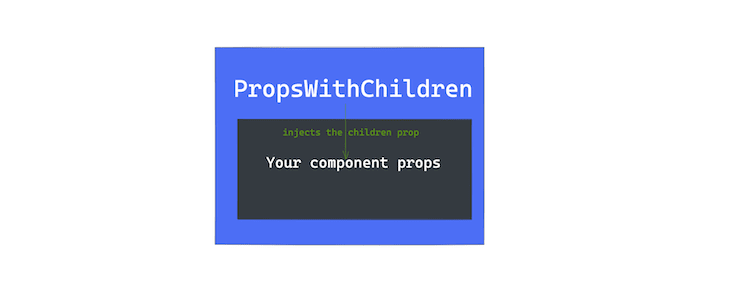 ](https://res.cloudinary.com/practicaldev/image/fetch/s--8xeVMEqc--/c_limit%2Cf_auto%2Cfl_progressive%2Cq_auto%2Cw_880/https://blog.logrocket .com/wp-content/uploads/2022/05/propswithchildren-type.png)
PropsWithChildren很容易推理出来。你将你的组件 props 传递给它,它会为你注入子 props 定义:
type Props <C extends React.ElementType> =
React.PropsWithChildren<TextProps<C>>
进入全屏模式 退出全屏模式
注意我们如何使用尖括号;这是传递泛型的语法。本质上,React.PropsWithChildren接受您的组件道具作为通用道具,并使用children道具对其进行扩充。甜的!
对于React.ComponentPropsWithoutRef<C>,我们将继续并在此处利用交叉点类型:
type Props <C extends React.ElementType> =
React.PropsWithChildren<TextProps<C>> &
React.ComponentPropsWithoutRef<C>
进入全屏模式 退出全屏模式
这是当前的完整解决方案:
type Rainbow =
  | "red"
  | "orange"
  | "yellow"
  | "green"
  | "blue"
  | "indigo"
  | "violet";

type TextProps<C extends React.ElementType> = {
  as?: C;
  color?: Rainbow | "black";
};

type Props <C extends React.ElementType> =
React.PropsWithChildren<TextProps<C>> &
React.ComponentPropsWithoutRef<C>

export const Text = <C extends React.ElementType = "span">({
  as,
  children,
}: Props<C>) => {
  const Component = as || "span";
  return <Component> {children} </Component>;
};
进入全屏模式 退出全屏模式
我知道这些感觉很多,但是当您仔细观察时,一切都会变得有意义。它真的只是把你迄今为止学到的所有东西放在一起!
完成了这个必要的重构之后,我们现在可以继续我们的解决方案了。我们现在所拥有的确实有效。我们已经明确输入了color属性,您可以按如下方式使用它:
<Text color="violet">Hello world</Text>
进入全屏模式 退出全屏模式
严格省略通用组件道具
只有一件事我不太满意:color原来也是许多 HTML 标签的有效属性,就像 HTML5 之前的情况一样。因此,如果我们从类型定义中删除color,它将被接受为任何有效的字符串。
见下文:
type TextProps<C extends React.ElementType> = {
  as?: C;
  // remove color from the definition here
};
进入全屏模式 退出全屏模式
[ ](https://res.cloudinary.com/practicaldev/image/fetch/s--ivdzWGv4--/c_limit%2Cf_auto%2Cfl_progressive%2Cq_auto%2Cw_880/https://blog .logrocket.com/wp-content/uploads/2022/05/removing-color-type-definition.png)现在,如果您像以前一样继续使用
Text,它同样有效:
<Text color="violet">Hello world</Text>
进入全屏模式 退出全屏模式
这里唯一的区别是它是如何输入的。color现在由以下定义表示:
color?: string | undefined
进入全屏模式 退出全屏模式
[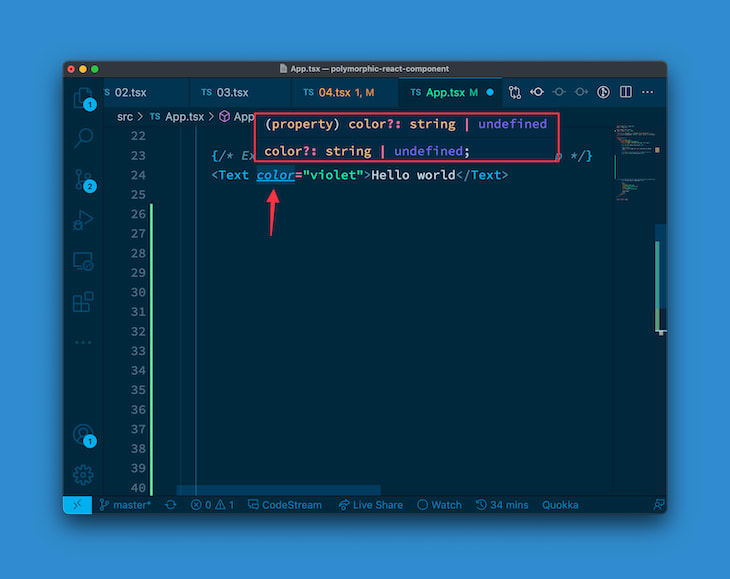 ](https://res.cloudinary.com/practicaldev/image/fetch/s--_gpLb590--/c_limit%2Cf_auto%2Cfl_progressive%2Cq_auto%2Cw_880/https://blog. logrocket.com/wp-content/uploads/2022/05/default-color-type.png)
同样,这不是我们在类型中编写的定义!
这是默认的 HTML 类型,其中color是大多数 HTML 元素的有效属性。有关更多上下文,请参阅这个 Stack Overflow 问题。
两种可能的解决方案
现在,有两种方法可以到达这里。第一个是保留我们最初的解决方案,我们明确声明了color属性:
type TextProps<C extends React.ElementType> = {
  as?: C;
  color?: Rainbow | "black"; // 👈 look here
};
进入全屏模式 退出全屏模式
第二个选项可以说提供了更多的类型安全性。要实现这一点,您必须了解之前的默认color定义来自何处:React.ComponentPropsWithoutRef<C>。这是根据as的类型添加其他道具的原因。
因此,有了这些信息,我们可以从React.ComponentPropsWithoutRef<C>中显式删除存在于我们的组件类型中的任何定义。
在你看到它之前很难理解它,所以让我们一步一步来。
如前所述,React.ComponentPropsWithoutRef<C>包含基于as类型的所有其他有效属性,例如href、color等,其中这些类型都有自己的定义,例如color?: string | undefined等:[ ](https://res.cloudinary.com/practicaldev/image/fetch/s--VjRyJsAF--/c_limit%2Cf_auto%2Cfl_progressive%2Cq_auto%2Cw_880/https://blog.logrocket.com/wp-content /uploads/2022/05/componentpropswithoutref-type.png)
可能存在于React.ComponentPropsWithoutRef<C>中的一些值也存在于我们的组件 props 类型定义中。在我们的例子中,两者都存在color ](https://res.cloudinary.com/practicaldev/image/fetch/s--VNxNq3XV--/c_limit%2Cf_auto%2Cfl_progressive%2Cq_auto%2Cw_880/https://blog.logrocket .com/wp-content/uploads/2022/05/componentpropswithoutref-and-textprops.png)
我们将显式删除组件类型定义中也存在的任何类型,而不是依赖我们的color定义来覆盖来自React.ComponentPropsWithoutRef<C>的内容。[ 中删除现有道具](https://res.cloudinary.com/practicaldev/image/fetch/s--p5s45qZg--/c_limit%2Cf_auto%2Cfl_progressive%2Cq_auto%2Cw_880/https://i .imgur.com/Vd2YT3K.png)
因此,如果我们的组件类型定义中存在任何类型,我们将从React.ComponentPropsWithoutRef<C>中显式删除这些类型。
从React.ComponentPropsWithoutRef<C>中删除类型
这是我们之前的:
type Props <C extends React.ElementType> =
React.PropsWithChildren<TextProps<C>> &
React.ComponentPropsWithoutRef<C>
进入全屏模式 退出全屏模式
我们将更有选择性,而不是添加来自React.ComponentPropsWithoutRef<C>的所有内容的交集类型。我们将使用Omit和keyofTypeScript 实用程序类型来执行一些 TypeScript 魔术。
看一看:
// before
type Props <C extends React.ElementType> =
React.PropsWithChildren<TextProps<C>> &
React.ComponentPropsWithoutRef<C>

// after
type Props <C extends React.ElementType> =
React.PropsWithChildren<TextProps<C>> &
Omit<React.ComponentPropsWithoutRef<C>, keyof TextProps<C>>;
进入全屏模式 退出全屏模式
这是重要的一点:
Omit<React.ComponentPropsWithoutRef<C>, keyof TextProps<C>>;
进入全屏模式 退出全屏模式
Omit接受两个泛型。第一个是对象类型,第二个是你想从对象类型中“省略”的类型的联合。
这是我最喜欢的例子。考虑一个Vowel对象类型,如下所示:
type Vowels = {
  a: 'a',
  e: 'e',
  i: 'i',
  o: 'o',
  u: 'u'
}
进入全屏模式 退出全屏模式
这是键和值的对象类型。假设我想从Vowels派生一个名为VowelsInOhans的新类型。
好吧,我知道名称Ohans包含两个元音,o和a。而不是手动声明这些:
type VowelsInOhans = {
  a: 'a',
  o: 'o'
}
进入全屏模式 退出全屏模式
我可以继续利用Omit,如下所示:
type VowelsInOhans = Omit<Vowels, 'e' | 'i' | 'u'>
进入全屏模式 退出全屏模式
[ ](https://res.cloudinary.com/practicaldev/image/fetch/s--2q_9-wcI--/c_limit%2Cf_auto%2Cfl_progressive%2Cq_auto%2Cw_880/https:/ /blog.logrocket.com/wp-content/uploads/2022/05/vowelsinohans.png)
Omit将“省略”对象类型Vowels中的e、i和u键。
另一方面,TypeScript 的keyof运算符的工作方式与您想象的一样。想想 JavaScript 中的Object.keys:给定object类型,keyof将返回对象键的联合类型。
呸!这是一口。这是一个例子:
type Vowels = {
  a: 'a',
  e: 'e',
  i: 'i',
  o: 'o',
  u: 'u'
}

type Vowel = keyof Vowels
进入全屏模式 退出全屏模式
现在,Vowel将是Vowels的键的联合类型,即:
type Vowel = 'a' | 'e' | 'i' | 'o' | 'u'
进入全屏模式 退出全屏模式
如果你把这些放在一起,再看看我们的解决方案,它们会很好地结合在一起:
Omit<React.ComponentPropsWithoutRef<C>, keyof TextProps<C>>;
进入全屏模式 退出全屏模式
keyof TextProps<C>返回我们组件道具的键的联合类型。这又被传递给Omit以从React.ComponentPropsWithoutRef<C>中省略它们。
甜的! 🕺
最后,让我们继续将color属性传递给渲染元素:
export const Text = <C extends React.ElementType = "span">({
  as,
  color, // 👈 look here
  children,
  ...restProps
}: Props<C>) => {
  const Component = as || "span";

  // 👇 compose an inline style object
  const style = color ? { style: { color } } : {};

  // 👇 pass the inline style to the rendered element
  return (
    <Component {...restProps} {...style}>
      {children}
    </Component>
  );
};
进入全屏模式 退出全屏模式
为多态类型创建可重用实用程序
我们终于找到了一个行之有效的解决方案。然而,现在让我们更进一步。吨
我们的解决方案非常适合我们的Text组件。但是,如果您希望有一个可以在您选择的任何组件上重用的解决方案,这样您就可以为每个用例提供一个可重用的解决方案怎么办?
让我们开始吧。首先,这是当前没有注释的完整解决方案:
type Rainbow =
  | "red"
  | "orange"
  | "yellow"
  | "green"
  | "blue"
  | "indigo"
  | "violet";

type TextProps<C extends React.ElementType> = {
  as?: C;
  color?: Rainbow | "black";
};

type Props<C extends React.ElementType> = React.PropsWithChildren<
  TextProps<C>
> &
  Omit<React.ComponentPropsWithoutRef<C>, keyof TextProps<C>>;

export const Text = <C extends React.ElementType = "span">({
  as,
  color,
  children,
  ...restProps
}: Props<C>) => {
  const Component = as || "span";

  const style = color ? { style: { color } } : {};

  return (
    <Component {...restProps} {...style}>
      {children}
    </Component>
  );
};
进入全屏模式 退出全屏模式
简洁实用。
如果我们使它可重用,那么它必须适用于任何组件。这意味着删除硬编码的TextProps并用泛型表示 - 因此任何人都可以传入他们需要的任何组件道具。
目前,我们用定义Props<C>表示我们的组件道具。其中C表示为as道具传递的元素类型。
我们现在将其更改为:
// before
Props<C>

// after
PolymorphicProps<C, TextProps>
进入全屏模式 退出全屏模式
PolymorphicProps代表我们将很快编写的实用程序类型。但是,请注意,它接受两种通用类型,第二种是有问题的组件道具:TextProps。
继续定义PolymorphicProps类型:
type PolymorphicComponentProp<
  C extends React.ElementType,
  Props = {}
> = {} // 👈 empty object for now
进入全屏模式 退出全屏模式
上面的定义应该是可以理解的。C代表as传入的元素类型,Props是实际的组件props,TextProps。
首先,让我们将之前的TextProps拆分为以下内容:
type AsProp<C extends React.ElementType> = {
  as?: C;
};

type TextProps = { color?: Rainbow | "black" };
进入全屏模式 退出全屏模式
因此,我们将AsProp与TextProps分开。公平地说,它们代表两种不同的东西。这是一个更好的表示。
现在,让我们更改PolymorphicComponentProp实用程序定义以包括as道具、组件道具和children道具,就像我们过去所做的那样:
type AsProp<C extends React.ElementType> = {
  as?: C;
};

type PolymorphicComponentProp<
  C extends React.ElementType,
  Props = {}
> = React.PropsWithChildren<Props & AsProp<C>>
进入全屏模式 退出全屏模式
我相信你现在已经明白这里发生了什么:我们有一个交叉类型Props(代表组件道具)和AsProp代表as道具。这些都传入PropsWithChildren以添加children属性定义。出色的!
现在,我们需要包含添加React.ComponentPropsWithoutRef<C>定义的位。但是,我们必须记住忽略组件定义中存在的道具。让我们提出一个强大的解决方案。
写出一个只包含我们想省略的道具的新类型。即AsProp的键和组件道具也是如此。
type PropsToOmit<C extends React.ElementType, P> = keyof (AsProp<C> & P);
进入全屏模式 退出全屏模式
还记得keyof实用程序类型吗?
PropsToOmit现在将包含我们要省略的 props 的联合类型,它是由P表示的组件的每个 prop 和由AsProps表示的实际多态 propas。
把这一切很好地放在PolymorphicComponentProp定义中:
type AsProp<C extends React.ElementType> = {
  as?: C;
};

// before
type PolymorphicComponentProp<
  C extends React.ElementType,
  Props = {}
> = React.PropsWithChildren<Props & AsProp<C>>

// after
type PolymorphicComponentProp<
  C extends React.ElementType,
  Props = {}
> = React.PropsWithChildren<Props & AsProp<C>> &
  Omit<React.ComponentPropsWithoutRef<C>,
   PropsToOmit<C, Props>>;
进入全屏模式 退出全屏模式
这里重要的是我们添加了以下定义:
Omit<React.ComponentPropsWithoutRef<C>,
   PropsToOmit<C, Props>>;
进入全屏模式 退出全屏模式
这基本上从React.componentPropsWithoutRef中省略了正确的类型。你还记得omit是如何工作的吗?
尽管看起来很简单,但您现在有了一个可以在不同项目的多个组件上重用的解决方案!
这是完整的实现:
type PropsToOmit<C extends React.ElementType, P> = keyof (AsProp<C> & P);

type PolymorphicComponentProp<
  C extends React.ElementType,
  Props = {}
> = React.PropsWithChildren<Props & AsProp<C>> &
  Omit<React.ComponentPropsWithoutRef<C>, PropsToOmit<C, Props>>;
进入全屏模式 退出全屏模式
现在我们可以继续在我们的Text组件上使用PolymorphicComponentProp,如下所示:
export const Text = <C extends React.ElementType = "span">({
  as,
  color,
  children,
  // look here 👇
}: PolymorphicComponentProp<C, TextProps>) => {
  const Component = as || "span";
  const style = color ? { style: { color } } : {};
  return <Component {...style}>{children}</Component>;
};
进入全屏模式 退出全屏模式
多好!如果您构建另一个组件,您可以继续输入它,如下所示:
PolymorphicComponentProp<C, MyNewComponentProps>
进入全屏模式 退出全屏模式
你听到那个声音了吗?那是胜利的声音——你已经走了这么远!
支持多态组件中的引用
您还记得到目前为止对React.ComponentPropsWithoutRef的所有引用吗? 😅 组件道具...... without refs。好吧,现在是时候加入裁判了!
这是我们解决方案的最后也是最复杂的部分。我需要你在这里耐心等待,但我也会尽力详细解释每一步。
首先,你还记得refs在 React 中是如何工作的吗?这里最重要的概念是,您只是不要将ref作为道具传递并期望它像其他所有道具一样传递到您的组件中。在功能组件中处理refs的推荐方法是使用forwardRef函数。
让我们从一个实用的笔记开始。如果您现在继续将ref传递给我们的Text组件,您将收到一个错误,显示为Property 'ref' does not exist on type ...。
// Create the ref object
const divRef = useRef<HTMLDivElement | null>(null);
...
// Pass the ref to the rendered Text component
<Text as="div" ref={divRef}>
  Hello Text world
</Text>
进入全屏模式 退出全屏模式
[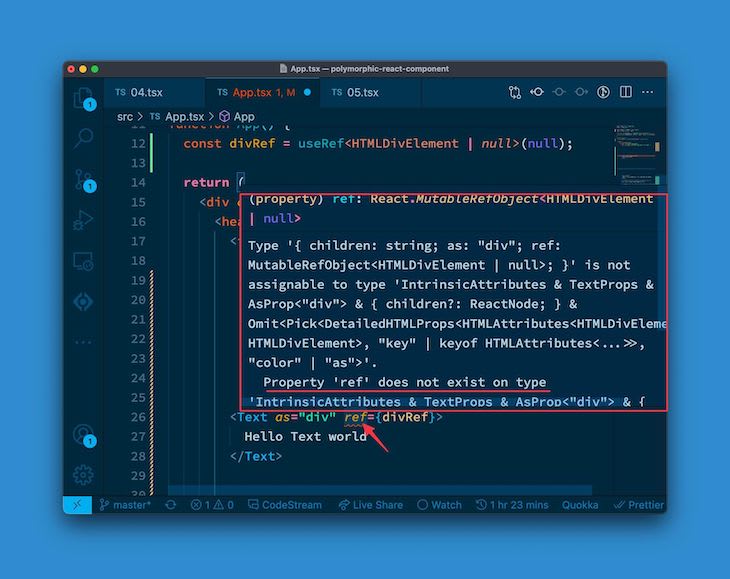 ](https://res.cloudinary.com/practicaldev/image/fetch/s--w6ShL9SP--/c_limit%2Cf_auto%2Cfl_progressive%2Cq_auto%2Cw_880/https:// blog.logrocket.com/wp-content/uploads/2022/05/property-ref-doesnt-exist-error.jpeg)
这是意料之中的。
我们第一次支持 refs 将是在Text组件中使用forwardRef,如下所示:
// before
export const Text = <C extends React.ElementType = "span">({
  as,
  color,
  children,
}: PolymorphicComponentProp<C, TextProps>) => {
  ...
};

// after
import React from "react";

export const Text = React.forwardRef(
  <C extends React.ElementType = "span">({
    as,
    color,
    children,
  }: PolymorphicComponentProp<C, TextProps>) => {
    ...
  }
);
进入全屏模式 退出全屏模式
这实际上只是将之前的代码包装在React.forwardRef中,仅此而已。
现在,React.forwardRef具有以下签名:
React.forwardRef((props, ref) ... )
进入全屏模式 退出全屏模式
本质上,接收到的第二个参数是ref对象。让我们继续处理这个问题:
type PolymorphicRef<C extends React.ElementType> = unknown;

export const Text = React.forwardRef(
  <C extends React.ElementType = "span">(
    { as, color, children }: PolymorphicComponentProp<C, TextProps>,
    // 👇 look here
    ref?: PolymorphicRef<C>
  ) => {
    ...
  }
);
进入全屏模式 退出全屏模式
我们在这里所做的是添加了第二个参数ref,并将其类型声明为PolymorphicRef,现在它只是指向unknown。
请注意,PolymorphicRef接受通用的C。这与之前的解决方案类似——div的ref对象与span的对象不同,因此我们需要考虑传递给as属性的元素类型。
请注意PolymorphicRef类型。我们如何根据as属性获取ref对象类型?
让我给你一个线索:React.ComponentPropsWithRef!
请注意,这表示_with_ ref。不是_没有_参考。
本质上,如果这是一组键(实际上就是这样),它将包括所有基于元素类型的相关组件道具,以及 ref 对象。[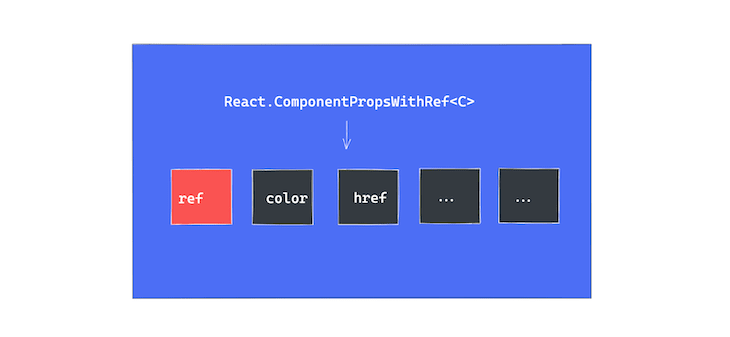 ](https://res.cloudinary.com/practicaldev/image/fetch/s--mp3yCLd1--/c_limit%2Cf_auto%2Cfl_progressive%2Cq_auto%2Cw_880/https://blog.logrocket .com/wp-content/uploads/2022/05/componentpropswithref-type.png)
所以现在,如果我们知道这个对象类型包含ref键,我们不妨通过执行以下操作来获取该引用类型:
// before
type PolymorphicRef<C extends React.ElementType> = unknown;

// after
type PolymorphicRef<C extends React.ElementType> =
  React.ComponentPropsWithRef<C>["ref"];
进入全屏模式 退出全屏模式
本质上,React.ComponentPropsWithRef<C>返回一个对象类型,例如,
{
  ref: SomeRefDefinition,
  // ... other keys,
  color: string
  href: string
  // ... etc
}
进入全屏模式 退出全屏模式
要只选择ref类型,我们可以这样做:
React.ComponentPropsWithRef<C>["ref"];
进入全屏模式 退出全屏模式
请注意,语法类似于 JavaScript 中的属性访问器语法,即["ref"]。现在我们已经输入了ref属性,我们可以继续将其传递给渲染的元素:
export const Text = React.forwardRef(
  <C extends React.ElementType = "span">(
    { as, color, children }: PolymorphicComponentProp<C, TextProps>,
    ref?: PolymorphicRef<C>
  ) => {
    //...

    return (
      <Component {...style} ref={ref}> // 👈 look here
        {children}
      </Component>
    );
  }
);
进入全屏模式 退出全屏模式
我们取得了不错的进展!事实上,如果你像我们之前那样继续检查Text的使用情况,就不会再出现错误了:
// create the ref object
const divRef = useRef<HTMLDivElement | null>(null);
...
// pass ref to the rendered Text component
<Text as="div" ref={divRef}>
  Hello Text world
</Text>
进入全屏模式 退出全屏模式
然而,我们的解决方案仍然没有我想要的那么强类型。让我们继续更改传递给Text的 ref,如下所示:
// create a "button" ref object
const buttonRef = useRef<HTMLButtonElement | null>(null);
...
// pass a button ref to a "div". NB: as = "div"
<Text as="div" ref={buttonRef}>
  Hello Text world
</Text>
进入全屏模式 退出全屏模式
TypeScript 应该在这里抛出错误,但它不会。我们正在创建一个button引用,但将其传递给div元素。那是不对的。[ ](https://res.cloudinary.com/practicaldev/image/fetch/s--ohnCSWU9--/c_limit%2Cf_auto%2Cfl_progressive%2Cq_auto%2Cw_880/ https://blog.logrocket.com/wp-content/uploads/2022/05/no-error-throw.png)
如果你看一下ref的确切类型,它看起来像这样:
React.RefAttributes<unknown>.ref?: React.Ref<unknown>
进入全屏模式 退出全屏模式
你看到里面的unknown了吗?这是弱类型的标志。理想情况下,我们应该在其中有HTMLDivElement以将 ref 对象明确定义为div元素 ref。
我们有工作要做。我们先看一下Text组件的其他 props 的类型,它仍然引用PolymorphicComponentProp类型。将其更改为名为PolymorphicComponentPropWithRef的新类型。这将只是PolymorphicComponentProp和 ref 属性的联合。 (你猜对了。)
这里是:
type PolymorphicComponentPropWithRef<
  C extends React.ElementType,
  Props = {}
> = PolymorphicComponentProp<C, Props> &
{ ref?: PolymorphicRef<C> };
进入全屏模式 退出全屏模式
这只是之前的PolymorphicComponentProp和{ ref?: PolymorphicRef<C> }的并集。
现在我们需要更改组件的 props 以引用新的PolymorphicComponentPropWithRef类型:
// before
type TextProps = { color?: Rainbow | "black" };

export const Text = React.forwardRef(
  <C extends React.ElementType = "span">(
    { as, color, children }: PolymorphicComponentProp<C, TextProps>,
    ref?: PolymorphicRef<C>
  ) => {
    ...
  }
);

// now
type TextProps<C extends React.ElementType> =
PolymorphicComponentPropWithRef<
  C,
  { color?: Rainbow | "black" }
>;

export const Text = React.forwardRef(
  <C extends React.ElementType = "span">(
    { as, color, children }: TextProps<C>, // 👈 look here
    ref?: PolymorphicRef<C>
  ) => {
    ...
  }
);
进入全屏模式 退出全屏模式
我们已将TextProps更新为引用PolymorphicComponentPropWithRef,现在它作为Text组件的道具传递。迷人的!
还有最后一件事要做:为Text组件提供类型注释。它看起来类似于:
export const Text : TextComponent = ...
进入全屏模式 退出全屏模式
TextComponent是我们要写的类型注解。这里完整地写出来:
type TextComponent = <C extends React.ElementType = "span">(
  props: TextProps<C>
) => React.ReactElement | null;
进入全屏模式 退出全屏模式
这本质上是一个函数组件,它接收TextProps并返回React.ReactElement | null,其中TextProps如前所述:
type TextProps<C extends React.ElementType> =
PolymorphicComponentPropWithRef<
  C,
  { color?: Rainbow | "black" }
>;
进入全屏模式 退出全屏模式
有了这个,我们现在有了一个完整的解决方案!
我现在要分享完整的解决方案。一开始可能会让人望而生畏,但请记住,我们已经逐行浏览了您在此处看到的所有内容。带着这种信心阅读它。
import React from "react";

type Rainbow =
  | "red"
  | "orange"
  | "yellow"
  | "green"
  | "blue"
  | "indigo"
  | "violet";

type AsProp<C extends React.ElementType> = {
  as?: C;
};

type PropsToOmit<C extends React.ElementType, P> = keyof (AsProp<C> & P);

// This is the first reusable type utility we built
type PolymorphicComponentProp<
  C extends React.ElementType,
  Props = {}
> = React.PropsWithChildren<Props & AsProp<C>> &
  Omit<React.ComponentPropsWithoutRef<C>, PropsToOmit<C, Props>>;

// This is a new type utitlity with ref!
type PolymorphicComponentPropWithRef<
  C extends React.ElementType,
  Props = {}
> = PolymorphicComponentProp<C, Props> & { ref?: PolymorphicRef<C> };

// This is the type for the "ref" only
type PolymorphicRef<C extends React.ElementType> =
  React.ComponentPropsWithRef<C>["ref"];

/**
* This is the updated component props using PolymorphicComponentPropWithRef
*/
type TextProps<C extends React.ElementType> =
PolymorphicComponentPropWithRef<
  C,
  { color?: Rainbow | "black" }
>;

/**
* This is the type used in the type annotation for the component
*/
type TextComponent = <C extends React.ElementType = "span">(
  props: TextProps<C>
) => React.ReactElement | null;

export const Text: TextComponent = React.forwardRef(
  <C extends React.ElementType = "span">(
    { as, color, children }: TextProps<C>,
    ref?: PolymorphicRef<C>
  ) => {
    const Component = as || "span";

    const style = color ? { style: { color } } : {};

    return (
      <Component {...style} ref={ref}>
        {children}
      </Component>
    );
  }
);
进入全屏模式 退出全屏模式
你去吧!
结论和下一步的想法
您已经成功构建了一个强大的解决方案,用于在 React 中使用 TypeScript 处理多态组件。我知道这并不容易,但你做到了。
感谢您的关注。记得在官方GitHub 存储库上加注星标,您可以在其中找到本指南的所有代码。如果您想与我分享您对本教程的想法,或者只是联系,您可以在GitHub、LinkedIn或Twitter上找到/关注我。
全面了解生产 React 应用程序
调试 React 应用程序可能很困难,尤其是当用户遇到难以重现的问题时。如果您对监视和跟踪 Redux 状态、自动显示 JavaScript 错误以及跟踪缓慢的网络请求和组件加载时间感兴趣,试试 LogRocket。
LogRocket就像一个用于 Web 和移动应用程序的 DVR,几乎可以记录您的 React 应用程序上发生的所有事情。无需猜测问题发生的原因,您可以汇总并报告问题发生时应用程序所处的状态。 LogRocket 还监控您的应用程序的性能,并使用客户端 CPU 负载、客户端内存使用情况等指标进行报告。
LogRocket Redux 中间件包为您的用户会话增加了一层额外的可见性。 LogRocket 记录来自 Redux 存储的所有操作和状态。

React社区为您提供最前沿的新闻资讯和知识内容
更多推荐
 0
0 0
0- 0



 已为社区贡献7744条内容

所有评论(0)