React 中的复合组件模式
在开发过程中,我们会遇到一些 React 中的设计模式。复合组件是 React 中最重要和最常用的设计模式之一。让我们使用 React 创建一个可扩展的 Accordion 组件。
复合组件是由两个或多个组件组成的组件,没有它的父组件就无法使用。
选择框就是一个例子。
[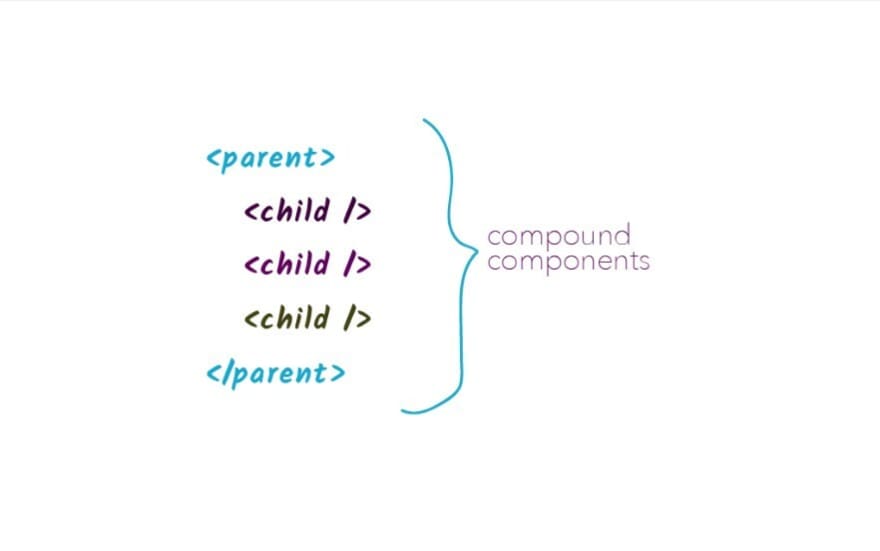 ](https://res.cloudinary.com/practicaldev/image/fetch/s--po_-JRkZ--/c_limit%2Cf_auto%2Cfl_progressive%2Cq_auto%2Cw_880/https://dev- to-uploads.s3.amazonaws.com/uploads/articles/52b7mw9w9czbk7zvy71x.jpg)
最初,我们设置了 Expandable 组件。这是随之而来的代码。
import React, {createContext} from React;
const ExpandableContext = createContext();
const {Provider} = ExpandableContext;

const Expandable = ({children}) => {
    return <Provider>{children}</Provider>
}

export default Expandable;
进入全屏模式 退出全屏模式
这里发生了以下事情
1.创建ExpdandableContext,
-
Provider 是从 ExpandableContext 解构出来的
-
最后,我们只是创建了一个可扩展组件并返回带有提供者的 JSX,该提供者显示传递给可扩展组件的子组件
现在我们必须为展开的手风琴引入状态,甚至为它创建一个切换功能。
const Expandable = ({children}) => {

    /**
     * State to update the expanded behaviour
     */
    const [expanded, setExpanded] = useState(false);

    /**
     * Method for toggling the expanded state
     */
    const toggle = setExpanded(prevExpanded => !prevExpanded);

    return <Provider>{children}</Provider>
}
进入全屏模式 退出全屏模式
现在切换回调函数将由可扩展标头调用,它不应该每次都更改或重新渲染。因此,我们可以按如下方式记忆回调。
在此之后,我们需要将这些-toggle 函数传递给provider。因此我们写下这一行:
const value = { expanded, toggle }
进入全屏模式 退出全屏模式
为了防止每次重新渲染值,我们使用 useMemo 来保存每次渲染时的对象。
const value = useMemo(()=> {expanded, toggle}, [expnded, toggle]);
进入全屏模式 退出全屏模式
为外部用户提供扩展后提供自定义功能的灵活性
有时,需要在手风琴展开后向用户提供自定义功能。在这种情况下,我们可以遵循以下模式。
对于类组件,我们可以使用回调来执行此操作,但是对于功能组件,我们需要使用 useEffect 执行此操作,并且仅在已安装功能组件时才运行此操作(每次都安装组件时不应运行)。
     * Check for mounting
     */
    const componentJustMounted = useRef(true);

    /**
     * Function to call when the expanded state is altered tp true,
     * that is when the expansion happens.
     */
    useEffect(()=> {
        if(!componentJustMounted.current){
            onExpand(expanded);
        }
        componentJustMounted.current = false
    }, [expanded])
进入全屏模式 退出全屏模式
我们正在使用 useRef,因为它将返回一个引用,该引用将在渲染周期中保留。最初它设置为真。只有在使用传递给它的扩展属性执行回调时,我们才会将其设为 false。
因此整个组件 Expandable.js 看起来像这样:
import React, {createContext, useState, useCallback, useRef, useEffect} from 'react';
const ExpandableContext = createContext();
const {Provider} = ExpandableContext;

const Expandable = ({children}) => {

    /**
     * State to update the expanded behaviour
     */
    const [expanded, setExpanded] = useState(false);

    /**
     * Check for mounting
     */
    const componentJustMounted = useRef(true);

    /**
     * Function to call when the expanded state is altered tp true,
     * that is when the expansion happens.
     */
    useEffect(()=> {

        if(!componentJustMounted.current){
            onExpand(expanded);
        }
        componentJustMounted.current = false
    }, [expanded, onExpand])

    /**
     * Method for toggling the expanded state
     */
    const toggle = useCallback(() =>
        setExpanded(prevExpanded => !prevExpanded), []
    );

    const value = useMemo(()=> {expanded, toggle}, [expanded, toggle])

    return <Provider value={value}>{children}</Provider>
}

export default Expandable;
进入全屏模式 退出全屏模式
构建子组件
body、header和icon这三个组成部分如下。
页眉.js
import React, { useContext } from 'react'
import { ExpandableContext } from './Expandable'

const Header = ({children}) => {
  const { toggle } = useContext(ExpandableContext)
  return <div onClick={toggle}>{children}</div>
}
export default Header;
进入全屏模式 退出全屏模式
在这里,我们只是尝试访问切换,单击时我们会在单击 div 时切换主体。这是手风琴的默认功能。
对于身体,
正文.js
import { useContext } from 'react'
import { ExpandableContext } from './Expandable'

const Body = ({ children }) => {
  const { expanded } = useContext(ExpandableContext)
  return expanded ? children : null
}
export default Body
进入全屏模式 退出全屏模式
在正文中,我们检查扩展属性是否为真。如果为真,我们将 body 设置为传递给它的 props.children,否则我们返回 null(因为 body 没有展开)。
对于图标,我们可以使用如下所示的 Icon.js:
图标.js
// Icon.js
import { useContext } from 'react'
import { ExpandableContext } from './Expandable'

const Icon = () => {
  const { expanded } = useContext(ExpandableContext)
  return expanded ? '-' : '+'
}
export default Icon
进入全屏模式 退出全屏模式
对于扩展的身体,我们显示 - 符号,对于收缩的身体,我们显示,+。
添加这些逻辑之后,让我们在每个元素中添加样式,最后组件看起来像这样。
可扩展的.js
import React, {
  createContext,
  useState,
  useCallback,
  useRef,
  useEffect,
  useMemo,
} from "react";
export const ExpandableContext = createContext();
const { Provider } = ExpandableContext;

const Expandable = ({ onExpand, children, className = "", ...otherProps }) => {
  const combinedClasses = ["Expandable", className].filter(Boolean).join("");

  /**
   * State to update the expanded behaviour
   */
  const [expanded, setExpanded] = useState(false);

  /**
   * Check for mounting
   */
  const componentJustMounted = useRef(true);

  /**
   * Method for toggling the expanded state
   */
  const toggle = useCallback(
    () => setExpanded((prevExpanded) => !prevExpanded),
    []
  );

  /**
   * Function to call when the expanded state is altered tp true,
   * that is when the expansion happens.
   */
  useEffect(() => {
    if (!componentJustMounted.current) {
      onExpand(expanded);
    }
    componentJustMounted.current = false;
  }, [expanded, onExpand]);

  const value = useMemo(() => ({ expanded, toggle }), [expanded, toggle]);

  return (
    <Provider value={value}>
      <div className={combinedClasses} {...otherProps}>{children}</div>
    </Provider>
  );
};
export default Expandable;
进入全屏模式 退出全屏模式
正文.js
// Body.js
import './Body.css'
import { useContext } from 'react'
import { ExpandableContext } from './Expandable'

const Body = ({ children , className='',... otherProps}) => {
  const { expanded } = useContext(ExpandableContext);
  const combinedClassName = ['Expandable-panel', className].filter(Boolean).join('');
  return expanded ?
  <div className ={combinedClassName} {...otherProps} >{children}</div> : null
}
export default Body
进入全屏模式 退出全屏模式
页眉.js
import React, { useContext } from 'react'
import { ExpandableContext } from './Expandable'
import './Header.css';
const Header = ({className='', children, ...otherProps}) => {

  const combinedClassName = ['Expandable-trigger',className].filter(Boolean).join('');

  const { toggle } = useContext(ExpandableContext)
  return <button className={combinedClassName} {...otherProps}
  onClick={toggle}>{children}</button>
}
export default Header;
进入全屏模式 退出全屏模式
图标.js
import { useContext } from 'react'
import { ExpandableContext } from './Expandable'

const Icon = ({ className='', ...otherProps}) => {
  const { expanded } = useContext(ExpandableContext);
  const combinedClassName = ['Expandable-icon', className].join('');
  return <span className={combinedClassName} {...otherProps}>{expanded ? '-' : '+'}</span>
}
export default Icon
进入全屏模式 退出全屏模式
您可以在查看它的行为 https://officialbidisha.github.io/exapandable-app/
github代码在https://github.com/officialbidisha/exapandable-app
这就是复合组件的工作方式。我们不能在没有 Header、Icon 和 Body 的情况下使用 Expandable 组件,反之亦然。我们现在已经成功地学习了一种设计模式。
快乐学习!

React社区为您提供最前沿的新闻资讯和知识内容
更多推荐
 0
0 0
0- 0



 已为社区贡献7744条内容

所有评论(0)