使用 Typescript、setInterval、axios 和 zustand 在 React 应用程序上实现静默刷新
简介
在这篇文章中,我将向你展示如何使用 Typescript、setInterval、axios 和 zustand 在 React 上实现静默刷新。
在写这篇文章的前一年,我参加了由年轻软件工程师协会(我隶属的一个学术组织)主办的内部研讨会,其中我们的一位校友认为我们从理论层面到实现都是后端开发。在最后一部分,他们简要讨论了使用 json Web 令牌进行身份验证以及如何使用访问和刷新令牌来保护您的应用程序。为了帮助我们更好地理解它,他们发送了一个链接到Hasura 的保护 JWT的指南。当我第一次阅读这篇文章时,我很困惑如何在 React 上实现静默刷新。
差不多一年后,我重新访问了这篇文章,因为我正在开发一个新项目,即桌面应用程序,我们必须对其进行静默刷新。经过几次尝试和错误,我终于得到了一个在后台实现静默刷新的运行原型。在本文中,我将与您分享我是如何做到的。
先决条件
再一次,我不会过多地讨论静默刷新的工作原理。如果您需要复习,可以阅读 Hasura 的指南。
要继续,您必须至少熟悉 ff。主题/技术
-
React & React Hooks
-
纱线(如果你使用 npm,只需安装它)
-
打字稿
-
axios(或任何 http-fetching 库)
-
异步/等待
-
状态
-
JSON Web 令牌
-
吉特
-
对 Node、Express 或后端开发有一定的了解
设置后端服务器
为了加快速度,我准备了一个后端服务器,你可以为这个迷你教程克隆它。您可以通过访问此链接或运行 ff. shell / 命令行中的命令
git clone https://github.com/dertrockx/example-auth-server.git
进入全屏模式 退出全屏模式
安全警告
在 Hasura 的指南中,建议后端将 refreshToken 附加到一个安全的 HTTP cookie,这样客户端就无法使用 Javascript 访问 refreshCookie。但是,为了简单起见,我没有这样做,而是让客户端随意存储 refreshToken,因此,这是一种不安全的存储 refreshToken 方式。如果您要这样做,请注意。
克隆存储库后,运行 ff.安装所有依赖项并启动服务器的命令
yarn # this is equivalent to 'npm install'
yarn dev # this is equivalent to 'npm run dev'
进入全屏模式 退出全屏模式
运行上述命令后,您的终端/命令行应如下所示:
[ ](https://res.cloudinary.com/practicaldev/image/fetch/s--BRapGNrc--/c_limit%2Cf_auto%2Cfl_progressive%2Cq_auto%2Cw_880/https://dev -to-uploads.s3.amazonaws.com/uploads/articles/5bix9et79uun1oapfm8d.png)
服务器提供了两个不同的端点,我们将在本迷你教程中使用它们。这些是:
-
POST /auth/login一个端点,它返回一个访问令牌、一个刷新令牌和一个令牌_expiry - 一个整数值,以毫秒为单位告诉您访问令牌还有多长时间到期 -
GET /auth/refresh一个端点,它返回一组新的令牌(访问和刷新)和令牌_expiry - 一个整数值,以毫秒为单位告诉您访问令牌过期的时间。这将检查标头中是否有带有标头名称Authorization和值Bearer ${token-goes-here}的刷新令牌
现在后端已经准备好了,让我们继续前端
创建前端应用程序
首先,我们需要创建一个使用 Typescript 的空白反应应用程序。为简单起见,我们将使用create-react-app和 Typescript 作为模板。为此,请运行 ff。命令
yarn create-react app --template typescript silent-refresh-app
# the command above is equivalent to running npx create-react-app --template typescript silent-refresh-app
进入全屏模式 退出全屏模式
初始化项目后,我们需要将cd到创建的目录。只需运行cd ./silent-refresh-app并安装我们将使用的其他依赖项
yarn add zustand axios # npm install zustand axios
进入全屏模式 退出全屏模式
-
Zusand 是一个状态管理库,主要鼓励开发人员使用钩子,并且比 Redux 需要更少的样板代码
-
Axios 是浏览器的 http 客户端 - 它是浏览器原生 Fetch API 的替代品
创建auth.service.ts
一旦我们安装了依赖项,我们现在可以向后端服务器发送请求。为此,我们需要创建一个带有自定义配置的 axios 新实例。只需在src/lib目录下创建一个名为axios.ts的新文件,使用 ff.内容:
import axios from "axios";

// Creates a new instance of axios
// Just export this instance and use it like a normal axios object
// but this time, the root endpoint is already set
// So, when you do axios.get("/personnel") under the hood it actually calls axios.get("http://<your-path-to-backend-uri>")
const instance = axios.create({
    baseURL: "<your-path-to-backend-uri>" // can be http://localhost:8000
});

export default instance;
进入全屏模式 退出全屏模式
这样做之后,我们需要将其导入到一个单独的文件中,该文件将调用我们的后端 api。我们需要在src/services/下创建一个名为auth.service.ts的文件,并添加 ff.内容
import http from "../lib/http";
import axios, { AxiosError } from "axios";

// This interface is used to give structure to the response object. This was directly taken from the backend
export interface IHttpException {
    success: boolean;
    statusCode: number;
    error: string;
    code: string;
    message: string;
    details?: any;
}

// A custom error that you can throw to signifiy that the frontend should log out
export class ActionLogout extends Error {}
// service function to login

/**
* An function that attempts to log in a user.
* Accepts a username and a password, and returns the tokens and the token expiration or throws an error
*/
export async function login({
    username,
    password,
}: {
    username: string;
    password: string;
}): Promise<
    | {
            auth: string;
            refresh: string;
            tokenExpiry: number;
      }
    | undefined
> {
    try {
        const credentials = {
            username: "admin",
            password: "password123",
        };
        // this is equal to http.post("http://<your-backend-uri>/auth/login", credentials);
        const res = await http.post("/auth/login", credentials);
        const {
            token: { auth, refresh },
            token_expiry,
        } = res.data;
        return { auth, refresh, tokenExpiry: token_expiry };
    } catch (err) {
        const error = err as Error | AxiosError;
        if (axios.isAxiosError(error)) {
            const data = error.response?.data as IHttpException;
            console.log(data.message);
            console.log(data.code);
            return;
        }
        console.error(error);
    }
}

/*
* An asynchronous function that refreshes the authenticated user's tokens.
* Returns a new set of tokens and its expiration time.
*/
export async function refreshTokens(token: string): Promise<
    | {
            auth: string;
            refresh: string;
            tokenExpiry: number;
      }
    | undefined
> {
    try {
        // This is equivalent to http.get("http://<path-to-uri>/auth/refresh", { ... })
        const res = await http.get("/auth/refresh", {
            headers: {
                Authorization: `Bearer ${token}`,
            },
        });
        const {
            token: { auth, refresh },
            token_expiry,
        } = res.data;

        return { auth, refresh, tokenExpiry: token_expiry };
    } catch (err) {
        const error = err as Error | AxiosError;
        if (axios.isAxiosError(error)) {
            const data = error.response?.data as IHttpException;
            console.log(data.message);
            console.log(data.code);
            if (data.code === "token/expired") {
                throw new ActionLogout();
            }
        }
        console.error(error);
        return;
    }
}
进入全屏模式 退出全屏模式
创建服务后,我们可以继续设置我们的商店
设立Zustand商店
Zusand 使用钩子,而不是 redux 的传统鸭子打字模式(是的,Redux 现在有个切片,但为了简单起见,我使用了 zustand,因为它是超级轻量级的,并且与 Redux 相比需要更少的样板代码来设置) .
要创建一个新的商店,只需在src/store/下创建一个名为auth.store.ts的文件并添加 ff.内容(别担心,我会解释他们的作用)
import create from "zustand";
import { devtools } from "zustand/middleware";

interface IAuthState {
    tokens: {
        auth: string;
        refresh: string;
    };
    count: number;
    tokenExpiry: number;
    authenticate: (
        tokens: {
            auth: string;
            refresh: string;
        },
        tokenExpiry: number
    ) => void;
    logout: () => void;
    increment: () => void;
}

export const useAuth = create<IAuthState>()(
    devtools((set, get) => ({
        count: 0,
        tokens: {
            auth: "",
            // We will store the refresh token in localStorage. Again, this is an unsecure option, feel free to look for alternatives.
            refresh: localStorage.getItem("refreshToken") || "",
        },
        tokenExpiry: 0,
        increment: () => set({ count: get().count + 1 }),
        logout: () => {
            localStorage.setItem("refreshToken", "");
            set(() => ({
                tokens: {
                    auth: "",
                    refresh: "",
                },
                tokenExpiry: 0,
            }));
        },
        authenticate: (tokens, tokenExpiry) => {
            localStorage.setItem("refreshToken", tokens.refresh);
            set(() => ({
                tokens,
                tokenExpiry,
            }));
        },
    }))
);
进入全屏模式 退出全屏模式
要导出创建的商店,请在src/store/下创建一个index.ts文件,该文件将从src/store/auth.ts导出所有内容。添加 ff.内容
// src/store/index.ts
export * from "./auth.ts"
进入全屏模式 退出全屏模式
我们为什么需要这个?这样当我们想要使用 auth 存储时,我们所要做的就是从文件夹中导入它,而不是文件本身
// sample code when you want to import `useAuth`
// Assuming you're in a file under the 'src' directory
import { useAuth } from "./store"
进入全屏模式 退出全屏模式
编辑 App.tsx
现在我们已经创建了服务和商店,然后我们编辑App.tx并在其中使用它们。
import React, { useCallback, useRef } from "react";
import "./App.css";
// start of 1
import { useAuth } from "./store";
import { login, refreshTokens, ActionLogout } from "./services/auth.service";
import { useEffectOnce } from "./hooks";
// end of 1
function App() {
    // start of 2
    const {
        tokens: { refresh, auth },
        tokenExpiry,

        logout,
        authenticate,
    } = useAuth((state) => state);
    const intervalRef = useRef<NodeJS.Timer>();
    // end of 2

    // start of 3
    useEffectOnce(() => {
        if (refresh) {
            // try to renew tokens
            refreshTokens(refresh)
                .then((result) => {
                    if (!result) return;
                    const { auth, refresh, tokenExpiry } = result;
                    authenticate({ auth, refresh }, tokenExpiry);
                    intervalRef.current = setInterval(() => {
                        console.log("called in useEffect()");
                        sendRefreshToken();
                    }, tokenExpiry);
                })
                .catch((err) => {
                    if (err instanceof ActionLogout) {
                        handleLogout();
                    }
                });
        }
    });
    // end of 3


    // start of 4
    const handleLogout = useCallback(() => {
        logout();
        clearInterval(intervalRef.current);
        // eslint-disable-next-line
    }, [intervalRef]);

    const handleLogin = useCallback(async () => {
        const res = await login({ username: "admin", password: "password123" });
        if (!res) {
            return;
        }
        const { refresh: newRefresh, tokenExpiry, auth } = res;
        authenticate({ auth, refresh: newRefresh }, tokenExpiry);

        intervalRef.current = setInterval(() => {
            sendRefreshToken();
        }, tokenExpiry);

        // eslint-disable-next-line
    }, [refresh]);

    const sendRefreshToken = async () => {
        const refresh = localStorage.getItem("refreshToken")!;

        try {
            const result = await refreshTokens(refresh);
            if (!result) {
                return;
            }
            const { auth, refresh: newRefresh, tokenExpiry } = result;
            authenticate({ auth, refresh: newRefresh }, tokenExpiry);
        } catch (error) {
            if (error instanceof ActionLogout) {
                handleLogout();
            }
        }
    };

    // end of 4
    // start of part 5
    return (
        <div className="App">
            <p>
                {auth ? (
                    <button onClick={() => handleLogout()}>Log out</button>
                ) : (
                    <button onClick={() => handleLogin()}>Login</button>
                )}
            </p>
            <p>
                Token expiry:{" "}
                {tokenExpiry !== 0 && new Date(Date.now() + tokenExpiry).toUTCString()}
            </p>
            <p>Auth token: {auth}</p>
            <p>Refresh token: {refresh}</p>
        </div>
    );
    // end of part 5
}

export default App;
进入全屏模式 退出全屏模式
我知道你在想什么,我只是将-pasta-d 复制到我的代码中是什么鬼? 别担心,我会逐步解释它们
第 1 部分:进口
首先,我们需要导入三样东西——服务提供者、商店和一个名为useEffectOnce的自定义钩子。这个自定义钩子是什么?
这个自定义钩子让你只运行一次 useEffect。从 React 18 开始,useEffect 在开发模式下运行两次(在此处插入链接)。为了防止这种情况发生,我将链接一篇基本上只运行 useEffect 一次的中型文章 - on mount。
由于这是一个自定义钩子,因此您需要创建它。创建一个名为src/hooks.ts的文件,带有 ff.内容
import { useRef, useState, useEffect } from "react";

export const useEffectOnce = (effect: () => void | (() => void)) => {
    const destroyFunc = useRef<void | (() => void)>();
    const effectCalled = useRef(false);
    const renderAfterCalled = useRef(false);
    const [, setVal] = useState<number>(0);

    if (effectCalled.current) {
        renderAfterCalled.current = true;
    }

    useEffect(() => {
        // only execute the effect first time around
        if (!effectCalled.current) {
            destroyFunc.current = effect();
            effectCalled.current = true;
        }

        // this forces one render after the effect is run
        setVal((val) => val + 1);

        return () => {
            // if the comp didn't render since the useEffect was called,
            // we know it's the dummy React cycle
            if (!renderAfterCalled.current) {
                return;
            }
            if (destroyFunc.current) {
                destroyFunc.current();
            }
        };
        // eslint-disable-next-line
    }, []);
};
进入全屏模式 退出全屏模式
为了节省时间,我将附上原始媒体文章的链接,以进一步解释这一点。
第 2 部分:获取状态和参考
在App.tx文件的一部分中,您可以看到我们提取了auth.ts内部的状态值和操作,因为我们需要每 X 秒更新令牌(其中 X 是任何整数 > 0,以毫秒为单位)并向后端发送请求,我们将访问用户setInterval并存储其 intervalId 而不会触发重新渲染。为此,我们必须使用useRef并传递一个类型 NodeJS.Timer 以让 Typescript 通过在我们编写代码时提供建议来发挥它的魔力。
const {
    tokens: { refresh, auth },
    tokenExpiry,
    logout,
    authenticate,
} = useAuth((state) => state);
// we pass NodeJS.Timer to useRef as its value's type

const intervalRef = useRef<NodeJS.Timer>();
进入全屏模式 退出全屏模式
第 3 部分:使用自定义挂钩useEffectOnce
启动 React 18,一个组件被安装,卸载,然后再次安装。这使得没有依赖关系的 useEffect 钩子运行两次——这就是为什么我们必须使用一个只会运行一次的自定义 useEffect 钩子(我忘记了我最初在哪里找到了自定义钩子——我会在评论部分留下一些东西或者我'一旦我找到它就会更新它)。
在useEffectOnce内部传递的函数就像传递给useEffect挂钩的任何普通函数一样。在初始页面加载时,我们想要获取一组新的令牌(访问和刷新)并每隔 X 秒(tokenExpiry)重新获取另一组令牌。在这里,我们从传入刷新令牌的auth.service.ts中调用函数refreshTokens()。它返回一个解析新的身份验证(或访问)令牌、刷新令牌和 tokenExpiry 的承诺。然后我们将更新商店,并开始静默刷新过程。
useEffectOnce(() => {
    if (refresh) {
        // try to renew tokens
        refreshTokens(refresh)
            .then((result) => {
                if (!result) return;
                const { auth, refresh, tokenExpiry } = result;
                // Update the store
                authenticate({ auth, refresh }, tokenExpiry);
                // start the silent refresh
                intervalRef.current = setInterval(() => {
                    sendRefreshToken();
                }, tokenExpiry);
            })
            .catch((err) => {
                // if the service fails and throws an ActionLogout, then the token has expired and in the frontend we should logout the user
                if (err instanceof ActionLogout) {
                    handleLogout();
                }
            });
    }
});
进入全屏模式 退出全屏模式
第 4 部分:处理登录、注销和 sendRefreshToken 的方法
现在我们已经设置了初始加载时的后台刷新,然后我将解释当用户单击按钮登录/注销和发送刷新令牌时调用的函数。
但首先,我知道你在想什么 - 但是 Ian,你为什么要使用 useCallback,它到底是什么? -useCallback是 React 提供的一个开箱即用的钩子,它接受两个参数 - 一个函数和一个依赖项列表。传递的函数会被缓存,并且仅在依赖关系发生变化时才会重新构建。
为什么会存在这种情况?因为当一个组件重新渲染时,它内部的功能也会被重建并且它会影响你的应用程序的性能(你可以进一步谷歌它)。对于小型应用程序来说,这不是什么大问题,但对于大型应用程序来说,这非常关键。因此,开发人员需要找到一种方法来缓存函数并仅在必要时重建它们——因此创建了useCallback。
const handleLogout = useCallback(() => {
    logout();
    clearInterval(intervalRef.current);
    // eslint-disable-next-line
}, [intervalRef]);

const handleLogin = useCallback(async () => {
    const res = await login({ username: "admin", password: "password123" });
    if (!res) {
        return;
    }
    const { refresh: newRefresh, tokenExpiry, auth } = res;
    authenticate({ auth, refresh: newRefresh }, tokenExpiry);

    intervalRef.current = setInterval(() => {
        sendRefreshToken();
    }, tokenExpiry);

    // eslint-disable-next-line
}, [refresh]);

const sendRefreshToken = async () => {
    const refresh = localStorage.getItem("refreshToken")!;

    try {
        const result = await refreshTokens(refresh);
        if (!result) {
            return;
        }
        const { auth, refresh: newRefresh, tokenExpiry } = result;
        authenticate({ auth, refresh: newRefresh }, tokenExpiry);
    } catch (error) {
        if (error instanceof ActionLogout) {
            handleLogout();
        }
    }
};
进入全屏模式 退出全屏模式
第一个函数handleLogout()是一个记忆函数,它从useAuth()钩子(清除存储)运行logout()并清理由intervalRef.标识的在后台运行的函数(静默刷新部分)
第二个函数handleLogin()是一个记忆函数,在用户按下Login按钮时运行。在内部,它调用login(),然后尝试将用户凭据发送到后端服务器。如果成功,则返回一组新的令牌(auth 和 refresh)和一个 tokenExpiry。然后,我们使用此 tokenExpiry 向后端服务器发送请求以刷新(看看我在那里做了什么?)令牌并再次刷新它 - 创建静默刷新功能。
最后一个函数sendRefreshToken()是由刷新令牌的handleLogin()函数调用的函数。正如您在此处看到的,我们通过直接从 localStorage 而不是通过 store 访问刷新令牌来访问它。为什么? TBH 我不太确定为什么 - 不知何故,当 Zusand 存储状态在setInterval中被引用时,它不会持续存在。
第 5 部分:渲染 UI
在定义了所有的功能和逻辑之后,我们然后根据商店的状态渲染使用登录/注销功能的 JSX 内容
return (
    <div className="App">
        <p>
            {auth ? (
                <button onClick={() => handleLogout()}>Log out</button>
            ) : (
                <button onClick={() => handleLogin()}>Login</button>
            )}
        </p>
        <p>
            Token expiry:{" "}
            {tokenExpiry !== 0 && new Date(Date.now() + tokenExpiry).toUTCString()}
        </p>
        <p>Auth token: {auth}</p>
        <p>Refresh token: {refresh}</p>
    </div>
);
进入全屏模式 退出全屏模式
完成所有操作后,保存它,然后通过运行 ff.d 运行开发服务器。命令到你的外壳/命令行
完成所有操作后,保存它,然后通过运行 ff.d 运行开发服务器。命令到你的外壳/命令行
yarn start # this is equivalent to npm start
进入全屏模式 退出全屏模式
如果它运行,它应该会自动在http://localhost:3000打开你的浏览器。如果没有,您可以自己打开它。你应该看到这样的东西。
[ ](https://res.cloudinary.com/practicaldev/image/fetch/s--rv_Yb28o--/c_limit%2Cf_auto%2Cfl_progressive%2Cq_66%2Cw_880/https://dev-to- uploads.s3.amazonaws.com/uploads/articles/qwn1yqyrdlxyncn26dgu.gif)
默认情况下,我将身份验证令牌的过期时间设置为 5 秒,将刷新令牌的过期时间设置为 10 秒。如您所见,令牌每 5 秒刷新一次。此外,如果您尝试刷新页面,令牌仍会每 5 秒刷新一次,因为它在初始页面加载时运行静默刷新。
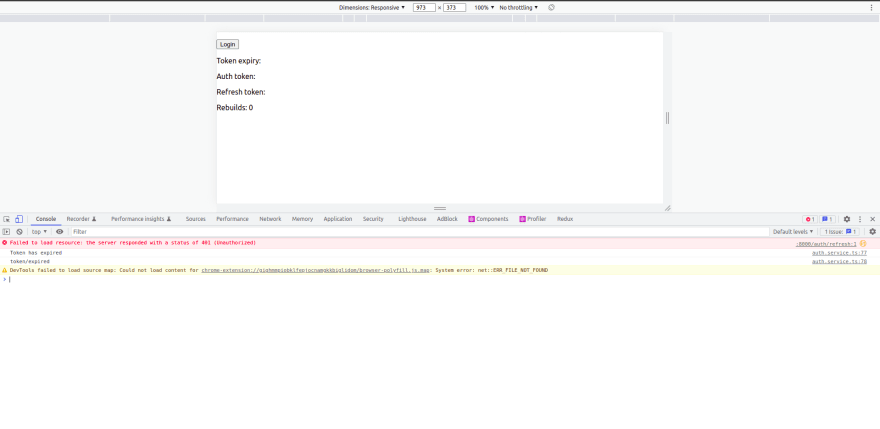
要测试刷新令牌是否真的过期,您可以关闭选项卡,等待 10 秒以上,然后重新访问同一个站点。它不应在后台运行静默刷新,而是自动注销,因为刷新令牌已过期。此外,您应该会看到类似这样的内容_(注意:您必须打开开发工具才能看到错误)_
[ ](https://res.cloudinary.com/practicaldev/image/fetch/s--lrYZUIHJ--/c_limit%2Cf_auto%2Cfl_progressive%2Cq_auto%2Cw_880/https://dev-to -uploads.s3.amazonaws.com/uploads/articles/jgw31afq2uhe4yzt311o.png)
要重新运行静默刷新,只需单击login.
结论
实现静默刷新很棘手 - 您必须使用 setInterval 定期运行函数,并且必须确保如果不使用此函数则清除。
静默刷新是一个不错的安全功能,但本文只是冰山一角——为了进一步阅读,我强烈推荐阅读hasura 的官方指南。
这是前端存储库的副本 →https://github.com/dertrockx/react-silent-refresh/
这是后端 →https://github.com/dertrockx/example-auth-server

React社区为您提供最前沿的新闻资讯和知识内容
更多推荐
 0
0 0
0- 0



 已为社区贡献7744条内容

所有评论(0)