在 React 中构建多人井字游戏
井字游戏是典型的童年游戏。它所需要的只是一些可以写的东西和一些可以写的东西。但是如果你想和在另一个地方的人一起玩呢?在这种情况下,您需要使用将您和其他玩家连接到游戏的应用程序。
该应用程序需要提供实时体验,因此您所做的每一个动作都会被其他玩家立即看到,反之亦然。如果应用程序不提供这种体验,那么您和许多人可能不会再使用它了。
那么开发者如何提供连接体验让玩家可以玩井字游戏或任何游戏,无论他们身在何处?
实时多人游戏概念
有几种方法可以为多人游戏提供实时基础设施。您可以使用Socket.IO、SignalR或WebSockets等技术和开源协议从头开始构建自己的基础设施。
虽然这似乎是一条吸引人的途径,但您会遇到几个问题;一个这样的问题是可扩展性。处理 100 个用户并不难,但如何处理 100,000+ 个用户?除了基础设施问题,您还必须担心维护游戏。
归根结底,唯一重要的是为游戏玩家提供出色的体验。但是你如何解决基础设施问题?这就是 PubNub 的用武之地。
PubNub 提供实时基础架构,通过其全球数据流网络为任何应用程序提供动力。 PubNub 拥有超过个 70 多个 SDK、个(包括最流行的编程语言),可在不到 100 毫秒内简化向任何设备发送和接收消息。它安全、可扩展且可靠,因此您不必担心创建和维护自己的基础架构。
为了展示使用 PubNub 开发多人游戏是多么容易,我们将使用PubNub React SDK构建一个简单的 React 井字游戏。在这个游戏中,两名玩家将连接到一个独特的游戏频道,他们将在其中对战。玩家的一举一动都会发布到频道,以实时更新其他玩家的棋盘。
您可以在GitHub 存储库中查看完整的项目。
应用概览
这是我们完成后应用程序的外观。点击这里试用我们的现场版游戏。
[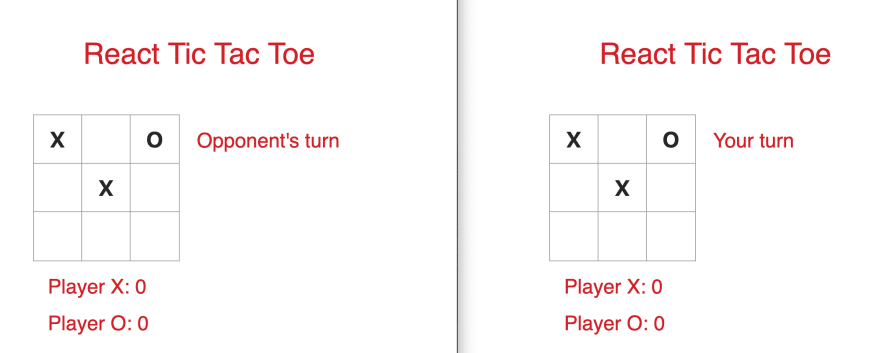 的屏幕截图](https://res.cloudinary.com/practicaldev/image/fetch/s--zFxEOkHs--/c_limit%2Cf_auto%2Cfl_progressive%2Cq_auto%2Cw_880/https ://www.pubnub.com/wp-content/uploads/2019/07/React-tic-tac-toe-overview.png)
玩家首先加入大厅,在那里他们可以创建频道或加入频道。如果玩家创建了一个频道,他们将获得一个 room id 以与其他玩家共享。创建频道的玩家将成为_Player X_,并将在游戏开始时迈出第一步。
[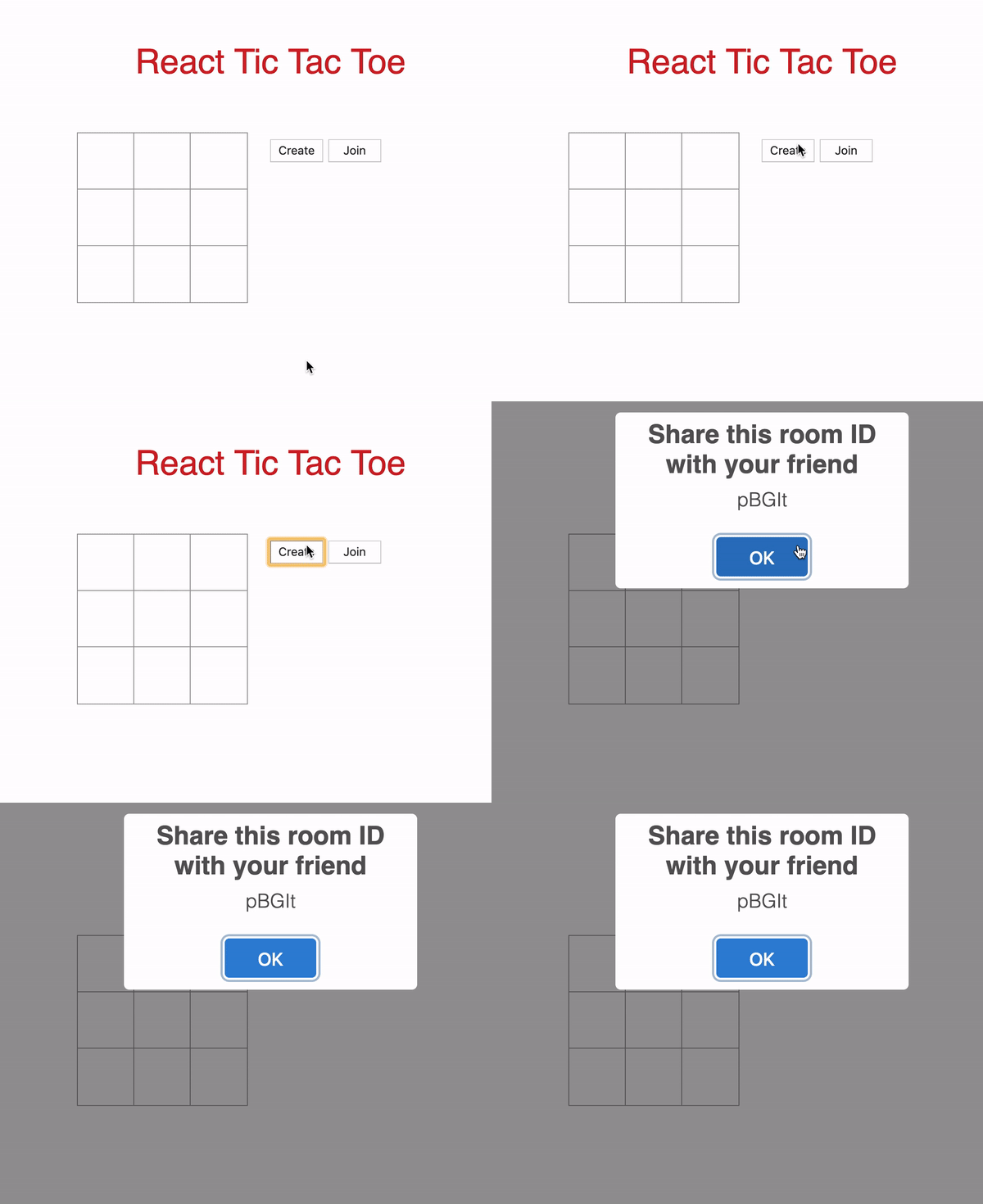 ](https://res.cloudinary.com/practicaldev/image/fetch/s--pBHPkya6--/c_limit%2Cf_auto%2Cfl_progressive%2Cq_66%2Cw_880/https://www. pubnub.com/wp-content/uploads/2019/07/create-room.gif)
使用他们所获得的_room id_加入频道的玩家将成为_Player O_。只有当频道中有其他人时,玩家才能加入频道。如果超过一个人,则该频道正在进行游戏,玩家将无法加入。一旦频道中有两名玩家,游戏就开始了。
[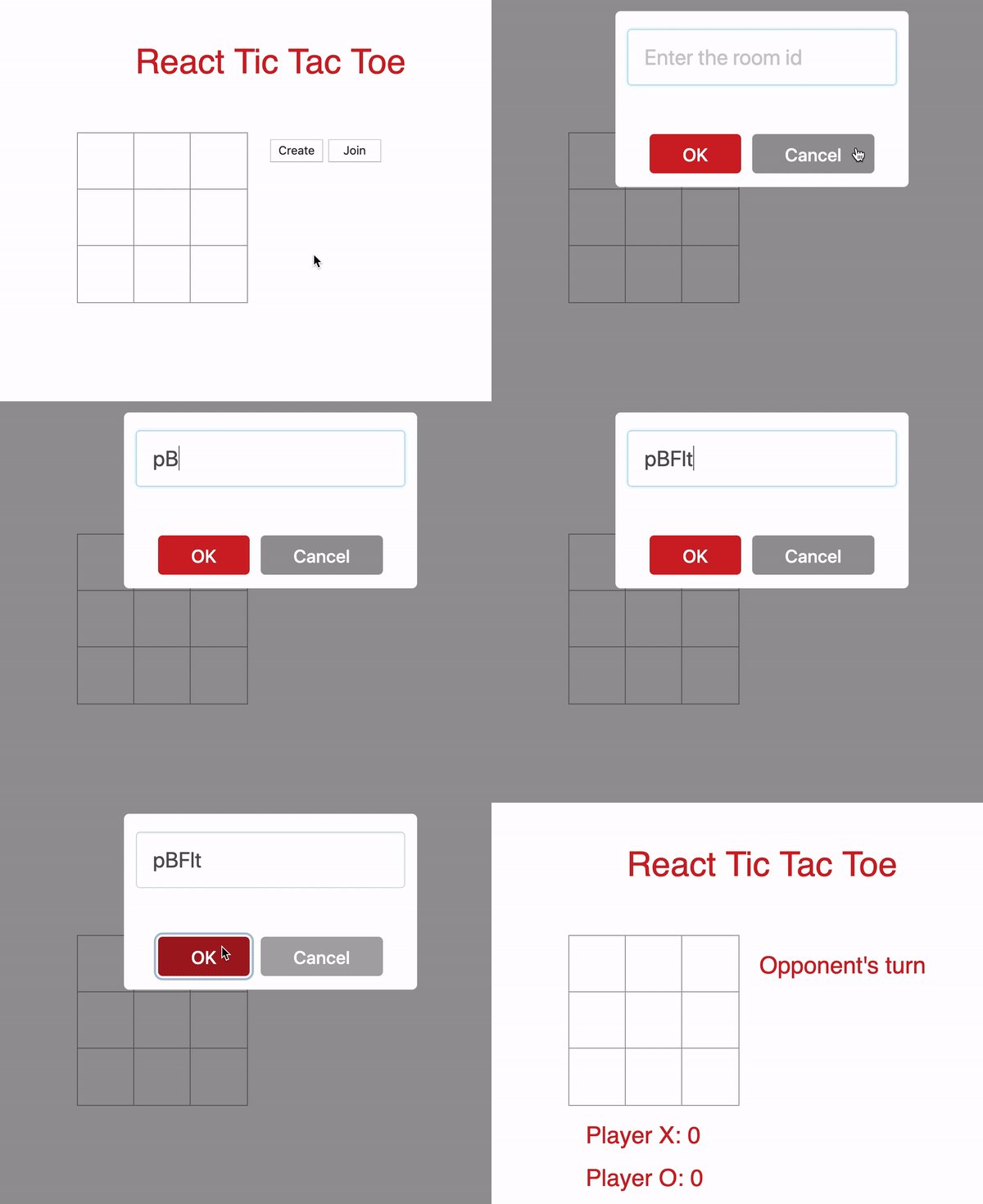 ](https://res.cloudinary.com/practicaldev/image/fetch/s--X9IiMtj1--/c_limit%2Cf_auto%2Cfl_progressive%2Cq_66%2Cw_880/https://www. pubnub.com/wp-content/uploads/2019/07/join-channel.gif)
比赛结束时,获胜者的得分增加一分。如果比赛以平局结束,则两名球员都没有得分。向 Player X 显示一个模式,要求他们开始新一轮或结束游戏。如果 Player X 继续游戏,则棋盘重置为新一轮。否则,游戏结束,两名玩家返回大厅。
[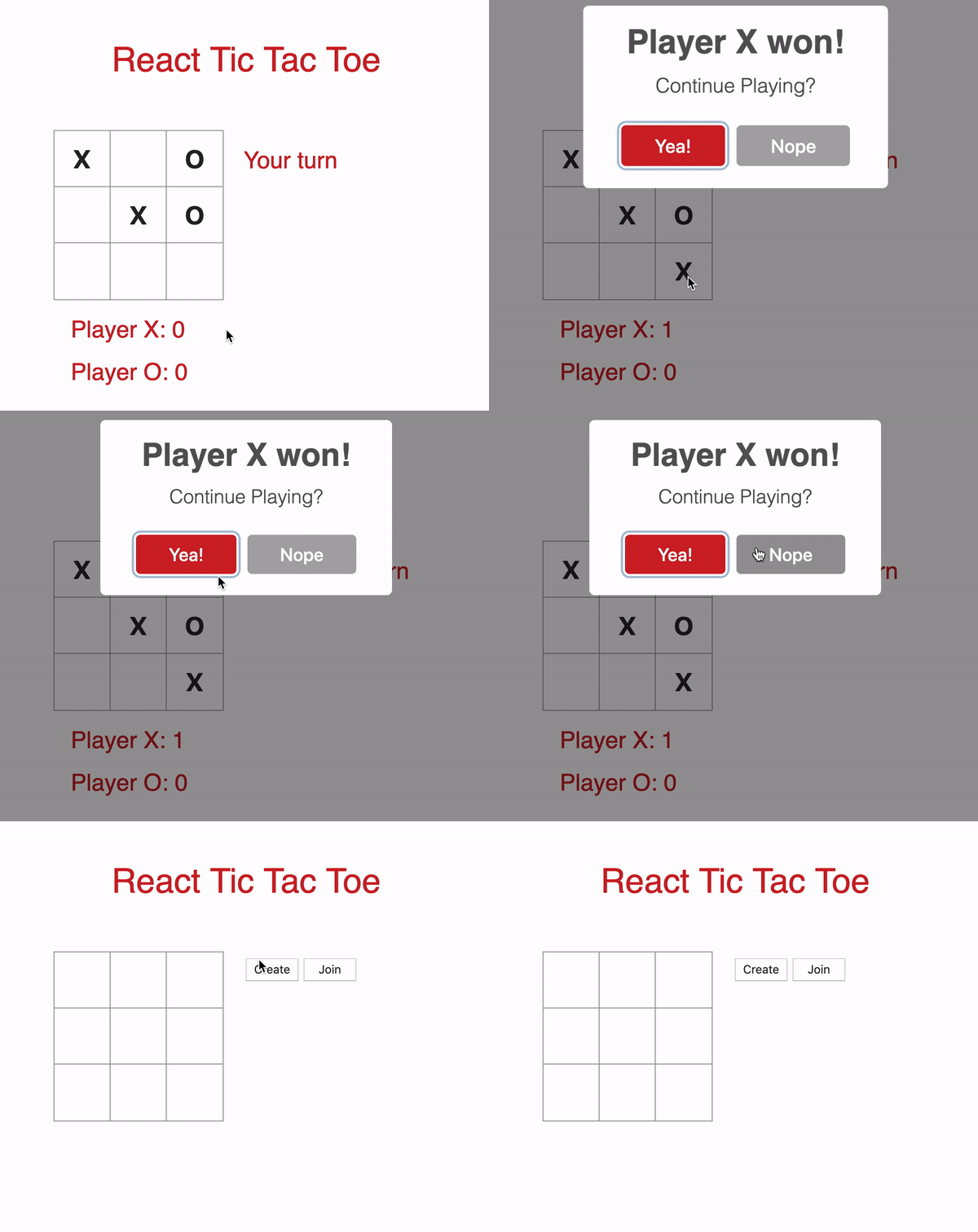 ](https://res.cloudinary.com/practicaldev/image/fetch/s--l31wbGVd--/c_limit%2Cf_auto%2Cfl_progressive%2Cq_66%2Cw_880/https://www.pubnub .com/wp-content/uploads/2019/07/exit-to-lobby-1.gif)
设置大厅
在我们设置大厅之前,先注册一个免费的 PubNub 帐户。您可以在PubNub Admin Dashboard中获取您唯一的发布/订阅密钥
获得密钥后,将它们插入 App.js 的构造函数中。
// App.js
import React, { Component } from 'react';
import Game from './Game';
import Board from './Board';
import PubNubReact from 'pubnub-react';
import Swal from "sweetalert2";
import shortid  from 'shortid';
import './Game.css';

class App extends Component {
  constructor(props) {
    super(props);
    // REPLACE with your keys
    this.pubnub = new PubNubReact({
      publishKey: "YOUR_PUBLISH_KEY_HERE",
      subscribeKey: "YOUR_SUBSCRIBE_KEY_HERE"
    });

    this.state = {
      piece: '', // X or O
      isPlaying: false, // Set to true when 2 players are in a channel
      isRoomCreator: false,
      isDisabled: false,
      myTurn: false,
    };

    this.lobbyChannel = null; // Lobby channel
    this.gameChannel = null; // Game channel
    this.roomId = null; // Unique id when player creates a room
    this.pubnub.init(this); // Initialize PubNub
  }

  render() {
    return ();
    }
  }

  export default App;
进入全屏模式 退出全屏模式
同样在构造函数中,状态对象和变量被初始化。当它们出现在整个文件中时,我们将检查对象和变量。最后,我们在构造函数的末尾初始化了 PubNub。
在 render 方法和 return 语句内部,我们为 Lobby 组件添加标记。
return (
    <div>
      <div className="title">
        <p> React Tic Tac Toe </p>
      </div>

      {
        !this.state.isPlaying &&
        <div className="game">
          <div className="board">
            <Board
                squares={0}
                onClick={index => null}
              />

            <div className="button-container">
              <button
                className="create-button "
                disabled={this.state.isDisabled}
                onClick={(e) => this.onPressCreate()}
                > Create
              </button>
              <button
                className="join-button"
                onClick={(e) => this.onPressJoin()}
                > Join
              </button>
            </div>

          </div>
        </div>
      }

      {
        this.state.isPlaying &&
        <Game
          pubnub={this.pubnub}
          gameChannel={this.gameChannel}
          piece={this.state.piece}
          isRoomCreator={this.state.isRoomCreator}
          myTurn={this.state.myTurn}
          xUsername={this.state.xUsername}
          oUsername={this.state.oUsername}
          endGame={this.endGame}
        />
      }
    </div>
);
进入全屏模式 退出全屏模式
Lobby 组件包含一个标题、一个空的井字棋盘(如果玩家按下方块则不会发生任何事情)以及“Create”和“Join”按钮。仅当状态值 isPlaying 为 false 时才显示此组件。如果设置为 true,则游戏已经开始,组件将更改为 Game 组件,我们将在教程的第二部分中介绍。
Board 组件也是 Lobby 组件的一部分。在Board组件中是Square组件。我们不会详细介绍这两个组件,以便专注于 Lobby 和 Game 组件。
当播放器按下“创建”按钮时,该按钮被禁用,因此播放器无法创建多个通道。 “加入”按钮不会被禁用,以防玩家决定加入频道。一旦按下“创建”按钮,就会调用方法 onPressCreate()。
创建频道
我们在 onPressCreate() 中做的第一件事是生成一个随机字符串 id,它被截断为 5 个字符。我们通过使用shortid()来做到这一点。我们将字符串附加到“tictactoelobby--”,这将是玩家订阅的唯一大厅频道。
// Create a room channel
onPressCreate = (e) => {
  // Create a random name for the channel
  this.roomId = shortid.generate().substring(0,5);
  this.lobbyChannel = 'tictactoelobby--' + this.roomId; // Lobby channel name

  this.pubnub.subscribe({
    channels: [this.lobbyChannel],
    withPresence: true // Checks the number of people in the channel
  });
}
进入全屏模式 退出全屏模式
为了防止两个以上的玩家加入给定的频道,我们使用PubNub Presence。稍后,我们将查看检查通道占用的逻辑。
玩家订阅大厅频道后,将显示带有房间 ID 的模式,以便其他玩家可以加入该频道。
[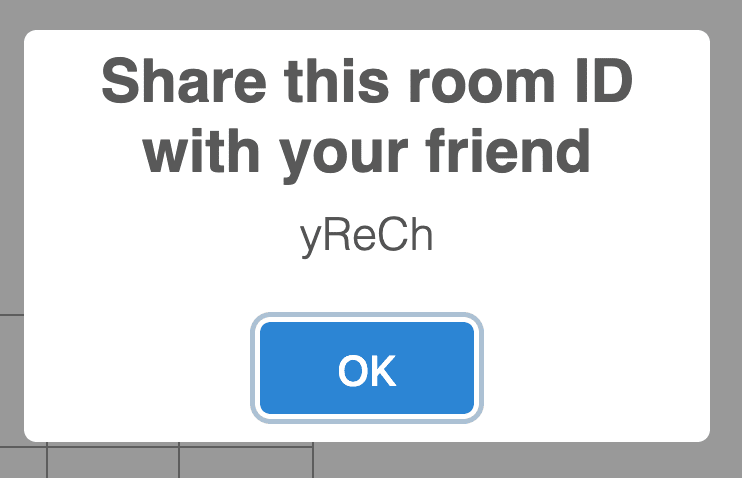 ](https://res.cloudinary.com/practicaldev/image/fetch/s--iL8bgFc_--/c_limit%2Cf_auto%2Cfl_progressive%2Cq_auto%2Cw_880/https://www. pubnub.com/wp-content/uploads/2019/07/share-roomid-1.png)
此模态以及此应用程序中使用的所有模态均由SweetAlert2创建,以替换 JavaScript 的默认 alert() 弹出框。
// Inside of onPressCreate()
// Modal
Swal.fire({
  position: 'top',
  allowOutsideClick: false,
  title: 'Share this room ID with your friend',
  text: this.roomId,
  width: 275,
  padding: '0.7em',
  // Custom CSS to change the size of the modal
  customClass: {
      heightAuto: false,
      title: 'title-class',
      popup: 'popup-class',
      confirmButton: 'button-class'
  }
})
进入全屏模式 退出全屏模式
在 onPressCreate() 结束时,我们更改状态值以反映应用程序的新状态。
this.setState({
  piece: 'X',
  isRoomCreator: true,
  isDisabled: true, // Disable the 'Create' button
  myTurn: true, // Player X makes the 1st move
});
进入全屏模式 退出全屏模式
一旦玩家创建了一个房间,他们必须等待另一个玩家加入该房间。让我们看看加入房间的逻辑。
加入频道
当玩家按下“加入”按钮时,会调用 onPressJoin()。向玩家显示一个模式,要求他们在输入字段中输入 room id。
[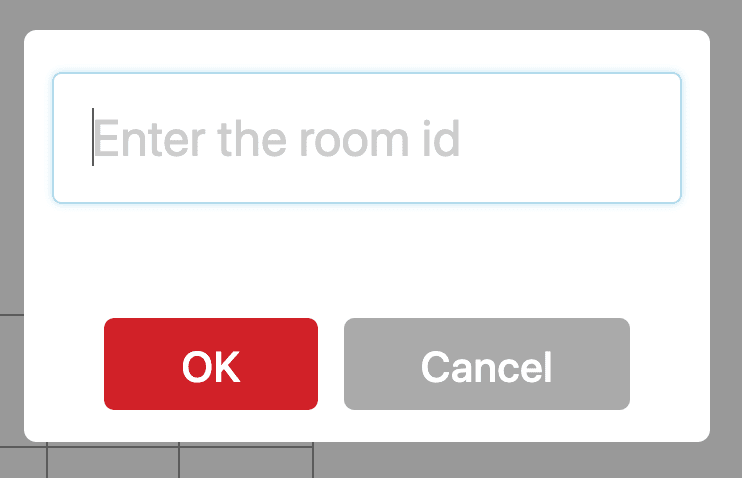 ](https://res.cloudinary.com/practicaldev/image/fetch/s--erSc88U7--/c_limit%2Cf_auto%2Cfl_progressive%2Cq_auto%2Cw_880/https://www. pubnub.com/wp-content/uploads/2019/07/enter-roomid.png)
如果玩家输入 room id 并按下“确定”按钮,则会调用 joinRoom(value),其中 value 是 room id。如果输入字段为空或玩家按下“取消”按钮,则不会调用此方法。
// The 'Join' button was pressed
onPressJoin = (e) => {
  Swal.fire({
    position: 'top',
    input: 'text',
    allowOutsideClick: false,
    inputPlaceholder: 'Enter the room id',
    showCancelButton: true,
    confirmButtonColor: 'rgb(208,33,41)',
    confirmButtonText: 'OK',
    width: 275,
    padding: '0.7em',
    customClass: {
      heightAuto: false,
      popup: 'popup-class',
      confirmButton: 'join-button-class',
      cancelButton: 'join-button-class'
    }
  }).then((result) => {
    // Check if the user typed a value in the input field
    if(result.value){
      this.joinRoom(result.value);
    }
  })
}
进入全屏模式 退出全屏模式
我们在 joinRoom() 中做的第一件事是将 value 附加到 'tictactoelobby--',类似于我们在 onPressCreate() 中所做的。
// Join a room channel
joinRoom = (value) => {
  this.roomId = value;
  this.lobbyChannel = 'tictactoelobby--' + this.roomId;
}
进入全屏模式 退出全屏模式
在玩家订阅大厅频道之前,我们必须使用hereNow()检查频道的总占用率。如果总入住人数小于2,则玩家可以成功订阅大厅频道。
// Check the number of people in the channel
this.pubnub.hereNow({
  channels: [this.lobbyChannel],
}).then((response) => {
    if(response.totalOccupancy < 2){
      this.pubnub.subscribe({
        channels: [this.lobbyChannel],
        withPresence: true
      });

      this.setState({
        piece: 'O', // Player O
      });

      this.pubnub.publish({
        message: {
          notRoomCreator: true,
        },
        channel: this.lobbyChannel
      });
    }
}).catch((error) => {
  console.log(error);
});
进入全屏模式 退出全屏模式
玩家订阅大厅频道后,piece 的状态值更改为“O”,并向该大厅频道发布消息。此消息通知 Player X 另一个玩家已加入频道。我们在 componentDidUpdate() 中设置了消息侦听器,稍后我们将进行介绍。
如果总占用率大于 2,则游戏正在进行中,尝试加入频道的玩家将被拒绝访问。以下代码位于 hereNow() 中的 if 语句下方。
// Below the if statement in hereNow()
else{
  // Game in progress
  Swal.fire({
    position: 'top',
    allowOutsideClick: false,
    title: 'Error',
    text: 'Game in progress. Try another room.',
    width: 275,
    padding: '0.7em',
    customClass: {
        heightAuto: false,
        title: 'title-class',
        popup: 'popup-class',
        confirmButton: 'button-class'
    }
  })
}
进入全屏模式 退出全屏模式
现在让我们看看 componentDidUpdate()。
开始游戏
在 componentDidUpdate() 中,我们检查播放器是否连接到频道,即检查 this.lobbyChannel 是否为 null。如果它不是 null,我们会设置一个侦听器来侦听到达通道上的所有消息。
componentDidUpdate() {
  // Check that the player is connected to a channel
  if(this.lobbyChannel != null){
    this.pubnub.getMessage(this.lobbyChannel, (msg) => {
      // Start the game once an opponent joins the channel
      if(msg.message.notRoomCreator){
        // Create a different channel for the game
        this.gameChannel = 'tictactoegame--' + this.roomId;

        this.pubnub.subscribe({
          channels: [this.gameChannel]
        });
      }
    });
  }
}
进入全屏模式 退出全屏模式
我们检查到达的消息是否为_msg.message.notRoomCreator_,由加入频道的玩家发布。如果是这样,我们将创建一个新频道“tictactoegame--”,并将 room id 附加到字符串中。游戏频道用于发布玩家所做的所有动作,这些动作将更新他们的棋盘。
最后,订阅游戏频道后,_isPlaying_的状态值设置为true。这样做会将大厅组件替换为游戏组件。
this.setState({
   isPlaying: true
 });

 // Close the modals if they are opened
 Swal.close();
}
进入全屏模式 退出全屏模式
显示游戏组件后,我们希望通过执行 Swal.close() 从 Lobby 组件关闭所有模式(如果已打开)。
现在我们有两个玩家连接到一个独特的游戏频道,他们可以开始玩井字游戏了!在下一节中,我们将实现游戏组件的 UI 和逻辑。
构建游戏功能
我们在 Game.js 中做的第一件事是设置 base 构造函数:
// Game.js
import React from 'react';
import Board from './Board';
import Swal from "sweetalert2";

class Game extends React.Component {
  constructor(props) {
    super(props);
    this.state = {
      squares: Array(9).fill(''), // 3x3 board
      xScore: 0,
      oScore: 0,
      whosTurn: this.props.myTurn // Player X goes first
    };

    this.turn = 'X';
    this.gameOver = false;
    this.counter = 0; // Game ends in a tie when counter is 9
  }

  render() {
    return ();
  }
 }
export default Game;
进入全屏模式 退出全屏模式
对于状态对象,我们初始化数组_squares_属性,用于存储玩家在棋盘中的位置。这将在下面进一步解释。我们还将玩家得分设置为 0,并将 whosTurn 的值设置为 myTurn,Player X 初始化为 true,Player O 初始化为 false。
变量 turn 和 counter 的值将在整个游戏进程中发生变化。游戏结束时,gameOver 设置为 true。
添加用户界面
接下来,让我们在 render 方法中为 Game 组件设置标记。
render() {
  let status;
  // Change to current player's turn
  status = `${this.state.whosTurn ? "Your turn" : "Opponent's turn"}`;

  return (
    <div className="game">
      <div className="board">
        <Board
            squares={this.state.squares}
            onClick={index => this.onMakeMove(index)}
          />
          <p className="status-info">{status}</p>
      </div>

      <div className="scores-container">
        <div>
          <p>Player X: {this.state.xScore} </p>
        </div>

        <div>
          <p>Player O: {this.state.oScore} </p>
        </div>
      </div>
    </div>
  );
}
进入全屏模式 退出全屏模式
我们在 UI 中显示 status 的值,让玩家知道是轮到他们行动还是轮到其他玩家。状态_whosTurn_ 的布尔值在每次移动时更新。 UI 的其余部分由 Board 组件和玩家的分数组成。
添加逻辑
当玩家在棋盘上移动时,会调用onMakeMove(****index),其中index 是棋子在棋盘上的位置。棋盘有 3 行 3 列,所以总共有 9 个方格。每个方格都有自己唯一的 index 值,从值 0 开始,以值 8 结束。
onMakeMove = (index) =>{
  const squares = this.state.squares;

  // Check if the square is empty and if it's the player's turn to make a move
  if(!squares[index] && (this.turn === this.props.piece)){
    squares[index] = this.props.piece;

    this.setState({
      squares: squares,
      whosTurn: !this.state.whosTurn
    });

    // Other player's turn to make a move
    this.turn = (this.turn === 'X') ? 'O' : 'X';

    // Publish move to the channel
    this.props.pubnub.publish({
      message: {
        index: index,
        piece: this.props.piece,
        turn: this.turn
      },
      channel: this.props.gameChannel
    });

    // Check if there is a winner
    this.checkForWinner(squares)
  }
}
进入全屏模式 退出全屏模式
获取数组_squares_的状态后,使用条件语句检查玩家触摸的方格是否为空,以及是否轮到他们移动。如果一个或两个条件都没有满足,则玩家的棋子不会放在方格上。否则,玩家的棋子将被添加到放置棋子的索引中的数组 squares 中。
例如,如果 Player X 在第 0 行第 2 列移动并且条件语句为真,则 squares[2] 的值将是“X”。
[ 为例](https://res.cloudinary.com/practicaldev/image/fetch/s--FshB5oAm--/c_limit%2Cf_auto%2Cfl_progressive%2Cq_auto%2Cw_880/https://www .pubnub.com/wp-content/uploads/2019/07/squares-example.png)
接下来,更改状态以反映游戏的新状态,并更新_turn_,以便其他玩家可以移动。为了让其他玩家的棋盘更新当前数据,我们将数据发布到游戏频道。所有这些都是实时发生的,因此一旦做出有效的动作,两名玩家都会立即看到他们的棋盘更新。在这个方法中要做的最后一件事是调用 checkForWinner(squares) 来检查是否有获胜者。
在我们这样做之前,让我们看一下 componentDidMount**()** ,我们在其中为到达游戏频道的新消息设置了侦听器。
componentDidMount(){
  this.props.pubnub.getMessage(this.props.gameChannel, (msg) => {
    // Update other player's board
    if(msg.message.turn === this.props.piece){
      this.publishMove(msg.message.index, msg.message.piece);
    }
  });
}
进入全屏模式 退出全屏模式
由于两个玩家都连接到同一个游戏频道,他们都会收到此消息。方法 publishMove(index,piece) 被调用,其中 index 是放置棋子的位置,piece 是做出移动的玩家的棋子。此方法使用当前移动更新棋盘并检查是否有赢家。为防止做出当前动作的玩家必须再次重做此过程,if 语句会检查玩家的棋子是否与 turn 的值匹配。如果是这样,他们的董事会就会更新。
// Opponent's move is published to the board
publishMove = (index, piece) => {
  const squares = this.state.squares;

  squares[index] = piece;
  this.turn = (squares[index] === 'X')? 'O' : 'X';

  this.setState({
    squares: squares,
    whosTurn: !this.state.whosTurn
  });

  this.checkForWinner(squares)
}
进入全屏模式 退出全屏模式
更新板子的逻辑同onMakeMove()。现在让我们回顾一下 checkForWinner()。
checkForWinner = (squares) => {
  // Possible winning combinations
  const possibleCombinations = [
    [0, 1, 2],
    [3, 4, 5],
    [6, 7, 8],
    [0, 3, 6],
    [1, 4, 7],
    [2, 5, 8],
    [0, 4, 8],
    [2, 4, 6],
  ];

  // Iterate every combination to see if there is a match
  for (let i = 0; i < possibleCombinations.length; i += 1) {
    const [a, b, c] = possibleCombinations[i];
    if (squares[a] && squares[a] === squares[b] && squares[a] === squares[c]) {
      this.announceWinner(squares[a]);
      return;
    }
  }
}
进入全屏模式 退出全屏模式
所有获胜组合都在双数组_possibleCombinations_中,其中每个数组都是赢得比赛的可能组合。 possibleCombinations 中的每个数组都会根据数组 squares 进行检查。如果有比赛,那么就有赢家。让我们通过一个例子来更清楚地说明这一点。
假设玩家 X 在第 2 行第 0 列中获胜。该位置的 index 为 6。棋盘现在看起来像这样:
[ ](https://res.cloudinary.com/practicaldev/image/fetch/s--jqXiMnGm--/c_limit%2Cf_auto%2Cfl_progressive%2Cq_auto%2Cw_880/https://www .pubnub.com/wp-content/uploads/2019/07/winning-move-example-1.png)
Player X 的获胜组合是 [2,4,6]。数组 squares 更新为:["O", "", "X", "O", "X", "", "X", "", ""]。
在 for 循环中,当 [a,b,c] 的值为 [2,4,6] 时,for 循环中的 if 语句为真,因为 [2,4,6\ ]都具有相同的_X_值。获胜者的分数需要更新,所以调用a****nnounceWinner() 来奖励获胜的玩家。
如果比赛以平局结束,则该回合没有获胜者。为了检查平局,我们使用一个计数器,每次在棋盘上移动时,计数器就加一。
// Below the for loop in checkForWinner()
// Check if the game ends in a draw
this.counter++;
// The board is filled up and there is no winner
if(this.counter === 9){
  this.gameOver = true;
  this.newRound(null);
}
进入全屏模式 退出全屏模式
如果计数器达到 9,则游戏以平局结束,因为玩家在棋盘的最后一格中没有获胜。发生这种情况时,会使用 null 参数调用方法newRound(),因为没有赢家。
在我们进入这个方法之前,让我们回到a****nnounceWinner()。
// Update score for the winner
announceWinner = (winner) => {
  let pieces = {
    'X': this.state.xScore,
    'O': this.state.oScore
  }

  if(winner === 'X'){
    pieces['X'] += 1;
    this.setState({
      xScore: pieces['X']
    });
  }
  else{
    pieces['O'] += 1;
    this.setState({
      oScore: pieces['O']
    });
  }
  // End the game once there is a winner
  this.gameOver = true;
  this.newRound(winner);
}
进入全屏模式 退出全屏模式
该方法的参数是_winner_,即赢得比赛的玩家。我们检查获胜者是“X”还是“O”,并将获胜者的分数增加一分。由于游戏结束,变量 gameOver 设置为 true 并调用方法 newRound()。
开始新一轮
玩家 X 可以选择再玩一轮或结束游戏并返回大厅。
[ 的终局模式](https://res.cloudinary.com/practicaldev/image/fetch/s--2mDFZ8EA--/c_limit%2Cf_auto%2Cfl_progressive%2Cq_auto%2Cw_880/https://www .pubnub.com/wp-content/uploads/2019/07/playero-endgame-modal.png)
另一位玩家已告知要等到_Player X_ 决定要做什么。
[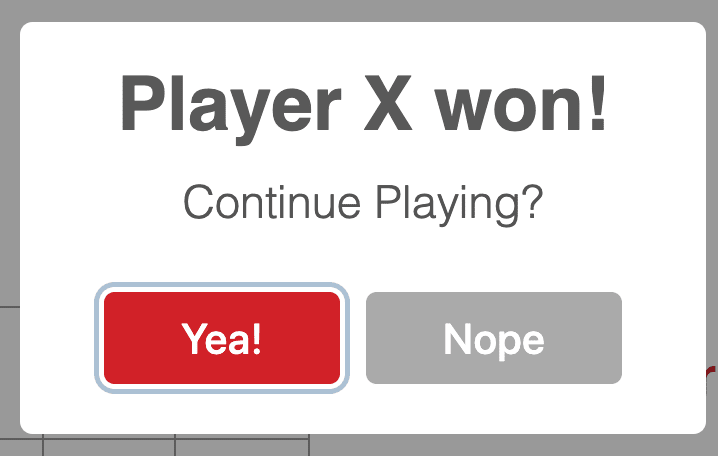 的终局模式](https://res.cloudinary.com/practicaldev/image/fetch/s--9IKjFyue--/c_limit%2Cf_auto%2Cfl_progressive%2Cq_auto%2Cw_880/https://www .pubnub.com/wp-content/uploads/2019/07/playerx-endgame-modal.png)
一旦 Player X 决定要做什么,就会向游戏频道发布一条消息,让其他玩家知道。然后更新 UI。
newRound = (winner) => {
  // Announce the winner or announce a tie game
  let title = (winner === null) ? 'Tie game!' : `Player ${winner} won!`;
  // Show this to Player O
  if((this.props.isRoomCreator === false) && this.gameOver){
    Swal.fire({
      position: 'top',
      allowOutsideClick: false,
      title: title,
      text: 'Waiting for a new round...',
      confirmButtonColor: 'rgb(208,33,41)',
      width: 275,
      customClass: {
          heightAuto: false,
          title: 'title-class',
          popup: 'popup-class',
          confirmButton: 'button-class',
      } ,
    });
    this.turn = 'X'; // Set turn to X so Player O can't make a move
  }

  // Show this to Player X
  else if(this.props.isRoomCreator && this.gameOver){
    Swal.fire({
      position: 'top',
      allowOutsideClick: false,
      title: title,
      text: 'Continue Playing?',
      showCancelButton: true,
      confirmButtonColor: 'rgb(208,33,41)',
      cancelButtonColor: '#aaa',
      cancelButtonText: 'Nope',
      confirmButtonText: 'Yea!',
      width: 275,
      customClass: {
          heightAuto: false,
          title: 'title-class',
          popup: 'popup-class',
          confirmButton: 'button-class',
          cancelButton: 'button-class'
      } ,
    }).then((result) => {
      // Start a new round
      if (result.value) {
        this.props.pubnub.publish({
          message: {
            reset: true
          },
          channel: this.props.gameChannel
        });
      }

      else{
        // End the game
        this.props.pubnub.publish({
          message: {
            endGame: true
          },
          channel: this.props.gameChannel
        });
      }
    })
  }
 }
进入全屏模式 退出全屏模式
如果消息是_reset_,则所有状态值和变量,除了玩家的得分,都将重置为其初始值。任何仍处于打开状态的模式都将关闭,双方玩家将开始新一轮。
对于消息_endGame_,关闭所有模态并调用方法endGame()。此方法在 App.js 中。
// Reset everything
endGame = () => {
  this.setState({
    piece: '',
    isPlaying: false,
    isRoomCreator: false,
    isDisabled: false,
    myTurn: false,
  });

  this.lobbyChannel = null;
  this.gameChannel = null;
  this.roomId = null;

  this.pubnub.unsubscribe({
    channels : [this.lobbyChannel, this.gameChannel]
  });
}
进入全屏模式 退出全屏模式
所有状态值和变量都重置为其初始值。频道名称被重置为空,因为每次玩家创建房间时都会生成一个新名称。由于频道名称不再有用,玩家同时取消订阅大厅和游戏频道。 isPlaying 的值重置为 false,因此游戏组件将替换为大厅组件。
App.js 中包含的最后一个方法是 componentWillUnmount(),它会取消两个频道的玩家订阅。
componentWillUnmount() {
  this.pubnub.unsubscribe({
    channels : [this.lobbyChannel, this.gameChannel]
  });
}
进入全屏模式 退出全屏模式
这就是游戏正常运行所需要做的一切!您可以在repo中获取游戏的 CSS 文件。现在,让我们启动并运行游戏。
运行游戏
在运行游戏之前,我们需要做几个小步骤。首先,我们需要启用PubNub Presence 功能因为我们使用它来获取频道中的人数(我们在订阅大厅频道时使用了_withPresence_)。转到PubNub 管理员仪表板并单击您的应用程序。点击 Keyset 并向下滚动到 Application add-ons。将 Presence 开关切换到 on。保持默认值相同。
[ ](https://res.cloudinary.com/practicaldev/image/fetch/s--BGzGGhpj--/c_limit%2Cf_auto%2Cfl_progressive%2Cq_auto%2Cw_880/https:// www.pubnub.com/wp-content/uploads/2019/07/enable-presence-1.png)
要安装应用程序中使用的三个依赖项并运行应用程序,您可以运行应用程序根目录中的脚本 dependencies.sh。
# dependencies.sh
npm install --save pubnub pubnub-react
npm install --save shortid
npm install --save sweetalert2

npm start
进入全屏模式 退出全屏模式
在终端中,转到应用程序的根目录并键入以下命令以使脚本可执行:
chmod +x dependencies.sh
进入全屏模式 退出全屏模式
使用以下命令运行脚本:
./dependencies.sh
进入全屏模式 退出全屏模式
该应用程序将在http://localhost:3000中打开,并显示大厅组件。
[ ](https://res.cloudinary.com/practicaldev/image/fetch/s--MuHq40es--/c_limit%2Cf_auto%2Cfl_progressive%2Cq_auto%2Cw_880/https://www .pubnub.com/wp-content/uploads/2019/07/run-the-app.png)
打开另一个选项卡,或者最好是窗口,然后复制并粘贴http://localhost:3000。在一个窗口中,通过单击“创建”按钮创建一个频道。将弹出一个显示 room id 的模式。复制并粘贴该 ID。转到另一个窗口,然后单击“加入”按钮。当模式弹出时,在输入字段中输入_room id_,然后按“确定”按钮。
[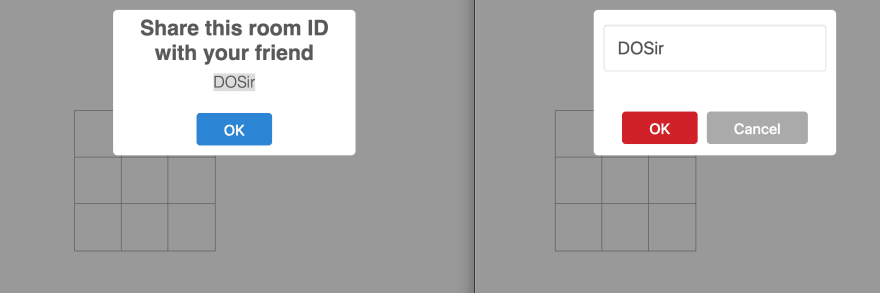 ](https://res.cloudinary.com/practicaldev/image/fetch/s--cGV3Oee4--/c_limit%2Cf_auto%2Cfl_progressive%2Cq_auto%2Cw_880/https://www .pubnub.com/wp-content/uploads/2019/07/create-join-lobby.png)
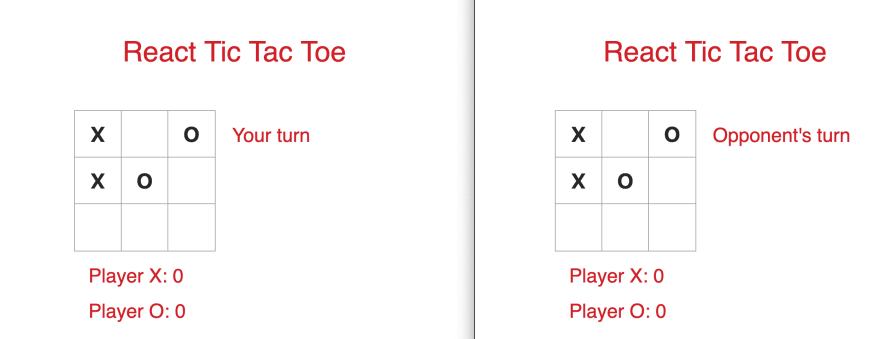
一旦玩家连接,游戏将开始。您用来创建通道的窗口是第一步。按下棋盘上的任何方块,看到棋子 X 在棋盘上实时显示在两个窗口中。如果您尝试在同一个棋盘上按下另一个方格,则什么也不会发生,因为不再轮到您采取行动了。在另一个窗口中,按下棋盘上的任何方块,将 O 放置在方块中。
[ ](https://res.cloudinary.com/practicaldev/image/fetch/s--fFuRK7KY--/c_limit%2Cf_auto%2Cfl_progressive%2Cq_auto%2Cw_880/https:// www.pubnub.com/wp-content/uploads/2019/07/place-piece-on-board.png)
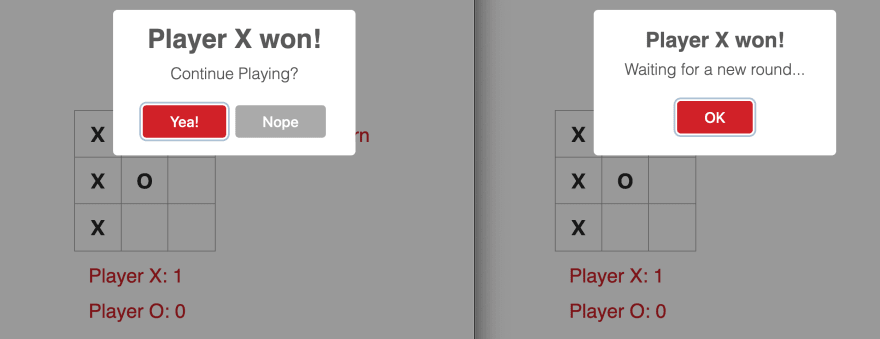
继续玩,直到有赢家或平局。然后显示一个模式,宣布该回合的获胜者,或宣布游戏以平局结束。在同一个模式中,Player X 必须决定是继续玩还是退出游戏。 Player O 的模式会告诉他们等待新一轮。
[ ](https://res.cloudinary.com/practicaldev/image/fetch/s--3FsKRR71--/c_limit%2Cf_auto%2Cfl_progressive%2Cq_auto%2Cw_880/https://www. pubnub.com/wp-content/uploads/2019/07/end-of-game.png)
如果 Player X 继续游戏,除分数外的所有内容都会重置。否则,两名玩家都会被带回大厅,在那里他们可以创建或加入新频道。查看此视频以获取游戏演示。
创建原生移动版
既然您的游戏可以在 Web 浏览器中完美运行,那就让我们把它带到移动设备上吧!查看如何在 Android 和 iOS 的 React Native 中构建多人井字游戏。如果您想构建更多实时游戏并想知道 PubNub 如何帮助您,请查看多人游戏教程。

React社区为您提供最前沿的新闻资讯和知识内容
更多推荐
 0
0 0
0- 0



 已为社区贡献7744条内容

所有评论(0)