

Working on my latest post regarding module federation here and the work I am doing regarding Module Federation at work brought me to a situation where I was wondering if there is another way to load a remote module, not at build time but runtime; After researching and attending to talks about the subject, I found that this is supported out of the box with Webpack and module federation plug-in.
When I discovered functionality, I was amazed and surprised nobody had told me this before. Now I will share how you can: Dynamically remote modules using Webpack Module Federation at runtime, so for me, "This Is The Way".
Steps required for Dynamic Remote modules
- Configuring the Host App
- Load script from remote module dynamically
- Load Component from
webpackshare scope - Consume remote component from host
- Small peek of remote configuration
- Result
Configuring the Host App
Use ModuleFederationPlugin in your webpack.config.js of the app that you wish to consume modules.
- Pay attention that the
remotesentry now it's an empty object; you can also omit the object. - This is the only change you need regarding configuration now you need some code.
- If you are consuming all dynamically, you can remove the plugin from the configuration
const ModuleFederationPlugin = require('webpack').container.ModuleFederationPlugin;
    // your original webpack.config.js configuration
    plugins: [
        new ModuleFederationPlugin({
            name: 'host_react_module',
            filename: 'remoteEntry.js',
            remotes: {
            },
            shared: {
                react: {
                    requiredVersion: false,
                    singleton: true,
            },
        },
    }),
],
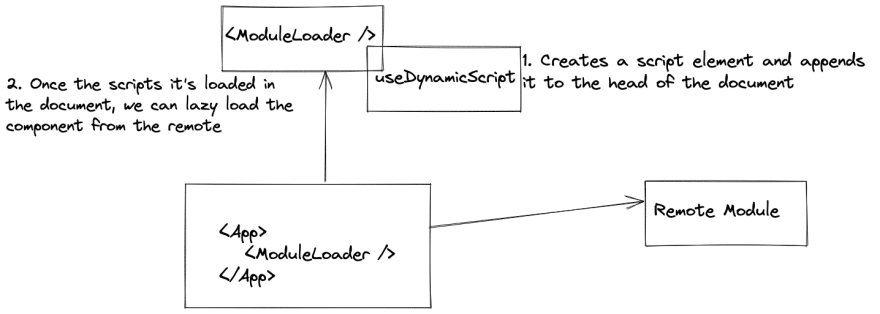
Load script from remote module dynamically
- I'm using here a simple
hookinReact - This
hookwill create a script element using the browser's native API - After the script element was created we set its properties
import React from "react";
const useDynamicScript = (args) => {
  const [ready, setReady] = React.useState(false);
  const [failed, setFailed] = React.useState(false);

  React.useEffect(() => {
    if (!args.url) {
      return;
    }

    const element = document.createElement("script");

    element.src = args.url;
    element.type = "text/javascript";
    element.async = true;

    setReady(false);
    setFailed(false);

    element.onload = () => {
      console.log(`Dynamic Script Loaded: ${args.url}`);
      setReady(true);
    };

    element.onerror = () => {
      console.error(`Dynamic Script Error: ${args.url}`);
      setReady(false);
      setFailed(true);
    };

    document.head.appendChild(element);

    return () => {
      console.log(`Dynamic Script Removed: ${args.url}`);
      document.head.removeChild(element);
    };
  }, [args.url]);

  return {
    ready,
    failed
  };
};

export default useDynamicScript;
Load Component from webpack share scope
- Use the created
hookfor loading the script - Load the component using
React.lazyAPI and webpack functionality
import React, { Suspense } from "react";
import useDynamicScript from './hooks/useDynamicScript';

function loadComponent(scope, module) {
  return async () => {
    // Initializes the share scope. This fills it with known provided modules from this build and all remotes
    await __webpack_init_sharing__("default");
    const container = window[scope]; // or get the container somewhere else
    // Initialize the container, it may provide shared modules
    await container.init(__webpack_share_scopes__.default);
    const factory = await window[scope].get(module);
    const Module = factory();
    return Module;
  };
}

function ModuleLoader(props) {
  const { ready, failed } = useDynamicScript({
    url: props.module && props.url
  });

  if (!props.module) {
    return <h2>Not system specified</h2>;
  }

  if (!ready) {
    return <h2>Loading dynamic script: {props.url}</h2>;
  }

  if (failed) {
    return <h2>Failed to load dynamic script: {props.url}</h2>;
  }

  const Component = React.lazy(
    loadComponent(props.scope, props.module)
  );

  return (
    <Suspense fallback="Loading Module">
      <Component />
    </Suspense>
  );
}

export default ModuleLoader;
Consume remote component from host
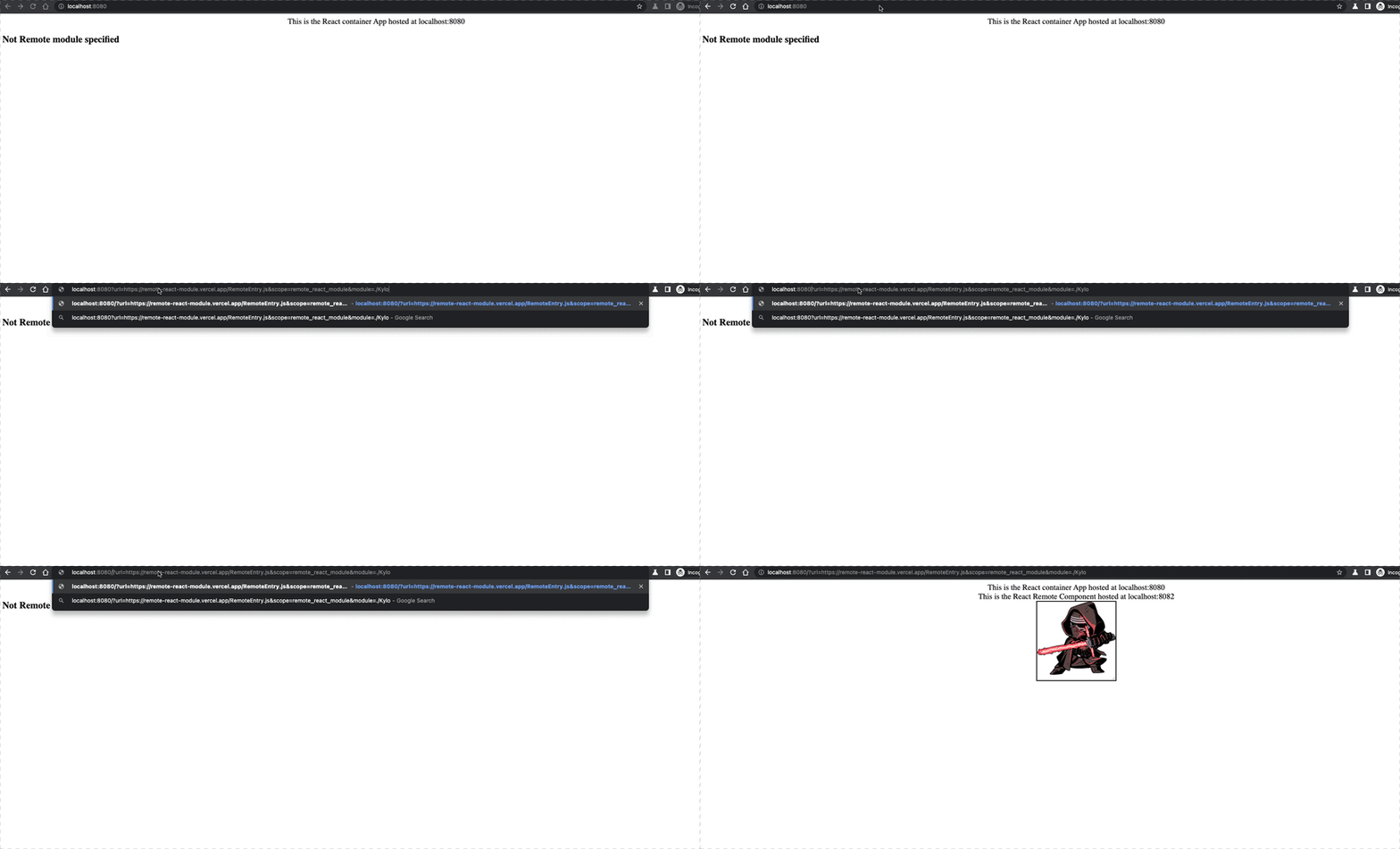
- Now, after all the parts are set in place, its time to consume the component
- I'm using passing the dynamic parameters thru the URL; this one approach, the easy one, but you can go crazy 🤪 with it and create your own implementation
- Once the app it loaded I'm injecting the parameters from the remote module in the URL
- I'm using a remote module that I already deployed at Vercel, so my URL will look like this:
- http://localhost:8080/?url=https://remote-react-module.vercel.app/RemoteEntry.js&scope=remote_react_module&module=./Kylo
- url: Address of remote module
- scope: name of the remote module set in its webpack config
- module: Component exposed in the remote module
import React, { Suspense, useEffect, useState } from 'react';
import ModuleLoader from './ModuleLoader';
function App() {
  useEffect(() => {
    const params = new URLSearchParams(window.location.search);
    const url = params.get('url');
    const scope = params.get('scope');
    const module = params.get('module');
    setRemote({ url, scope, module });
  }, []);
  const [remote, setRemote] = useState(null);
  return (
    <>
      <div className='Text'>
        This is the React container App hosted at localhost:8080
      </div>
      <div className='Host-Container'>
      <Suspense fallback={'Loading . . . '}>
        {
          remote && <ModuleLoader url={remote.url} scope={remote.scope} module={remote.module} />
        }
      </Suspense>

      </div>

    </>

  );
}

export default App;
Small peek of remote configuration
- In the
webpackconfig of the remote module:- Name of the remote module:
remote_react_module - Expose a component called:
./Kylo - These parameters MUST match when passing in the URL of the host app
- Name of the remote module:
    plugins: [
        new ModuleFederationPlugin({
            name: 'remote_react_module',
            filename: 'RemoteEntry.js',
            exposes: {
                './Kylo': './src/components/Kylo',
            },
    }),
    .
    .
    .
🤯 Result 🤯
Resources
Link to host react using this functionality


 已为社区贡献7744条内容

所有评论(0)