

What is jsPDF🤔?
It's a JavaScript library for generating PDFs.
Installation
- Through npm
npm install jspdf --save
- Or yarn
yarn add jspdf
How can you use it?
So to use this library, You need to create a new instance
const doc = new jsPDF();
You can change the format, orientation of the PDF, plus other options. You can check out the documentation for more details.
How can you generate PDF from HTML?
To generate PDF from HTML, you will need to use a method called html()
    doc.html(html_element, {
      async callback(doc) {
        // save the document as a PDF with name of pdf_name
        doc.save("pdf_name");
      }
    });
How can you add custom fonts?
To add custom fonts, you need a .ttf version of your desired font file. For example when you download a Google Font, you will get the .ttf file for each font you downloaded.
Once you have your .ttf files, you need to upload each font that you want to use (one at a time) to this jsPDF Font Converter.
Note: You don't need to enter the name, fontStyle, or Module format. This will fill in automatically when you select your .ttf font file.
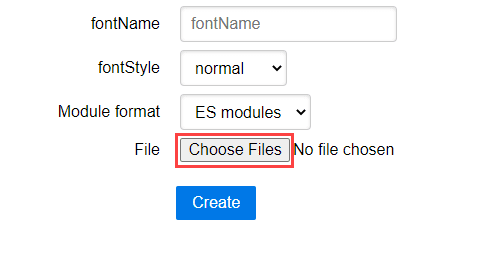
Click the "Choose Files" button and select your .ttf font file.
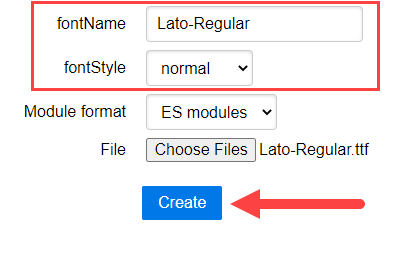
After selecting your .ttf file, take note of the text that appears in the fontName and fontStyle text boxes before clicking the "Create" button. This text is what you will use with the setFont() method, like so:
doc.setFont('Lato-Regular', 'normal');
After you have taken note of the fontName and fontStyle text, click the "Create" button and save the JavaScript file somewhere safe. You will need to include it in your project's output folder and link to it accordingly.
If you are using multiple custom fonts in your PDF, then you will need to go through this process with each one of them.
How can you apply styles to the PDF?
You can apply them through inline styling to the html_element.
Example of using jsPDF
I created a sandbox in CodeSandbox, you can check it out 😁
Conclusion
By using jsPDF, you can generate as well reports and certificates which is cool 😎. If you found another cool library that can do awesome stuff with PDFs, you can share it in the comments below 😁.
Stay awesome guys and have a nice day 😎
Additional Links
- How to use custom fonts with jsPDF - Devlin Peck
- jsPDF - main page


 已为社区贡献7744条内容

所有评论(0)