

An Interview Like No Other
It was a front-end React UI developer interview which began like any other. But unlike others, by the end of it I'd learned enough to change my whole approach to data-fetching - if not literally my life.
I was the interviewer for a 60 minutes live-coding interview. Let's call the candidate Chris. The goal ws to build a simple React GUI that could fetch a random GIF. We assumed any candidate who reached this round could do async data-fetching in React. But we wanted to learn how a candidate thought about front-end problems in general. We were looking for some insight that we didn't already have. And in this candidate Chris - we found it :)
I handed Chris the paper with the requirements for their live-coding interview.
Getting Acquainted
First Chris read the requirements of what was to be built in the interview.
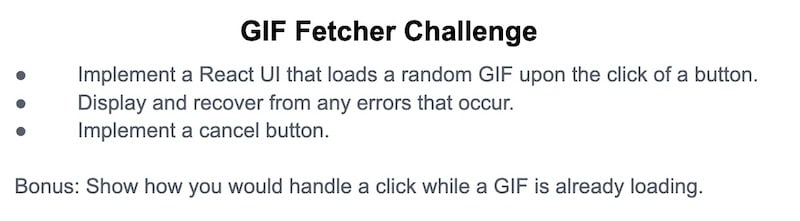
Chris asked a few questions:
"Does it have to be cats, or will any GIF do?"
"Ha!" I said. "You can choose any GIF you want, but we've provided a function to get cats."
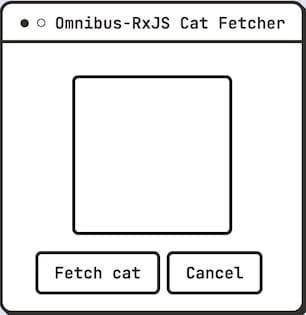
"Do we want to show a spinner/loading indicator?", asked Chris.
I said, "That's a great idea. Why don't you show us your prefererred style?"
"Can I use any libraries?" was Chris's next question. I replied: "Do you think one is needed for this app?"
"Well, we need a cancel button... And I find Observables make for cleaner, less error-prone code than AbortControllers for this purpose."
This took me by surprise. Chris knew about two ways to do cancelation - a less-frequently implemented feature. I only knew of one cancelation tool, AbortControllers, and Chris pinpointed my frustrations with them - that they're easy to forget, don't compose well, and obscure the logic of the happy path.
I said, "yes you can use a library, but you must be able to explain what it is doing, and justify its contribution to the bundle size."
Chris chimed up with, "Sounds good— shall we get to work then?"
Omnibus-RxJS—An Odd Choice of Library
The template I gave Chris had a button labeled "Fetch Cat", a space for a picture, and a skeleton React component with no state.
Chris started by creating a new file, naming it gifService. I gently inquired why they made a separate file instead of coding into the provided React component.
"A service that abstracts the Gif endpoint is what I'm going for. You'll see it's a thin wrapper, and will allow for one-line cancelation. Would you like me to proceed?"
"Go for it," I said. I gave Chris a point for a strong sense of direction and architecture. Chris wrote the following as though from memory, and with perfect TypeScript, but I'll post just the JS here.
import { Omnibus, createService } from "omnibus-rxjs";
import { fetchRandomGif } from "./prebuilt-for-candidate";
const bus = new Omnibus();
bus.spy(console.log);

export const gifService = createService("gif", bus, () => fetchRandomGif);
I said - OK, this is going to need some explaining. What is this library doing?
"Have you used Redux Saga, createAsyncThunk, or other async middleware? Omnibus-RxJS is a drop-in replacement, at less than half the bundle size. Right now it uses the console instead of DevTools to see all its events, but we could turn that off when we get to prod."
I knew Redux Saga. I said "The fetchRandomGif function - it's not written as a generator function like a saga, it just returns a Promise. Is that going to be compatible with your middleware?"
"Yep, no problem. It can do Promises, Observables, or generators."
I asked: "One more thing, if you don't mind. What is this 'bus' object, Omnibus?"
"If you've ever been frustrated using React Context to share data across a component tree, an Omnibus is a VanillaJS way to do the same. Using this bus would allow for other listeners to do things like send analytics events, without modifying the button that requests a GIF."
I thought this was another clever React problem addressed by an Event Bus, and I had just shipped an analytics implementation last week that did have to splice into existing code, which got quite gnarly but I digress.
The State Model and Reducer
"Great— now let's start on our state model. How do you want to display errors?"
I said "We can just display any error right above the Fetch button."
"Okay, so I think the error, and the image url will be our state fields."
Chris wrote this reducer:
const initialState = {
  url: "",
  error: ""
};

export const gifReducer = (state = initialState, e = {}) => {
  switch (e.type) {
    case "gif/next":
      return { ...state, url: e.payload };
    case "gif/error":
      return { ...state, error: e.payload.message };
    case "gif/started":
      return { ...state, error: "" };
    default:
      return state;
  }
};
I noticed the lack of a loading state, that would surely be a problem later.
But first, I was concerned about the strings in the case statements.. I said "These look like Redux Toolkit conventions, but with different names - where do they come from?"
"Fair question. See here in the docs for createService? A service has a standard set of actions, based on Observable life-cycle events. The next event delivers data, error an error, and started indicates a search began. There are typesafe versions of these too, do you want me to use them?"
I said, "That's good to know, but let's skip that for now. I'd love to see how this reducer works to deliver data to the UI."
"Now let's add the reducer to our service, then it will keep track of whether we have an error, a gif, or both."
Chris changed the line to create the service ever-so-slightly, by adding the reducer.
- export const gifService = createService('gif', bus, () => fetchRandomGif);
+ export const gifService = createService('gif', bus, () => fetchRandomGif, () => gifReducer);
"And now let's bring state into our UI".
I thought, "Yes, please, but you're going to regret leaving out the isLoading state field!"
UI Updates
I asked Chris how the state moves from the reducer into the UI. Chris looked down and typed the following in a flurry of keystrokes..
import { gifService, initialState } from "./services/gifService";

function CatFetcher() {
  const [state, setState] = useState({ url: "", error: "" });
  const { url, error } = state;
  useEffect(() => {
     gifService.state.subscribe(console.log)
  }, []);
  ...

  <img src={url} alt="animal GIF" />
  ...
  <div className="error" style={{ visibility: error ? "visible" : "hidden" }}>{error}</div>
  ...
  <button onClick={() => gifService()}/>
I said "Let me get caught up. For state, you're using a combined object for the image url, and the error strings. Mirroring what the gifService keeps track of.
At mount time you subscribe to gifService.state.
Then in the click handler, you invoke gifService() as a function, like you would with createAsyncThunk."
"Yeah, precisely!"
"And, why are we logging gifService.state?"
"That's just a temporary step to show that gifService.state is an Observable of the return values of the gifReducer. See - it has all we need for the UI. Look in the console, and you'll see all the events producing it."


"Oh cool." I asked: "And how do we update the UI?"
Chris made this change, and we saw the GIF!
- gifService.state.subscribe(console.log)
+ gifService.state.subscribe(setState)

With 45 minutes still to go, I decided to throw every curve possible. Starting with errors.
Errors
It only took Chris a minute with this strange Omnibus-RxJS service to show off error behavior. When this function was combined with the GIF fetcher, the error case in the reducer just worked.
if (Math.random() < 0.2) { throw new Error("Error: WOOF!"); }

After it had shown an error, it resumed future fetches just fine. It cleared the error on gif/start, like I saw in the reducer. I said "You pulled that off nicely. Now let's have some fun with that loading state, shall we?"
Loading State
I thought about how Chris hadn't included a loading state in their data model. I prompted: "I notice you don't have a field for isLoading, are we going to add that now?"
"How do you want loading state to be displayed?" I said it'd suffice to change the text "Fetch Cat" to "Fetching.." I asked "Would you add a state field loading or isLoading to your service?"
Chris opened the console and explained:
"See here? The service already knows when it's doing work. It's simply the time between the started and complete events. It's only React that needs to know it."
Then, a new state field appeared, along with a useEffect to set it.
const [isLoading, setLoading] = useState(false);
useEffect(() => {
  gifService.isActive.subscribe({ next: setLoading });
}, []);
I moused over isActive - its type was Observable<boolean>.
I asked: "So setLoading is passed each new value of the isActive Observable?"
"Exactly. Like I said, the service knows when it's doing work. It keeps a count of gif/started and gif/complete events and emits true when the count is > 0 and false otherwise. We just need to tell React about it
"_

We tried it out, and it worked like a dream - minus a little delay in image loading "Probably due to our network", I mused.
Then Chris must have read my mind when they asked:
"Do you notice there's a gap from the time the loading indicator goes away to the time the image shows up - shall we fix that?"
Tangent: Load the Image bytes First

"Here, let me throttle the Network connection in DevTools. You see? The time it takes to download the image is not factored into to isLoading. The service only thinks its active while it's getting the image URL - the bytes of the image still haven't arrived"
"But that's not a requirement for the challenge." I said uneasily, as I didn't want their results to be uncomparable to others.
"Yes, but it's easily solvable. And if we solve it now, we'll be even more set up for cancelation."
I asked: "And then we'll wait for all the image bytes before the service triggers an event of type gif/complete to the bus?"
"What we want is for the bytes to be in the cache before we update the DOM. We want to delay the gif/next event, since that is the event that causes React to insert the url in the DOM."
Made sense to me. So I let Chris follow this tangent - it was so subtle, yet quite logical!
Preloader of Image Bytes
"So let's summarize our problem like this: How do we produce a composable unit of work which doesn't complete, or resolve, until the bytes of an image have arrived?"
"I don't know. How would you do it?". I wondered what C could show me that I didn't already know.
Chris explained: "With Promises, an image preloader is like this:"
function preloadImage(url) {
  return new Promise((resolve) => {
    const img = new Image();
    img.onload = () => resolve();
    img.src = url;
  });
}
"Ok, that makes sense," I said.. "The Promise waits until the onload event to resolve. So you can just chain that onto the Promise for the API response?"
"Yes, we could. But since we're going to implement cancelation soon, can I show you how making it an Observable instead of a Promise helps with this?"
Chris made a few changes, and I tried to apply what I knew about Promises and useEffect to understand it..
function preloadImage(url) {
  return new Observable((notify) => {
    const img = new Image();
    img.onload = () => {
      notify.next(url);
      notify.complete();
    };
    img.src = url;

    return () => img.src = "data:image/gif;base64,R0lGODlhAQABAAAAACH5BAEKAAEALAAAAAABAAEAAAICTAEAOw==";
  };
};
I asked: "So— next and complete events are separate for Observables, and you have to call next and complete? And they're methods on an object instead of separate arguments?"
"That's right. That's the Observer argument, but I like to call it notify"
I asked: "And the Observable is cancelable when it returns a cancelation function - just like in useEffect? And what the heck is that gif for?"
"You're right - this is a cancelation function. That data:image/gif is the smallest possible transparent GIF! If the Image object was loading a remote URL, and you switched its .src property, it would stop loading the original one. That's cancelation!"
I liked the idea that Observables could return their own cancelation functions. And it was cool to me that this pattern was usable even outside of React.
I asked "But how do you chain an Observable with a Promise? I didn't think you could await an Observable or call .then?"
"If we want cancelation to be easy and seamless, we should update the Ajax to an Observable as well. Observables are like a cancelable form of Promises, so this diff should be small:"
function fetchRandomGif() {
-   return
-     fetch("https://api.thecatapi.com/v1/images/search", {headers: {...}})
-       .then((res) => res.json())
-       .then((data) => data[0].url)
-   );
+   return
+     ajax.getJSON("https://api.thecatapi.com/v1/images/search", {...})
+     .pipe(
+        map((data) => data[0].url),
+     );
}
I noticed that TypeScript told me the return type was now Observable<string> instead of Promise<string>. Other than that, the code looked about the same. Chris ran it again, and it worked exactly as before— it still had the image loading issue.
"Now you asked how to compose both pieces? Like this:"
  return
     ajax.getJSON("https://api.thecatapi.com/v1/images/search", {...})
     .pipe(
        map((data) => data[0].url),
+        mergeMap(preloadImage)
     );
"That's better. What do you think now?"

I looked now, and indeed there was no delay between when the loading indicator turned off, and the image appeared. The only code change was one new pure function returning an Observable<string> from a url, and a single line to compose it in. Very little chance of regression there.
I'd seen enough to recommend a hire. I saw we only had 15 minutes left now, and I was about to hand it over to Chris for questions when they piped up.
Refactor: Better RxJS Cancelation
"If you don't mind, I'd like to address a point about cancelation. We subscribe to state and isActive of the gifService when the component mounts, but we never unsubscribe. Could I show you two ways we could fix this, and you can tell me which you like?"
Great question. I said to go ahead. These options were presented:
// Option 1
useEffect(() => {
  const sub = gifService.state.subscribe(setState);
  return () => sub.unsubscribe();
}, []);

// Option 2
import { useWhileMounted } from "omnibus-react";
useWhileMounted(() => gifService.state.subscribe(setState));
I took it in. "Isn't Option 1 basically the implementation of useWhileMounted?" I asked. Chris confirmed that it was.
I liked that name. It always bugged me that the dependency array [] for at the end, and not self-explanatory. "I like Option 2, useWhileMounted is much more readable.".
"useWhileMounted also works with regular effects, and Observables, so feel free to borrow that one."
I asked Chris if we could move onto cancelation. That would surely determine if Chris had knowledge to write air-tight user interfaces - something even many good candidates of even a few years had usually not mastered.
"Now we're ready to do easy cancelation of our Observable chain"
Cancelation and The Finished Product
Cancelation was the final feature. I'd shipped many apps without it before, especially before Abort Controllers. But networks are not always fast, client devices not always high-powered, and I knew that to do top-notch UX, one had to have some chops when it came to cancelation. I had to see how Chris would approach this, and I saw them start to add a cancel button to the form.
I said I had to step away for a bio break. And when I came back, Chris put away their phone, and this additional line was present.
<button onClick={() => gifService.cancelCurrent()}>Cancel One</button>
"That's all?" I said?
"That's all. I believe it should be easy to fall into the pit of success, and if cancelation isn't easy, it won't get done."
I opened up DevTools, throttled the Network, and clicked Fetch Cat. I clicked cancel, and BOOM, a canceled XHR on /search!

"Where's the cancelation code" I asked?
"Its just that call to cancelCurrent on the gifService? It's crazy that Observables have been able to do this since 2012, and we're only got this API now!"
"And it doesn't proceed to fetch the image bytes if canceled?" I remarked.
"Right. When you cancel a chain of Observables, you cancel the whole thing."
I said "Let's try this again, only while the image bytes are downloading". Sure enough, the HTTP request in DevTools turned red and showed (canceled) right away. And the cat image never changed from its current one, or was lost.

I asked: "What if the user navigated to another route, and wouldn't see that cat - could we cancel then?"
"You can just call call cancelCurrent in the return function of a useWhileMounted."
This was great. I made a mental note: Suggest the whole team learn about Observables and this API around them.
A Mysterious Departure
Chris had exceeded expectations on the first 3 mandatory points of the challenge. I wanted to hire, so I moved on to Chris's questions. We talked pleasantly, then when we were standing up to say goodbye, curiosity got the best of me, and I asked one more technical question:
"Just curious- but how would you handle a click while a GIF was already loading? Something like XState?"
Chris lifted their backpack to their shoulder and smiled.
"Oh, the Omnibus service has that covered too. Look up createQueueingService in the README or docs. I'll send you a CodeSandbox of it later today so you can try it out."
And with that, Chris was gone. And my learning into RxJS and Omnibus-RxJS had just begun.
Author's Note: As you may have guessed, this was a fictitous story. I am the author of omnibus-rxjs and omnibus-react and I thought this format might be a good way to explain the real use cases of the features in this package. I must stress that Omnibus was not designed to handle interview problems, but real world ones! And it has been deployed to production in various forms for 3 years, solving problems like dynamic forms, 60FPS animation, Web Sockets and many more. I hope you will give it a look, and let me know what you think! Here's the CodeSandbox of which I spoke.
-- Dean


 已为社区贡献7744条内容

所有评论(0)