在 Fly.io 上使用 Docker 部署 Elixir 版本
我将向您展示如何将我们的 Elixir 版本部署到Fly.io。我们将使用我们的Docker 镜像。
准备 Elixir 版本以部署到Fly.io
Fly.io在其所有内部网络中使用 IPv6。因此,如果我们想将应用程序连接到数据库,我们需要将应用程序配置为使用 IPv6。
运行此命令以生成rel/env.sh.eex文件等:
mix release.init
该文件在启动您的应用程序之前运行。是动态配置的环境变量。将文件的内容设置为:
#!/bin/sh

ip=$(grep fly-local-6pn /etc/hosts | cut -f 1)
export RELEASE_DISTRIBUTION=name
export RELEASE_NODE=$FLY_APP_NAME@$ip
export ELIXIR_ERL_OPTIONS="-proto_dist inet6_tcp"
该文件在启动时获取fly.io分配的 IPv6,并将其分配给一个变量。然后它使用该变量以及fly.io自动提供的FLY_APP_NAME环境变量来设置另一个环境变量RELEASE_NODE。这将用作运行我们的应用程序的节点的唯一名称。最后一行将 BEAM 虚拟机配置为使用 IPv6。
让我们修改config/runtime.exs文件。
将Saturn.Repo配置更改为:
config :saturn, Saturn.Repo,
    # ssl: true,
    socket_options: [:inet6],
    url: database_url,
    pool_size: String.to_integer(System.get_env("POOL_SIZE") || "10")
将SaturnWeb.Endpoint更改为
  app_name =
    System.get_env("FLY_APP_NAME") ||
      raise "FLY_APP_NAME not available"

  config :saturn, SaturnWeb.Endpoint,
    url: [host: "#{app_name}.fly.dev", port: 80],
    http: [
      # Enable IPv6 and bind on all interfaces.
      # Set it to  {0, 0, 0, 0, 0, 0, 0, 1} for local network only access.
      # See the documentation on https://hexdocs.pm/plug_cowboy/Plug.Cowboy.html
      # for details about using IPv6 vs IPv4 and loopback vs public addresses.
      ip: {0, 0, 0, 0, 0, 0, 0, 0},
      port: String.to_integer(System.get_env("PORT") || "4000")
    ],
    secret_key_base: secret_key_base
在项目根目录下添加一个.dockerignore文件:
assets/node_modules/
deps/
修改Dockerfile并将复制runtime.exs文件的行更改为:
# copy runtime configuration file
COPY rel rel
COPY config/runtime.exs config/
我正在创建一个名为fly-io-deployment的分支并将所有这些更改提交给它:
git checkout -b fly-io-deployment
git add .
git commit -m "Deploying to fly.io"
git push -u origin fly-io-deployment
创建并配置您的Fly.io帐户
安装flyctl
brew install superfly/tap/flyctl
注册到fly.io
如果你还没有fly.io账号,创建一个
flyctl auth signup
登录fly.io
如果你已经有fly.io账号,请登录
flyctl auth login
创建一个Fly.io应用程序
在启动应用程序之前,确保您已通过访问fly.io/organizations/personal并添加一张信用卡来为您的组织添加一张信用卡。否则,下一个命令将不起作用。
准备好后,运行以下命令:
fly launch
它会问你一些事情来配置你的应用程序fly.io。将应用程序名称留空,以便为其获取一个随机名称。选择一个靠近您居住地的区域,并确保您对有关立即部署的问题回答“否”。
您应该会看到与此类似的内容:
fly launch
Creating app in /Users/mcoba/Code/saturn
Scanning source code
Detected a Dockerfile app
? App Name (leave blank to use an auto-generated name):
Automatically selected personal organization: Miguel Cobá
? Select region: mad (Madrid, Spain)
Created app damp-paper-3277 in organization personal
Wrote config file fly.toml
? Would you like to deploy now? No
Your app is ready. Deploy with `flyctl deploy`
打开flyctl在项目根目录下创建的fly.toml文件。将kill_signal更改为:
kill_signal = "SIGTERM"
并在[env]之后添加一个[deploy]部分
[env]

[deploy]
  release_command = "eval Saturn.Release.migrate"
将internal_port更改为:
internal_port = 4000
在Fly.io 上设置秘密
我们需要在Fly.io基础设施中创建一些秘密,以便在应用程序启动时使用。
fly secrets set SECRET_KEY_BASE=$(mix phx.gen.secret)
创建数据库
为应用程序创建一个数据库。回答将应用名称留空的问题以获得随机名称并确保选择最小的 VM 大小。
fly postgres create
您应该会看到与此类似的内容:
fly postgres create

? App Name:
Automatically selected personal organization: Miguel Cobá
? Select region: mad (Madrid, Spain)
? Select VM size: shared-cpu-1x - 256
? Volume size (GB): 10
Creating postgres cluster  in organization personal
Postgres cluster still-sun-6781 created
  Username:    postgres
  Password:   <some big password>
  Hostname:    still-sun-6781.internal
  Proxy Port:  5432
  PG Port: 5433
Save your credentials in a secure place, you won't be able to see them again!

Monitoring Deployment

2 desired, 2 placed, 0 healthy, 0 unhealthy [health checks: 6 total, 1 passing,
2 desired, 2 placed, 0 healthy, 0 unhealthy [health checks: 6 total, 1 passing,
2 desired, 2 placed, 0 healthy, 0 unhealthy [health checks: 6 total, 1 passing,
2 desired, 2 placed, 0 healthy, 0 unhealthy [health checks: 6 total, 2 passing,
2 desired, 2 placed, 0 healthy, 0 unhealthy [health checks: 6 total, 3 passing,
2 desired, 2 placed, 0 healthy, 0 unhealthy [health checks: 6 total, 4 passing,
2 desired, 2 placed, 0 healthy, 0 unhealthy [health checks: 6 total, 5 passing,
2 desired, 2 placed, 2 healthy, 0 unhealthy [health checks: 6 total, 6 passing]
--> v0 deployed successfully

Connect to postgres
Any app within the personal organization can connect to postgres using the above credentials and the hostname "still-sun-6781.internal."
For example: postgres://postgres:<the big password>@still-sun-6781.internal:5432

See the postgres docs for more information on next steps, managing postgres, connecting from outside fly:  https://fly.io/docs/reference/postgres/
记下生成的数据库名称,下一步将需要它。我的是:still-sun-6781。
剩下的是将 Elixir Release 应用程序连接到 PostgreSQL 应用程序。运行此命令,但使用您自己的数据库名称。这将创建一个新的 postgres 用户和密码,以从 Elixir 版本连接到 PostgreSQL 数据库:
fly postgres attach --postgres-app still-sun-6781
你会看到这样的东西:
fly postgres attach --postgres-app still-sun-6781

Postgres cluster still-sun-6781 is now attached to damp-paper-3277
The following secret was added to damp-paper-3277:
  DATABASE_URL=postgres://<some new user>:<some new password>@still-sun-6781.internal:5432/damp_paper_3277?sslmode=disable
如您所见,这会自动创建一个我们缺少的带有DATABASE_URL的秘密。
部署到Fly.io
进行部署:
fly deploy
这将启动 Docker 镜像构建,将其推送到fly.io的注册表,然后将基于该镜像部署一个容器,并提供我们配置它以启动它的秘密。在大量输出日志之后,您应该会看到如下内容:
==> Release command
Command: eval Saturn.Release.migrate
     Starting instance
     Configuring virtual machine
     Pulling container image
     Unpacking image
     Preparing kernel init
     Configuring firecracker
     Starting virtual machine
     Starting init (commit: 50ffe20)...
     Preparing to run: `bin/saturn eval Saturn.Release.migrate` as elixir
     2021/10/29 23:19:47 listening on [fdaa:0:37f6:a7b:2656:f312:7c7b:2]:22 (DNS: [fdaa::3]:53)
     Reaped child process with pid: 561 and signal: SIGUSR1, core dumped? false
     23:19:50.604 [info] Migrations already up
     Main child exited normally with code: 0
     Reaped child process with pid: 563 and signal: SIGUSR1, core dumped? false
     Starting clean up.
Monitoring Deployment

1 desired, 1 placed, 1 healthy, 0 unhealthy [health checks: 1 total, 1 passing]
--> v1 deployed successfully
如您所见,部署已正确执行并运行了迁移。现在让我们访问该应用程序。
fly open
打开浏览器,您应该看到您的应用程序,该应用程序在Fly.io基础架构上运行:
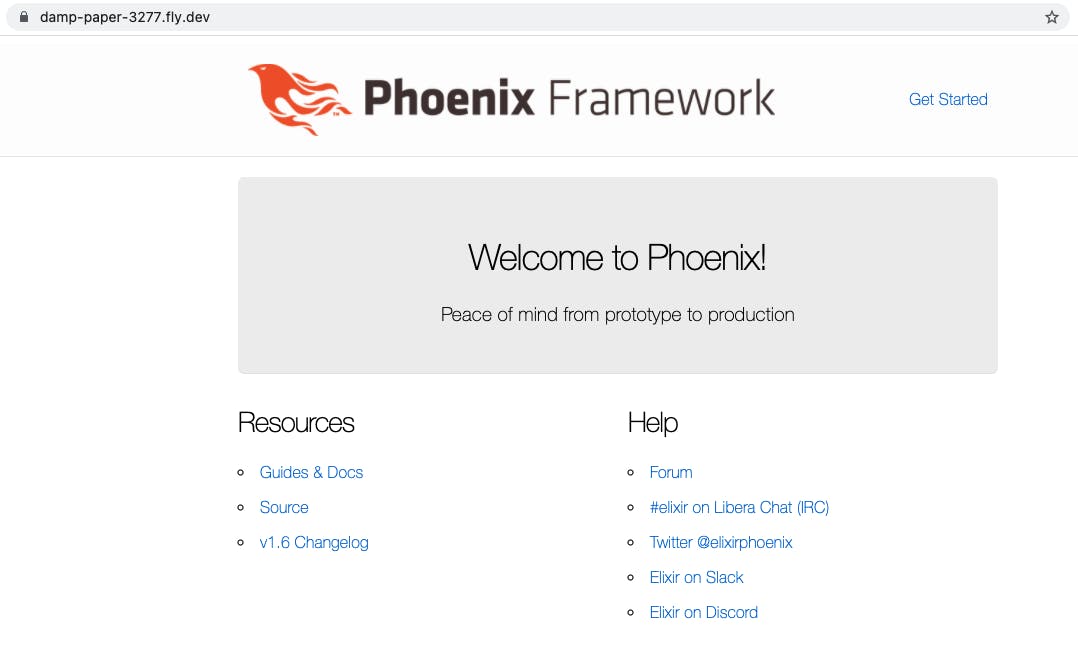
奖金
用IEx连接运行节点
我们需要为运行在fly.io中的容器配置一个安全的 ssh 隧道。
fly ssh establish
fly ssh issue
回复您的电子邮件并选择一个地方来保存您的私钥。如果您已经将 ssh 用于其他连接,则可以将其保存到相同的 $HOME/.ssh/ 目录中。我懂了:
fly ssh establish
Automatically selected personal organization: Miguel Cobá
Establishing SSH CA cert for organization personal
New organization root certificate:
ssh-ed25519-cert-v01@openssh.com <some big value>

fly ssh issue
? Email address for user to issue cert:  miguel.coba@gmail.com

!!!! WARNING: We're now prompting you to save an SSH private key and certificate       !!!!
!!!! (the private key in "id_whatever" and the certificate in "id_whatever-cert.pub"). !!!!
!!!! These SSH credentials are time-limited and handling them in files is clunky;      !!!!
!!!! consider running an SSH agent and running this command with --agent. Things       !!!!
!!!! should just sort of work like magic if you do.                                    !!!!
? Path to store private key:  ~/.ssh/id_fly_io
? Path to store private key:  /Users/mcoba/.ssh/.id_fly_io
Wrote 24-hour SSH credential to /Users/mcoba/.ssh/.id_fly_io, /Users/mcoba/.ssh/.id_fly_io-cert.pub
您现在可以使用fly ssh console连接到容器,并使用app/bin/saturn remote连接到 erlang 节点:
fly ssh console
Connecting to damp-paper-3277.internal... complete
/ # cd ~
/home/elixir # ls
app
/home/elixir # app/bin/saturn remote
Erlang/OTP 24 [erts-12.1.2] [source] [64-bit] [smp:1:1] [ds:1:1:10] [async-threads:1] [jit:no-native-stack]

Interactive Elixir (1.12.3) - press Ctrl+C to exit (type h() ENTER for help)
而已。
源码
土星项目的源代码是在MIT许可下开源的。使用fly-io-deployment分支。
关于
我是Miguel Cobá。我撰写有关 Elixir、Elm、软件开发和电子书写作的文章。
-
关注我Twitter
-
订阅我的时事通讯
-
阅读我在我的博客上的所有文章
-
获取我的书籍:
*100 灵药提示[免费]
*部署 Elixir[免费]
*部署 Elixir:高级主题
*开发人员的电子书写作工作流程
照片来自Jan RanftonUnsplash

云原生社区为您提供最前沿的新闻资讯和知识内容
更多推荐



 0
0 0
0- 0


 已为社区贡献35528条内容

所有评论(0)