
【模型评测】主流编程大模型QML编程横向对比
·
主流编程大模型QML编程横向对比
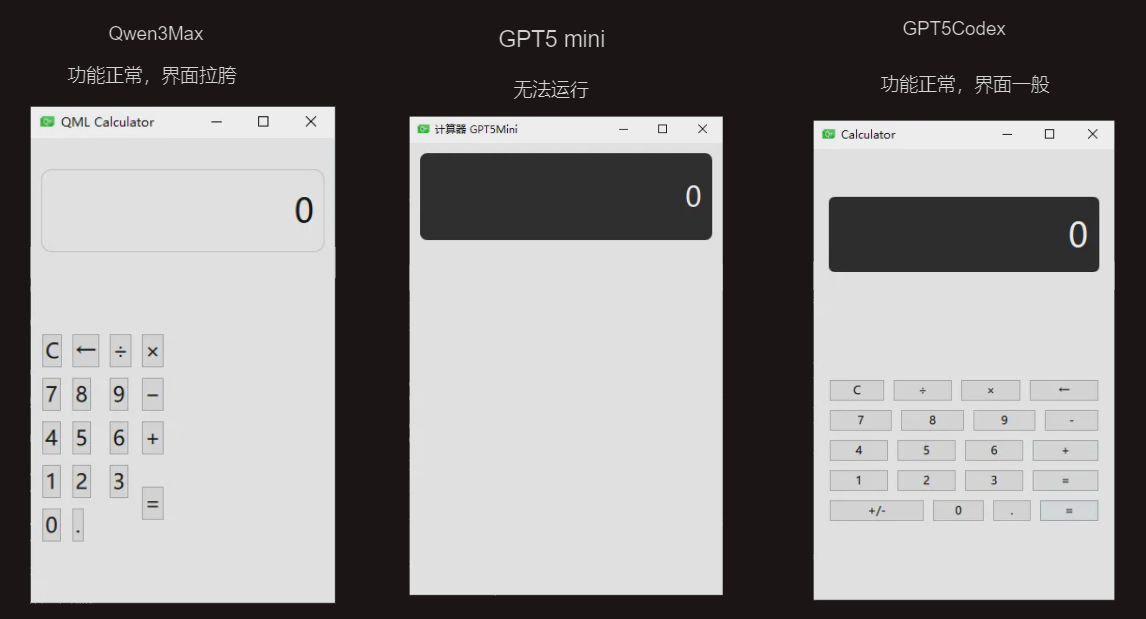
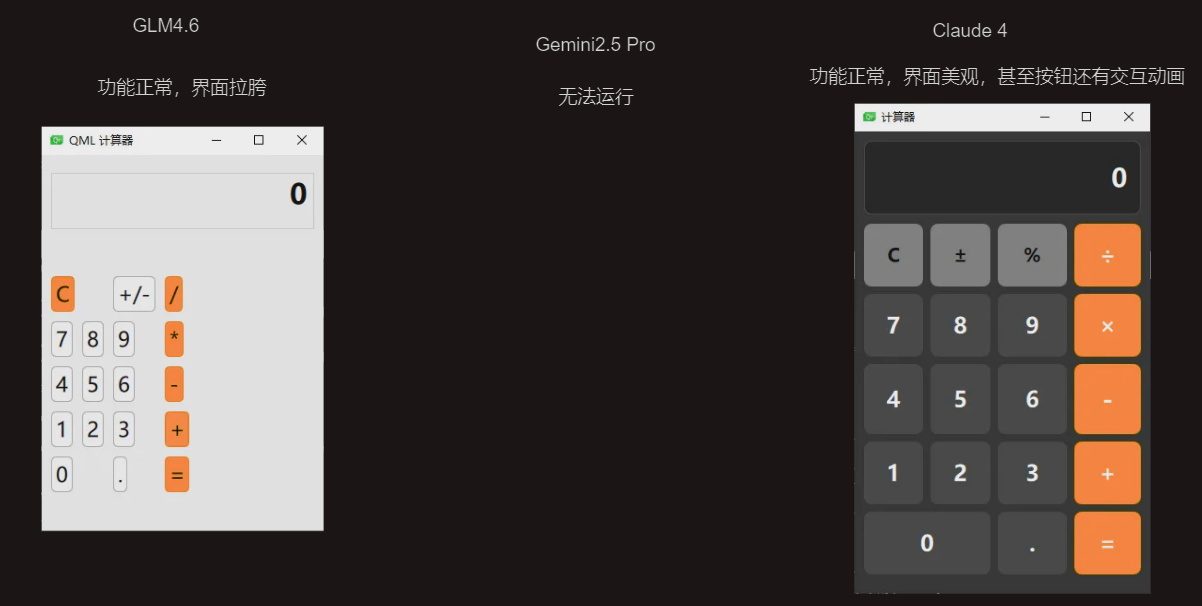
今天晚上闲来无事,拉了一堆排行榜上的模型做了一个小测试,本次测试一共邀请了下面的这些模型进行同台竞技
Claude sonnet 4,Claude sonnet 4.5,Gemini2.5Pro,GPT5Codex,GPT5Mini,Qwen3Max,KimiK2
所有的都是一次提问,提示词都是使用QML创建一个计算器
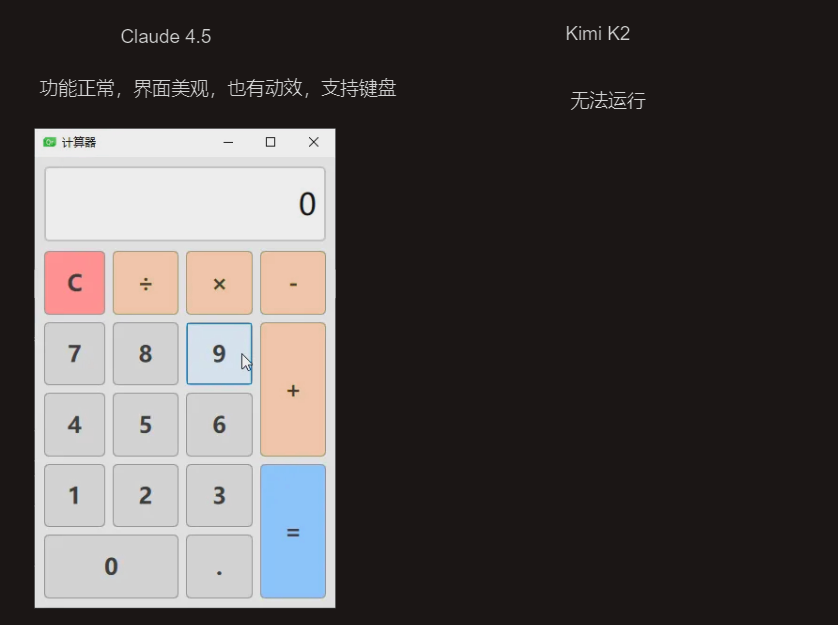
Kimi2 生成了很多东西,但是Bug也一大堆,我手动修复了一下发现界面其实也还可以,不过没有鼠标悬浮的动效,但是也有键盘快捷键
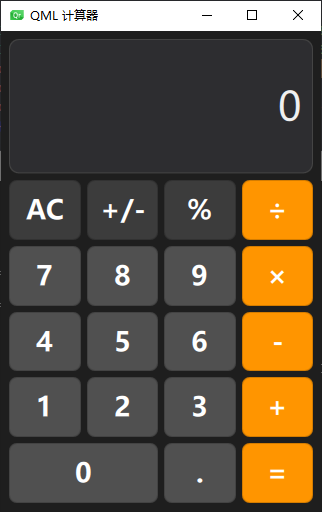
额外内容
虽然 Claude Sonnet 4.5 看起来比 Claude Sonnet 4 美观性上差了一点,但是我点进代码之后发现实际上非常惊人,Sonnet 4 一共有 510 行,而 Sonnet 4.5 只有 181 行,Sonnet 4.5 在编程的时候真的会用到 QML 的特性让我非常震惊,他定义了一个自定义的组件CalcButton,以此大幅减少了代码量,而其他的模型,包括 Qwen3, Kimi K2, GLM 4.6, Sonnet 4都还是在用 Button,所以代码量飙升
总结
虽然 GLM 4.6 号称是对其了 Claude sonnet 4,但是在 QML 领域可能是缺乏训练数据,实际效果很明显比不上 Claude sonnet 4,除此之外大部分模型的功能都能正常实现,但是界面比较美观的只有 Claude 家的模型和 Kimi K2,不过 Kimi K2 功能有问题,没法运行。
期待未来国产模型越来越强,也期待年底的 GLM 5 能够达到或者超越 Sonnet 4
生成代码一览
Sonnet 4.5
import QtQuick 2.15
import QtQuick.Controls 2.15
import QtQuick.Layouts 1.15

ApplicationWindow {
    visible: true
    width: 320
    height: 480
    title: "计算器"

    property string displayText: "0"
    property real firstNumber: 0
    property string currentOperator: ""
    property bool startNewNumber: true

    Rectangle {
        anchors.fill: parent
        color: "#f0f0f0"

        ColumnLayout {
            anchors.fill: parent
            anchors.margins: 10
            spacing: 10

            // 显示屏
            Rectangle {
                Layout.fillWidth: true
                Layout.preferredHeight: 80
                color: "white"
                border.color: "#cccccc"
                border.width: 2
                radius: 5

                Text {
                    anchors.fill: parent
                    anchors.margins: 10
                    text: displayText
                    font.pixelSize: 32
                    horizontalAlignment: Text.AlignRight
                    verticalAlignment: Text.AlignVCenter
                    elide: Text.ElideLeft
                }
            }

            // 按钮网格
            GridLayout {
                Layout.fillWidth: true
                Layout.fillHeight: true
                columns: 4
                rowSpacing: 8
                columnSpacing: 8

                // 第一行:C, ÷, ×, -
                CalcButton { text: "C"; color: "#ff9999"; onClicked: clear() }
                CalcButton { text: "÷"; color: "#ffd699"; onClicked: operatorClicked("÷") }
                CalcButton { text: "×"; color: "#ffd699"; onClicked: operatorClicked("×") }
                CalcButton { text: "-"; color: "#ffd699"; onClicked: operatorClicked("-") }

                // 第二行:7, 8, 9, +
                CalcButton { text: "7"; onClicked: numberClicked("7") }
                CalcButton { text: "8"; onClicked: numberClicked("8") }
                CalcButton { text: "9"; onClicked: numberClicked("9") }
                CalcButton { text: "+"; color: "#ffd699"; Layout.rowSpan: 2; onClicked: operatorClicked("+") }

                // 第三行:4, 5, 6
                CalcButton { text: "4"; onClicked: numberClicked("4") }
                CalcButton { text: "5"; onClicked: numberClicked("5") }
                CalcButton { text: "6"; onClicked: numberClicked("6") }

                // 第四行:1, 2, 3, =
                CalcButton { text: "1"; onClicked: numberClicked("1") }
                CalcButton { text: "2"; onClicked: numberClicked("2") }
                CalcButton { text: "3"; onClicked: numberClicked("3") }
                CalcButton { text: "="; color: "#99ccff"; Layout.rowSpan: 2; onClicked: calculate() }

                // 第五行:0, .
                CalcButton { text: "0"; Layout.columnSpan: 2; onClicked: numberClicked("0") }
                CalcButton { text: "."; onClicked: numberClicked(".") }
            }
        }
    }

    // 数字按钮点击处理
    function numberClicked(num) {
        if (startNewNumber) {
            if (num === ".") {
                displayText = "0."
            } else {
                displayText = num
            }
            startNewNumber = false
        } else {
            if (num === "." && displayText.indexOf(".") !== -1) {
                return // 已有小数点,不再添加
            }
            displayText = displayText === "0" && num !== "." ? num : displayText + num
        }
    }

    // 运算符按钮点击处理
    function operatorClicked(op) {
        if (currentOperator !== "" && !startNewNumber) {
            calculate()
        }
        firstNumber = parseFloat(displayText)
        currentOperator = op
        startNewNumber = true
    }

    // 计算结果
    function calculate() {
        if (currentOperator === "") return

        var secondNumber = parseFloat(displayText)
        var result = 0

        switch (currentOperator) {
            case "+":
                result = firstNumber + secondNumber
                break
            case "-":
                result = firstNumber - secondNumber
                break
            case "×":
                result = firstNumber * secondNumber
                break
            case "÷":
                if (secondNumber === 0) {
                    displayText = "错误"
                    clear()
                    return
                }
                result = firstNumber / secondNumber
                break
        }

        // 格式化结果(去除不必要的小数位)
        displayText = result.toString()
        if (displayText.indexOf(".") !== -1) {
            var parts = displayText.split(".")
            if (parts[1].length > 8) {
                displayText = result.toFixed(8).replace(/\.?0+$/, "")
            }
        }

        currentOperator = ""
        startNewNumber = true
    }

    // 清除
    function clear() {
        displayText = "0"
        firstNumber = 0
        currentOperator = ""
        startNewNumber = true
    }

    // 自定义按钮组件
    component CalcButton: Button {
        property color color: "#e0e0e0"

        Layout.fillWidth: true
        Layout.fillHeight: true

        background: Rectangle {
            color: parent.pressed ? Qt.darker(parent.color, 1.2) : parent.color
            radius: 5
            border.color: "#999999"
            border.width: 1
        }

        contentItem: Text {
            text: parent.text
            font.pixelSize: 24
            font.bold: true
            horizontalAlignment: Text.AlignHCenter
            verticalAlignment: Text.AlignVCenter
            color: "#333333"
        }
    }
}
Sonnet 4
import QtQuick 2.15
import QtQuick.Controls 2.15
import QtQuick.Layouts 1.15
ApplicationWindow {
id: window
visible: true
width: 320
height: 500
title: "计算器"
property string currentNumber: "0"
property string previousNumber: ""
property string operator: ""
property bool waitingForOperand: false
Rectangle {
anchors.fill: parent
color: "#2b2b2b"
Column {
anchors.fill: parent
anchors.margins: 10
spacing: 10
// 显示屏
Rectangle {
width: parent.width
height: 80
color: "#1a1a1a"
border.color: "#404040"
border.width: 1
radius: 8
Text {
id: display
anchors.right: parent.right
anchors.verticalCenter: parent.verticalCenter
anchors.rightMargin: 15
text: currentNumber
color: "white"
font.pixelSize: 28
font.bold: true
}
}
// 按钮网格
GridLayout {
width: parent.width
height: parent.height - 100
columns: 4
rowSpacing: 8
columnSpacing: 8
// 第一行:C, ±, %, ÷
Button {
Layout.fillWidth: true
Layout.fillHeight: true
text: "C"
onClicked: clear()
background: Rectangle {
color: parent.pressed ? "#666666" : "#808080"
radius: 8
}
contentItem: Text {
text: parent.text
color: "black"
font.pixelSize: 20
font.bold: true
horizontalAlignment: Text.AlignHCenter
verticalAlignment: Text.AlignVCenter
}
}
Button {
Layout.fillWidth: true
Layout.fillHeight: true
text: "±"
onClicked: toggleSign()
background: Rectangle {
color: parent.pressed ? "#666666" : "#808080"
radius: 8
}
contentItem: Text {
text: parent.text
color: "black"
font.pixelSize: 20
font.bold: true
horizontalAlignment: Text.AlignHCenter
verticalAlignment: Text.AlignVCenter
}
}
Button {
Layout.fillWidth: true
Layout.fillHeight: true
text: "%"
onClicked: percentage()
background: Rectangle {
color: parent.pressed ? "#666666" : "#808080"
radius: 8
}
contentItem: Text {
text: parent.text
color: "black"
font.pixelSize: 20
font.bold: true
horizontalAlignment: Text.AlignHCenter
verticalAlignment: Text.AlignVCenter
}
}
Button {
Layout.fillWidth: true
Layout.fillHeight: true
text: "÷"
onClicked: setOperator("/")
background: Rectangle {
color: parent.pressed ? "#cc6600" : "#ff9500"
radius: 8
}
contentItem: Text {
text: parent.text
color: "white"
font.pixelSize: 24
font.bold: true
horizontalAlignment: Text.AlignHCenter
verticalAlignment: Text.AlignVCenter
}
}
// 第二行:7, 8, 9, ×
Button {
Layout.fillWidth: true
Layout.fillHeight: true
text: "7"
onClicked: inputNumber("7")
background: Rectangle {
color: parent.pressed ? "#666666" : "#404040"
radius: 8
}
contentItem: Text {
text: parent.text
color: "white"
font.pixelSize: 24
font.bold: true
horizontalAlignment: Text.AlignHCenter
verticalAlignment: Text.AlignVCenter
}
}
Button {
Layout.fillWidth: true
Layout.fillHeight: true
text: "8"
onClicked: inputNumber("8")
background: Rectangle {
color: parent.pressed ? "#666666" : "#404040"
radius: 8
}
contentItem: Text {
text: parent.text
color: "white"
font.pixelSize: 24
font.bold: true
horizontalAlignment: Text.AlignHCenter
verticalAlignment: Text.AlignVCenter
}
}
Button {
Layout.fillWidth: true
Layout.fillHeight: true
text: "9"
onClicked: inputNumber("9")
background: Rectangle {
color: parent.pressed ? "#666666" : "#404040"
radius: 8
}
contentItem: Text {
text: parent.text
color: "white"
font.pixelSize: 24
font.bold: true
horizontalAlignment: Text.AlignHCenter
verticalAlignment: Text.AlignVCenter
}
}
Button {
Layout.fillWidth: true
Layout.fillHeight: true
text: "×"
onClicked: setOperator("*")
background: Rectangle {
color: parent.pressed ? "#cc6600" : "#ff9500"
radius: 8
}
contentItem: Text {
text: parent.text
color: "white"
font.pixelSize: 24
font.bold: true
horizontalAlignment: Text.AlignHCenter
verticalAlignment: Text.AlignVCenter
}
}
// 第三行:4, 5, 6, -
Button {
Layout.fillWidth: true
Layout.fillHeight: true
text: "4"
onClicked: inputNumber("4")
background: Rectangle {
color: parent.pressed ? "#666666" : "#404040"
radius: 8
}
contentItem: Text {
text: parent.text
color: "white"
font.pixelSize: 24
font.bold: true
horizontalAlignment: Text.AlignHCenter
verticalAlignment: Text.AlignVCenter
}
}
Button {
Layout.fillWidth: true
Layout.fillHeight: true
text: "5"
onClicked: inputNumber("5")
background: Rectangle {
color: parent.pressed ? "#666666" : "#404040"
radius: 8
}
contentItem: Text {
text: parent.text
color: "white"
font.pixelSize: 24
font.bold: true
horizontalAlignment: Text.AlignHCenter
verticalAlignment: Text.AlignVCenter
}
}
Button {
Layout.fillWidth: true
Layout.fillHeight: true
text: "6"
onClicked: inputNumber("6")
background: Rectangle {
color: parent.pressed ? "#666666" : "#404040"
radius: 8
}
contentItem: Text {
text: parent.text
color: "white"
font.pixelSize: 24
font.bold: true
horizontalAlignment: Text.AlignHCenter
verticalAlignment: Text.AlignVCenter
}
}
Button {
Layout.fillWidth: true
Layout.fillHeight: true
text: "-"
onClicked: setOperator("-")
background: Rectangle {
color: parent.pressed ? "#cc6600" : "#ff9500"
radius: 8
}
contentItem: Text {
text: parent.text
color: "white"
font.pixelSize: 28
font.bold: true
horizontalAlignment: Text.AlignHCenter
verticalAlignment: Text.AlignVCenter
}
}
// 第四行:1, 2, 3, +
Button {
Layout.fillWidth: true
Layout.fillHeight: true
text: "1"
onClicked: inputNumber("1")
background: Rectangle {
color: parent.pressed ? "#666666" : "#404040"
radius: 8
}
contentItem: Text {
text: parent.text
color: "white"
font.pixelSize: 24
font.bold: true
horizontalAlignment: Text.AlignHCenter
verticalAlignment: Text.AlignVCenter
}
}
Button {
Layout.fillWidth: true
Layout.fillHeight: true
text: "2"
onClicked: inputNumber("2")
background: Rectangle {
color: parent.pressed ? "#666666" : "#404040"
radius: 8
}
contentItem: Text {
text: parent.text
color: "white"
font.pixelSize: 24
font.bold: true
horizontalAlignment: Text.AlignHCenter
verticalAlignment: Text.AlignVCenter
}
}
Button {
Layout.fillWidth: true
Layout.fillHeight: true
text: "3"
onClicked: inputNumber("3")
background: Rectangle {
color: parent.pressed ? "#666666" : "#404040"
radius: 8
}
contentItem: Text {
text: parent.text
color: "white"
font.pixelSize: 24
font.bold: true
horizontalAlignment: Text.AlignHCenter
verticalAlignment: Text.AlignVCenter
}
}
Button {
Layout.fillWidth: true
Layout.fillHeight: true
text: "+"
onClicked: setOperator("+")
background: Rectangle {
color: parent.pressed ? "#cc6600" : "#ff9500"
radius: 8
}
contentItem: Text {
text: parent.text
color: "white"
font.pixelSize: 24
font.bold: true
horizontalAlignment: Text.AlignHCenter
verticalAlignment: Text.AlignVCenter
}
}
// 第五行:0 (占两列), ., =
Button {
Layout.fillWidth: true
Layout.fillHeight: true
Layout.columnSpan: 2
text: "0"
onClicked: inputNumber("0")
background: Rectangle {
color: parent.pressed ? "#666666" : "#404040"
radius: 8
}
contentItem: Text {
text: parent.text
color: "white"
font.pixelSize: 24
font.bold: true
horizontalAlignment: Text.AlignHCenter
verticalAlignment: Text.AlignVCenter
}
}
Button {
Layout.fillWidth: true
Layout.fillHeight: true
text: "."
onClicked: inputDecimal()
background: Rectangle {
color: parent.pressed ? "#666666" : "#404040"
radius: 8
}
contentItem: Text {
text: parent.text
color: "white"
font.pixelSize: 24
font.bold: true
horizontalAlignment: Text.AlignHCenter
verticalAlignment: Text.AlignVCenter
}
}
Button {
Layout.fillWidth: true
Layout.fillHeight: true
text: "="
onClicked: calculate()
background: Rectangle {
color: parent.pressed ? "#cc6600" : "#ff9500"
radius: 8
}
contentItem: Text {
text: parent.text
color: "white"
font.pixelSize: 24
font.bold: true
horizontalAlignment: Text.AlignHCenter
verticalAlignment: Text.AlignVCenter
}
}
}
}
}
// 计算器功能函数
function inputNumber(num) {
if (waitingForOperand) {
currentNumber = num
waitingForOperand = false
} else {
currentNumber = currentNumber === "0" ? num : currentNumber + num
}
}
function inputDecimal() {
if (waitingForOperand) {
currentNumber = "0."
waitingForOperand = false
} else if (currentNumber.indexOf(".") === -1) {
currentNumber += "."
}
}
function clear() {
currentNumber = "0"
previousNumber = ""
operator = ""
waitingForOperand = false
}
function toggleSign() {
if (currentNumber !== "0") {
currentNumber = currentNumber.charAt(0) === "-" ?
currentNumber.slice(1) :
"-" + currentNumber
}
}
function percentage() {
currentNumber = (parseFloat(currentNumber) / 100).toString()
}
function setOperator(nextOperator) {
var inputValue = parseFloat(currentNumber)
if (previousNumber === "") {
previousNumber = currentNumber
} else if (operator !== "") {
var prevValue = parseFloat(previousNumber)
var result = performCalculation(prevValue, inputValue, operator)
currentNumber = result.toString()
previousNumber = currentNumber
}
waitingForOperand = true
operator = nextOperator
}
function calculate() {
var inputValue = parseFloat(currentNumber)
if (previousNumber !== "" && operator !== "") {
var prevValue = parseFloat(previousNumber)
var result = performCalculation(prevValue, inputValue, operator)
currentNumber = result.toString()
previousNumber = ""
operator = ""
waitingForOperand = true
}
}
function performCalculation(firstOperand, secondOperand, operator) {
switch (operator) {
case "+":
return firstOperand + secondOperand
case "-":
return firstOperand - secondOperand
case "*":
return firstOperand * secondOperand
case "/":
if (secondOperand === 0) {
return "错误"
}
return firstOperand / secondOperand
default:
return secondOperand
}
}
}
Gemini 2.5 Pro
import QtQuick
import QtQuick.Controls
import QtQuick.Layouts

Window {
    id: root
    width: 320
    height: 480
    visible: true
    title: qsTr("Calculator")
    color: "#f0f0f0"

    // Function to perform calculation
    function calculate() {
        try {
            // A simple validation to prevent unsafe eval, not exhaustive
            if (/^[0-9+\-*/.() ]+$/.test(display.text)) {
                var result = eval(display.text);
                display.text = String(result);
            } else {
                display.text = "Error";
            }
        } catch (e) {
            display.text = "Error";
        }
    }

    ColumnLayout {
        anchors.fill: parent
        anchors.margins: 10
        spacing: 5

        // Display
        Text {
            id: display
            Layout.fillWidth: true
            Layout.preferredHeight: 80
            text: "0"
            font.pixelSize: 48
            horizontalAlignment: Text.AlignRight
            verticalAlignment: Text.AlignVCenter
            background: Rectangle {
                color: "white"
                border.color: "gray"
                radius: 5
            }
            clip: true
        }

        // Buttons
        GridLayout {
            Layout.fillWidth: true
            Layout.fillHeight: true
            columns: 4

            readonly property var buttons: [
                "C", "(", ")", "/",
                "7", "8", "9", "*",
                "4", "5", "6", "-",
                "1", "2", "3", "+",
                "0", ".", "=", ""
            ]

            Repeater {
                model: parent.buttons
                delegate: Button {
                    text: modelData
                    font.pixelSize: 24
                    Layout.fillWidth: true
                    Layout.fillHeight: true
                    visible: text !== ""

                    background: Rectangle {
                        color: parent.down ? "#d0d0d0" : "#e0e0e0"
                        border.color: "gray"
                        radius: 5
                    }

                    onClicked: {
                        if (text === "C") {
                            display.text = "0";
                        } else if (text === "=") {
                            calculate();
                        } else {
                            if (display.text === "0" || display.text === "Error") {
                                display.text = text;
                            } else {
                                display.text += text;
                            }
                        }
                    }

                    // Special styling for operator buttons
                    Component.onCompleted: {
                        if ("/*-+".includes(text)) {
                            background.color = "#f0ad4e";
                        }
                        if (text === "=") {
                            background.color = "#5cb85c";
                        }
                        if (text === "C") {
                            background.color = "#d9534f";
                        }
                    }
                }
            }
        }
    }
}
GLM 4.6
import QtQuick 2.15
import QtQuick.Controls 2.15
import QtQuick.Layouts 1.15

ApplicationWindow {
    id: root
    visible: true
    width: 300
    height: 400
    title: qsTr("QML 计算器")

    // =================================================================
    // 1. 状态和逻辑 (之前在 CalculatorLogic.qml 中的内容)
    // =================================================================

    // --- 状态属性 ---
    // 显示在屏幕上的文本
    property string displayText: "0"
    // 存储前一个操作数
    property string previousValue: ""
    // 存储当前操作符 (+, -, *, /)
    property string currentOperator: ""
    // 标记是否正在等待输入新的操作数
    property bool waitingForOperand: false

    // --- 逻辑函数 ---

    // 处理数字按钮 (0-9)
    function digitPressed(digit) {
        if (waitingForOperand) {
            displayText = digit;
            waitingForOperand = false;
        } else {
            displayText = displayText === "0" ? digit : displayText + digit;
        }
    }

    // 处理操作符按钮 (+, -, *, /)
    function operatorPressed(op) {
        const currentValue = parseFloat(displayText);

        if (previousValue !== "" && currentOperator !== "" && !waitingForOperand) {
            // 如果已经有操作符和前一个值,先进行计算
            calculate();
        }

        previousValue = displayText;
        currentOperator = op;
        waitingForOperand = true;
    }

    // 处理等号按钮 (=)
    function equalsPressed() {
        if (currentOperator === "") return; // 没有操作符,不计算
        calculate();
        currentOperator = ""; // 计算后清除操作符
    }

    // 处理清除按钮 (C)
    function clearPressed() {
        displayText = "0";
        previousValue = "";
        currentOperator = "";
        waitingForOperand = false;
    }

    // 处理小数点按钮 (.)
    function pointPressed() {
        if (waitingForOperand) {
            displayText = "0.";
            waitingForOperand = false;
        } else if (displayText.indexOf('.') === -1) {
            displayText += ".";
        }
    }

    // 处理正负号切换 (+/-)
    function signPressed() {
        displayText = (parseFloat(displayText) * -1).toString();
    }

    // --- 内部计算函数 ---
    function calculate() {
        const prev = parseFloat(previousValue);
        const current = parseFloat(displayText);
        let result = 0;

        switch (currentOperator) {
            case '+':
                result = prev + current;
                break;
            case '-':
                result = prev - current;
                break;
            case '*':
                result = prev * current;
                break;
            case '/':
                if (current === 0) {
                    displayText = "Error";
                    waitingForOperand = true;
                    return;
                }
                result = prev / current;
                break;
        }

        // 处理浮点数精度问题,并转换为字符串
        displayText = Number.isInteger(result) ? result.toString() : result.toFixed(8).replace(/\.?0+$/, "");
        waitingForOperand = true;
    }


    // =================================================================
    // 2. 用户界面 (之前在 main.qml 中的内容)
    // =================================================================

    // 使用垂直布局来组织显示屏和按钮区域
    ColumnLayout {
        anchors.fill: parent
        anchors.margins: 10
        spacing: 10

        // 显示屏
        TextField {
            id: display
            Layout.fillWidth: true
            Layout.preferredHeight: 60
            // 直接绑定到根对象的 displayText 属性
            text: root.displayText
            horizontalAlignment: TextInput.AlignRight
            font.pixelSize: 30
            font.bold: true
            readOnly: true
            background: Rectangle {
                color: "#f0f0f0"
                border.color: "#d0d0d0"
            }
        }

        // 按钮区域,使用网格布局
        GridLayout {
            id: grid
            Layout.fillWidth: true
            Layout.fillHeight: true
            columns: 4
            rowSpacing: 10
            columnSpacing: 10

            // 第一行
            Button { text: "C"; Layout.columnSpan: 2; font.pixelSize: 22; onClicked: root.clearPressed(); background: Rectangle { color: "#ff9500"; border.color: "#e68500"; radius: 5; } }
            Button { text: "+/-"; font.pixelSize: 22; onClicked: root.signPressed(); background: Rectangle { color: "#f5f5f5"; border.color: "#b0b0b0"; radius: 5; } }
            Button { text: "/"; font.pixelSize: 22; onClicked: root.operatorPressed(text); background: Rectangle { color: "#ff9500"; border.color: "#e68500"; radius: 5; } }

            // 第二行
            Button { text: "7"; font.pixelSize: 22; onClicked: root.digitPressed(text); background: Rectangle { color: "#f5f5f5"; border.color: "#b0b0b0"; radius: 5; } }
            Button { text: "8"; font.pixelSize: 22; onClicked: root.digitPressed(text); background: Rectangle { color: "#f5f5f5"; border.color: "#b0b0b0"; radius: 5; } }
            Button { text: "9"; font.pixelSize: 22; onClicked: root.digitPressed(text); background: Rectangle { color: "#f5f5f5"; border.color: "#b0b0b0"; radius: 5; } }
            Button { text: "*"; font.pixelSize: 22; onClicked: root.operatorPressed(text); background: Rectangle { color: "#ff9500"; border.color: "#e68500"; radius: 5; } }

            // 第三行
            Button { text: "4"; font.pixelSize: 22; onClicked: root.digitPressed(text); background: Rectangle { color: "#f5f5f5"; border.color: "#b0b0b0"; radius: 5; } }
            Button { text: "5"; font.pixelSize: 22; onClicked: root.digitPressed(text); background: Rectangle { color: "#f5f5f5"; border.color: "#b0b0b0"; radius: 5; } }
            Button { text: "6"; font.pixelSize: 22; onClicked: root.digitPressed(text); background: Rectangle { color: "#f5f5f5"; border.color: "#b0b0b0"; radius: 5; } }
            Button { text: "-"; font.pixelSize: 22; onClicked: root.operatorPressed(text); background: Rectangle { color: "#ff9500"; border.color: "#e68500"; radius: 5; } }

            // 第四行
            Button { text: "1"; font.pixelSize: 22; onClicked: root.digitPressed(text); background: Rectangle { color: "#f5f5f5"; border.color: "#b0b0b0"; radius: 5; } }
            Button { text: "2"; font.pixelSize: 22; onClicked: root.digitPressed(text); background: Rectangle { color: "#f5f5f5"; border.color: "#b0b0b0"; radius: 5; } }
            Button { text: "3"; font.pixelSize: 22; onClicked: root.digitPressed(text); background: Rectangle { color: "#f5f5f5"; border.color: "#b0b0b0"; radius: 5; } }
            Button { text: "+"; font.pixelSize: 22; onClicked: root.operatorPressed(text); background: Rectangle { color: "#ff9500"; border.color: "#e68500"; radius: 5; } }

            // 第五行
            Button { text: "0"; Layout.columnSpan: 2; font.pixelSize: 22; onClicked: root.digitPressed(text); background: Rectangle { color: "#f5f5f5"; border.color: "#b0b0b0"; radius: 5; } }
            Button { text: "."; font.pixelSize: 22; onClicked: root.pointPressed(); background: Rectangle { color: "#f5f5f5"; border.color: "#b0b0b0"; radius: 5; } }
            Button { text: "="; font.pixelSize: 22; onClicked: root.equalsPressed(); background: Rectangle { color: "#ff9500"; border.color: "#e68500"; radius: 5; } }
        }
    }
}
GPT5 Codex
import QtQuick 2.15
import QtQuick.Controls 2.15
import QtQuick.Layouts 1.15

ApplicationWindow {
    width: 320
    height: 480
    visible: true
    title: qsTr("Calculator")

    property string displayText: "0"
    property double previousValue: 0
    property string pendingOperator: ""
    property bool resetDisplay: false

    function resetError() {
        if (displayText === "Error")
            displayText = "0"
    }

    function handleNumber(digit) {
        resetError()
        if (resetDisplay || displayText === "0") {
            displayText = digit
        } else {
            displayText += digit
        }
        resetDisplay = false
    }

    function handleDecimal() {
        resetError()
        if (resetDisplay) {
            displayText = "0."
            resetDisplay = false
            return
        }
        if (displayText.indexOf(".") === -1)
            displayText += "."
    }

    function handleToggleSign() {
        resetError()
        if (displayText === "0")
            return
        if (displayText.charAt(0) === "-")
            displayText = displayText.slice(1)
        else
            displayText = "-" + displayText
    }

    function handleBackspace() {
        resetError()
        if (resetDisplay) {
            displayText = "0"
            resetDisplay = false
            return
        }
        if (displayText.length <= 1 || (displayText.length === 2 && displayText.startsWith("-"))) {
            displayText = "0"
        } else {
            displayText = displayText.slice(0, -1)
        }
    }

    function applyOperator(op) {
        resetError()
        var current = parseFloat(displayText)
        if (pendingOperator !== "")
            executePending(current)
        else
            previousValue = current
        pendingOperator = op
        resetDisplay = true
    }

    function executePending(current) {
        switch (pendingOperator) {
        case "+":
            previousValue += current
            break
        case "-":
            previousValue -= current
            break
        case "×":
            previousValue *= current
            break
        case "÷":
            if (current === 0) {
                displayText = "Error"
                previousValue = 0
                pendingOperator = ""
                resetDisplay = true
                return
            }
            previousValue /= current
            break
        default:
            previousValue = current
        }
        displayText = String(previousValue)
    }

    function handleEquals() {
        if (pendingOperator === "" || displayText === "Error")
            return
        executePending(parseFloat(displayText))
        pendingOperator = ""
        resetDisplay = true
    }

    function handleClear() {
        displayText = "0"
        previousValue = 0
        pendingOperator = ""
        resetDisplay = false
    }

    ColumnLayout {
        anchors.fill: parent
        anchors.margins: 16
        spacing: 12

        Rectangle {
            Layout.fillWidth: true
            Layout.preferredHeight: 80
            color: "#202020"
            radius: 6
            Text {
                anchors.fill: parent
                anchors.margins: 12
                horizontalAlignment: Text.AlignRight
                verticalAlignment: Text.AlignVCenter
                font.pixelSize: 36
                color: "#ffffff"
                text: displayText
            }
        }

        ColumnLayout {
            Layout.fillWidth: true
            Layout.fillHeight: true
            spacing: 8

            RowLayout {
                Layout.fillWidth: true
                spacing: 8
                Button { text: "C"; Layout.fillWidth: true; onClicked: handleClear() }
                Button { text: "÷"; Layout.fillWidth: true; onClicked: applyOperator("÷") }
                Button { text: "×"; Layout.fillWidth: true; onClicked: applyOperator("×") }
                Button { text: "←"; Layout.fillWidth: true; onClicked: handleBackspace() }
            }

            RowLayout {
                Layout.fillWidth: true
                spacing: 8
                Button { text: "7"; Layout.fillWidth: true; onClicked: handleNumber("7") }
                Button { text: "8"; Layout.fillWidth: true; onClicked: handleNumber("8") }
                Button { text: "9"; Layout.fillWidth: true; onClicked: handleNumber("9") }
                Button { text: "-"; Layout.fillWidth: true; onClicked: applyOperator("-") }
            }

            RowLayout {
                Layout.fillWidth: true
                spacing: 8
                Button { text: "4"; Layout.fillWidth: true; onClicked: handleNumber("4") }
                Button { text: "5"; Layout.fillWidth: true; onClicked: handleNumber("5") }
                Button { text: "6"; Layout.fillWidth: true; onClicked: handleNumber("6") }
                Button { text: "+"; Layout.fillWidth: true; onClicked: applyOperator("+") }
            }

            RowLayout {
                Layout.fillWidth: true
                spacing: 8
                Button { text: "1"; Layout.fillWidth: true; onClicked: handleNumber("1") }
                Button { text: "2"; Layout.fillWidth: true; onClicked: handleNumber("2") }
                Button { text: "3"; Layout.fillWidth: true; onClicked: handleNumber("3") }
                Button { text: "="; Layout.fillWidth: true; onClicked: handleEquals() }
            }

            RowLayout {
                Layout.fillWidth: true
                spacing: 8
                Button { text: "+/-"; Layout.fillWidth: true; onClicked: handleToggleSign() }
                Button { text: "0"; Layout.fillWidth: true; onClicked: handleNumber("0") }
                Button { text: "."; Layout.fillWidth: true; onClicked: handleDecimal() }
                Button { text: "="; Layout.fillWidth: true; onClicked: handleEquals() }
            }
        }
    }
}
GPT5 mini
import QtQuick 2.15
import QtQuick.Controls 2.15
import QtQuick.Layouts 1.15

ApplicationWindow {
    id: win
    width: 360
    height: 520
    visible: true
    title: qsTr("计算器 GPT5Mini")

    property string expr: ""
    property string displayText: expr === "" ? "0" : expr

    ColumnLayout {
        anchors.fill: parent
        anchors.margins: 12
        spacing: 12

        Rectangle {
            id: displayBg
            Layout.fillWidth: true
            height: 100
            color: "#222"
            radius: 8

            Text {
                id: display
                anchors.right: parent.right
                anchors.rightMargin: 12
                anchors.verticalCenter: parent.verticalCenter
                text: win.displayText
                font.pixelSize: 32
                color: "#fff"
                horizontalAlignment: Text.AlignRight
                verticalAlignment: Text.AlignVCenter
                elide: Text.ElideLeft
            }
        }

        // 按钮区
        GridLayout {
            id: grid
            Layout.fillWidth: true
            Layout.fillHeight: true
            columns: 4
            rowSpacing: 8
            columnSpacing: 8

            // 按钮标签顺序
            property var keys: [
                { label: "C", value: "C" }, { label: "⌫", value: "⌫" }, { label: "/", value: "/" }, { label: "*", value: "*" },
                { label: "7", value: "7" }, { label: "8", value: "8" }, { label: "9", value: "9" }, { label: "-", value: "-" },
                { label: "4", value: "4" }, { label: "5", value: "5" }, { label: "6", value: "6" }, { label: "+", value: "+" },
                { label: "1", value: "1" }, { label: "2", value: "2" }, { label: "3", value: "3" }, { label: "=", value: "=" },
                { label: "0", value: "0", columnSpan: 2 }, { label: ".", value: "." }, { label: "=", value: "=" }
            ]

            Repeater {
                model: keys.length
                Button {
                    Layout.preferredHeight: 60
                    Layout.preferredWidth: ((grid.width - (grid.columnSpacing * (grid.columns - 1))) / grid.columns) * Layout.columnSpan

                    text: keys[index].label

                    // 处理 0 占两列的视觉效果
                    Layout.columnSpan: keys[index].columnSpan || 1

                    onClicked: {
                        var key = keys[index].value;
                        if (key === "C") {
                            win.clearAll();
                        } else if (key === "⌫") {
                            win.backspace();
                        } else if (key === "=") {
                            win.compute();
                        } else {
                            win.append(key);
                        }
                    }
                }
            }
        }
    }

    function isOperator(ch) {
        return ch === "+" || ch === "-" || ch === "*" || ch === "/";
    }

    function append(text) {
        // 数字或点或运算符处理
        if (text === ".") {
            // 防止在当前数字中重复小数点
            var lastOp = -1;
            for (var i = expr.length - 1; i >= 0; --i) {
                if (isOperator(expr[i])) { lastOp = i; break; }
            }
            var current = expr.slice(lastOp + 1);
            if (current.indexOf(".") !== -1) return;
            if (current === "") expr += "0";
            expr += ".";
        } else if (isOperator(text)) {
            if (expr === "") {
                // 允许以负号开始
                if (text === "-") expr = "-";
                return;
            }
            var last = expr[expr.length - 1];
            if (isOperator(last)) {
                // 连续运算符则替换(允许 - 作为负号)
                if (text === "-" && last !== "-") {
                    expr += "-";
                } else {
                    expr = expr.slice(0, -1) + text;
                }
            } else {
                expr += text;
            }
        } else { // 数字
            expr += text;
        }
        displayText = expr === "" ? "0" : expr;
    }

    function backspace() {
        if (expr.length > 0) {
            expr = expr.slice(0, -1);
            displayText = expr === "" ? "0" : expr;
        }
    }

    function clearAll() {
        expr = "";
        displayText = "0";
    }

    function compute() {
        if (expr === "") return;
        // 避免末尾是运算符
        var last = expr[expr.length - 1];
        if (isOperator(last)) expr = expr.slice(0, -1);

        try {
            // 使用 Function 安全地计算表达式
            var result = Function('"use strict"; return (' + expr + ')')();
            if (result === Infinity || result === -Infinity || isNaN(result)) {
                displayText = "错误";
                expr = "";
                return;
            }
            // 格式化:去掉末尾多余的 0
            if (typeof result === "number") {
                // 保留最多 10 位小数,去掉尾部 0
                var fixed = parseFloat(result.toFixed(10)).toString();
                displayText = fixed;
                expr = fixed;
            } else {
                displayText = String(result);
                expr = displayText;
            }
        } catch (e) {
            displayText = "错误";
            expr = "";
        }
    }
}
Kimi K2
import QtQuick 2.15
import QtQuick.Controls 2.15
import QtQuick.Layouts 1.15

ApplicationWindow {
    id: root
    visible: true
    width: 320; height: 480
    minimumWidth: 280; minimumHeight: 420
    title: qsTr("QML 计算器")
    color: "#1e1e1e"

    property string expr: ""          // 当前表达式
    property bool justResult: false   // 刚算完结果,下次输入清空

    // 主布局
    ColumnLayout {
        anchors.fill: parent
        anchors.margins: 8
        spacing: 6

        // 显示屏
        Rectangle {
            Layout.fillWidth: true
            Layout.preferredHeight: root.height * 0.28
            color: "#2d2d30"
            radius: 10
            border.color: "#444"
            border.width: 1

            Text {
                id: display
                anchors {
                    right: parent.right; rightMargin: 12
                    verticalCenter: parent.verticalCenter
                }
                text: root.expr === "" ? "0" : root.expr
                font.pixelSize: Math.max(28, root.width / 8)
                color: "#f0f0f0"
            }
        }

        // 按钮区
        GridLayout {
            Layout.fillWidth: true
            Layout.fillHeight: true
            columns: 4
            rowSpacing: 6; columnSpacing: 6

            // 按钮数据:文字、角色、颜色
            readonly property var data: [
                // row 0
                {txt:"AC", role:"clear", bg:"#3c3c3c"},
                {txt:"+/-",role:"sign", bg:"#3c3c3c"},
                {txt:"%", role:"percent",bg:"#3c3c3c"},
                {txt:"÷", role:"op",    bg:"#ff9500"},
                // row 1
                {txt:"7", role:"num"},
                {txt:"8", role:"num"},
                {txt:"9", role:"num"},
                {txt:"×", role:"op",    bg:"#ff9500"},
                // row 2
                {txt:"4", role:"num"},
                {txt:"5", role:"num"},
                {txt:"6", role:"num"},
                {txt:"-", role:"op",    bg:"#ff9500"},
                // row 3
                {txt:"1", role:"num"},
                {txt:"2", role:"num"},
                {txt:"3", role:"num"},
                {txt:"+", role:"op",    bg:"#ff9500"},
                // row 4
                {txt:"0", role:"num", wide:true},
                {txt:".", role:"dot"},
                {txt:"=", role:"eq",    bg:"#ff9500"}
            ]

            Repeater {
                model: parent.data
                delegate: Rectangle {
                    color: modelData.bg || "#505050"
                    radius: 8
                    Layout.fillHeight: true
                    Layout.fillWidth: true
                    Layout.columnSpan: modelData.wide ? 2 : 1
                    border.width: 0.5
                    border.color: Qt.darker(color, 1.2)

                    Text {
                        anchors.centerIn: parent
                        text: modelData.txt
                        font { pixelSize: root.width / 12; bold: true }
                        color: "white"
                    }

                    MouseArea {
                        anchors.fill: parent
                        onClicked: handle(modelData)
                        onPressed: parent.scale = 0.92
                        onReleased: parent.scale = 1.0
                    }
                }
            }
        }
    }

    // 统一按键分发
    function handle(btn) {
        const r = btn.role, t = btn.txt
        if (r === "num")   append(t)
        else if (r === "op") appendOp(t)
        else if (r === "dot") appendDot()
        else if (r === "eq")  calculate()
        else if (r === "clear") { expr = ""; justResult = false }
        else if (r === "sign")  toggleSign()
        else if (r === "percent") percent()
    }

    function append(ch) {
        if (justResult) { expr = ""; justResult = false }
        expr += ch
    }

    function appendOp(op) {
        if (expr === "") return
        const last = expr.slice(-1)
        if ("+-×÷".indexOf(last) !== -1) expr = expr.slice(0, -1)
        expr += op
        justResult = false
    }

    function appendDot() {
        if (justResult) { expr = "0."; justResult = false; return }
        // 防止重复小数点
        const tokens = expr.split(/[\+\-\×÷]/)
        const cur = tokens[tokens.length - 1]
        if (cur.indexOf(".") === -1) expr += "."
    }

    function toggleSign() {
        if (expr === "") return
        const m = expr.match(/(.*)([\+\-\×÷])([^\+\-\×÷]*)$/)
        if (m) {
            const num = parseFloat(m[3])
            expr = m[1] + m[2] + (num * -1).toString()
        } else {
            expr = (parseFloat(expr) * -1).toString()
        }
    }

    function percent() {
        if (expr === "") return
        const last = parseFloat(expr.split(/[\+\-\×÷]/).pop())
        expr = expr.slice(0, -last.toString().length) + (last * 0.01).toString()
    }

    function calculate() {
        if (expr === "") return
        // 替换符号 → JS 可识别
        let js = expr.replace("×", "*").replace("÷", "/")
        try {
            const res = Number(eval(js).toFixed(8))  // 防浮点误差
            expr = res.toString()
            justResult = true
        } catch(e) {
            expr = "Error"
            justResult = true
        }
    }

    // 键盘支持
    Keys.onPressed: {
        const k = event.key
        if (k >= Qt.Key_0 && k <= Qt.Key_9) append((k - Qt.Key_0).toString())
        else if (k === Qt.Key_Plus)  appendOp("+")
        else if (k === Qt.Key_Minus) appendOp("-")
        else if (k === Qt.Key_Asterisk || k === Qt.Key_multiply) appendOp("×")
        else if (k === Qt.Key_Slash) appendOp("÷")
        else if (k === Qt.Key_Period || k === Qt.Key_Comma) appendDot()
        else if (k === Qt.Key_Return || k === Qt.Key_Equal) calculate()
        else if (k === Qt.Key_Escape) { expr = ""; justResult = false }
        else if (k === Qt.Key_Backspace) {
            if (!justResult && expr.length) expr = expr.slice(0, -1)
        }
    }
    focus: true
}
Qwen3 Max
import QtQuick 2.15
import QtQuick.Controls 2.15
import QtQuick.Layouts 1.15

ApplicationWindow {
    id: window
    visible: true
    width: 300
    height: 450
    title: "QML Calculator"

    property string currentInput: "0"
    property real lastNumber: 0
    property string operator: ""
    property bool waitingForOperand: false

    function clear() {
        currentInput = "0"
        lastNumber = 0
        operator = ""
        waitingForOperand = false
    }

    function inputDigit(digit) {
        if (waitingForOperand) {
            currentInput = "0"
            waitingForOperand = false
        }
        if (currentInput === "0") {
            currentInput = digit
        } else {
            currentInput += digit
        }
    }

    function inputOperator(op) {
        if (operator !== "") {
            calculate()
        } else {
            lastNumber = parseFloat(currentInput)
        }
        operator = op
        waitingForOperand = true
    }

    function calculate() {
        if (operator === "") return

        var current = parseFloat(currentInput)
        var result

        switch (operator) {
        case "+":
            result = lastNumber + current
            break
        case "-":
            result = lastNumber - current
            break
        case "*":
            result = lastNumber * current
            break
        case "/":
            if (current === 0) {
                currentInput = "Error"
                operator = ""
                waitingForOperand = true
                return
            }
            result = lastNumber / current
            break
        default:
            return
        }

        currentInput = (Math.round(result * 1e10) / 1e10).toString()
        operator = ""
        waitingForOperand = true
    }

    function backspace() {
        if (waitingForOperand || currentInput === "0" || currentInput === "Error") return
        currentInput = currentInput.slice(0, -1)
        if (currentInput === "" || currentInput === "-") {
            currentInput = "0"
        }
    }

    ColumnLayout {
        anchors.fill: parent
        anchors.margins: 10
        spacing: 10

        // 显示屏
        Rectangle {
            Layout.fillWidth: true
            height: 80
            radius: 10
            color: "#f0f0f0"
            border.color: "#ccc"
            border.width: 1

            Text {
                anchors.centerIn: parent
                text: currentInput
                font.pixelSize: 32
                horizontalAlignment: Text.AlignRight
                verticalAlignment: Text.AlignVCenter
                elide: Text.ElideRight
                width: parent.width - 20
            }
        }

        // 按钮网格
        GridLayout {
            Layout.fillWidth: true
            Layout.fillHeight: true
            rows: 5
            columns: 4
            columnSpacing: 8
            rowSpacing: 8

            // 第一行
            Button {
                text: "C"; font.pixelSize: 20
                onClicked: clear()
            }
            Button {
                text: "←"; font.pixelSize: 20
                onClicked: backspace()
            }
            Button {
                text: "÷"; font.pixelSize: 20
                onClicked: inputOperator("/")
            }
            Button {
                text: "×"; font.pixelSize: 20
                onClicked: inputOperator("*")
            }

            // 第二行
            Button {
                text: "7"; font.pixelSize: 20
                onClicked: inputDigit("7")
            }
            Button {
                text: "8"; font.pixelSize: 20
                onClicked: inputDigit("8")
            }
            Button {
                text: "9"; font.pixelSize: 20
                onClicked: inputDigit("9")
            }
            Button {
                text: "−"; font.pixelSize: 20
                onClicked: inputOperator("-")
            }

            // 第三行
            Button {
                text: "4"; font.pixelSize: 20
                onClicked: inputDigit("4")
            }
            Button {
                text: "5"; font.pixelSize: 20
                onClicked: inputDigit("5")
            }
            Button {
                text: "6"; font.pixelSize: 20
                onClicked: inputDigit("6")
            }
            Button {
                text: "+"; font.pixelSize: 20
                onClicked: inputOperator("+")
            }

            // 第四行
            Button {
                text: "1"; font.pixelSize: 20
                onClicked: inputDigit("1")
            }
            Button {
                text: "2"; font.pixelSize: 20
                onClicked: inputDigit("2")
            }
            Button {
                text: "3"; font.pixelSize: 20
                onClicked: inputDigit("3")
            }
            Button {
                Layout.rowSpan: 2
                text: "="; font.pixelSize: 20
                onClicked: calculate()
            }

            // 第五行
            Button {
                text: "0"; font.pixelSize: 20
                onClicked: inputDigit("0")
            }
            Button {
                text: "."; font.pixelSize: 20
                onClicked: {
                    if (waitingForOperand) {
                        currentInput = "0"
                        waitingForOperand = false
                    }
                    if (!currentInput.includes(".")) {
                        currentInput += "."
                    }
                }
            }
            // 空占位(因为 = 占两行,这里第5行第3列留空)
            Item { }
        }
    }
}
更多推荐
 7
7 0
0- 0


 已为社区贡献1条内容

所有评论(0)