
NS3仿真 third
·
1. 头文件和命名空间
#include "ns3/applications-module.h"  // 应用层模块
#include "ns3/core-module.h"           // 核心模块
#include "ns3/csma-module.h"           // CSMA(以太网)模块
#include "ns3/internet-module.h"       // 网络层模块
#include "ns3/mobility-module.h"       // 移动性模块
#include "ns3/network-module.h"        // 网络基础模块
#include "ns3/point-to-point-module.h" // 点对点链路模块
#include "ns3/ssid.h"                  // WiFi SSID定义
#include "ns3/yans-wifi-helper.h"      // WiFi物理层助手

using namespace ns3;  // 使用ns3命名空间
2. 日志组件定义
NS_LOG_COMPONENT_DEFINE("ThirdScriptExample");
// 定义日志组件名称,用于调试输出
3. CourseChange回调函数
void CourseChange(std::string context, Ptr<const MobilityModel> model)
{
    Vector position = model->GetPosition();  // 获取当前位置
    NS_LOG_UNCOND(context << " x = " << position.x << ", y = " << position.y);
    // 无条件输出位置变化信息
}
// 这是一个回调函数,当节点位置改变时被调用
4. 主函数开始和参数处理
int main(int argc, char* argv[])
{
    bool verbose = true;      // 是否启用详细输出
    uint32_t nCsma = 3;       // CSMA节点数(默认3个)
    uint32_t nWifi = 3;       // WiFi STA节点数(默认3个)
    bool tracing = false;     // 是否启用pcap跟踪

    CommandLine cmd(__FILE__);
    // 添加命令行参数支持
    cmd.AddValue("nCsma", "Number of \"extra\" CSMA nodes/devices", nCsma);
    cmd.AddValue("nWifi", "Number of wifi STA devices", nWifi);
    cmd.AddValue("verbose", "Tell echo applications to log if true", verbose);
    cmd.AddValue("tracing", "Enable pcap tracing", tracing);
    cmd.Parse(argc, argv);  // 解析命令行参数
5. 参数验证
if (nWifi > 18)  // WiFi节点数限制
{
    std::cout << "nWifi should be 18 or less..." << std::endl;
    return 1;  // 超过18个退出程序
}
// 限制是因为网格位置分配器的配置限制
6. 日志设置
if (verbose)
{
    LogComponentEnable("UdpEchoClientApplication", LOG_LEVEL_INFO);
    LogComponentEnable("UdpEchoServerApplication", LOG_LEVEL_INFO);
}
// 启用UDP回声应用的日志输出
7. 点对点链路创建
NodeContainer p2pNodes;
p2pNodes.Create(2);  // 创建2个P2P节点(节点ID: 0, 1)

PointToPointHelper pointToPoint;
pointToPoint.SetDeviceAttribute("DataRate", StringValue("5Mbps"));  // 数据率
pointToPoint.SetChannelAttribute("Delay", StringValue("2ms"));      // 延迟

NetDeviceContainer p2pDevices;
p2pDevices = pointToPoint.Install(p2pNodes);  // 安装P2P设备和信道
8. CSMA网络创建
NodeContainer csmaNodes;
csmaNodes.Add(p2pNodes.Get(1));  // 添加P2P的第2个节点作为CSMA的一部分
csmaNodes.Create(nCsma);         // 创建额外的CSMA节点(节点ID: 2, 3, 4)

CsmaHelper csma;
csma.SetChannelAttribute("DataRate", StringValue("100Mbps"));  // 数据率
csma.SetChannelAttribute("Delay", TimeValue(NanoSeconds(6560))); // 延迟

NetDeviceContainer csmaDevices;
csmaDevices = csma.Install(csmaNodes);  // 安装CSMA设备和信道
9. WiFi网络创建
NodeContainer wifiStaNodes;
wifiStaNodes.Create(nWifi);  // 创建WiFi STA节点(节点ID: 5, 6, 7)
NodeContainer wifiApNode = p2pNodes.Get(0);  // AP使用P2P的第一个节点

YansWifiChannelHelper channel = YansWifiChannelHelper::Default();  // 创建默认信道
YansWifiPhyHelper phy;  // 物理层助手
phy.SetChannel(channel.Create());  // 设置信道

WifiMacHelper mac;      // MAC层助手
Ssid ssid = Ssid("ns-3-ssid");  // 设置SSID

WifiHelper wifi;  // WiFi助手

// 创建STA设备
mac.SetType("ns3::StaWifiMac", "Ssid", SsidValue(ssid),
            "ActiveProbing", BooleanValue(false));
NetDeviceContainer staDevices = wifi.Install(phy, mac, wifiStaNodes);

// 创建AP设备
mac.SetType("ns3::ApWifiMac", "Ssid", SsidValue(ssid));
NetDeviceContainer apDevices = wifi.Install(phy, mac, wifiApNode);
10. 移动性模型设置
MobilityHelper mobility;

// 设置位置分配器 - 网格布局
mobility.SetPositionAllocator("ns3::GridPositionAllocator",
                              "MinX", DoubleValue(0.0),    // 网格起点X
                              "MinY", DoubleValue(0.0),    // 网格起点Y
                              "DeltaX", DoubleValue(5.0),  // X方向间距
                              "DeltaY", DoubleValue(10.0), // Y方向间距
                              "GridWidth", UintegerValue(3), // 每行节点数
                              "LayoutType", StringValue("RowFirst"));

// STA节点使用随机游走模型
mobility.SetMobilityModel("ns3::RandomWalk2dMobilityModel",
                          "Bounds", RectangleValue(Rectangle(-50, 50, -50, 50)));
mobility.Install(wifiStaNodes);

// AP节点固定位置
mobility.SetMobilityModel("ns3::ConstantPositionMobilityModel");
mobility.Install(wifiApNode);
11. 网络协议栈安装
InternetStackHelper stack;
stack.Install(csmaNodes);      // 为CSMA节点安装协议栈
stack.Install(wifiApNode);     // 为AP节点安装协议栈
stack.Install(wifiStaNodes);   // 为STA节点安装协议栈
12. IP地址分配
Ipv4AddressHelper address;

// P2P链路IP:10.1.1.0/24
address.SetBase("10.1.1.0", "255.255.255.0");
Ipv4InterfaceContainer p2pInterfaces = address.Assign(p2pDevices);

// CSMA网络IP:10.1.2.0/24
address.SetBase("10.1.2.0", "255.255.255.0");
Ipv4InterfaceContainer csmaInterfaces = address.Assign(csmaDevices);

// WiFi网络IP:10.1.3.0/24
address.SetBase("10.1.3.0", "255.255.255.0");
address.Assign(staDevices);  // STA设备
address.Assign(apDevices);   // AP设备
13. 应用层设置
// UDP回声服务器(在最后一个CSMA节点上)
UdpEchoServerHelper echoServer(9);  // 端口9
ApplicationContainer serverApps = echoServer.Install(csmaNodes.Get(nCsma));
serverApps.Start(Seconds(1.0));  // 1秒后启动
serverApps.Stop(Seconds(10.0));  // 10秒后停止

// UDP回声客户端(在最后一个WiFi STA节点上)
UdpEchoClientHelper echoClient(csmaInterfaces.GetAddress(nCsma), 9);
echoClient.SetAttribute("MaxPackets", UintegerValue(1));   // 发送1个包
echoClient.SetAttribute("Interval", TimeValue(Seconds(1.0)));  // 间隔1秒
echoClient.SetAttribute("PacketSize", UintegerValue(1024));    // 包大小1024字节

ApplicationContainer clientApps = echoClient.Install(wifiStaNodes.Get(nWifi - 1));
clientApps.Start(Seconds(2.0));  // 2秒后启动
clientApps.Stop(Seconds(10.0));  // 10秒后停止
14. 路由表和仿真设置
Ipv4GlobalRoutingHelper::PopulateRoutingTables();  // 填充路由表

Simulator::Stop(Seconds(10.0));  // 仿真停止时间10秒

// 如果启用跟踪,生成pcap文件
if (tracing)
{
    phy.SetPcapDataLinkType(WifiPhyHelper::DLT_IEEE802_11_RADIO);
    pointToPoint.EnablePcapAll("third");        // P2P链路pcap
    phy.EnablePcap("third", apDevices.Get(0));  // AP的pcap
    csma.EnablePcap("third", csmaDevices.Get(0), true);  // CSMA的pcap
}
15. CourseChange跟踪设置
std::ostringstream oss;
oss << "/NodeList/" << wifiStaNodes.Get(nWifi - 1)->GetId()
    << "/$ns3::MobilityModel/CourseChange";
Config::Connect(oss.str(), MakeCallback(&CourseChange));
// 连接最后一个WiFi STA节点的移动模型变化事件到CourseChange回调函数
16. 仿真运行和清理
Simulator::Run();      // 开始仿真
Simulator::Destroy();  // 清理仿真环境
return 0;              // 程序正常结束
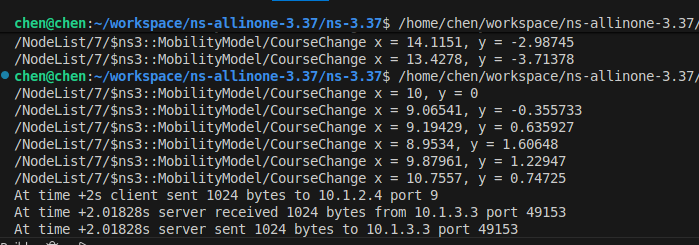
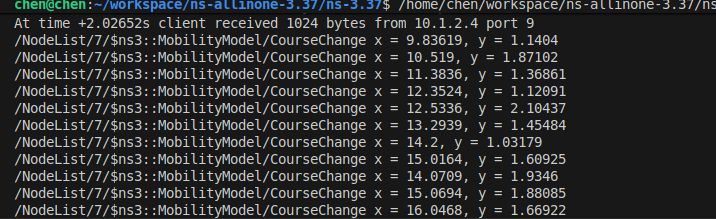
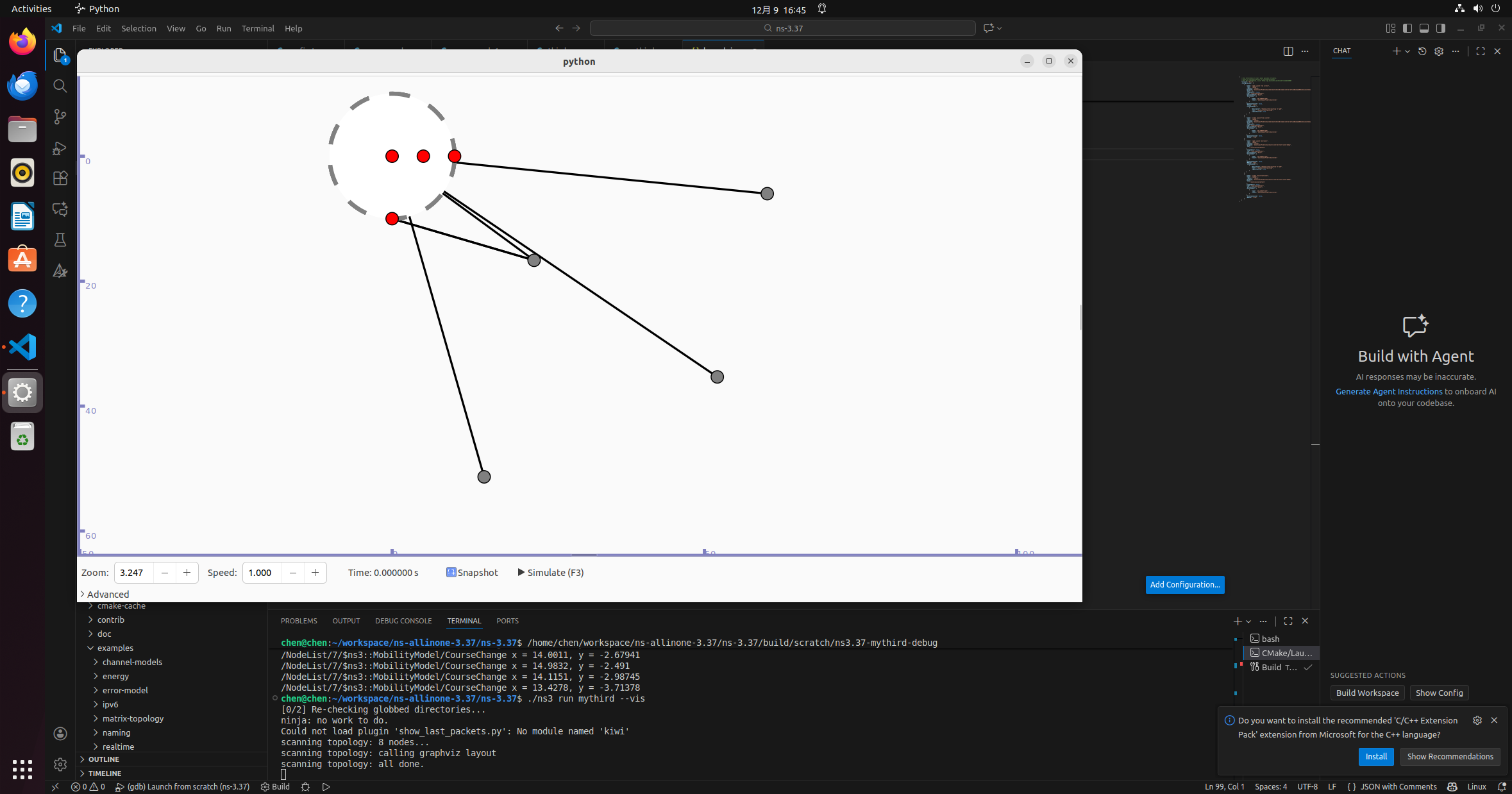
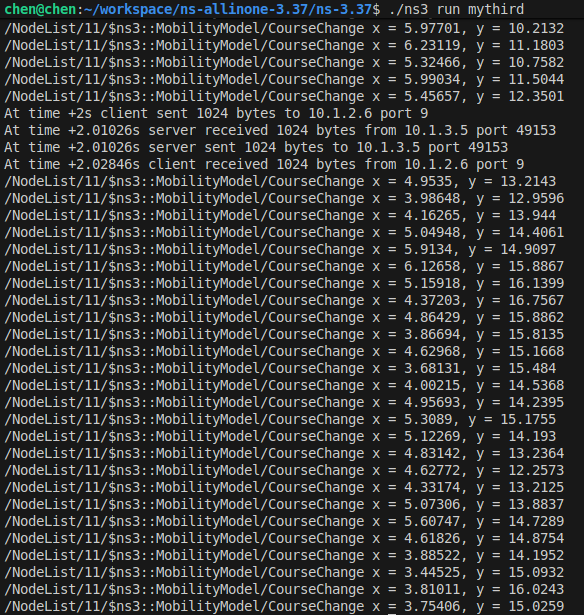
运行截图:
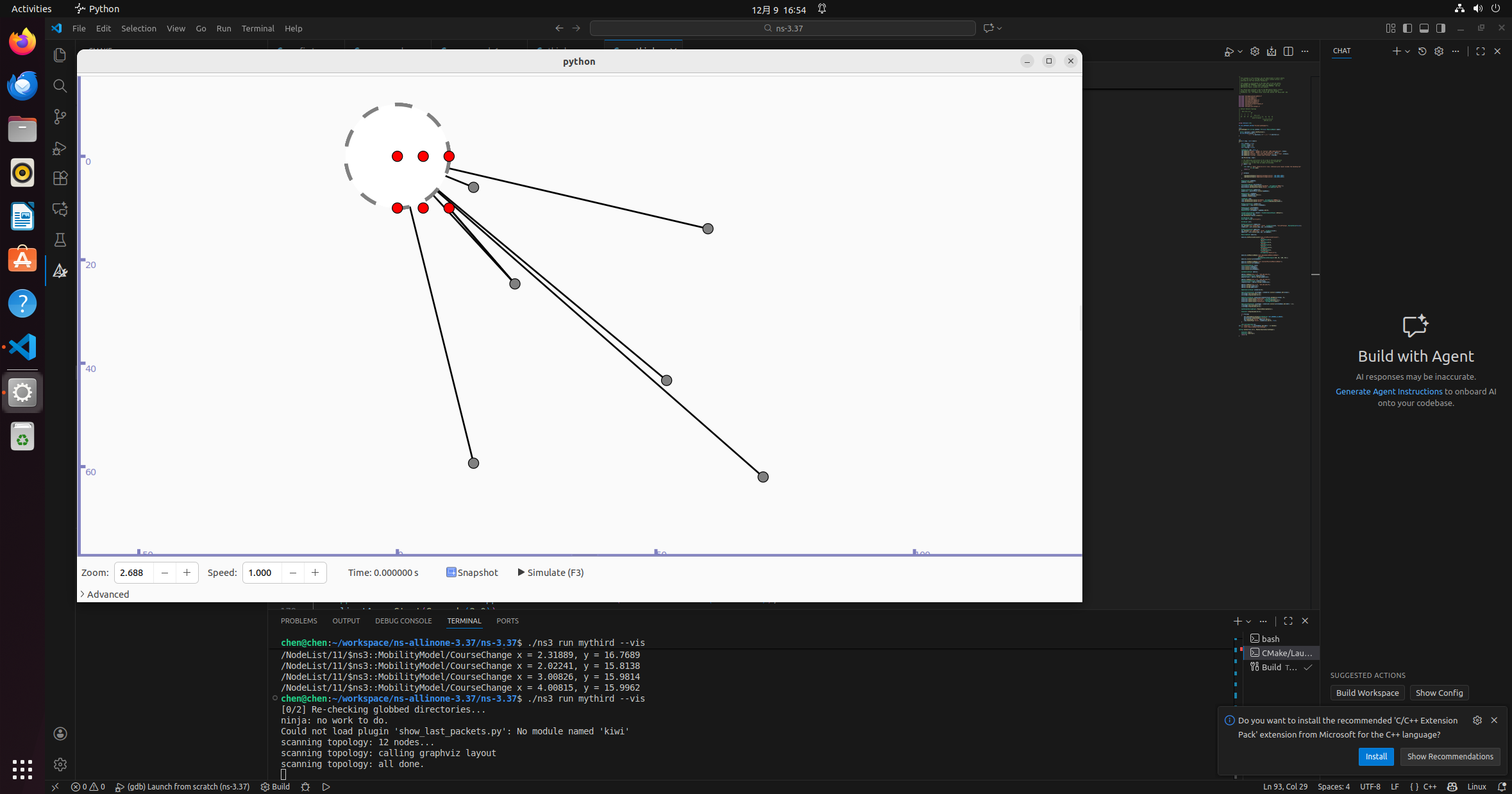
对代码进行修改
    bool verbose = true;//修改csma和wifi的节点数量
    uint32_t nCsma = 5;
    uint32_t nWifi = 5;
    bool tracing = false;
对移动模型进行修改
    mobility.SetMobilityModel("ns3::RandomWalk2dMobilityModel",
                              "Bounds",
                              RectangleValue(Rectangle(-100, 50, -100, 50)));
    mobility.Install(wifiStaNodes);//改变运动范围
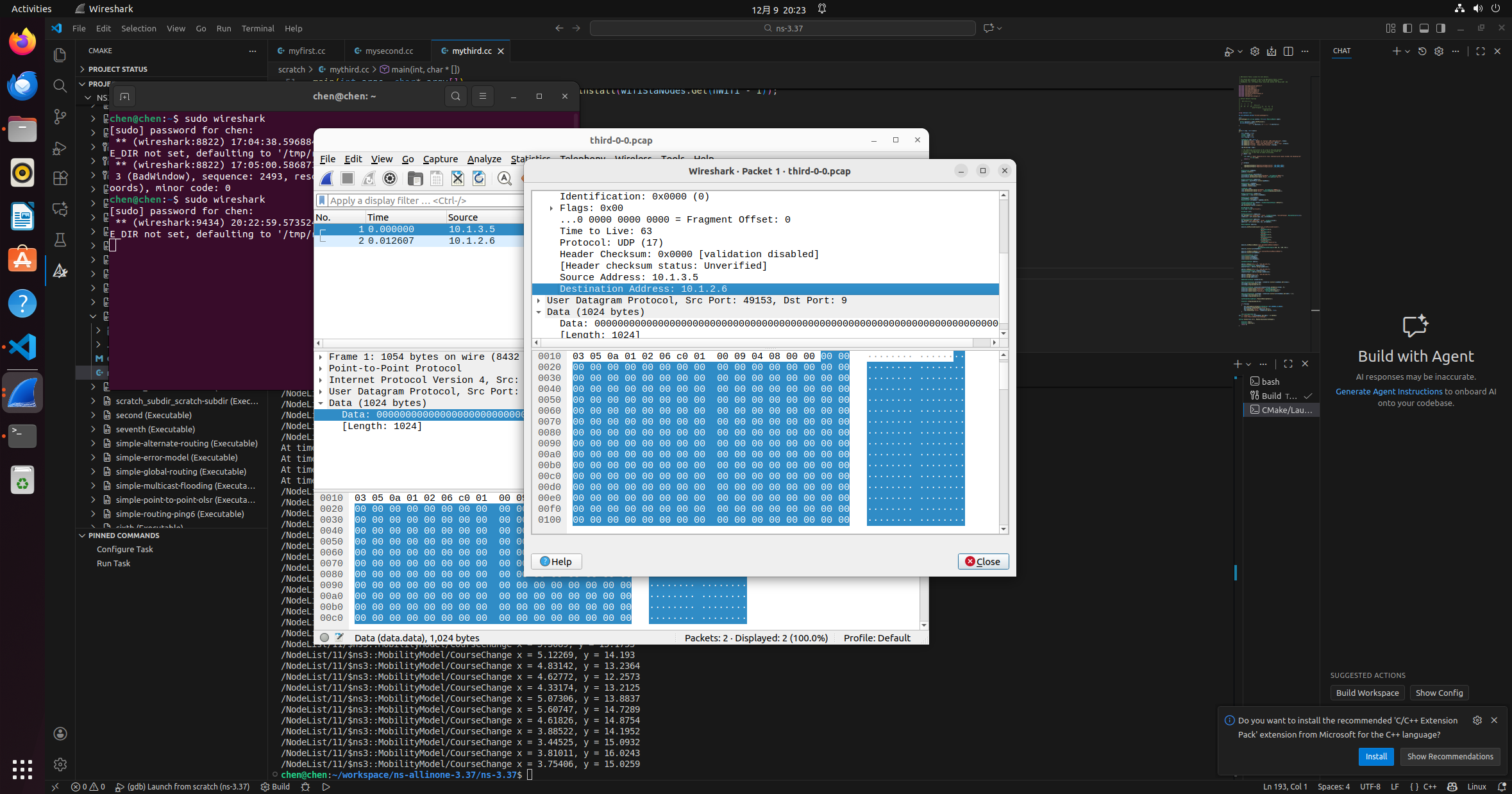
如果打开pcap抓包,使用wireshark对数据进行分析
更多推荐
 12
12 0
0- 0


 已为社区贡献4条内容

所有评论(0)