
S32DS for S32 Platform UART实践
·
1、配置GPIO
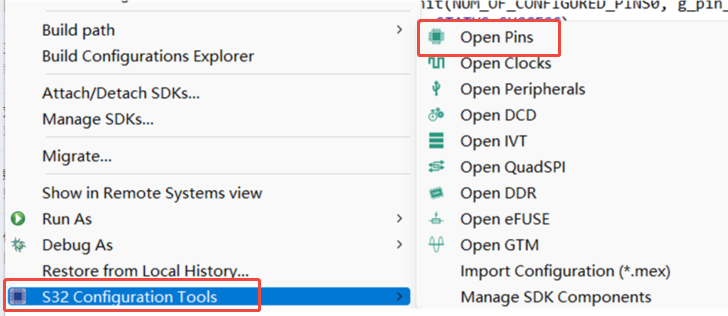
新建完项目后,右键项目找到“S32 Configuration Tools”–》“Open Pins”进入PIN脚操作页面配置GPIO。这里用的MCU为S32K144:
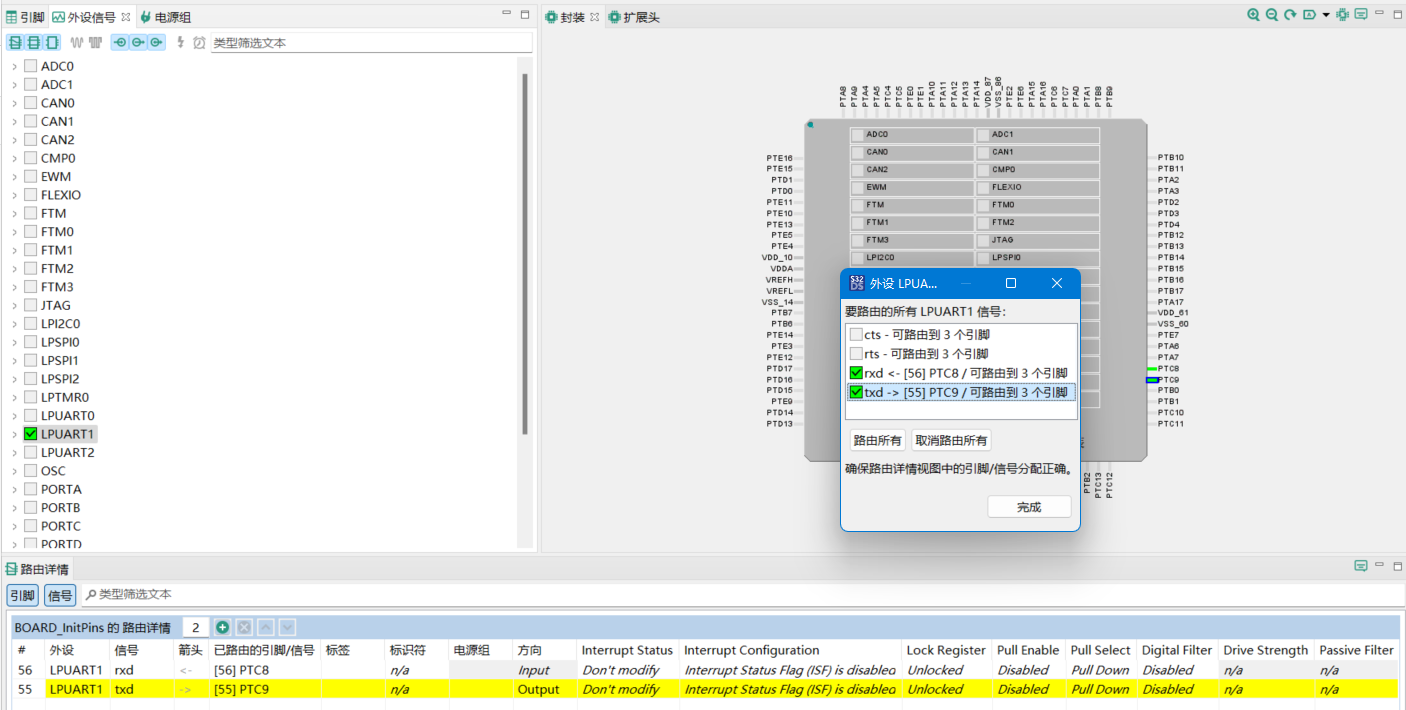
在“外设信号”窗口选择LPUART(这里选择的是LPUART1),选择对应引脚进行配置,保存后更新源码
2、添加UART外设组件
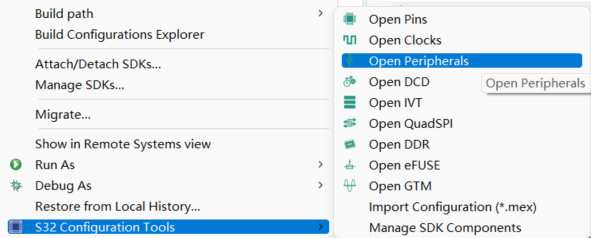
右键项目找到“S32 Configuration Tools”–》“Open Peripherals”进入外设组件界面
选择Drivers搜索“uart”,这里使用的是lpuart
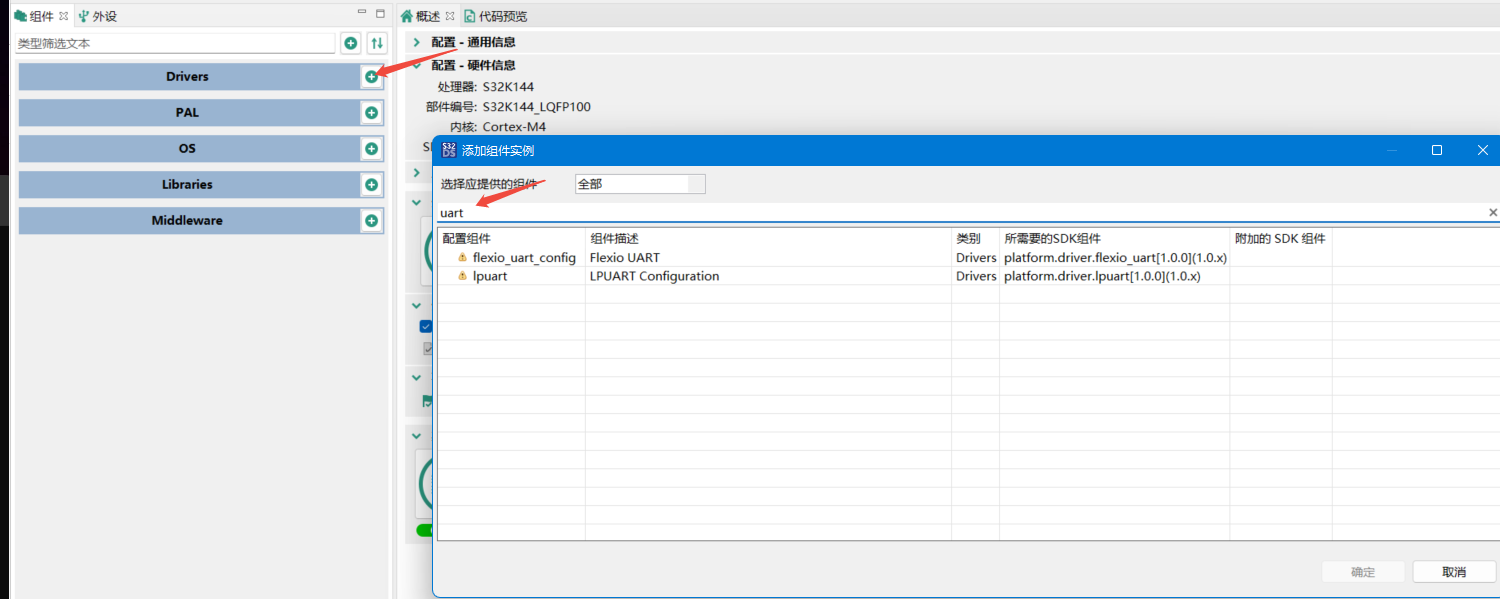
添加完后双击lpuart_1,修改uart参数即可
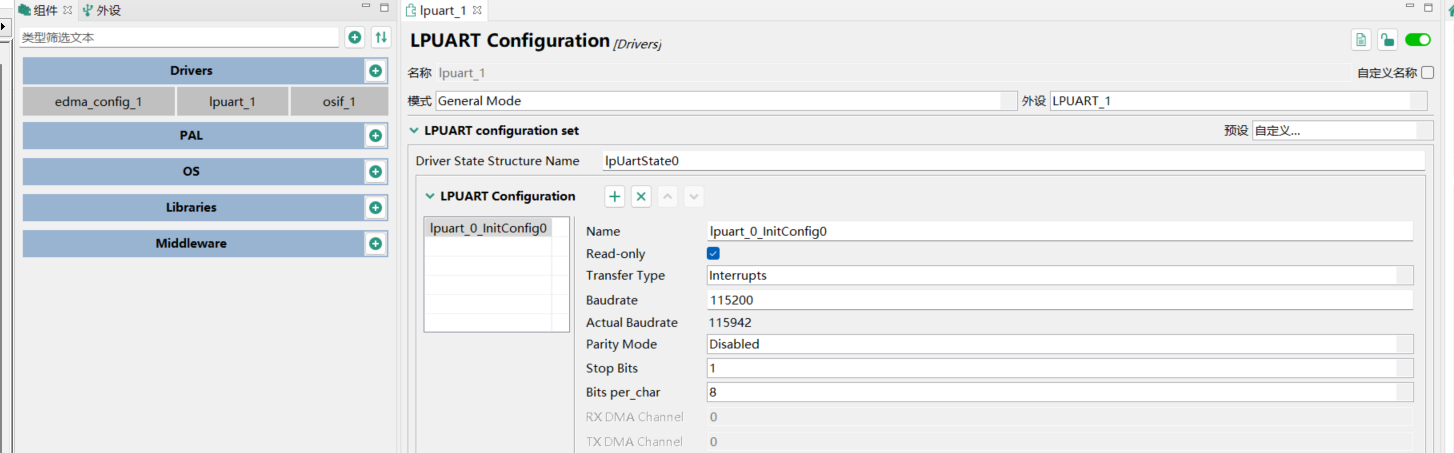
3、初始化
  uint8_t buffer[50];
  uint8_t bufferIdx;

  status_t error;
  /* Configure clocks for PORT */
  error = CLOCK_DRV_Init(&clockMan1_InitConfig0);
  DEV_ASSERT(error == STATUS_SUCCESS);
  /* Set pins as GPIO */
  error = PINS_DRV_Init(NUM_OF_CONFIGURED_PINS0, g_pin_mux_InitConfigArr0);
  DEV_ASSERT(error == STATUS_SUCCESS);

  /* Initialize LPUART instance */
  LPUART_DRV_Init(1, &lpUartState0, &lpuart_0_InitConfig0);//第一个参数指定是uart几;第二次参数为在组件配置时的Structure Name;第三个参数为组件中的Configruation的Name
  /* Install the callback for rx events */
  LPUART_DRV_InstallRxCallback(1, rxCallback, NULL);
  LPUART_DRV_ReceiveData(INST_LPUART_LPUART_1, &buffer[bufferIdx], 1U);
4、中断回调函数
/* UART rx callback for continuous reception, byte by byte */
void rxCallback(void *driverState, uart_event_t event, void *userData)
{
    /* Check the event type */
    if (event == UART_EVENT_RX_FULL)
    {
        /* The reception stops when newline is received or the buffer is full */
        if ((buffer[bufferIdx] != '\n') && (bufferIdx != (BUFFER_SIZE - 2U)))
        {
            /* Update the buffer index and the rx buffer */
            bufferIdx++;
            LPUART_DRV_SetRxBuffer(INST_LPUART_LPUART_1, &buffer[bufferIdx], 1U);//更改缓冲区
            LPUART_DRV_ReceiveData(INST_LPUART_LPUART_1, &buffer[bufferIdx], 1U);//开启接收
        }
    }
}
5、main函数
下面是我的main函数
#include "sdk_project_config.h"
#include "lpuart_driver.h"

#define welcomeMsg "This example is an simple echo using LPUART\r\n\
it will send back any character you send to it.\r\n\
The board will greet you if you send 'Hello Board'\r\
\nNow you can begin typing:\r\n"

uint8_t buffer[50];
uint8_t bufferIdx=0;

/* UART rx callback for continuous reception, byte by byte */
void rxCallback(void *driverState, uart_event_t event, void *userData)
{
    /* Check the event type */
    if (event == UART_EVENT_RX_FULL)
    {
        /* The reception stops when newline is received or the buffer is full */
        if ((buffer[bufferIdx] != '\n') && (bufferIdx != (BUFFER_SIZE - 2U)))
        {
            /* Update the buffer index and the rx buffer */
            bufferIdx++;
            LPUART_DRV_SetRxBuffer(INST_LPUART_LPUART_1, &buffer[bufferIdx], 1U);//更改缓冲区
            LPUART_DRV_ReceiveData(INST_LPUART_LPUART_1, &buffer[bufferIdx], 1U);//开启接收
        }
    }
}

int main(void)
{
  status_t error;
  /* Configure clocks for PORT */
  error = CLOCK_DRV_Init(&clockMan1_InitConfig0);
  DEV_ASSERT(error == STATUS_SUCCESS);
  /* Set pins as GPIO */
  error = PINS_DRV_Init(NUM_OF_CONFIGURED_PINS0, g_pin_mux_InitConfigArr0);
  DEV_ASSERT(error == STATUS_SUCCESS);

  /* Initialize LPUART instance */
  LPUART_DRV_Init(1, &lpUartState0, &lpuart_0_InitConfig0);
  /* Install the callback for rx events */
  LPUART_DRV_InstallRxCallback(1, rxCallback, NULL);
  LPUART_DRV_SendDataBlocking(1, (uint8_t *)date, strlen(date),500U);
  LPUART_DRV_ReceiveData(INST_LPUART_LPUART_1, &buffer[bufferIdx], 1U);
  for (;;)
  {

  }
}
更多推荐
 2
2 0
0- 0


 已为社区贡献6条内容

所有评论(0)