
k8s服务部署相关问题
·
本来是跟着黑马的k8s视频一直做的没什么问题,直到部署nginx部分,部署nginx和暴露端口都是可以正常实现的,但是输入
kubectl get pods,service
查看服务状态,却看见
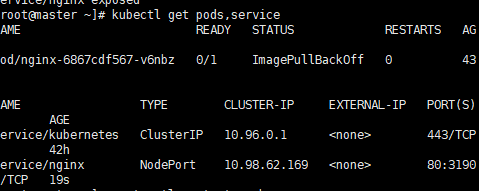
显示服务状态为:ImagePullBackOff,看了评论区中的大神才知道要将docker中的下载源修改,因为这是黑马之前的老教程了,已经有五六年了,所以导致原来kube-flannel.yml中的镜像源使用不了,所以需要我们手动修改docker的镜像源
我们需要在三个节点中都进行以下修改,并且重启docker
sudo tee /etc/docker/daemon.json << 'EOF'
{
  "registry-mirrors": [
    "https://docker.1panel.live",
    "https://hub-mirror.c.163.com",
    "https://mirror.baidubce.com"
  ]
}
EOF
sudo systemctl restart docker
这样我们再删除之前 Flannel 相关资源
kubectl delete -f kube-flannel.yml
重新apply
kubectl apply -f kube-flannel.yml
现在我们再看
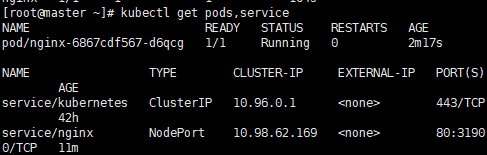
现在就可以了,80:3190是映射的主机端口号
之前也意识到了是镜像源的相关问题,但是科学上网,阿里云的镜像源,网易的镜像源,甚至手动拉取都尝试过了,使用这个镜像源目前是可以的,整了一整天终于搞好了
现在访问浏览器虚拟机ip地址:3190就可以访问到nginx的默认欢迎页了
下面我附上完整的daemon.json和kube-flannel.yml文件
/etc/docker/daemon.json
{
  "registry-mirrors": [
    "https://docker.m.daocloud.io",
    "https://mirror.baidubce.com",
    "https://hub-mirror.c.163.com"
  ],
  "exec-opts": ["native.cgroupdriver=systemd"],
  "log-driver": "json-file",
  "log-opts": {
    "max-size": "100m"
  },
  "storage-driver": "overlay2"
}
kube-flannel.yml
---
kind: Namespace
apiVersion: v1
metadata:
  name: kube-flannel
  labels:
    k8s-app: flannel
    pod-security.kubernetes.io/enforce: privileged
---
kind: ClusterRole
apiVersion: rbac.authorization.k8s.io/v1
metadata:
  labels:
    k8s-app: flannel
  name: flannel
rules:
- apiGroups:
  - ""
  resources:
  - pods
  verbs:
  - get
- apiGroups:
  - ""
  resources:
  - nodes
  verbs:
  - get
  - list
  - watch
- apiGroups:
  - ""
  resources:
  - nodes/status
  verbs:
  - patch
---
kind: ClusterRoleBinding
apiVersion: rbac.authorization.k8s.io/v1
metadata:
  labels:
    k8s-app: flannel
  name: flannel
roleRef:
  apiGroup: rbac.authorization.k8s.io
  kind: ClusterRole
  name: flannel
subjects:
- kind: ServiceAccount
  name: flannel
  namespace: kube-flannel
---
apiVersion: v1
kind: ServiceAccount
metadata:
  labels:
    k8s-app: flannel
  name: flannel
  namespace: kube-flannel
---
kind: ConfigMap
apiVersion: v1
metadata:
  name: kube-flannel-cfg
  namespace: kube-flannel
  labels:
    tier: node
    k8s-app: flannel
    app: flannel
data:
  cni-conf.json: |
    {
      "name": "cbr0",
      "cniVersion": "0.3.1",
      "plugins": [
        {
          "type": "flannel",
          "delegate": {
            "hairpinMode": true,
            "isDefaultGateway": true
          }
        },
        {
          "type": "portmap",
          "capabilities": {
            "portMappings": true
          }
        }
      ]
    }
  net-conf.json: |
    {
      "Network": "10.244.0.0/16",
      "EnableNFTables": false,
      "Backend": {
        "Type": "vxlan"
      }
    }
---
apiVersion: apps/v1
kind: DaemonSet
metadata:
  name: kube-flannel-ds
  namespace: kube-flannel
  labels:
    tier: node
    app: flannel
    k8s-app: flannel
spec:
  selector:
    matchLabels:
      app: flannel
  template:
    metadata:
      labels:
        tier: node
        app: flannel
    spec:
      affinity:
        nodeAffinity:
          requiredDuringSchedulingIgnoredDuringExecution:
            nodeSelectorTerms:
            - matchExpressions:
              - key: kubernetes.io/os
                operator: In
                values:
                - linux
      hostNetwork: true
      priorityClassName: system-node-critical
      tolerations:
      - operator: Exists
        effect: NoSchedule
      serviceAccountName: flannel
      initContainers:
      - name: install-cni-plugin
        image: ghcr.io/flannel-io/flannel-cni-plugin:v1.8.0-flannel1
        command:
        - cp
        args:
        - -f
        - /flannel
        - /opt/cni/bin/flannel
        volumeMounts:
        - name: cni-plugin
          mountPath: /opt/cni/bin
      - name: install-cni
        image: ghcr.io/flannel-io/flannel:v0.27.4
        command:
        - cp
        args:
        - -f
        - /etc/kube-flannel/cni-conf.json
        - /etc/cni/net.d/10-flannel.conflist
        volumeMounts:
        - name: cni
          mountPath: /etc/cni/net.d
        - name: flannel-cfg
          mountPath: /etc/kube-flannel/
      containers:
      - name: kube-flannel
        image: ghcr.io/flannel-io/flannel:v0.27.4
        command:
        - /opt/bin/flanneld
        args:
        - --ip-masq
        - --kube-subnet-mgr
        resources:
          requests:
            cpu: "100m"
            memory: "50Mi"
        securityContext:
          privileged: false
          capabilities:
            add: ["NET_ADMIN", "NET_RAW"]
        env:
        - name: POD_NAME
          valueFrom:
            fieldRef:
              fieldPath: metadata.name
        - name: POD_NAMESPACE
          valueFrom:
            fieldRef:
              fieldPath: metadata.namespace
        - name: EVENT_QUEUE_DEPTH
          value: "5000"
        - name: CONT_WHEN_CACHE_NOT_READY
          value: "false"
        volumeMounts:
        - name: run
          mountPath: /run/flannel
        - name: flannel-cfg
          mountPath: /etc/kube-flannel/
        - name: xtables-lock
          mountPath: /run/xtables.lock
      volumes:
      - name: run
        hostPath:
          path: /run/flannel
      - name: cni-plugin
        hostPath:
          path: /opt/cni/bin
      - name: cni
        hostPath:
          path: /etc/cni/net.d
      - name: flannel-cfg
        configMap:
          name: kube-flannel-cfg
      - name: xtables-lock
        hostPath:
          path: /run/xtables.lock
          type: FileOrCreate
更多推荐
 4
4 0
0- 0


 已为社区贡献3条内容

所有评论(0)