
kubernetes-client API 相关功能实现
·
文章目录
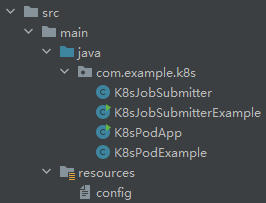
一、上代码
K8sPodExample.java:
package com.example.k8s;

import io.kubernetes.client.openapi.ApiClient;
import io.kubernetes.client.openapi.ApiException;
import io.kubernetes.client.openapi.Configuration;
import io.kubernetes.client.openapi.apis.CoreV1Api;
import io.kubernetes.client.openapi.models.V1DeleteOptions;
import io.kubernetes.client.openapi.models.V1Pod;
import io.kubernetes.client.openapi.models.V1PodList;
import io.kubernetes.client.util.Config;

import java.io.File;
import java.io.FileOutputStream;
import java.io.IOException;
import java.io.InputStream;

/**
 * Kubernetes Pod 操作工具类
 * 提供 Pod 删除、状态查询、日志获取等功能
 */
public class K8sPodExample {

    private CoreV1Api api;

    /**
     * 构造函数,初始化 Kubernetes API 客户端
     * 从 src/main/resources/config 文件读取配置
     */
    public K8sPodExample() throws IOException {
        ApiClient client = createClientFromResourcesConfig();
        Configuration.setDefaultApiClient(client);
        this.api = new CoreV1Api();
    }

    /**
     * 从 resources/config 文件创建 ApiClient
     * 如果文件在文件系统中存在,直接使用;否则从 resources 中提取到临时文件
     */
    private ApiClient createClientFromResourcesConfig() throws IOException {
        File configFile = null;

        // 首先尝试从文件系统读取(开发环境)
        String[] possiblePaths = {
            "src/main/resources/config",
            "config",
            System.getProperty("user.dir") + "/src/main/resources/config"
        };

        System.out.println("正在查找 Kubernetes 配置文件...");
        for (String path : possiblePaths) {
            File file = new File(path);
            System.out.println("检查路径: " + file.getAbsolutePath() + " (存在: " + file.exists() + ")");
            if (file.exists() && file.isFile()) {
                configFile = file;
                System.out.println("找到配置文件: " + configFile.getAbsolutePath());
                break;
            }
        }

        // 如果文件不存在(可能是打包后的 jar),从 resources 中提取
        if (configFile == null || !configFile.exists()) {
            System.out.println("文件系统中未找到配置文件,尝试从 resources 中读取...");
            InputStream configStream = getClass().getClassLoader().getResourceAsStream("config");
            if (configStream == null) {
                throw new IOException("无法找到配置文件: resources/config");
            }

            // 创建临时文件
            File tempFile = File.createTempFile("kubeconfig", ".tmp");
            tempFile.deleteOnExit();
            System.out.println("创建临时配置文件: " + tempFile.getAbsolutePath());

            try (FileOutputStream fos = new FileOutputStream(tempFile);
                 InputStream is = configStream) {
                byte[] buffer = new byte[8192];
                int bytesRead;
                while ((bytesRead = is.read(buffer)) != -1) {
                    fos.write(buffer, 0, bytesRead);
                }
            }
            configFile = tempFile;
        }

        // 使用 Config.fromConfig 读取配置文件
        System.out.println("正在加载 Kubernetes 配置: " + configFile.getAbsolutePath());
        try {
            ApiClient client = Config.fromConfig(configFile.getAbsolutePath());
            System.out.println("Kubernetes 客户端初始化成功!");
            System.out.println("API Server: " + client.getBasePath());
            return client;
        } catch (Exception e) {
            throw new IOException("加载 Kubernetes 配置失败: " + e.getMessage(), e);
        }
    }

    /**
     * 检查 Pod 是否存在
     *
     * @param namespace Pod 所在的命名空间
     * @param podName   Pod 名称
     * @return 如果 Pod 存在返回 true,否则返回 false
     */
    public boolean podExists(String namespace, String podName) {
        try {
            api.readNamespacedPod(podName, namespace, null);
            return true;
        } catch (ApiException e) {
            if (e.getCode() == 404) {
                return false;
            }
            // 其他错误也返回 false
            return false;
        }
    }

    /**
     * 删除指定命名空间中的 Pod
     *
     * @param namespace Pod 所在的命名空间
     * @param podName   Pod 名称
     * @return 被删除的 Pod 对象
     * @throws ApiException 如果删除操作失败
     */
    public V1Pod deletePod(String namespace, String podName) throws ApiException {
        return deletePod(namespace, podName, null);
    }

    /**
     * 删除指定命名空间中的 Pod(带删除选项)
     *
     * @param namespace    Pod 所在的命名空间
     * @param podName      Pod 名称
     * @param deleteOptions 删除选项(如优雅删除时间等)
     * @return 被删除的 Pod 对象
     * @throws ApiException 如果删除操作失败
     */
    public V1Pod deletePod(String namespace, String podName, V1DeleteOptions deleteOptions) throws ApiException {
        // 先检查 Pod 是否存在
        if (!podExists(namespace, podName)) {
            throw new ApiException(404, "Pod '" + podName + "' 在命名空间 '" + namespace + "' 中不存在");
        }

        if (deleteOptions == null) {
            deleteOptions = new V1DeleteOptions();
            deleteOptions.setGracePeriodSeconds(0L);  // 0 表示立即删除
        }

        V1Pod pod = api.deleteNamespacedPod(
                podName,
                namespace,
                null,                    // pretty
                null,                    // dryRun
                null,                    // gracePeriodSeconds (通过 deleteOptions 设置)
                null,                    // orphanDependents
                null,                    // propagationPolicy
                deleteOptions            // body
        );

        return pod;
    }

    /**
     * 获取 Pod 的详细信息(包括状态)
     *
     * @param namespace Pod 所在的命名空间
     * @param podName   Pod 名称
     * @return Pod 对象,包含完整的状态信息
     * @throws ApiException 如果查询操作失败
     */
    public V1Pod getPodStatus(String namespace, String podName) throws ApiException {
        return api.readNamespacedPod(podName, namespace, null);
    }

    /**
     * 获取 Pod 的状态信息(简化版)
     *
     * @param namespace Pod 所在的命名空间
     * @param podName   Pod 名称
     * @return Pod 状态信息字符串
     * @throws ApiException 如果查询操作失败
     */
    public String getPodStatusInfo(String namespace, String podName) throws ApiException {
        V1Pod pod = getPodStatus(namespace, podName);
        if (pod == null || pod.getStatus() == null) {
            return "无法获取 Pod 状态";
        }

        StringBuilder statusInfo = new StringBuilder();
        statusInfo.append("Pod 名称: ").append(podName).append("\n");
        statusInfo.append("命名空间: ").append(namespace).append("\n");

        if (pod.getMetadata() != null) {
            statusInfo.append("创建时间: ").append(pod.getMetadata().getCreationTimestamp()).append("\n");
            if (pod.getMetadata().getLabels() != null) {
                statusInfo.append("标签: ").append(pod.getMetadata().getLabels()).append("\n");
            }
        }

        statusInfo.append("阶段 (Phase): ").append(pod.getStatus().getPhase()).append("\n");

        if (pod.getStatus().getConditions() != null) {
            statusInfo.append("条件 (Conditions):\n");
            pod.getStatus().getConditions().forEach(condition -> {
                statusInfo.append("  - ").append(condition.getType())
                        .append(": ").append(condition.getStatus())
                        .append(" (").append(condition.getReason()).append(")\n");
            });
        }

        if (pod.getStatus().getContainerStatuses() != null) {
            statusInfo.append("容器状态:\n");
            pod.getStatus().getContainerStatuses().forEach(containerStatus -> {
                statusInfo.append("  - 容器: ").append(containerStatus.getName()).append("\n");
                statusInfo.append("    就绪: ").append(containerStatus.getReady()).append("\n");
                statusInfo.append("    重启次数: ").append(containerStatus.getRestartCount()).append("\n");

                if (containerStatus.getState() != null) {
                    if (containerStatus.getState().getRunning() != null) {
                        statusInfo.append("    状态: 运行中\n");
                        statusInfo.append("    启动时间: ").append(containerStatus.getState().getRunning().getStartedAt()).append("\n");
                    } else if (containerStatus.getState().getWaiting() != null) {
                        statusInfo.append("    状态: 等待中\n");
                        statusInfo.append("    原因: ").append(containerStatus.getState().getWaiting().getReason()).append("\n");
                        statusInfo.append("    消息: ").append(containerStatus.getState().getWaiting().getMessage()).append("\n");
                    } else if (containerStatus.getState().getTerminated() != null) {
                        statusInfo.append("    状态: 已终止\n");
                        statusInfo.append("    退出码: ").append(containerStatus.getState().getTerminated().getExitCode()).append("\n");
                        statusInfo.append("    原因: ").append(containerStatus.getState().getTerminated().getReason()).append("\n");
                        statusInfo.append("    开始时间: ").append(containerStatus.getState().getTerminated().getStartedAt()).append("\n");
                        statusInfo.append("    结束时间: ").append(containerStatus.getState().getTerminated().getFinishedAt()).append("\n");
                    }
                }
            });
        }

        return statusInfo.toString();
    }

    /**
     * 获取 Pod 的日志(指定容器)
     *
     * @param namespace Pod 所在的命名空间
     * @param podName   Pod 名称
     * @param containerName 容器名称(如果 Pod 有多个容器,需要指定)
     * @return Pod 的日志内容
     * @throws ApiException 如果获取日志失败
     */
    public String getPodLogs(String namespace, String podName, String containerName) throws ApiException {
        return getPodLogs(namespace, podName, containerName, null, null);
    }

    /**
     * 获取 Pod 的日志(完整参数)
     *
     * @param namespace Pod 所在的命名空间
     * @param podName   Pod 名称
     * @param containerName 容器名称(可选,如果 Pod 有多个容器)
     * @param tailLines 返回最后 N 行日志(可选)
     * @param sinceSeconds 返回最近 N 秒的日志(可选)
     * @return Pod 的日志内容
     * @throws ApiException 如果获取日志失败
     */
    public String getPodLogs(String namespace, String podName, String containerName,
                            Integer tailLines, Integer sinceSeconds) throws ApiException {
        return api.readNamespacedPodLog(
                podName,
                namespace,
                containerName,      // container
                Boolean.FALSE,      // follow
                Boolean.FALSE,      // previous
                sinceSeconds,       // sinceSeconds
                tailLines != null ? String.valueOf(tailLines) : null,  // tailLines (String)
                Boolean.FALSE,      // timestamps
                null,               // limitBytes
                null,               // other params
                null                // other params
        );
    }

    /**
     * 获取 Pod 的日志并保存到文件
     *
     * @param namespace Pod 所在的命名空间
     * @param podName   Pod 名称
     * @param containerName 容器名称(可选)
     * @param filePath 保存日志的文件路径
     * @throws ApiException 如果获取日志失败
     * @throws IOException 如果写入文件失败
     */
    public void savePodLogsToFile(String namespace, String podName,
                                   String containerName, String filePath) throws ApiException, IOException {
        String logs = getPodLogs(namespace, podName, containerName);
        try (FileOutputStream fos = new FileOutputStream(filePath)) {
            fos.write(logs.getBytes("UTF-8"));
        }
    }

    /**
     * 列出命名空间中的所有 Pod
     *
     * @param namespace 命名空间
     * @return Pod 列表
     * @throws ApiException 如果查询操作失败
     */
    public V1PodList listPods(String namespace) throws ApiException {
        return api.listNamespacedPod(namespace, null, Boolean.FALSE, null, null, null, null, null, null, null, null, null);
    }
}
K8sPodApp.java:
package com.example.k8s;

import io.kubernetes.client.openapi.ApiException;
import io.kubernetes.client.openapi.models.V1Pod;

import java.io.IOException;

/**
 * K8sPodKiller 功能演示示例
 * 演示 Pod 状态查询、日志获取等功能
 */
public class K8sPodApp {

    public static void main(String[] args) {
        String namespace = "task-xiaoqiang";
        String podName = "task-xiaoqiang-a55bedc8-j5q6n";

        try {
            // 创建 K8sPodKiller 实例
            K8sPodExample operator = new K8sPodExample();

            // ========== 1. 检查 Pod 是否存在 ==========
            System.out.println("\n========== 1. 检查 Pod 是否存在 ==========");
            System.out.println("Pod: " + podName + " (命名空间: " + namespace + ")");
            if (operator.podExists(namespace, podName)) {
                System.out.println("✓ Pod 存在");
            } else {
                System.out.println("✗ Pod 不存在");
                System.out.println("请确认 Pod 名称和命名空间是否正确");
                return;
            }

            // ========== 2. 查询 Pod 状态 ==========
            System.out.println("\n========== 2. 查询 Pod 状态 ==========");
            try {
                // 方式1: 获取完整的 Pod 对象
                V1Pod pod = operator.getPodStatus(namespace, podName);
                System.out.println("Pod 阶段 (Phase): " + pod.getStatus().getPhase());
                System.out.println("Pod IP: " + pod.getStatus().getPodIP());
                System.out.println("节点名称: " + pod.getSpec().getNodeName());

                // 方式2: 获取格式化的状态信息
                System.out.println("\n详细状态信息:");
                String statusInfo = operator.getPodStatusInfo(namespace, podName);
                System.out.println(statusInfo);
            } catch (ApiException e) {
                System.err.println("查询 Pod 状态失败:");
                System.err.println("HTTP 状态码: " + e.getCode());
                System.err.println("错误信息: " + e.getMessage());
            }

            // ========== 3. 保存日志到文件 ==========
//            System.out.println("\n========== 3. 保存日志到文件 ==========");
//            try {
//                String logFilePath = "pod-logs-" + podName + ".txt";
//                operator.savePodLogsToFile(namespace, podName, null, logFilePath);
//                System.out.println("日志已保存到文件: " + logFilePath);
//            } catch (ApiException | IOException e) {
//                System.err.println("保存日志失败: " + e.getMessage());
//            }
//
//            // ========== 4. 删除 Pod(可选) ==========
//             System.out.println("\n========== 4. 删除 Pod ==========");
//             try {
//                 V1Pod deletedPod = operator.deletePod(namespace, podName);
//                 System.out.println("删除成功!");
//                 if (deletedPod != null && deletedPod.getMetadata() != null) {
//                     System.out.println("Pod 名称: " + deletedPod.getMetadata().getName());
//                 }
//             } catch (ApiException e) {
//                 System.err.println("删除失败:");
//                 System.err.println("HTTP 状态码: " + e.getCode());
//                 System.err.println("错误信息: " + e.getMessage());
//             }

        } catch (IOException e) {
            System.err.println("无法初始化 Kubernetes 客户端: " + e.getMessage());
            e.printStackTrace();
        }
    }
}
K8sJobSubmitter.java:
package com.example.k8s;

import io.kubernetes.client.openapi.ApiClient;
import io.kubernetes.client.openapi.ApiException;
import io.kubernetes.client.openapi.Configuration;
import io.kubernetes.client.openapi.apis.BatchV1Api;
import io.kubernetes.client.openapi.models.V1Container;
import io.kubernetes.client.openapi.models.V1Job;
import io.kubernetes.client.openapi.models.V1JobSpec;
import io.kubernetes.client.openapi.models.V1ObjectMeta;
import io.kubernetes.client.openapi.models.V1PodSpec;
import io.kubernetes.client.openapi.models.V1PodTemplateSpec;
import io.kubernetes.client.openapi.models.V1ResourceRequirements;
import io.kubernetes.client.openapi.models.V1Volume;
import io.kubernetes.client.openapi.models.V1VolumeMount;
import io.kubernetes.client.util.Config;
import io.kubernetes.client.custom.Quantity;

import java.io.File;
import java.io.FileOutputStream;
import java.io.IOException;
import java.io.InputStream;
import java.util.ArrayList;
import java.util.HashMap;
import java.util.List;
import java.util.Map;

/**
 * Kubernetes Job 提交工具类
 * 提供 Job 创建和提交功能
 */
public class K8sJobSubmitter {

    private BatchV1Api batchApi;

    /**
     * 构造函数,初始化 Kubernetes API 客户端
     * 从 src/main/resources/config 文件读取配置
     */
    public K8sJobSubmitter() throws IOException {
        ApiClient client = createClientFromResourcesConfig();
        Configuration.setDefaultApiClient(client);
        this.batchApi = new BatchV1Api();
    }

    /**
     * 从 resources/config 文件创建 ApiClient
     */
    private ApiClient createClientFromResourcesConfig() throws IOException {
        File configFile = null;

        // 首先尝试从文件系统读取(开发环境)
        String[] possiblePaths = {
            "src/main/resources/config",
            "config",
            System.getProperty("user.dir") + "/src/main/resources/config"
        };

        for (String path : possiblePaths) {
            File file = new File(path);
            if (file.exists() && file.isFile()) {
                configFile = file;
                break;
            }
        }

        // 如果文件不存在(可能是打包后的 jar),从 resources 中提取
        if (configFile == null || !configFile.exists()) {
            InputStream configStream = getClass().getClassLoader().getResourceAsStream("config");
            if (configStream == null) {
                throw new IOException("无法找到配置文件: resources/config");
            }

            // 创建临时文件
            File tempFile = File.createTempFile("kubeconfig", ".tmp");
            tempFile.deleteOnExit();

            try (FileOutputStream fos = new FileOutputStream(tempFile);
                 InputStream is = configStream) {
                byte[] buffer = new byte[8192];
                int bytesRead;
                while ((bytesRead = is.read(buffer)) != -1) {
                    fos.write(buffer, 0, bytesRead);
                }
            }
            configFile = tempFile;
        }

        // 使用 Config.fromConfig 读取配置文件
        return Config.fromConfig(configFile.getAbsolutePath());
    }

    /**
     * 提交 Job(使用默认配置)
     *
     * @param namespace 命名空间
     * @param jobName   Job 名称
     * @param image     容器镜像
     * @param command   执行命令(数组形式)
     * @return 创建的 Job 对象
     * @throws ApiException 如果提交失败
     */
    public V1Job submitJob(String namespace, String jobName, String image, List<String> command) throws ApiException {
        return submitJob(namespace, jobName, image, command, null, null, null, null, null, null, null);
    }

    /**
     * 提交 Job(完整参数)
     *
     * @param namespace           命名空间
     * @param jobName             Job 名称
     * @param image               容器镜像
     * @param command             执行命令(数组形式)
     * @param workingDir          工作目录(可选)
     * @param pvcName             PVC 名称(可选,用于数据卷)
     * @param cpuRequest          CPU 请求量(可选,例如 "0.1")
     * @param memoryRequest       内存请求量(可选,例如 "10Gi")
     * @param cpuLimit            CPU 限制(可选,例如 "20")
     * @param memoryLimit         内存限制(可选,例如 "100Gi")
     * @param ttlSecondsAfterFinished 完成后 TTL(秒,可选,默认 30)
     * @return 创建的 Job 对象
     * @throws ApiException 如果提交失败
     */
    public V1Job submitJob(String namespace, String jobName, String image, List<String> command,
                          String workingDir, String pvcName, String cpuRequest, String memoryRequest,
                          String cpuLimit, String memoryLimit, Integer ttlSecondsAfterFinished) throws ApiException {

        // 创建 Job 对象
        V1Job job = new V1Job();

        // 设置元数据
        V1ObjectMeta metadata = new V1ObjectMeta();
        metadata.setName(jobName);
        job.setMetadata(metadata);

        // 设置 Job Spec
        V1JobSpec jobSpec = new V1JobSpec();

        // 设置 TTLSecondsAfterFinished(默认 30 秒)
        if (ttlSecondsAfterFinished == null) {
            ttlSecondsAfterFinished = 30;
        }
        jobSpec.setTtlSecondsAfterFinished(ttlSecondsAfterFinished);

        // 创建 Pod Template Spec
        V1PodTemplateSpec podTemplateSpec = new V1PodTemplateSpec();
        V1PodSpec podSpec = new V1PodSpec();

        // 设置 RestartPolicy: Never
        podSpec.setRestartPolicy("Never");

        // 创建容器
        V1Container container = new V1Container();
        container.setName("data-xiaoqiang");
        container.setImage(image);
        container.setImagePullPolicy("IfNotPresent");

        // 设置命令
        if (command != null && !command.isEmpty()) {
            container.setCommand(command);
        }

        // 设置工作目录
        if (workingDir != null && !workingDir.isEmpty()) {
            container.setWorkingDir(workingDir);
        } else {
            container.setWorkingDir("/mnt/");
        }

        // 设置资源限制
        if (cpuRequest != null || memoryRequest != null || cpuLimit != null || memoryLimit != null) {
            V1ResourceRequirements resources = new V1ResourceRequirements();
            Map<String, Quantity> requests = new HashMap<>();
            Map<String, Quantity> limits = new HashMap<>();

            if (cpuRequest != null) {
                requests.put("cpu", Quantity.fromString(cpuRequest));
            }
            if (memoryRequest != null) {
                requests.put("memory", Quantity.fromString(memoryRequest));
            }
            if (cpuLimit != null) {
                limits.put("cpu", Quantity.fromString(cpuLimit));
            }
            if (memoryLimit != null) {
                limits.put("memory", Quantity.fromString(memoryLimit));
            }

            if (!requests.isEmpty()) {
                resources.setRequests(requests);
            }
            if (!limits.isEmpty()) {
                resources.setLimits(limits);
            }

            container.setResources(resources);
        } else {
            // 使用默认资源限制(参考 Go 代码)
            V1ResourceRequirements resources = new V1ResourceRequirements();
            Map<String, Quantity> requests = new HashMap<>();
            Map<String, Quantity> limits = new HashMap<>();

            requests.put("cpu", Quantity.fromString("0.1"));
            requests.put("memory", Quantity.fromString("10Gi"));
            limits.put("cpu", Quantity.fromString("20"));
            limits.put("memory", Quantity.fromString("100Gi"));

            resources.setRequests(requests);
            resources.setLimits(limits);
            container.setResources(resources);
        }

        // 设置 Volume Mounts
        if (pvcName != null && !pvcName.isEmpty()) {
            List<V1VolumeMount> volumeMounts = new ArrayList<>();
            V1VolumeMount volumeMount = new V1VolumeMount();
            volumeMount.setName("data");
            volumeMount.setMountPath("/mnt");
            volumeMounts.add(volumeMount);
            container.setVolumeMounts(volumeMounts);

            // 设置 Volumes
            List<V1Volume> volumes = new ArrayList<>();
            V1Volume volume = new V1Volume();
            volume.setName("data");

            io.kubernetes.client.openapi.models.V1PersistentVolumeClaimVolumeSource pvcSource =
                new io.kubernetes.client.openapi.models.V1PersistentVolumeClaimVolumeSource();
            pvcSource.setClaimName(pvcName);
            volume.setPersistentVolumeClaim(pvcSource);

            volumes.add(volume);
            podSpec.setVolumes(volumes);
        } else {
            // 使用默认 PVC(参考 Go 代码)
            List<V1VolumeMount> volumeMounts = new ArrayList<>();
            V1VolumeMount volumeMount = new V1VolumeMount();
            volumeMount.setName("data");
            volumeMount.setMountPath("/mnt");
            volumeMounts.add(volumeMount);
            container.setVolumeMounts(volumeMounts);

            List<V1Volume> volumes = new ArrayList<>();
            V1Volume volume = new V1Volume();
            volume.setName("data");

            io.kubernetes.client.openapi.models.V1PersistentVolumeClaimVolumeSource pvcSource =
                new io.kubernetes.client.openapi.models.V1PersistentVolumeClaimVolumeSource();
            pvcSource.setClaimName("task-xiaoqiang-nfs-pvc");

            volume.setPersistentVolumeClaim(pvcSource);

            volumes.add(volume);
            podSpec.setVolumes(volumes);
        }

        // 将容器添加到 Pod Spec
        List<V1Container> containers = new ArrayList<>();
        containers.add(container);
        podSpec.setContainers(containers);

        // 设置 Pod Template Spec
        podTemplateSpec.setSpec(podSpec);
        jobSpec.setTemplate(podTemplateSpec);

        // 设置 Job Spec
        job.setSpec(jobSpec);

        // 提交 Job
        return batchApi.createNamespacedJob(namespace, job, null, null, null, null);
    }

    /**
     * 提交 Job(简化版,使用默认配置)
     * 参考 Go 代码示例的配置
     *
     * @param namespace 命名空间
     * @param jobName   Job 名称
     * @param image     容器镜像(默认: repo.xiaoqiang.net/task/basic:v0.5)
     * @param command   执行命令(数组形式)
     * @return 创建的 Job 对象
     * @throws ApiException 如果提交失败
     */
    public V1Job submitDataAnalysisJob(String namespace, String jobName, List<String> command) throws ApiException {
        return submitJob(
            namespace,
            jobName,
            "repo.xiaoqiang.net/task/basic:v0.5",  // 默认镜像
            command,
            "/mnt/",                                  // 工作目录
            "task-xiaoqiang-nfs-pvc",                  // 默认 PVC
            "0.1",                                    // CPU 请求
            "10Gi",                                   // 内存请求
            "20",                                     // CPU 限制
            "100Gi",                                  // 内存限制
            30                                        // TTL 30 秒
        );
    }

    /**
     * 获取 Job 状态
     *
     * @param namespace 命名空间
     * @param jobName   Job 名称
     * @return Job 对象
     * @throws ApiException 如果查询失败
     */
    public V1Job getJobStatus(String namespace, String jobName) throws ApiException {
        return batchApi.readNamespacedJob(jobName, namespace, null);
    }

    /**
     * 删除 Job
     *
     * @param namespace 命名空间
     * @param jobName   Job 名称
     * @throws ApiException 如果删除失败
     */
    public void deleteJob(String namespace, String jobName) throws ApiException {
        batchApi.deleteNamespacedJob(
            jobName,
            namespace,
            null,  // pretty
            null,  // dryRun
            null,  // gracePeriodSeconds
            null,  // orphanDependents
            null,  // propagationPolicy
            null   // body
        );
    }
}
K8sJobSubmitterExample.java:
package com.example.k8s;

import io.kubernetes.client.openapi.ApiException;
import io.kubernetes.client.openapi.models.V1Job;

import java.io.IOException;
import java.util.Arrays;
import java.util.List;

/**
 * K8sJobSubmitter 使用示例
 * 演示如何提交 Kubernetes Job
 */
public class K8sJobSubmitterExample {

    public static void main(String[] args) {
        String namespace = "task-xiaoqiang";

        try {
            // 创建 K8sJobSubmitter 实例
            K8sJobSubmitter submitter = new K8sJobSubmitter();

            // ========== 示例 1: 使用自定义配置提交 Job ==========
            System.out.println("\n========== 示例 1: 使用自定义配置提交 Job ==========");
            try {
                String customJobName = "custom-job-" + System.currentTimeMillis();
                String commandBuild = "python3 main.py -dt 2026-02-28";
                List<String> command = Arrays.asList(commandBuild.split(" "));

                System.out.println("提交自定义 Job:");
                System.out.println("  名称: " + customJobName);
                System.out.println("  镜像: repo.xiaoqiang.net/task/basic:v0.5");
                System.out.println("  命令: " + String.join(" ", command));

                V1Job job = submitter.submitJob(
                    namespace,
                    customJobName,
                    "repo.xiaoqiang.net/task/basic:v0.5",
                    command,
                    "/mnt/",                    // 工作目录
                    "task-xiaoqiang-nfs-pvc",     // PVC 名称
                    "0.1",                      // CPU 请求
                    "10Gi",                     // 内存请求
                    "20",                       // CPU 限制
                    "100Gi",                    // 内存限制
                    30                          // TTL 30 秒
                );

                System.out.println("✓ Job 提交成功!");
                System.out.println("Job UID: " + job.getMetadata().getUid());

            } catch (ApiException e) {
                System.err.println("提交 Job 失败:");
                System.err.println("HTTP 状态码: " + e.getCode());
                System.err.println("错误信息: " + e.getMessage());
            }
//
//            // ========== 示例 2: 查询 Job 状态 ==========
//            System.out.println("\n========== 示例 2: 查询 Job 状态 ==========");
//            try {
//                V1Job job = submitter.getJobStatus(namespace, jobName);
//                if (job != null && job.getStatus() != null) {
//                    System.out.println("Job 状态:");
//                    System.out.println("  名称: " + job.getMetadata().getName());
//                    System.out.println("  活动 Pods: " +
//                        (job.getStatus().getActive() != null ? job.getStatus().getActive() : 0));
//                    System.out.println("  成功 Pods: " +
//                        (job.getStatus().getSucceeded() != null ? job.getStatus().getSucceeded() : 0));
//                    System.out.println("  失败 Pods: " +
//                        (job.getStatus().getFailed() != null ? job.getStatus().getFailed() : 0));
//                }
//            } catch (ApiException e) {
//                System.err.println("查询 Job 状态失败:");
//                System.err.println("HTTP 状态码: " + e.getCode());
//                System.err.println("错误信息: " + e.getMessage());
//            }

            // ========== 示例 3: 删除 Job(可选) ==========
//             System.out.println("\n========== 示例 3: 删除 Job ==========");
//             try {
////                 submitter.deleteJob(namespace, jobName);
//                 System.out.println("✓ Job 删除成功!");
//             } catch (ApiException e) {
//                 System.err.println("删除 Job 失败:");
//                 System.err.println("HTTP 状态码: " + e.getCode());
//                 System.err.println("错误信息: " + e.getMessage());
//             }

        } catch (IOException e) {
            System.err.println("无法初始化 Kubernetes 客户端: " + e.getMessage());
            e.printStackTrace();
        }
    }
}
config:
apiVersion: v1
clusters:
- cluster:
    certificate-authority-data: xxx
    server: https://xxx.xxx.xxx.xxx:110
  name: cluster1
contexts:
- context:
    cluster: cluster1
    user: admin
  name: xiaoqiang-cluster1
current-context: xiaoqiang-cluster1
kind: Config
preferences: {}
users:
- name: admin
  user:
    client-certificate-data: xxx
    client-key-data: xxx
注:K8s 认证信息可在服务器上查看 cat ~/.kube/config
更多推荐
 0
0 0
0- 0


 已为社区贡献1条内容

所有评论(0)