
ESP32-S3 SD卡
·
ESP32-S3 SD卡
SPI(Serial Peripheral Interface)和 QSPI(Quad Serial Peripheral Interface)是两种常用的串行通信协议,主要用于微控制器与外围设备(如闪存、传感器等)之间的数据传输。好在ESP32 S3 既支持 SPI 又支持 QSPI,开发者仅需要根据需求定制总线。
接下来跟随博主汇总简表格看看具体差异。
| 类别 | SPI | QSPI |
|---|---|---|
| 通信线路与速度 | 使用4条基本线路(SCLK、MOSI、MISO、SS),数据通过单线(MOSI/MISO)传输,理论速度为全双工。 | 扩展为4条数据线(IO0-IO3),支持单线、双线或四线模式,传输速度显著提升(理论上可达SPI的4倍)。 |
| 数据传输模式 | 仅支持标准全双工或半双工模式,数据逐位传输。 | 支持四线同时传输(Quad Mode),还支持命令、地址和数据的灵活配置(如仅用单线发命令,四线传数据)。 |
| 应用场景 | 适用于低速外设(如传感器、ADC/DAC),协议简单,资源占用少。 | 常见于高速存储设备(如NOR Flash),需更高带宽的场景。 |
| 硬件复杂度 | 接口简单,主从设备均易实现。 | 需硬件支持多线模式,控制器设计更复杂,但可减少引脚占用(如地址和数据复用引脚)。 |
| 协议灵活性 | 固定帧格式(通常8/16位),需手动管理片选(SS)信号。 | 支持内存映射模式(直接通过地址访问外设),自动化程度更高。 |
点击 牛瘪汤 主页可以了解更多。
提示: QSPI模式 需要SD卡支持QSPI总线(大多数现代SDHC/SDXC卡支持)。
1. 核查硬件原理图
1.1 SPI 模式连接 SDcard
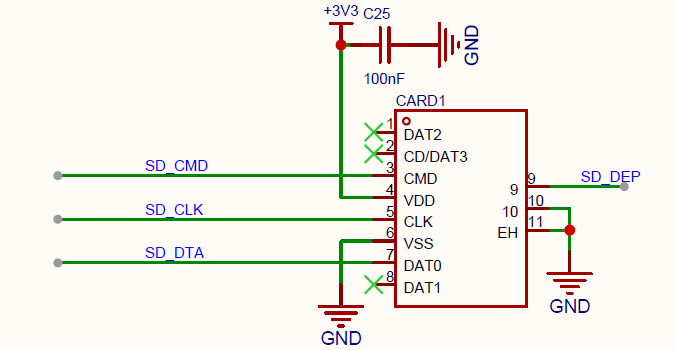
标准SPI使用3线(MOSI/MISO/SCK)。如果SPI总线只挂载 SDcard 可以省略 CS 信号线。
供电 3.3V。SD_DEP 是 TF 卡连接检测,根据是实际情况连接走线。
1.2 QSPI 模式连接 SDcard
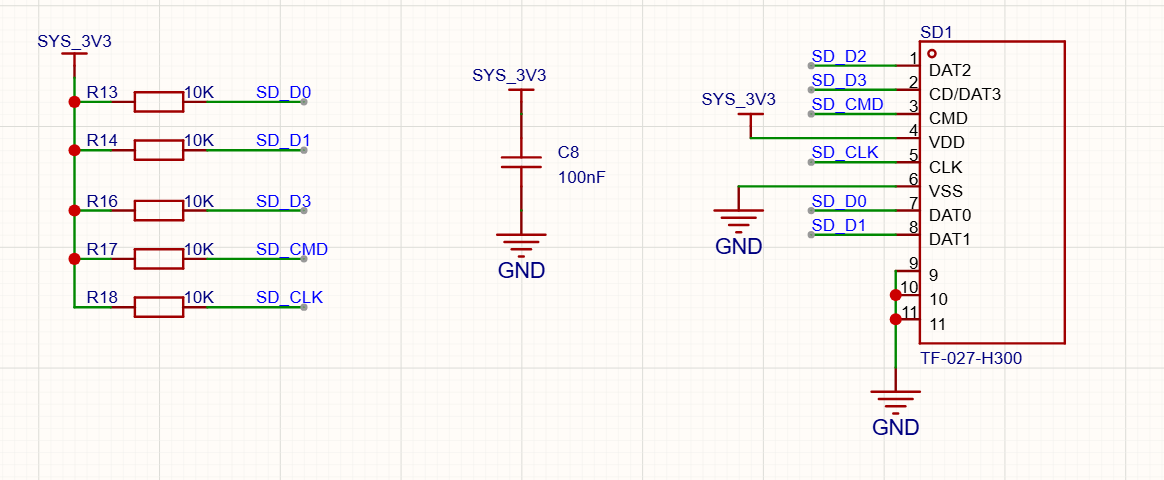
相比SPI模式,QSPI需要额外DATA1-3引脚。其它信号线与SPI模式相同。
2. SPI 模式读写测试
废话不多说,先看 SPI模式下 SDcard 读写测试代码。
/*
 * pin 1 - not used          |  Micro SD card     |
 * pin 2 - CS (SS)           |                   /
 * pin 3 - DI (MOSI)         |                  |__
 * pin 4 - VDD (3.3V)        |                    |
 * pin 5 - SCK (SCLK)        | 8 7 6 5 4 3 2 1   /
 * pin 6 - VSS (GND)         | ▄ ▄ ▄ ▄ ▄ ▄ ▄ ▄  /
 * pin 7 - DO (MISO)         | ▀ ▀ █ ▀ █ ▀ ▀ ▀ |
 * pin 8 - not used          |_________________|
 *                             ║ ║ ║ ║ ║ ║ ║ ║
 *                     ╔═══════╝ ║ ║ ║ ║ ║ ║ ╚═════════╗
 *                     ║         ║ ║ ║ ║ ║ ╚══════╗    ║
 *                     ║   ╔═════╝ ║ ║ ║ ╚═════╗  ║    ║
 * Connections for     ║   ║   ╔═══╩═║═║═══╗   ║  ║    ║
 * full-sized          ║   ║   ║   ╔═╝ ║   ║   ║  ║    ║
 * SD card             ║   ║   ║   ║   ║   ║   ║  ║    ║
 * Pin name         |  -  DO  VSS SCK VDD VSS DI CS    -  |
 * SD pin number    |  8   7   6   5   4   3   2   1   9 /
 *                  |                                  █/
 *                  |__▍___▊___█___█___█___█___█___█___/
 *
 * Note:  The SPI pins can be manually configured by using `SPI.begin(sck, miso, mosi, cs).`
 *        Alternatively, you can change the CS pin and use the other default settings by using `SD.begin(cs)`.
 *
 * +--------------+---------+-------+----------+----------+----------+----------+----------+
 * | SPI Pin Name | ESP8266 | ESP32 | ESP32‑S2 | ESP32‑S3 | ESP32‑C3 | ESP32‑C6 | ESP32‑H2 |
 * +==============+=========+=======+==========+==========+==========+==========+==========+
 * | CS (SS)      | GPIO15  | GPIO5 | GPIO34   | GPIO10   | GPIO7    | GPIO18   | GPIO0    |
 * +--------------+---------+-------+----------+----------+----------+----------+----------+
 * | DI (MOSI)    | GPIO13  | GPIO23| GPIO35   | GPIO11   | GPIO6    | GPIO19   | GPIO25   |
 * +--------------+---------+-------+----------+----------+----------+----------+----------+
 * | DO (MISO)    | GPIO12  | GPIO19| GPIO37   | GPIO13   | GPIO5    | GPIO20   | GPIO11   |
 * +--------------+---------+-------+----------+----------+----------+----------+----------+
 * | SCK (SCLK)   | GPIO14  | GPIO18| GPIO36   | GPIO12   | GPIO4    | GPIO21   | GPIO10   |
 * +--------------+---------+-------+----------+----------+----------+----------+----------+
 *
 * For more info see file README.md in this library or on URL:
 * https://github.com/espressif/arduino-esp32/tree/master/libraries/SD
 */

#include "FS.h"
#include "SD.h"
#include "SPI.h"

/*
Uncomment and set up if you want to use custom pins for the SPI communication
#define REASSIGN_PINS
int sck = -1;
int miso = -1;
int mosi = -1;
int cs = -1;
*/

void listDir(fs::FS &fs, const char *dirname, uint8_t levels) {
  Serial.printf("Listing directory: %s\n", dirname);

  File root = fs.open(dirname);
  if (!root) {
    Serial.println("Failed to open directory");
    return;
  }
  if (!root.isDirectory()) {
    Serial.println("Not a directory");
    return;
  }

  File file = root.openNextFile();
  while (file) {
    if (file.isDirectory()) {
      Serial.print("  DIR : ");
      Serial.println(file.name());
      if (levels) {
        listDir(fs, file.path(), levels - 1);
      }
    } else {
      Serial.print("  FILE: ");
      Serial.print(file.name());
      Serial.print("  SIZE: ");
      Serial.println(file.size());
    }
    file = root.openNextFile();
  }
}

void createDir(fs::FS &fs, const char *path) {
  Serial.printf("Creating Dir: %s\n", path);
  if (fs.mkdir(path)) {
    Serial.println("Dir created");
  } else {
    Serial.println("mkdir failed");
  }
}

void removeDir(fs::FS &fs, const char *path) {
  Serial.printf("Removing Dir: %s\n", path);
  if (fs.rmdir(path)) {
    Serial.println("Dir removed");
  } else {
    Serial.println("rmdir failed");
  }
}

void readFile(fs::FS &fs, const char *path) {
  Serial.printf("Reading file: %s\n", path);

  File file = fs.open(path);
  if (!file) {
    Serial.println("Failed to open file for reading");
    return;
  }

  Serial.print("Read from file: ");
  while (file.available()) {
    Serial.write(file.read());
  }
  file.close();
}

void writeFile(fs::FS &fs, const char *path, const char *message) {
  Serial.printf("Writing file: %s\n", path);

  File file = fs.open(path, FILE_WRITE);
  if (!file) {
    Serial.println("Failed to open file for writing");
    return;
  }
  if (file.print(message)) {
    Serial.println("File written");
  } else {
    Serial.println("Write failed");
  }
  file.close();
}

void appendFile(fs::FS &fs, const char *path, const char *message) {
  Serial.printf("Appending to file: %s\n", path);

  File file = fs.open(path, FILE_APPEND);
  if (!file) {
    Serial.println("Failed to open file for appending");
    return;
  }
  if (file.print(message)) {
    Serial.println("Message appended");
  } else {
    Serial.println("Append failed");
  }
  file.close();
}

void renameFile(fs::FS &fs, const char *path1, const char *path2) {
  Serial.printf("Renaming file %s to %s\n", path1, path2);
  if (fs.rename(path1, path2)) {
    Serial.println("File renamed");
  } else {
    Serial.println("Rename failed");
  }
}

void deleteFile(fs::FS &fs, const char *path) {
  Serial.printf("Deleting file: %s\n", path);
  if (fs.remove(path)) {
    Serial.println("File deleted");
  } else {
    Serial.println("Delete failed");
  }
}

void testFileIO(fs::FS &fs, const char *path) {
  File file = fs.open(path);
  static uint8_t buf[512];
  size_t len = 0;
  uint32_t start = millis();
  uint32_t end = start;
  if (file) {
    len = file.size();
    size_t flen = len;
    start = millis();
    while (len) {
      size_t toRead = len;
      if (toRead > 512) {
        toRead = 512;
      }
      file.read(buf, toRead);
      len -= toRead;
    }
    end = millis() - start;
    Serial.printf("%u bytes read for %lu ms\n", flen, end);
    file.close();
  } else {
    Serial.println("Failed to open file for reading");
  }

  file = fs.open(path, FILE_WRITE);
  if (!file) {
    Serial.println("Failed to open file for writing");
    return;
  }

  size_t i;
  start = millis();
  for (i = 0; i < 2048; i++) {
    file.write(buf, 512);
  }
  end = millis() - start;
  Serial.printf("%u bytes written for %lu ms\n", 2048 * 512, end);
  file.close();
}

void setup() {
  Serial.begin(115200);

  Serial.println("Initializing SPI bus(SD card)!");

#ifdef REASSIGN_PINS
  SPI.begin(sck, miso, mosi, cs);
  if (!SD.begin(cs, SPI, 80000000)) {
#else
  if (!SD.begin()) {
#endif
    Serial.println("Card Mount Failed");
    return;
  }
  uint8_t cardType = SD.cardType();

  if (cardType == CARD_NONE) {
    Serial.println("No SD card attached");
    return;
  }

  Serial.print("SD Card Type: ");
  if (cardType == CARD_MMC) {
    Serial.println("MMC");
  } else if (cardType == CARD_SD) {
    Serial.println("SDSC");
  } else if (cardType == CARD_SDHC) {
    Serial.println("SDHC");
  } else {
    Serial.println("UNKNOWN");
  }

  uint64_t cardSize = SD.cardSize() / (1024 * 1024);
  Serial.printf("SD Card Size: %lluMB\n", cardSize);

  listDir(SD, "/", 0);
  createDir(SD, "/mydir");
  listDir(SD, "/", 0);
  removeDir(SD, "/mydir");
  listDir(SD, "/", 2);
  writeFile(SD, "/hello.txt", "Hello ");
  appendFile(SD, "/hello.txt", "World!\n");
  readFile(SD, "/hello.txt");
  deleteFile(SD, "/foo.txt");
  renameFile(SD, "/hello.txt", "/foo.txt");
  readFile(SD, "/foo.txt");
  testFileIO(SD, "/test.txt");
  Serial.printf("Total space: %lluMB\n", SD.totalBytes() / (1024 * 1024));
  Serial.printf("Used space: %lluMB\n", SD.usedBytes() / (1024 * 1024));
}

void loop() {
  /* Nothing to do in the main loop; brief delay to yield CPU */
  delay(10);
}
编译、烧录完成,可以看到串口日志。取下SD卡,接入电脑端可以看到 根目录下文件夹 mydir 和 hello.txt、 foo.tx、 test.txt 等文件。
3. QSPI 模式读写测试
标准SPI使用3线(MOSI/MISO/SCK),QSPI使用6线(CLK/CMD/DATA0-3)。用到的函数从 SPI 变为标准的 SD 函数,接下来看示例。
#include "FS.h"
#include "SD.h"
#include "SPI.h"

#define QSPI_CLK  14
#define QSPI_CMD  15
#define QSPI_DATA0 16
#define QSPI_DATA1 17
#define QSPI_DATA2 18
#define QSPI_DATA3 19
#define QSPI_CS   5

void setup() {
  Serial.begin(115200);

  if(!SD.begin(QSPI_CS, QSPI_CLK, QSPI_CMD, QSPI_DATA0, QSPI_DATA1, QSPI_DATA2, QSPI_DATA3)){
    Serial.println("SD Card Mount Failed");
    return;
  }

  uint8_t cardType = SD.cardType();
  if(cardType == CARD_NONE){
    Serial.println("No SD card attached");
    return;
  }

  Serial.print("SD Card Type: ");
  if(cardType == CARD_MMC) Serial.println("MMC");
  else if(cardType == CARD_SD) Serial.println("SDSC");
  else if(cardType == CARD_SDHC) Serial.println("SDHC");
  else Serial.println("UNKNOWN");

  Serial.printf("Total space: %lluMB\n", SD.totalBytes() / (1024 * 1024));
  Serial.printf("Used space: %lluMB\n", SD.usedBytes() / (1024 * 1024));
}

void loop() {
  listDir(SD, "/", 0);
  delay(5000);
}

void listDir(fs::FS &fs, const char *dirname, uint8_t levels) {
  File root = fs.open(dirname);
  if(!root || !root.isDirectory()) return;

  File file = root.openNextFile();
  while(file){
    if(file.isDirectory()){
      Serial.printf("  DIR : %s\n", file.path());
      if(levels) listDir(fs, file.path(), levels-1);
    } else {
      Serial.printf("  FILE: %s\tSIZE: %d\n", file.path(), file.size());
    }
    file = root.openNextFile();
  }
}

void createDir(fs::FS &fs, const char *path) {
  Serial.printf("Creating Dir: %s\n", path);
  fs.mkdir(path) ? Serial.println("Dir created") : Serial.println("mkdir failed");
}

void removeDir(fs::FS &fs, const char *path) {
  Serial.printf("Removing Dir: %s\n", path);
  fs.rmdir(path) ? Serial.println("Dir removed") : Serial.println("rmdir failed");
}

void readFile(fs::FS &fs, const char *path) {
  File file = fs.open(path);
  if(!file) return;

  while(file.available()){
    Serial.write(file.read());
  }
  file.close();
}

void writeFile(fs::FS &fs, const char *path, const char *message) {
  File file = fs.open(path, FILE_WRITE);
  if(!file) return;

  file.print(message) ? Serial.println("File written") : Serial.println("Write failed");
  file.close();
}

void appendFile(fs::FS &fs, const char *path, const char *message) {
  File file = fs.open(path, FILE_APPEND);
  if(!file) return;

  file.print(message) ? Serial.println("Message appended") : Serial.println("Append failed");
  file.close();
}
结语
文章都看到完了,就不点个关注吗,老铁!
欢迎关注博主–牛瘪汤 。
更多推荐
 14
14 0
0- 0


 已为社区贡献11条内容

所有评论(0)