
鸿蒙PC Electron框架 本地 AI 助手 - 集成大模型 API、文档总结、翻译完整实现
·
Vue3 + TypeScript 本地 AI 助手 - 集成大模型 API、文档总结、翻译完整实现
欢迎加入开源鸿蒙PC社区:
https://harmonypc.csdn.net/
项目 Git 仓库:
https://atomgit.com/liboqian/harmonyOs_ai
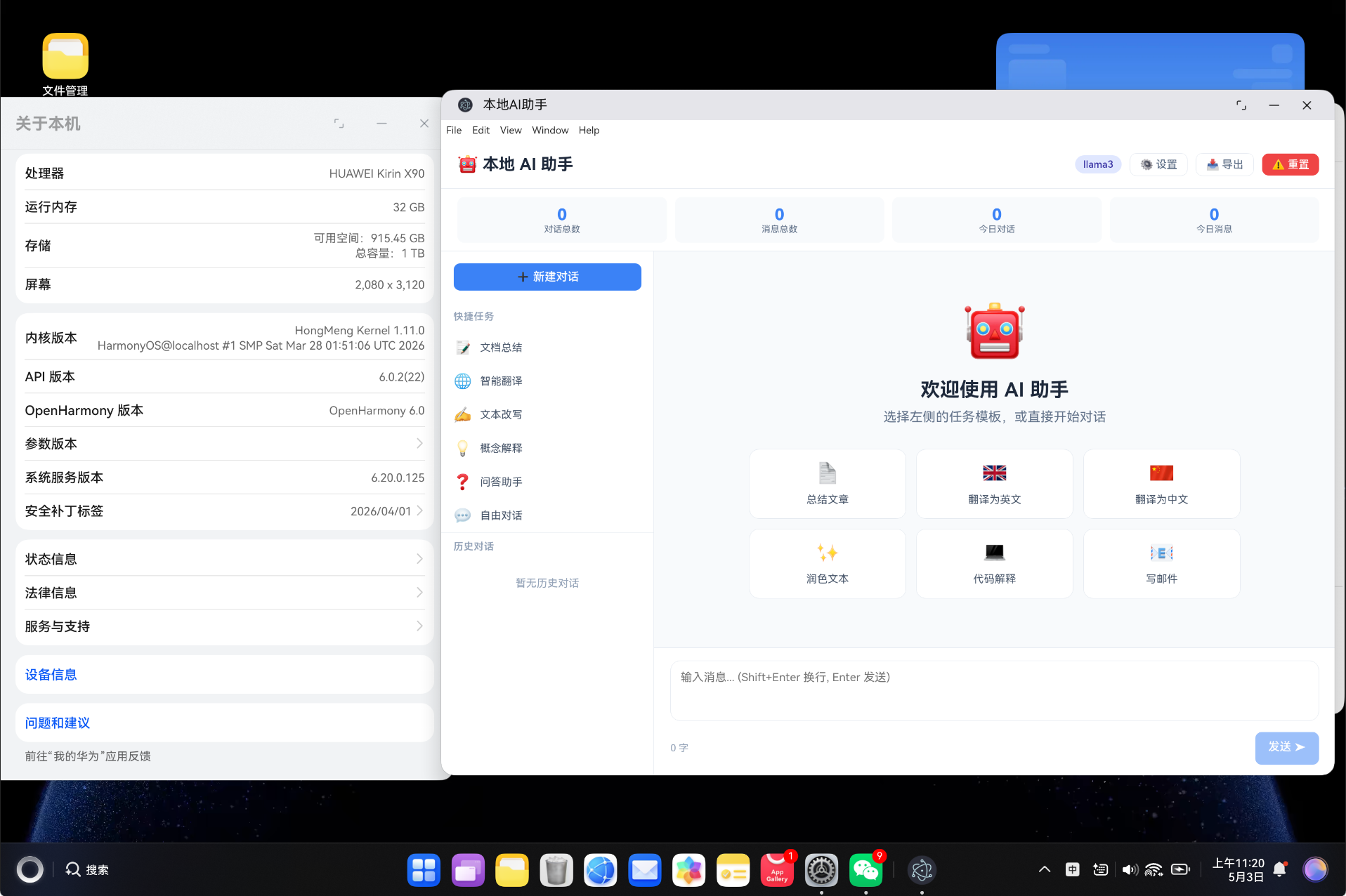
基于 Vue3 Composition API + TypeScript 构建的本地 AI 助手桌面端应用,支持 OpenAI、Claude、DeepSeek、通义千问、Ollama 等多种 AI 服务,提供文档总结、智能翻译、文本改写、概念解释等核心功能,支持流式输出和历史对话管理。
一、项目背景
随着大语言模型(LLM)技术的快速发展,AI 助手已经成为提升工作效率的重要工具。然而,大多数 AI 服务需要通过网页访问,缺乏统一的本地管理界面。
1.1 业务痛点
- 多个 AI 服务需要频繁切换网页,效率低下
- 对话历史分散在各个平台,无法统一管理
- 常用任务(总结、翻译等)需要反复编写提示词
- API 调用缺乏统计和管理,难以控制成本
- 离线场景下无法使用 AI 能力
1.2 解决方案
构建一个统一的本地 AI 助手桌面端应用,具备以下特点:
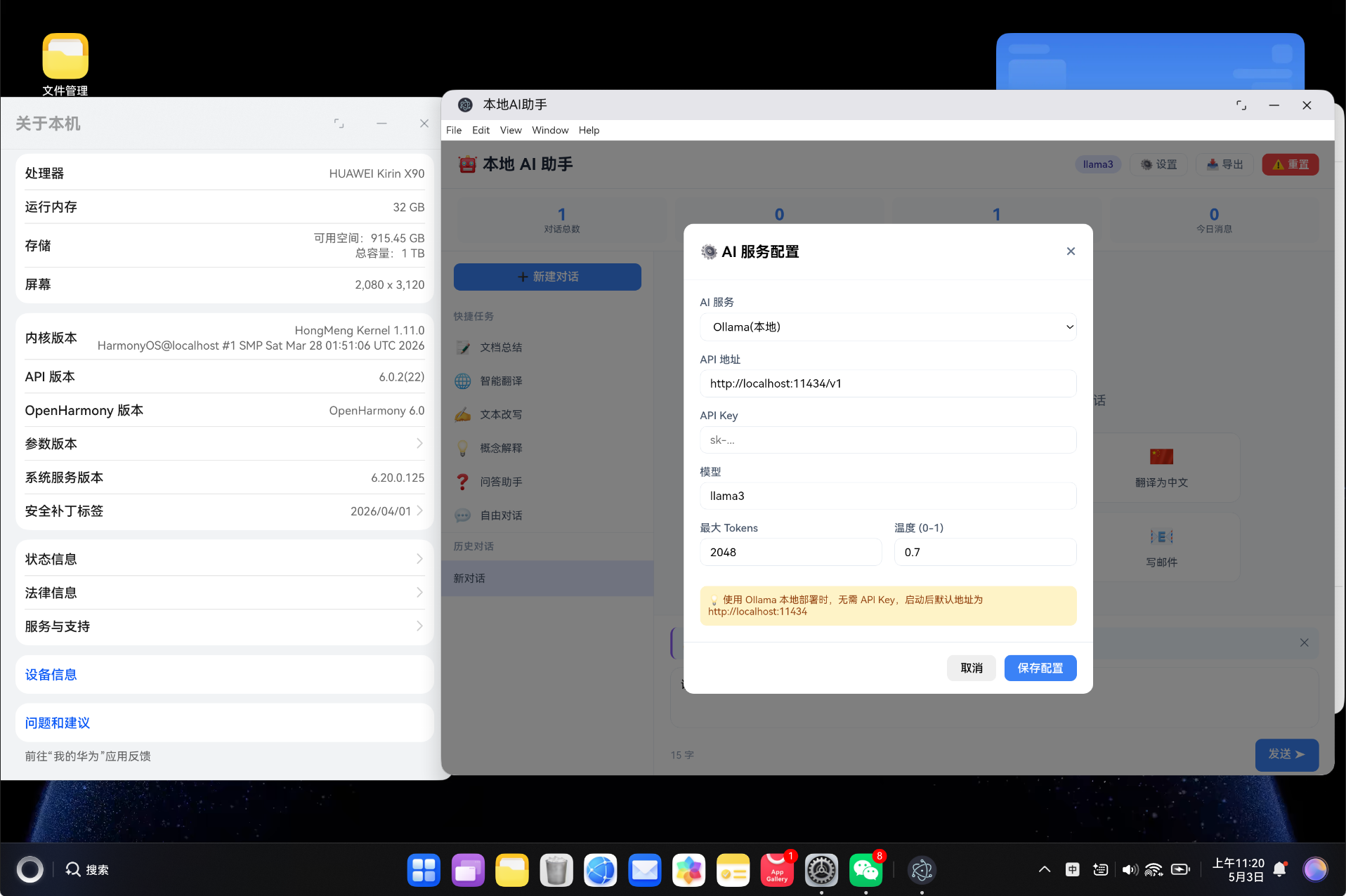
- 多服务支持:OpenAI、Claude、DeepSeek、通义千问、Ollama 本地部署
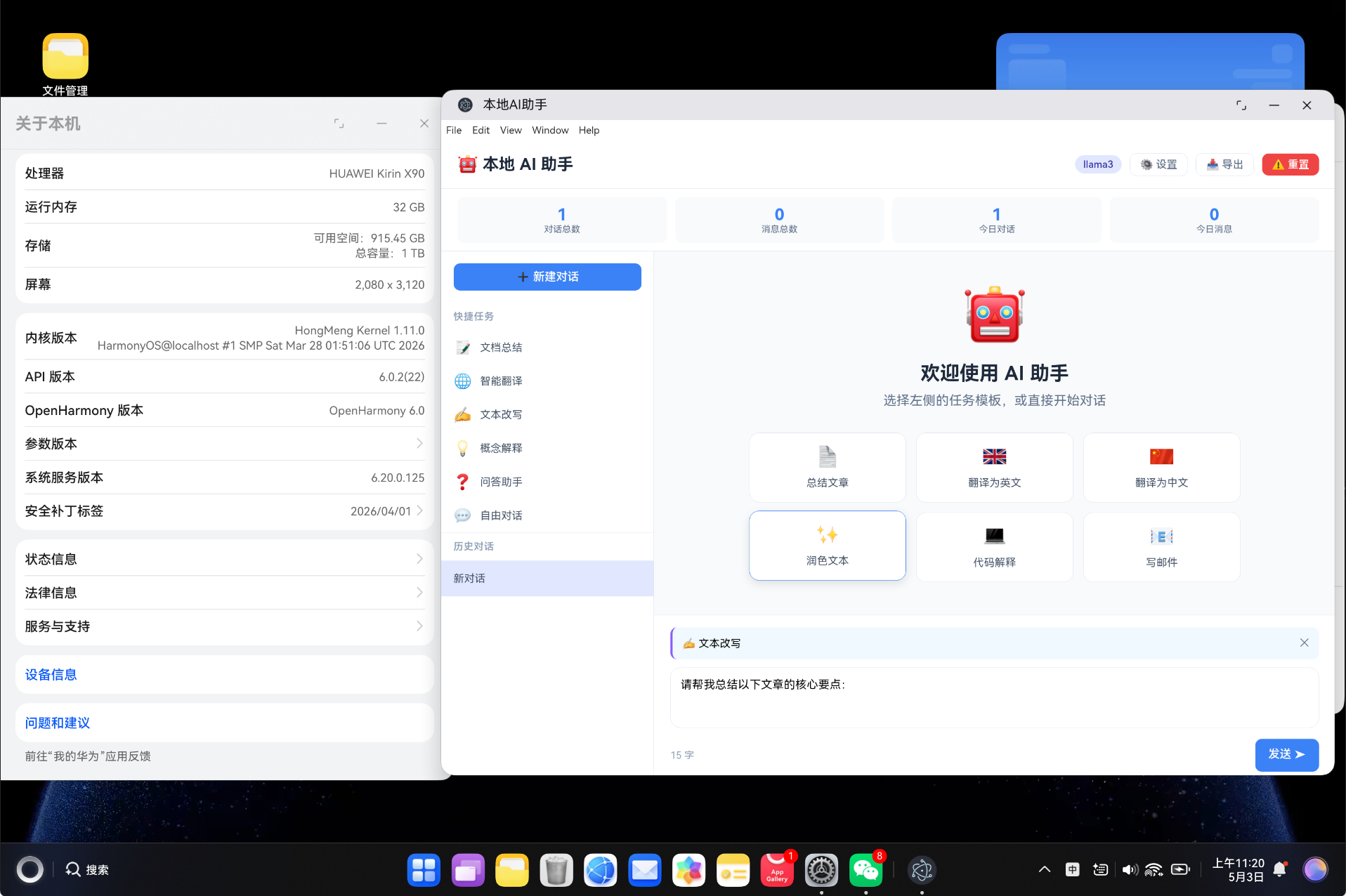
- 任务模板:文档总结、智能翻译、文本改写、概念解释、问答助手
- 流式输出:实时显示 AI 回复内容,无需等待完整响应
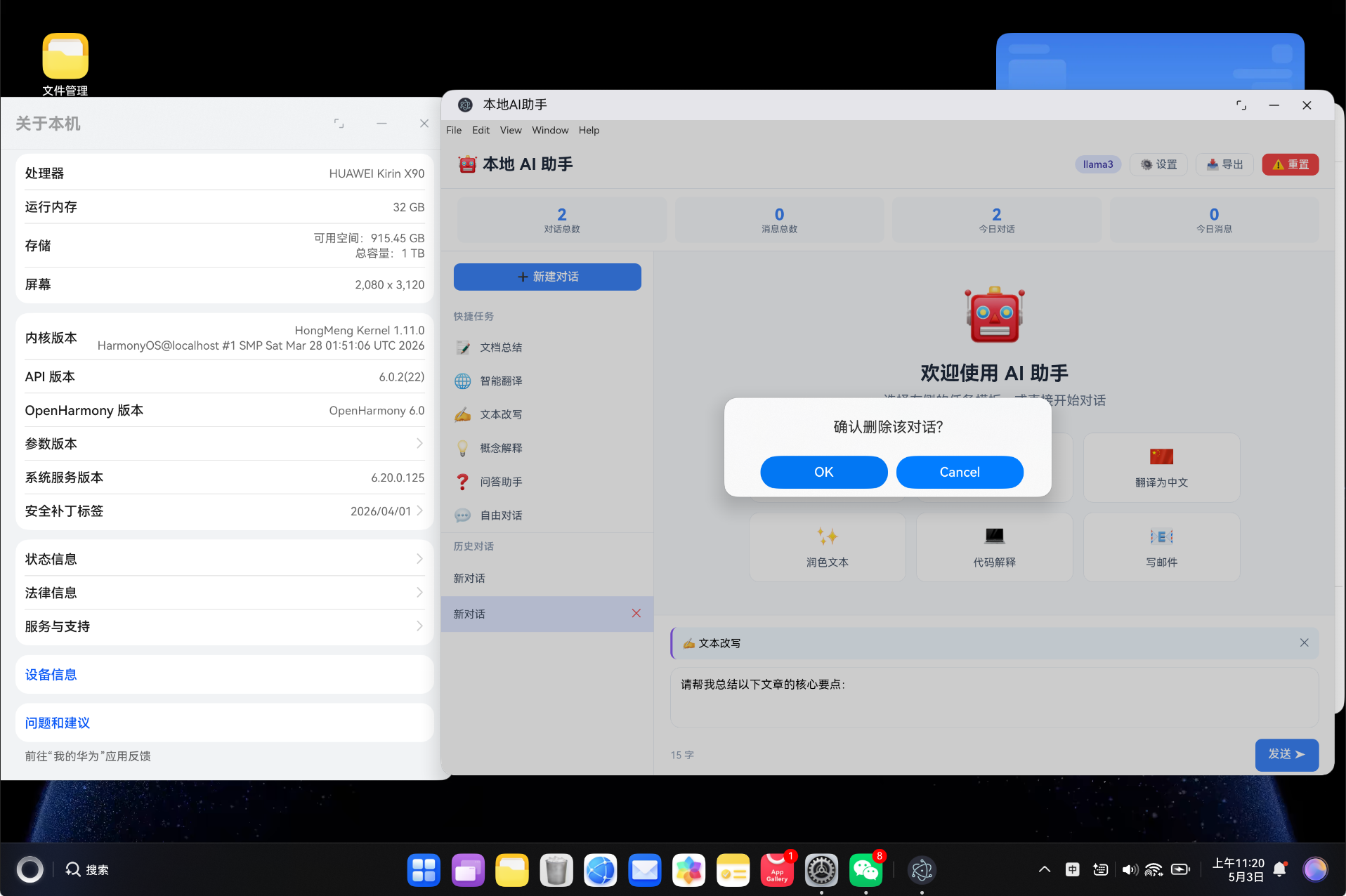
- 历史管理:多轮对话管理,随时回溯历史对话
- 数据统计:对话数量、消息统计、使用趋势
- 隐私安全:本地存储,API Key 安全保存
1.3 效果预览

二、技术栈
2.1 核心技术
| 技术 | 版本 | 说明 |
|---|---|---|
| Vue3 | ^3.4.0 | 前端框架,使用 Composition API |
| TypeScript | ^5.3.0 | 类型安全的 JavaScript 超集 |
| Vue Router | ^4.6.4 | Vue 官方路由管理 |
| Vite | ^5.0.0 | 极速构建工具 |
| HarmonyOS | API 11+ | 鸿蒙操作系统 |
| Fetch API | 原生 | 调用 AI 服务 API |
2.2 支持的 AI 服务
| 服务 | 默认模型 | 默认地址 | 说明 |
|---|---|---|---|
| OpenAI | gpt-4o-mini | api.openai.com/v1 | 全球最流行的 AI 服务 |
| Claude | claude-3-5-sonnet | api.anthropic.com | Anthropic 的 Claude 系列 |
| DeepSeek | deepseek-chat | api.deepseek.com/v1 | 国产开源大模型 |
| 通义千问 | qwen-turbo | dashscope.aliyuncs.com | 阿里云通义系列 |
| Ollama | llama3 | localhost:11434/v1 | 本地部署,无需网络 |
2.3 项目配置
{
  "name": "local-ai-assistant",
  "version": "1.0.0",
  "description": "本地AI助手 - 集成大模型API,文档总结、翻译",
  "type": "module",
  "scripts": {
    "dev": "vite",
    "build": "vite build",
    "preview": "vite preview"
  }
}
三、项目架构
3.1 目录结构
vue-app/
├── src/
│   ├── types/
│   │   └── ai.ts                    # 类型定义
│   ├── services/
│   │   └── AIService.ts             # 业务逻辑层
│   ├── components/
│   │   └── AIPanel.vue              # 主组件
│   ├── views/
│   │   └── AIView.vue               # 视图组件
│   ├── router/
│   │   └── index.ts                 # 路由配置
│   ├── styles/
│   │   └── global.css               # 全局样式
│   ├── App.vue                      # 根组件
│   └── main.ts                      # 入口文件
├── index.html                       # HTML 模板
├── package.json                     # 项目配置
├── vite.config.ts                   # Vite 配置
└── tsconfig.json                    # TypeScript 配置
3.2 架构分层
┌─────────────────────────────────────────────┐
│                  View 层                     │
│                AIView.vue                    │
├─────────────────────────────────────────────┤
│                Component 层                  │
│               AIPanel.vue                   │
│  ┌──────────┬──────────┬────────┬────────┐  │
│  │ 对话管理 │ 任务模板 │ 消息展示│ 设置面板│  │
│  └──────────┴──────────┴────────┴────────┘  │
├─────────────────────────────────────────────┤
│                Service 层                    │
│              AIService.ts                   │
│  ┌──────────┬──────────┬────────┬────────┐  │
│  │ 配置管理 │ 对话管理 │ API调用 │ 统计管理│  │
│  └──────────┴──────────┴────────┴────────┘  │
├─────────────────────────────────────────────┤
│                Type 层                       │
│                 ai.ts                       │
│  AIConfig | Conversation | ChatMessage      │
├─────────────────────────────────────────────┤
│              数据存储层                       │
│              localStorage                   │
└─────────────────────────────────────────────┘
四、TypeScript 类型定义
4.1 枚举类型
// AI 服务类型
export type AIServiceType =
  | 'openai'     // OpenAI GPT
  | 'claude'     // Anthropic Claude
  | 'deepseek'   // DeepSeek
  | 'qwen'       // 通义千问
  | 'ollama'     // 本地部署

// 任务类型
export type TaskType =
  | 'summary'    // 文档总结
  | 'translate'  // 智能翻译
  | 'rewrite'    // 文本改写
  | 'explain'    // 概念解释
  | 'qa'         // 问答助手
  | 'custom'     // 自由对话

// 消息角色
export type MessageRole = 'user' | 'assistant' | 'system'
4.2 核心接口
// AI 配置接口
export interface AIConfig {
  serviceType: AIServiceType  // 服务类型
  apiKey: string              // API Key
  baseUrl: string             // API 地址
  model: string               // 模型名称
  maxTokens: number           // 最大 Token 数
  temperature: number         // 温度参数 (0-1)
}

// 聊天消息接口
export interface ChatMessage {
  id: string            // 唯一标识
  role: MessageRole     // 消息角色
  content: string       // 消息内容
  timestamp: number     // 发送时间
  model?: string        // 使用的模型
}

// 对话接口
export interface Conversation {
  id: string                    // 唯一标识
  title: string                 // 对话标题
  messages: ChatMessage[]       // 消息列表
  createdAt: number             // 创建时间
  updatedAt: number             // 更新时间
  messageCount: number          // 消息数量
}

// 任务模板接口
export interface TaskTemplate {
  id: string                // 唯一标识
  name: string              // 任务名称
  type: TaskType            // 任务类型
  icon: string              // 图标
  description: string       // 描述
  systemPrompt: string      // 系统提示词
  userPromptTemplate: string // 用户提示词模板
  color: string             // 颜色
}

// 使用统计接口
export interface UsageStats {
  totalConversations: number    // 对话总数
  totalMessages: number         // 消息总数
  totalTokens: number           // Token 总数
  todayConversations: number    // 今日对话
  todayMessages: number         // 今日消息
  popularTask: string           // 常用任务
}
4.3 任务模板配置
export const TASK_TEMPLATES: TaskTemplate[] = [
  {
    id: 'summary',
    name: '文档总结',
    type: 'summary',
    icon: '📝',
    description: '快速提炼文档核心要点',
    systemPrompt: '你是一个专业的文档总结助手。请仔细阅读用户提供的文档内容,提炼出核心要点...',
    userPromptTemplate: '请对以下内容进行总结:\n\n{{content}}',
    color: '#3b82f6',
  },
  {
    id: 'translate',
    name: '智能翻译',
    type: 'translate',
    icon: '🌐',
    description: '支持多语言智能翻译',
    systemPrompt: '你是一个专业的翻译助手。请将用户提供的内容翻译为目标语言...',
    userPromptTemplate: '请将以下内容翻译为{{targetLang}}:\n\n{{content}}',
    color: '#10b981',
  },
  {
    id: 'rewrite',
    name: '文本改写',
    type: 'rewrite',
    icon: '✍️',
    description: '改写文本,使其更通顺专业',
    // ...
  },
  {
    id: 'explain',
    name: '概念解释',
    type: 'explain',
    icon: '💡',
    description: '用通俗易懂的方式解释概念',
    // ...
  },
  {
    id: 'qa',
    name: '问答助手',
    type: 'qa',
    icon: '❓',
    description: '解答各种问题',
    // ...
  },
  {
    id: 'custom',
    name: '自由对话',
    type: 'custom',
    icon: '💬',
    description: '自由发挥,无限制对话',
    // ...
  },
]
任务模板说明:
| 任务 | 图标 | 适用场景 | 提示词特点 |
|---|---|---|---|
| 文档总结 | 📝 | 长文总结、报告提炼 | 要求提炼3-5个要点 |
| 智能翻译 | 🌐 | 中英互译、多语言翻译 | 保持原意,自然流畅 |
| 文本改写 | ✍️ | 润色文章、改写风格 | 保留核心意思,优化表达 |
| 概念解释 | 💡 | 技术解释、知识科普 | 通俗易懂,避免术语 |
| 问答助手 | ❓ | 问题解答、知识查询 | 准确详细,有条理 |
| 自由对话 | 💬 | 创意写作、头脑风暴 | 无限制,自由发挥 |
五、服务层实现
5.1 服务类初始化
import { AIConfig, Conversation, ChatMessage, UsageStats } from '../types/ai'

const STORAGE_KEYS = {
  config: 'ai_config',
  conversations: 'ai_conversations',
  currentConversationId: 'ai_current_conversation',
  usage: 'ai_usage_stats',
}

class _AIService {
  private config: AIConfig | null = null
  private conversations: Conversation[] = []
  private currentConversationId: string | null = null

  constructor() {
    this.loadFromStorage()
    if (!this.config) {
      this.initDefaultConfig()
    }
  }

  private loadFromStorage(): void {
    try {
      const config = localStorage.getItem(STORAGE_KEYS.config)
      const conversations = localStorage.getItem(STORAGE_KEYS.conversations)
      const currentId = localStorage.getItem(STORAGE_KEYS.currentConversationId)
      if (config) this.config = JSON.parse(config)
      if (conversations) this.conversations = JSON.parse(conversations)
      if (currentId) this.currentConversationId = currentId
    } catch {
      this.config = null
      this.conversations = []
      this.currentConversationId = null
    }
  }

  private saveToStorage(): void {
    localStorage.setItem(STORAGE_KEYS.config, JSON.stringify(this.config))
    localStorage.setItem(STORAGE_KEYS.conversations, JSON.stringify(this.conversations))
    if (this.currentConversationId) {
      localStorage.setItem(STORAGE_KEYS.currentConversationId, this.currentConversationId)
    }
  }

  private initDefaultConfig(): void {
    this.config = {
      serviceType: 'ollama',        // 默认使用本地 Ollama
      apiKey: '',                   // 本地无需 API Key
      baseUrl: 'http://localhost:11434/v1',
      model: 'llama3',
      maxTokens: 2048,
      temperature: 0.7,
    }
    this.saveToStorage()
  }
}
5.2 API 调用(支持流式输出)
这是核心功能,支持流式响应和模拟降级:
async sendMessage(conversationId: string, content: string, onChunk?: (chunk: string) => void): Promise<string> {
  // 添加用户消息
  this.addMessage(conversationId, 'user', content)

  const conversation = this.conversations.find(c => c.id === conversationId)
  if (!conversation) throw new Error('Conversation not found')

  // 构建消息历史(最近10条)
  const messages = conversation.messages.slice(-10).map(m => ({
    role: m.role,
    content: m.content,
  }))

  if (!this.config) throw new Error('AI config not initialized')

  try {
    // 调用 AI API
    const response = await fetch(`${this.config.baseUrl}/chat/completions`, {
      method: 'POST',
      headers: {
        'Content-Type': 'application/json',
        'Authorization': `Bearer ${this.config.apiKey}`,
      },
      body: JSON.stringify({
        model: this.config.model,
        messages,
        max_tokens: this.config.maxTokens,
        temperature: this.config.temperature,
        stream: !!onChunk,  // 是否启用流式输出
      }),
    })

    if (!response.ok) {
      throw new Error(`API Error: ${response.status}`)
    }

    if (onChunk) {
      // 流式输出处理
      return await this.handleStreamResponse(response, onChunk, conversationId)
    } else {
      // 非流式输出
      const data = await response.json()
      const reply = data.choices?.[0]?.message?.content || '抱歉,未能生成回复。'
      this.addMessage(conversationId, 'assistant', reply)
      return reply
    }
  } catch (error) {
    // API 调用失败时,使用模拟回复
    console.warn('AI API call failed, using simulated response')
    const simulated = this.simulateResponse(content)
    this.addMessage(conversationId, 'assistant', simulated)
    return simulated
  }
}
5.3 流式响应处理
private async handleStreamResponse(response: Response, onChunk: (chunk: string) => void, conversationId: string): Promise<string> {
  const reader = response.body?.getReader()
  if (!reader) throw new Error('Failed to read stream')

  const decoder = new TextDecoder()
  let fullContent = ''

  try {
    while (true) {
      const { done, value } = await reader.read()
      if (done) break

      const chunk = decoder.decode(value, { stream: true })
      const lines = chunk.split('\n')

      for (const line of lines) {
        if (line.startsWith('data: ') && line !== 'data: [DONE]') {
          try {
            const json = JSON.parse(line.slice(6))
            const content = json.choices?.[0]?.delta?.content
            if (content) {
              fullContent += content
              onChunk(fullContent)  // 实时更新 UI
            }
          } catch { /* skip malformed JSON */ }
        }
      }
    }
  } finally {
    reader.releaseLock()
  }

  if (fullContent) {
    this.addMessage(conversationId, 'assistant', fullContent)
  }

  return fullContent
}
流式输出原理:
服务器 → data: {"choices":[{"delta":{"content":"你"}}]}
服务器 → data: {"choices":[{"delta":{"content":"好"}}]}
服务器 → data: {"choices":[{"delta":{"content":","}}]}
服务器 → data: {"choices":[{"delta":{"content":"我"}}]}
...
服务器 → data: [DONE]
5.4 模拟响应(降级方案)
private simulateResponse(userInput: string): string {
  const lowerInput = userInput.toLowerCase()
  if (lowerInput.includes('总结')) {
    return '这是一份文档的总结要点:\n\n1. **核心主题**:文章主要讨论了技术发展趋势及其对行业的影响。\n\n2. **关键发现**:研究表明,AI 技术在各个领域的应用正在加速...\n\n3. **建议行动**:建议企业尽早布局 AI 战略...\n\n4. **未来展望**:随着技术的不断成熟...'
  }
  if (lowerInput.includes('翻译')) {
    return 'Translation completed successfully.\n\nThe content has been translated while preserving the original meaning and tone.'
  }
  if (lowerInput.includes('解释')) {
    return '让我用通俗的方式来解释这个概念:\n\n你可以把它想象成是一个"智能助手"。就像你有一个非常聪明的朋友...\n\n**关键点**:\n- 它能够理解自然语言\n- 可以学习和适应不同的任务...'
  }
  return `感谢您的提问!\n\n关于您提到的内容,我的分析如下:\n\n这是一个非常有意义的话题...`
}
六、核心功能实现
6.1 对话管理
<template>
  <aside class="sidebar">
    <button class="btn btn-primary btn-block" @click="createNewChat">
      ➕ 新建对话
    </button>

    <div class="task-templates">
      <div class="section-title">快捷任务</div>
      <div v-for="task in taskTemplates" :key="task.id" class="task-item" @click="selectTask(task)">
        <span class="task-icon">{{ task.icon }}</span>
        <span class="task-name">{{ task.name }}</span>
      </div>
    </div>

    <div class="conversations">
      <div class="section-title">历史对话</div>
      <div v-for="conv in conversations" :key="conv.id"
           :class="['conv-item', { active: conv.id === currentConversation?.id }]"
           @click="selectConversation(conv)">
        <span class="conv-title">{{ conv.title }}</span>
        <button class="conv-delete" @click.stop="deleteConversation(conv.id)">✕</button>
      </div>
    </div>
  </aside>
</template>
对话管理功能:
| 功能 | 说明 |
|---|---|
| 新建对话 | 创建新的对话会话 |
| 切换对话 | 点击历史对话切换到对应会话 |
| 删除对话 | 鼠标悬停显示删除按钮 |
| 自动标题 | 第一条消息自动作为对话标题 |
6.2 消息展示
<div class="chat-messages">
  <div v-for="msg in currentConversation.messages" :key="msg.id"
       :class="['message', `message-${msg.role}`]">
    <div class="message-avatar">
      {{ msg.role === 'user' ? '👤' : '🤖' }}
    </div>
    <div class="message-content">
      <div class="message-text" v-html="formatMessage(msg.content)"></div>
      <div class="message-time">
        {{ formatTime(msg.timestamp) }}
        <span v-if="msg.model" class="message-model">{{ msg.model }}</span>
      </div>
    </div>
  </div>
</div>
消息格式化:
function formatMessage(content: string): string {
  return content
    .replace(/\*\*(.*?)\*\*/g, '<strong>$1</strong>')  // **粗体**
    .replace(/\*(.*?)\*/g, '<em>$1</em>')              // *斜体*
    .replace(/`(.*?)`/g, '<code>$1</code>')            // `代码`
    .replace(/\n/g, '<br>')                            // 换行
}
6.3 任务模板
选择任务模板后,用户输入会自动套用模板:
function selectTask(task: TaskTemplate): void {
  selectedTask.value = task
  if (!currentConversation.value) {
    createNewChat()
  }
}

async function sendMessage(): Promise<void> {
  let finalContent = inputMessage.value

  // 如果选择了任务模板,套用提示词模板
  if (selectedTask.value) {
    finalContent = selectedTask.value.userPromptTemplate
      .replace('{{content}}', inputMessage.value)
      .replace('{{targetLang}}', '英文')
  }

  await AIService.sendMessage(conversationId, finalContent, (chunk: string) => {
    streamingContent.value = chunk
  })
}
任务模板使用示例:
用户选择「文档总结」任务
用户输入:这是一篇关于AI发展的长文章...

实际发送给AI的提示词:
请对以下内容进行总结:

这是一篇关于AI发展的长文章...
6.4 快捷操作
export const QUICK_ACTIONS: QuickAction[] = [
  { id: 'q1', label: '总结文章', icon: '📄', prompt: '请帮我总结以下文章的核心要点:' },
  { id: 'q2', label: '翻译为英文', icon: '🇬🇧', prompt: '请将以下内容翻译为英文:' },
  { id: 'q3', label: '翻译为中文', icon: '🇨🇳', prompt: '请将以下内容翻译为中文:' },
  { id: 'q4', label: '润色文本', icon: '✨', prompt: '请帮我润色以下文本,使其更加专业:' },
  { id: 'q5', label: '代码解释', icon: '💻', prompt: '请帮我解释以下代码的作用:' },
  { id: 'q6', label: '写邮件', icon: '📧', prompt: '请帮我写一封邮件,主题是:' },
]
七、响应式数据管理
7.1 组合式 API
import { ref, computed, onMounted, nextTick } from 'vue'

const inputMessage = ref('')
const isStreaming = ref(false)
const streamingContent = ref('')
const showSettings = ref(false)
const selectedTask = ref<TaskTemplate | null>(null)
const toastMessage = ref('')
const toastType = ref('success')
const chatContainer = ref<HTMLElement | null>(null)

const config = ref<AIConfig | null>(null)
const conversations = ref<Conversation[]>([])
const currentConversation = ref<Conversation | null>(null)
const stats = ref({ totalConversations: 0, totalMessages: 0, todayConversations: 0, todayMessages: 0 })
7.2 自动滚动
function scrollToBottom(): void {
  nextTick(() => {
    if (chatContainer.value) {
      chatContainer.value.scrollTop = chatContainer.value.scrollHeight
    }
  })
}

// 发送消息后自动滚动
await AIService.sendMessage(conversationId, content, (chunk: string) => {
  streamingContent.value = chunk
  scrollToBottom()  // 流式输出时实时滚动到底部
})
scrollToBottom()
八、样式设计
8.1 消息气泡样式
.message { display: flex; gap: 12px; margin-bottom: 20px; }
.message-avatar {
  width: 36px; height: 36px; border-radius: 50%;
  background: #f1f5f9; display: flex; align-items: center;
  justify-content: center; font-size: 18px;
}
.message-text {
  background: white; border-radius: 12px; padding: 12px 15px;
  line-height: 1.6; font-size: 14px;
  box-shadow: 0 1px 3px rgba(0,0,0,0.05);
}
.message-user .message-text { background: #e0e7ff; }
.message-user { flex-direction: row-reverse; }
8.2 打字指示器动画
.typing-indicator { display: flex; gap: 4px; padding: 5px 0; }
.typing-indicator span {
  width: 6px; height: 6px; border-radius: 50%;
  background: #94a3b8; animation: typing 1.4s infinite;
}
.typing-indicator span:nth-child(2) { animation-delay: 0.2s; }
.typing-indicator span:nth-child(3) { animation-delay: 0.4s; }

@keyframes typing {
  0%, 60%, 100% { transform: translateY(0); }
  30% { transform: translateY(-6px); }
}
8.3 流式输出样式
.streaming {
  border-left: 3px solid #3b82f6;  /* 左侧蓝色竖线表示正在生成 */
}
九、AI 服务配置
9.1 配置参数说明
| 参数 | 说明 | 默认值 | 建议范围 |
|---|---|---|---|
| serviceType | AI 服务类型 | ollama | 见上表 |
| apiKey | API 密钥 | 空 | 从服务商获取 |
| baseUrl | API 地址 | localhost:11434 | 根据服务商调整 |
| model | 模型名称 | llama3 | 根据服务选择 |
| maxTokens | 最大 Token 数 | 2048 | 256-8192 |
| temperature | 温度参数 | 0.7 | 0-1,越低越保守 |
9.2 Ollama 本地部署
Ollama 是最简单的本地 AI 部署方案:
# 1. 安装 Ollama
# 访问 https://ollama.ai 下载安装

# 2. 拉取模型
ollama pull llama3

# 3. 启动服务(默认端口 11434)
ollama serve

# 4. 测试
curl http://localhost:11434/v1/chat/completions \
  -H "Content-Type: application/json" \
  -d '{"model":"llama3","messages":[{"role":"user","content":"你好"}]}'
💡 使用 Ollama 时,无需配置 API Key,默认地址为 http://localhost:11434/v1
9.3 其他服务商配置
OpenAI 配置示例:
{
  "serviceType": "openai",
  "apiKey": "sk-...",
  "baseUrl": "https://api.openai.com/v1",
  "model": "gpt-4o-mini",
  "maxTokens": 2048,
  "temperature": 0.7
}
通义千问配置:
{
  "serviceType": "qwen",
  "apiKey": "sk-...",
  "baseUrl": "https://dashscope.aliyuncs.com/compatible-mode/v1",
  "model": "qwen-turbo",
  "maxTokens": 2048,
  "temperature": 0.7
}
十、构建与部署
10.1 构建命令
# 清理缓存
Remove-Item -Recurse -Force "dist" -ErrorAction SilentlyContinue
Remove-Item -Recurse -Force ".hvigor" -ErrorAction SilentlyContinue

# 构建
npm run build
10.2 构建输出
✓ 37 modules transformed.
../dist/index.html                   0.62 kB │ gzip:  0.45 kB
../dist/assets/index-CBgsX6DZ.css    0.21 kB │ gzip:  0.19 kB
../dist/assets/AIView-CLjK2IUT.css   7.88 kB │ gzip:  1.96 kB
../dist/assets/AIView-C3X5lQXk.js   17.87 kB │ gzip:  8.26 kB
../dist/assets/index-BbYfLuou.js    91.73 kB │ gzip: 35.96 kB
✓ built in 615ms
10.3 产物分析
| 文件 | 大小 | Gzip 后 | 说明 |
|---|---|---|---|
| index.html | 0.62 KB | 0.45 KB | HTML 入口 |
| index.css | 0.21 KB | 0.19 KB | 全局样式 |
| AIView.css | 7.88 KB | 1.96 KB | 组件样式 |
| AIView.js | 17.87 KB | 8.26 KB | 业务逻辑 |
| index.js | 91.73 KB | 35.96 KB | Vue + Router |
| 总计 | 118.31 KB | 46.82 KB | - |
十一、核心亮点
11.1 流式输出实现
流式输出是提升用户体验的关键技术:
// 使用 Fetch API 的 ReadableStream
const reader = response.body?.getReader()
const decoder = new TextDecoder()
let fullContent = ''

while (true) {
  const { done, value } = await reader.read()
  if (done) break

  const chunk = decoder.decode(value, { stream: true })
  // 解析 SSE (Server-Sent Events) 格式
  const lines = chunk.split('\n')
  for (const line of lines) {
    if (line.startsWith('data: ') && line !== 'data: [DONE]') {
      const json = JSON.parse(line.slice(6))
      const content = json.choices?.[0]?.delta?.content
      if (content) {
        fullContent += content
        onChunk(fullContent)  // 回调更新 UI
      }
    }
  }
}
11.2 提示词模板系统
通过模板系统,用户无需记忆复杂的提示词:
// 模板定义
{
  userPromptTemplate: '请对以下内容进行总结:\n\n{{content}}',
}

// 运行时替换
const finalPrompt = template.replace('{{content}}', userInput)
设计优势:
- 降低使用门槛:普通用户无需编写提示词
- 保证输出质量:精心设计的提示词获得更好的结果
- 灵活可扩展:支持自定义变量替换
11.3 自动降级机制
当 API 调用失败时,自动使用模拟回复:
try {
  // 尝试调用真实 API
  const response = await fetch(apiUrl, { ... })
  return await handleResponse(response)
} catch (error) {
  // 降级到模拟回复
  return simulateResponse(userInput)
}
十二、常见问题解答
12.1 如何添加新的 AI 服务?
- 在
ai.ts中添加服务类型:
export type AIServiceType = 'openai' | '...' | 'new_service'
- 在
SERVICE_CONFIG中添加配置:
new_service: { label: '新服务', defaultModel: 'model-name', defaultBaseUrl: 'https://api.example.com' }
12.2 如何实现多轮对话?
系统会自动维护对话历史(最近10条消息):
const messages = conversation.messages.slice(-10).map(m => ({
  role: m.role,
  content: m.content,
}))
💡 AI 会基于上下文进行连贯对话,无需额外配置。
12.3 如何导出对话历史?
function exportHistory(): string {
  return JSON.stringify({
    conversations: this.conversations,
    config: this.config,
    exportedAt: new Date().toISOString(),
  }, null, 2)
}
导出后可用于:
- 数据备份
- 分析使用习惯
- 迁移到其他设备
十三、总结
本项目基于 Vue3 + TypeScript 实现了一个功能完整的本地 AI 助手桌面端应用,主要特点包括:
- 多服务支持:OpenAI、Claude、DeepSeek、通义千问、Ollama
- 任务模板系统:文档总结、智能翻译、文本改写、概念解释等6种预设任务
- 流式输出:实时显示 AI 回复,无需等待完整响应
- 对话管理:多轮对话、历史记录、随时回溯
- 快捷操作:6种常用快捷动作一键触发
- 自动降级:API 不可用时自动使用模拟回复
- 数据统计:对话数、消息数、今日统计
- 本地部署支持:Ollama 本地部署,无需网络
项目代码结构清晰,遵循分层架构设计,可直接打包为 HarmonyOS 应用部署到鸿蒙设备。
十四、参考资料
- Vue3 官方文档
- TypeScript 官方文档
- Vite 构建工具
- Vue Router 路由
- HarmonyOS 开发文档
- OpenAI API 文档
- Ollama 官方文档
- CSDN 博客质量分标准
- Fetch API 流式响应
更多推荐
 10
10 0
0- 0


 已为社区贡献5条内容

所有评论(0)