
使用.py脚本下载并加载开源大模型LLMs
·
-
可以通过以下代码下载并加载模型,以
facebook/opt-6.7b为例:from transformers import AutoModelForCausalLM, AutoTokenizer tokenizer = AutoTokenizer.from_pretrained('facebook/opt-6.7b', cache_dir='your_loaded_path') model = AutoModelForCausalLM.from_pretrained('facebook/opt-6.7b', cache_dir='your_loaded_path', device_map='your_device', load_in_8bit=True) -
如果出现以下报错,则说明是网络连接问题:无法连接到 Hugging Face 的服务器
OSError: We couldn't connect to 'https://huggingface.co' to load this file, couldn't find it in the cached files and it looks like facebook/opt-6.7b is not the path to a directory containing a file named config.json. Checkout your internet connection or see how to run the library in offline mode at 'https://huggingface.co/docs/transformers/installation#offline-mode'.解决方法:只需要设置 HF mirror 就可以修复HF的网络连接问题,在终端输入以下命令
export HF_ENDPOINT=https://hf-mirror.com成功开始下载:
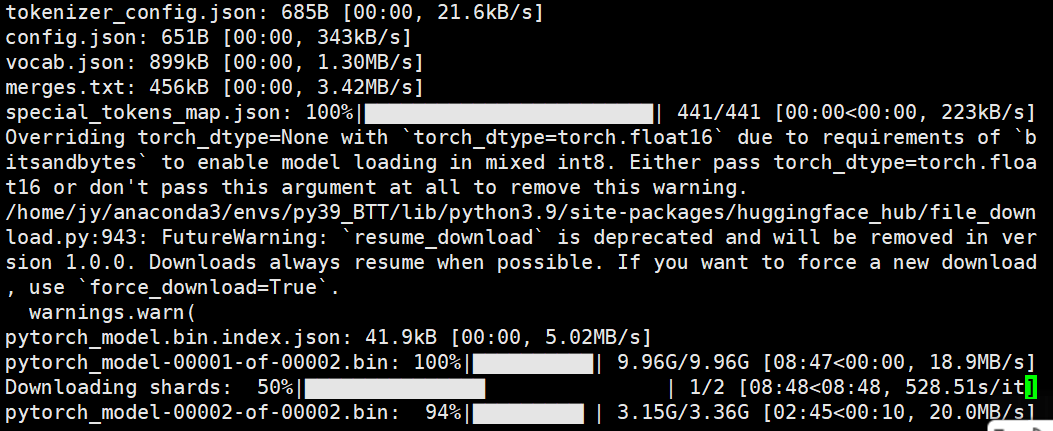
-
如果仅需要下载模型,且安装了 Hugging Face CLI 工具,可以使用以下命令简单快捷地下载模型ckpt到本地:
huggingface-cli download facebook/opt-6.7b --cache-dir [/本地路径]

# Shell
huggingface-cli download --repo-type dataset --token [你的token] --resume-download [数据集名称] --cache-dir [/本地路径] --local-dir-use-symlinks False
更多推荐
 0
0 0
0- 0


 已为社区贡献4条内容

所有评论(0)