
微服务组件源码5——Setinel核心流程详解
Node数据统计结点
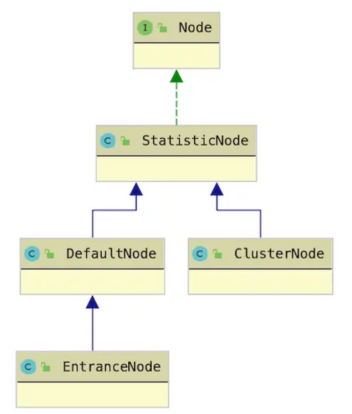
Node接口
Node负责指标统计,包含每秒/每分钟QPS、Thread、RT等指标。
public interface Node extends OccupySupport, DebugSupport {
//每分钟请求数,pass + block
long totalRequest();
//每分钟通过的请求数
long totalPass();
//每分钟完成的请求数,即调用了Entry#exit()
long totalSuccess();
//每分钟阻塞的请求数
long blockRequest();
//每分钟发生异常的请求数
long totalException();
//同上,每秒的指标,passQps() + #blockQps()
double totalQps();
double passQps();
double successQps();
double blockQps();
double exceptionQps();
//每秒估计的最大成功QPS
double maxSuccessQps();
//每秒平均RT
double avgRt();
//获取最短的响应时间
double minRt();
//当前活跃的线程数
int curThreadNum();
//上一个窗口BlockQps
double previousBlockQps();
double previousPassQps();
//MetricNode 封装了指定的timestamp、passQps、blockQps、successQps、exceptionQps、rt
Map<Long, MetricNode> metrics();
//添加指标
void addPassRequest(int count);
void addRtAndSuccess(long rt, int success);
void increaseBlockQps(int count);
void increaseExceptionQps(int count);
void increaseThreadNum();
void decreaseThreadNum();
//重置,当IntervalProperty#INTERVAL or SampleCountProperty#SAMPLE_COUNT改变时
void reset();
}
StatisticNode
概述
* StatisticNode主要负责做指标统计,所有的Node都继承了StatisticNode。统计的时机在StatisticSlot中。
* StatisticNode中包含一个ArrayMetric秒级滑动窗口和一个ArrayMetric分钟级滑动窗口,用于保存统计数据,但两者的用途不同。
* 此外有个LongAddr线程安全的工具类负责统计并发线程数量,这个计数就和窗口无关,单纯就此刻并发活跃的线程数
* 存在嵌套调用,即存在Entry链结点超过2个的场景时,只需去最外层自己的统计数据即可
这时因为外层的运行内,自然包含了内存的执行时间,那么StatisticSlot在统计外层Entry的Node的统计数据时,其内层的Entry自然是执行完的
public class StatisticNode implements Node {
// 秒级滑动窗口,SAMPLE_COUNT=2,代表每500ms一个时间窗口
private transient volatile Metric rollingCounterInSecond = new ArrayMetric(SampleCountProperty.SAMPLE_COUNT,IntervalProperty.INTERVAL);
// 分钟级滑动窗口,SAMPLE_COUNT=60,代表每1s一个时间窗口
private transient Metric rollingCounterInMinute = new ArrayMetric(60, 60 * 1000, false);
// 当前并发线程数量
private LongAdder curThreadNum = new LongAdder();
}
* 3个子类
都继承与StatisticNode,使用其作为统计数据的工具
三者的主要区别在于统计维度的不同,由于统计维度不同,创建时机和数量就不同:
①DefaultNode:统计维度是Context + Resource,表示同一个上下文中的同一资源,在线程中共享一个DefaultNode实例,在NodeSelectorSlot中创建;
②EntranceNode:统计维度是Context,表示同一个上下文中,共享同一个EntranceNode实例,在Context创建时创建;
③ClusterNode:统计维度是Resource,表示同一个资源共享同一个ClusterNode实例,在ClusterBuilderSlot中创建;
* 各个结点再sentinel里的关系
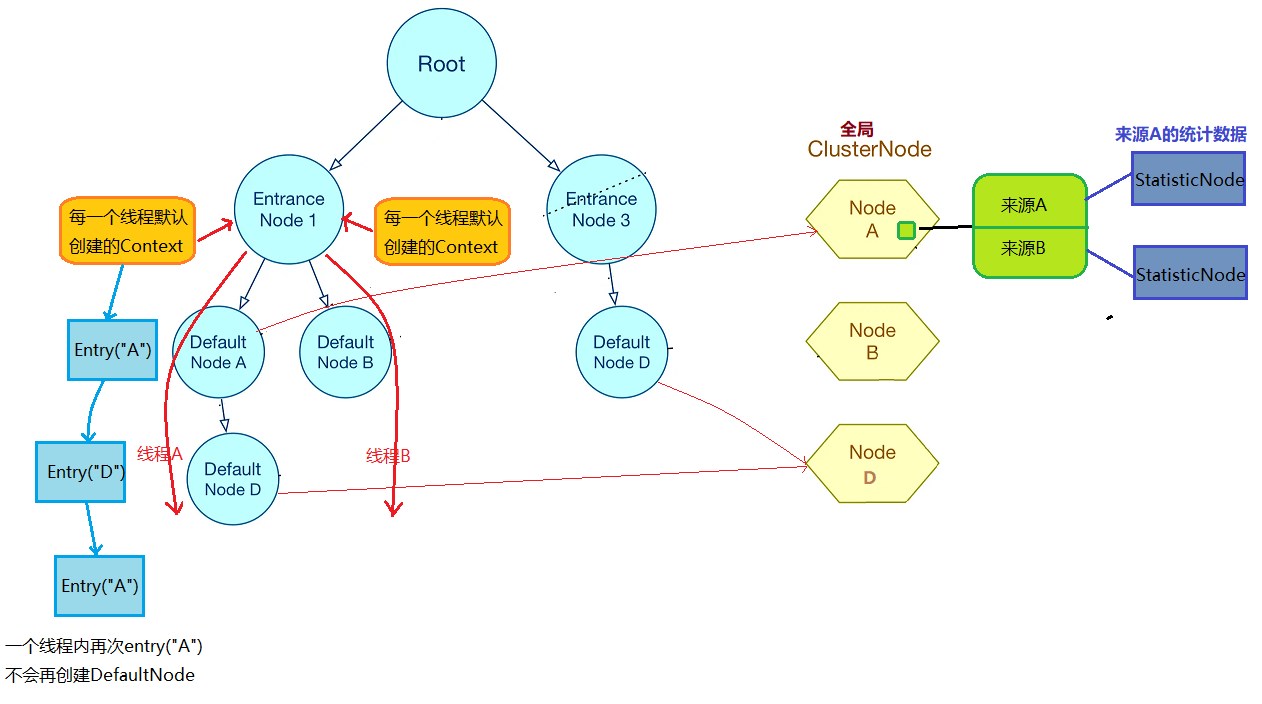
DefaultNode一线程一个
* 普通链路节点,继承StatisticNode,统计的工作还是交给父类处理,统计维度:Context + Resource
通过调用的时机来区分统计的维度
* 主要的扩展扩展功能是:
①维护了一个Node集合,用于表示当前节点的子节点,通过这种方式,DefaultNode构成了一颗树。通过类结点增删改查的方法
多次调用SphU.entry,NodeSelectorSlot执行时创建DefaultNode(如果Context+Resource维度已经有这个Node了,将使用原来的Node实例),
并加入Context上下文的Node链表中。
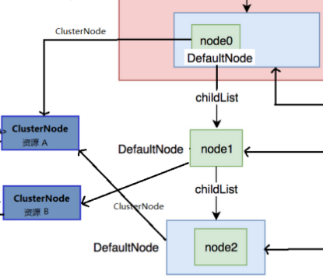
②关联的ClusterNode,表示当前资源的全局统计信息
因此,也重写了StaticNode更新统计数据的相关方法,
如increaseBlockQps增加被拒绝的QPS时,额外调用了ClusterNode的increaseBlockQps方法
public class DefaultNode extends StatisticNode {
// 关联的资源
private ResourceWrapper id;
// 子节点
private volatile Set<Node> childList = new HashSet<>();
// 关联的ClusterNode
private ClusterNode clusterNode;
public DefaultNode(ResourceWrapper id, ClusterNode clusterNode) {
this.id = id;
this.clusterNode = clusterNode;
}
public void addChild(Node node) {
if (node == null) { return;}
if (!childList.contains(node)) {
synchronized (this) {
if (!childList.contains(node)) {
Set<Node> newSet = new HashSet<>(childList.size() + 1);
newSet.addAll(childList);
newSet.add(node);
childList = newSet;
}
}
}
}
@Override
public void increaseBlockQps(int count) {
super.increaseBlockQps(count);
this.clusterNode.increaseBlockQps(count);
}
//略
}
ClusterNode全局
* 全局结点,继承StatisticNode,统计的工作还是交给父类处理统计一个Resource的全局情况下的统计数据。统计维度:Resource
* 创建时机:多次调用Sph.entry获取不同资源,ClusterBuilderSlot执行时创建ClusterNode。如果这个Resource从来没有被entry调用过,则创建一个ClusterNode
否则沿用Resource对应的ClusterNode
* 主要的扩展扩展功能是:
①其内部维护一个Map<String, StatisticNode> originCountMap
在originCountMap中保存了此Resource下不同origin的统计数据StatisticNode
public class ClusterNode extends StatisticNode {
private Map<String, StatisticNode> originCountMap = new HashMap<String, StatisticNode>();
public Node getOrCreateOriginNode(String origin) {
StatisticNode statisticNode = originCountMap.get(origin);
if (statisticNode == null) {
try {
lock.lock();
statisticNode = originCountMap.get(origin);
if (statisticNode == null) {
statisticNode = new StatisticNode();
HashMap<String, StatisticNode> newMap = new HashMap<>(originCountMap.size() + 1);
newMap.putAll(originCountMap);
newMap.put(origin, statisticNode);
originCountMap = newMap;
}
} finally {
lock.unlock();
}
}
return statisticNode;
}
//略
}
EntranceNode线程树根
* 入口节,继承DefaultNode,是特殊的DefaultNode链路节点,其本身不统计数据。统计维度:Context。
创建时机:每个上下文Context,都会有一个EntranceNode与之关联,代表链路的入口,如果两个线程除此进入Setinel时没有指定(线程变量中没有)Cotext
那么会公共同一个EntranceNode
* EntranceNode继承了DefaultNode,是Node树的树根。
* EntranceNode重写了所有统计方法,比如avgRt统计平均响应时间,根据所有子节点的统计数据,计算得到最终的平均响应时间。
public class EntranceNode extends DefaultNode {
public EntranceNode(ResourceWrapper id, ClusterNode clusterNode) {
super(id, clusterNode);
}
@Override
public double avgRt() {
double total = 0;
double totalQps = 0;
for (Node node : getChildList()) {
total += node.avgRt() * node.passQps();
totalQps += node.passQps();
}
return total / (totalQps == 0 ? 1 : totalQps);
}
//略
}
统计工具
ArrayMetric数据统计
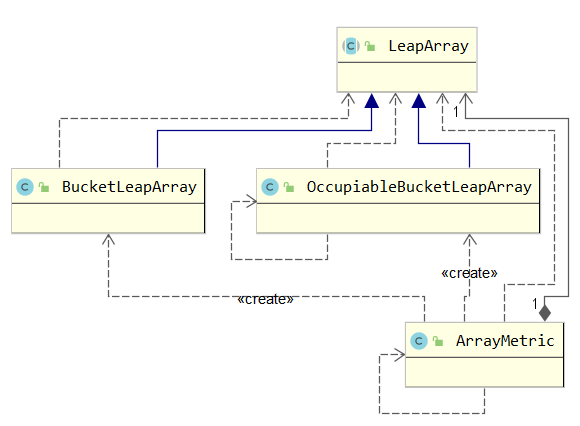
* StatisticNode的Node接口的实现都是基于两个ArrayMetric,如下的获取分钟内的所有请求数
- 在调用StatisticNode的方法进行记录时,底层就是直接调用样本窗口对应的方法即可
- 例如调用底层ArrayMetric的addPass(count)可以进行对应样本窗口的计数add
在计算qps时,使用滑动窗口统计周期内的pass整数(即所有样本数据总和) / 滑动窗口统计周期
// 秒级滑动窗口,SAMPLE_COUNT=2,代表每500ms一个时间窗口
private transient volatile Metric rollingCounterInSecond = new ArrayMetric(SampleCountProperty.SAMPLE_COUNT,IntervalProperty.INTERVAL);
// 分钟级滑动窗口,SAMPLE_COUNT=60,代表每1s一个时间窗口
private transient Metric rollingCounterInMinute = new ArrayMetric(60, 60 * 1000, false);
public long totalRequest() {
long totalRequest = rollingCounterInMinute.pass() + rollingCounterInMinute.block();
return totalRequest;
}
@Override
public void addPassRequest(int count) {
rollingCounterInSecond.addPass(count);
rollingCounterInMinute.addPass(count);
}
@Override
public double passQps() {
return rollingCounterInSecond.pass() / rollingCounterInSecond.getWindowIntervalInSec();
}
* 而ArrayMetric的方法时基于样本滑动窗口类LeapArray进行实现的,对统计窗口的所有数据,进行累加统计
①秒级滑动窗口对应的是OccupiableBucketLeapArray
②分钟级滑动窗口对应的是BucketLeapArray
sampleCount表示样本的数量,intervalInMs代表统计时长(一个滑动窗口时长),那么一个样本窗口的时长为intervalInMs/sampleCount
* 计数时:
ArrayMetric直接在当前时间对应的样本窗口内进行递增即可
通过LeapArray的currentWindow方法获取当前时间的窗口对象MetricBucket进行计数即可
* 查询时:
ArrayMetric需要或当前时间往后一个统计窗口周期内的所有样本MetricBucket,进行求和即可
public class ArrayMetric implements Metric {
private final LeapArray<MetricBucket> data;
public ArrayMetric(int sampleCount, int intervalInMs) {
this.data = new OccupiableBucketLeapArray(sampleCount, intervalInMs);
}
public ArrayMetric(int sampleCount, int intervalInMs, boolean enableOccupy) {
if (enableOccupy) {
this.data = new OccupiableBucketLeapArray(sampleCount, intervalInMs);
} else {
this.data = new BucketLeapArray(sampleCount, intervalInMs);
}
}
//添加的时候,执行找到LeapArray 中当前的窗口进行添加即可
@Override
public void addSuccess(int count) {
WindowWrap<MetricBucket> wrap = data.currentWindow();
wrap.value().addSuccess(count);
}
//获取LeapArray data统计窗口的所有数据,进行累加统计
@Override
public long pass() {
data.currentWindow();
long pass = 0;
List<MetricBucket> list = data.values();
for (MetricBucket window : list) {
pass += window.pass();
}
return pass;
}
}
LeapArray样本窗口载体
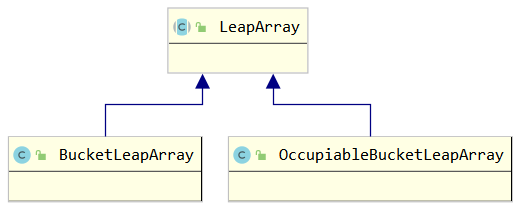
LaepArray抽象父类
* LaepArray是基于滑动窗口思想进行一个时间段内的数据统计的
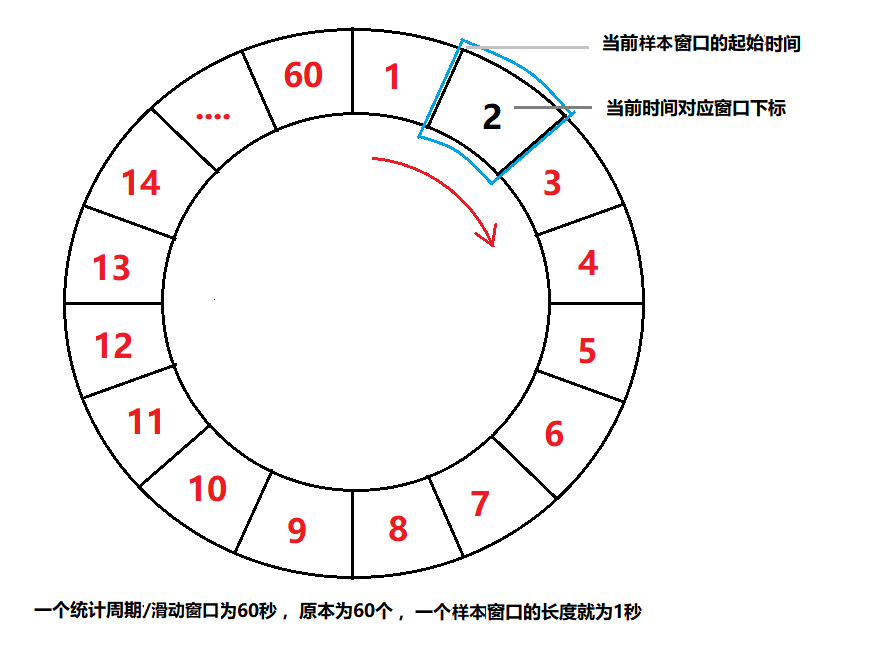
- 例如分钟的统计结构如下:统计窗口周期是1分钟,样本窗口为1s
Metric rollingCounterInMinute = new ArrayMetric(60, 60 * 1000, false);
* 核心方法currentWindow:
以当前时间为同一的基准,无论扫描线程,当需要获取当前时间点的某个资源的统计数据时,需要获取当前的窗口,步骤如下
①根据当前时间计算出当前时间属于那个滑动窗口的数组下标
当前时间戳 - 整数倍n的统计周期后,剩下的时间/样本大小,最后的值即为下标。不同时间依序的调用,其结果下标递增的
如上,9:00为下标0,9:01为下标1,以此类推
②根据当前时间计算出当前滑动窗口的开始时间
即如果当前时间位于样本窗口中间的话,需要把时间回退到样本窗口的起始时间
③在环形数组中获取滑动窗口(桶)的规则:
- 如果桶不存在则创建新的桶,并通过CAS将新桶赋值到数组下标位。这里CAS失败会进行Thread.yield()
- 如果获取到的桶不为空,并且桶的开始时间等于②刚刚算出来的时间,那么返回当前获取到的桶。
- 如果获取到的桶不为空,并且桶的开始时间小于②刚刚算出来的开始时间,那么说明这个桶是上一圈用过的桶,重置当前桶,并返回。
- 如果获取到的桶不为空,并且桶的开始时间大于②刚刚算出来的开始时间,理论上不应该出现这种情况,会返回新的空桶。原桶不会做任何改动也不替换
* 每一个滑动窗口(桶)里面保存的数据对象,由子类实现newEmptyBucket
* 重置当前桶的方法resetWindowTo,由子类实现
* 统计数据添加和查询,都是需要先获取到对应窗口的数据对象,存入或读取即可
由于查询是基于一个周期的,所以需要遍历累加当去周期的所有有效窗口即可
如果当前时间-窗口的起始时间 大于滑动窗口周期 ,就说明此窗口是过去周期使用的,是无效的
public boolean isWindowDeprecated(long time, WindowWrap<T> windowWrap) {
return time - windowWrap.windowStart() > intervalInMs;
}
public abstract class LeapArray<T> {
//略
//LeapArray构造方法
public LeapArray(int sampleCount, int intervalInMs) {
//一个滑动窗口的时长
this.windowLengthInMs = intervalInMs / sampleCount;
//统计周期
this.intervalInMs = intervalInMs;
//统计样本数
this.sampleCount = sampleCount;
this.array = new AtomicReferenceArray<>(sampleCount);
}
public WindowWrap<T> currentWindow(long timeMillis) {
if (timeMillis < 0) { return null;
}
// 根据当前时间计算出当前时间属于那个滑动窗口的数组下标
// (timeMillis / windowLengthInMs) % array.length()
int idx = calculateTimeIdx(timeMillis);
// 根据当前时间计算出当前滑动窗口的开始时间
// timeMillis - timeMillis % windowLengthInMs
long windowStart = calculateWindowStart(timeMillis);
/*
* 根据下脚标在环形数组中获取滑动窗口(桶)
* (1) 如果桶不存在则创建新的桶,并通过CAS将新桶赋值到数组下标位。
* (2) 如果获取到的桶不为空,并且桶的开始时间等于刚刚算出来的时间,那么返回当前获取到的桶。
* (3) 如果获取到的桶不为空,并且桶的开始时间小于刚刚算出来的开始时间,那么说明这个桶是上一圈用过的桶,重置当前桶
* (4) 如果获取到的桶不为空,并且桶的开始时间大于刚刚算出来的开始时间,理论上不应该出现这种情况。
*/
while (true) {
WindowWrap<T> old = array.get(idx);
if (old == null) {
WindowWrap<T> window = new WindowWrap<T>(windowLengthInMs, windowStart, newEmptyBucket(timeMillis));
if (array.compareAndSet(idx, null, window)) {
return window;
} else {
Thread.yield();
}
} else if (windowStart == old.windowStart()) {
return old;
} else if (windowStart > old.windowStart()) {
if (updateLock.tryLock()) {
try {
// Successfully get the update lock, now we reset the bucket.
return resetWindowTo(old, windowStart);
} finally {
updateLock.unlock();
}
} else {
Thread.yield();
}
} else if (windowStart < old.windowStart()) {
return new WindowWrap<T>(windowLengthInMs, windowStart, newEmptyBucket(timeMillis));
}
}
}
}
BucketLeapArray
* 所有功能都是基于抽象父类
* 实现抽象方法
①newEmptyBucket(long time):使用MetricBucket作为每一个样本窗口的数据载体对象
②resetWindowTo重置样本窗口,简单的清空数据和设置窗口起始时间
public class BucketLeapArray extends LeapArray<MetricBucket> {
public BucketLeapArray(int sampleCount, int intervalInMs) {
super(sampleCount, intervalInMs);
}
@Override
public MetricBucket newEmptyBucket(long time) {
return new MetricBucket();
}
@Override
protected WindowWrap<MetricBucket> resetWindowTo(WindowWrap<MetricBucket> w, long startTime) {
// Update the start time and reset value.
w.resetTo(startTime);
w.value().reset();
return w;
}
}
* MetricBucket对象
MetricBucket存了一个事件统计数组,基于此数据进行操作即可
public enum MetricEvent {
PASS,
BLOCK,
EXCEPTION,
SUCCESS,
RT,
OCCUPIED_PASS
}
public class MetricBucket {
//每个事件对应一个LongAdder,对每一个事件的计数统计数组
private final LongAdder[] counters;
private volatile long minRt;
public MetricBucket() {
MetricEvent[] events = MetricEvent.values();
this.counters = new LongAdder[events.length];
for (MetricEvent event : events) {
counters[event.ordinal()] = new LongAdder();
}
initMinRt();
}
//略
//对事件对应的LongAdder添加即可
public void addSuccess(int n) {
add(MetricEvent.SUCCESS, n);
}
public MetricBucket add(MetricEvent event, long n) {
counters[event.ordinal()].add(n);
return this;
}
public void addRT(long rt) {
add(MetricEvent.RT, rt);
// Not thread-safe, but it's okay.
if (rt < minRt) {
minRt = rt;
}
}
}
FutureBucketLeapArray
* 和BucketLeapArray类似
* 区别在于isWindowDeprecated,这个方法会再获取当前周期的所有样本的调用以判断时候需使用此样本窗口的数据--data.values()
①BucketLeapArray判断(继承父类):要求本周期内的数据
②而FutureBucketLeapArray判断:当窗口起始时间小于当前时间就丢弃,即只会计算哪些为未来时间预先加上的窗口
例如在流量整型的处理中,就会为阻塞的请求,放到下一个窗口在执行,此时就需要为未来时间预先占用窗口
这些未来的创建可能是其他请求发起而计入的数据,此时对于流量整形的处理就需要考虑下这些负载
* 我们说的未来时间,是用户在调用方法是传递的时间参数long timeMillis是晚于当前时间的,这在流量整形的时候会这样调用
//LeapArray
public List<T> values(long timeMillis) {
if (timeMillis < 0) {
return new ArrayList<T>();
}
int size = array.length();
List<T> result = new ArrayList<T>(size);
for (int i = 0; i < size; i++) {
WindowWrap<T> windowWrap = array.get(i);
if (windowWrap == null || isWindowDeprecated(timeMillis, windowWrap)) {
continue;
}
result.add(windowWrap.value());
}
return result;
}
public class FutureBucketLeapArray extends LeapArray<MetricBucket> {
public FutureBucketLeapArray(int sampleCount, int intervalInMs) {
// This class is the original "BorrowBucketArray".
super(sampleCount, intervalInMs);
}
@Override
public MetricBucket newEmptyBucket(long time) {
return new MetricBucket();
}
@Override
protected WindowWrap<MetricBucket> resetWindowTo(WindowWrap<MetricBucket> w, long startTime) {
// Update the start time and reset value.
w.resetTo(startTime);
w.value().reset();
return w;
}
@Override
public boolean isWindowDeprecated(long time, WindowWrap<MetricBucket> windowWrap) {
// Tricky: will only calculate for future.
return time >= windowWrap.windowStart();
}
}
OccupiableBucketLeapArray
* 为秒级窗口,支持流量整型,其中新加了一个滑动窗口变量FutureBucketLeapArray,作为未来时间预占用窗口(就不会影响当前周期的数据统计)
和BucketLeapArray类似,只不过在其基础上需要考虑下未来时间预占用样本窗口的统计数据
* 这样就需要重写方法,父类默认是不支持流量整型
①currentWaiting方法:判断当前窗口中,未来时间预占用的的请求
②addWaiting方法;进行未来时间预占用窗口
* 在当前周期创建/重置正常的窗口(即OccupiableBucketLeapArray原窗口),pass事件的统计就需要考虑在预占用窗口的数据
就需要重写OccupiableBucketLeapArray的newEmptyBucket,newEmptyBucket以累加FutureBucketLeapArray对应事件的pass事件数据
注意:FutureBucketLeapArray本身只重写了isWindowDeprecated(见上)
public class OccupiableBucketLeapArray extends LeapArray<MetricBucket> {
//未来时间预占用的LeapArray
private final FutureBucketLeapArray borrowArray;
public OccupiableBucketLeapArray(int sampleCount, int intervalInMs) {
super(sampleCount, intervalInMs);
this.borrowArray = new FutureBucketLeapArray(sampleCount, intervalInMs);
}
//在当前周期创建正常的窗口(即OccupiableBucketLeapArray原窗口),pass事件的统计就需要考虑在此时预占用窗口的数据
@Override
public MetricBucket newEmptyBucket(long time) {
MetricBucket newBucket = new MetricBucket();
MetricBucket borrowBucket = borrowArray.getWindowValue(time);
if (borrowBucket != null) {
newBucket.reset(borrowBucket);
}
return newBucket;
}
@Override
protected WindowWrap<MetricBucket> resetWindowTo(WindowWrap<MetricBucket> w, long time) {
// this.windowStart = time;.
w.resetTo(time);
MetricBucket borrowBucket = borrowArray.getWindowValue(time);
if (borrowBucket != null) {
// 重置所有统计时间,然后把pass计数改为未来窗口的数据
w.value().reset();
w.value().addPass((int)borrowBucket.pass());
} else {
w.value().reset();
}
return w;
}
//在流量整型时会调用,此FutureBucketLeapArray.就会记录窗口开始时间大于当前时间的样本MetricBucket
@Override
public long currentWaiting() {
borrowArray.currentWindow();
long currentWaiting = 0;
List<MetricBucket> list = borrowArray.values();
for (MetricBucket window : list) {
currentWaiting += window.pass();
}
return currentWaiting;
}
//在流量整型时,即将进行等到下一轮时,就需要预占用指定的未来时间对应的窗口,递增pass的计数
@Override
public void addWaiting(long time, int acquireCount) {
WindowWrap<MetricBucket> window = borrowArray.currentWindow(time);
window.value().add(MetricEvent.PASS, acquireCount);
}
}
执行Slot链chain.entry
* DefaultProcessorSlotChain的执行流程(责任链的处理见上)
* 同名资源对应同一个DefaultProcessorSlotChain,则其内的Slot,同名资源获取到的也是同一个实例
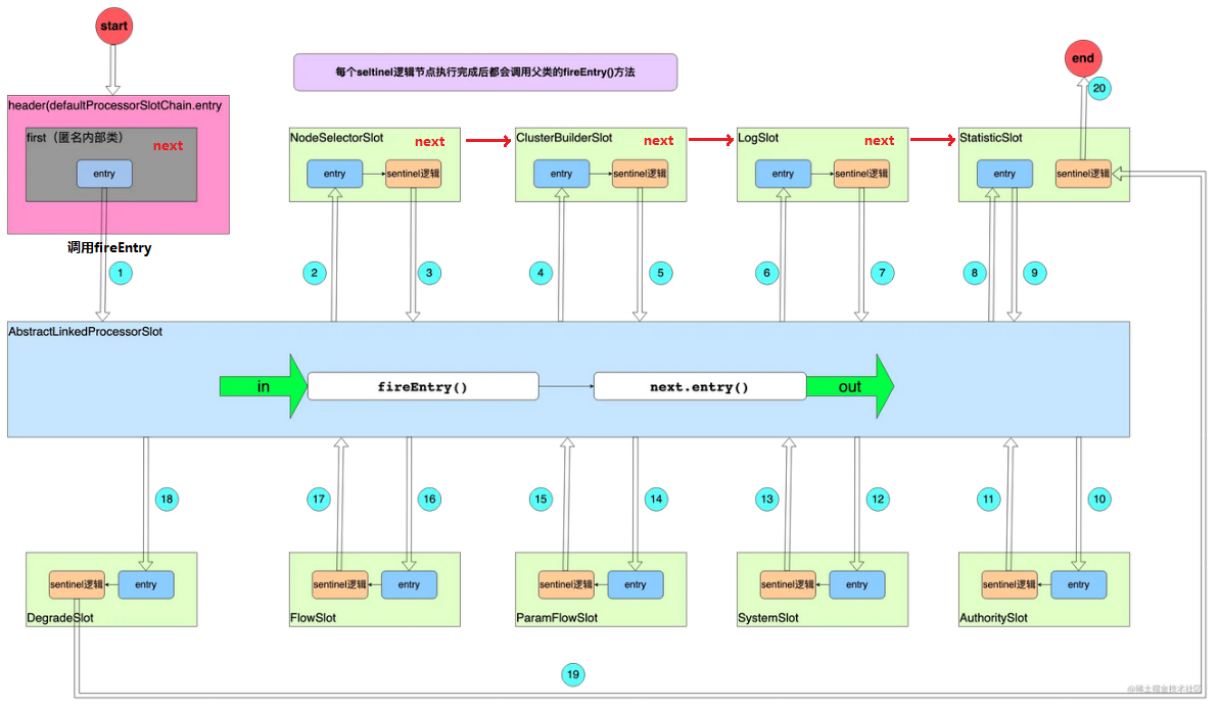
注:DefaultProcessorSlotChain的执行原理见上
* 按照Slot排列顺序如下,前三个提供数据支撑,后五个负责规则校验(抛出BlockException):
依序执行每个Slot的entry方法,在fierEntry执行下一个,有区别的是Statistics节点,它的sentinel逻辑是所有节点执行结束才执行,即它是先fierEntry后在entry
①NodeSelectorSlot:构建资源(Resource)的路径(DefaultNode),用树的结构存储。
②ClusterBuilderSlot:构建ClusterNode,用于记录资源维度的统计信息。
③StatisticSlot:使用Node记录指标信息,如RT、Pass/Block Count,为后续规则校验提供数据支撑。
④AuthoritySlot:授权规则校验
⑤SystemSlot:系统规则校验
⑥ParamFlowSlot:热点参数流控规则校验
⑦FlowSlot:流控规则校验
⑧DegradeSlot:降级规则校验
public class StatisticSlot extends AbstractLinkedProcessorSlot<DefaultNode> {
@Override
public void entry(Context context, ResourceWrapper resourceWrapper, DefaultNode node, int count,
boolean prioritized, Object... args) throws Throwable {
// Do some checking.
fireEntry(context, resourceWrapper, node, count, prioritized, args);
//执行自己的逻辑
...
}
//略
}
NodeSelectorSlot
* NodeSelectorSlot负责构造并存储当前Context的DefaultNode,DefaultNode负责统计Context+Resource维度流量;
* NodeSelectorSlot内部用一个Map存储context和DefaultNode的映射关系;
相同资源的entry共用一个相同的NodeSelectorSlot实例,一个资源可以同时被不同的线程来使用,这样就需要map 记录一个Context对应的DefaultNode
* entry方法主要分为两步:
①获取Resource+Context维度的DefaultNode,
- 如果存在,直接走②,因为Context+Resource维度已经存在了对应DefaultNode,调用树的结构不会更新
- 如果不存在则创建,将这个新的DefaultNode加入调用树尾(每次新增的都会追加到上一个entry的curNode(最顶层就是此Context的entranceNode),作为其子节点)
②设置当前Context中curEntry里的curNode值为此DefaultNode。
curEntry.setCurNode(node);
* Node树的构建
- 对于默认创建的Context,即在执行CtSph的entry之前,当前线程并不存在已经创建的Conext,通常来说就是当前线程第一次执行CtSph的entry时候
就会创建一个EnteanceNode(也是DefaultNode)类型,不同的线程在第一次执行CtSph的entry()创建Conetxt,那么他们将公共同一个EnteanceNode(也是DefaultNode)
同时这种默认创建的Context的EnteanceNode也作为Root的子节点
接着两个线程entry(“不同资源”)走Slot链的时候,都会新建DefaultNode作为此EnteanceNode的子节点,
接着此线程后面的每一个嵌套的entry(“不同资源”)都会追加到自己的分支链中
public class NodeSelectorSlot extends AbstractLinkedProcessorSlot<Object> {
//一个Resource 对应一个NodeSelectorSlot实例 即对应一个这个map
// map的key是Context,所以这个map存储的Node是Context+Resource维度的Node
private volatile Map<String, DefaultNode> map = new HashMap<String, DefaultNode>(10);
@Override
public void entry(Context context, ResourceWrapper resourceWrapper, Object obj, int count, boolean prioritized, Object... args)
throws Throwable {
DefaultNode node = map.get(context.getName());
if (node == null) {
synchronized (this) {
node = map.get(context.getName());
if (node == null) {
// 1. 创建DefaultNode,存储到当前NodeSelectorSlot实例
node = new DefaultNode(resourceWrapper, null);
HashMap<String, DefaultNode> cacheMap = new HashMap<String, DefaultNode>(map.size());
cacheMap.putAll(map);
cacheMap.put(context.getName(), node);
map = cacheMap;
// 2. 将这个DefaultNode加入调用树
((DefaultNode) context.getLastNode()).addChild(node);
}
}
}
// 3. 设置当前节点
context.setCurNode(node);
// 4. 执行后面的Slot
fireEntry(context, resourceWrapper, node, count, prioritized, args);
}
@Override
public void exit(Context context, ResourceWrapper resourceWrapper, int count, Object... args) {
fireExit(context, resourceWrapper, count, args);
}
}
ClusterBuilderSlot
* ClusterBuilderSlot构建ClusterNode,用于记录Resource维度的统计信息。
* 维护一个static的Map<ResourceWrapper, ClusterNode> Map,保存所有Resource对应的ClusterNode;
* 同一Resource对应一个ClusterBuilderSlot实例,clusterNode保存了当前资源对应的流量信息ClusterNode
* entry方法主要分为三步:
①获取Resource对应ClusterNode,如果不存在则创建;
②保存ClusterNode到当前上下文当前处理节点DefaultNode中;
③如果当前上下文中设置了来源系统origin,则创建origin + Resource维度ClusterNode(一个单纯的StatisticNode,由对应ClusterNode维护) ,
存入当前ClusterNode,设置origin ClusterNode到上下文中当前Entry的originNode变量中
public class ClusterBuilderSlot extends AbstractLinkedProcessorSlot<Object> {
// ClusterBuilderSlot.java
// 保存全局 资源 - 资源统计数据
private static volatile Map<ResourceWrapper, ClusterNode> clusterNodeMap = new HashMap<>();
private static final Object lock = new Object();
// ClusterBuilderSlot每个资源一个实例,这里保存当前资源对应ClusterNode
private volatile ClusterNode clusterNode = null;
@Override
public void entry(Context context, ResourceWrapper resourceWrapper, DefaultNode node, int count,
boolean prioritized, Object... args)
throws Throwable {
// 1. 构造Resource对应ClusterNode
if (clusterNode == null) {
synchronized (lock) {
if (clusterNode == null) {
clusterNode = new ClusterNode(resourceWrapper.getName(), resourceWrapper.getResourceType());
HashMap<ResourceWrapper, ClusterNode> newMap = new HashMap<>(Math.max(clusterNodeMap.size(), 16));
newMap.putAll(clusterNodeMap);
newMap.put(node.getId(), clusterNode);
clusterNodeMap = newMap;
}
}
}
// 2. 保存ClusterNode到当前上下文正在处理的DefaultNode
node.setClusterNode(clusterNode);
// 3. 设置origin ClusterNode
if (!"".equals(context.getOrigin())) {
Node originNode = node.getClusterNode().getOrCreateOriginNode(context.getOrigin());
context.getCurEntry().setOriginNode(originNode);
}
// 4. 执行下一个slot
fireEntry(context, resourceWrapper, node, count, prioritized, args);
}
}
StatisticSlot
* StatisticSlot负责记录指标信息,如RT、Pass/Block Count,为后续规则校验提供数据支撑。
* StatisticSlot是全局单例,entry方法分为两步:
①先执行后续的规则校验Slot(fireEntry);
②如果校验通过,统计当前Entry里关联Node的threadNum线程数/passRequest成功请求数
- 调用DefaultNode.increaseThreadNum/addPassRequest(count);其方法也会调用DefaultNode关联的ClusterBuilderSlot的increaseThreadNum/addPassRequest
- 如果origin ClusterNode不为空,调用context.getCurEntry().getOriginNode().increaseThreadNum/.addPassRequest(count);
- 全局入口流量统计,Constants.ENTRY_NODE.increaseThreadNum/addPassRequest(count);
- 给用户的扩展点,可以通过SPI加载
③如果发生PriorityWaitException异常,统计的Node结点范围和②一样,但是只统计threadNum;不会抛出异常
④如果发生BlockException
- 设置BlockError到上下文的当前Entry中的BlockError变量中 ,context.getCurEntry().setBlockError(e);
- 统计blockQps。统计的Node结点范围和②一样,但是只统计threadNum
- 给用户的扩展点,可以通过SPI加载
- 抛出异常
⑤如果发生Throwable
- 设置Throwable 到上下文的当前Entry中的Error变量中 ,context.getCurEntry().setError(e);
- 抛出异常
public class StatisticSlot extends AbstractLinkedProcessorSlot<DefaultNode> {
@Override
public void entry(Context context, ResourceWrapper resourceWrapper, DefaultNode node, int count,
boolean prioritized, Object... args) throws Throwable {
try {
// 1. 先执行后续Slot的entry
fireEntry(context, resourceWrapper, node, count, prioritized, args);
// 2. 统计数据ThreadNum++ passRequest++
// 2-1. DefaultNode Resource+Context维度 ClusterNode Resource 维度
node.increaseThreadNum();
node.addPassRequest(count);
// 2-2. origin ClusterNode origin+Resource维度
if (context.getCurEntry().getOriginNode() != null) {
context.getCurEntry().getOriginNode().increaseThreadNum();
context.getCurEntry().getOriginNode().addPassRequest(count);
}
// 2-3 全局入口流量统计
if (resourceWrapper.getEntryType() == EntryType.IN) {
Constants.ENTRY_NODE.increaseThreadNum();
Constants.ENTRY_NODE.addPassRequest(count);
}
// 3. 给用户的扩展点,可以通过SPI加载
for (ProcessorSlotEntryCallback<DefaultNode> handler : StatisticSlotCallbackRegistry.getEntryCallbacks()) {
handler.onPass(context, resourceWrapper, node, count, args);
}
} catch (PriorityWaitException ex) {
// 这是流控规则才会抛出的异常
node.increaseThreadNum();
if (context.getCurEntry().getOriginNode() != null) {
context.getCurEntry().getOriginNode().increaseThreadNum();
}
if (resourceWrapper.getEntryType() == EntryType.IN) {
Constants.ENTRY_NODE.increaseThreadNum();
}
for (ProcessorSlotEntryCallback<DefaultNode> handler : StatisticSlotCallbackRegistry.getEntryCallbacks()) {
handler.onPass(context, resourceWrapper, node, count, args);
}
} catch (BlockException e) {
// 1. 设置BlockError到上下文中
context.getCurEntry().setBlockError(e);
// 2. 统计数据 BlockQps++
// 2-1. DefaultNode Resource+Context维度 ClusterNode Resource 维度
node.increaseBlockQps(count);
// 2-2 origin ClusterNode origin+Resource维度
if (context.getCurEntry().getOriginNode() != null) {
context.getCurEntry().getOriginNode().increaseBlockQps(count);
}
// 2-3 全局入口流量统计
if (resourceWrapper.getEntryType() == EntryType.IN) {
Constants.ENTRY_NODE.increaseBlockQps(count);
}
// 3. 给用户的扩展点,可以通过SPI加载
for (ProcessorSlotEntryCallback<DefaultNode> handler : StatisticSlotCallbackRegistry.getEntryCallbacks()) {
handler.onBlocked(e, context, resourceWrapper, node, count, args);
}
throw e;
} catch (Throwable e) {
context.getCurEntry().setError(e);
throw e;
}
}
}
AuthoritySlot
AuthoritySlot是第一个规则校验Slot,校验来源应用是否能够有权限访问这个资源。
真正运行时比较的来源在SphU的trueEnter(name, origin)方法指定,例如有些web过滤器会使用IP作为origin参数,在调用trueEnter进来拦截
private static void initWhiteRules() {
AuthorityRule rule = new AuthorityRule();
rule.setResource(RESOURCE_NAME);
rule.setStrategy(RuleConstant.AUTHORITY_WHITE);
rule.setLimitApp("appA,appE");
AuthorityRuleManager.loadRules(Collections.singletonList(rule));
}
* AuthorityRule需要配置三个字段:
resource资源名;
limitApp流控应用:逗号分割;
授权类型:白名单/黑名单,默认白名单;RuleConstant.AUTHORITY_WHITE
* AuthoritySlot的entry方法分为两步:
①从AuthorityRuleManager获取Resource对应的AuthorityRule集合;
②循环每个AuthorityRule,执行AuthorityRuleChecker.passCheck校验来源应用是否有权限访问资源;
- 如果授权配置是黑名单,且origin在黑名单内,则拒绝;
- 如果授权配置是白名单,且origin不在白名单内,则拒绝;
public class AuthoritySlot extends AbstractLinkedProcessorSlot<DefaultNode> {
@Override
public void entry(Context context, ResourceWrapper resourceWrapper, DefaultNode node, int count, boolean prioritized, Object... args)
throws Throwable {
checkBlackWhiteAuthority(resourceWrapper, context);
fireEntry(context, resourceWrapper, node, count, prioritized, args);
}
@Override
public void exit(Context context, ResourceWrapper resourceWrapper, int count, Object... args) {
fireExit(context, resourceWrapper, count, args);
}
void checkBlackWhiteAuthority(ResourceWrapper resource, Context context) throws AuthorityException {
Map<String, Set<AuthorityRule>> authorityRules = AuthorityRuleManager.getAuthorityRules();
if (authorityRules == null) {
return;
}
Set<AuthorityRule> rules = authorityRules.get(resource.getName());
if (rules == null) {
return;
}
for (AuthorityRule rule : rules) {
if (!AuthorityRuleChecker.passCheck(rule, context)) {
throw new AuthorityException(context.getOrigin(), rule);
}
}
}
}
final class AuthorityRuleChecker {
static boolean passCheck(AuthorityRule rule, Context context) {
String requester = context.getOrigin();
if (StringUtil.isEmpty(requester) || StringUtil.isEmpty(rule.getLimitApp())) {
return true;
}
// 1. 判断规则是否适用于当前上下文中的app
int pos = rule.getLimitApp().indexOf(requester);
boolean contain = pos > -1;
if (contain) {
boolean exactlyMatch = false;
String[] appArray = rule.getLimitApp().split(",");
for (String app : appArray) {
if (requester.equals(app)) {
exactlyMatch = true;
break;
}
}
contain = exactlyMatch;
}
// 2. 如果规则配置是黑名单,来源应用在黑名单内,则拒绝
int strategy = rule.getStrategy();
if (strategy == RuleConstant.AUTHORITY_BLACK && contain) {
return false;
}
// 3. 如果规则配置是白名单,来源应用在白名单外,则拒绝
if (strategy == RuleConstant.AUTHORITY_WHITE && !contain) {
return false;
}
return true;
}
}
SystemSlot
SystemSlot系统规则校验
②Constants.ENTRY_NODE统计的入口流量,校验QPS、ThreadNum、RT,这些数据是在StatisticSlot中已经统计了
③系统负载和CPU使用率校验
- 基于定时任务SystemStatusListener,每秒统计系统负载和CPU使用率(JDK的MXBean获取)
- 在判断系统负载时,只有当系统负载大于规则阈值,且每秒并发线程数 > 最大qps * 最小rt(秒)时(参考BBR算法),才会抛出SystemBlockException。
也就是说针对于load的配置,系统负载高不能直接决定是否拒绝请求,还取决于最大qps * 最小rt 和 每秒并发线程数的关系。
- CPU使用率校验,需要计算这一秒内(定时任务周期):JVM的CPU使用率 = JVM的正常运行时间 / 当前进程使用CPU运行时间 / 可用CPU核数
public class SystemSlot extends AbstractLinkedProcessorSlot<DefaultNode> {
@Override
public void entry(Context context, ResourceWrapper resourceWrapper, DefaultNode node, int count,
boolean prioritized, Object... args) throws Throwable {
SystemRuleManager.checkSystem(resourceWrapper);
fireEntry(context, resourceWrapper, node, count, prioritized, args);
}
@Override
public void exit(Context context, ResourceWrapper resourceWrapper, int count, Object... args) {
fireExit(context, resourceWrapper, count, args);
}
}
public static void checkSystem(ResourceWrapper resourceWrapper) throws BlockException {
if (resourceWrapper == null) {
return;
}
// Ensure the checking switch is on.
if (!checkSystemStatus.get()) {
return;
}
// 1. 入口流量才执行系统规则校验
// for inbound traffic only
if (resourceWrapper.getEntryType() != EntryType.IN) {
return;
}
// 2. 通过全局ClusterNode(__total_inbound_traffic__)【StatisticSlot】统计的入口流量,校验QPS、ThreadNum、RT
double currentQps = Constants.ENTRY_NODE == null ? 0.0 : Constants.ENTRY_NODE.successQps();
if (currentQps > qps) {
throw new SystemBlockException(resourceWrapper.getName(), "qps");
}
int currentThread = Constants.ENTRY_NODE == null ? 0 : Constants.ENTRY_NODE.curThreadNum();
if (currentThread > maxThread) {
throw new SystemBlockException(resourceWrapper.getName(), "thread");
}
double rt = Constants.ENTRY_NODE == null ? 0 : Constants.ENTRY_NODE.avgRt();
if (rt > maxRt) {
throw new SystemBlockException(resourceWrapper.getName(), "rt");
}
// 3. 系统负载和cpu使用率校验
if (highestSystemLoadIsSet && getCurrentSystemAvgLoad() > highestSystemLoad) {
//在额外判断
if (!checkBbr(currentThread)) {
throw new SystemBlockException(resourceWrapper.getName(), "load");
}
}
if (highestCpuUsageIsSet && getCurrentCpuUsage() > highestCpuUsage) {
throw new SystemBlockException(resourceWrapper.getName(), "cpu");
}
}
public static double getCurrentSystemAvgLoad() {
return statusListener.getSystemAverageLoad();
}
public static double getCurrentCpuUsage() {
return statusListener.getCpuUsage();
}
//scheduler.scheduleAtFixedRate(statusListener, 0, 1, TimeUnit.SECONDS);
public class SystemStatusListener implements Runnable {
volatile double currentLoad = -1;
volatile double currentCpuUsage = -1;
volatile long processCpuTime = 0;
volatile long processUpTime = 0;
@Override
public void run() {
try {
OperatingSystemMXBean osBean = ManagementFactory.getPlatformMXBean(OperatingSystemMXBean.class);
// 1. 系统负载
currentLoad = osBean.getSystemLoadAverage();
// 2. cpu使用率
// 2-1. 普通linux环境下cpu使用率
double systemCpuUsage = osBean.getSystemCpuLoad();
// 2-2. 运行于容器内的应用cpu使用率
RuntimeMXBean runtimeBean = ManagementFactory.getPlatformMXBean(RuntimeMXBean.class);
long newProcessCpuTime = osBean.getProcessCpuTime(); //当前进程使用CPU运行时间
long newProcessUpTime = runtimeBean.getUptime(); //应用JVM的正常运行时间
int cpuCores = osBean.getAvailableProcessors(); // 可用CPU核数
long processCpuTimeDiffInMs = TimeUnit.NANOSECONDS.toMillis(newProcessCpuTime - processCpuTime); //这一秒内(定时任务周期):当前进程使用CPU运行时间
long processUpTimeDiffInMs = newProcessUpTime - processUpTime; //这一秒内(定时任务周期):JVM的正常运行时间
double processCpuUsage = (double) processCpuTimeDiffInMs / processUpTimeDiffInMs / cpuCores; //这一秒内(定时任务周期):内JVM的CPU使用率
processCpuTime = newProcessCpuTime;
processUpTime = newProcessUpTime;
// 2-3. max(2-1,2-2)
currentCpuUsage = Math.max(processCpuUsage, systemCpuUsage);
// 3. 如果系统负载大于规则中的阈值,打印日志
if (currentLoad > SystemRuleManager.getSystemLoadThreshold()) {
writeSystemStatusLog();
}
} catch (Throwable e) {
RecordLog.warn("[SystemStatusListener] Failed to get system metrics from JMX", e);
}
}
}
FlowSlot
概述
* 基于当前资源的流量
- 阈值类型:即流量的统计来源,不同的选项选择的数据统计载体不同,(qps默认/线程数)
- 流控模式:当流量超过阈值时,对当前请求的控制
* FlowRule的配置项比较多,如下:
public class FlowRule extends AbstractRule {
// 阈值类型 0-线程数 1-QPS(默认)
private int grade = RuleConstant.FLOW_GRADE_QPS;
// 阈值
private double count;
// 流控模式 0-直接 1-关联 2-链路(以入口)
private int strategy = RuleConstant.STRATEGY_DIRECT;
// 引用资源
private String refResource;
// 流控效果 0-快速失败 1-Warm up 2-排队等待
private int controlBehavior = RuleConstant.CONTROL_BEHAVIOR_DEFAULT;
// 预热时长(s)
private int warmUpPeriodSec = 10;
// 排队等待时长(ms)
private int maxQueueingTimeMs = 500;
// 是否集群流控
private boolean clusterMode;
// 集群流控配置
private ClusterFlowConfig clusterConfig;
// 流量整形控制器 与controlBehavior相关,不同的流控效果会对应不同的TrafficShapingController实现类
private TrafficShapingController controller;
}
* FlowRule的entry主体流程
①从FlowRuleManager.getFlowRuleMap()中获取此资源所有流控规则,
②遍历执行没有流控规则的调用canPassCheck进行判断,这里有集群流控和单机流控,如果一个不通过,抛出FlowException异常
②canPassCheck进行判断逻辑
- 选择数据节点,以获取规则校验的统计数据
Node selectedNode = selectNodeByRequesterAndStrategy(rule, context, node);
- 执行校验,rule中的流控效果会对应TrafficShapingController实现类的canPass方法(此实现类在FlowRuleUtil.buildFlowRuleMap构建规则时确定)
如果不是QPS模式:使用DefaultController。
如果是QPS模式:
快速失败:使用DefaultController。
WARM_UP:WarmUpControlle;
RATE_LIMITER:RateLimiterController;
BEHAVIOR_WARM_UP_RATE_LIMITER:WarmUpRateLimiterController
public class FlowSlot extends AbstractLinkedProcessorSlot<DefaultNode> {
private final FlowRuleChecker checker;
//DefaultNode node,是当前Context中的curNode
@Override
public void entry(Context context, ResourceWrapper resourceWrapper, DefaultNode node, int count,
boolean prioritized, Object... args) throws Throwable {
checkFlow(resourceWrapper, context, node, count, prioritized);
fireEntry(context, resourceWrapper, node, count, prioritized, args);
}
void checkFlow(ResourceWrapper resource, Context context, DefaultNode node, int count, boolean prioritized)
throws BlockException {
checker.checkFlow(ruleProvider, resource, context, node, count, prioritized);
}
private final Function<String, Collection<FlowRule>> ruleProvider = new Function<String, Collection<FlowRule>>() {
@Override
public Collection<FlowRule> apply(String resource) {
Map<String, List<FlowRule>> flowRules = FlowRuleManager.getFlowRuleMap();
return flowRules.get(resource);
}
};
}
public class FlowRuleChecker {
public void checkFlow(Function<String, Collection<FlowRule>> ruleProvider, ResourceWrapper resource,
Context context, DefaultNode node, int count, boolean prioritized) throws BlockException {
if (ruleProvider == null || resource == null) {
return;
}
//获取所有流控规则,调用canPassCheck进行判断
Collection<FlowRule> rules = ruleProvider.apply(resource.getName());
if (rules != null) {
for (FlowRule rule : rules) {
if (!canPassCheck(rule, context, node, count, prioritized)) {
throw new FlowException(rule.getLimitApp(), rule);
}
}
}
}
public boolean canPassCheck(FlowRule rule, Context context, DefaultNode node,
int acquireCount) {
return canPassCheck(rule, context, node, acquireCount, false);
}
public boolean canPassCheck(FlowRule rule, Context context, DefaultNode node, int acquireCount, boolean prioritized) {
String limitApp = rule.getLimitApp();
if (limitApp == null) {
return true;
}
// 集群流控
if (rule.isClusterMode()) {
return passClusterCheck(rule, context, node, acquireCount, prioritized);
}
// 单机流控(重点)
return passLocalCheck(rule, context, node, acquireCount, prioritized);
}
}
private static boolean passLocalCheck(FlowRule rule, Context context, DefaultNode node, int acquireCount,
boolean prioritized) {
// 1. 选择节点
Node selectedNode = selectNodeByRequesterAndStrategy(rule, context, node);
if (selectedNode == null) {
return true;
}
// 2. 执行校验
return rule.getRater().canPass(selectedNode, acquireCount, prioritized);
}
选择数据节点
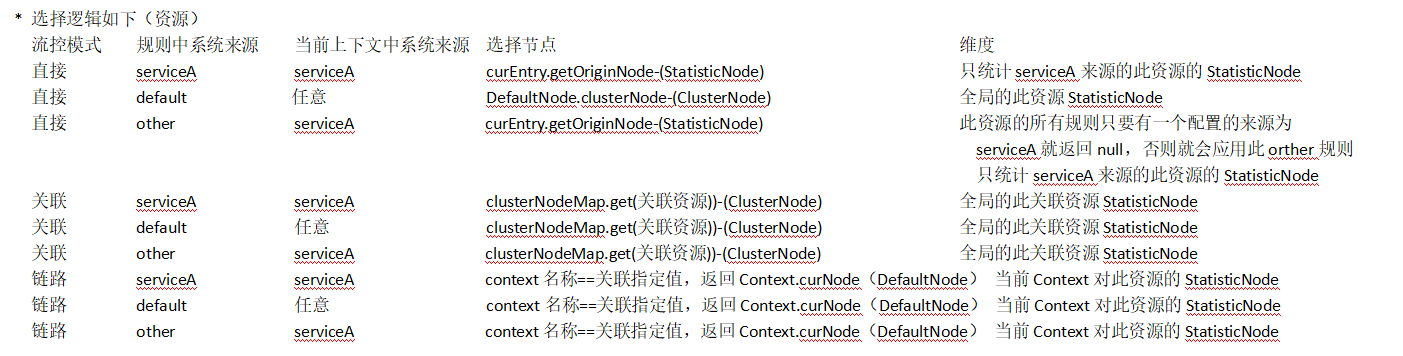
* 首先是选择节点Node,选择不同的节点,会导致后续执行规则校验的目标不同。这里选择Node的逻辑层层嵌套,非常复杂,其判断依据:
origin/limitApp:根据来源app不同,选择不同
strategy:根据流控模式不同,选择不同
* 选择逻辑如下(资源)
// FlowRuleChecker.java
static Node selectNodeByRequesterAndStrategy(FlowRule rule, Context context, DefaultNode node) {
String limitApp = rule.getLimitApp();
int strategy = rule.getStrategy();
String origin = context.getOrigin();
if (limitApp.equals(origin) && filterOrigin(origin)) {
// 1. context.origin = rule.limitApp = xxx(非default和other)
if (strategy == RuleConstant.STRATEGY_DIRECT) {
// STRATEGY_DIRECT --- 取context.curEntry.originNode
return context.getOriginNode();
}
// 非STRATEGY_DIRECT,获取引用的Node返回
return selectReferenceNode(rule, context, node);
} else if (RuleConstant.LIMIT_APP_DEFAULT.equals(limitApp)) {
// 2. context.origin = rule.limitApp = default(默认)
if (strategy == RuleConstant.STRATEGY_DIRECT) {
// STRATEGY_DIRECT --- 取Node对应ClusterNode(Resource)维度指标返回
return node.getClusterNode();
}
// 非STRATEGY_DIRECT,获取引用的Node返回
return selectReferenceNode(rule, context, node);
} else if (RuleConstant.LIMIT_APP_OTHER.equals(limitApp)
&& FlowRuleManager.isOtherOrigin(origin, rule.getResource())) {
// 3. rule.limitApp = other && RuleManager中找不到origin+resource维度的Rule
if (strategy == RuleConstant.STRATEGY_DIRECT) {
// STRATEGY_DIRECT --- 取context.curEntry.originNode
return context.getOriginNode();
}
// 非STRATEGY_DIRECT,获取引用的Node返回
return selectReferenceNode(rule, context, node);
}
return null;
}
// 针对关联和链路模式,选择引用节点
static Node selectReferenceNode(FlowRule rule, Context context, DefaultNode node) {
String refResource = rule.getRefResource();
int strategy = rule.getStrategy();
if (StringUtil.isEmpty(refResource)) {
return null;
}
// 流控模式 = 关联,返回引用资源的ClusterNode(Context维度)
if (strategy == RuleConstant.STRATEGY_RELATE) {
return ClusterBuilderSlot.getClusterNode(refResource);
}
// 流控模式 = 链路,如果引用资源与当前上下文(EntranceNode对应资源名称)一致,返回context.curEntry.curNode,否则返回空
// 意思是,当前Rule针对某个上下文链路(EntranceNode对应链路)才生效,返回当前Node节点(Context+Resource维度)
if (strategy == RuleConstant.STRATEGY_CHAIN) {
if (!refResource.equals(context.getName())) {
return null;
}
return node;
}
return null;
}
执行校验
选择controlBehavior行为控制器
rule.getRater().canPass(selectedNode, acquireCount, prioritized)
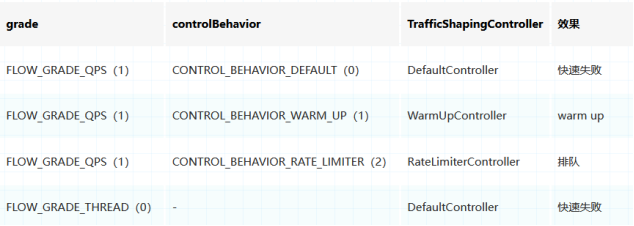
* 通过设置FlowRule的controlBehavior行为控制器属性决定流控效果,从而决定选择流量整形控制器的实现。
但根据FlowRuleUtil.generateRater方法可以看到,grade属性(阈值类型)也与流控效果有关系
rule中的流控效果会对应TrafficShapingController实现类的canPass方法(此实现类在FlowRuleUtil.buildFlowRuleMap构建规则时确定)
- 如果不是QPS模式:使用DefaultController。
- 如果是QPS模式:
快速失败:使用DefaultController。
WARM_UP:WarmUpControlle;
RATE_LIMITER:RateLimiterController;
BEHAVIOR_WARM_UP_RATE_LIMITER:WarmUpRateLimiterController
// FlowRuleUtil.java
private static TrafficShapingController generateRater(FlowRule rule) {
if (rule.getGrade() == RuleConstant.FLOW_GRADE_QPS) {
switch (rule.getControlBehavior()) {
case RuleConstant.CONTROL_BEHAVIOR_WARM_UP:
return new WarmUpController(rule.getCount(), rule.getWarmUpPeriodSec(),
ColdFactorProperty.coldFactor);
case RuleConstant.CONTROL_BEHAVIOR_RATE_LIMITER:
return new RateLimiterController(rule.getMaxQueueingTimeMs(), rule.getCount());
case RuleConstant.CONTROL_BEHAVIOR_WARM_UP_RATE_LIMITER:
return new WarmUpRateLimiterController(rule.getCount(), rule.getWarmUpPeriodSec(),
rule.getMaxQueueingTimeMs(), ColdFactorProperty.coldFactor);
case RuleConstant.CONTROL_BEHAVIOR_DEFAULT:
default:
}
}
return new DefaultController(rule.getCount(), rule.getGrade());
}
DefaultController
* 使用DefaultController作为行为控制器的场景
- 阈值类型是线程模式
- 阈值类型是QPS模式且流控模式快速失败:
* 首先avgUsedTokens通过FlowRule.grade区分阈值类型,获取Node中不同的属性值,用于判断是否大于FlowRule阈值。
即线程数或者QPS
* 如果小于,直接放行,否则分两种情况:
①调用Sph.entry方法时,入参prioritized为true(代表业务逻辑很重要),且阈值类型为QPS。支持让当前线程睡眠到下一个时间窗口,起到流量整形的作用
线程唤醒后会抛出PriorityWaitException,这个PriorityWaitException会阻断后续规则校验,被外层的StatisticSlot吃掉(见上一章),进而可以正常执行业务代码;
②不满足上述1中条件的,拒绝通过;
//CtSph
public Entry entry(ResourceWrapper resourceWrapper, int count, Object... args) throws BlockException {
return entryWithPriority(resourceWrapper, count, false, args);
}
private Entry entryWithPriority(ResourceWrapper resourceWrapper, int count, boolean prioritized, Object... args)
throws BlockException {
Context context = ContextUtil.getContext();
if (context instanceof NullContext) {
return new CtEntry(resourceWrapper, null, context);
}
if (context == null) {
context = CtSph.InternalContextUtil.internalEnter(Constants.CONTEXT_DEFAULT_NAME);
}
if (!Constants.ON) {
return new CtEntry(resourceWrapper, null, context);
}
ProcessorSlot<Object> chain = lookProcessChain(resourceWrapper);
if (chain == null) {
return new CtEntry(resourceWrapper, null, context);
}
Entry e = new CtEntry(resourceWrapper, chain, context);
try {
//这里如果抛出了PriorityWaitException,不会被捕捉,从而可以通过
chain.entry(context, resourceWrapper, null, count, prioritized, args);
} catch (BlockException e1) {
e.exit(count, args);
throw e1;
} catch (Throwable e1) {
}
return e;
}
* 流量整形中睡眠时间的计算tryOccupyNext
- 如果我们设计采样周期为1秒,样本数为4,那么每个采样窗口为250ms;设置的阈值为40QPS/s,最大允许等待请求数为100。
- 通过如下示意图可以知道如果在当前时间请求数量突增到30且具有prioritized优先级,明显10+10+5+2+30=57>40会触发canPass中的tryOccupyNext计算等待请求的阻塞时长
阻塞时长以样本时间为单位,当计算后面一个样本是否可以阻塞进去时,就需要考虑这个为了样本的预占请求数量 和 这个样本之前的流量,两个之差是一个周期
- 依据下图可以分析得到
当采样周期第一 次右移一个窗口时,currentPass减去第一个窗口流量10=17,那么17+30=47>40,不满足
还需第二次右移一个窗口,currentPass减去第二个窗口流量10=7,那么2+5+30 + 未来样本预占(假设0) =37<40,可以通过,那么阻塞时间就是2个样本周期的时长
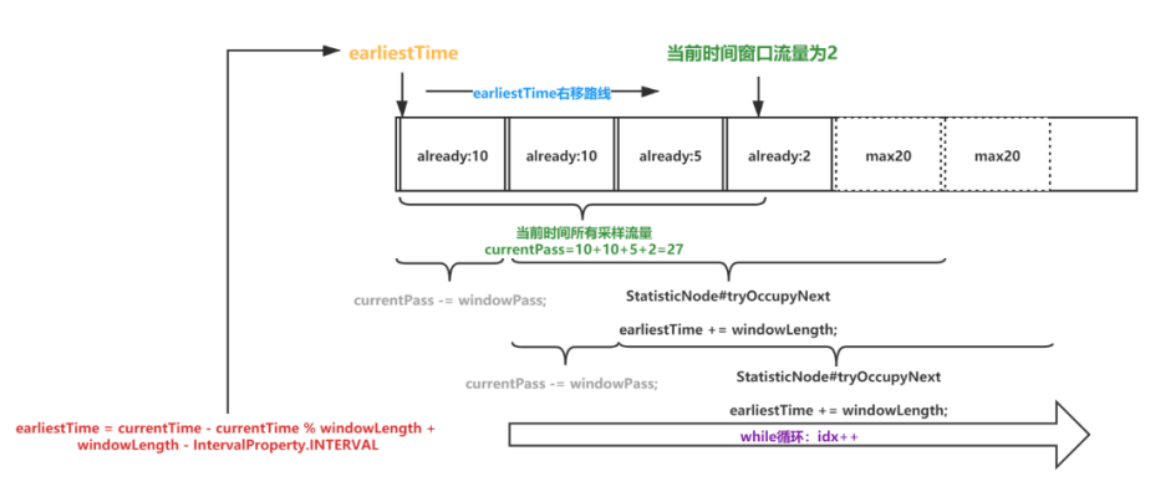
注:这里需要往前退一个周期的原因在于,我们在计算未来的窗口时间,也是需要考虑此未来窗口的流量情况,才能解决把请求放置到哪个未来窗口。
那么未来周期的流量就可以参考上一个周期的数据。
public class DefaultController implements TrafficShapingController {
// FlowRule.count
private double count;
// FlowRule.grade
private int grade;
@Override
public boolean canPass(Node node, int acquireCount, boolean prioritized) {
// 1. 根据阈值类型,从node获取不同指标curCount
int curCount = avgUsedTokens(node);
// 2. 如果超过阈值
if (curCount + acquireCount > count) {
// 3. 如果prioritized=true,且是阈值类型为QPS,支持睡眠到下一个时间窗口,让业务代码再执行
// PriorityWaitException会被外层的StatisticSlot吃掉,不会先上抛出异常
if (prioritized && grade == RuleConstant.FLOW_GRADE_QPS) {
long currentTime;
long waitInMs;
currentTime = TimeUtil.currentTimeMillis();
//获取睡眠的时间,此时间对应请求预占的未来窗口的起始时间
waitInMs = node.tryOccupyNext(currentTime, acquireCount, count);
if (waitInMs < OccupyTimeoutProperty.getOccupyTimeout()) {
node.addWaitingRequest(currentTime + waitInMs, acquireCount);
node.addOccupiedPass(acquireCount);
sleep(waitInMs);
throw new PriorityWaitException(waitInMs);
}
}
// 4. 不满足上述条件,只要超过阈值则不通过
return false;
}
// 5. 没超过阈值,正常返回
return true;
}
private int avgUsedTokens(Node node) {
// 阈值类型为线程数 返回当前并发线程数
// 阈值类型为QPS 返回当前通过的QPS
return grade == RuleConstant.FLOW_GRADE_THREAD ? node.curThreadNum() : (int)(node.passQps());
}
}
public long tryOccupyNext(long currentTime, int acquireCount, double threshold) {
//配置的周期内最大允许的请求量,就是1秒内阈值
double maxCount = threshold * IntervalProperty.INTERVAL* 1000;
//主要从borrowArray中获取周期内所有waiting状态流量,即预占了窗口的未来请求(其他流量整形的线程已经预占了)
//例如当前时间对应了下标1,那么就需要变量1~60的样本窗口,只取样本窗口的开始时间大于当前时间的,取pass总和
long currentBorrow = rollingCounterInSecond.waiting();
if (currentBorrow >= maxCount) {
//如果大于最大限制maxCount,则直接返回500ms
return OccupyTimeoutProperty.getOccupyTimeout();
}
//样本窗口长度
int windowLength = IntervalProperty.INTERVAL/SampleCountProperty.SAMPLE_COUNT;
//earliestTime = 当前时间所在的窗口的起始时间 - 再减去一个周期的时间
long earliestTime = currentTime - currentTime % windowLength + windowLength - IntervalProperty.INTERVAL;
int idx = 0;
//获取当前时间,往前退一个窗口周期所有样本的pass流量,注意与borrowArray的区别,他们是两个不同的数据载体,相互隔离的
long currentPass = rollingCounterInSecond.pass();
//从earliestTime一直往currentTime递增推,会是一个周期,会一个样本一个样本的变量计算
//例如 1 2 3 4 5 6 1 2 3 4 5 6,当前时间在4这个样本,那么earliestTime 就在5这个样本,那么会依次计算waitInMs 5 6 1 2 3 4 每一个位置的情况
while (earliestTime < currentTime) {
//为了保证一个周期,如果当前待计算的样本为6,且流量满足的话,当前线程就就只阻塞到下一个窗口,那么等待时间就是一个窗口的时间。即5。 1 2 3 4 5 6 1 2 3 4 5 6
long waitInMs = idx * windowLength + windowLength - currentTime % windowLength;
//预计算的线程等待时间,如果超过配置的最大阻塞时间,直接break,返回默认的500ms
if (waitInMs >= OccupyTimeoutProperty.getOccupyTimeout()) {
break;
}
//earliestTime所在窗口的流量
long windowPass = rollingCounterInSecond.getWindowPass(earliestTime);
//当前周期窗口的流量,减去earliestTime为终点的周期的量,即 1 2 3 4 5 () 6 1 2 3 4 ) 5 6 括号内的流量,再加上未来已经被预占的流量
//如果小于配置的流量,那么就允许阻塞这个时间
if (currentPass + currentBorrow + acquireCount - windowPass <= maxCount) {
return waitInMs;
}
//不满,earliestTime 窗口右移,就意味着阻塞时间会加一个样本时长
earliestTime += windowLength;
//减去earliestTime所在窗口的流量
currentPass -= windowPass;
//上述两行代码代表的就是取样时间所拆分成的窗口,按照一个窗口一个窗口的右移,来统计需要的窗口数
idx++;
}
//如果上述return都失败则直接返回500ms
return OccupyTimeoutProperty.getOccupyTimeout();
}
WarmUpController
* 使用场景
QPS阈值类型且流控为预热WarmUp
* canPass方法逻辑如下:
①根据上一个时间窗口的QPS,调整令牌数量;基于令牌桶算法,可以控制QPS的斜率
②判断当前剩余令牌数量与warningToken的大小关系;以决定放不放行
* 重要的字段
public class WarmUpController implements TrafficShapingController {
// FlowRule.count QPS阈值
protected double count;
// 默认3,冷却因子
private int coldFactor;
// 警戒令牌数量,区分系统冷热状态
// 小于warningToken,热状态,走正常逻辑,允许QPS最大为阈值count;大于warningToken,冷状态,允许QPS不超过阈值count
// (int)(warmUpPeriodInSec * count) / (coldFactor - 1);
protected int warningToken = 0;
// 令牌最大数量 warningToken + (int)(2 * warmUpPeriodInSec * count / (1.0 + coldFactor));
private int maxToken;
// 斜率 固定等于 (coldFactor - 1.0) / count / (maxToken - warningToken),冷状态时的爬升QPS速度
protected double slope;
// 令牌桶
protected AtomicLong storedTokens = new AtomicLong(0);
// 上次投放令牌的时间,用于计算本次需要新增多少令牌
protected AtomicLong lastFilledTime = new AtomicLong(0);
}
* 先根据上一个样本窗口的passQps,调整令牌数量,每次一个请求进来更新令牌数量,并发的情况下只有一个会更新成功,其他更新失败的请求就使用那个成功的结果
基本的算法流程和常规的令牌桶算法一致,区别在于
①计算新令牌的逻辑,会根据预警线计算令牌数量
- 如果剩余的令牌数小于warningToken,说明系统处于热状态,即后半阶段,此时QPS已经接近配置的。所以需要放行越多请求,就需要添加令牌
在当前桶剩余令牌的基础上,加上(当前时间 - 上一次添加令牌的时间)* QPS,
其中(当前时间 - 上一次添加令牌的时间)表示假设下一次添加令牌的时间间隔也是这个,那么为了起到热状态,就需要在当前时间到下一次添加令牌时间的这一段未来时间
的流量能够达到指定QPS,那么就需要乘于QPS
注:上一次添加令牌的时间一般就是上一个请求到达的时间
- 如果剩余的令牌数大于warningToken,说明系统处于冷状态,即前半阶段/或者过去的流量不高,说明当令牌的消耗程度远远低于警戒线,此时不能简单再去添加令牌,
因为前期需要控制较低的QPS,当上一个窗口的QPS大于count / coldFactor(默认为指定QPS的1/3)的时候是不会去补充令牌的;
在小于的时候,此时需要添加令牌以使QPS上升
②最后新增的令牌数量还需减少上一个窗口的QPS
// passQps为上一个窗口的qps
protected void syncToken(long passQps) {
// 1. 判断当前时间是否小于上次发放令牌时间
long currentTime = TimeUtil.currentTimeMillis();
currentTime = currentTime - currentTime % 1000;
long oldLastFillTime = lastFilledTime.get();
if (currentTime <= oldLastFillTime) {
return;
}
// 2. 走到这里表示需要开启新的令牌桶,coolDownTokens里会根据预警线计算令牌数量
long oldValue = storedTokens.get();
long newValue = coolDownTokens(currentTime, passQps);
// 3. 设置新的令牌数量,这里使用上一个窗口的qps作为消耗值
if (storedTokens.compareAndSet(oldValue, newValue)) {
long currentValue = storedTokens.addAndGet(0 - passQps);
if (currentValue < 0) {
storedTokens.set(0L);
}
lastFilledTime.set(currentTime);
}
}
private long coolDownTokens(long currentTime, long passQps) {
long oldValue = storedTokens.get();
long newValue = oldValue;
// 添加令牌的判断前提条件:
// 当令牌的消耗程度远远低于警戒线的时候
if (oldValue < warningToken) {
newValue = (long)(oldValue + (currentTime - lastFilledTime.get()) * count / 1000);
} else if (oldValue > warningToken) {
if (passQps < (int)count / coldFactor) {
newValue = (long)(oldValue + (currentTime - lastFilledTime.get()) * count / 1000);
}
}
return Math.min(newValue, maxToken);
}
* 判断当前剩余令牌数量与warningToken的大小关系,以决定放不放行--这里进行了冷热控制
①如果令牌充足,即storedTokens剩余令牌 >= warningToken,代表系统处于业务低峰期,冷阶段,需要执行warm up,控制QPS缓慢上升。
warm up时,通过token数量+QPS阈值+slope斜率,计算得到QPS警戒阈值warningQps,要求获取令牌数量 + 当前时间窗口qps 不能超过QPS警戒阈值warningQps。
当aboveToken越来越小,会导致warningQps慢慢变大,表示对QPS的限制越来越松,即warm up,让QPS限制缓慢放开;
当剩余token大于warningToken,通过slope控制qps的增长速度,让剩余token缓慢低于warningToken,让系统进入热状态
②如果令牌不充足,即storedTokens剩余令牌 < warningToken,代表系统处于非业务低峰期,热阶段了,此时QPS也快接近配置的值。
需要执行严格的QPS控制。比较逻辑等同于DefaultController(prioritized=false);
注:放行的请求也不会取扣减桶里的令牌,这样就较少了锁的竞争
// WarmUpController.java
@Override
public boolean canPass(Node node, int acquireCount, boolean prioritized) {
long passQps = (long) node.passQps();
long previousQps = (long) node.previousPassQps();
// 1. 根据上一个时间窗口的QPS,调整令牌数量
syncToken(previousQps);
long restToken = storedTokens.get();
if (restToken >= warningToken) {
// 2. 如果剩余token相对比较充足,大于警戒线,代表系统处于业务低峰期,需要warm up,动态计算QPS阈值
long aboveToken = restToken - warningToken;
double warningQps = Math.nextUp(1.0 / (aboveToken * slope + 1.0 / count));
if (passQps + acquireCount <= warningQps) {
return true;
}
} else {
// 3. 如果剩余token不是很充足,小于警戒线,代表系统处于非业务低峰期,要严格控制QPS
// 逻辑同DefaultController
if (passQps + acquireCount <= count) {
return true;
}
}
return false;
}
RateLimiterController
* 算法思想
RateLimiterController将配置的QPS阈值,转换为请求耗时(1/qps),根据上次通过时间和预计耗时,计算期望通过时间。如果这个时间大于当前时间,表示请求速率过快,可能需要
等待;否则直接放行。(这和常规的漏桶算法实现不太一样,把QPS转为了一个请求期望的响应时间(这时qps的另一个表象),总结如下:
①如果资源长时间没被访问(上次访问时间 + 期望的响应时间 < 当前时间),通过;
②如果上次访问时间 + 期望的响应时间 > 当前时间 ,大于的时间就为需要等待的时间,
- 如果大于配置的排队时间,拒绝;
- 尝试再次计算,如果需要等待且小于配置的排队时间就进行阻塞,否则直接拒绝
public class RateLimiterController implements TrafficShapingController {
// 超时时间
private final int maxQueueingTimeMs;
// qps阈值
private final double count;
// 上次通过该资源的时间戳
private final AtomicLong latestPassedTime = new AtomicLong(-1);
// RateLimiterController.java
public boolean canPass(Node node, int acquireCount, boolean prioritized) {
if (acquireCount <= 0) {
return true;
}
if (count <= 0) {
return false;
}
long currentTime = TimeUtil.currentTimeMillis();
// RT = 1 / qps
long costTime = Math.round(1.0 * (acquireCount) / count * 1000);
// 期望通过时间 = RT + 上次通过时间
long expectedTime = costTime + latestPassedTime.get();
if (expectedTime <= currentTime) {
// 如果期望通过时间,小于当前时间,可以通过(上一次请求这个资源,已经过去了很长时间)
latestPassedTime.set(currentTime);
return true;
} else {
// 如果期望通过时间,大于当前时间,可能需要等待
long waitTime = costTime + latestPassedTime.get() - TimeUtil.currentTimeMillis();
// 如果等待时间,大于配置的排队时间,不能等待,要直接拒绝
if (waitTime > maxQueueingTimeMs) {
return false;
} else {
// 尝试累加上次通过时间
long oldTime = latestPassedTime.addAndGet(costTime);
try {
// 如果二次确认等待时间大于排队时间,回滚,并拒绝
waitTime = oldTime - TimeUtil.currentTimeMillis();
if (waitTime > maxQueueingTimeMs) {
latestPassedTime.addAndGet(-costTime);
return false;
}
// 等待
if (waitTime > 0) {
Thread.sleep(waitTime);
}
// 通过
return true;
} catch (InterruptedException e) {
}
}
}
return false;
}
}
DegradeSlot
概述
* DegradeSlot负责处理降级规则校验。通过设置不同熔断策略,实现不同的熔断逻辑。Sentinel的降级和熔断是一个概念,熔断之后会抛出DegradeException
* 区别流控Slot的阈值类型,DegradeSlot不统计qps或者线程池,他的阈值类型,即不同的熔断策略
rt响应时长、异常率和异常数
* 流控的效果就是进行熔断,断路器从开放变为半开,最后再全开
* DegradeRule成员变量如下
public class DegradeRule extends AbstractRule {
// 熔断策略 0-慢调用比率 1-异常率 2-异常数
private int grade = RuleConstant.DEGRADE_GRADE_RT;
// 阈值
// 当grade = 慢调用比率 时,阈值=最大rt
// 当grade = 异常率 时,阈值=异常率
// 当grade = 异常数 时,阈值=异常数
private double count;
// 熔断时长(秒):断路器 从 开放 变为 半开 的时长
private int timeWindow;
// 最少请求数 ---> 断路器起效 默认5
private int minRequestAmount = RuleConstant.DEGRADE_DEFAULT_MIN_REQUEST_AMOUNT;
// 使用grade=慢调用比率时,代表慢调用比率的阈值
private double slowRatioThreshold = 1.0d;
// 统计时长(毫秒)--- 时间窗口大小
private int statIntervalMs = 1000;
}
DegradeSlot逻辑
* entry方法:调用每个断路器的tryPass方法,判断是否可以通过;只有存于一个不通过就抛出DegradeException异常
* exit方法:当没有发生(DegradeException)BlockException的情况下,即在正常或异常退出时调用exit,在调用Slot链的exit时,
DegradeSlot.exit里面会额外的调用断路器的onRequestComplete方法,统计数据并变更断路器状态。
public class DegradeSlot extends AbstractLinkedProcessorSlot<DefaultNode> {
@Override
public void entry(Context context, ResourceWrapper resourceWrapper, DefaultNode node, int count,
boolean prioritized, Object... args) throws Throwable {
performChecking(context, resourceWrapper);
fireEntry(context, resourceWrapper, node, count, prioritized, args);
}
void performChecking(Context context, ResourceWrapper r) throws BlockException {
// 获取资源对应所有断路器
List<CircuitBreaker> circuitBreakers = DegradeRuleManager.getCircuitBreakers(r.getName());
if (circuitBreakers == null || circuitBreakers.isEmpty()) {
return;
}
// 断路器决定是否放行请求
for (CircuitBreaker cb : circuitBreakers) {
if (!cb.tryPass(context)) {
throw new DegradeException(cb.getRule().getLimitApp(), cb.getRule());
}
}
}
@Override
public void exit(Context context, ResourceWrapper r, int count, Object... args) {
Entry curEntry = context.getCurEntry();
if (curEntry.getBlockError() != null) {
fireExit(context, r, count, args);
return;
}
List<CircuitBreaker> circuitBreakers = DegradeRuleManager.getCircuitBreakers(r.getName());
if (circuitBreakers == null || circuitBreakers.isEmpty()) {
fireExit(context, r, count, args);
return;
}
// 触发所有断路器的onRequestComplete方法
if (curEntry.getBlockError() == null) {
for (CircuitBreaker circuitBreaker : circuitBreakers) {
circuitBreaker.onRequestComplete(context);
}
}
fireExit(context, r, count, args);
}
}
CircuitBreaker断路器
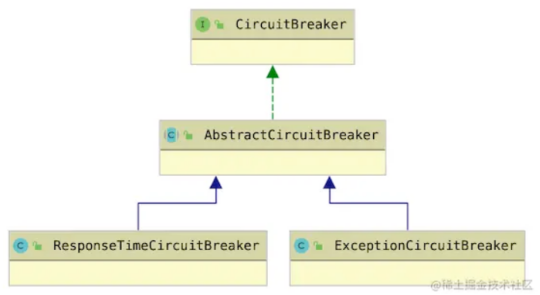
* 在DegradeRuleManager中,所有的降级规则,都会转换为CircuitBreaker断路器实例
根据规则的grade不同,分为两种断路器:
①如果grade=0,慢调用比率,则创建ResponseTimeCircuitBreaker;
②如果grade=1或2,异常率或异常数,则创建ExceptionCircuitBreaker;
public final class DegradeRuleManager {
// 资源名称 - 断路器集合
private static volatile Map<String, List<CircuitBreaker>> circuitBreakers = new HashMap<>();
// 资源名称 - 降级规则集合
private static volatile Map<String, Set<DegradeRule>> ruleMap = new HashMap<>();
private static CircuitBreaker getExistingSameCbOrNew(DegradeRule rule) {
List<CircuitBreaker> cbs = getCircuitBreakers(rule.getResource());
if (cbs == null || cbs.isEmpty()) {
return newCircuitBreakerFrom(rule);
}
for (CircuitBreaker cb : cbs) {
if (rule.equals(cb.getRule())) {
return cb;
}
}
return newCircuitBreakerFrom(rule);
}
// 根据降级规则创建断路器
private static CircuitBreaker newCircuitBreakerFrom(DegradeRule rule) {
switch (rule.getGrade()) {
case RuleConstant.DEGRADE_GRADE_RT:
return new ResponseTimeCircuitBreaker(rule);
case RuleConstant.DEGRADE_GRADE_EXCEPTION_RATIO:
case RuleConstant.DEGRADE_GRADE_EXCEPTION_COUNT:
return new ExceptionCircuitBreaker(rule);
default:
return null;
}
}
}
* CircuitBreaker接口
定义了Sentinel断路器需要具备的能力,定义了断路器三种状态:完全开放、半开、关闭。
public interface CircuitBreaker {
// 对应降级规则
DegradeRule getRule();
// 是否允许请求通过
boolean tryPass(Context context);
// 断路器状态
State currentState();
// 请求完成后的钩子方法
void onRequestComplete(Context context);
// 断路器状态
enum State {
OPEN,
HALF_OPEN,
CLOSED
}
}
* AbstractCircuitBreaker
是断路器的抽象实现,实现了大部分断路器逻辑,包括CAS状态变更、tryPass等
①实现了tryPass方法
- 如果断路器关闭,直接放行;
- 如果断路器开放,需要判断当前时间是否已经超过熔断时间窗口nextRetryTimestamp,如果超过,尝试执行fromOpenToHalfOpen方法,将断路器变为半开状态;
fromOpenToHalfOpen首先CAS将断路器状态从开,变为半开,如果CAS失败,返回false拒绝请求。这里保证半开状态断路器只允许放行一个探测请求。
然后给当前Entry注册一个回调钩子,当探测Entry退出时会被调用,如果是因为后续规则校验抛出了BlockException,也将当前断路器重新打开(这时系统的一个bug修复)
- 如果断路器半开,只允许一个请求通过(进入case2且fromOpenToHalfOpen执行成功的请求),其余请求通通拒绝;
这一个通过的请求就是把断路器状态由开放转为半开放入那个
②3个在子类的onRequestComplete里会调用的方法(代码略),任何一个请求结束后就绪根据断路器的状态和统计数据对应断路的状态进行变更
- fromHalfOpenToOpen(double snapshotValue):设置从半开到开,需要更新下次重试时间nextRetryTimestamp = 当前时间 + 熔断时长
- fromCloseToOpen(double snapshotValue):设置从关到开,和从半开到开逻辑一致
- fromHalfOpenToClose():设置从半开到关,调用子类实现的resetStat方法,用于清除子类保存的统计数据
// AbstractCircuitBreaker.java
// 半开状态下,下次重试时间戳
protected volatile long nextRetryTimestamp;
// 断路器状态
protected final AtomicReference<State> currentState = new AtomicReference<>(State.CLOSED);
@Override
public boolean tryPass(Context context) {
if (currentState.get() == State.CLOSED) {
return true;
}
if (currentState.get() == State.OPEN) {
return retryTimeoutArrived() && fromOpenToHalfOpen(context);
}
return false;
}
protected boolean retryTimeoutArrived() {
return TimeUtil.currentTimeMillis() >= nextRetryTimestamp;
}
// AbstractCircuitBreaker.java
protected boolean fromOpenToHalfOpen(Context context) {
if (currentState.compareAndSet(State.OPEN, State.HALF_OPEN)) {
notifyObservers(State.OPEN, State.HALF_OPEN, null);
Entry entry = context.getCurEntry();
// 注册一个回调方法,修复#1638
entry.whenTerminate(new BiConsumer<Context, Entry>() {
@Override
public void accept(Context context, Entry entry) {
if (entry.getBlockError() != null) {
currentState.compareAndSet(State.HALF_OPEN, State.OPEN);
notifyObservers(State.HALF_OPEN, State.OPEN, 1.0d);
}
}
});
return true;
}
return false;
}
* ExceptionCircuitBreaker为例
①内部基于一个统计窗口类LeapArray<SimpleErrorCounter>,由于统计一段时间内的
LongAdder errorCount; 发送错误的总数
LongAdder totalCount; 请求总数
②Entry正常通过或发生异常时,都会进入onRequestComplete这个方法
进行错误请求数和总数的统计,在基于配置的规则判断断路器状态是否要变更handleStateChangeWhenThresholdExceeded
- 如果当前状态是OPEN,不变,由父类tryPass方法负责从OPEN变为HALF_OPEN
- 如果当前状态是HALF_OPEN,判断本次请求(为探测请求)是否发生异常,
如果发生异常,重新变为OPEN,调用父类的fromHalfOpenToOpen
否则变为CLOSE,调用父类fromHalfOpenToClose
- 当前是CLOSE状态,根据统计数据,判断是否需要OPEN
如果错误数或错误率超过阈值,调用父类transformToOpen方法OPEN断路器,并更新下次重试时间
public class ExceptionCircuitBreaker extends AbstractCircuitBreaker {
// 熔断策略 1-异常率 2-异常数
private final int strategy;
// 最小请求数
private final int minRequestAmount;
// 阈值
private final double threshold;
// 窗口数据统计
private final LeapArray<SimpleErrorCounter> stat;
public ExceptionCircuitBreaker(DegradeRule rule) {
this(rule, new SimpleErrorCounterLeapArray(1, rule.getStatIntervalMs()));
}
ExceptionCircuitBreaker(DegradeRule rule, LeapArray<SimpleErrorCounter> stat) {
super(rule);
this.strategy = rule.getGrade();
boolean modeOk = strategy == DEGRADE_GRADE_EXCEPTION_RATIO || strategy == DEGRADE_GRADE_EXCEPTION_COUNT;
this.minRequestAmount = rule.getMinRequestAmount();
this.threshold = rule.getCount();
this.stat = stat;
}
//只有Entry正常通过或发生异常时(见DegradeSlot.exit),才会进入这个方法。
public void onRequestComplete(Context context) {
Entry entry = context.getCurEntry();
if (entry == null) {
return;
}
// 有异常,记录异常数,如果在执行中发送了异常(包括业务和Sentinel异常),会赋值到此Error字段中
Throwable error = entry.getError();
//获取当前窗口
SimpleErrorCounter counter = stat.currentWindow().value();
//记录异常数
if (error != null) {
counter.getErrorCount().add(1);
}
// 记录总数
counter.getTotalCount().add(1);
// 判断断路器状态是否要变更
handleStateChangeWhenThresholdExceeded(error);
}
private void handleStateChangeWhenThresholdExceeded(Throwable error) {
// 1. 如果当前状态是OPEN,不变,由父类tryPass方法负责从OPEN变为HALF_OPEN
if (currentState.get() == State.OPEN) {
return;
}
// 2. 如果当前状态是HALF_OPEN,判断本次请求是否发生异常,如果发生异常,重新变为OPEN,否则变为CLOSE
if (currentState.get() == State.HALF_OPEN) {
if (error == null) {
//父类实现,会回调resetStat
fromHalfOpenToClose();
} else {
fromHalfOpenToOpen(1.0d);
}
return;
}
// 3. 当前是CLOSE状态,根据统计数据,判断是否需要OPEN
List<SimpleErrorCounter> counters = stat.values();
long errCount = 0;
long totalCount = 0;
// 其实这边只会有一个窗口,因为构造SimpleErrorCounterLeapArray时窗口数量是1
for (SimpleErrorCounter counter : counters) {
errCount += counter.errorCount.sum();
totalCount += counter.totalCount.sum();
}
// 如果窗口时间内,请求数量不足,不做处理
if (totalCount < minRequestAmount) {
return;
}
// 错误数或错误率
double curCount = errCount;
if (strategy == DEGRADE_GRADE_EXCEPTION_RATIO) {
curCount = errCount * 1.0d / totalCount;
}
// 如果错误数或错误率超过阈值,调用父类方法OPEN断路器,并更新下次重试时间
if (curCount > threshold) {
transformToOpen(curCount);
}
}
protected void resetStat() {
stat.currentWindow().value().reset();
}
// 窗口统计,和BucketLeapArray类似,数据重载对象不同SimpleErrorCounter
// 包含了LongAdder errorCount; 发送错误的总数
// LongAdder totalCount; 请求总数
static class SimpleErrorCounterLeapArray extends LeapArray<SimpleErrorCounter> {
public SimpleErrorCounterLeapArray(int sampleCount, int intervalInMs) {
super(sampleCount, intervalInMs);
}
@Override
public SimpleErrorCounter newEmptyBucket(long timeMillis) {
return new SimpleErrorCounter();
}
@Override
protected WindowWrap<SimpleErrorCounter> resetWindowTo(WindowWrap<SimpleErrorCounter> w, long startTime) {
w.resetTo(startTime);
w.value().reset();
return w;
}
}
}
ParamFlowSlot
概述
* 规则作用
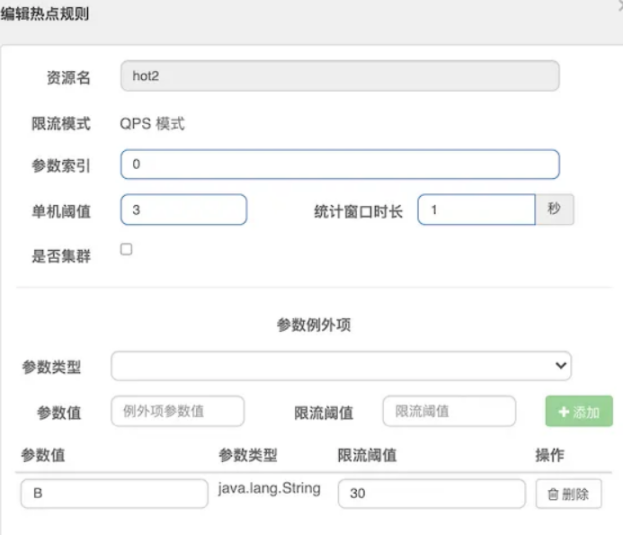
①ParamFlowSlot处理热点参数流控规则校验,在FlowSlot流控QPS规则校验的基础上,增加了参数匹配。资源除了基础的阈值限制以外,可以控制不同入参的阈值限制。
②如果匹配例外项,则选定例外项的qps,否则使用基础的阈值限制
注:每一个指定的参数例外值都是独立的qps校验,值,他们的令牌桶是不一样的。如下参数值为B的有自己的一套统计数据,如有自己的令牌桶、上次投递令牌时间记录、
并发数记录,
指定下ParamFlowRule对应的CacheMap<Object, AtomicInteger>,在这个CacheMap<Object, AtomicInteger>中在找指定value(例外项)的AtomicInteger
这三个ConcurrentLinkedHashMapWrapper底层都是用的google包下的基于LRU算法的LinkedHashMap。超过最大容量后,会淘汰最近最少使用的kv对,以防止内存泄露
* 如下图所示,对于资源hot2, 默认QPS阈值是3,但是对于方法第一个参数为B时,QPS阈值是30。
public class ParamFlowRule extends AbstractRule {
// 阈值类型
private int grade = RuleConstant.FLOW_GRADE_QPS;
// 参数下标
private Integer paramIdx;
// 阈值,其qps = count/durationInSec
private double count;
// 流控效果 0-快速失败 1-warm up(热点规则不支持,效果同0) 2-排队等待
private int controlBehavior = RuleConstant.CONTROL_BEHAVIOR_DEFAULT;
// 排队等待超时时间
private int maxQueueingTimeMs = 0;
// 膨胀数量 阈值类型为QPS时,决定令牌桶的最大数量
private int burstCount = 0;
// 时间窗口
private long durationInSec = 1;
// 参数例外项
private List<ParamFlowItem> paramFlowItemList = new ArrayList<ParamFlowItem>();
// Sentinel内部使用,用于包装例外项
private Map<Object, Integer> hotItems = new HashMap<Object, Integer>();
}
// 例外项
public class ParamFlowItem {
// 例外项入参值,String类型
private String object;
// 阈值
private Integer count;
// Class
private String classType;
}
entry方法流程
* 校验热点规则索引下标是否小于0,如果小于0做相应调整,忽略这段逻辑,因为正常配置,不会配置小于0的参数下标;
* 初始化资源对应ParameterMetric,用于统计热点参数频率;Map<资源名, ParameterMetric> metricsMap = new ConcurrentHashMap<>();
一个资源对应一个ParameterMetric,里面会初始化三个维度的计数器(没有使用Node统计):
①key为一个ParamFlowRule资源下每一个热点规则对象的每一个例外项,值为上次投递令牌时间,阈值类型为qps时使用
long size = Math.min(40000 * rule.getDurationInSec(), 200000);
private final Map<ParamFlowRule, CacheMap<Object, AtomicLong>> ruleTimeCounters = new HashMap<>();
②key为一个ParamFlowRule资源下每一个热点规则对象的每一个例外项,值为对应的令牌桶 ,阈值类型为qps时使用
long size = Math.min(40000 * rule.getDurationInSec(), 200000);
private final Map<ParamFlowRule, CacheMap<Object, AtomicLong>> ruleTokenCounter = new HashMap<>();
③key为下标索引,值为并发线程数,阈值类型为并发线程数时使用,注:这个key是Integer类型,不同的rule相同的下标,其引用也是不同的
大小为4000
private final Map<Integer, CacheMap<Object, AtomicInteger>> threadCountMap = new HashMap<>();
注:指定下ParamFlowRule对应的CacheMap<Object, AtomicInteger>,在这个CacheMap<Object, AtomicInteger>中在找指定value(例外项)的AtomicInteger
这三个ConcurrentLinkedHashMapWrapper底层都是用的google包下的基于LRU算法的LinkedHashMap。超过最大容量后,会淘汰最近最少使用的kv对,以防止内存泄露
* ParamFlowChecker.passCheck执行热点规则校验;
①选择入参
注意虽然Sentinel只支持基础数据类型和String等类型的热点规则配置,但是通过实现ParamFlowArgument接口的paramFlowKey方法指定其他类型
②集群和单机走不同的规则校验,我们只看单机的passLocalCheck
③区分了入参是否是集合或数组类型,如果是的话,循环集合或数组中每个元素,进行规则校验;如果是普通类型,直接进行规则校验
校验方法都是同一个passSingleValueCheck
@Spi(order = -3000)
public class ParamFlowSlot extends AbstractLinkedProcessorSlot<DefaultNode> {
@Override
public void entry(Context context, ResourceWrapper resourceWrapper, DefaultNode node, int count,
boolean prioritized, Object... args) throws Throwable {
if (!ParamFlowRuleManager.hasRules(resourceWrapper.getName())) {
fireEntry(context, resourceWrapper, node, count, prioritized, args);
return;
}
checkFlow(resourceWrapper, count, args);
fireEntry(context, resourceWrapper, node, count, prioritized, args);
}
void checkFlow(ResourceWrapper resourceWrapper, int count, Object... args) throws BlockException {
if (args == null) {
return;
}
if (!ParamFlowRuleManager.hasRules(resourceWrapper.getName())) {
return;
}
List<ParamFlowRule> rules = ParamFlowRuleManager.getRulesOfResource(resourceWrapper.getName());
for (ParamFlowRule rule : rules) {
// 1 如果规则索引下标小于0,调整为正数 忽略
applyRealParamIdx(rule, args.length);
// 2 初始化ParameterMetric,用于统计热点参数频率
ParameterMetricStorage.initParamMetricsFor(resourceWrapper, rule);
// 3 校验热点规则
if (!ParamFlowChecker.passCheck(resourceWrapper, rule, count, args)) {
String triggeredParam = "";
if (args.length > rule.getParamIdx()) {
Object value = args[rule.getParamIdx()];
triggeredParam = String.valueOf(value);
}
throw new ParamFlowException(resourceWrapper.getName(), triggeredParam, rule);
}
}
}
public static boolean passCheck(ResourceWrapper resourceWrapper, ParamFlowRule rule, int count, Object... args) {
if (args == null) {
return true;
}
// 1. 选择value入参
int paramIdx = rule.getParamIdx();
if (args.length <= paramIdx) {
return true;
}
Object value = args[paramIdx];
// 入参实现ParamFlowArgument,可以实现任意object类型的入参配置热点规则
if (value instanceof ParamFlowArgument) {
value = ((ParamFlowArgument) value).paramFlowKey();
}
if (value == null) {
return true;
}
// 2. 集群 or 单机规则校验
if (rule.isClusterMode() && rule.getGrade() == RuleConstant.FLOW_GRADE_QPS) {
return passClusterCheck(resourceWrapper, rule, count, value);
}
return passLocalCheck(resourceWrapper, rule, count, value);
}
private static boolean passLocalCheck(ResourceWrapper resourceWrapper, ParamFlowRule rule, int count,
Object value) {
try {
// 集合类型,循环校验集合中每个参数
if (Collection.class.isAssignableFrom(value.getClass())) {
for (Object param : ((Collection)value)) {
if (!passSingleValueCheck(resourceWrapper, rule, count, param)) {
return false;
}
}
}
// 数组类型,循环校验数组中每个参数
else if (value.getClass().isArray()) {
int length = Array.getLength(value);
for (int i = 0; i < length; i++) {
Object param = Array.get(value, i);
if (!passSingleValueCheck(resourceWrapper, rule, count, param)) {
return false;
}
}
}
// 其他直接校验入参
else {
return passSingleValueCheck(resourceWrapper, rule, count, value);
}
} catch (Throwable e) {
RecordLog.warn("[ParamFlowChecker] Unexpected error", e);
}
return true;
}
// ParamFlowChecker.java
static boolean passSingleValueCheck(ResourceWrapper resourceWrapper, ParamFlowRule rule, int acquireCount,
Object value) {
// case1 : 阈值类型 QPS
if (rule.getGrade() == RuleConstant.FLOW_GRADE_QPS) {
// case1-1 : 流控效果 排队等待
if (rule.getControlBehavior() == RuleConstant.CONTROL_BEHAVIOR_RATE_LIMITER) {
return passThrottleLocalCheck(resourceWrapper, rule, acquireCount, value);
} else {
// case1-2 : 流控效果 默认
return passDefaultLocalCheck(resourceWrapper, rule, acquireCount, value);
}
}
// case2 : 阈值类型 并发线程数
else if (rule.getGrade() == RuleConstant.FLOW_GRADE_THREAD) {
// 例外项入参集合
Set<Object> exclusionItems = rule.getParsedHotItems().keySet();
// 热点参数目前并发线程数
long threadCount = getParameterMetric(resourceWrapper).getThreadCount(rule.getParamIdx(), value);
// 如果热点参数在例外项中,取例外项中的阈值做校验,否则取热点规则默认阈值做校验
if (exclusionItems.contains(value)) {
int itemThreshold = rule.getParsedHotItems().get(value);
return ++threadCount <= itemThreshold;
}
long threshold = (long)rule.getCount();
return ++threadCount <= threshold;
}
return true;
}
}
passSingleValueCheck校验
当阈值类型为QPS时,区分流控效果,根据不同流控效果决定规则校验逻辑。注意在控制台上并不能设置流控效果,会采用默认流控效果;
当阈值类型为并发线程数时,通过ParameterMetric获取当前并发线程数,如果超过阈值,返回false
// ParamFlowChecker.java
static boolean passSingleValueCheck(ResourceWrapper resourceWrapper, ParamFlowRule rule, int acquireCount,Object value) {
// case1 : 阈值类型 QPS
if (rule.getGrade() == RuleConstant.FLOW_GRADE_QPS) {
// case1-1 : 流控效果 排队等待
if (rule.getControlBehavior() == RuleConstant.CONTROL_BEHAVIOR_RATE_LIMITER) {
return passThrottleLocalCheck(resourceWrapper, rule, acquireCount, value);
} else {
// case1-2 : 流控效果 默认
return passDefaultLocalCheck(resourceWrapper, rule, acquireCount, value);
}
}
// case2 : 阈值类型 并发线程数
else if (rule.getGrade() == RuleConstant.FLOW_GRADE_THREAD) {
// 例外项入参集合
Set<Object> exclusionItems = rule.getParsedHotItems().keySet();
// 热点参数目前并发线程数
long threadCount = getParameterMetric(resourceWrapper).getThreadCount(rule.getParamIdx(), value);
// 如果热点参数在例外项中,取例外项中的阈值做校验,否则取热点规则默认阈值做校验
if (exclusionItems.contains(value)) {
int itemThreshold = rule.getParsedHotItems().get(value);
return ++threadCount <= itemThreshold;
}
long threshold = (long)rule.getCount();
return ++threadCount <= threshold;
}
return true;
}
* passDefaultLocalCheck处理阈值类型=QPS,流控效果=默认
算法和一般的令牌桶一致,区别在于,这里还有一个窗口时间的设置,这样确保处理在于
①qps的计算为 配置的阈值/窗口时间,阈值会优先去例外项的,不匹配采取基础的
②添加令牌的时机:
一般算法的添加令牌的时机为当前时间低于最后一次添加令牌的时间
而这里只要最后一次添加令牌的时间距离当前时间,超过了指定的窗口才会添加令牌
// 阈值类型QPS 流控效果默认
static boolean passDefaultLocalCheck(ResourceWrapper resourceWrapper, ParamFlowRule rule, int acquireCount,
Object value) {
// 规则对应 ParameterMetric
ParameterMetric metric = getParameterMetric(resourceWrapper);
// 规则对应 令牌桶
CacheMap<Object, AtomicLong> tokenCounters = metric == null ? null : metric.getRuleTokenCounter(rule);
// 规则对应 上次添加令牌时间
CacheMap<Object, AtomicLong> timeCounters = metric == null ? null : metric.getRuleTimeCounter(rule);
if (tokenCounters == null || timeCounters == null) {
return true;
}
// 将QPS阈值转换为令牌概念 令牌数量 = QPS
Set<Object> exclusionItems = rule.getParsedHotItems().keySet();
long tokenCount = (long)rule.getCount();
if (exclusionItems.contains(value)) {
tokenCount = rule.getParsedHotItems().get(value);
}
if (tokenCount == 0) {
return false;
}
// 获取token的上限数量 = 阈值 + rule.burstCount(0)
long maxCount = tokenCount + rule.getBurstCount();
if (acquireCount > maxCount) {
return false;
}
while (true) {
long currentTime = TimeUtil.currentTimeMillis();
// case1 : 从来没有获取过token
// 尝试更新上次添加token的时间
AtomicLong lastAddTokenTime = timeCounters.putIfAbsent(value, new AtomicLong(currentTime));
if (lastAddTokenTime == null) {
// 添加token = 上限 - 本次需要获取数量
tokenCounters.putIfAbsent(value, new AtomicLong(maxCount - acquireCount));
return true;
}
long passTime = currentTime - lastAddTokenTime.get();
if (passTime > rule.getDurationInSec() * 1000) {
// case2 : 当规则配置时间窗口过去后,计算令牌桶token数量
AtomicLong oldQps = tokenCounters.putIfAbsent(value, new AtomicLong(maxCount - acquireCount));
if (oldQps == null) {
lastAddTokenTime.set(currentTime);
return true;
} else {
// 剩余token
long restQps = oldQps.get();
// 新增token = 阈值qps * 过去x秒没添加过token / 时间窗口大小
long toAddCount = (passTime * tokenCount) / (rule.getDurationInSec() * 1000);
// 确保新增token不超过令牌桶容量
long newQps = toAddCount + restQps > maxCount ? (maxCount - acquireCount)
: (restQps + toAddCount - acquireCount);
// 如果增加之后 token数量仍然小于0,则不通过
if (newQps < 0) {
return false;
}
// cas修改令牌桶
if (oldQps.compareAndSet(restQps, newQps)) {
lastAddTokenTime.set(currentTime);
return true;
}
Thread.yield();
}
} else {
// case3 : 仍然处于当前时间窗口,令牌数量 -= 资源请求数量
AtomicLong oldQps = tokenCounters.get(value);
if (oldQps != null) {
long oldQpsValue = oldQps.get();
if (oldQpsValue - acquireCount >= 0) {
if (oldQps.compareAndSet(oldQpsValue, oldQpsValue - acquireCount)) {
return true;
}
} else {
return false;
}
}
Thread.yield();
}
}
}
* 阈值类型=QPS,流控效果=排队等待
Sentinel控制台上没有配置排队等待流控效果的热点规则入口,所以这类配置只能通过编码方式实现。
当流控效果为CONTROL_BEHAVIOR_RATE_LIMITER排队等待时,使用漏桶算法,控制请求速率。实现逻辑类似普通流控规则的RateLimiterController。
* 阈值类型=线程数
①获取ParamterMetric中记录的当前下标参数的并发线程数threadCount;
Map<Integer, CacheMap<Object, AtomicInteger>> threadCountMap
②判断并发线程数是否超过阈值。如果下标参数在例外项中,阈值取例外项配置阈值,否则取热点规则级别阈值。这个判断的时机在passSingleValueCheck中
// 热点参数目前并发线程数,取指定下标的CacheMap<Object, AtomicInteger>,在这个CacheMap<Object, AtomicInteger>中在找指定value(例外项)的AtomicInteger
long threadCount = getParameterMetric(resourceWrapper).getThreadCount(rule.getParamIdx(), value);
// 如果热点参数在例外项中,取例外项中的阈值做校验,否则取热点规则默认阈值做校验
if (exclusionItems.contains(value)) {
int itemThreshold = rule.getParsedHotItems().get(value);
return ++threadCount <= itemThreshold;
}
long threshold = (long)rule.getCount();
return ++threadCount <= threshold;
③重点在于threadCountMap的统计
- 在StatisticSlot的entry/exit方法中,调用了ProcessorSlotEntryCallback的onPass/onExit方法;
是给给用户的扩展点,可以通过SPI加载ProcessorSlotEntryCallback<DefaultNode>类型的对象
- 首先SPI会加载InitFunc=ParamFlowStatisticSlotCallbackInit,执行init方法时,注册了两个回调函数。
- ParameterMetric的addThreadCount方法,遍历entry带进了所有args参数列表,对于每个参数都进行threadCount++存于threadCountMap中
public class StatisticSlot extends AbstractLinkedProcessorSlot<DefaultNode> {
@Override
public void entry(Context context, ResourceWrapper resourceWrapper, DefaultNode node, int count,
boolean prioritized, Object... args) throws Throwable {
try {
// ...
// 3. 给用户的扩展点,可以通过SPI加载
for (ProcessorSlotEntryCallback<DefaultNode> handler : StatisticSlotCallbackRegistry.getEntryCallbacks()) {
handler.onPass(context, resourceWrapper, node, count, args);
}
} catch (PriorityWaitException ex) {
// ...
}
@Override
public void exit(Context context, ResourceWrapper resourceWrapper, int count, Object... args) {
// 2. 给用户的扩展点,可以通过SPI加载
Collection<ProcessorSlotExitCallback> exitCallbacks = StatisticSlotCallbackRegistry.getExitCallbacks();
for (ProcessorSlotExitCallback handler : exitCallbacks) {
handler.onExit(context, resourceWrapper, count, args);
}
// ...
}
}
public class ParamFlowStatisticEntryCallback implements ProcessorSlotEntryCallback<DefaultNode> {
@Override
public void onPass(Context context, ResourceWrapper resourceWrapper, DefaultNode node, int count, Object... args) {
ParameterMetric parameterMetric = ParameterMetricStorage.getParamMetric(resourceWrapper);
if (parameterMetric != null) {
parameterMetric.addThreadCount(args);
}
}
}
RuleManager
概述
* 在内存中存储当前的规则集合
* 提供规则的多态更新的功能
* 每个XXXRuleManager的设计基本一样:
①一个Map<String, List<XXXRule>> xxxRules:由于保存当前的规则
②一个SentinelProperty<List<XXXRule>> currentProperty = new DynamicSentinelProperty<List<XXXRule>>();
- 用于接受最新推过来的值,并其内关联了监听器集合,在currentProperty 调用addListener方法或者updateValue方法时,会回调监听器的configLoad或者configUpdate方法
- register2Property方法可用于关联currentProperty和监听器
③一个XXXPropertyListener实现configLoad或者configUpdate方法,用于处理最新推过来的值,然后保存到Map<String, List<XXXRule>> xxxRules中
* 最终逻辑就是
用户调用loadRules(最新副本),会执行currentProperty ,其内会遍历注册的监听器,调用监听器的configLoad或者configUpdate方法
FlowRuleManager为例
* 在概述说是的基础有又新起了一个定时任务MetricTimerListener用于统计当前时间周期的统计信息,如qps,passCount等推送到Sentinel控制中心
* 对于数据的推送扩展,可以调用register2Property方法或者loadRules,第三方(比如Sentinel控制中心、其他配置中心等)可以直接调用此方法即可
例如在应用代码内使用Apollo的监听注解标志一个方法,实时监听指定key的数据,接受到最新规则后,转为List<FlowRule> rules集合在调用loadRules即可
public class FlowRuleManager {
private static final Map<String, List<FlowRule>> flowRules = new ConcurrentHashMap<String, List<FlowRule>>();
private static final FlowPropertyListener LISTENER = new FlowPropertyListener();
private static SentinelProperty<List<FlowRule>> currentProperty = new DynamicSentinelProperty<List<FlowRule>>();
private static final ScheduledExecutorService SCHEDULER = Executors.newScheduledThreadPool(1,
new NamedThreadFactory("sentinel-metrics-record-task", true));
static {
currentProperty.addListener(LISTENER);
SCHEDULER.scheduleAtFixedRate(new MetricTimerListener(), 0, 1, TimeUnit.SECONDS);
}
//数据的新增(注册)和修改,最触发监听器事件,最终会处理后保存到flowRules中
public static void register2Property(SentinelProperty<List<FlowRule>> property) {
synchronized (LISTENER) {
currentProperty.removeListener(LISTENER);
//内部会调用listener.configLoad(value);
property.addListener(LISTENER);
currentProperty = property;
}
}
public static void loadRules(List<FlowRule> rules) {
currentProperty.updateValue(rules);
}
public static List<FlowRule> getRules() {
List<FlowRule> rules = new ArrayList<FlowRule>();
for (Map.Entry<String, List<FlowRule>> entry : flowRules.entrySet()) {
rules.addAll(entry.getValue());
}
return rules;
}static Map<String, List<FlowRule>> getFlowRuleMap() {
return flowRules;
}
public static boolean hasConfig(String resource) {
return flowRules.containsKey(resource);
}
private static final class FlowPropertyListener implements PropertyListener<List<FlowRule>> {
@Override
public void configUpdate(List<FlowRule> value) {
//对数据进行处理,比如:
// 配置对应的TrafficShapingController,按照资源名称分组、排序(集群>LimitApp为Defalut>其他)
Map<String, List<FlowRule>> rules = FlowRuleUtil.buildFlowRuleMap(value);
if (rules != null) {
flowRules.clear();
flowRules.putAll(rules);
}
}
@Override
public void configLoad(List<FlowRule> conf) {
Map<String, List<FlowRule>> rules = FlowRuleUtil.buildFlowRuleMap(conf);
if (rules != null) {
flowRules.clear();
flowRules.putAll(rules);
}
}
}
}
public class DynamicSentinelProperty<T> implements SentinelProperty<T> {
protected Set<PropertyListener<T>> listeners = Collections.synchronizedSet(new HashSet<PropertyListener<T>>());
private T value = null;
public DynamicSentinelProperty() {
}
public DynamicSentinelProperty(T value) {
super();
this.value = value;
}
@Override
public void addListener(PropertyListener<T> listener) {
listeners.add(listener);
listener.configLoad(value);
}
@Override
public void removeListener(PropertyListener<T> listener) {
listeners.remove(listener);
}
@Override
public boolean updateValue(T newValue) {
if (isEqual(value, newValue)) {
return false;
}
RecordLog.info("[DynamicSentinelProperty] Config will be updated to: " + newValue);
value = newValue;
for (PropertyListener<T> listener : listeners) {
listener.configUpdate(newValue);
}
return true;
}
private boolean isEqual(T oldValue, T newValue) {
if (oldValue == null && newValue == null) {
return true;
}
if (oldValue == null) {
return false;
}
return oldValue.equals(newValue);
}
public void close() {
listeners.clear();
}
}
更多推荐
 10
10 0
0- 0


 已为社区贡献10条内容

所有评论(0)