
运维|devops|openobserve+Fluent Bit (日志采集和打标)
·
运维|devops|openobserve+Fluent Bit (日志采集和打标)
📑 目录
1. 运维|devops|openobserve+Fluent Bit (日志采集和打标)
1.1 Fluent Bit和Fluentd区别
1.2 Fluent Bit 拆解说明
1.3 最新配置示例
1.4 demo示例
1.5 多应用指定tag用于快速检索
1.6 避免重复采集
1.7 数据格式化-抽离检索关键字
1.7.1 Parser(解析器)
1.7.2 示例
1.7.3 实战如下
1.7.4 parsers.conf
1.7.5 检测parsers.conf是否正确加载
1.7.6 conf文件
1.7.7 验证结果
1.8 调整采用过滤方式(将parser调整为FILTER)
1.8.1 验证结果
Fluent Bit和Fluentd区别
| 特性 | Fluent Bit | Fluentd |
|---|---|---|
| 定位 | 轻量级的数据采集与转发器(Agent) | 统一日志层,强大的数据聚合与路由器(Aggregator) |
| 开发语言 | C 语言 | C 和 Ruby |
| 资源占用 | 极低,初始内存约 450KB | 较高,初始内存约 40-60MB |
| 性能 | 高性能,处理速度可比Fluentd快 10到40倍 | 高性能 |
| 插件生态 | 内置 超过100种 插件 | 拥有 超过1000种 外部插件 |
| 适用场景 | 资源受限环境(边缘设备、嵌入式)、容器/K8s | 中心化日志服务器、复杂数据处理管道 |
| OpenTelemetry | 原生支持 OTLP 数据的接收和发送 | 需要通过插件支持 |
Fluent Bit 拆解说明
- [SERVICE] (服务段落)
定义 Fluent Bit 服务本身的全局行为
- [INPUT] (输入段落)
定义数据源,比如从哪里读取日志(如 tail 插件监控文件,cpu 插件采集指标),Name 和 Tag 是常见配置项
- [FILTER] (过滤段落)
(可选) 在数据发送前对其进行修改或增强,Name 和 Match/Match_Regex 是必填项
- [OUTPUT] (输出段落)
定义数据的目的地,比如发送到 OpenObserve、标准输出或文件
最新配置示例
text
[SERVICE]
    # 服务段落:全局配置
    Flush         1     # 刷新间隔,单位秒[reference:21]
    Daemon        off   # 是否以后台进程运行[reference:22]
    Log_Level     info  # 日志级别[reference:23]

[INPUT]
    # 输入段落:数据来源
    Name          cpu   # 使用 cpu 输入插件[reference:24]
    Tag           my_cpu # 给数据打上标签,用于路由[reference:25]

[OUTPUT]
    # 输出段落:数据目的地
    Name          stdout # 输出到标准输出(控制台)[reference:26]
    Match         my_cpu # 匹配具有相同 Tag 的数据[reference:27]
demo示例
text
[SERVICE]
    Flush       5
    Log_Level   info

[INPUT]
    Name          tail
    Path          /data/log/api-gateway.log
    Tag           gateway
    Refresh_Interval 10
    Mem_Buf_Limit 50MB
    Skip_Long_Lines On

[OUTPUT]
    Name             http
    Match            gateway
    Host             192.168.0.20
    Port             5080
    URI              /api/default/default/_json
    Format           json
    json_date_key    timestamp
    json_date_format iso8601
    HTTP_User        admin@example.com
    HTTP_Passwd      YourP@ssw0rd#123
    tls              off
    compress         gzip
    net.connect_timeout 10s
    net.io_timeout     10s
    retry_limit        5
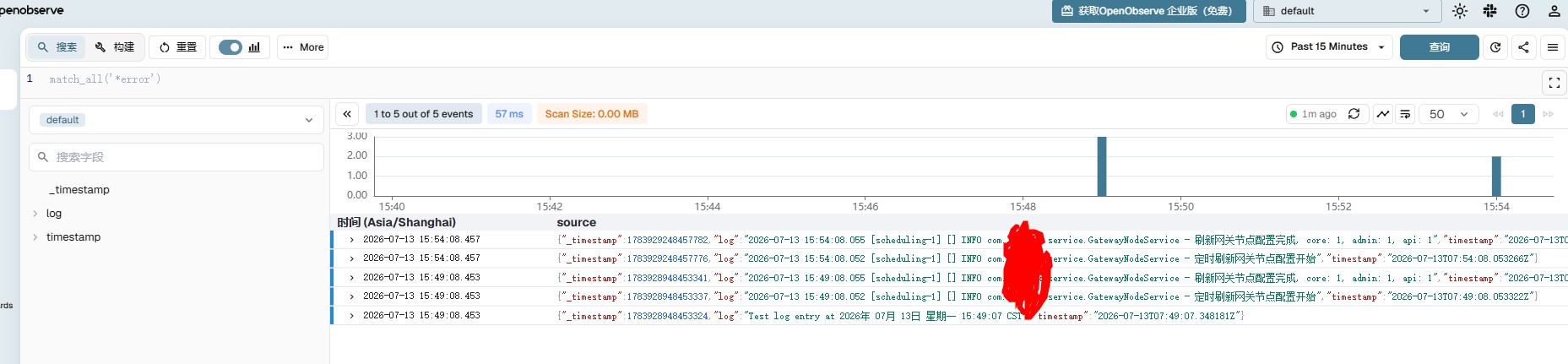
多应用指定tag用于快速检索
text
[SERVICE]
    Flush       1
    Log_Level   info

[INPUT]
    Name          tail
    Path          /data/log/api-gateway.log
    Tag           gateway
    Refresh_Interval 10
    Mem_Buf_Limit 50MB
    Skip_Long_Lines On

[INPUT]
    Name          tail
    Path          /data/log/core.log
    Tag           core
    Refresh_Interval 10
    Mem_Buf_Limit 50MB
    Skip_Long_Lines On

[OUTPUT]
    Name             http
    Match            gateway
    Host             192.168.0.20
    Port             5080
    URI              /api/default/gateway/_json
    Format           json
    json_date_key    timestamp
    json_date_format iso8601
    HTTP_User        admin@example.com
    HTTP_Passwd      YourP@ssw0rd#123
    tls              off
    compress         gzip
    net.connect_timeout 10s
    net.io_timeout     10s
    retry_limit        5

[OUTPUT]
    Name             http
    Match            core
    Host             192.168.0.20
    Port             5080
    URI              /api/default/core/_json
    Format           json
    json_date_key    timestamp
    json_date_format iso8601
    HTTP_User        admin@example.com
    HTTP_Passwd      YourP@ssw0rd#123
    tls              off
    compress         gzip
    net.connect_timeout 10s
    net.io_timeout     10s
    retry_limit        5
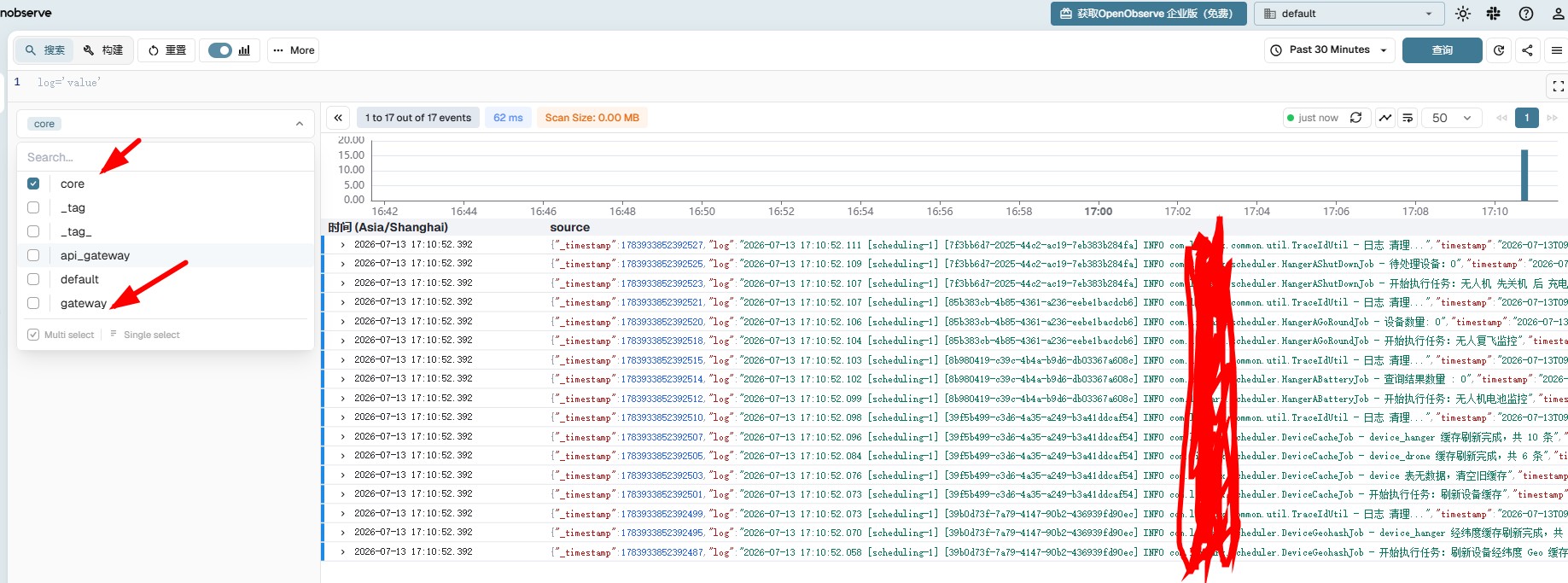
避免重复采集
Fluent Bit用SQLite数据库来记录每个日志文件的读取位置(偏移量)
- 无DB
重启后从尾部读取,不会重复发送旧数据,但可能出现极短时间窗口内的重复(例如在 Fluent Bit 发送过程中突然崩溃,部分数据已发送但未标记完成,重启后从尾部开始,那些未标记的数据可能因文件偏移未更新而丢失,但不会重复)
- 启用DB后
彻底避免重复,且能保证“断点续传”
text
[SERVICE]
    Flush       1
    Log_Level   info

[INPUT]
    Name          tail
    Path          /data/log/api-gateway.log
    Tag           gateway
    Refresh_Interval 10
    Mem_Buf_Limit 50MB
    Skip_Long_Lines On
    DB            /data/log/tail_gateway.db

[INPUT]
    Name          tail
    Path          /data/log/core.log
    Tag           core
    Refresh_Interval 10
    Mem_Buf_Limit 50MB
    Skip_Long_Lines On
    DB            /data/log/tail_core.db

[OUTPUT]
    Name             http
    Match            gateway
    Host             192.168.0.20
    Port             5080
    URI              /api/default/gateway/_json
    Format           json
    json_date_key    timestamp
    json_date_format iso8601
    HTTP_User        admin@example.com
    HTTP_Passwd      YourP@ssw0rd#123
    tls              off
    compress         gzip
    net.connect_timeout 10s
    net.io_timeout     10s
    retry_limit        5

[OUTPUT]
    Name             http
    Match            core
    Host             192.168.0.20
    Port             5080
    URI              /api/default/core/_json
    Format           json
    json_date_key    timestamp
    json_date_format iso8601
    HTTP_User        admin@example.com
    HTTP_Passwd      YourP@ssw0rd#123
    tls              off
    compress         gzip
    net.connect_timeout 10s
    net.io_timeout     10s
    retry_limit        5
数据格式化-抽离检索关键字
Parser(解析器)
- 输入一条非结构化的日志文本
text
192.168.2.20 - - [28/Jul/2006:10:27:10 -0300] "GET /cgi-bin/try/ HTTP/1.0" 200 3395
- 输出一个结构化的 JSON 对象
text
{"host": "192.168.2.20", "user": "-", "method": "GET", ...}
示例
- 在 [SERVICE] 部分加载解析器配置文件
text
[SERVICE]
    Flush        1
    Log_Level    info
    # 加载刚才定义的解析器配置文件
    Parsers_File /etc/fluent-bit/parsers.conf
- 在 [INPUT] 中指定使用哪个解析器
text
[INPUT]
    Name          tail
    Path          /data/test/log/api-gateway.log
    Tag           gateway
    # 指定使用名为 springboot-parser 的解析器
    Parser        springboot-parser
    # ... 其他配置
实战如下
- 样例日志
text
2026-07-13 17:20:52.096 [scheduling-1] [1273acbc-49ff-4b4a-992f-8ee290d1a7ad] INFO  com.test.scheduler.HangerAGoRoundJob - 开始执行任务:无人复飞监控
2026-07-13 17:20:52.099 [scheduling-1] [1273acbc-49ff-4b4a-992f-8ee290d1a7ad] INFO  com.test.scheduler.HangerAGoRoundJob - 设备数量: 0
2026-07-13 17:20:52.100 [scheduling-1] [1273acbc-49ff-4b4a-992f-8ee290d1a7ad] INFO  com.test.common.util.TraceIdUtil - 日志 清理...
2026-07-13 17:20:52.100 [scheduling-1] [08bcfba5-b648-4426-9628-615e2a4e1443] INFO  com.test.scheduler.HangerAShutDownJob - 开始执行任务:无人机 先关机 后 充电
2026-07-13 17:20:52.103 [scheduling-1] [08bcfba5-b648-4426-9628-615e2a4e1443] INFO  com.test.scheduler.HangerAShutDownJob - 待处理设备:0
2026-07-13 17:20:52.105 [scheduling-1] [08bcfba5-b648-4426-9628-615e2a4e1443] INFO  com.test.common.util.TraceIdUtil - 日志 清理...
parsers.conf
text
[PARSER]
    Name        app-parser
    Format      regex
    Regex       ^ (?<time>\d{4}-\d{2}-\d{2} \d{2}:\d{2}:\d{2}\.\d{3}) \s+ \[(?<thread>[^\]]*)\] \s+ \[(?<traceId>[^\]]*)\] \s+ (?<level>[^\s]+) \s+ (?<class>[^\s]+) \s+ - \s+ (?<message>.*)$
    Time_Key    time
    Time_Format %Y-%m-%d %H:%M:%S.%L
检测parsers.conf是否正确加载
text
/opt/fluent-bit/bin/fluent-bit -c /data/log/fluent-bit.conf -vv
conf文件
text
[SERVICE]
    Flush        1
    Log_Level    info
    Parsers_File /data/log/parsers.conf

[INPUT]
    Name          tail
    Path          /data/log/api-gateway.log
    Tag           gateway
    Parser        app-parser
    Refresh_Interval 10
    Mem_Buf_Limit 50MB
    Skip_Long_Lines On
    DB            /data/log/tail_gateway.db

[INPUT]
    Name          tail
    Path          /data/log/core.log
    Tag           core
    Parser        app-parser
    Refresh_Interval 10
    Mem_Buf_Limit 50MB
    Skip_Long_Lines On
    DB            /data/log/tail_core.db

[OUTPUT]
    Name             http
    Match            gateway
    Host             192.168.0.20
    Port             5080
    URI              /api/default/gateway/_json
    Format           json
    json_date_key    timestamp
    json_date_format iso8601
    HTTP_User        admin@example.com
    HTTP_Passwd      YourP@ssw0rd#123
    tls              off
    compress         gzip
    net.connect_timeout 10s
    net.io_timeout     10s
    retry_limit        5

[OUTPUT]
    Name             http
    Match            core
    Host             192.168.0.20
    Port             5080
    URI              /api/default/core/_json
    Format           json
    json_date_key    timestamp
    json_date_format iso8601
    HTTP_User        admin@example.com
    HTTP_Passwd      YourP@ssw0rd#123
    tls              off
    compress         gzip
    net.connect_timeout 10s
    net.io_timeout     10s
    retry_limit        5
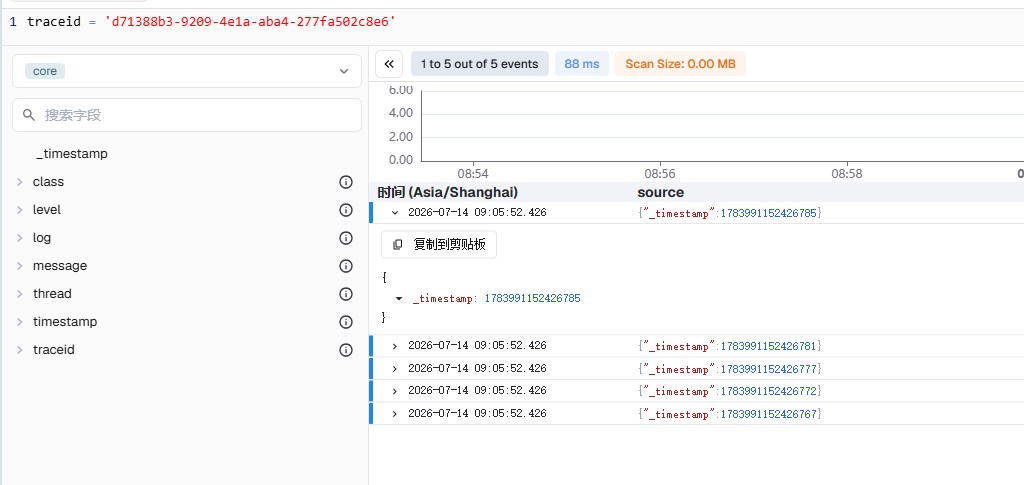
验证结果
调整采用过滤方式(将parser调整为FILTER)
- 完整的 fluent-bit.conf
text
[SERVICE]
    Flush        1
    Log_Level    info
    Parsers_File /data/log/parsers.conf

[INPUT]
    Name          tail
    Path          /data/log/api-gateway.log
    Tag           gateway
    Refresh_Interval 10
    Mem_Buf_Limit 50MB
    Skip_Long_Lines On
    DB            /data/log/tail_gateway.db

[INPUT]
    Name          tail
    Path          /data/log/core.log
    Tag           core
    Refresh_Interval 10
    Mem_Buf_Limit 50MB
    Skip_Long_Lines On
    DB            /data/log/tail_core.db

[FILTER]
    Name     parser
    Match    gateway
    Key_Name log
    Parser   app-parser
    Reserve_Data On

[FILTER]
    Name     parser
    Match    core
    Key_Name log
    Parser   app-parser
    Reserve_Data On

[OUTPUT]
    Name   stdout
    Match  *
    Format json_lines

[OUTPUT]
    Name             http
    Match            gateway
    Host             192.168.0.20
    Port             5080
    URI              /api/default/gateway/_json
    Format           json
    json_date_key    timestamp
    json_date_format iso8601
    HTTP_User        admin@example.com
    HTTP_Passwd      YourP@ssw0rd#123
    tls              off
    compress         gzip
    net.connect_timeout 10s
    net.io_timeout     10s
    retry_limit        5

[OUTPUT]
    Name             http
    Match            core
    Host             192.168.0.20
    Port             5080
    URI              /api/default/core/_json
    Format           json
    json_date_key    timestamp
    json_date_format iso8601
    HTTP_User        admin@example.com
    HTTP_Passwd      YourP@ssw0rd#123
    tls              off
    compress         gzip
    net.connect_timeout 10s
    net.io_timeout     10s
    retry_limit        5
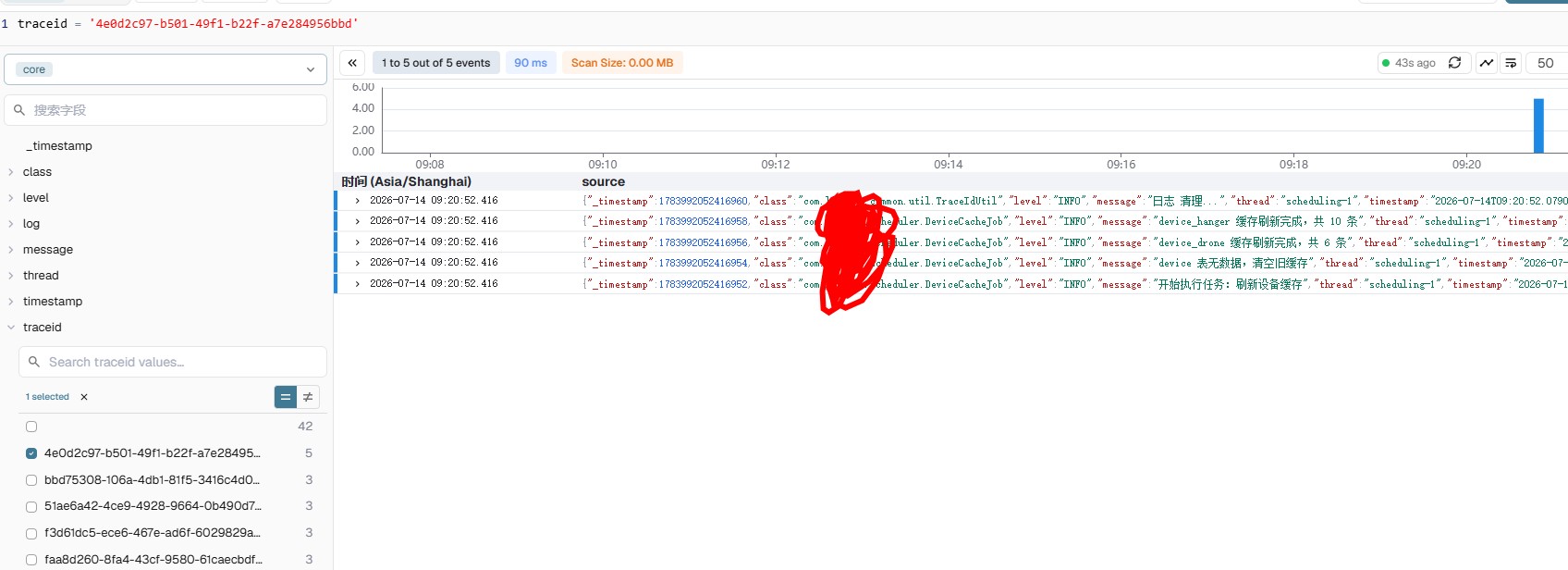
验证结果
更多推荐


 6
6 0
0- 0


 已为社区贡献14条内容

所有评论(0)