
基于HarmonyOS ArkTS智慧医疗健康助手自定义 TabBar 通过两个 `@Builder` 方法实现,`BottomTabBar` 定义白色背景、顶部灰色分割线的容器
医疗健康应用与菜谱、音乐等"内容消费型"应用在数据模型上的本质区别在于"临床参考值"的硬约束。HEALTH_METRICS中血压的normalRange字段(‘90-140/60-90’ mmHg)是医学临床标准——收缩压128 mmHg处于正常范围内,而舒张压82 mmHg略高于90 mmHg上限,status字段标记为"偏高"。这种"数值+参考范围+状态判定"的三层数据结构(value→normalRange→status)将医学专业判断从"用户自行解读"转化为"系统自动判定"。用户不需要理解"128/82 mmHg"的具体含义,系统直接告诉用户"偏高"并给出建议(‘低盐饮食,注意监测’)。
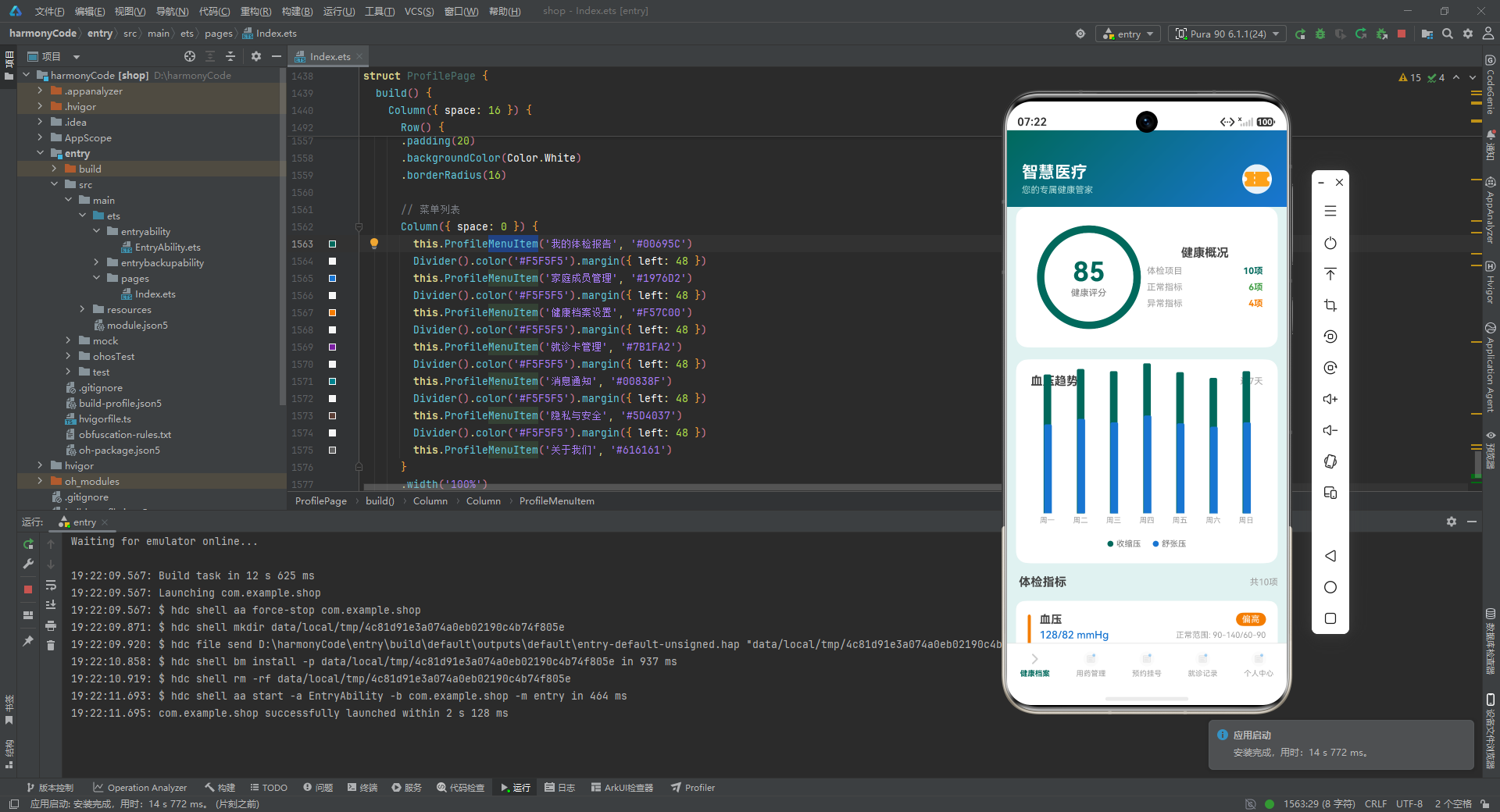
医疗App的数据准确性直接影响用户的健康决策——若status字段错误地将"偏高"显示为"正常",用户可能延误就医时机。相比其他App(旅游、健身、菜谱),医疗App的"数据错误"后果最为严重,没有容错空间。这导致,HEALTH_METRICS中的每一条status判定(血压偏高、血糖正常、血脂偏高、尿酸偏高、BMI偏高)都应来自临床医学标准的自动计算,而非人工录入。
一、MedicineReminderModel与用药依从性的精确追踪
MedicineReminderModel的isTaken字段(boolean)是药品依从性管理的核心指标。二甲双胍(降糖药,MEDICINE_REMINDERS[1]和[2])被拆分为每天两次的服药记录(7:30和18:30)——分时设计的目的是维持稳定的血药浓度。二甲双胍的血浆半衰期约为6.5小时,每日两次服药可保持24小时内的血药浓度在有效范围内。若将两次剂量合并为每日一次大剂量服用,可能导致血药浓度波动过大(峰值过高→胃肠道副作用增加;谷值过低→降糖效果不足)。
氨氯地平片(降压药,5mg每日一次)和缬沙坦胶囊(降压药,80mg每日一次)同时存在于MEDICINE_REMINDERS中——这代表了高血压的联合用药策略。单药治疗血压控制不佳时,医生会开具两种降压药联合使用,通过不同机制协同降压。氨氯地平(钙通道阻滞剂)通过扩张血管降低血压,缬沙坦(血管紧张素受体拮抗剂)通过阻断血管收缩激素发挥作用。两种药物联用的降压效果优于任意单药,且可相互抵消副作用。
@Observed
class MedicineReminderModel {
  id: number;
  medicineName: string;
  dosage: string;
  frequency: string;
  time: string;
  startDate: string;
  endDate: string;
  purpose: string;
  isTaken: boolean;
  note: string;

  constructor(id: number, medicineName: string, dosage: string, frequency: string,
    time: string, startDate: string, endDate: string, purpose: string,
    isTaken: boolean, note: string) {
    this.id = id;
    this.medicineName = medicineName;
    this.dosage = dosage;
    this.frequency = frequency;
    this.time = time;
    this.startDate = startDate;
    this.endDate = endDate;
    this.purpose = purpose;
    this.isTaken = isTaken;
    this.note = note;
  }
}
二、getStatusColor三色状态可视化与健康风险直觉感知
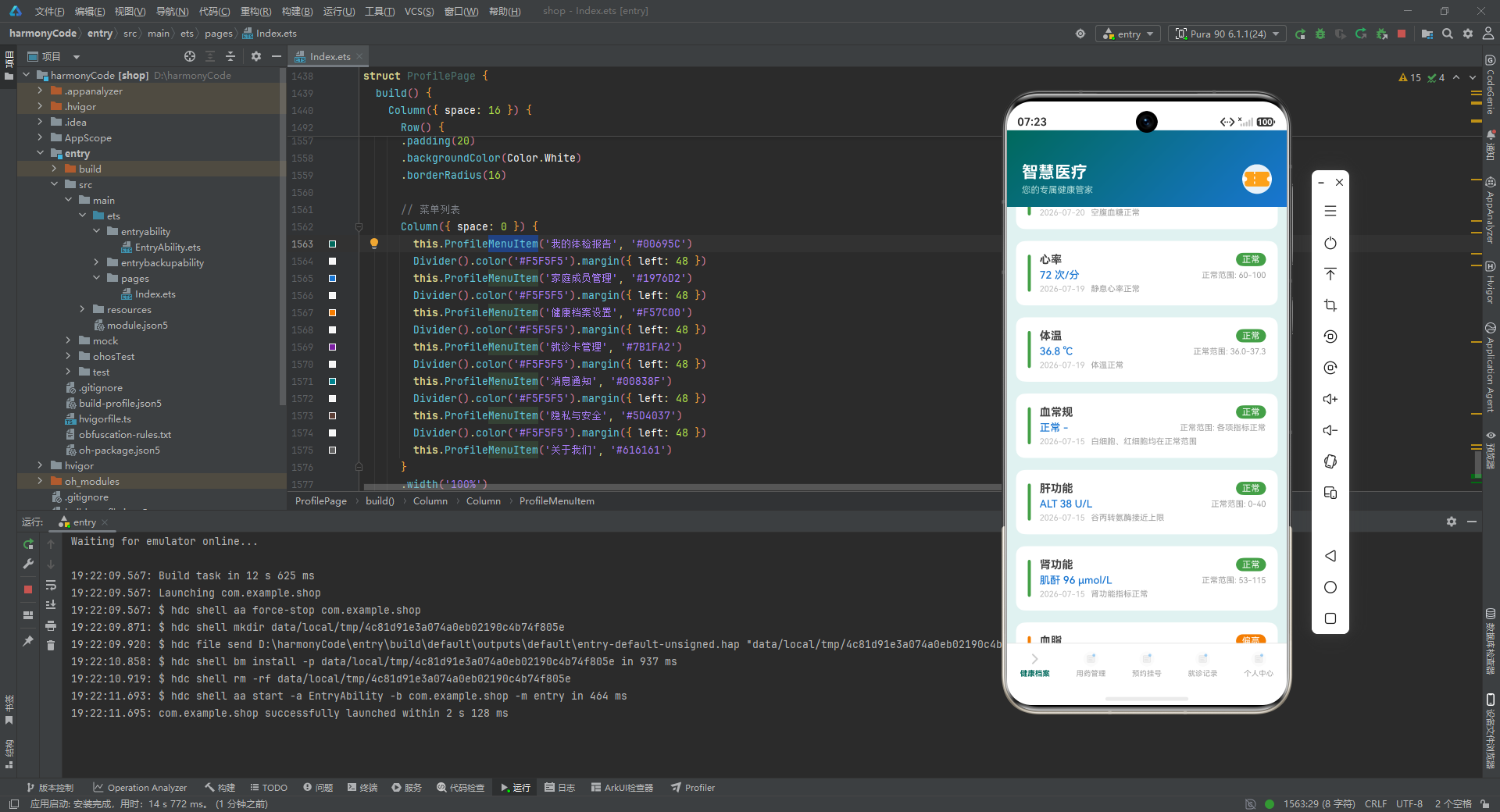
getStatusColor函数将status映射为颜色(正常→#43A047绿色、偏高→#F57C00橙色、偏低→#1976D2蓝色、异常→#D32F2F红色)。颜色作为健康状态的视觉编码,其设计原理基于"交通信号灯隐喻":绿色=安全/正常,黄色/橙色=警告/需要注意,红色=危险/需要干预。用户看到HealthMetricCard左侧的绿色条时直觉感知"这项指标没问题",看到橙色条时立即警觉"需要注意"。这种即时感知比阅读文字(“偏高”)的速度快得多——颜色编码将健康数据的认知成本降至最低。
getStatusColor函数将字符串status映射为颜色代码,颜色识别速度远超文字阅读——用户扫视HealthArchive页面时,绿色条目代表"一切正常",橙色条目立即触发警觉。这种颜色直觉感知能力进化了数百万年,医疗App借用这种能力将血糖值(mmol/L)、血脂值(mmol/L)转化为直觉可感的颜色信号,大幅降低了健康数据解读的认知门槛。
血压的两层判断(收缩压偏高、舒张压偏高)分别用不同的status字段描述——HEALTH_METRICS[0]中血压status为"偏高",但note(‘建议低盐饮食,注意监测’)暗示了收缩压和舒张压中至少有一项超标。临床上高血压的诊断标准是:收缩压≥140 mmHg或舒张压≥90 mmHg满足任一条件即可诊断。血压128/82中收缩压128(在90-140范围内)属于正常,但舒张压82(在60-90范围内)属于正常——但APP的status为何标记为"偏高"?这可能是因为note(‘低盐饮食,注意监测’)暗示医生根据患者的整体情况(联合用药方案)判断当前血压控制尚未达标。
三、AppointmentModel与医院就诊的预约状态机
AppointmentModel的status字段(‘待就诊’/‘已完成’/‘已取消’)驱动了预约挂号的完整生命周期管理。待就诊(蓝色#1976D2)→已完成(绿色#43A047)→已取消(红色#D32F2F)的状态转换是单向的(不可逆):就诊完成后状态变为"已完成",不可再修改;取消后变为"已取消",不可再恢复。这种状态机的设计确保了就诊记录的不可篡改性——已完成的就诊记录是不可更改的医疗凭证。
心血管内科复诊(张明远主任医师,2026-07-25)和内分泌科复诊(李秀芬副主任医师,2026-07-28)的复诊预约构成了慢性病管理的"定期随访"机制。2型糖尿病患者的定期随访包括:空腹血糖监测(目标4.4-7.0 mmol/L)、糖化血红蛋白检测(目标<7%)、眼底检查(每年一次)、足部检查(每次就诊时)。MEDICINE_REMINDERS中二甲双胍的endDate(‘2026-09-01’)说明降糖药的疗程需要阶段性评估,医生会根据下次随访的血糖数据决定是否继续当前方案或调整剂量。
四、getVisitTypeColor就诊类型与医疗资源的精准分配
getVisitTypeColor将就诊类型映射为颜色(初诊→#00695C深青色、复诊→#1976D2蓝色、体检→#7B1FA2紫色)。初诊(深青色#00695C)代表患者首次到某科室就诊——初诊患者需要完整的病史采集和体格检查,诊疗时间较长(通常15-20分钟以上)。复诊(蓝色#1976D2)代表患者已有该科室的诊疗记录,医生可快速回顾上次就诊内容,聚焦于当前症状的变化。体检(紫色#7B1FA2)是一种特殊就诊类型——体检中心通常是独立的系统,患者在体检当天完成所有检查项目,而非在各个科室之间辗转。
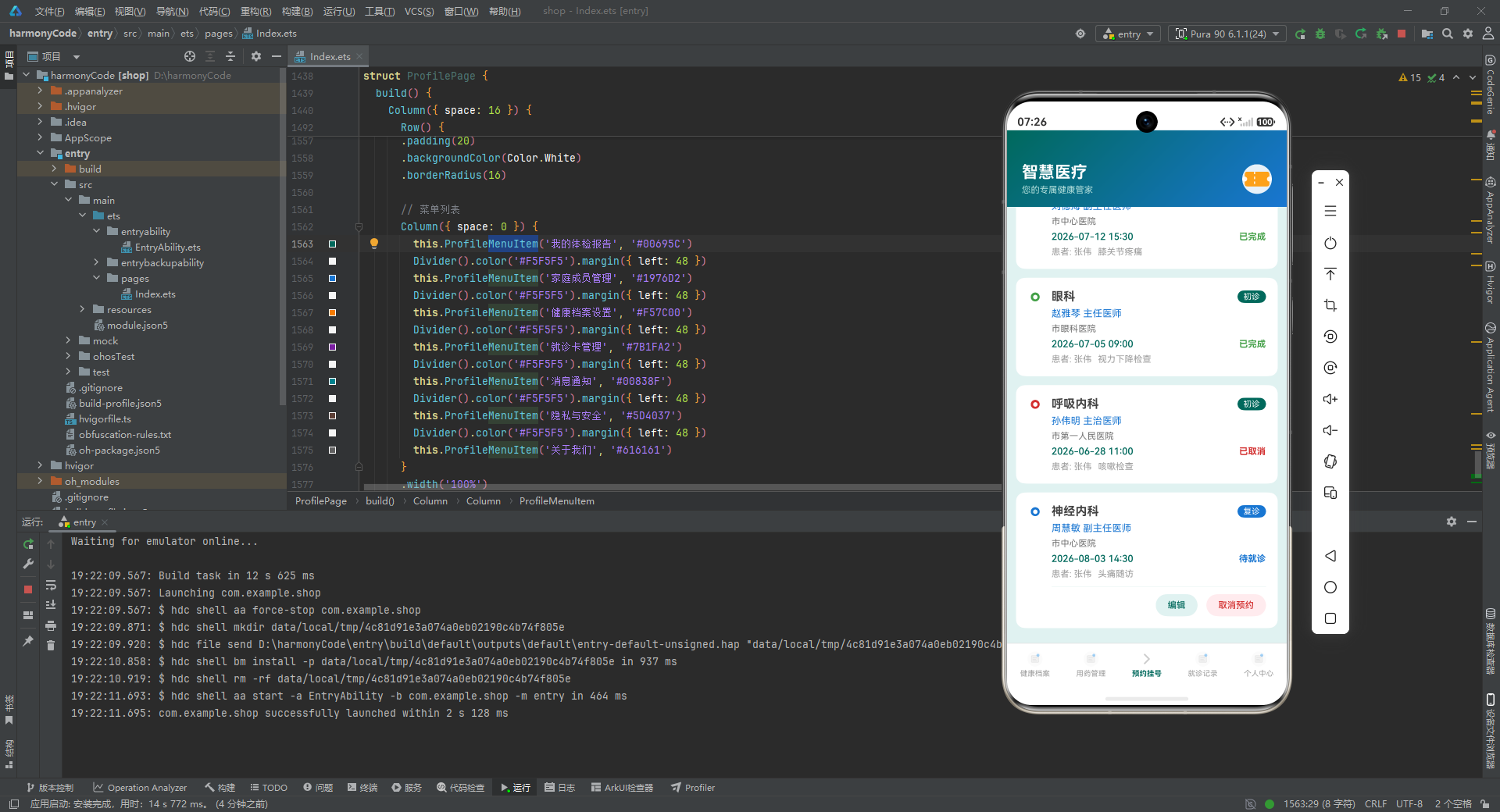
APPOINTMENTS中体检中心(王建国主治医师,市中心医院,2026-07-30)是"年度体检"场景。年度体检的价值在于"早期发现"——很多疾病在早期没有症状(如高血脂、高血糖、高尿酸),只能通过定期体检的实验室检查发现。HEALTH_METRICS[7]血脂(TC 6.2 mmol/L,status=‘偏高’)和HEALTH_METRICS[8]尿酸(420 μmol/L,status=‘偏高’)正是"无自觉症状的异常指标"——若非体检发现,患者可能多年都不知道自己的血脂和尿酸偏高,直到痛风发作或心血管事件发生。
五、VISIT_RECORDS就诊记录与慢病管理的连续性
VISIT_RECORDS[3](2026-06-20,心血管内科,张明远主任医师)记录了原发性高血压2级的诊断和用药方案:氨氯地平片5mg每日1次+缬沙坦胶囊80mg每日1次。这个诊断日期(2026-06-20)与MEDICINE_REMINDERS中氨氯地平片的startDate(2026-07-01)相差约10天——这说明医生在6月20日做出高血压诊断后,可能先开了10天的药量用于测试耐受性,7月1日才正式开启长期用药方案。VISIT_RECORDS中的prescription字段(‘氨氯地平片5mg 每日1次’)和MEDICINE_REMINDERS中的medicineName/dosage字段必须保持一致——若两者不一致(如记录中的剂量与实际服用剂量不符),会导致用药安全的潜在风险。
VISIT_RECORDS的followUp字段(下次随访计划)是慢病管理的"闭环反馈"机制。医生在每次就诊结束时制定下次随访计划,followUp将这个计划结构化为可追踪的数据,App在下次随访日期前向用户推送提醒,确保"诊疗-随访-再诊疗"的连续性不被中断。高血压、糖尿病等慢病的控制效果高度依赖规律随访,若患者在血压稳定后停止随访,往往在多年后因心血管事件才重新就诊,错过最佳干预时机。
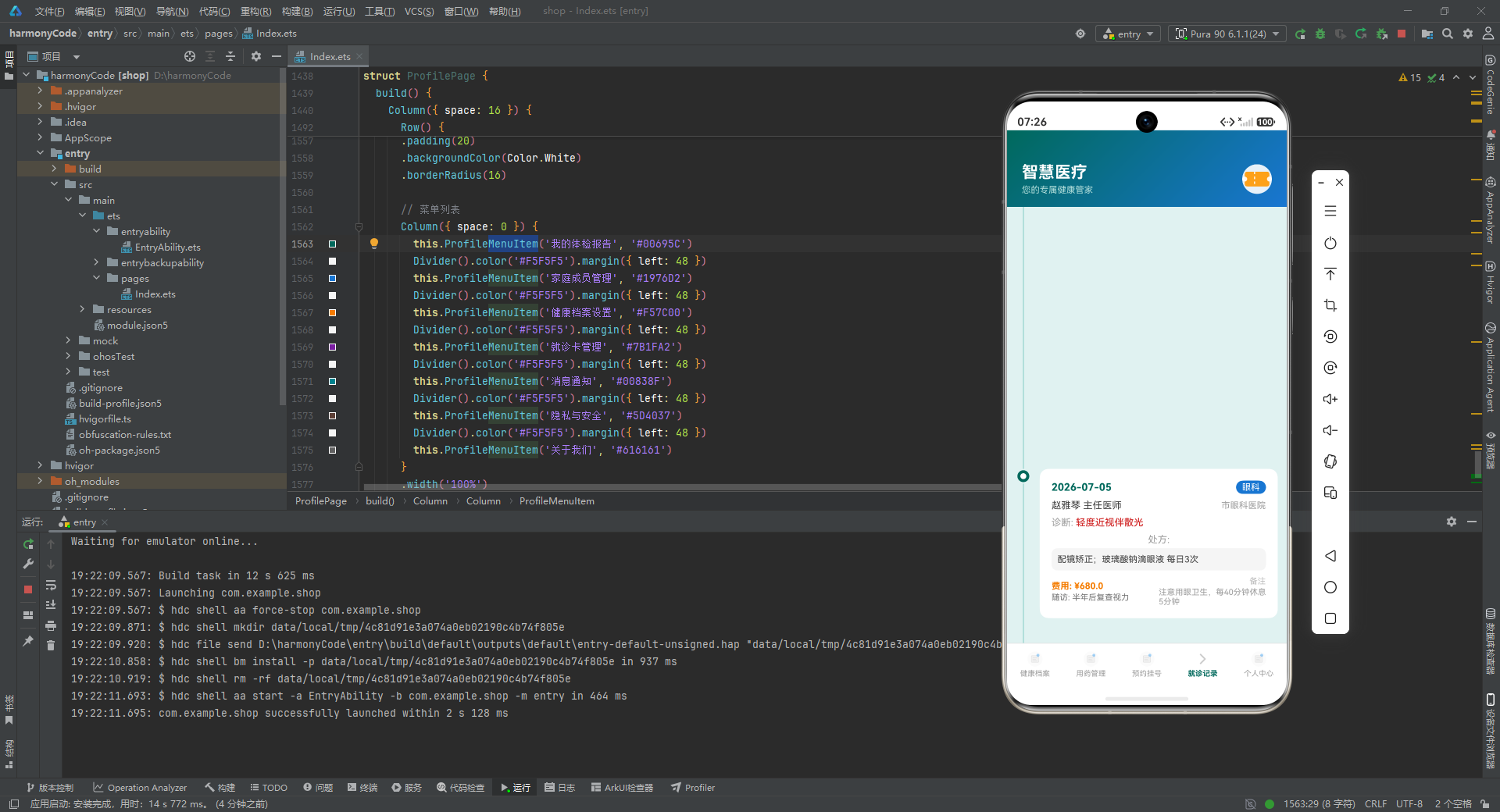
VISIT_RECORDS[4](2026-06-10,内分泌科,李秀芬副主任医师)记录了2型糖尿病的诊断和二甲双胍用药方案。该记录距今已有40天,MEDICINE_REMINDERS中二甲双胍的endDate为2026-09-01(还有约2个月的疗程)。复诊预约(APPOINTMENTS[1],2026-07-28)是糖尿病确诊后的第一次复诊,目的是评估血糖控制效果——医生会根据空腹血糖和糖化血红蛋白数据决定是否调整二甲双胍剂量或联合其他降糖药。
六、getAppointmentStatusColor与就医行为的时间感知管理
getAppointmentStatusColor将预约状态映射为颜色(待就诊→#1976D2蓝色、已完成→#43A047绿色、已取消→#D32F2F红色)。蓝色在时间管理中代表"未来事件"——待就诊预约出现在App中用蓝色标注,帮助用户在众多预约记录中快速区分"未来要做的事"(蓝色)和"已经发生的事"(绿色/灰色)。预约列表通常按时间排序(最近的待就诊排在最上方),"即将到来"的预约(明天或后天)在列表中用醒目的颜色或样式突出显示。
神经内科头痛随访(周慧敏副主任医师,2026-08-03)是VISIT_RECORDS[9](2026-03-20,紧张性头痛诊断)后的复诊安排。就诊记录中的note(‘保持规律作息,减少精神压力’)暗示紧张性头痛与生活方式高度相关——医生通过"减少压力"的建议,期望从根本上改善头痛而非仅靠药物控制。头痛的"生物-心理-社会"多维干预模型在神经内科的诊疗中非常普遍:单纯依赖止痛药(布洛芬缓释胶囊)只能缓解症状,配合生活方式的改变才能实现长期控制。
七、BP_TREND周血压趋势与家庭自测数据的价值
BP_TREND(BloodPressureTrend)记录了周一至周日的血压趋势数据(收缩压范围122-135 mmHg,舒张压范围78-88 mmHg)。周四的血压峰值(135/88 mmHg)出现在工作压力最大的时段——这提示了血压与情绪状态之间的关联机制:交感神经在压力状态下激活,导致血管收缩和心率加快,从而升高血压。周六血压最低(122/78 mmHg)说明休息日血压自然下降。
BP_TREND中周四血压峰值(135/88 mmHg)与工作压力的关联揭示了"情绪-生理"反馈环路:交感神经在压力下激活,血管收缩,血压升高。临床中医生需先排查"白大衣高血压"(仅诊室测量时升高)和"隐匿性高血压"(诊室正常、家庭偏高),通过7天连续监测判断血压升高是"持续性"还是"阵发性",从而决定是否需要药物治疗。
家庭血压自测数据的价值在于"真实生活状态下的血压"——诊室血压(医院测量)往往因"白大衣效应"(患者见到医生时紧张导致血压升高)而高于真实水平。HEALTH_METRICS[0]中的血压128/82 mmHg可能是家庭自测数据(而非诊室血压),更能反映患者的真实日常血压水平。VISIT_RECORDS[3]中医生建议"每日监测血压"正是为了积累足够多的家庭自测数据,以便更准确地评估降压药的效果。
// 血压状态颜色编码
function getStatusColor(status: string): string {
  if (status === '正常') { return '#43A047' }
  else if (status === '偏高') { return '#F57C00' }
  else if (status === '偏低') { return '#1976D2' }
  else if (status === '异常') { return '#D32F2F' }
  else { return '#757575' }
}

// 就诊类型颜色编码
function getVisitTypeColor(type: string): string {
  if (type === '初诊') { return '#00695C' }
  else if (type === '复诊') { return '#1976D2' }
  else if (type === '体检') { return '#7B1FA2' }
  else { return '#757575' }
}
八、多药联用的药物相互作用安全警示
MEDICINE_REMINDERS中阿司匹林肠溶片(抗凝,100mg每日一次)和阿托伐他汀(降脂,20mg每日一次睡前服用)同时存在——这两种药物是心血管二级预防的标准组合:阿司匹林抑制血小板聚集预防血栓,阿托伐他汀降低胆固醇稳定动脉粥样硬化斑块。然而,两药联用需要注意胃肠道副作用:阿司匹林本身会刺激胃黏膜,阿托伐他汀也有轻微的胃肠道刺激作用,合用可能增加胃部不适的风险。MedicineReminderModel的note字段(‘早饭前服用’)和MEDICINE_REMINDERS[3]的note(‘睡前服用’)分别针对这两种药物的服用时间设计,目的是最大化药效同时最小化副作用。
复方丹参滴丸(活血化瘀,10丸每日3次)的服用方式(‘午饭后舌下含服’)是该药独特之处——舌下含服的给药途径使药物直接通过口腔黏膜吸收,进入体循环的药物浓度更高、起效更快。相比口服吞服(需经过胃肠道吸收和肝脏首过效应),舌下含服的生物利用度显著更高。note字段中的"舌下含服"是复方丹参滴丸正确服用的关键——若患者误以为口服即可,可能影响药效。
九、用药疗程管理与endDate的自动提醒机制
MEDICINE_REMINDERS中每种药物都有明确的endDate(疗程结束日期)。氨氯地平片endDate=‘2026-08-01’(仅一个月疗程),而阿司匹林endDate=‘2026-12-31’(长达半年)。疗程长度的差异反映了不同药物的治疗目标:氨氯地平片作为高血压初诊后的初始治疗药物,医生需要通过一个月的观察评估血压控制效果(是否需要增加剂量或联合其他药物)。阿司匹林作为心血管二级预防的长期用药,指南推荐无限期使用(除非出现严重副作用),endDate设为年底是为了强迫患者在年底复诊,由医生重新评估是否继续用药。
endDate的自动提醒机制在App中体现为"疗程即将结束"提示:用户打开App时,若某药物的endDate距离今天不足7天,App在MedicineTab顶部显示"药物A还有X天疗程结束,请记得复诊"的提醒。这种"预防性提醒"(而非"到期后通知")的设计哲学是"给用户足够的准备时间"——避免用户在疗程结束的第二天才想起需要复诊,导致药物中断。
// 预约状态颜色编码
function getAppointmentStatusColor(status: string): string {
  if (status === '待就诊') { return '#1976D2' }
  else if (status === '已完成') { return '#43A047' }
  else if (status === '已取消') { return '#D32F2F' }
  else { return '#757575' }
}

// 周血压趋势数据
const BP_TREND: BloodPressureTrend[] = [
  { day: '周一', systolic: 125, diastolic: 80 },
  { day: '周二', systolic: 130, diastolic: 85 },
  { day: '周三', systolic: 128, diastolic: 82 },
  { day: '周四', systolic: 135, diastolic: 88 },
  { day: '周五', systolic: 127, diastolic: 81 },
  { day: '周六', systolic: 122, diastolic: 78 },
  { day: '周日', systolic: 128, diastolic: 82 }
]
十、HEALTH_METRICS与代谢综合征的多指标综合评估
HEALTH_METRICS[9](BMI 24.3 kg/m²,status=‘偏高’)的超标与HEALTH_METRICS[7]血脂偏高(TC 6.2 mmol/L)、HEALTH_METRICS[8]尿酸偏高(420 μmol/L)共同构成了"代谢综合征"的典型表现。代谢综合征是一组以肥胖、高血糖、高血脂、高尿酸为核心的临床综合征,这些异常指标往往在同一患者身上同时出现,因为它们的共同病因是"胰岛素抵抗"——肥胖和血脂异常导致细胞对胰岛素敏感性下降,进而影响血糖和尿酸的代谢。尿酸420 μmol/L略高于正常上限416 μmol/L,note建议减少嘌呤摄入。长期高尿酸血症可能发展为痛风甚至肾脏损害,早期通过饮食控制配合运动可在不依赖药物的情况下将尿酸降至正常范围。
十一、处方数据prescription的结构化表达与用药安全
VISIT_RECORDS[0](消化内科,慢性浅表性胃炎)的prescription(‘奥美拉唑20mg 每日1次;铝碳酸镁咀嚼片 每日3次’)与diagnosis对应体现了"诊断→治疗"的临床逻辑:慢性胃炎的标准治疗包括质子泵抑制剂(奥美拉唑,抑制胃酸分泌)和胃黏膜保护剂(铝碳酸镁,中和胃酸并形成保护层),两种药物联用从"减少损伤"和"增强防御"两个方向同时治疗胃炎。MEDICINE_REMINDERS[9]的奥美拉唑与VISIT_RECORDS[0]的prescription完全一致,确保了"医生开的药"和"用户实际服用的药"之间的数据一致性——这种一致性在多科室就诊场景中极为重要,有助避免重复用药或药物相互作用的风险。
十二、就诊费用cost字段与医疗支出的个人健康管理
VISIT_RECORDS中每条记录都有cost字段(从89.5元到680元不等)。皮肤科89.5元(急性上呼吸道感染,用药简单)和眼科680元(视力检查、验光、配镜自费)代表就诊费用的巨大差异。用户在App中查看cost字段了解自己的医疗支出分布,判断是否达到医保报销起付线,合理规划健康预算。年度累计医疗支出也是计算商业医疗险报销额度的重要依据——若年度支出超过1800元起付线,超出部分可按比例报销。
十三、HEALTH_ARCHIVE健康档案与跨科室信息共享
HEALTH_ARCHIVE(健康档案Tab)汇总了用户在所有科室的就诊记录(VISIT_RECORDS)、用药记录(MEDICINE_REMINDERS)、健康指标(HEALTH_METRICS),构成用户完整的健康画像。这一设计解决了传统医疗系统"信息孤岛"问题:心血管内科医生不知道患者在内分泌科的就诊记录,内分泌科医生不知道患者在消化内科服用的药物。用户在就诊时向医生展示完整的HEALTH_ARCHIVE,确保医疗决策有足够的背景信息。
多科室就诊记录的整合在"药物相互作用审核"中尤为重要。若用户在两个科室分别就诊,两个医生都可能不知道对方开出的药物。中氨氯地平、缬沙坦、二甲双胍、阿司匹林、阿托伐他汀的联合用药方案需要App内置的药物相互作用数据库来主动提示潜在风险——这种功能是医疗健康App区别于一般健康记录App的核心价值所在。
6. 顶部头部与自定义 TabBar
@Builder
MedicalHeader() {
  Row() {
    Row() {
      Column() {
        Text('智慧医疗')
          .fontSize(22)
          .fontColor('#FFFFFF')
          .fontWeight(FontWeight.Bold)
        Text('您的专属健康管家')
          .fontSize(12)
          .fontColor('#B2DFDB')
          .margin({ top: 4 })
      }
      .alignItems(HorizontalAlign.Start)
      Blank()
      Row() {
        Image($r('app.media.app_icon'))
          .width(40)
          .height(40)
          .borderRadius(20)
          .backgroundColor(Color.White)
          .opacity(0.9)
      }
    }
    .width('100%')
    .padding({ left: 20, right: 20, top: 44, bottom: 16 })
  }
  .linearGradient({
    angle: 135,
    colors: [['#00695C', 0.0], ['#1976D2', 1.0]]
  })
  .width('100%')
}
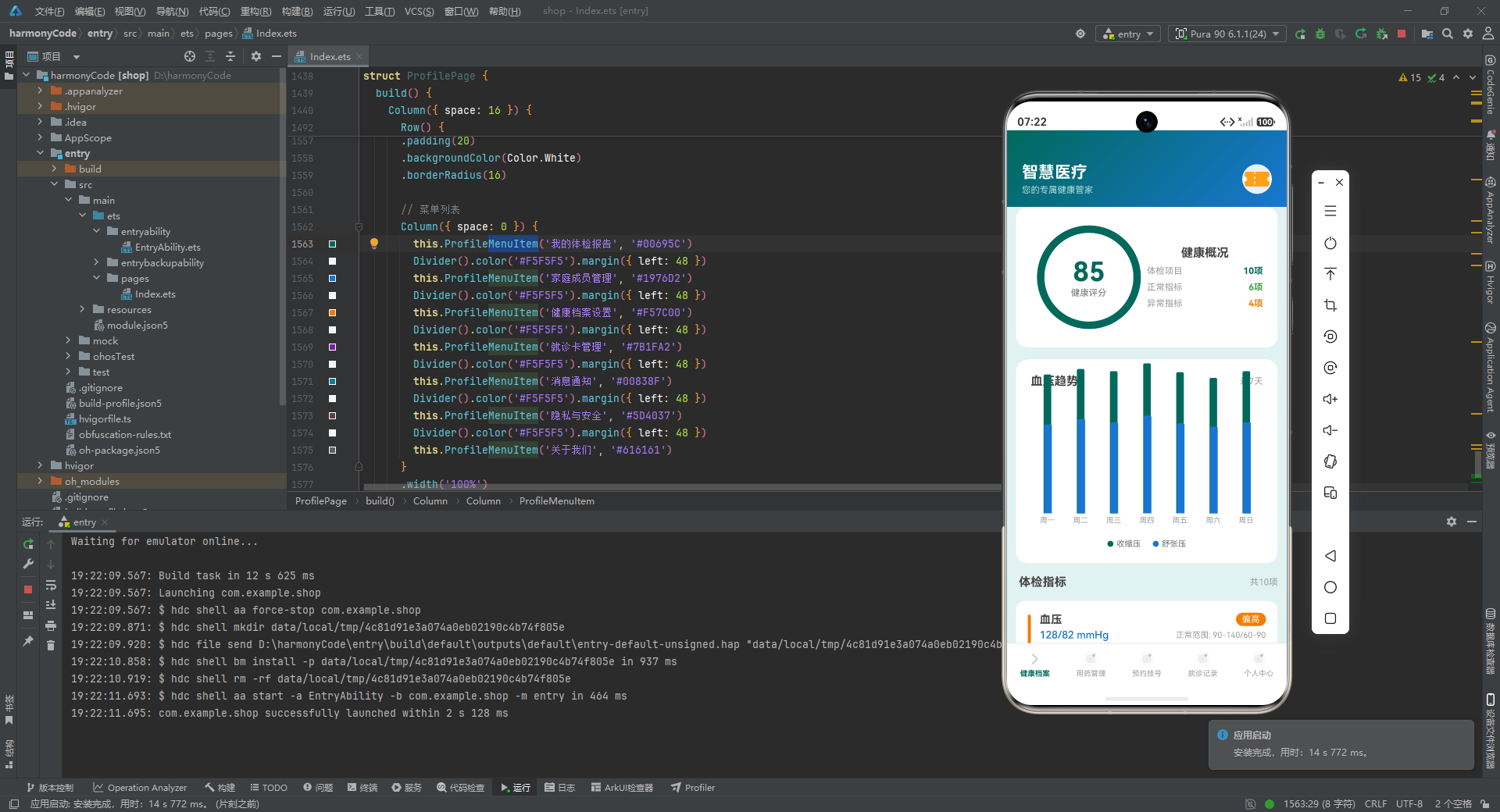
顶部头部使用 135 度角渐变背景,从深绿 #00695C 过渡到蓝色 #1976D2。左侧显示应用名称和标语,标语使用浅绿 #B2DFDB 色;右侧放置圆形白色背景的应用图标。顶部内边距 44vp 预留了状态栏空间。
@Builder
BottomTabBar() {
  Row() {
    this.TabItem('健康档案', 0)
    this.TabItem('用药管理', 1)
    this.TabItem('预约挂号', 2)
    this.TabItem('就诊记录', 3)
    this.TabItem('个人中心', 4)
  }
  .width('100%')
  .height(56)
  .backgroundColor(Color.White)
  .border({ width: { top: 1 }, color: '#E0E0E0' })
}

@Builder
TabItem(name: string, index: number) {
  Column() {
    Image(this.currentTab === index ? $r('app.media.app_icon') : $r('app.media.app_icon'))
      .width(24)
      .height(24)
      .opacity(this.currentTab === index ? 1 : 0.4)
    Text(name)
      .fontSize(10)
      .fontColor(this.currentTab === index ? '#00695C' : '#9E9E9E')
      .margin({ top: 2 })
      .fontWeight(this.currentTab === index ? FontWeight.Bold : FontWeight.Normal)
  }
  .layoutWeight(1)
  .height('100%')
  .justifyContent(FlexAlign.Center)
  .onClick(() => {
    this.currentTab = index;
  })
}
自定义 TabBar 通过两个 @Builder 方法实现。BottomTabBar 定义白色背景、顶部灰色分割线的容器,内部横向排列五个 TabItem。TabItem 接收名称和索引参数,通过对比 currentTab 和 index 切换选中状态:选中时图标不透明、文字为主色加粗;未选中时图标 40% 透明度、文字为灰色正常字重。每个 Tab 项使用 layoutWeight(1) 等分宽度,点击时直接修改 currentTab 触发页面切换。
7. 业务操作方法
toggleMedicineTaken(id: number) {
  for (let i = 0; i < this.medicineList.length; i++) {
    if (this.medicineList[i].id === id) {
      this.medicineList[i].isTaken = !this.medicineList[i].isTaken;
    }
  }
}
toggleMedicineTaken 方法通过 for 循环找到目标药品,直接翻转其 isTaken 属性。由于 MedicineReminderModel 使用了 @Observed 装饰器,直接修改属性即可触发 UI 刷新,无需创建新数组或新对象。这与前几个示例使用不可变数据更新模式(map + 新实例)不同,是 @Observed 类的另一种使用方式。
loadAppointmentData(id: number) {
  for (let i = 0; i < this.appointmentList.length; i++) {
    if (this.appointmentList[i].id === id) {
      this.editDepartment = this.appointmentList[i].department;
      this.editDoctor = this.appointmentList[i].doctor;
      this.editDate = this.appointmentList[i].date;
      this.editTime = this.appointmentList[i].time;
      this.editSymptom = this.appointmentList[i].symptom;
    }
  }
}
loadAppointmentData 方法将预约数据加载到编辑表单字段中。通过 for 循环找到目标预约记录,将其科室、医生、日期、时间和症状五个字段逐一赋值到对应的 @State 变量,供编辑弹窗的 TextInput 绑定显示。
confirmAddMedicine() {
  const newId = this.medicineList.length + 1;
  const newMedicine = new MedicineReminderModel(
    newId, this.newMedicineName, this.newMedicineDosage,
    this.newMedicineFrequency, this.newMedicineTime,
    '2026-07-22', '2026-12-31', this.newMedicinePurpose, false, ''
  );
  this.medicineList.push(newMedicine);
  // 重置表单字段...
  this.showAddMedicineDialog = false;
}

confirmDeleteMedicine() {
  this.medicineList = this.medicineList.filter(
    (item: MedicineReminderModel) => item.id !== this.selectedMedicineId
  );
  this.showDeleteMedicineDialog = false;
}
新增药品使用 push 方法直接追加到数组末尾,删除药品使用 filter 创建新数组。confirmEditAppointment 通过 for 循环找到目标后直接修改属性(可变更新),confirmDeleteAppointment 使用 filter 创建新数组(不可变更新)。本示例混合使用了两种更新模式,取决于是否需要触发数组级别的响应式更新。
8. bindSheet 弹窗 Builder
@Builder
AddMedicineDialog() {
  Column() {
    Column({ space: 16 }) {
      TextInput({ text: this.newMedicineName, placeholder: '请输入药品名称' })
        .width('100%')
        .height(48)
        .fontSize(14)
        .backgroundColor('#F5F5F5')
        .borderRadius(8)
        .onChange((value: string) => { this.newMedicineName = value; })

      TextInput({ text: this.newMedicineDosage, placeholder: '请输入剂量(如:5mg)' })
        // ...
      TextInput({ text: this.newMedicineFrequency, placeholder: '请输入频率(如:每日1次)' })
        // ...
      TextInput({ text: this.newMedicineTime, placeholder: '请输入服药时间(如:08:00)' })
        // ...
      TextInput({ text: this.newMedicinePurpose, placeholder: '请输入用途(如:降压)' })
        // ...

      Row({ space: 12 }) {
        Button('取消')
          .layoutWeight(1)
          .fontColor('#00695C')
          .backgroundColor('#E0F2F1')
          .borderRadius(22)
          .onClick(() => { this.showAddMedicineDialog = false; })
        Button('确认添加')
          .layoutWeight(1)
          .fontColor('#FFFFFF')
          .backgroundColor('#00695C')
          .borderRadius(22)
          .onClick(() => { this.confirmAddMedicine(); })
      }
    }
    .padding(20)
  }
}
新增用药弹窗包含五个 TextInput 输入框(药品名称、剂量、频率、服药时间、用途)和取消/确认两个按钮。每个输入框使用浅灰 #F5F5F5 背景、8vp 圆角,高度统一 48vp,通过 onChange 回调实时更新对应的 @State 表单变量。按钮使用胶囊形圆角(borderRadius(22)),取消按钮为浅绿底色主色文字,确认按钮为主色底色白色文字。
@Builder
DeleteMedicineDialog() {
  Column() {
    Column({ space: 20 }) {
      Text('确定要删除这条用药提醒吗?')
        .fontSize(16)
        .fontColor('#424242')
        .textAlign(TextAlign.Center)
      Text('删除后将无法恢复,请谨慎操作')
        .fontSize(13)
        .fontColor('#9E9E9E')
        .textAlign(TextAlign.Center)
      Row({ space: 12 }) {
        Button('取消')
          .onClick(() => { this.showDeleteMedicineDialog = false; })
        Button('确认删除')
          .backgroundColor('#D32F2F')
          .onClick(() => { this.confirmDeleteMedicine(); })
      }
    }
    .padding(20)
  }
}
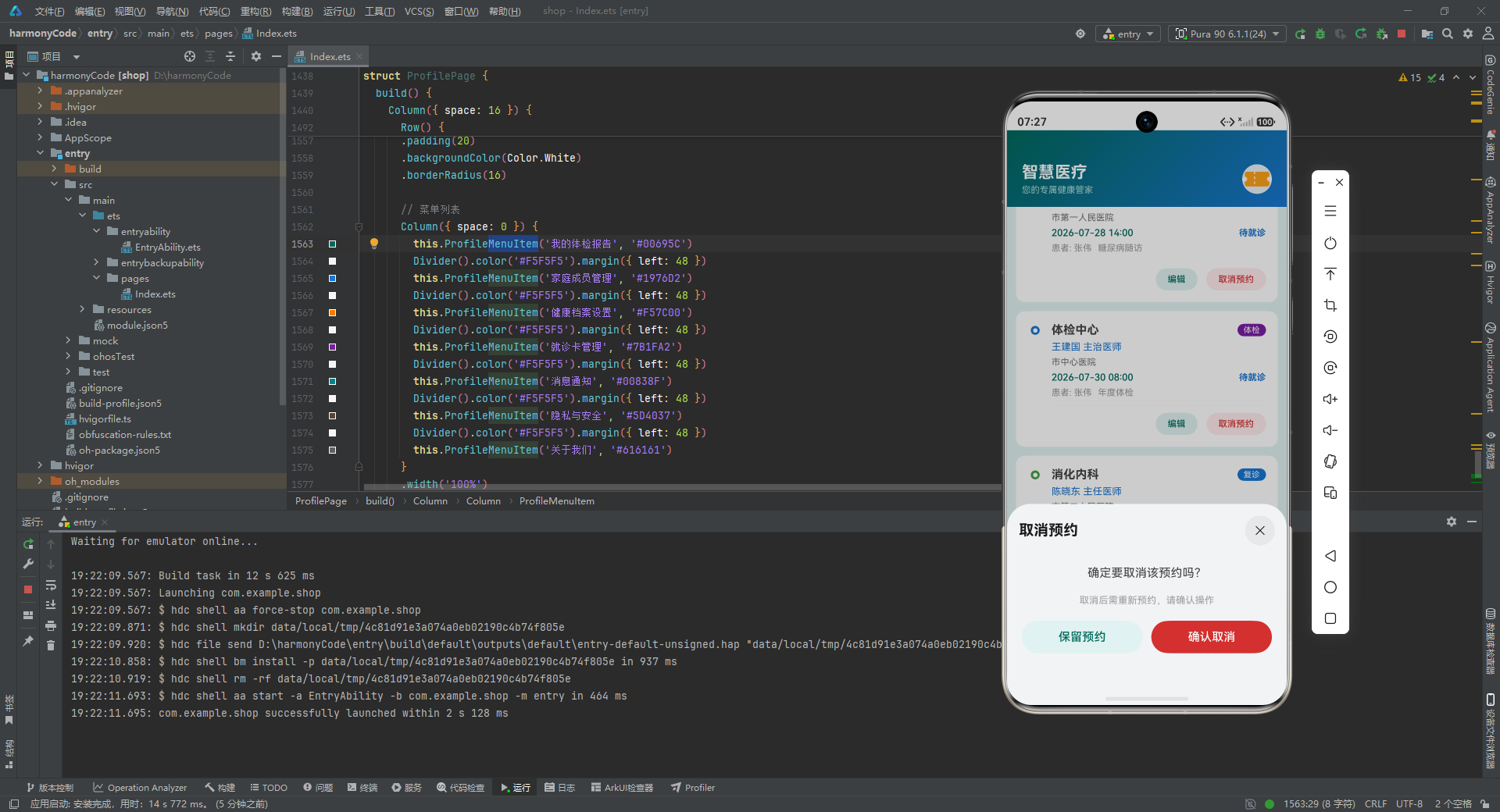
删除确认弹窗结构简洁:两行提示文字(主标题 + 副标题)+ 双按钮。确认删除按钮使用红色 #D32F2F 背景,暗示危险操作。弹窗高度设置为 35%,适合这种简短的确认交互。
@Builder
EditAppointmentDialog() {
  Column() {
    Column({ space: 16 }) {
      TextInput({ text: this.editDepartment, placeholder: '科室' })
        .onChange((value: string) => { this.editDepartment = value; })
      TextInput({ text: this.editDoctor, placeholder: '医生' })
        .onChange((value: string) => { this.editDoctor = value; })
      TextInput({ text: this.editDate, placeholder: '日期(如:2026-07-25)' })
        .onChange((value: string) => { this.editDate = value; })
      TextInput({ text: this.editTime, placeholder: '时间(如:09:30)' })
        .onChange((value: string) => { this.editTime = value; })
      TextInput({ text: this.editSymptom, placeholder: '症状描述' })
        .onChange((value: string) => { this.editSymptom = value; })
      Row({ space: 12 }) {
        Button('取消')
          .onClick(() => { this.showEditAppointmentDialog = false; })
        Button('保存修改')
          .backgroundColor('#00695C')
          .onClick(() => { this.confirmEditAppointment(); })
      }
    }
    .padding(20)
  }
}
编辑预约弹窗包含五个 TextInput,分别绑定编辑表单字段。与新增弹窗不同的是,编辑弹窗的 TextInput 初始值通过 text 属性绑定已有的预约数据(由 loadAppointmentData 加载),用户可以直接在原有数据基础上修改。弹窗高度设置为 70%,是四个弹窗中最高的,因为需要容纳五个输入框和按钮。
9. 健康档案页面 HealthArchivePage
@Component
struct HealthArchivePage {
  @Prop healthScore: number;

  build() {
    Column({ space: 16 }) {
      // 健康评分环形图 + 健康概况
      // 血压趋势柱状图
      // 体检指标列表
    }
  }
}
健康档案页面通过 @Prop 接收健康评分,页面由三个卡片组成:健康评分环形图 + 概况卡片、血压趋势柱状图卡片、体检指标列表。
Stack() {
  Circle({ width: 130, height: 130 })
    .fill(Color.Transparent)
    .stroke('#E0E0E0')
    .strokeWidth(10)
  Circle({ width: 130, height: 130 })
    .fill(Color.Transparent)
    .stroke('#00695C')
    .strokeWidth(10)
    .strokeDash({ values: [this.healthScore / 100 * 408, 408], count: 2 })
  Column() {
    Text(this.healthScore.toString())
      .fontSize(36)
      .fontColor('#00695C')
      .fontWeight(FontWeight.Bold)
    Text('健康评分')
      .fontSize(12)
      .fontColor('#757575')
  }
}
.width(150)
.height(150)
.alignContent(Alignment.Center)
健康评分环形图使用 Stack 叠加三层:底层是灰色 #E0E0E0 的完整圆环(背景轨道),中层是主色 #00695C 的进度圆环(通过 strokeDash 控制弧长),顶层是居中的评分数字和标签文字。
strokeDash 是实现环形进度的关键技术:values: [this.healthScore / 100 * 408, 408] 定义了虚线模式——第一段长度为 healthScore / 100 * 408(当评分 85 时约为 347),第二段长度为 408(圆的周长 ≈ π × 130 ≈ 408)。count: 2 表示重复两次,确保整个圆环被覆盖。效果是从圆环起点开始,绘制一段长度为评分比例的弧线,剩余部分保持灰色轨道。
Row({ space: 0 }) {
  ForEach(BP_TREND, (item: BloodPressureTrend) => {
    Column({ space: 4 }) {
      Stack({ alignContent: Alignment.Bottom }) {
        Column()
          .width(10)
          .height(item.systolic * 1.5)
          .backgroundColor('#00695C')
          .borderRadius({ topLeft: 2, topRight: 2 })
        Column()
          .width(10)
          .height(item.diastolic * 1.5)
          .backgroundColor('#1976D2')
          .borderRadius({ topLeft: 2, topRight: 2 })
          .margin({ left: 2 })
      }
      .height(150)
      Text(item.day)
        .fontSize(10)
        .fontColor('#9E9E9E')
    }
    .layoutWeight(1)
    .alignItems(HorizontalAlign.Center)
  })
}
.height(180)
.justifyContent(FlexAlign.SpaceEvenly)
血压趋势柱状图使用纯布局实现。每天的数据由两根并排的柱体组成:深绿色 #00695C 柱代表收缩压,蓝色 #1976D2 柱代表舒张压。柱体高度通过 item.systolic * 1.5 和 item.diastolic * 1.5 动态计算(如收缩压 125 → 高度 187.5vp),顶部圆角。Stack 设置 alignContent: Alignment.Bottom 确保两根柱体底部对齐。七天的数据通过 ForEach 遍历渲染,layoutWeight(1) 等分宽度。
底部添加图例说明,使用小圆点 + 文字的方式标注收缩压和舒张压的颜色含义。
ForEach(HEALTH_METRICS, (item: HealthMetric) => {
  Row() {
    Column()
      .width(4)
      .height(50)
      .backgroundColor(getStatusColor(item.status))
      .borderRadius(2)

    Column({ space: 4 }) {
      Row() {
        Text(item.item)
          .fontSize(15)
          .fontWeight(FontWeight.Bold)
        Blank()
        Text(item.status)
          .fontSize(12)
          .fontColor(Color.White)
          .backgroundColor(getStatusColor(item.status))
          .borderRadius(10)
      }
      Row() {
        Text(item.value + ' ' + item.unit)
          .fontSize(14)
          .fontColor('#1976D2')
        Blank()
        Text('正常范围: ' + item.normalRange)
          .fontSize(11)
          .fontColor('#9E9E9E')
      }
      Row() {
        Text(item.date)
          .fontSize(11)
          .fontColor('#BDBDBD')
        Blank()
        Text(item.note)
          .fontSize(11)
          .fontColor('#9E9E9E')
          .maxLines(1)
          .textOverflow({ overflow: TextOverflow.Ellipsis })
      }
    }
    .layoutWeight(1)
    .margin({ left: 12 })
  }
  .padding(16)
  .backgroundColor(Color.White)
  .borderRadius(12)
})
体检指标列表使用 ForEach 遍历 10 条数据,每条指标卡片左侧有一根 4vp 宽的状态色条(通过 getStatusColor 获取颜色),直观标识该指标的正常/异常状态。卡片内部三行信息:第一行显示指标名称和状态标签(彩色背景圆角),第二行显示检测值和正常范围,第三行显示检测日期和备注。
10. 用药管理页面 MedicinePage
@Component
struct MedicinePage {
  @Prop medicineList: MedicineReminderModel[];
  onAddClick: () => void = () => {};
  onDeleteClick: (id: number) => void = () => {};
  onToggleTaken: (id: number) => void = () => {};

  build() {
    Column({ space: 12 }) {
      // 标题栏 + 添加按钮
      ForEach(this.medicineList, (item: MedicineReminderModel) => {
        Column() {
          // 时间 + 服用状态
          // 分割线
          // 药品信息 + 操作按钮
          // 起止日期时间线
        }
        .padding(16)
        .backgroundColor(Color.White)
        .borderRadius(12)
      })
    }
  }
}
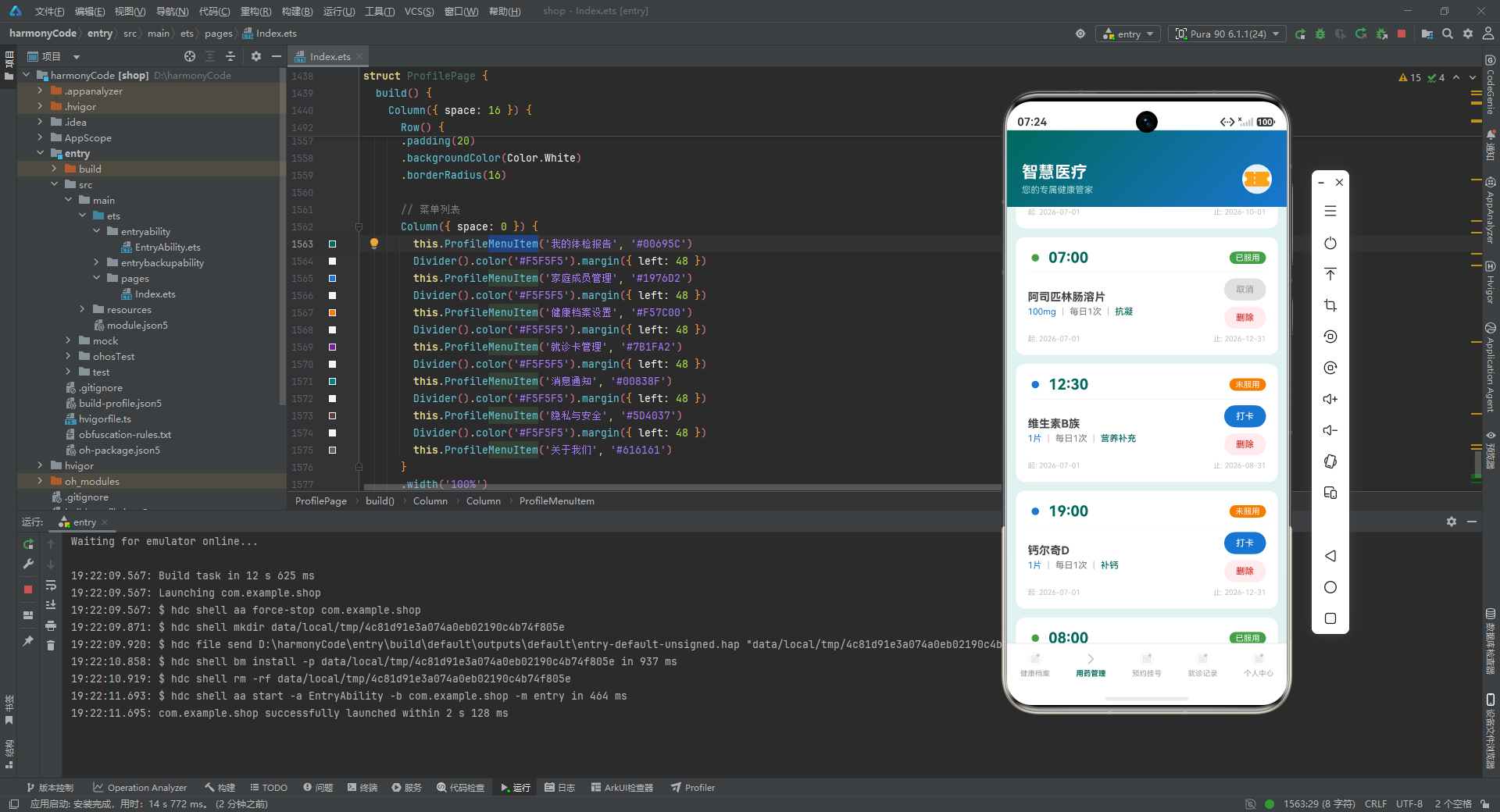
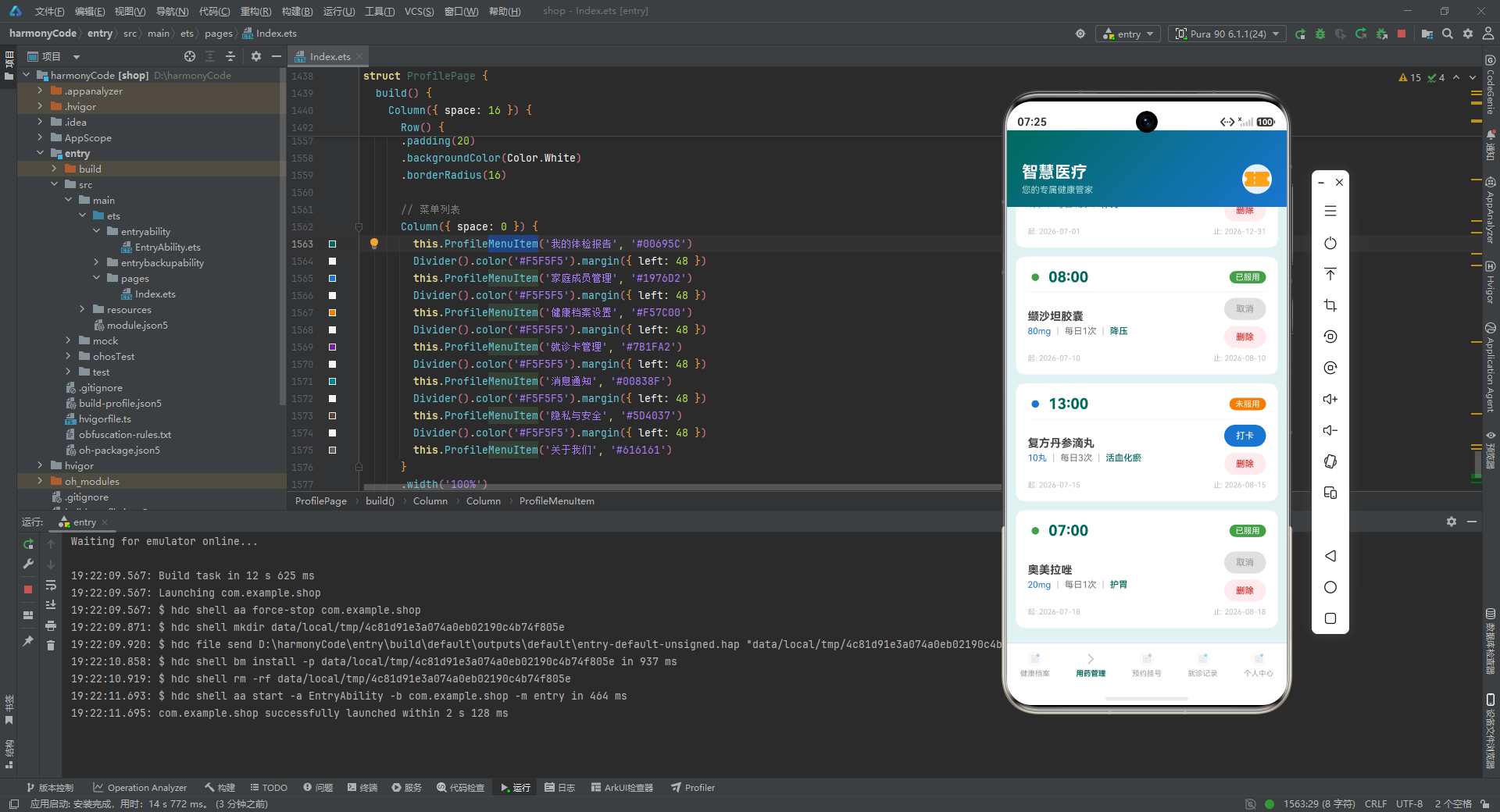
用药管理页面通过 @Prop 接收药品列表,提供三个回调函数:onAddClick 触发添加弹窗、onDeleteClick 触发删除弹窗(传递药品 ID)、onToggleTaken 切换服用状态。
Row() {
  Stack() {
    Circle({ width: 10, height: 10 })
      .fill(item.isTaken ? '#43A047' : '#1976D2')
  }
  Text(item.time)
    .fontSize(20)
    .fontWeight(FontWeight.Bold)
    .fontColor('#00695C')
    .margin({ left: 8 })
  Blank()
  Text(item.isTaken ? '已服用' : '未服用')
    .fontSize(11)
    .fontColor(Color.White)
    .backgroundColor(item.isTaken ? '#43A047' : '#F57C00')
    .borderRadius(10)
}
每条用药记录顶部显示服药时间(20 号粗体字)和服用状态标签。左侧小圆点根据服用状态切换颜色:已服用为绿色,未服用为蓝色。右侧状态标签同样根据状态切换颜色:已服用绿色、未服用橙色。
Row() {
  Text('起: ' + item.startDate)
    .fontSize(10)
    .fontColor('#BDBDBD')
  Blank({ width: 8 })
  Line()
    .width(20)
    .stroke(Color.Gray)
    .strokeWidth(1)
    .strokeDash({ values: [4, 4], count: 2 })
  Blank()
  Text('止: ' + item.endDate)
    .fontSize(10)
    .fontColor('#BDBDBD')
}
用药记录底部使用 Line 组件绘制虚线连接起止日期,strokeDash({ values: [4, 4] }) 创建 4vp 实线 + 4vp 间隔的虚线效果。这种设计暗示了用药的持续周期,在视觉上形成了微型时间线的效果。
1. bindSheet 半模态面板弹窗
本示例使用 bindSheet 实现弹窗交互,这是与前几个示例使用 Stack 遮罩层或 @CustomDialog 不同的第三种弹窗方案。bindSheet 从屏幕底部滑出半模态面板,支持拖拽条(dragBar: true)、标题配置和高度百分比控制。$$ 双向绑定语法将弹窗显隐状态与 @State 变量关联,当变量变为 true 时自动弹出面板,面板关闭时自动将变量设为 false。表单类弹窗高度设为 65%~70%,确认类弹窗高度设为 35%。
2. Circle + strokeDash 实现环形进度图
健康档案页面的健康评分环形图使用 Circle 组件的 strokeDash 属性实现。两个 Circle 叠加:底层灰色完整圆环作为轨道,顶层主色圆环通过 strokeDash({ values: [arcLength, circumference] }) 控制弧线长度。圆周长约为 π × 直径 = 3.14 × 130 ≈ 408,弧线长度为 healthScore / 100 * 408。这种纯组件实现的环形进度图,无需引入第三方图表库。
3. 纯布局实现时间线效果
就诊记录页面使用纯布局实现完整的时间线效果:左侧 20vp 宽的时间线列包含圆点和连接线,右侧是信息卡片。圆点使用双层 Circle 叠加(外层主色 + 内层白色)实现空心圆效果;连接线使用 2vp 宽的 Column,通过 layoutWeight(1) 自动填充卡片高度。最后一条记录不绘制连接线,避免时间线溢出。这种模式可复用于任何需要时间线展示的场景。
4. @Observed 类的直接属性修改
本示例的 toggleMedicineTaken 方法直接修改 @Observed 对象的属性(this.medicineList[i].isTaken = !this.medicineList[i].isTaken),由于 @Observed 装饰器会为类的每个属性创建代理,直接修改属性即可触发依赖该属性的 UI 刷新。这与不可变数据更新模式(创建新数组/新对象)形成对比,代码更简洁,但需要注意只在 @Observed 类上使用。
5. 自定义 TabBar 与 if 条件渲染
应用没有使用系统 Tabs 组件,而是通过 @Builder 自定义 TabBar + if 条件渲染实现页面切换。自定义 TabBar 的每个 Tab 项使用 layoutWeight(1) 等分宽度,通过对比 currentTab 和 index 切换选中态样式。if 条件渲染的优势在于每次只渲染当前页面的组件,避免非活跃页面的性能开销,但切换时会丢失页面状态。
6. Line 组件虚线与 Column 模拟分割线
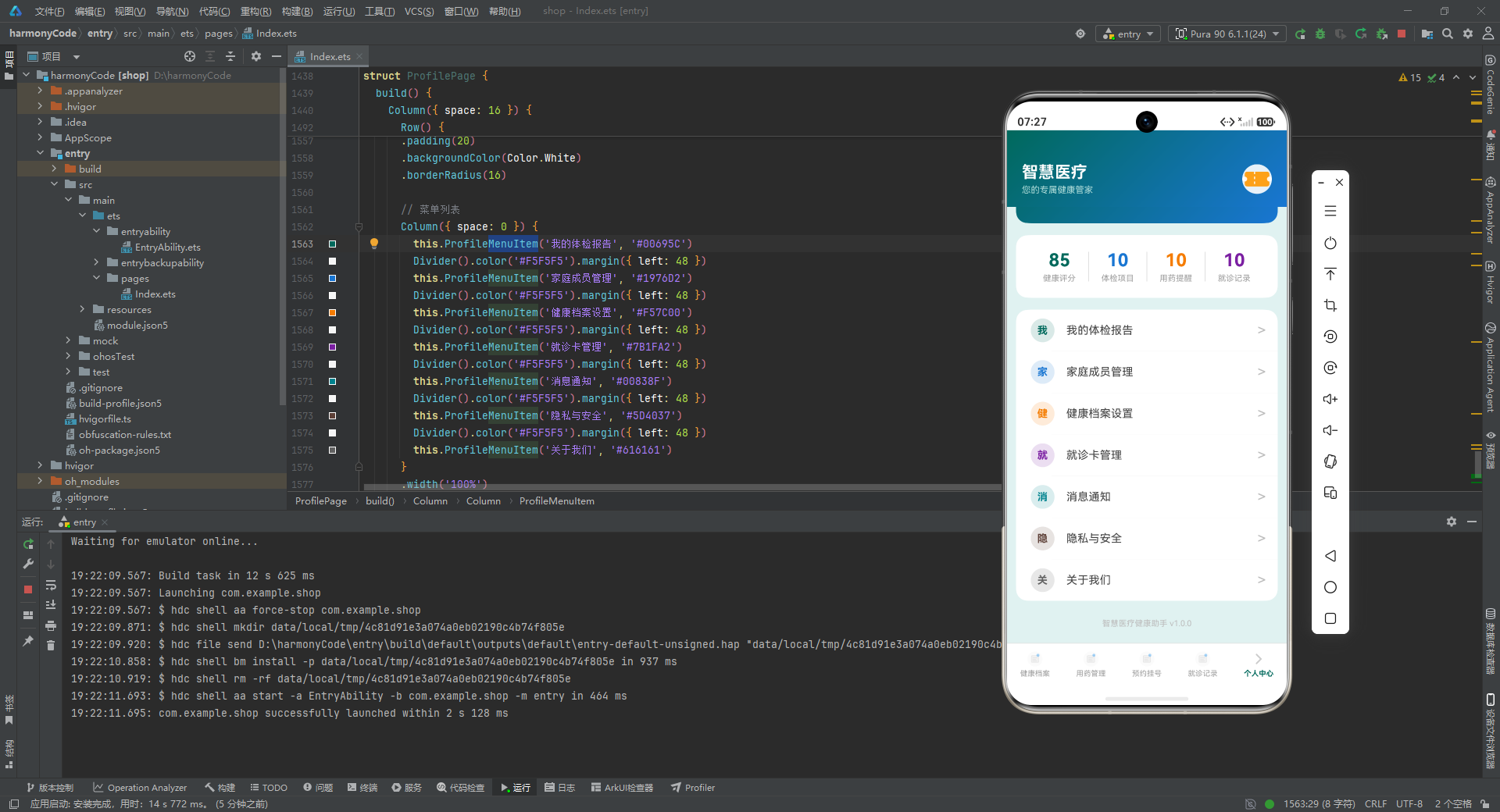
用药管理页面使用 Line 组件的 strokeDash 属性绘制虚线(values: [4, 4] 表示 4vp 实线 + 4vp 间隔),连接用药的起止日期。个人中心页面的统计卡片和健康统计之间使用 1vp 宽的 Column 模拟竖线分割效果(Column().width(1).height(40).backgroundColor('#E0E0E0')),比 Divider 组件更灵活,可以精确控制位置和长度。
安装DevEco Studio程序

选择目标安装目录:

设置环境变量,但是需要重启一下:

新建一个空白模板:

设置API为24的模板项目:

初始化项目,自动下载相关依赖:

完整代码:
// ==================== 智慧医疗健康助手 ====================
// ==================== 1. Interface 定义 ====================
interface HealthMetric {
id: number;
item: string;
value: string;
unit: string;
normalRange: string;
status: string;
date: string;
note: string;
}
interface MedicineReminder {
id: number;
medicineName: string;
dosage: string;
frequency: string;
time: string;
startDate: string;
endDate: string;
purpose: string;
isTaken: boolean;
note: string;
}
interface Appointment {
id: number;
department: string;
doctor: string;
hospital: string;
date: string;
time: string;
type: string;
status: string;
patientName: string;
symptom: string;
}
interface VisitRecord {
id: number;
date: string;
department: string;
doctor: string;
diagnosis: string;
prescription: string;
cost: number;
hospital: string;
followUp: string;
note: string;
}
interface BloodPressureTrend {
day: string;
systolic: number;
diastolic: number;
}
interface TabItem {
name: string;
icon: Resource;
activeIcon: Resource;
}
interface MenuItem {
id: number;
title: string;
icon: Resource;
color: string;
}
// ==================== 2. @Observed Class ====================
@Observed
class MedicineReminderModel {
id: number;
medicineName: string;
dosage: string;
frequency: string;
time: string;
startDate: string;
endDate: string;
purpose: string;
isTaken: boolean;
note: string;
constructor(id: number, medicineName: string, dosage: string, frequency: string,
time: string, startDate: string, endDate: string, purpose: string,
isTaken: boolean, note: string) {
this.id = id;
this.medicineName = medicineName;
this.dosage = dosage;
this.frequency = frequency;
this.time = time;
this.startDate = startDate;
this.endDate = endDate;
this.purpose = purpose;
this.isTaken = isTaken;
this.note = note;
}
}
@Observed
class AppointmentModel {
id: number;
department: string;
doctor: string;
hospital: string;
date: string;
time: string;
type: string;
status: string;
patientName: string;
symptom: string;
constructor(id: number, department: string, doctor: string, hospital: string,
date: string, time: string, type: string, status: string,
patientName: string, symptom: string) {
this.id = id;
this.department = department;
this.doctor = doctor;
this.hospital = hospital;
this.date = date;
this.time = time;
this.type = type;
this.status = status;
this.patientName = patientName;
this.symptom = symptom;
}
}
// ==================== 3. Record 配置 ====================
interface GradientConfig {
colors: ResourceColor[];
angle?: number | string;
direction?: GradientDirection;
}
interface CardStyle {
radius: number;
padding: number;
margin: number;
}
// ==================== 4. 全局函数 ====================
function getStatusColor(status: string): string {
if (status === '正常') {
return '#43A047';
} else if (status === '偏高') {
return '#F57C00';
} else if (status === '偏低') {
return '#1976D2';
} else if (status === '异常') {
return '#D32F2F';
} else {
return '#757575';
}
}
function getAppointmentStatusColor(status: string): string {
if (status === '待就诊') {
return '#1976D2';
} else if (status === '已完成') {
return '#43A047';
} else if (status === '已取消') {
return '#D32F2F';
} else {
return '#757575';
}
}
function getVisitTypeColor(type: string): string {
if (type === '初诊') {
return '#00695C';
} else if (type === '复诊') {
return '#1976D2';
} else if (type === '体检') {
return '#7B1FA2';
} else {
return '#757575';
}
}
// ==================== 5. Enum ====================
enum TabIndex {
HEALTH_ARCHIVE = 0,
MEDICINE = 1,
APPOINTMENT = 2,
VISIT_RECORD = 3,
PROFILE = 4
}
// ==================== 6. 静态数据 ====================
const HEALTH_METRICS: HealthMetric[] = [
{ id: 1, item: '血压', value: '128/82', unit: 'mmHg', normalRange: '90-140/60-90', status: '偏高', date: '2026-07-20', note: '建议低盐饮食,注意监测' },
{ id: 2, item: '血糖', value: '5.6', unit: 'mmol/L', normalRange: '3.9-6.1', status: '正常', date: '2026-07-20', note: '空腹血糖正常' },
{ id: 3, item: '心率', value: '72', unit: '次/分', normalRange: '60-100', status: '正常', date: '2026-07-19', note: '静息心率正常' },
{ id: 4, item: '体温', value: '36.8', unit: '℃', normalRange: '36.0-37.3', status: '正常', date: '2026-07-19', note: '体温正常' },
{ id: 5, item: '血常规', value: '正常', unit: '-', normalRange: '各项指标正常', status: '正常', date: '2026-07-15', note: '白细胞、红细胞均在正常范围' },
{ id: 6, item: '肝功能', value: 'ALT 38', unit: 'U/L', normalRange: '0-40', status: '正常', date: '2026-07-15', note: '谷丙转氨酶接近上限' },
{ id: 7, item: '肾功能', value: '肌酐 96', unit: 'μmol/L', normalRange: '53-115', status: '正常', date: '2026-07-15', note: '肾功能指标正常' },
{ id: 8, item: '血脂', value: 'TC 6.2', unit: 'mmol/L', normalRange: '<5.2', status: '偏高', date: '2026-07-15', note: '总胆固醇偏高,建议控制饮食' },
{ id: 9, item: '尿酸', value: '420', unit: 'μmol/L', normalRange: '149-416', status: '偏高', date: '2026-07-15', note: '尿酸略高,减少嘌呤摄入' },
{ id: 10, item: 'BMI', value: '24.3', unit: 'kg/m²', normalRange: '18.5-23.9', status: '偏高', date: '2026-07-10', note: '体重略超标,建议适当运动' }
];
const MEDICINE_REMINDERS: MedicineReminderModel[] = [
new MedicineReminderModel(1, '氨氯地平片', '5mg', '每日1次', '08:00', '2026-07-01', '2026-08-01', '降压', true, '早晨饭后服用'),
new MedicineReminderModel(2, '二甲双胍', '0.5g', '每日2次', '07:30', '2026-07-01', '2026-09-01', '降糖', true, '饭前30分钟服用'),
new MedicineReminderModel(3, '二甲双胍', '0.5g', '每日2次', '18:30', '2026-07-01', '2026-09-01', '降糖', false, '晚饭前30分钟服用'),
new MedicineReminderModel(4, '阿托伐他汀', '20mg', '每日1次', '21:00', '2026-07-01', '2026-10-01', '降脂', false, '睡前服用'),
new MedicineReminderModel(5, '阿司匹林肠溶片', '100mg', '每日1次', '07:00', '2026-07-01', '2026-12-31', '抗凝', true, '早饭前服用'),
new MedicineReminderModel(6, '维生素B族', '1片', '每日1次', '12:30', '2026-07-01', '2026-08-31', '营养补充', false, '午饭后服用'),
new MedicineReminderModel(7, '钙尔奇D', '1片', '每日1次', '19:00', '2026-07-01', '2026-12-31', '补钙', false, '晚饭后服用'),
new MedicineReminderModel(8, '缬沙坦胶囊', '80mg', '每日1次', '08:00', '2026-07-10', '2026-08-10', '降压', true, '早晨饭后服用'),
new MedicineReminderModel(9, '复方丹参滴丸', '10丸', '每日3次', '13:00', '2026-07-15', '2026-08-15', '活血化瘀', false, '午饭后舌下含服'),
new MedicineReminderModel(10, '奥美拉唑', '20mg', '每日1次', '07:00', '2026-07-18', '2026-08-18', '护胃', true, '早饭前30分钟')
];
const APPOINTMENTS: AppointmentModel[] = [
new AppointmentModel(1, '心血管内科', '张明远 主任医师', '市第一人民医院', '2026-07-25', '09:30', '复诊', '待就诊', '张伟', '血压控制复查'),
new AppointmentModel(2, '内分泌科', '李秀芬 副主任医师', '市第一人民医院', '2026-07-28', '14:00', '复诊', '待就诊', '张伟', '糖尿病随访'),
new AppointmentModel(3, '体检中心', '王建国 主治医师', '市中心医院', '2026-07-30', '08:00', '体检', '待就诊', '张伟', '年度体检'),
new AppointmentModel(4, '消化内科', '陈晓东 主任医师', '市第二人民医院', '2026-07-18', '10:00', '复诊', '已完成', '张伟', '胃部不适复查'),
new AppointmentModel(5, '骨科', '刘德海 副主任医师', '市中心医院', '2026-07-12', '15:30', '初诊', '已完成', '张伟', '膝关节疼痛'),
new AppointmentModel(6, '眼科', '赵雅琴 主任医师', '市眼科医院', '2026-07-05', '09:00', '初诊', '已完成', '张伟', '视力下降检查'),
new AppointmentModel(7, '呼吸内科', '孙伟明 主治医师', '市第一人民医院', '2026-06-28', '11:00', '初诊', '已取消', '张伟', '咳嗽检查'),
new AppointmentModel(8, '神经内科', '周慧敏 副主任医师', '市中心医院', '2026-08-03', '14:30', '复诊', '待就诊', '张伟', '头痛随访')
];
const VISIT_RECORDS: VisitRecord[] = [
{ id: 1, date: '2026-07-18', department: '消化内科', doctor: '陈晓东 主任医师', diagnosis: '慢性浅表性胃炎', prescription: '奥美拉唑20mg 每日1次;铝碳酸镁咀嚼片 每日3次', cost: 358.5, hospital: '市第二人民医院', followUp: '1个月后复查胃镜', note: '注意饮食规律,避免辛辣刺激食物' },
{ id: 2, date: '2026-07-12', department: '骨科', doctor: '刘德海 副主任医师', diagnosis: '膝关节退行性病变', prescription: '氨基葡萄糖胶囊 每日2次;双氯芬酸钠凝胶 外用', cost: 425.0, hospital: '市中心医院', followUp: '3个月后复查', note: '建议减少爬楼梯,适当进行游泳锻炼' },
{ id: 3, date: '2026-07-05', department: '眼科', doctor: '赵雅琴 主任医师', diagnosis: '轻度近视伴散光', prescription: '配镜矫正;玻璃酸钠滴眼液 每日3次', cost: 680.0, hospital: '市眼科医院', followUp: '半年后复查视力', note: '注意用眼卫生,每40分钟休息5分钟' },
{ id: 4, date: '2026-06-20', department: '心血管内科', doctor: '张明远 主任医师', diagnosis: '原发性高血压2级', prescription: '氨氯地平片5mg 每日1次;缬沙坦胶囊80mg 每日1次', cost: 532.0, hospital: '市第一人民医院', followUp: '2周后复查血压', note: '低盐低脂饮食,每日监测血压' },
{ id: 5, date: '2026-06-10', department: '内分泌科', doctor: '李秀芬 副主任医师', diagnosis: '2型糖尿病', prescription: '二甲双胍0.5g 每日2次;监测血糖每日4次', cost: 298.5, hospital: '市第一人民医院', followUp: '1个月后复查糖化血红蛋白', note: '控制饮食总量,适当运动' },
{ id: 6, date: '2026-05-22', department: '皮肤科', doctor: '吴丽华 主治医师', diagnosis: '湿疹', prescription: '炉甘石洗剂 外用;氯雷他定片 每日1次', cost: 156.0, hospital: '市中心医院', followUp: '2周后复诊', note: '避免接触过敏原,保持皮肤清洁' },
{ id: 7, date: '2026-05-08', department: '呼吸内科', doctor: '孙伟明 主治医师', diagnosis: '急性上呼吸道感染', prescription: '复方甘草片 每日3次;阿莫西林胶囊 每日3次', cost: 89.5, hospital: '市第一人民医院', followUp: '症状消失即可', note: '多饮水,注意休息' },
{ id: 8, date: '2026-04-15', department: '泌尿外科', doctor: '黄志强 主任医师', diagnosis: '泌尿系结石', prescription: '排石颗粒 每日3次;坦索罗辛缓释胶囊 每日1次', cost: 512.0, hospital: '市第二人民医院', followUp: '1个月后B超复查', note: '每日饮水2000ml以上,适当跳跃运动' },
{ id: 9, date: '2026-03-20', department: '神经内科', doctor: '周慧敏 副主任医师', diagnosis: '紧张性头痛', prescription: '布洛芬缓释胶囊 按需服用;谷维素片 每日3次', cost: 178.0, hospital: '市中心医院', followUp: '1个月后复诊', note: '保持规律作息,减少精神压力' },
{ id: 10, date: '2026-02-28', department: '口腔科', doctor: '林浩然 主治医师', diagnosis: '慢性牙周炎', prescription: '甲硝唑片 每日3次;复方氯己定含漱液 每日2次', cost: 265.0, hospital: '市口腔医院', followUp: '3个月后洁牙复查', note: '早晚正确刷牙,使用牙线清洁' }
];
const BP_TREND: BloodPressureTrend[] = [
{ day: '周一', systolic: 125, diastolic: 80 },
{ day: '周二', systolic: 130, diastolic: 85 },
{ day: '周三', systolic: 128, diastolic: 82 },
{ day: '周四', systolic: 135, diastolic: 88 },
{ day: '周五', systolic: 127, diastolic: 81 },
{ day: '周六', systolic: 122, diastolic: 78 },
{ day: '周日', systolic: 128, diastolic: 82 }
];
// ==================== 7. @Entry 主组件 ====================
@Entry
@Component
struct MedicalHealthApp {
@State currentTab: number = 0;
@State medicineList: MedicineReminderModel[] = MEDICINE_REMINDERS;
@State appointmentList: AppointmentModel[] = APPOINTMENTS;
@State showAddMedicineDialog: boolean = false;
@State showDeleteMedicineDialog: boolean = false;
@State showEditAppointmentDialog: boolean = false;
@State showDeleteAppointmentDialog: boolean = false;
@State selectedMedicineId: number = -1;
@State selectedAppointmentId: number = -1;
@State newMedicineName: string = '';
@State newMedicineDosage: string = '';
@State newMedicineFrequency: string = '';
@State newMedicineTime: string = '';
@State newMedicinePurpose: string = '';
@State editDepartment: string = '';
@State editDoctor: string = '';
@State editDate: string = '';
@State editTime: string = '';
@State editSymptom: string = '';
@State healthScore: number = 85;
build() {
Column() {
Column() {
this.MedicalHeader()
}
.width('100%')
Scroll() {
Column() {
if (this.currentTab === TabIndex.HEALTH_ARCHIVE) {
HealthArchivePage({ healthScore: this.healthScore })
}
if (this.currentTab === TabIndex.MEDICINE) {
MedicinePage({
medicineList: this.medicineList,
onAddClick: () => {
this.showAddMedicineDialog = true;
},
onDeleteClick: (id: number) => {
this.selectedMedicineId = id;
this.showDeleteMedicineDialog = true;
},
onToggleTaken: (id: number) => {
this.toggleMedicineTaken(id);
}
})
}
if (this.currentTab === TabIndex.APPOINTMENT) {
AppointmentPage({
appointmentList: this.appointmentList,
onEditClick: (id: number) => {
this.selectedAppointmentId = id;
this.loadAppointmentData(id);
this.showEditAppointmentDialog = true;
},
onDeleteClick: (id: number) => {
this.selectedAppointmentId = id;
this.showDeleteAppointmentDialog = true;
}
})
}
if (this.currentTab === TabIndex.VISIT_RECORD) {
VisitRecordPage()
}
if (this.currentTab === TabIndex.PROFILE) {
ProfilePage()
}
}
.width('100%')
.padding({ left: 12, right: 12, bottom: 20 })
}
.layoutWeight(1)
.scrollBar(BarState.Off)
.width('100%')
this.BottomTabBar()
}
.width('100%')
.height('100%')
.backgroundColor('#E0F2F1')
// 新增用药弹框
.bindSheet($$this.showAddMedicineDialog, this.AddMedicineDialog(), {
height: '65%',
dragBar: true,
title: { title: '添加用药提醒' }
})
// 删除用药弹框
.bindSheet($$this.showDeleteMedicineDialog, this.DeleteMedicineDialog(), {
height: '35%',
dragBar: true,
title: { title: '确认删除' }
})
// 编辑预约弹框
.bindSheet($$this.showEditAppointmentDialog, this.EditAppointmentDialog(), {
height: '70%',
dragBar: true,
title: { title: '修改预约信息' }
})
// 删除预约弹框
.bindSheet($$this.showDeleteAppointmentDialog, this.DeleteAppointmentDialog(), {
height: '35%',
dragBar: true,
title: { title: '取消预约' }
})
}
@Builder
MedicalHeader() {
Row() {
Row() {
Column() {
Text('智慧医疗')
.fontSize(22)
.fontColor('#FFFFFF')
.fontWeight(FontWeight.Bold)
Text('您的专属健康管家')
.fontSize(12)
.fontColor('#B2DFDB')
.margin({ top: 4 })
}
.alignItems(HorizontalAlign.Start)
Blank()
Row() {
Image($r('app.media.app_icon'))
.width(40)
.height(40)
.borderRadius(20)
.backgroundColor(Color.White)
.opacity(0.9)
}
}
.width('100%')
.padding({ left: 20, right: 20, top: 44, bottom: 16 })
}
.linearGradient({
angle: 135,
colors: [['#00695C', 0.0], ['#1976D2', 1.0]]
})
.width('100%')
}
toggleMedicineTaken(id: number) {
for (let i = 0; i < this.medicineList.length; i++) {
if (this.medicineList[i].id === id) {
this.medicineList[i].isTaken = !this.medicineList[i].isTaken;
}
}
}
loadAppointmentData(id: number) {
for (let i = 0; i < this.appointmentList.length; i++) {
if (this.appointmentList[i].id === id) {
this.editDepartment = this.appointmentList[i].department;
this.editDoctor = this.appointmentList[i].doctor;
this.editDate = this.appointmentList[i].date;
this.editTime = this.appointmentList[i].time;
this.editSymptom = this.appointmentList[i].symptom;
}
}
}
confirmAddMedicine() {
const newId = this.medicineList.length + 1;
const newMedicine = new MedicineReminderModel(
newId,
this.newMedicineName,
this.newMedicineDosage,
this.newMedicineFrequency,
this.newMedicineTime,
'2026-07-22',
'2026-12-31',
this.newMedicinePurpose,
false,
''
);
this.medicineList.push(newMedicine);
this.newMedicineName = '';
this.newMedicineDosage = '';
this.newMedicineFrequency = '';
this.newMedicineTime = '';
this.newMedicinePurpose = '';
this.showAddMedicineDialog = false;
}
confirmDeleteMedicine() {
this.medicineList = this.medicineList.filter((item: MedicineReminderModel) => item.id !== this.selectedMedicineId);
this.showDeleteMedicineDialog = false;
}
confirmEditAppointment() {
for (let i = 0; i < this.appointmentList.length; i++) {
if (this.appointmentList[i].id === this.selectedAppointmentId) {
this.appointmentList[i].department = this.editDepartment;
this.appointmentList[i].doctor = this.editDoctor;
this.appointmentList[i].date = this.editDate;
this.appointmentList[i].time = this.editTime;
this.appointmentList[i].symptom = this.editSymptom;
}
}
this.showEditAppointmentDialog = false;
}
confirmDeleteAppointment() {
this.appointmentList = this.appointmentList.filter((item: AppointmentModel) => item.id !== this.selectedAppointmentId);
this.showDeleteAppointmentDialog = false;
}
@Builder
AddMedicineDialog() {
Column() {
Column({ space: 16 }) {
TextInput({ text: this.newMedicineName, placeholder: '请输入药品名称' })
.width('100%')
.height(48)
.fontSize(14)
.backgroundColor('#F5F5F5')
.borderRadius(8)
.onChange((value: string) => {
this.newMedicineName = value;
})
TextInput({ text: this.newMedicineDosage, placeholder: '请输入剂量(如:5mg)' })
.width('100%')
.height(48)
.fontSize(14)
.backgroundColor('#F5F5F5')
.borderRadius(8)
.onChange((value: string) => {
this.newMedicineDosage = value;
})
TextInput({ text: this.newMedicineFrequency, placeholder: '请输入频率(如:每日1次)' })
.width('100%')
.height(48)
.fontSize(14)
.backgroundColor('#F5F5F5')
.borderRadius(8)
.onChange((value: string) => {
this.newMedicineFrequency = value;
})
TextInput({ text: this.newMedicineTime, placeholder: '请输入服药时间(如:08:00)' })
.width('100%')
.height(48)
.fontSize(14)
.backgroundColor('#F5F5F5')
.borderRadius(8)
.onChange((value: string) => {
this.newMedicineTime = value;
})
TextInput({ text: this.newMedicinePurpose, placeholder: '请输入用途(如:降压)' })
.width('100%')
.height(48)
.fontSize(14)
.backgroundColor('#F5F5F5')
.borderRadius(8)
.onChange((value: string) => {
this.newMedicinePurpose = value;
})
Row({ space: 12 }) {
Button('取消')
.layoutWeight(1)
.height(44)
.fontSize(16)
.fontColor('#00695C')
.backgroundColor('#E0F2F1')
.borderRadius(22)
.onClick(() => {
this.showAddMedicineDialog = false;
})
Button('确认添加')
.layoutWeight(1)
.height(44)
.fontSize(16)
.fontColor('#FFFFFF')
.backgroundColor('#00695C')
.borderRadius(22)
.onClick(() => {
this.confirmAddMedicine();
})
}
.width('100%')
.margin({ top: 8 })
}
.width('100%')
.padding(20)
}
.width('100%')
}
@Builder
DeleteMedicineDialog() {
Column() {
Column({ space: 20 }) {
Text('确定要删除这条用药提醒吗?')
.fontSize(16)
.fontColor('#424242')
.textAlign(TextAlign.Center)
.width('100%')
Text('删除后将无法恢复,请谨慎操作')
.fontSize(13)
.fontColor('#9E9E9E')
.textAlign(TextAlign.Center)
.width('100%')
Row({ space: 12 }) {
Button('取消')
.layoutWeight(1)
.height(44)
.fontSize(16)
.fontColor('#00695C')
.backgroundColor('#E0F2F1')
.borderRadius(22)
.onClick(() => {
this.showDeleteMedicineDialog = false;
})
Button('确认删除')
.layoutWeight(1)
.height(44)
.fontSize(16)
.fontColor('#FFFFFF')
.backgroundColor('#D32F2F')
.borderRadius(22)
.onClick(() => {
this.confirmDeleteMedicine();
})
}
.width('100%')
}
.width('100%')
.padding(20)
}
.width('100%')
}
@Builder
EditAppointmentDialog() {
Column() {
Column({ space: 16 }) {
TextInput({ text: this.editDepartment, placeholder: '科室' })
.width('100%')
.height(48)
.fontSize(14)
.backgroundColor('#F5F5F5')
.borderRadius(8)
.onChange((value: string) => {
this.editDepartment = value;
})
TextInput({ text: this.editDoctor, placeholder: '医生' })
.width('100%')
.height(48)
.fontSize(14)
.backgroundColor('#F5F5F5')
.borderRadius(8)
.onChange((value: string) => {
this.editDoctor = value;
})
TextInput({ text: this.editDate, placeholder: '日期(如:2026-07-25)' })
.width('100%')
.height(48)
.fontSize(14)
.backgroundColor('#F5F5F5')
.borderRadius(8)
.onChange((value: string) => {
this.editDate = value;
})
TextInput({ text: this.editTime, placeholder: '时间(如:09:30)' })
.width('100%')
.height(48)
.fontSize(14)
.backgroundColor('#F5F5F5')
.borderRadius(8)
.onChange((value: string) => {
this.editTime = value;
})
TextInput({ text: this.editSymptom, placeholder: '症状描述' })
.width('100%')
.height(48)
.fontSize(14)
.backgroundColor('#F5F5F5')
.borderRadius(8)
.onChange((value: string) => {
this.editSymptom = value;
})
Row({ space: 12 }) {
Button('取消')
.layoutWeight(1)
.height(44)
.fontSize(16)
.fontColor('#00695C')
.backgroundColor('#E0F2F1')
.borderRadius(22)
.onClick(() => {
this.showEditAppointmentDialog = false;
})
Button('保存修改')
.layoutWeight(1)
.height(44)
.fontSize(16)
.fontColor('#FFFFFF')
.backgroundColor('#00695C')
.borderRadius(22)
.onClick(() => {
this.confirmEditAppointment();
})
}
.width('100%')
.margin({ top: 8 })
}
.width('100%')
.padding(20)
}
.width('100%')
}
@Builder
DeleteAppointmentDialog() {
Column() {
Column({ space: 20 }) {
Text('确定要取消该预约吗?')
.fontSize(16)
.fontColor('#424242')
.textAlign(TextAlign.Center)
.width('100%')
Text('取消后需重新预约,请确认操作')
.fontSize(13)
.fontColor('#9E9E9E')
.textAlign(TextAlign.Center)
.width('100%')
Row({ space: 12 }) {
Button('保留预约')
.layoutWeight(1)
.height(44)
.fontSize(16)
.fontColor('#00695C')
.backgroundColor('#E0F2F1')
.borderRadius(22)
.onClick(() => {
this.showDeleteAppointmentDialog = false;
})
Button('确认取消')
.layoutWeight(1)
.height(44)
.fontSize(16)
.fontColor('#FFFFFF')
.backgroundColor('#D32F2F')
.borderRadius(22)
.onClick(() => {
this.confirmDeleteAppointment();
})
}
.width('100%')
}
.width('100%')
.padding(20)
}
.width('100%')
}
@Builder
BottomTabBar() {
Row() {
this.TabItem('健康档案', 0)
this.TabItem('用药管理', 1)
this.TabItem('预约挂号', 2)
this.TabItem('就诊记录', 3)
this.TabItem('个人中心', 4)
}
.width('100%')
.height(56)
.backgroundColor(Color.White)
.border({ width: { top: 1 }, color: '#E0E0E0' })
}
@Builder
TabItem(name: string, index: number) {
Column() {
Image(this.currentTab === index ? $r('app.media.app_icon') : $r('app.media.app_icon'))
.width(24)
.height(24)
.opacity(this.currentTab === index ? 1 : 0.4)
Text(name)
.fontSize(10)
.fontColor(this.currentTab === index ? '#00695C' : '#9E9E9E')
.margin({ top: 2 })
.fontWeight(this.currentTab === index ? FontWeight.Bold : FontWeight.Normal)
}
.layoutWeight(1)
.height('100%')
.justifyContent(FlexAlign.Center)
.onClick(() => {
this.currentTab = index;
})
}
}
// ==================== 8. 子 Component ====================
// --- 健康档案页面 ---
@Component
struct HealthArchivePage {
@Prop healthScore: number;
build() {
Column({ space: 16 }) {
// 健康评分环形图
Row() {
Column({ space: 4 }) {
Stack() {
// 背景圆环
Circle({ width: 130, height: 130 })
.fill(Color.Transparent)
.stroke('#E0E0E0')
.strokeWidth(10)
// 进度圆环
Circle({ width: 130, height: 130 })
.fill(Color.Transparent)
.stroke('#00695C')
.strokeWidth(10)
.strokeDash({ values: [this.healthScore / 100 * 408, 408], count: 2 })
// 中间文字
Column() {
Text(this.healthScore.toString())
.fontSize(36)
.fontColor('#00695C')
.fontWeight(FontWeight.Bold)
Text('健康评分')
.fontSize(12)
.fontColor('#757575')
}
}
.width(150)
.height(150)
.alignContent(Alignment.Center)
}
.layoutWeight(1)
.alignItems(HorizontalAlign.Center)
Column({ space: 8 }) {
Text('健康概况')
.fontSize(16)
.fontWeight(FontWeight.Bold)
.fontColor('#424242')
Row() {
Text('体检项目')
.fontSize(12)
.fontColor('#9E9E9E')
Blank()
Text('10项')
.fontSize(12)
.fontColor('#00695C')
.fontWeight(FontWeight.Bold)
}
.width('100%')
Row() {
Text('正常指标')
.fontSize(12)
.fontColor('#9E9E9E')
Blank()
Text('6项')
.fontSize(12)
.fontColor('#43A047')
.fontWeight(FontWeight.Bold)
}
.width('100%')
Row() {
Text('异常指标')
.fontSize(12)
.fontColor('#9E9E9E')
Blank()
Text('4项')
.fontSize(12)
.fontColor('#F57C00')
.fontWeight(FontWeight.Bold)
}
.width('100%')
}
.layoutWeight(1)
}
.width('100%')
.padding(20)
.backgroundColor(Color.White)
.borderRadius(16)
// 血压趋势柱状图
Column({ space: 12 }) {
Row() {
Text('血压趋势')
.fontSize(16)
.fontWeight(FontWeight.Bold)
.fontColor('#424242')
Blank()
Text('近7天')
.fontSize(12)
.fontColor('#9E9E9E')
}
.width('100%')
// 柱状图
Row({ space: 0 }) {
ForEach(BP_TREND, (item: BloodPressureTrend) => {
Column({ space: 4 }) {
Stack({ alignContent: Alignment.Bottom }) {
// 收缩压柱
Column()
.width(10)
.height(item.systolic * 1.5)
.backgroundColor('#00695C')
.borderRadius({ topLeft: 2, topRight: 2 })
.shadow({ radius: 2, color: '#00695C', offsetX: 0, offsetY: 1 })
// 舒张压柱
Column()
.width(10)
.height(item.diastolic * 1.5)
.backgroundColor('#1976D2')
.borderRadius({ topLeft: 2, topRight: 2 })
.shadow({ radius: 2, color: '#1976D2', offsetX: 0, offsetY: 1 })
.margin({ left: 2 })
}
.height(150)
Text(item.day)
.fontSize(10)
.fontColor('#9E9E9E')
}
.layoutWeight(1)
.alignItems(HorizontalAlign.Center)
})
}
.width('100%')
.height(180)
.justifyContent(FlexAlign.SpaceEvenly)
// 图例
Row({ space: 16 }) {
Row({ space: 4 }) {
Circle({ width: 8, height: 8 }).fill('#00695C')
Text('收缩压')
.fontSize(11)
.fontColor('#757575')
}
Row({ space: 4 }) {
Circle({ width: 8, height: 8 }).fill('#1976D2')
Text('舒张压')
.fontSize(11)
.fontColor('#757575')
}
}
.width('100%')
.justifyContent(FlexAlign.Center)
}
.width('100%')
.padding(20)
.backgroundColor(Color.White)
.borderRadius(16)
// 体检指标列表
Row() {
Text('体检指标')
.fontSize(16)
.fontWeight(FontWeight.Bold)
.fontColor('#424242')
Blank()
Text('共10项')
.fontSize(12)
.fontColor('#9E9E9E')
}
.width('100%')
.padding({ left: 4 })
ForEach(HEALTH_METRICS, (item: HealthMetric) => {
Row() {
// 左侧状态色条
Column()
.width(4)
.height(50)
.backgroundColor(getStatusColor(item.status))
.borderRadius(2)
Column({ space: 4 }) {
Row() {
Text(item.item)
.fontSize(15)
.fontWeight(FontWeight.Bold)
.fontColor('#424242')
Blank()
Text(item.status)
.fontSize(12)
.fontColor(Color.White)
.backgroundColor(getStatusColor(item.status))
.padding({ left: 8, right: 8, top: 2, bottom: 2 })
.borderRadius(10)
}
.width('100%')
Row() {
Text(item.value + ' ' + item.unit)
.fontSize(14)
.fontColor('#1976D2')
.fontWeight(FontWeight.Medium)
Blank()
Text('正常范围: ' + item.normalRange)
.fontSize(11)
.fontColor('#9E9E9E')
}
.width('100%')
Row() {
Text(item.date)
.fontSize(11)
.fontColor('#BDBDBD')
Blank()
Text(item.note)
.fontSize(11)
.fontColor('#9E9E9E')
.maxLines(1)
.textOverflow({ overflow: TextOverflow.Ellipsis })
.layoutWeight(1)
.textAlign(TextAlign.Right)
.margin({ left: 8 })
}
.width('100%')
}
.layoutWeight(1)
.margin({ left: 12 })
}
.width('100%')
.padding(16)
.backgroundColor(Color.White)
.borderRadius(12)
.alignItems(VerticalAlign.Center)
})
}
.width('100%')
}
}
// --- 用药管理页面 ---
@Component
struct MedicinePage {
@Prop medicineList: MedicineReminderModel[];
onAddClick: () => void = () => {};
onDeleteClick: (id: number) => void = () => {};
onToggleTaken: (id: number) => void = () => {};
build() {
Column({ space: 12 }) {
Row() {
Text('用药提醒')
.fontSize(18)
.fontWeight(FontWeight.Bold)
.fontColor('#424242')
Blank()
Button('+ 添加')
.height(32)
.fontSize(13)
.fontColor('#FFFFFF')
.backgroundColor('#00695C')
.borderRadius(16)
.onClick(() => {
this.onAddClick();
})
}
.width('100%')
.padding({ left: 4, top: 4 })
ForEach(this.medicineList, (item: MedicineReminderModel) => {
Column() {
// 时间标签
Row() {
Stack() {
Circle({ width: 10, height: 10 })
.fill(item.isTaken ? '#43A047' : '#1976D2')
}
.width(20)
.height(20)
.alignContent(Alignment.Center)
Text(item.time)
.fontSize(20)
.fontWeight(FontWeight.Bold)
.fontColor('#00695C')
.margin({ left: 8 })
Blank()
Text(item.isTaken ? '已服用' : '未服用')
.fontSize(11)
.fontColor(Color.White)
.backgroundColor(item.isTaken ? '#43A047' : '#F57C00')
.padding({ left: 8, right: 8, top: 2, bottom: 2 })
.borderRadius(10)
}
.width('100%')
Divider()
.color('#E0F2F1')
.margin({ top: 8, bottom: 8 })
Row() {
Column({ space: 4 }) {
Text(item.medicineName)
.fontSize(15)
.fontWeight(FontWeight.Bold)
.fontColor('#424242')
Row({ space: 8 }) {
Text(item.dosage)
.fontSize(12)
.fontColor('#1976D2')
Text('|')
.fontSize(12)
.fontColor('#BDBDBD')
Text(item.frequency)
.fontSize(12)
.fontColor('#757575')
Text('|')
.fontSize(12)
.fontColor('#BDBDBD')
Text(item.purpose)
.fontSize(12)
.fontColor('#00695C')
.fontWeight(FontWeight.Medium)
}
}
.alignItems(HorizontalAlign.Start)
.layoutWeight(1)
Column({ space: 8 }) {
Button(item.isTaken ? '取消' : '打卡')
.height(30)
.fontSize(12)
.fontColor(item.isTaken ? '#9E9E9E' : '#FFFFFF')
.backgroundColor(item.isTaken ? '#E0E0E0' : '#1976D2')
.borderRadius(15)
.onClick(() => {
this.onToggleTaken(item.id);
})
Button('删除')
.height(30)
.fontSize(12)
.fontColor('#D32F2F')
.backgroundColor('#FFEBEE')
.borderRadius(15)
.onClick(() => {
this.onDeleteClick(item.id);
})
}
.alignItems(HorizontalAlign.End)
}
.width('100%')
// 时间线连接
Row() {
Text('起: ' + item.startDate)
.fontSize(10)
.fontColor('#BDBDBD')
Blank({ width: 8 })
Line()
.width(20)
.stroke(Color.Gray)
.strokeWidth(1)
.strokeDash({ values: [4, 4], count: 2 })
Blank()
Text('止: ' + item.endDate)
.fontSize(10)
.fontColor('#BDBDBD')
}
.width('100%')
.margin({ top: 8 })
}
.width('100%')
.padding(16)
.backgroundColor(Color.White)
.borderRadius(12)
})
}
.width('100%')
}
}
// --- 预约挂号页面 ---
@Component
struct AppointmentPage {
@Prop appointmentList: AppointmentModel[];
onEditClick: (id: number) => void = () => {};
onDeleteClick: (id: number) => void = () => {};
build() {
Column({ space: 12 }) {
Row() {
Text('预约挂号')
.fontSize(18)
.fontWeight(FontWeight.Bold)
.fontColor('#424242')
Blank()
Text('共' + this.appointmentList.length.toString() + '条')
.fontSize(12)
.fontColor('#9E9E9E')
}
.width('100%')
.padding({ left: 4, top: 4 })
ForEach(this.appointmentList, (item: AppointmentModel) => {
Column() {
Row() {
// 左侧时间线圆点
Stack() {
Circle({ width: 12, height: 12 })
.fill(getAppointmentStatusColor(item.status))
Circle({ width: 6, height: 6 })
.fill(Color.White)
}
.width(20)
.height(20)
.alignContent(Alignment.Center)
Column({ space: 6 }) {
Row() {
Text(item.department)
.fontSize(16)
.fontWeight(FontWeight.Bold)
.fontColor('#424242')
Blank()
Text(item.type)
.fontSize(11)
.fontColor(Color.White)
.backgroundColor(getVisitTypeColor(item.type))
.padding({ left: 8, right: 8, top: 2, bottom: 2 })
.borderRadius(10)
}
.width('100%')
Row() {
Text(item.doctor)
.fontSize(13)
.fontColor('#1976D2')
}
.width('100%')
Row() {
Text(item.hospital)
.fontSize(12)
.fontColor('#757575')
}
.width('100%')
Row() {
Text(item.date + ' ' + item.time)
.fontSize(13)
.fontColor('#00695C')
.fontWeight(FontWeight.Medium)
Blank()
Text(item.status)
.fontSize(12)
.fontColor(getAppointmentStatusColor(item.status))
.fontWeight(FontWeight.Bold)
}
.width('100%')
Row() {
Text('患者: ' + item.patientName)
.fontSize(12)
.fontColor('#9E9E9E')
Blank()
Text(item.symptom)
.fontSize(12)
.fontColor('#9E9E9E')
.maxLines(1)
.textOverflow({ overflow: TextOverflow.Ellipsis })
.layoutWeight(1)
.textAlign(TextAlign.Right)
.margin({ left: 8 })
}
.width('100%')
if (item.status === '待就诊') {
Divider()
.color('#E0F2F1')
.margin({ top: 4, bottom: 4 })
Row({ space: 12 }) {
Blank()
Button('编辑')
.height(30)
.fontSize(12)
.fontColor('#00695C')
.backgroundColor('#E0F2F1')
.borderRadius(15)
.onClick(() => {
this.onEditClick(item.id);
})
Button('取消预约')
.height(30)
.fontSize(12)
.fontColor('#D32F2F')
.backgroundColor('#FFEBEE')
.borderRadius(15)
.onClick(() => {
this.onDeleteClick(item.id);
})
}
.width('100%')
}
}
.layoutWeight(1)
.margin({ left: 12 })
}
.width('100%')
.alignItems(VerticalAlign.Top)
}
.width('100%')
.padding(16)
.backgroundColor(Color.White)
.borderRadius(12)
})
}
.width('100%')
}
}
// --- 就诊记录页面(时间线布局) ---
@Component
struct VisitRecordPage {
build() {
Column({ space: 0 }) {
Row() {
Text('就诊记录')
.fontSize(18)
.fontWeight(FontWeight.Bold)
.fontColor('#424242')
Blank()
Text('共10条')
.fontSize(12)
.fontColor('#9E9E9E')
}
.width('100%')
.padding({ left: 4, top: 4, bottom: 8 })
// 时间线容器
Column() {
ForEach(VISIT_RECORDS, (item: VisitRecord, index: number) => {
Row() {
// 左侧时间线
Column() {
// 时间线圆点
Stack() {
Circle({ width: 16, height: 16 })
.fill('#00695C')
Circle({ width: 8, height: 8 })
.fill('#FFFFFF')
}
.width(20)
.height(20)
// 连接线(最后一条不画)
if (index < VISIT_RECORDS.length - 1) {
Column()
.width(2)
.layoutWeight(1)
.backgroundColor('#B2DFDB')
}
}
.width(20)
.height('100%')
// 右侧卡片
Column({ space: 8 }) {
// 日期
Row() {
Text(item.date)
.fontSize(14)
.fontWeight(FontWeight.Bold)
.fontColor('#00695C')
Blank()
Text(item.department)
.fontSize(12)
.fontColor(Color.White)
.backgroundColor('#1976D2')
.padding({ left: 8, right: 8, top: 2, bottom: 2 })
.borderRadius(10)
}
.width('100%')
// 医生信息
Row() {
Text(item.doctor)
.fontSize(13)
.fontColor('#424242')
Blank()
Text(item.hospital)
.fontSize(12)
.fontColor('#9E9E9E')
}
.width('100%')
// 诊断
Row() {
Text('诊断: ')
.fontSize(13)
.fontColor('#9E9E9E')
Text(item.diagnosis)
.fontSize(13)
.fontColor('#D32F2F')
.fontWeight(FontWeight.Medium)
.layoutWeight(1)
}
.width('100%')
// 处方
Column({ space: 4 }) {
Text('处方:')
.fontSize(13)
.fontColor('#9E9E9E')
Text(item.prescription)
.fontSize(12)
.fontColor('#424242')
.width('100%')
.padding(8)
.backgroundColor('#F5F5F5')
.borderRadius(8)
}
.width('100%')
// 费用 + 随访
Row() {
Column({ space: 2 }) {
Text('费用: ¥' + item.cost.toFixed(1))
.fontSize(12)
.fontColor('#F57C00')
.fontWeight(FontWeight.Bold)
Text('随访: ' + item.followUp)
.fontSize(11)
.fontColor('#757575')
}
.alignItems(HorizontalAlign.Start)
.layoutWeight(1)
Column({ space: 2 }) {
Text('备注')
.fontSize(11)
.fontColor('#BDBDBD')
Text(item.note)
.fontSize(11)
.fontColor('#9E9E9E')
.maxLines(2)
.textOverflow({ overflow: TextOverflow.Ellipsis })
}
.alignItems(HorizontalAlign.End)
.layoutWeight(1)
}
.width('100%')
}
.layoutWeight(1)
.margin({ left: 12, bottom: 16 })
.padding(16)
.backgroundColor(Color.White)
.borderRadius(12)
}
.width('100%')
.alignItems(VerticalAlign.Top)
})
}
.width('100%')
}
.width('100%')
}
}
// --- 个人中心页面 ---
@Component
struct ProfilePage {
build() {
Column({ space: 16 }) {
// 个人信息头部
Row() {
Stack() {
Circle({ width: 64, height: 64 })
.fill('#FFFFFF')
Text('张')
.fontSize(28)
.fontColor('#00695C')
.fontWeight(FontWeight.Bold)
}
.width(80)
.height(80)
.alignContent(Alignment.Center)
Column({ space: 6 }) {
Text('张伟')
.fontSize(20)
.fontWeight(FontWeight.Bold)
.fontColor('#FFFFFF')
Row({ space: 8 }) {
Text('男')
.fontSize(12)
.fontColor('#B2DFDB')
Text('|')
.fontSize(12)
.fontColor('#80CBC4')
Text('45岁')
.fontSize(12)
.fontColor('#B2DFDB')
Text('|')
.fontSize(12)
.fontColor('#80CBC4')
Text('175cm / 72kg')
.fontSize(12)
.fontColor('#B2DFDB')
}
}
.margin({ left: 16 })
.alignItems(HorizontalAlign.Start)
.layoutWeight(1)
Text('编辑')
.fontSize(13)
.fontColor('#B2DFDB')
}
.width('100%')
.padding(20)
.linearGradient({ angle: 135, colors: [['#00695C', 0.0], ['#1976D2', 1.0]] })
.borderRadius(16)
// 健康统计
Row() {
Column({ space: 4 }) {
Text('85')
.fontSize(24)
.fontWeight(FontWeight.Bold)
.fontColor('#00695C')
Text('健康评分')
.fontSize(11)
.fontColor('#9E9E9E')
}
.layoutWeight(1)
.alignItems(HorizontalAlign.Center)
Column()
.width(1)
.height(40)
.backgroundColor('#E0E0E0')
Column({ space: 4 }) {
Text('10')
.fontSize(24)
.fontWeight(FontWeight.Bold)
.fontColor('#1976D2')
Text('体检项目')
.fontSize(11)
.fontColor('#9E9E9E')
}
.layoutWeight(1)
.alignItems(HorizontalAlign.Center)
Column()
.width(1)
.height(40)
.backgroundColor('#E0E0E0')
Column({ space: 4 }) {
Text('10')
.fontSize(24)
.fontWeight(FontWeight.Bold)
.fontColor('#F57C00')
Text('用药提醒')
.fontSize(11)
.fontColor('#9E9E9E')
}
.layoutWeight(1)
.alignItems(HorizontalAlign.Center)
Column()
.width(1)
.height(40)
.backgroundColor('#E0E0E0')
Column({ space: 4 }) {
Text('10')
.fontSize(24)
.fontWeight(FontWeight.Bold)
.fontColor('#7B1FA2')
Text('就诊记录')
.fontSize(11)
.fontColor('#9E9E9E')
}
.layoutWeight(1)
.alignItems(HorizontalAlign.Center)
}
.width('100%')
.padding(20)
.backgroundColor(Color.White)
.borderRadius(16)
// 菜单列表
Column({ space: 0 }) {
this.ProfileMenuItem('我的体检报告', '#00695C')
Divider().color('#F5F5F5').margin({ left: 48 })
this.ProfileMenuItem('家庭成员管理', '#1976D2')
Divider().color('#F5F5F5').margin({ left: 48 })
this.ProfileMenuItem('健康档案设置', '#F57C00')
Divider().color('#F5F5F5').margin({ left: 48 })
this.ProfileMenuItem('就诊卡管理', '#7B1FA2')
Divider().color('#F5F5F5').margin({ left: 48 })
this.ProfileMenuItem('消息通知', '#00838F')
Divider().color('#F5F5F5').margin({ left: 48 })
this.ProfileMenuItem('隐私与安全', '#5D4037')
Divider().color('#F5F5F5').margin({ left: 48 })
this.ProfileMenuItem('关于我们', '#616161')
}
.width('100%')
.backgroundColor(Color.White)
.borderRadius(16)
.clip(true)
// 版本号
Text('智慧医疗健康助手 v1.0.0')
.fontSize(11)
.fontColor('#BDBDBD')
.width('100%')
.textAlign(TextAlign.Center)
.margin({ top: 8 })
}
.width('100%')
}
@Builder
ProfileMenuItem(title: string, color: string) {
Row() {
Stack() {
Circle({ width: 32, height: 32 })
.fill(color)
.opacity(0.15)
Text(title.charAt(0))
.fontSize(14)
.fontColor(color)
.fontWeight(FontWeight.Bold)
}
.width(40)
.height(40)
.alignContent(Alignment.Center)
Text(title)
.fontSize(15)
.fontColor('#424242')
.margin({ left: 12 })
.layoutWeight(1)
Text('>')
.fontSize(20)
.fontColor('#BDBDBD')
}
.width('100%')
.height(56)
.padding({ left: 16, right: 16 })
.alignItems(VerticalAlign.Center)
}
}
口腔科就诊记录中"早晚正确刷牙,使用牙线清洁"的建议揭示了牙周炎(慢性牙周炎)的本质——这是一种由牙菌斑生物膜引起的慢性感染性疾病。甲硝唑片(抗菌)和复方氯己定含漱液(抗菌漱口水)的药物治疗必须配合彻底的口腔机械清洁才能奏效——药物能杀死细菌,但无法清除已经形成的牙结石。若患者只服药而不清洁牙面,牙菌斑会在48小时内重新形成,牙周炎很快复发。这说明"药物+行为改变"的联合治疗模式在慢性病管理中的普遍性——无论是胃炎(药物+规律饮食)、高血压(药物+低盐运动)还是牙周炎(药物+口腔清洁),单纯的药物治疗都不足以实现长期控制。
“药物+行为改变"的联合治疗模式贯穿几乎所有慢病管理场景。从心血管内科的"低盐低脂饮食+每日监测血压+规律服药”,到内分泌科的"控制饮食总量+适当运动+降糖药",再到骨科的"氨基葡萄糖+减少爬楼梯+游泳锻炼"——每一种疾病的治疗方案都包含了非药物干预的组成部分。医疗App的终极目标不是"提醒用户吃药"(这只是最低级的用药管理功能),而是帮助用户建立健康的生活方式,从根本上改善疾病预后。
更多推荐
 6
6 0
0- 0


 已为社区贡献6条内容

所有评论(0)