
大模型接入(5)-多工具调用与基础RAG
RAG检索知识库
知识库的创建大致分为四步:
1. 读文件 2.文件分片 3.文本转向量 4.存入向量数据库
四步走完就创建好了一个基础的向量库,后续再根据用户的问题,将其转向量去库中检索即可
(1)读文件
def load_file(file_path):
    document = Document(file_path)
    all_text=[]
    for i in document.paragraphs:
        all_text.append(i.text)
    return "\n".join(all_text)
首先:调用 python-docx 库中的 Document 类,读取指定路径的 .docx 文件,生成一个文档对象 document,循环文档中所有段落的,返回段落的纯文本。将其加入提前定义好的空列表中。最后,使用换行符 \n 将所有段落连接成一个大的字符串,保留段落间的换行。
(2)文件分片
def split_text(all_text):
    chunks=[]
    for i in range(0,len(all_text),200):
        chunks.append(all_text[i:i+200])
    return chunks
取文件的长度,按照每200字符作为一个片段,将其存入定义好的空列表中,用于存储分割后的片段
(3)文本转向量
def text_embedding(chunks):
    if isinstance(chunks,str):
        chunks=[chunks]
    else:
        chunks=chunks

    step=10
    embeddings=[]
    for i in range(0,len(chunks),step):
        batch_chunk=chunks[i:i+step]
        #调用大模型转向两
        completion = client.embeddings.create(
            model="text-embedding-v4",
            input=batch_chunk
        )
        print(f'11111:{completion}')

        batch_embedding = [j.embedding for j in completion.data]
        print(f'22222:{batch_embedding}')

        embeddings.extend(batch_embedding)
    print(embeddings)
    return embeddings
首先判断传过来的是字符串(用户传过来的问题是字符串)还是列表,如果是字符串需要先将字符串转为列表。step是模型所允许的最大批次大小,在这里选用的是text-embedding-v4模型,它允许的最大批次就是10.然后将每个批次的内容调用大模型转为向量,只取其中向量数据,加入提前定义好的空列表中。
(4)存入向量数据库
def save_to_vector_db(chunks):
    collection = chroma_client.get_or_create_collection(
        name="employee_manual_collection",
        embedding_function=None
    )
    collection.add(
        ids=[f"chunk_{i}" for i in range(len(chunks))],
        documents=chunks,
        embeddings=text_embedding(chunks)
    )
第一次调用改方法创建向量数据库,name:库名,embedding_function=None:不使用自带的转向量器,然后在向集合中添加文本文档,ids,documents,embeddings一一对应,所以长度数量一致。
多工具调用
大致分为三步骤:
1. 封装工具 2.封装工具的schma 3.前端调用接口的主体(最终大模型返回给前端的结果)
(1)封装工具
在上一篇文章中有讲到,此处前两个工具的封装不在赘述,可以直接去官网粘贴,在此处只说明一下封装的查询向量库的操作
async def academic_credential_verification(arguments):
    if arguments is None:
        return "请提供正确的学历验证码"
    vcode=arguments["vcode"]
    if vcode is None:
        return "请提供正确的学历验证码"

    BASE_URL = "https://www.apimy.cn/api/xxw/bgcx"

    key = f"boss:llm:academic_credential_verification:{vcode}"
    redis_date=redis_client.get(key)

    if redis_date is None:
        payload = {"key": os.getenv("MY_XXW_API_KEY"), "vcode": vcode}
        headers = {"Content-Type": "application/json"}
        response = requests.post(BASE_URL, json=payload, headers=headers, timeout=30)
        response.raise_for_status()
        data = response.json()
        redis_client.set(key,json.dumps(data,ensure_ascii=False))
        return json.dumps(data,ensure_ascii=False)
    else:
        return redis_date


#查询岗位
async def query_job_tool(arguments):
    if arguments is None:
        return "请提供正确的岗位查询参数"
    job_name=arguments["job_name"]

    job = await Job.get_or_none(job_name=job_name)
    enterprise=await Enterprise.get_or_none(id=job.enterprise_id)
    recruitteam = await RecruitTeam.get_or_none(id=job.recruit_team_id)
    if job is None:
        return "没有此岗位"

    job_info=f"""
    职位名称:{job.job_name}
    工作地点:{job.work_location}
    最低薪资:{job.min_salary}
    最高薪资:{job.max_salary}
    经验要求:{job.exp_require}
    学历要求:{job.edu_require}
    性别要求:{job.gender_require}
    招聘人数:{job.recruit_num}
    企业名称:{enterprise.enterprise_name}
    人事姓名:{recruitteam.name}
    """

    return job_info


#查知识库

chroma_client = chromadb.PersistentClient(path="D:\\pyt\\boos-api\\zhishiku")
async def query_knowledge_tool(arguments):
    if arguments is None:
        return "请提供正确的知识库查询参数"
    user_question=arguments["user_question"]
    #取
    collection = chroma_client.get_collection(
        name="employee_manual_collection",
        embedding_function=None
    )

    #查

    results = collection.query(
        query_embeddings=text_embedding(user_question),
        n_results=3,  # how many results to return
        include= [
            "metadatas",
            "documents",
            "distances",
    ]
    )

    #从查询结果中取文件
    retrieval_chunks=results['documents'][0]
    content = "\n".join([f"--: {i}" for i in retrieval_chunks])

    #拼接上下文
    prompt=f"""
    ## 角色设定
       你是一个专业的人力资源专家,
       ## 任务描述
       根据用户的问题和公司的制度内容,回答问题
       ## 输入数据
       用户的问题:{user_question}
       公司制度内容:{content}
       ## 约束
       1:严格基于公司的制度内容回答问题,不要胡编乱造
       2:如果公司的制度内容没有相关信息,请明确说明“暂无此知识”
       3:回答简洁明了,条理清晰
    """

    completions = client.chat.completions.create(
        model="qwen3.7-plus",
        messages=[{"role": "user", "content": prompt}]
    )

    return completions.choices[0].message.content
首先从字典中提取用户问题 user_question,获取名为 "employee_manual_collection" 的已有集合,embedding_function=None:指定集合的嵌入函数为 None。这意味着查询时必须手动提供向量(通过 query_embeddings 参数),而不会由 Chroma 自动对文本进行嵌入。前提:集合在创建时也是用 None 作为嵌入函数,并直接存储了向量和文档(即文档已经预先向量化并存入了集合)。然后用query方法去向量库中查询与用户问题相似度高的前三条数据。此方法在官方文档中存在。我们得到的结果是
{
  'documents': [[
      'This is a document about pineapple',
      'This is a document about oranges'
  ]],
  'ids': [['id1', 'id2']],
  'distances': [[1.0404009819030762, 1.243080496788025]],
  'uris': None,
  'data': None,
  'metadatas': [[None, None]],
  'embeddings': None,
}
这种样式,我们要从该结果中取到想要的文件内容,并将其拼接一个大的字符串。
取到之后我们需要将该内容作为上下文和用户的问题拼接到一起喂给大模型,在这里用到了提示词工程。调用大模型后我们也只是要content其中的内容。
(2)封装工具的schma
这个也在上一篇文章中讲到过,此处不在赘述,只要注意几个模型对应几个模块,以及其中那些必须修改的字段即可,官方文档也有,可直接粘贴。
tools = [
    {
        "type": "function",
        "function": {
            "name": "academic_credential_verification",
            "description": "当你想查询学历或者验证学历时非常有用。",
            "parameters": {
                "type": "object",
                "properties": {
                    "vcode": {
                        "type": "string",
                        "description": "学历验证码。",
                    }
                },
                "required": ["vcode"],
            },
        },
    },
    {
        "type": "function",
        "function": {
            "name": "query_job_tool",
            "description": "当你想查询岗位相关信息时非常有用。",
            "parameters": {
                "type": "object",
                "properties": {
                    "job_name": {
                        "type": "string",
                        "description": "岗位名称。",
                    }
                },
                "required": ["job_name"],
            },
        },
    },
    {
        "type": "function",
        "function": {
            "name": "query_knowledge_tool",
            "description": "当你想查询企业员工手册内容时非常有用。",
            "parameters": {
                "type": "object",
                "properties": {
                    "user_question": {
                        "type": "string",
                        "description": "用户的问题。",
                    }
                },
                "required": ["user_question"],
            },
        },
    },
]
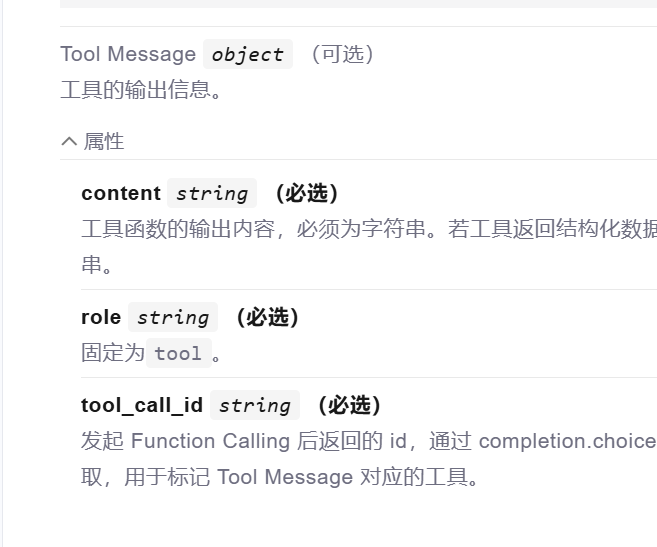
由官方文章可知这三个参数是必须的,此处的tool就是作为参数role的值
(3)接口主体
@llm_day07_router.post("/llm_chat")
async def finally_results(user_request:LLMCase3):
    messages = [{"role": "user", "content": user_request.user_query}]
    response = get_response(messages)
    assistant_output = response.choices[0].message
    if assistant_output.content is None:
        assistant_output.content = ""
    messages.append(assistant_output)
    # 如果不需要调用工具,直接输出内容
    if assistant_output.tool_calls is None:
        print(f"无需调用查询工具,直接回复:{assistant_output.content}")
    else:
        # 进入工具调用循环
        while assistant_output.tool_calls is not None:
            tool_call = assistant_output.tool_calls

            for i in tool_call:
                tool_call_id = i.id
                func_name = i.function.name
                arguments = json.loads(i.function.arguments)
                print(f"正在调用工具 [{func_name}],参数:{arguments}")
            # 执行工具
                func_mapping={
                    "academic_credential_verification":academic_credential_verification,
                    "query_job_tool":query_job_tool,
                    "query_knowledge_tool":query_knowledge_tool
                }
                tool_result =await func_mapping[func_name](arguments)
                # 构造工具返回信息
                tool_message = {
                    "role": "tool",
                    "tool_call_id": tool_call_id,
                    "content": tool_result,  # 保持原始工具输出
                }
                print(f"工具返回:{tool_message['content']}")
                messages.append(tool_message)
            # 再次调用模型,获取总结后的自然语言回复
            response = get_response(messages)
            assistant_output = response.choices[0].message
            if assistant_output.content is None:
                assistant_output.content = ""
            messages.append(assistant_output)
            # print(f"助手最终回复:{assistant_output.content}")
            return {
                "code": 1,
                "message": "OK",
                "data": assistant_output.content
            }
这里也有官方文档可以直接粘贴,只是需要注意的是两方面,第一方面,我们上述封装工具的方法都用到的是异步方法,那么在此处的tool_result =await func_mapping[func_name](arguments),这里必须加上await。第二方面,我们这个调用的是多工具,不是当个工具,不能在循环的时候只取小标为0的数据,而是需要遍历,自己去组装一条字典(func_mapping),将所有工具放入,这样在执行工具的时候就可以根据上面得到的func_name 的值正确的调用工具。
更多推荐


 6
6 0
0- 0


 已为社区贡献6条内容

所有评论(0)