
K8s pod管理
·
一、基础pod管理
#创建pod
[root@master ~]# kubectl run wjh --image nginx:latest
pod/wjh created

#查看pod的运行情况和在哪里运行
[root@master ~]# kubectl get pods -o wide
NAME                          READY   STATUS              RESTARTS        AGE   IP           NODE    NOMINATED NODE   READINESS GATES
deployment-846957654c-hr66v   1/1     Running             2 (19h ago)     47h   10.244.1.2   node1   <none>           <none>
deployment-846957654c-n498b   1/1     Running             2 (6m53s ago)   47h   10.244.2.2   node2   <none>           <none>
webcluster-77c87d9946-fz86w   1/1     Running             2 (19h ago)     47h   10.244.1.3   node1   <none>           <none>
webcluster-77c87d9946-nxxjr   1/1     Running             2 (6m53s ago)   47h   10.244.2.3   node2   <none>           <none>
wjh                           0/1     ContainerCreating   0               9s    <none>       node1   <none>           <none>

#出现问题可以查看pod运行的详细信息
[root@k8s-master ~]# kubectl describe  pods  wjh

#删除
[root@k8s-master ~]# kubectl delete  pods wjh
[root@k8s-master ~]# kubectl delete pods --all    -- 删除所有
创建pod,pod所用的镜像harbor仓库要有
二、利用yaml文件运行pod
1.在pod中运行多容器
[root@master pod]# kubectl run testpod --image myapp:v1 --dry-run=client -o yaml > testpod.yaml
[root@master pod]# vim testpod.yaml
apiVersion: v1
kind: Pod
metadata:
  labels:
    run: testpod
  name: testpod
spec:
  containers:
  - image: myapp:v1
    name: myapp1
  - image: busybox:latest
    name: busybox
    command:
    - /bin/sh
    - -c
    - sleep 10000

[root@master pod]# kubectl apply -f testpod.yaml
[root@master pod]# kubectl get pods
NAME                          READY   STATUS    RESTARTS   AGE
testpod                       2/2     Running   0          78s

[root@master pod]# kubectl exec -it pods/testpod -c busybox -- /bin/sh
[ root@testpod:/ ]$ curl 127.0.0.1
Hello MyApp | Version: v1 | <a href="hostname.html">Pod Name</a>
2.在pod运行主机中暴漏端口
[root@master pod]# vim testpod.yaml
apiVersion: v1
kind: Pod
metadata:
  labels:
    run: testpod
  name: testpod
spec:
  containers:
  - image: myapp:v1
    name: myapp1
    ports:
    - name: http
      containerPort: 80			#pod内部容器端口
      hostPort: 80				#pod所在节点端口
      protocol: TCP				#端口所用协议

[root@master pod]# kubectl apply -f testpod.yaml
pod/testpod created

[root@master pod]# kubectl get pods -o wide
testpod                       1/1     Running   0          10s   10.244.1.13   node1

[root@master pod]# curl node1
Hello MyApp | Version: v1 | <a href="hostname.html">Pod Name</a>
3.在pod中指定变量
[root@master pod]# vim mysql.yml

apiVersion: v1
kind: Pod
metadata:
  labels:
    run: mysql
  name: mysql
spec:
  containers:
  - image: mysql:latest
    name: mysql8
    env:
    - name: MYSQL_ROOT_PASSWORD
      value: wjh

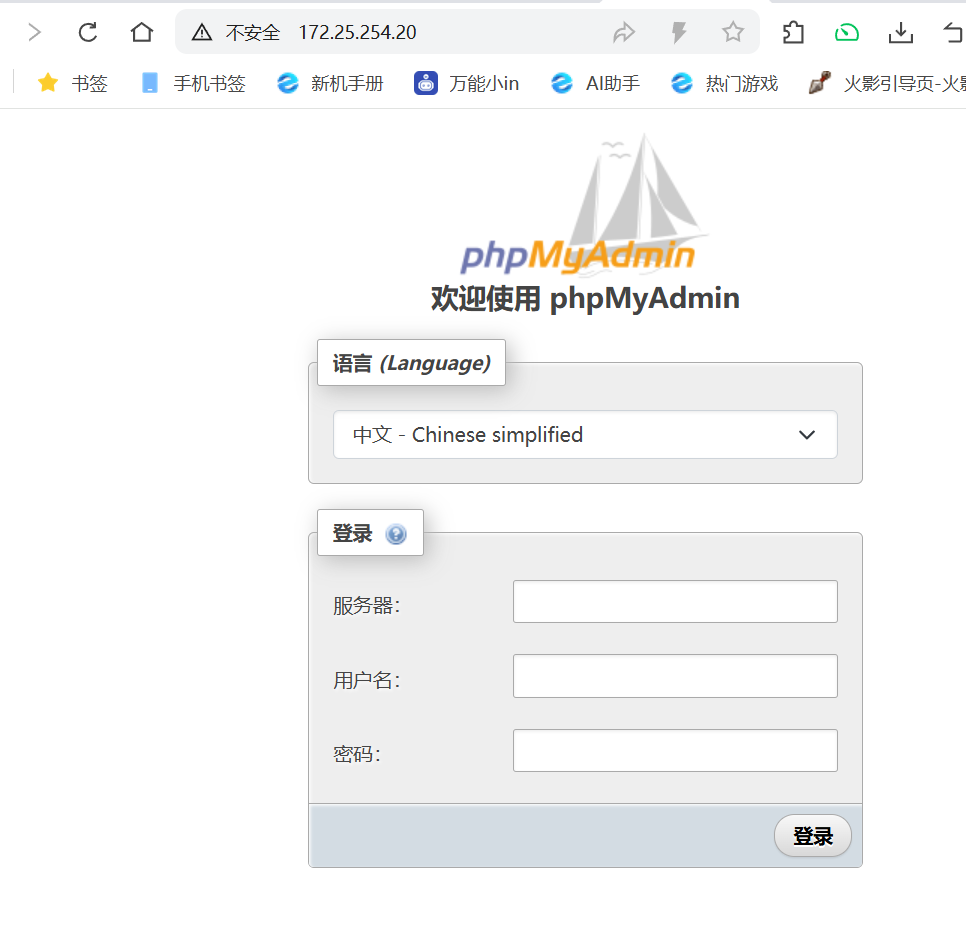
  - image: phpmyadmin:latest
    name: mysqladmin
    env:
    - name: PMA_ARBITRARY
      value: "1"
    ports:
    - name: phpadminport
      containerPort: 80
      hostPort: 80
      protocol: TCP

[root@master pod]# kubectl apply -f mysql.yml
pod/mysql created
[root@master pod]# kubectl get pods -o wide
mysql                         2/2     Running   0          15s     10.244.2.10   node2
4.指定运行节点
#在yaml文件下添加
spec:
  nodeSelector:
    kubernetes.io/hostname: node2
mysql 2/2 Running 0 2s 10.244.2.11 node2
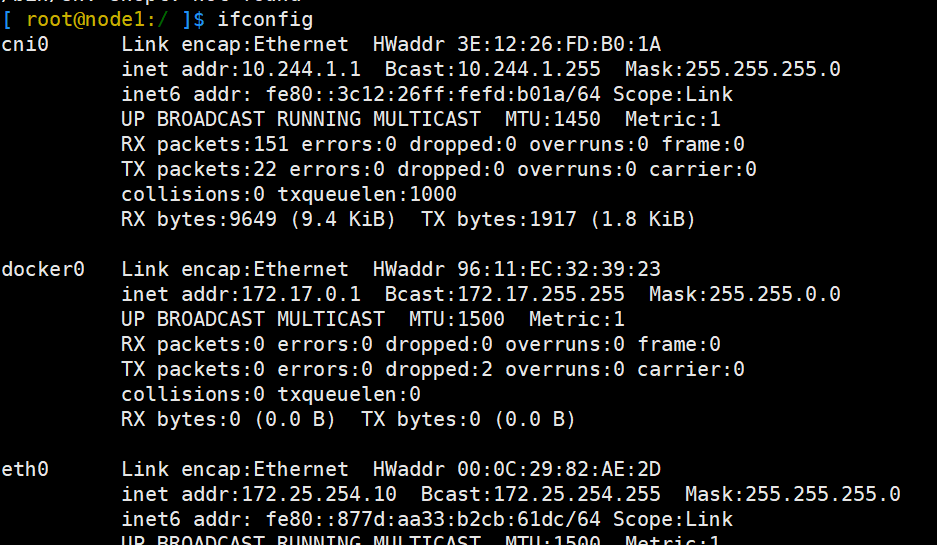
5.共享宿主机网络
spec:
  hostNetwork: true

测试:
[root@master pod]# kubectl apply -f testpod.yaml
pod/testpod created
[root@master pod]# kubectl exec -it pods/testpod -c busybox -- /bin/sh
6.资源优先级
Besteffort:没有做任何资源限制,资源使用优先级最低
[root@master pod]# vim testpod.yaml
apiVersion: v1
kind: Pod
metadata:
  labels:
    run: testpod
  name: testpod
spec:
  hostNetwork: true
  containers:
  - image: busybox:latest
    name: busybox
    command:
    - /bin/sh
    - -c
    - sleep 10000
apiVersion: v1
kind: Pod
metadata:
  labels:
    run: testpod
  name: testpod
spec:
  hostNetwork: true
  containers:
  - image: busybox:latest
    name: busybox
    command:
    - /bin/sh
    - -c
    - sleep 10000

[root@master pod]# kubectl apply -f testpod.yaml
pod/testpod created

[root@master pod]# kubectl describe pods testpod | grep "QoS Class"
QoS Class:                   BestEffort
Burstable:设定了资源限制,但是期望值和限制值不同,资源使用优先级次之
选一个pod里编写resource模块
apiVersion: v1
kind: Pod
metadata:
  labels:
    run: testpod
  name: testpod
spec:
  hostNetwork: true
  containers:
  - image: busybox:latest
    name: busybox
    command:
    - /bin/sh
    - -c
    - sleep 10000
	resources:
      limits:
        cpu: 700m
        memory: 200M
      requests:
        cpu: 500m
        memory: 100M

[root@master pod]# kubectl apply -f testpod.yaml
pod/testpod created

[root@master pod]# kubectl describe pods testpod | grep "QoS Class"
QoS Class:                   Burstable
Guaranteed:期望值和最大使用限制相同,优先级最高
resources:
      limits:
        cpu: 500m
        memory: 100M
      requests:
        cpu: 500m
        memory: 100M

[root@master pod]# kubectl apply -f testpod.yaml
pod/testpod created
[root@master pod]# kubectl describe pods testpod | grep "QoS Class"
QoS Class:                   Guaranteed
三、容器重启规则
#Always 无论什么原因都会从新运行pod

apiVersion: v1
kind: Pod
metadata:
  labels:
    run: testpod
  name: testpod
spec:
  hostNetwork: true
  restartPolicy: Always
  containers:
  - image: busybox:latest
    name: busybox
    command:
    - /bin/sh
    - -c
    - sleep 60

#OnFailure 非正常管关闭会从其pod
restartPolicy: OnFailure

#Never pod关闭后不重启
restartPolicy: Never
四、Pod的生命周期
1.init容器
[root@master pod]# kubectl run webserver --image myapp:v1 --dry-run=client -o yaml > init-example.yml

[root@master pod]# vim init-example.yml
apiVersion: v1
kind: Pod
metadata:
  labels:
    run: webserver
  name: webserver
spec:
  initContainers:
  - name: busybox
    image: busybox:latest
    command:
    - /bin/sh
    - -c
    - "until test -e /testfile;do echo wating for myservice; sleep 2;done"
  containers:
  - image: myapp:v1
    name: webserver
  restartPolicy: Always

[root@master pod]# watch -n 1 kubectl get pods  -o wide

[root@master pod]# kubectl apply -f init-example.yml
pod/webserver created

[root@master pod]# kubectl exec -it pods/webserver -c busybox -- /bin/sh
[ root@webserver:/ ]$ touch /testfile
2.livness存活探针
没有存活探针时,将nginx服务停掉能看到pod状态依然时runing
[root@master pod]# vim liveness-example.yaml
spec:
  containers:
  - image: myapp:v1
    name: testpod
    command: ["/bin/sh", "-c"]
    args:
    - |
      nginx -g "daemon off;"
      sleep 10000
    livenessProbe:    #存活探针
      tcpSocket:
        port: 80
      initialDelaySeconds: 3
      periodSeconds: 1
      timeoutSeconds: 1
  restartPolicy: Always

[root@master pod]# kubectl get pods  -o wide  -w

[root@master pod]#  kubectl exec -it pods/webserver -c webserver -- /bin/sh
/ #  nginx -s stop
2026/08/23 03:59:45 [notice] 15#15: signal process started

/ # exit
[root@master pod]# curl 10.244.1.15
curl: (7) Failed to connect to 10.244.5.66 port 80: 拒绝连接
[root@master pod]# curl 10.244.1.15
curl: (7) Failed to connect to 10.244.5.66 port 80: 拒绝连接
[root@master pod]# curl 10.244.1.15
curl: (7) Failed to connect to 10.244.5.66 port 80: 拒绝连接
[root@master pod]# curl 10.244.1.15
curl: (7) Failed to connect to 10.244.5.66 port 80: 拒绝连接
[root@master pod]# curl 10.244.1.15
Hello MyApp | Version: v1 | <a href="hostname.html">Pod Name</a>
3.readness 就绪探针
没有就绪探针
[root@k8s-master pod]# vim readness-example.yml
apiVersion: v1
kind: Pod
metadata:
  labels:
    run: webserver
  name: webserver
spec:
  containers:
  - image: myapp:v1
    name: webserver
  restartPolicy: Always

---
apiVersion: v1
kind: Service
metadata:
  labels:
    run: webserver
  name: webserver
spec:
  ports:
  - port: 80
    protocol: TCP
    targetPort: 80
  selector:
    run: webserver

[root@k8s-master pod]# kubectl apply -f readness-example.yml
pod/webserver unchanged
service/webserver created
[root@k8s-master pod]# kubectl describe  svc webserver
Name:                     webserver
Namespace:                default
Labels:                   run=webserver
Annotations:              <none>
Selector:                 run=webserver
Type:                     ClusterIP
IP Family Policy:         SingleStack
IP Families:              IPv4
IP:                       10.102.162.217
IPs:                      10.102.162.217
Port:                     <unset>  80/TCP
TargetPort:               80/TCP
Endpoints:                10.244.5.67:80
Session Affinity:         None
Internal Traffic Policy:  Cluster
Events:                   <none>

#删除默认发布文件
[root@k8s-master ~]# kubectl exec -it pods/webserver -c webserver -- /bin/sh
/ # cd /usr/share/nginx/
/usr/share/nginx # ls
html
/usr/share/nginx # cd html/
/usr/share/nginx/html # ls
50x.html    index.html
/usr/share/nginx/html # rm -fr index.html
/usr/share/nginx/html # ls
50x.html
/usr/share/nginx/html #

#验证是否在访问service时endpoints中被下架
[root@k8s-master pod]# kubectl describe  svc webserver
Name:                     webserver
Namespace:                default
Labels:                   run=webserver
Annotations:              <none>
Selector:                 run=webserver
Type:                     ClusterIP
IP Family Policy:         SingleStack
IP Families:              IPv4
IP:                       10.102.162.217
IPs:                      10.102.162.217
Port:                     <unset>  80/TCP
TargetPort:               80/TCP
Endpoints:                10.244.5.67:80			#还在
Session Affinity:         None
Internal Traffic Policy:  Cluster
Events:                   <none>


#业务问题
[root@k8s-master pod]# curl  10.102.162.217
<html>
<head><title>403 Forbidden</title></head>
<body bgcolor="white">
<center><h1>403 Forbidden</h1></center>
<hr><center>nginx/1.12.2</center>
</body>
</html>
有就绪探针的情况
[root@k8s-master pod]# vim readness-example.yml
apiVersion: v1
kind: Pod
metadata:
  labels:
    run: webserver
  name: webserver
spec:
  containers:
  - image: myapp:v1
    name: webserver
    readinessProbe:
      httpGet:
        path: /index.html
        port: 80
      initialDelaySeconds: 3
      periodSeconds: 2
      timeoutSeconds: 1
  restartPolicy: Always
---
apiVersion: v1
kind: Service
metadata:
  labels:
    run: webserver
  name: webserver
spec:
  ports:
  - port: 80
    protocol: TCP
    targetPort: 80
  selector:
    run: webserver


[root@k8s-master pod]# kubectl get pods  -o wide
NAME        READY   STATUS    RESTARTS   AGE   IP            NODE        NOMINATED NODE   READINESS GATES
webserver   1/1     Running   0          7s    10.244.5.69   k8s-node2   <none>           <none>
[root@k8s-master pod]# kubectl describe  svc webserver
Name:                     webserver
Namespace:                default
Labels:                   run=webserver
Annotations:              <none>
Selector:                 run=webserver
Type:                     ClusterIP
IP Family Policy:         SingleStack
IP Families:              IPv4
IP:                       10.110.248.237
IPs:                      10.110.248.237
Port:                     <unset>  80/TCP
TargetPort:               80/TCP
Endpoints:                10.244.5.69:80
Session Affinity:         None
Internal Traffic Policy:  Cluster
Events:                   <none>


#复现问题
[root@k8s-master ~]#kubectl exec -it pods/webserver -c webserver -- /bin/sh
/ # rm -fr /usr/share/nginx/html/index.html #endpoint没有了
/ # echo timinglee > /usr/share/nginx/html/index.html
/ #
更多推荐
 6
6 0
0- 0


 已为社区贡献4条内容

所有评论(0)