
偷懒工具2:拒绝卡死!用 Python + PyQt5 打造支持“GB级超大图”的格式转换器
·
日常开发或设计工作中,我们经常会遇到格式转换的需求。市面上虽然有很多图片转换工具,但当你尝试导入一张 几百兆甚至超过 1GB 的无损 BMP 图像 时,大多数软件不是直接崩溃,就是卡死无响应。
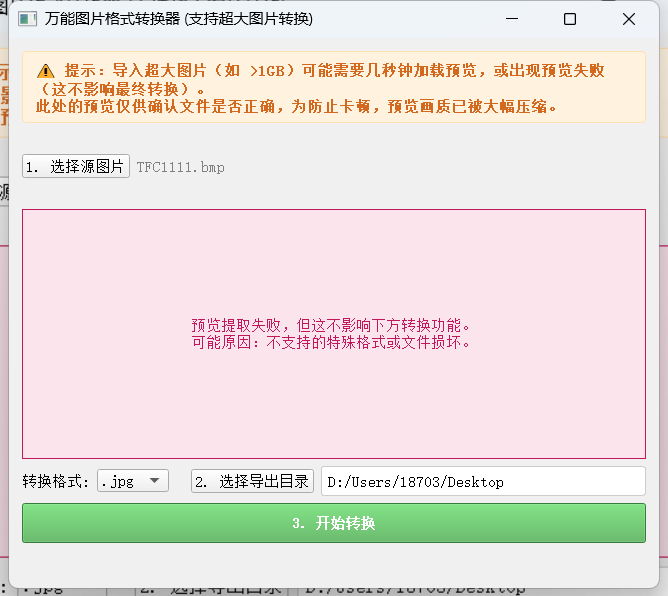
这种都是正常状态,太大图片我就不预览了,要不太卡了,图像如果过大,会提高转换时间,等等就好了。
我自己还生成一个logo,到时候封装起来还行挺好看的。
import sys
import os
from PIL import Image
from PyQt5.QtWidgets import (QApplication, QWidget, QVBoxLayout, QHBoxLayout,
                             QPushButton, QLabel, QComboBox, QFileDialog,
                             QMessageBox, QProgressBar, QFrame, QLineEdit)
from PyQt5.QtCore import Qt, QThread, pyqtSignal
# 【修改点】引入 QImageReader
from PyQt5.QtGui import QPixmap, QImageReader

# 解除Pillow的像素数量限制
Image.MAX_IMAGE_PIXELS = None


class ConvertThread(QThread):
    """后台转换线程:防止转换大图时卡死UI界面"""
    finished_signal = pyqtSignal(bool, str)

    def __init__(self, input_path, output_path, target_format):
        super().__init__()
        self.input_path = input_path
        self.output_path = output_path
        self.target_format = target_format.lower()

    def run(self):
        try:
            with Image.open(self.input_path) as img:
                # 转JPG时丢弃透明通道
                if self.target_format in ['.jpg', '.jpeg'] and img.mode in ('RGBA', 'P'):
                    img = img.convert('RGB')

                # 限制ICO尺寸
                if self.target_format == '.ico' and (img.size[0] > 256 or img.size[1] > 256):
                    img = img.resize((256, 256), Image.Resampling.LANCZOS)

                # 保存
                if self.target_format == '.png':
                    img.save(self.output_path, 'PNG', optimize=False)
                elif self.target_format == '.ico':
                    img.save(self.output_path, format='ICO', sizes=[(256, 256)])
                else:
                    img.save(self.output_path)

            self.finished_signal.emit(True, f"转换成功!文件已保存至:\n{self.output_path}")
        except Exception as e:
            self.finished_signal.emit(False, f"转换失败:{str(e)}")


class ImageConverterApp(QWidget):
    def __init__(self):
        super().__init__()
        self.input_image_path = ""
        self.init_ui()

    def init_ui(self):
        self.setWindowTitle('万能图片格式转换器 (支持超大BMP)')
        self.resize(650, 550)

        main_layout = QVBoxLayout()

        # --- 0. 明显的注释提示栏 ---
        self.lbl_notice = QLabel(
            "⚠️ 提示:导入超大图片(如 >1GB)可能需要几秒钟加载预览,或出现预览失败(这不影响最终转换)。\n"
            "此处的预览仅供确认文件是否正确,为防止卡顿,预览画质已被大幅压缩。"
        )
        self.lbl_notice.setStyleSheet(
            "color: #d2691e; font-weight: bold; background-color: #fff3e0; "
            "padding: 8px; border: 1px solid #ffe0b2; border-radius: 4px;"
        )
        self.lbl_notice.setWordWrap(True)

        # --- 1. 顶部操作区 ---
        top_layout = QHBoxLayout()

        self.btn_select_img = QPushButton("1. 选择源图片")
        self.btn_select_img.clicked.connect(self.select_image)
        self.lbl_input_path = QLabel("未选择图片")
        self.lbl_input_path.setStyleSheet("color: gray;")

        top_layout.addWidget(self.btn_select_img)
        top_layout.addWidget(self.lbl_input_path, 1)

        # --- 2. 图片预览区 ---
        self.lbl_preview = QLabel("图片预览区")
        self.lbl_preview.setAlignment(Qt.AlignCenter)
        self.lbl_preview.setFrameShape(QFrame.Box)
        self.lbl_preview.setMinimumHeight(250)
        self.lbl_preview.setStyleSheet("background-color: #f0f0f0; color: #999;")

        # --- 3. 设置区(格式与导出位置框体) ---
        setting_layout = QHBoxLayout()

        self.lbl_format = QLabel("转换格式:")
        self.combo_format = QComboBox()
        self.combo_format.addItems([".png", ".jpg", ".jpeg", ".webp", ".ico", ".bmp", ".tiff"])

        self.btn_select_dir = QPushButton("2. 选择导出目录")
        self.btn_select_dir.clicked.connect(self.select_output_dir)

        self.line_output_dir = QLineEdit()
        self.line_output_dir.setPlaceholderText("默认与原图同目录,可点击左侧按钮选择或直接粘贴路径")
        self.line_output_dir.setStyleSheet("padding: 4px; border: 1px solid #ccc; border-radius: 3px;")

        setting_layout.addWidget(self.lbl_format)
        setting_layout.addWidget(self.combo_format)
        setting_layout.addSpacing(15)
        setting_layout.addWidget(self.btn_select_dir)
        setting_layout.addWidget(self.line_output_dir, 1)

        # --- 4. 转换与进度区 ---
        bottom_layout = QVBoxLayout()

        self.btn_convert = QPushButton("3. 开始转换")
        self.btn_convert.setMinimumHeight(40)
        self.btn_convert.setStyleSheet("background-color: #4CAF50; color: white; font-weight: bold; font-size: 14px;")
        self.btn_convert.clicked.connect(self.start_conversion)

        self.progress_bar = QProgressBar()
        self.progress_bar.setValue(0)
        self.progress_bar.setTextVisible(False)
        self.progress_bar.hide()

        self.lbl_status = QLabel("")
        self.lbl_status.setAlignment(Qt.AlignCenter)

        bottom_layout.addWidget(self.btn_convert)
        bottom_layout.addWidget(self.progress_bar)
        bottom_layout.addWidget(self.lbl_status)

        # 将所有部件加入主布局
        main_layout.addWidget(self.lbl_notice)  # 添加提示栏
        main_layout.addLayout(top_layout)
        main_layout.addWidget(self.lbl_preview)
        main_layout.addLayout(setting_layout)
        main_layout.addLayout(bottom_layout)

        self.setLayout(main_layout)

    def select_image(self):
        file_path, _ = QFileDialog.getOpenFileName(
            self, "选择图片", "", "图片文件 (*.bmp *.png *.jpg *.jpeg *.webp *.tiff)"
        )
        if file_path:
            self.input_image_path = file_path
            self.lbl_input_path.setText(os.path.basename(file_path))
            self.show_preview(file_path)

    def show_preview(self, img_path):
        """【优化】使用极低内存方式加载超大图预览"""
        # 强制刷新UI,让用户看到加载提示,防止读取大图时短暂卡死以为崩溃
        self.lbl_preview.setText("图片较大,正在极速提取预览图,请稍候...")
        self.lbl_preview.setStyleSheet("background-color: #e0f7fa; color: #006064; font-weight: bold;")
        QApplication.processEvents()

        try:
            # 使用 QImageReader 而不是直接 QPixmap(),允许流式降采样读取
            reader = QImageReader(img_path)
            reader.setAutoTransform(True)

            img_size = reader.size()
            if img_size.isValid():
                # 如果图片极其巨大(宽或高大于 800),我们在它装入内存前就把它缩水
                if img_size.width() > 800 or img_size.height() > 800:
                    scaled_size = img_size.scaled(800, 800, Qt.KeepAspectRatio)
                    reader.setScaledSize(scaled_size) # 核心降压手段

            image = reader.read()

            if image.isNull():
                self.lbl_preview.setText(f"预览提取失败,但这不影响下方转换功能。\n可能原因:不支持的特殊格式或文件损坏。")
                self.lbl_preview.setStyleSheet("background-color: #fce4ec; color: #c2185b;")
                return

            pixmap = QPixmap.fromImage(image)

            # 自适应到UI预览框
            scaled_pixmap = pixmap.scaled(
                self.lbl_preview.width() - 10,
                self.lbl_preview.height() - 10,
                Qt.KeepAspectRatio,
                Qt.SmoothTransformation
            )
            self.lbl_preview.setPixmap(scaled_pixmap)
            # 恢复默认底色
            self.lbl_preview.setStyleSheet("background-color: #f0f0f0; color: #999;")

        except Exception as e:
            self.lbl_preview.setText(f"预览报错: {e}\n(不影响转换)")
            self.lbl_preview.setStyleSheet("background-color: #fce4ec; color: #c2185b;")

    def select_output_dir(self):
        dir_path = QFileDialog.getExistingDirectory(self, "选择导出目录")
        if dir_path:
            self.line_output_dir.setText(dir_path)

    def start_conversion(self):
        if not self.input_image_path:
            QMessageBox.warning(self, "提示", "请先选择需要转换的图片!")
            return

        target_format = self.combo_format.currentText()

        # 超大图检测与耗时提醒
        file_size_mb = os.path.getsize(self.input_image_path) / (1024 * 1024)
        if file_size_mb > 50:
            reply = QMessageBox.information(
                self, "超大文件预警",
                f"当前图片文件极大(约 {file_size_mb:.1f} MB)。\n\n超大图转换可能需要较长时间(预计 1 - 2 分钟)。\n转换期间请耐心等待,注意下方会有加载动画。\n\n是否继续?",
                QMessageBox.Yes | QMessageBox.No
            )
            if reply == QMessageBox.No:
                return

        # 拦截并警告过大尺寸转ICO
        if target_format == '.ico':
            try:
                with Image.open(self.input_image_path) as tmp_img:
                    w, h = tmp_img.size
                    if w > 256 or h > 256:
                        reply = QMessageBox.warning(
                            self, "尺寸过大警告",
                            f"原图尺寸为 {w}x{h}。\n.ico 后缀通常用于小型Logo,最大支持 256x256。\n继续转换将被强制压缩并可能失真。是否继续?",
                            QMessageBox.Yes | QMessageBox.No
                        )
                        if reply == QMessageBox.No:
                            return
            except Exception:
                pass

        filename_without_ext = os.path.splitext(os.path.basename(self.input_image_path))[0]
        custom_out_dir = self.line_output_dir.text().strip()
        out_dir = custom_out_dir if custom_out_dir else os.path.dirname(self.input_image_path)

        if custom_out_dir and not os.path.exists(custom_out_dir):
            try:
                os.makedirs(custom_out_dir)
            except Exception as e:
                QMessageBox.warning(self, "错误", f"无法创建或找到导出目录:\n{e}")
                return

        output_path = os.path.join(out_dir, filename_without_ext + target_format)

        if output_path == self.input_image_path:
            output_path = os.path.join(out_dir, filename_without_ext + "_converted" + target_format)

        self.btn_convert.setEnabled(False)
        self.btn_convert.setText("转换中,请稍候...")
        self.progress_bar.show()
        self.progress_bar.setRange(0, 0)
        self.lbl_status.setText("正在努力转换中,超大文件请耐心等待...")
        self.lbl_status.setStyleSheet("color: blue;")

        self.thread = ConvertThread(self.input_image_path, output_path, target_format)
        self.thread.finished_signal.connect(self.conversion_finished)
        self.thread.start()

    def conversion_finished(self, success, message):
        self.btn_convert.setEnabled(True)
        self.btn_convert.setText("3. 开始转换")
        self.progress_bar.hide()
        self.progress_bar.setRange(0, 100)

        if success:
            self.lbl_status.setText("转换成功!")
            self.lbl_status.setStyleSheet("color: green;")
            QMessageBox.information(self, "成功", message)
        else:
            self.lbl_status.setText("转换失败!")
            self.lbl_status.setStyleSheet("color: red;")
            QMessageBox.critical(self, "错误", message)


if __name__ == "__main__":
    QApplication.setAttribute(Qt.AA_EnableHighDpiScaling, True)
    QApplication.setAttribute(Qt.AA_UseHighDpiPixmaps, True)

    app = QApplication(sys.argv)
    app.setStyle('Fusion')

    window = ImageConverterApp()
    window.show()
    sys.exit(app.exec_())
更多推荐

 4
4 0
0- 0


 已为社区贡献2条内容

所有评论(0)