
用pyinstall库将python脚本代码打包成一个EXE执行文件
最近了解了下用pyinstall库将python写的脚本程序打包成一个exe文件来发布,此exe文件除包含全部..py模块文件外,还会将当前电脑上的python解释器和模块脚本中引用的外部依赖库一并打包,在其他电脑上无需安装python或依赖库,双击exe文件即可运行。我原先在咸鱼上花了1块钱买了别人的此类似工具,发现运行时总出现问题无法运行,于是自已借助AI写了此基于pyinstall库的打包脚本代码,可以正确打包和运行,运行程序后,会在要打包的程序的开发根目录下生成的dist子目录中,形成三个文件,一个是用于pyinstall打包的批处理程序,供学习参考,一个是将全部模块.py文件和python解释器及依赖库一同打包的exe文件,一个是将exe文件和开发根目录下的其他全部非.py模块文件(如资源文件和数据文件等)和对应全部子目录中的全部文件(如资源文件和数据文件等)一同打包成一个用于发布的zip压缩文件(已无源码文件了),使用时只需将此zip压缩包拷贝到其他电脑解压并双击.exe文件即可运行。如运行报错,可能是打包时没有将一些模块中需要隐形导入的库导入,如使用numpy库时,虽然用了import numpy as np,在编辑器中可以正常运行,打包后会报错,这时可在此模块中加入以下两行导入pyinstall没有查询的的两个隐形库
import numpy as np
import numpy.core._multiarray_umath #无此代码可正常运行,用pyinstall打包时,exe会报错,因pyinstall没有发现此此隐藏模块,这时显示导入
import numpy.core._dtype_ctypes
或将numpy.core._multiarray_umath和numpy.core._dtype_ctypes 在打包时录入"显示导入模块编辑框中"即可让pyinstall正确打包完整
程序运行界面如下:
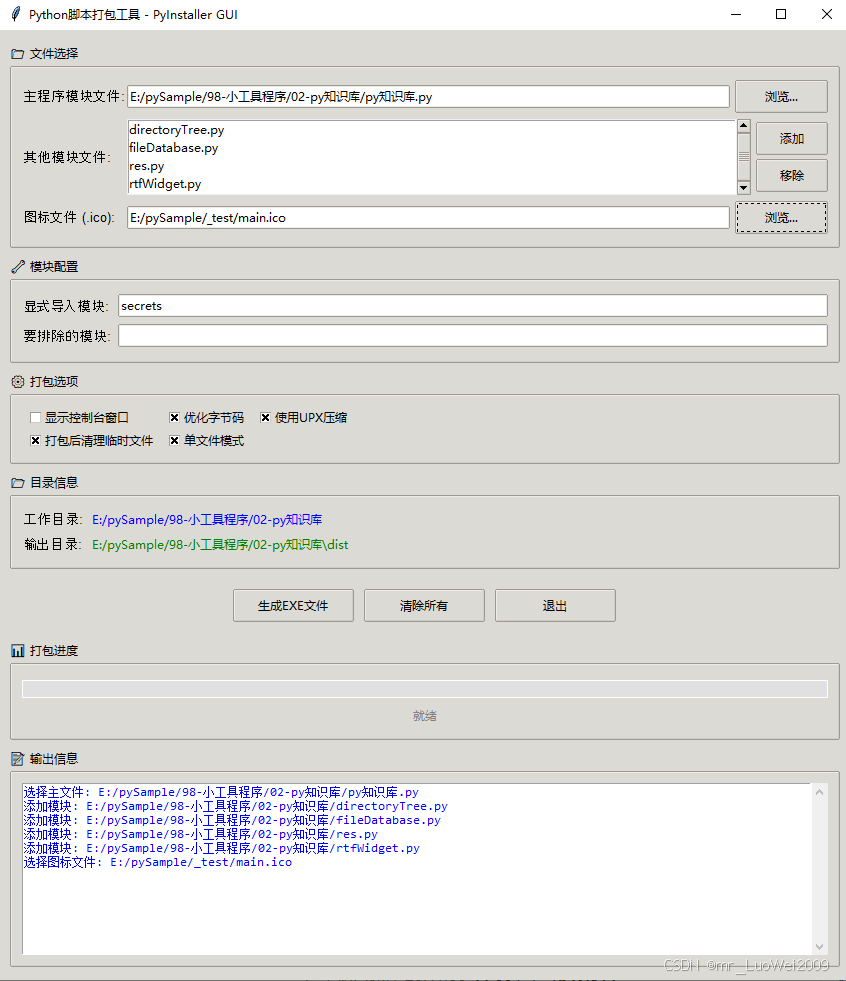
下面的完整的打包exe代码
import tkinter as tk
from tkinter import ttk, filedialog, messagebox, scrolledtext
import os
import sys
import subprocess
import zipfile
import time
import shutil
from pathlib import Path
import locale
import threading
class PyInstallerGUI:
def __init__(self, root):
self.root = root
self.root.title("Python脚本打包工具 - PyInstaller GUI")
self.root.geometry("850x950") # 进一步增加高度
self.root.resizable(True, True)
self.root.minsize(800, 700)
# 设置系统编码
self.system_encoding = locale.getpreferredencoding()
# 设置样式
style = ttk.Style()
style.theme_use('clam')
# 自定义进度条样式
style.configure("color.Horizontal.TProgressbar",
background='#4CAF50', # 绿色进度条
troughcolor='#E0E0E0',
bordercolor='#FFFFFF',
lightcolor='#4CAF50',
darkcolor='#4CAF50')
# 变量定义
self.main_file = tk.StringVar()
self.icon_file = tk.StringVar()
self.hidden_imports = tk.StringVar(value="secrets")
self.excluded_modules = tk.StringVar()
self.work_dir = tk.StringVar(value=os.getcwd())
# 其他模块列表
self.other_files = []
# 复选框变量
self.console_var = tk.BooleanVar(value=True)
self.optimize_var = tk.BooleanVar(value=False)
self.upx_var = tk.BooleanVar(value=True)
self.clean_var = tk.BooleanVar(value=True)
self.onefile_var = tk.BooleanVar(value=True)
# 打包状态
self.is_packing = False
self.process = None
self.progress_value = 0
self.create_widgets()
def create_widgets(self):
# 创建主框架
main_frame = ttk.Frame(self.root, padding="10")
main_frame.grid(row=0, column=0, sticky=(tk.W, tk.E, tk.N, tk.S))
# 配置网格权重
self.root.columnconfigure(0, weight=1)
self.root.rowconfigure(0, weight=1)
main_frame.columnconfigure(1, weight=1)
main_frame.rowconfigure(7, weight=1) # 输出信息区域可扩展
# 1. 主模块文件选择 - 使用Labelframe美化
file_frame = ttk.LabelFrame(main_frame, text="📁 文件选择", padding="10")
file_frame.grid(row=0, column=0, columnspan=3, sticky=(tk.W, tk.E), pady=5)
file_frame.columnconfigure(1, weight=1)
# 主模块文件
ttk.Label(file_frame, text="主程序模块文件:", font=('Arial', 10)).grid(row=0, column=0, sticky=tk.W, pady=5)
file_frame1 = ttk.Frame(file_frame)
file_frame1.grid(row=0, column=1, columnspan=2, sticky=(tk.W, tk.E), pady=2)
file_frame1.columnconfigure(0, weight=1)
ttk.Entry(file_frame1, textvariable=self.main_file).grid(row=0, column=0, sticky=(tk.W, tk.E), padx=(0,5))
ttk.Button(file_frame1, text="浏览...", command=self.select_main_file).grid(row=0, column=1)
# 其他模块文件
ttk.Label(file_frame, text="其他模块文件:", font=('Arial', 10)).grid(row=1, column=0, sticky=tk.W, pady=5)
file_frame2 = ttk.Frame(file_frame)
file_frame2.grid(row=1, column=1, columnspan=2, sticky=(tk.W, tk.E), pady=2)
file_frame2.columnconfigure(0, weight=1)
# 创建列表和滚动条的框架
list_frame = ttk.Frame(file_frame2)
list_frame.grid(row=0, column=0, sticky=(tk.W, tk.E), pady=2)
list_frame.columnconfigure(0, weight=1)
self.other_files_listbox = tk.Listbox(list_frame, height=4)
self.other_files_listbox.grid(row=0, column=0, sticky=(tk.W, tk.E))
scrollbar = ttk.Scrollbar(list_frame, orient=tk.VERTICAL, command=self.other_files_listbox.yview)
scrollbar.grid(row=0, column=1, sticky=(tk.N, tk.S))
self.other_files_listbox.configure(yscrollcommand=scrollbar.set)
btn_frame = ttk.Frame(file_frame2)
btn_frame.grid(row=0, column=1, sticky=(tk.W, tk.E), padx=(5,0))
ttk.Button(btn_frame, text="添加", command=self.add_other_files, width=8).pack(pady=2)
ttk.Button(btn_frame, text="移除", command=self.remove_other_files, width=8).pack(pady=2)
# 图标文件
ttk.Label(file_frame, text="图标文件 (.ico):", font=('Arial', 10)).grid(row=2, column=0, sticky=tk.W, pady=5)
file_frame3 = ttk.Frame(file_frame)
file_frame3.grid(row=2, column=1, columnspan=2, sticky=(tk.W, tk.E), pady=2)
file_frame3.columnconfigure(0, weight=1)
ttk.Entry(file_frame3, textvariable=self.icon_file).grid(row=0, column=0, sticky=(tk.W, tk.E), padx=(0,5))
ttk.Button(file_frame3, text="浏览...", command=self.select_icon_file).grid(row=0, column=1)
# 2. 模块配置 - 使用Labelframe美化
module_frame = ttk.LabelFrame(main_frame, text="🔧 模块配置", padding="10")
module_frame.grid(row=1, column=0, columnspan=3, sticky=(tk.W, tk.E), pady=5)
module_frame.columnconfigure(1, weight=1)
# 隐藏导入模块
ttk.Label(module_frame, text="显式导入模块:", font=('Arial', 10)).grid(row=0, column=0, sticky=tk.W, pady=5)
ttk.Entry(module_frame, textvariable=self.hidden_imports).grid(row=0, column=1, sticky=(tk.W, tk.E), pady=2, padx=(5,0))
# 排除模块
ttk.Label(module_frame, text="要排除的模块:", font=('Arial', 10)).grid(row=1, column=0, sticky=tk.W, pady=5)
ttk.Entry(module_frame, textvariable=self.excluded_modules).grid(row=1, column=1, sticky=(tk.W, tk.E), pady=2, padx=(5,0))
# 3. 打包选项 - 使用Labelframe美化
options_frame = ttk.LabelFrame(main_frame, text="⚙️ 打包选项", padding="10")
options_frame.grid(row=2, column=0, columnspan=3, sticky=(tk.W, tk.E), pady=5)
# 第一行选项
ttk.Checkbutton(options_frame, text="显示控制台窗口", variable=self.console_var).grid(row=0, column=0, sticky=tk.W, padx=5)
ttk.Checkbutton(options_frame, text="优化字节码", variable=self.optimize_var).grid(row=0, column=1, sticky=tk.W, padx=5)
ttk.Checkbutton(options_frame, text="使用UPX压缩", variable=self.upx_var).grid(row=0, column=2, sticky=tk.W, padx=5)
# 第二行选项
ttk.Checkbutton(options_frame, text="打包后清理临时文件", variable=self.clean_var).grid(row=1, column=0, sticky=tk.W, padx=5)
ttk.Checkbutton(options_frame, text="单文件模式", variable=self.onefile_var).grid(row=1, column=1, sticky=tk.W, padx=5)
# 4. 目录信息
dir_frame = ttk.LabelFrame(main_frame, text="📂 目录信息", padding="10")
dir_frame.grid(row=3, column=0, columnspan=3, sticky=(tk.W, tk.E), pady=5)
dir_frame.columnconfigure(1, weight=1)
ttk.Label(dir_frame, text="工作目录:", font=('Arial', 10)).grid(row=0, column=0, sticky=tk.W, pady=2)
ttk.Label(dir_frame, textvariable=self.work_dir, foreground="blue", wraplength=500).grid(row=0, column=1, sticky=tk.W, pady=2, padx=(5,0))
ttk.Label(dir_frame, text="输出目录:", font=('Arial', 10)).grid(row=1, column=0, sticky=tk.W, pady=2)
self.output_dir_label = ttk.Label(dir_frame, text="", foreground="green", wraplength=500)
self.output_dir_label.grid(row=1, column=1, sticky=tk.W, pady=2, padx=(5,0))
# 5. 按钮
button_frame = ttk.Frame(main_frame)
button_frame.grid(row=4, column=0, columnspan=3, pady=15)
self.pack_button = ttk.Button(button_frame, text="生成EXE文件", command=self.start_packing, width=15)
self.pack_button.pack(side=tk.LEFT, padx=5)
ttk.Button(button_frame, text="清除所有", command=self.clear_all, width=15).pack(side=tk.LEFT, padx=5)
ttk.Button(button_frame, text="退出", command=self.quit_app, width=15).pack(side=tk.LEFT, padx=5)
# 6. 进度条
progress_frame = ttk.LabelFrame(main_frame, text="📊 打包进度", padding="10")
progress_frame.grid(row=5, column=0, columnspan=3, sticky=(tk.W, tk.E), pady=5)
progress_frame.columnconfigure(0, weight=1)
# 使用自定义样式的进度条
self.progress = ttk.Progressbar(progress_frame, mode='determinate',
style="color.Horizontal.TProgressbar",
length=100)
self.progress.grid(row=0, column=0, sticky=(tk.W, tk.E), pady=5)
self.progress_label = ttk.Label(progress_frame, text="就绪", foreground="gray")
self.progress_label.grid(row=1, column=0, pady=2)
# 7. 输出信息
output_frame = ttk.LabelFrame(main_frame, text="📝 输出信息", padding="10")
output_frame.grid(row=6, column=0, columnspan=3, pady=5, sticky=(tk.W, tk.E, tk.N, tk.S))
output_frame.columnconfigure(0, weight=1)
output_frame.rowconfigure(0, weight=1)
# 创建带滚动条的文本框框架
self.output_text = scrolledtext.ScrolledText(output_frame, height=12, width=85, # 增加高度到12行
font=('Consolas', 9))
self.output_text.grid(row=0, column=0, sticky=(tk.W, tk.E, tk.N, tk.S))
# 配置标签颜色
self.output_text.tag_config('error', foreground='red')
self.output_text.tag_config('success', foreground='green')
self.output_text.tag_config('info', foreground='blue')
def select_main_file(self):
filename = filedialog.askopenfilename(
title="选择主程序文件",
filetypes=[("Python files", "*.py"), ("All files", "*.*")]
)
if filename:
self.main_file.set(filename)
work_dir = os.path.dirname(filename)
self.work_dir.set(work_dir)
# 更新输出目录显示
main_name = os.path.splitext(os.path.basename(filename))[0]
output_dir = os.path.join(work_dir, "dist")
self.output_dir_label.config(text=output_dir)
self.log(f"选择主文件: {filename}", 'info')
def select_icon_file(self):
filename = filedialog.askopenfilename(
title="选择图标文件",
filetypes=[("Icon files", "*.ico"), ("All files", "*.*")]
)
if filename:
self.icon_file.set(filename)
self.log(f"选择图标文件: {filename}", 'info')
def add_other_files(self):
filenames = filedialog.askopenfilenames(
title="选择其他Python模块",
filetypes=[("Python files", "*.py"), ("All files", "*.*")]
)
for filename in filenames:
if filename not in self.other_files:
self.other_files.append(filename)
self.other_files_listbox.insert(tk.END, os.path.basename(filename))
self.log(f"添加模块: {filename}", 'info')
def remove_other_files(self):
selection = self.other_files_listbox.curselection()
for index in reversed(selection):
self.other_files.pop(index)
self.other_files_listbox.delete(index)
self.log(f"移除模块: {self.other_files_listbox.get(index) if index < self.other_files_listbox.size() else ''}", 'info')
def clear_all(self):
self.main_file.set("")
self.icon_file.set("")
self.hidden_imports.set("secrets")
self.excluded_modules.set("")
self.other_files.clear()
self.other_files_listbox.delete(0, tk.END)
self.output_dir_label.config(text="")
self.progress['value'] = 0
self.progress_label.config(text="就绪")
self.log("已清除所有输入", 'info')
def quit_app(self):
if self.is_packing and self.process:
try:
self.process.terminate()
except:
pass
self.root.quit()
def log(self, message, tag=None):
"""安全的日志记录,支持颜色标签"""
try:
if tag:
self.output_text.insert(tk.END, message + "\n", tag)
else:
self.output_text.insert(tk.END, message + "\n")
self.output_text.see(tk.END)
self.root.update_idletasks()
except Exception as e:
print(f"日志记录错误: {e}")
def update_progress(self, value, text):
"""更新进度条"""
self.progress['value'] = value
self.progress_label.config(text=text)
self.root.update_idletasks()
def safe_decode(self, byte_data):
"""安全解码字节数据"""
if isinstance(byte_data, bytes):
try:
return byte_data.decode('utf-8')
except UnicodeDecodeError:
try:
return byte_data.decode('gbk', errors='ignore')
except:
return byte_data.decode('utf-8', errors='ignore')
return str(byte_data)
def start_packing(self):
"""在单独的线程中启动打包过程"""
if self.is_packing:
messagebox.showwarning("警告", "正在打包中,请稍候...")
return
if not self.main_file.get():
messagebox.showerror("错误", "请选择主程序文件!")
return
# 禁用打包按钮
self.pack_button.config(state='disabled')
self.is_packing = True
self.update_progress(10, "准备打包...")
# 启动打包线程
thread = threading.Thread(target=self.generate_exe)
thread.daemon = True
thread.start()
def generate_exe(self):
"""执行打包过程"""
try:
main_file_path = self.main_file.get()
main_dir = os.path.dirname(main_file_path)
main_name = os.path.splitext(os.path.basename(main_file_path))[0]
# 确保dist目录存在
dist_dir = os.path.join(main_dir, "dist")
if not os.path.exists(dist_dir):
os.makedirs(dist_dir)
# 清理dist目录中的旧文件
self.update_progress(20, "清理旧文件...")
if os.path.exists(dist_dir):
try:
for item in os.listdir(dist_dir):
item_path = os.path.join(dist_dir, item)
if item != f"{main_name}_package.zip":
if os.path.isdir(item_path):
shutil.rmtree(item_path)
else:
os.remove(item_path)
except Exception as e:
self.log(f"清理dist目录时出错: {str(e)}", 'error')
# 生成批处理文件(放在dist目录中)
bat_file = os.path.join(dist_dir, f"{main_name}_build.bat")
# 构建PyInstaller命令
cmd = ["pyinstaller"]
# 添加选项
if not self.console_var.get():
cmd.append("--noconsole")
if self.onefile_var.get():
cmd.append("--onefile")
else:
cmd.append("--onedir")
if self.optimize_var.get():
cmd.append("--optimize=2")
if self.upx_var.get():
cmd.append("--upx-dir=.")
if self.clean_var.get():
cmd.append("--clean")
# 添加图标
if self.icon_file.get():
cmd.append(f'--icon="{self.icon_file.get()}"')
# 添加隐藏导入
if self.hidden_imports.get():
for imp in self.hidden_imports.get().split(','):
imp = imp.strip()
if imp:
cmd.append(f'--hidden-import={imp}')
# 添加排除模块
if self.excluded_modules.get():
for mod in self.excluded_modules.get().split(','):
mod = mod.strip()
if mod:
cmd.append(f'--exclude-module={mod}')
# 添加其他模块文件
for file in self.other_files:
cmd.append(f'--add-data="{file};."')
# 添加主文件
cmd.append(f'"{main_file_path}"')
# 写入批处理文件
try:
with open(bat_file, 'w', encoding='utf-8') as f:
f.write('@echo off\n')
f.write('chcp 65001 > nul\n')
f.write('echo 开始打包Python程序...\n')
f.write('cd /d "' + main_dir + '"\n')
f.write(' '.join(cmd) + '\n')
f.write('if errorlevel 1 (\n')
f.write(' echo 打包失败!\n')
f.write(' pause\n')
f.write(' exit /b 1\n')
f.write(')\n')
f.write('echo 打包完成!\n')
self.log(f"已生成批处理文件: {bat_file}", 'info')
self.log("开始执行打包过程...", 'info')
self.update_progress(30, "正在打包...")
# 执行批处理文件
self.process = subprocess.Popen(
bat_file,
shell=True,
cwd=main_dir,
stdout=subprocess.PIPE,
stderr=subprocess.PIPE,
stdin=subprocess.PIPE,
universal_newlines=False,
bufsize=1
)
# 读取输出
stdout_thread = threading.Thread(target=self.read_output, args=(self.process.stdout, False))
stderr_thread = threading.Thread(target=self.read_output, args=(self.process.stderr, True))
stdout_thread.daemon = True
stderr_thread.daemon = True
stdout_thread.start()
stderr_thread.start()
# 等待进程结束
return_code = self.process.wait()
# 等待输出线程完成
stdout_thread.join(timeout=1)
stderr_thread.join(timeout=1)
self.update_progress(70, "打包完成,正在创建ZIP包...")
# 检查是否成功
if return_code == 0:
self.log("打包成功!", 'success')
# 创建ZIP包(放在dist目录中)
self.create_zip_file(main_dir, main_name, dist_dir)
else:
self.log(f"打包失败!返回码: {return_code}", 'error')
self.update_progress(0, "打包失败")
except Exception as e:
self.log(f"错误: {str(e)}", 'error')
self.update_progress(0, "打包失败")
finally:
# 恢复界面状态
self.root.after(0, self.packing_finished)
def read_output(self, pipe, is_error):
"""读取进程输出"""
try:
for line in iter(pipe.readline, b''):
if line:
decoded_line = self.safe_decode(line)
if decoded_line.strip():
if is_error:
self.log(f"错误: {decoded_line.strip()}", 'error')
else:
self.log(decoded_line.strip())
except Exception as e:
self.log(f"读取输出错误: {str(e)}", 'error')
finally:
try:
pipe.close()
except:
pass
def packing_finished(self):
"""打包完成后的界面恢复"""
self.is_packing = False
self.pack_button.config(state='normal')
self.process = None
def create_zip_file(self, main_dir, main_name, dist_dir):
"""创建包含exe和其他文件的ZIP包,放在dist目录中"""
try:
# 确定exe文件位置
if self.onefile_var.get():
# 单文件模式:exe在dist目录
exe_file = os.path.join(dist_dir, f"{main_name}.exe")
else:
# 目录模式:exe在子目录中
exe_file = os.path.join(dist_dir, main_name, f"{main_name}.exe")
# 等待一下确保exe文件完全生成
time.sleep(1)
if not os.path.exists(exe_file):
self.log("警告:未找到生成的EXE文件", 'error')
self.update_progress(0, "未找到EXE文件")
return
# 创建ZIP文件名(放在dist目录中)
zip_file = os.path.join(dist_dir, f"{main_name}_package.zip")
self.log(f"开始创建ZIP包: {zip_file}", 'info')
# 如果ZIP文件已存在,先删除
if os.path.exists(zip_file):
os.remove(zip_file)
self.log(f"删除旧的ZIP文件", 'info')
with zipfile.ZipFile(zip_file, 'w', zipfile.ZIP_DEFLATED) as zf:
# 添加exe文件到ZIP根目录
if self.onefile_var.get():
zf.write(exe_file, os.path.basename(exe_file))
self.log(f"添加EXE文件到ZIP: {os.path.basename(exe_file)}", 'info')
else:
# 如果是目录模式,添加整个目录
exe_dir = os.path.dirname(exe_file)
for root, dirs, files in os.walk(exe_dir):
for file in files:
file_path = os.path.join(root, file)
# 计算相对于exe_dir的路径
rel_path = os.path.relpath(file_path, exe_dir)
zf.write(file_path, os.path.join(main_name, rel_path))
self.log(f"添加文件到ZIP: {os.path.join(main_name, rel_path)}", 'info')
# 添加当前目录下的其他文件(排除.py文件和临时目录)
for root, dirs, files in os.walk(main_dir):
# 排除不需要的目录
dirs[:] = [d for d in dirs if d not in ['__pycache__', 'build', 'venv', '.venv', 'env']
and not d.startswith('.')]
# 获取相对路径
rel_root = os.path.relpath(root, main_dir)
if rel_root == '.':
rel_root = ''
for file in files:
file_path = os.path.join(root, file)
# 排除规则
if (file.endswith('.py') or
file.endswith('.pyc') or
file.endswith('.log') or
file.startswith('build_') or
'pyinstaller' in file.lower()):
continue
# 排除dist目录下的内容(除了我们正在创建的zip文件)
if rel_root.startswith('dist'):
continue
# 计算在ZIP中的路径
if rel_root:
zip_path = os.path.join(rel_root, file)
else:
zip_path = file
try:
zf.write(file_path, zip_path)
self.log(f"添加文件到ZIP: {zip_path}", 'info')
except Exception as e:
self.log(f"添加文件失败 {zip_path}: {str(e)}", 'error')
if os.path.exists(zip_file):
file_size = os.path.getsize(zip_file) / (1024*1024)
self.log(f"ZIP包创建完成: {zip_file}", 'success')
self.log(f"文件大小: {file_size:.2f} MB", 'success')
self.update_progress(100, f"完成!ZIP包大小: {file_size:.2f} MB")
# 打开包含ZIP的文件夹
self.root.after(0, lambda: self.ask_open_folder(dist_dir, zip_file, file_size))
else:
self.log("ZIP包创建失败", 'error')
self.update_progress(0, "ZIP包创建失败")
except Exception as e:
self.log(f"创建ZIP包时出错: {str(e)}", 'error')
self.update_progress(0, "创建ZIP包失败")
def ask_open_folder(self, folder_path, zip_file, file_size):
"""询问是否打开文件夹"""
if messagebox.askyesno("完成", f"✅ 打包完成!\n\nZIP包已创建:{zip_file}\n文件大小:{file_size:.2f} MB\n\n是否打开所在文件夹?"):
try:
if sys.platform == 'win32':
os.startfile(folder_path)
elif sys.platform == 'darwin': # macOS
subprocess.run(['open', folder_path])
else: # Linux
subprocess.run(['xdg-open', folder_path])
except Exception as e:
self.log(f"打开文件夹失败: {str(e)}", 'error')
def main():
# 检查是否安装了pyinstaller
try:
import PyInstaller
except ImportError:
if messagebox.askyesno("安装依赖", "未检测到PyInstaller,是否现在安装?"):
try:
subprocess.check_call([sys.executable, "-m", "pip", "install", "pyinstaller"])
messagebox.showinfo("安装完成", "PyInstaller安装完成,请重新运行程序。")
except Exception as e:
messagebox.showerror("错误", f"安装PyInstaller失败:{str(e)}")
sys.exit(0)
else:
messagebox.showerror("错误", "需要PyInstaller才能运行此程序。")
sys.exit(1)
root = tk.Tk()
app = PyInstallerGUI(root)
root.mainloop()
if __name__ == "__main__":
main()
对打包的单文件exe运行时,解释脚本代码用的是打包exe中的python.exe版本,而不是用当前电脑上安装了的python版本,依赖库同理。如果在模块中对文件路径有使用绝对路径的,如采用
pyPath=sys.path[0] #打包模式下,此值将是一临时目录,不是脚本模块运行的根路径了
这时如模块中用了pyPath+'res\\123.png'等代码将会在EXE文件运行模式下找不到此文件了,所有模块中有关文件路径最好用相对路径防止打包后找不到文件,如./res/123.png等,如确实要用绝对路径,下面作了一个可以正确识别打包或非打包运行状态下,主模块文件所在的绝对路径供参考:
def getAppPath(defPyexe='python.exe'):
    """
    得到脚本确切的主模块所在根目录路径
    将此方法copy到对应要打包成单EXE文件的脚本中,来处理文件路径关系
    """
    pyPath=sys.path[0]   #打包模式下,此值将是一临时目录,不是脚本模块路径
    python_exe=sys.executable #python.exe解释文件位置
    appPath=None
    if python_exe:
        python_exe=python_exe.lower()
        # 分解路径
        python_exe_path = os.path.dirname(python_exe)  # 获取目录路径:不含\
        filename = os.path.basename(python_exe)        # 获取文件名
        if filename==defPyexe:   #表示当前不是单文件打包的模式
            appPath=pyPath
            print(f'非打包运行模式,当前脚本所在路径="{appPath}"')
        else:
            appPath=python_exe_path
            print(f'打包单exe运行模式,当前脚本所在路径="{appPath}"')

    if appPath is None:  return None

    count=len(appPath)
    if appPath[count-1]!='\\' or appPath[count-1]!='/':   #对如在驱动器的根目录,会自带'\',非驱动器的根目录字串尾部不会带'\',这里统一处理成路径尾部带'\'
        appPath+='\\'
    return appPath
更多推荐



 4
4 0
0- 0


 已为社区贡献1条内容

所有评论(0)