
Java Card RE 3.20 chapter4 Logical Channels and Applet Selection Part2
4.4 Forwarding APDU Commands To a Logical Channel
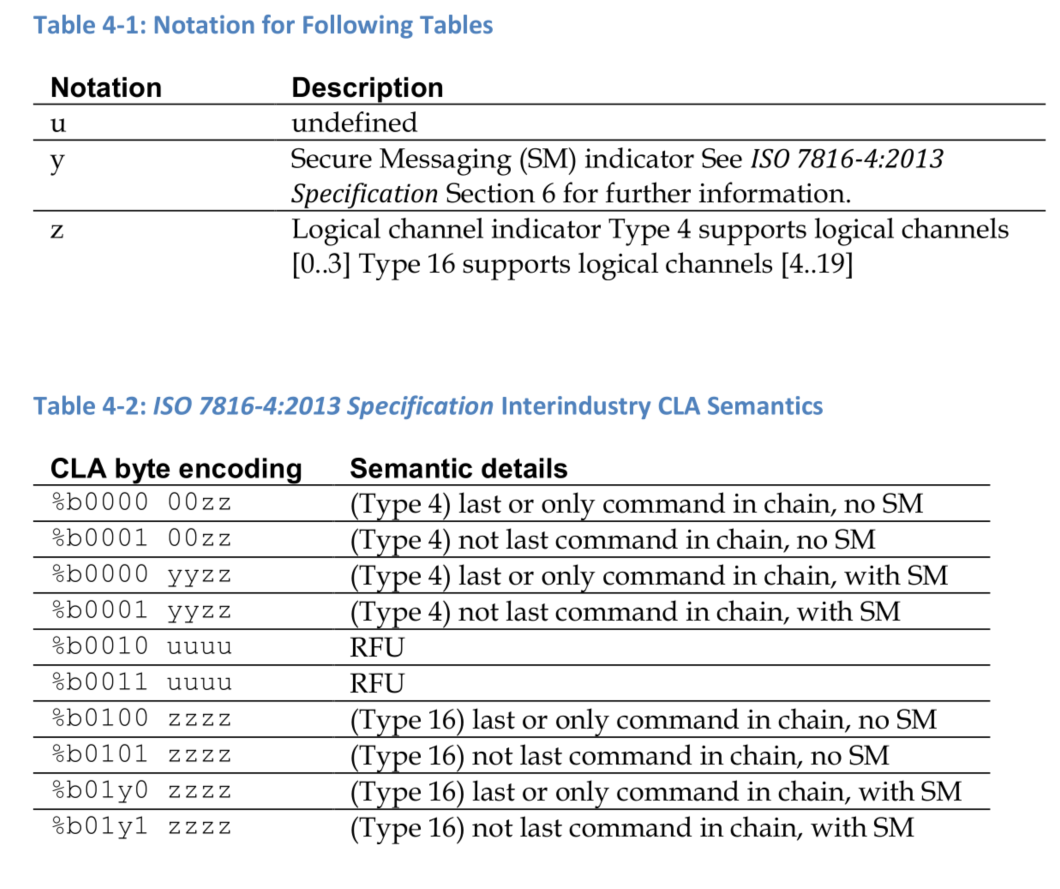
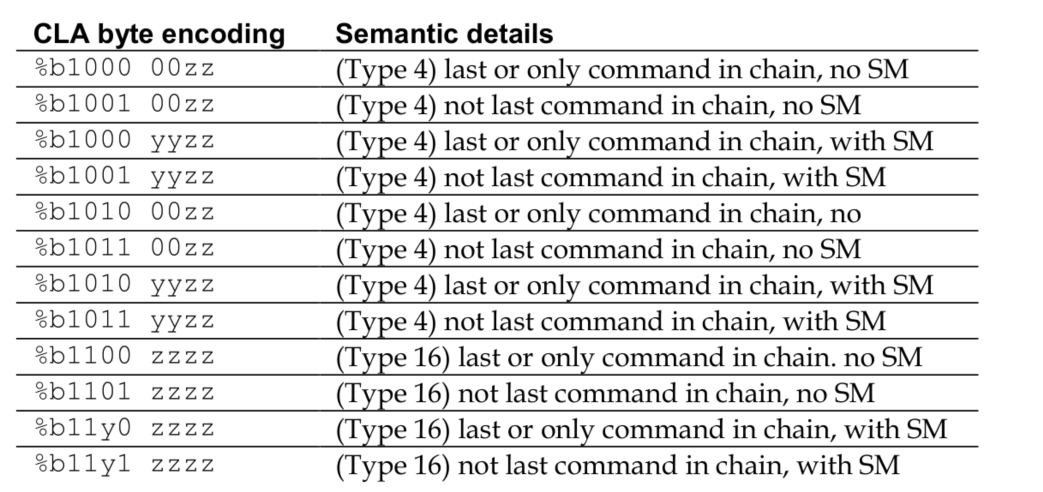
According to Section 5.4 of the ISO 7816-4:2013 Specification, the interindustry values of the CLA byte equal to 0x0X and 0x1X in the APDU command encode channel numbers in the range 0-3, whereas interindustry values of the CLA byte equal to 0x4Y, 0x5Y, 0x6Y and 0x7Y in the APDU command encode channel numbers in the range 4-19.
In addition, cards compliant with the Java Card Platform specification must also support proprietary class values of the CLA byte equal to 0x8X, 0x9X, 0xAx and 0xBX for channel numbers in the range 0-3 and proprietary class values of the CLA byte equal to 0xCY, 0xDY, 0xEY and 0xFY for channel numbers 4- 19 (using 0 origin notation). The bit encoding of the proprietary class values of the CLA byte mirror that of the ISO 7816-4:2013 Specification defined interindustry values with the most significant bit b8 set to 1. Table 4-2 and Table 4-3 show the supported encodings of the CLA byte.
根据 ISO 7816-4:2013 规范第 5.4 节的规定,APDU 命令中 CLA 字节的跨行业值等于 0x0X 和 0x1X,则表示通道号在 0-3 范围内;而 APDU 命令中 CLA 字节的跨行业值等于 0x4Y、0x5Y、0x6Y 和 0x7Y,则表示通道号在 4-19 范围内。
此外,符合 Java Card Platform 规范的卡还必须支持通道号在 0-3 范围内的 CLA 字节的专有类值 0x8X、0x9X、0xAx 和 0xBX,以及通道号在 4-19 范围内的 CLA 字节的专有类值 0xCY、0xDY、0xEY 和 0xFY(使用 0 起始表示法)。 CLA 字节的专有类值的位编码反映了ISO 7816-4:2013 规范第 35 页定义的行业间值,其中最高有效位 b8 设置为 1。表 4-2 和表 4-3 显示了 CLA 字节支持的编码。
补充:CLA的b7=1,b1~b4表示通道号4~19;b7=0,b1~b2表示通道号0~3
For a Java Card Platform supporting logical channels encoding Type 4 (Table 4.2 and Table 4.3), the twoleast significant bits (b2,b1*) of the X nibble encodes the logical channels numbers 0-3.
For a Java Card Platform supporting logical channels encoding Type 16 (Table 4.2 and Table 4.3), the Ynibble (b4-b1*) encodes logical channel numbers in the range 4-19 (using 0 origin notation).
When an APDU command is received, the Java Card RE shall process it and determine, based on supported encoding types, whether or not the command has logical channel information. If logical channel information is encoded, the card dispatches the APDU command to the appropriate logical channel on that I/O interface. All other APDU commands are forwarded to the basic logical channel (logical channel 0) on that I/O interface.
对于支持逻辑通道编码类型 4(表 4.2 和表 4.3)的 Java Card 平台,X 半字节的两个最低有效位 (b2,b1*) 编码逻辑通道号 0-3。
对于支持逻辑通道编码类型 16(表 4.2 和表 4.3)的 Java Card 平台,Y 半字节 (b4-b1*) 编码逻辑通道号范围为 4-19(使用 0 作为起始符号)。
当收到 APDU 命令时,Java Card RE 应对其进行处理,并根据支持的编码类型确定该命令是否包含逻辑通道信息。如果已编码逻辑通道信息,则卡会将 APDU 命令发送到该 I/O 接口上相应的逻辑通道。所有其他 APDU 命令都将转发到该 I/O 接口上的基本逻辑通道(逻辑通道 0)。

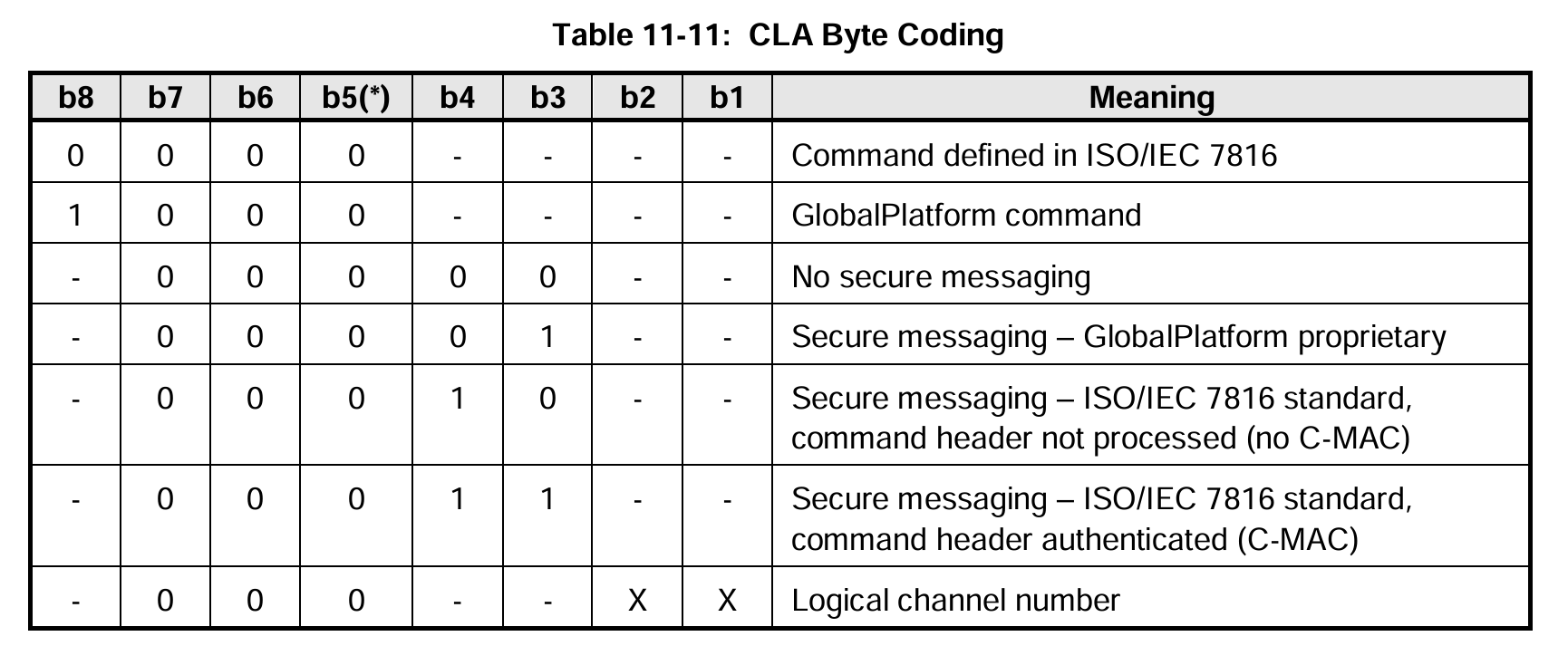
CLA编码各bit意义可参考global platform:
通道号0~3(Type 4)的CLA字节编码,注意b3b4安全信息secure message为上述表格的SM
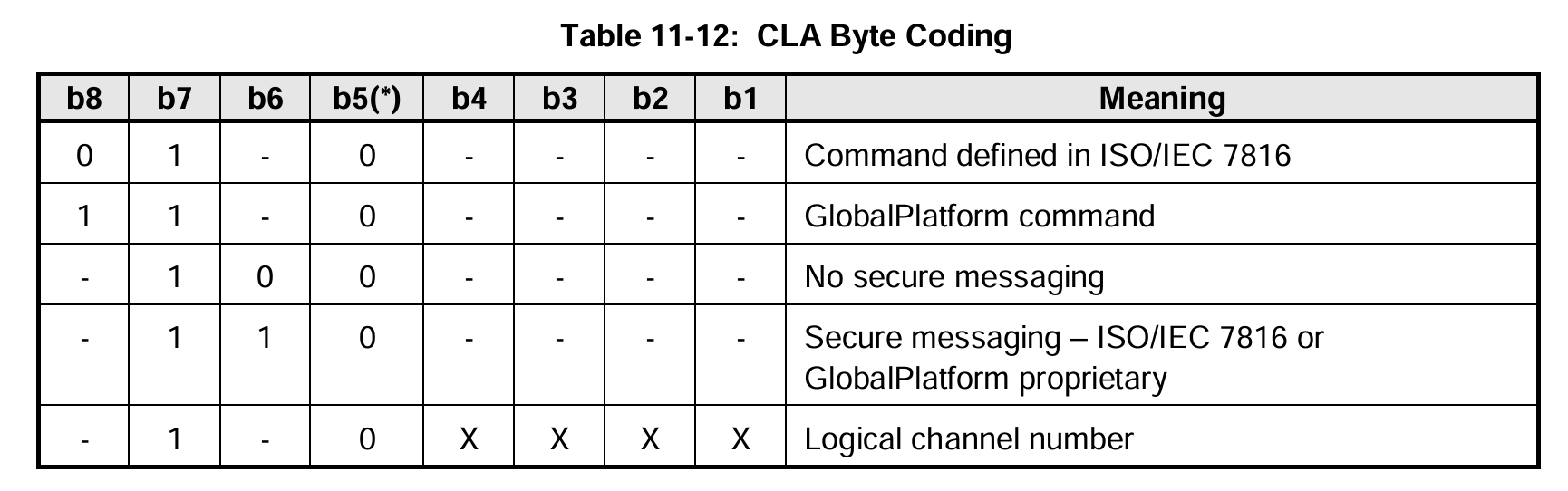
通道号4~20(Type 16)的CLA字节编码,注意b5安全信息为上述表格的SM
Note: CLA byte 0xFX cannot encode logical channel 19 because CLA = 0xFF is a reserved value for Protocol Type Selection. In compliance with ISO 7816-4:2013 Specification, logical channel number 19 is not available when using this CLA byte.
注意:CLA 字节 0xFX 无法编码逻辑通道 19,因为 CLA = 0xFF 是协议类型选择的保留值。根据 ISO 7816-4:2013 规范,使用此 CLA 字节时,逻辑通道号 19 不可用。
The Java Card RE always forwards the command “as is” to the appropriate applet instance. In particular, the Java Card RE does not clear the logical channel encoding bits of the CLA byte.
To avoid the complexity of the transport information encoded in the CLA byte of the APDU command header, the application programmer is advised not to parse the CLA byte directly. The following methods in the javacard.framework.APDU class may be used to extract application specific information:
- APDU.isISOInterindustryCLA
- APDU.isSecureMessagingCLA
- APDU.isCommandChainingCLA
- APDU.getCLAChannel
- APDU.isValidCLA
Note: An asterisk indicates binary notation (%b) using bit numbering as in the ISO7816 specification. Most significant bit is b8. Least significant bit is b1.
Java Card RE 始终将命令“按原样”转发到相应的小程序实例。特别是,Java Card RE 不会清除 CLA 字节的逻辑通道编码位。
为了避免 APDU 命令头中 CLA 字节编码的传输信息的复杂性,建议应用程序员不要直接解析 CLA 字节。javacard.framework.APDU 类中的以下方法可用于提取应用程序特定的信息:
- APDU.isISOInterindustryCLA
- APDU.isSecureMessagingCLA
- APDU.isCommandChainingCLA
- APDU.getCLAChannel
- APDU.isValidCLA
注意:星号表示二进制表示法 (%b),使用与 ISO7816 规范中相同的位编号方式。最高有效位为 b8,最低有效位为 b1。
4.5 Opening and Closing Logical Channels
According to Section 5.5.2 of the ISO 7816-4:2013 Specification, the following two ways to open a logical channel in the smart card exist:
- By selecting an applet instance on a new logical channel. This is accomplished by issuing an Applet SELECT FILE APDU command, and specifying the logical channel number in the CLA byte of the command. If this logical channel is currently closed, it shall be opened, and the specified applet instance shall be selected. See Section 4.6.2 Applet Selection with SELECT FILE.
- By issuing a MANAGE CHANNEL OPEN APDU command. MANAGE CHANNEL commands are provided to open a logical channel from another logical channel, or to close a logical channel from another logical channel. See Section 4.5.1 MANAGE CHANNEL Command Processing.
根据 ISO 7816-4:2013 规范第 5.5.2 节的规定,在智能卡中打开逻辑通道有两种方式:
- 通过选择新逻辑通道上的 Applet 实例。具体操作是:发出 Applet SELECT FILE APDU 命令,并在该命令的 CLA 字节中指定逻辑通道号。如果此逻辑通道当前处于关闭状态,则应打开该通道并选择指定的 Applet 实例。请参阅第 4.6.2 节“使用 SELECT FILE 选择 Applet”。
- 通过发出 MANAGE CHANNEL OPEN APDU 命令。MANAGE CHANNEL 命令可用于从另一个逻辑通道打开逻辑通道,或从另一个逻辑通道关闭逻辑通道。请参阅第 4.5.1 节“MANAGE CHANNEL 命令处理”。
4.5.1 MANAGE CHANNEL Command Processing
The Java Card RE shall intercept all APDU messages coming into the card, perform card management functions (such as selecting or deselecting applet instances), and shall forward APDU messages to the appropriate applet instance. As part of its card management functions, the Java Card RE notifies applet instances about selection events (a function it performs by calling the applet instances’ select and deselect methods).
With the addition of logical channels in Java Card platform, the Java Card RE includes a multichannel dispatching mechanism, as well as checks to ensure applet integrity during multi-channel operations. The Java Card RE must ensure that applets written to operate in a single logical channel environment operate consistently on a multiple logical channel smart card.
A Java Card platform providing support for multiple logical channels must define a class of APDU commands, called MANAGE CHANNEL commands. Note that a platform supporting the Type 4 encoding only, will not interpret a command with a CLA byte encoded with the Type 16 as to be a MANAGE CHANNEL command.
Java Card RE 应拦截所有进入卡片的 APDU 消息,执行卡片管理功能(例如选择或取消选择小程序实例),并将 APDU 消息转发到相应的小程序实例。作为卡片管理功能的一部分,Java Card RE 会将选择事件通知小程序实例(该功能通过调用小程序实例的 select 和 deselect 方法执行)。
随着 Java Card 平台逻辑通道的增加,Java Card RE 包含多通道调度机制,以及用于确保多通道操作期间小程序完整性的检查。Java Card RE 必须确保编写为在单逻辑通道环境中运行的小程序在多逻辑通道智能卡上能够一致运行。
支持多逻辑通道的 Java Card 平台必须定义一类 APDU 命令,称为 MANAGE CHANNEL 命令。请注意,仅支持 Type 4 编码的平台不会将 CLA 字节以 Type 16 编码的命令解释为 MANAGE CHANNEL 命令。
The functions the Java Card RE must perform by using MANAGE CHANNEL command processing are: MANAGE CHANNEL OPEN:
Open a new logical channel from an already-open logical channel. Two variations of this command are supported:
- The Java Card RE selects the new logical channel specified in the command
- The Java Card RE automatically assigns a new logical channel.
MANAGE CHANNEL CLOSE: Close a specified logical channel from another open logical channel.
In addition, the SELECT FILE APDU command to select an applet instance is extended to specify a new or already opened logical channel on which the specified applet instance is to be selected.
The term origin logical channel refers to the logical channel on which the command is received based on the logical channel number encoding within the CLA byte, as described in Section 4.4 Forwarding APDU Commands To a Logical Channel.
Java Card RE 使用 MANAGE CHANNEL 命令处理时必须执行的功能包括:
MANAGE CHANNEL OPEN:从已打开的逻辑通道打开新的逻辑通道。此命令支持两种变体:
- Java Card RE 选择命令中指定的新逻辑通道
- Java Card RE 自动分配新的逻辑通道。
MANAGE CHANNEL CLOSE:从另一个打开的逻辑通道关闭指定的逻辑通道。
此外,用于选择 Applet 实例的 SELECT FILE APDU 命令,可指定在新的或已打开的逻辑通道上选择Applet 实例。
术语“原始逻辑通道”是指根据 CLA 字节内的逻辑通道号编码接收命令的逻辑通道,如第 4.4 节“将 APDU 命令转发到逻辑通道”中所述。
4.6 Applet Selection
There are two ways to select an applet instance in the Java Card platform: with a MANAGE CHANNEL OPEN command (Section 4.6.1 Applet Selection with MANAGE CHANNEL OPEN), or with a SELECT FILE command (Section 4.6.2 Applet Selection with SELECT FILE).
The Java Card RE shall guarantee that an applet that is designed to run on any logical channel can be selected on any of the available logical channels on the card. The resources accessed by the applet instance must be the same, irrespective of the logical channel on which it is selected.
在 Java Card 平台中,选择 Applet 实例有两种方式:使用 MANAGE CHANNEL OPEN 命令(第 4.6.1 节“使用 MANAGE CHANNEL OPEN 选择 Applet”)或使用 SELECT FILE 命令(第 4.6.2 节“使用 SELECT FILE 选择 Applet”)。
Java Card RE 应保证,设计为在任何逻辑通道上运行的 Applet 都可以在卡上任何可用的逻辑通道上被选中。无论在哪个逻辑通道上被选中,Applet 实例访问的资源必须相同。
4.6.1 Applet Selection with MANAGE CHANNEL OPEN
Upon receiving a MANAGE CHANNEL OPEN command on an I/O interface, the Java Card RE shall run the following procedure:
在 I/O 接口上接收到 MANAGE CHANNEL OPEN 命令后,Java Card RE 应运行以下程序:
- The MANAGE CHANNEL OPEN command uses: CLA=%b000000cc* (where cc in the bits (b2,b1) denotes the origin logical channel: 0-3), or CLA=%0100dddd* (where dddd in the bits (b4-b1) denote the origin logical channel: 4-19), INS=0x70and P1=0. Two variants of this command are supported:
- P2=0 when the Java Card RE shall assign a new logical channel number.
- P2=the logical channel number specified.
- If the MANAGE CHANNEL OPEN command has non-zero secure messaging bits (b4,b3*) in the CLA byte when the origin logical channel is 0-3 or non-zero bit (b6*) when the origin logical channel is 4-19, the Java Card RE responds with status code 0x6882 (SW_SECURE_MESSAGING_NOT_SUPPORTED).
- If the MANAGE CHANNEL OPEN command is issued with a specified logical channel number greater than 3 for a platform supporting only the Type 4 encoding or 19 otherwise, the Java Card RE responds with status code 0x6A81 (SW_FUNC_NOT_SUPPORTED).
- MANAGE CHANNEL OPEN 命令使用:CLA=%b000000cc*(其中 (b2,b1) 位中的 cc 表示原始逻辑通道:0-3),或 CLA=%0100dddd*(其中 (b4-b1) 位中的 dddd 表示原始逻辑通道:4-19),INS=0x70 且 P1=0。此命令支持两种变体:
- 当 Java Card RE 应分配新的逻辑通道号时,P2=0。
- P2=指定的逻辑通道号。
- 如果在原始逻辑通道为 0-3 时 MANAGE CHANNEL OPEN 命令的 CLA 字节中具有非零安全消息传递位(b4,b3*),或者在原始逻辑通道为 4-19 时具有非零位(b6*),则 Java Card RE 将以状态代码 0x6882 (SW_SECURE_MESSAGING_NOT_SUPPORTED) 进行响应。
- 如果在仅支持类型 4 编码的平台上发出 MANAGE CHANNEL OPEN 命令时指定的逻辑通道号大于 3,否则为 19,则 Java Card RE 将以状态代码 0x6A81 (SW_FUNC_NOT_SUPPORTED) 进行响应。
- If the origin logical channel on that I/O interface is not open, the Java Card RE responds with status code 0x6881 (SW_LOGICAL_CHANNEL_NOT_SUPPORTED)
- If the Java Card RE supports only the basic logical channel on that I/O interface, the Java Card RE responds with status code 0x6881 (SW_LOGICAL_CHANNEL_NOT_SUPPORTED).
- If the P2=0 variant is used:
- If the expected length value (Le) is not equal to 1, the Java Card RE responds with status code 0x6C01 (SW_CORRECT_LENGTH_00+0x01).
- If resources for the new logical channel are not available, the Java Card RE responds with status code 0x6A81 (SW_FUNC_NOT_SUPPORTED).
- If the P2!=0 variant is used:
If the specified logical channel number is not supported or resources for the specified logical channel are not available or the logical channel is already open, the Java Card RE responds with status code 0x6A86 (SW_INCORRECT_P1P2).- The new logical channel on the I/O interface that received the MANAGE CHANNEL OPEN command is now open. This logical channel will be the assigned channel for the applet instance that will be selected on it.
- 如果该 I/O 接口上的原始逻辑通道未打开,Java 卡 RE 将响应状态代码 0x6881 (SW_LOGICAL_CHANNEL_NOT_SUPPORTED)。
- 如果 Java 卡 RE 仅支持该 I/O 接口上的基本逻辑通道,则 Java 卡 RE 将响应状态代码 0x6881 (SW_LOGICAL_CHANNEL_NOT_SUPPORTED)。
- 如果使用 P2=0 变量:
- 如果预期长度值 (Le) 不等于 1,则 Java 卡 RE 将响应状态代码 0x6C01 (SW_CORRECT_LENGTH_00+0x01)。
- 如果新逻辑通道的资源不可用,则 Java 卡 RE 将响应状态代码 0x6A81 (SW_FUNC_NOT_SUPPORTED)。
- 如果使用 P2!=0 变量:
如果指定的逻辑通道号不受支持,或者指定逻辑通道的资源不可用,或者该逻辑通道已打开,则 Java Card RE 将响应状态代码 0x6A86 (SW_INCORRECT_P1P2)。 - 接收 MANAGE CHANNEL OPEN 命令的 I/O 接口上的新逻辑通道现已打开。该逻辑通道将分配给在其上选定的小程序实例。
- Determine the applet instance to be selected on the new logical channel.
- If the origin logical channel is the basic logical channel (logical channel 0), then:
- If a default applet instance for the new logical channel on the I/O interface is defined, pick the default applet instance for that logical channel as the candidate for selection on the new logical channel.
- Otherwise, set the Java Card RE state so that no applet is active on the new logical channel. The Java Card RE responds with status code 0x9000 and if the P2=0 variant is used, one data byte containing the newly assigned logical channel number.
- If the origin logical channel is not the basic logical channel:
- If an applet instance is active on the origin logical channel, pick the applet instance as the candidate for selection on the new logical channel.
- Otherwise, set the Java Card RE state so that no applet is active on the new logical channel. The Java Card RE responds with status code 0x9000 and if the P2=0 variant is used, one data byte containing the newly assigned logical channel number.
- If the candidate applet instance is not a multiselectable applet (as defined in Section 4.3 Multiselectable Applets) and the candidate applet’s context is active, the Java Card RE shall close the new logical channel. The Java Card RE responds with status code 0x6985 (SW_CONDITIONS_NOT_SATISFIED).
- Assign the CLEAR_ON_DESELECT transient memory segment for the new logical channel:
- If the applet’s context is active, assign the CLEAR_ON_DESELECT transient memory segment associated with that context to this logical channel.
- Otherwise, assign a new (zero-filled) CLEAR_ON_DESELECT transient memory segment to this new logical channel.
- 确定要在新逻辑通道上选择的小程序实例。
- 如果原始逻辑通道是基本逻辑通道(逻辑通道 0),则:
- 如果 I/O 接口上已为新逻辑通道定义了默认小程序实例,则选择该逻辑通道的默认小程序实例作为新逻辑通道上的候选小程序实例。
- 否则,设置 Java Card RE 状态,使新逻辑通道上没有活动的小程序。Java Card RE 会以状态码 0x9000 进行响应,如果使用 P2=0 变体,则还会返回一个包含新分配的逻辑通道号的数据字节。
- 如果原始逻辑通道不是基本逻辑通道:
- 如果原始逻辑通道上有一个活动的小程序实例,则选择该小程序实例作为新逻辑通道上的候选小程序实例。
- 否则,设置 Java Card RE 状态,使新逻辑通道上没有活动的小程序实例。 Java Card RE 以状态码 0x9000 进行响应,如果使用 P2=0 变体,则返回一个包含新分配的逻辑通道号的数据字节。
- 如果候选小程序实例不是可多选的小程序(定义见第 4.3 节“可多选小程序”),且候选小程序的上下文处于活动状态,则 Java Card RE 应关闭新的逻辑通道。Java Card RE 以状态码 0x6985 (SW_CONDITIONS_NOT_SATISFIED) 进行响应。
- 为新的逻辑通道分配 CLEAR_ON_DESELECT 临时内存段:
- 如果小程序的上下文处于活动状态,则将与该上下文关联的 CLEAR_ON_DESELECT 临时内存段分配给此逻辑通道。
- 否则,为这个新的逻辑通道分配一个新的(用零填充的)CLEAR_ON_DESELECT 临时内存段。
- Check whether the candidate applet instance accepts selection:
- If the candidate applet’s context is active, the Java Card RE shall set the candidate applet instance as the currently selected applet instance and call the MultiSelectable.select method, where the parameter appInstAlreadyActive is set to true if the same applet instance is already active on another logical channel. A context switch into the candidate applet instance’s context occurs at this point. For more details on contexts, see Section 6.1.2 Contexts and Context Switching.
- Otherwise, if the candidate applet’s context is not active, the Java Card RE shall set the candidate applet instance as the currently selected applet instance and call the Applet.select method. A context switch into the candidate applet instance’s context occurs at this point.
- If the applet instance’s select method throws an exception or returns false, or returns true when an applet-initiated transaction is in progress then the Java Card RE closes the new logical channel. The Java Card RE responds with status code 0x6999 (SW_APPLET_SELECT_FAILED).
- The Java Card RE responds with status code 0x9000 (and if the P2=0variant is used, 1 data byte containing the newly assigned logical channel number.) Note: Unlike the SELECT FILE commands to select an applet instance, the MANAGE CHANNEL command is never forwarded to the applet instance.
- 检查候选小程序实例是否接受选择:
- 如果候选小程序的上下文处于活动状态,Java Card RE 应将候选小程序实例设置为当前选定的小程序实例,并调用 MultiSelectable.select 方法。如果同一小程序实例已在另一个逻辑通道上处于活动状态,则将参数 appInstAlreadyActive 设置为 true。此时,将发生上下文切换到候选小程序实例的上下文。有关上下文的更多详细信息,请参见第 6.1.2 节“上下文和上下文切换”。
- 否则,如果候选小程序的上下文未处于活动状态,Java Card RE 应将候选小程序实例设置为当前选定的小程序实例,并调用 Applet.select 方法。此时,将发生上下文切换到候选小程序实例的上下文。
- 如果小程序实例的 select 方法抛出异常或返回 false,或者在小程序发起的事务正在进行时返回 true,则 Java Card RE 将关闭新的逻辑通道。 Java Card RE 以状态代码 0x6999 (SW_APPLET_SELECT_FAILED) 进行响应。
- Java Card RE 以状态代码 0x9000 进行响应(如果使用 P2=0 变量,则为 1 个数据字节,包含新分配的逻辑通道号。)注意:与用于选择小程序实例的 SELECT FILE 命令不同,MANAGE CHANNEL 命令永远不会转发到小程序实例。
MANAGE CHANNEL 指令不会触发Applet的process()方法
4.6.2 Applet Selection with SELECT FILE
Upon receiving a SELECT FILE command on an I/O interface, the Java Card RE shall run the following procedure:
在 I/O 接口上接收到 SELECT FILE 命令后,Java Card RE 应运行以下程序:
- The Applet SELECT FILE command uses an INS=0xA4 and a CLA byte as follows:
- for platforms supporting Type 4 encoding: CLA=%b000000cc* (where cc in the bits (b2,b1*) specifies the logical channel to be selected: 0-3)
- for platforms supporting Type 16 encoding: CLA=%0100dddd* (where dddd in the bits (b4-b1) denote the origin logical channel: 4-19)
- otherwise: CLA=0x00
If the CLA byte value does not conform to the type of encoding supported by the platform, or if the SELECT FILE command has non-zero secure messaging bits (b4,b3*) in the CLA byte when the origin logical channel is 0-3 or non-zero bit (b6*) when the origin logical channel is 4-19, the command is deemed not to be an Applet SELECT FILE command. The Java Card RE simply forwards the command according to 4 and 4.4 Forwarding APDU Commands To a Logical Channel paragraphs.- The Applet SELECT FILE command uses “Selection by DF name” with P1=0x04.
- The Java Card RE shall support both of the following:
- Selection by “exact DF name(AID)” 3 with P2=%b0000xx00 (b4,b3* are ignored) and
- The RFU variant described in ISO 7816-4 Specification with P2=%b0001xx00 (b4,b3* are ignored).
All other partial DF name SELECT FILE options (b2,b1* variants) are Java Card RE implementation dependent. Errors which occur during the processing of these commands may result in implementation-defined, error response status codes.
All file control information options codes (b4,b3*) of the P2 parameter shall be supported by the Java Card RE and interpreted and processed by the applet instance itself.
- Applet 的 SELECT FILE 命令使用 INS=0xA4 和一个 CLA 字节,如下所示:
- 对于支持 Type 4 编码的平台:CLA=%b000000cc*(其中,(b2,b1*) 位中的 cc 指定要选择的逻辑通道:0-3)
- 对于支持 Type 16 编码的平台:CLA=%0100dddd*(其中,(b4-b1) 位中的 dddd 表示原始逻辑通道:4-19)
- 否则:CLA=0x00
如果 CLA 字节值不符合平台支持的编码类型,或者如果 SELECT FILE 命令在原始逻辑通道为 0-3 时 CLA 字节中存在非零安全消息位 (b4,b3*),或者在原始逻辑通道为 4-19 时 CLA 字节中存在非零安全消息位 (b6*),则该命令将被视为非 Applet 的 SELECT FILE 命令。 Java Card RE 只需根据 4 和 4.4 将 APDU 命令转发到逻辑通道段落转发命令即可。 - Applet 的 SELECT FILE 命令使用“按 DF 名称选择”,P1=0x04。
- Java Card RE 应支持以下两种方式:
- 按“精确 DF 名称 (AID)”3 选择,P2=%b0000xx00(忽略 b4 和 b3*);以及
- ISO 7816-4 规范中描述的 RFU 变体,P2=%b0001xx00(忽略 b4 和 b3*)。
- 所有其他部分 DF 名称 SELECT FILE 选项(b2 和 b1* 变体)均取决于 Java Card RE 实现。处理这些命令期间发生的错误可能会导致实现定义的错误响应状态代码。
- P2 参数的所有文件控制信息选项代码(b4、b3*)应由 Java Card RE 支持,并由小程序实例本身解释和处理。
- If resources for the specified logical channel are not available, the Java Card RE responds with status code 0x6881 (SW_LOGICAL_CHANNEL_NOT_SUPPORTED).
- If the specified logical channel is not open on the I/O interface that received the SELECT FILE command, it is now opened and the Java Card RE state is set so that no applet is active on this new logical channel. The specified logical channel will be the assigned channel for the applet instance that will be active on it.
- The Java Card RE searches the internal applet table which lists all successfully installed applet instances on the card for an applet instance with a matching AID. If a matching applet instance is found, it is picked as the candidate applet instance. Otherwise, if no AID match is found:
- If there is no active applet instance on the specified logical channel, the Java Card RE responds with status code 0x6999 (SW_APPLET_SELECT_FAILED).
- Otherwise, the active applet instance on this logical channel is set as the currently selected applet instance and the SELECT FILE command is forwarded to that applet instance’s process method. A context switch into the applet instance’s context occurs at this point, see Section 6.1.1 Firewall Protection. Applets may use the SELECT FILE command for their own internal processing. Upon return from the applet’s process method, the Java Card RE sends the applet instance’s response as the response to the SELECT FILE command.
- 如果指定逻辑通道的资源不可用,Java 卡 RE 将响应状态码 0x6881 (SW_LOGICAL_CHANNEL_NOT_SUPPORTED)。
- **如果接收 SELECT FILE 命令的 I/O 接口上未打开指定的逻辑通道,则该通道现在已打开,**并设置 Java 卡 RE 状态,以使此新的逻辑通道上没有处于活动状态的 Applet。指定的逻辑通道将分配给将在其上处于活动状态的 Applet 实例。
- Java 卡 RE 将在内部 Applet 表中搜索具有匹配 AID 的 Applet 实例,该表列出了卡上所有成功安装的 Applet 实例。如果找到匹配的 Applet 实例,则将其选为候选 Applet 实例。否则,如果未找到匹配的 AID:
- 如果指定的逻辑通道上没有处于活动状态的 Applet 实例,Java 卡 RE 将响应状态码 0x6999 (SW_APPLET_SELECT_FAILED)。
- 否则,将此逻辑通道上的活动 Applet 实例设置为当前选定的 Applet 实例,并将 SELECT FILE 命令转发给该 Applet 实例的 process 方法。此时将发生上下文切换到 Applet 实例的上下文,请参阅第 6.1.1 节“防火墙保护”。Applet 可以使用 SELECT FILE 命令进行其内部处理。从 Applet 的 process 方法返回后,Java Card RE 将 Applet 实例的响应作为对 SELECT FILE 命令的响应发送。
- If the candidate applet instance is not a multiselectable applet, and the candidate applet’s context is active, the logical channel remains open and the Java Card RE records an error response status code of 0x6985 (SW_CONDITIONS_NOT_SATISFIED). Prior to sending the response code, if there is an active applet instance on the logical channel, then the Java Card RE may optionally deselect the applet instance, as described in Section 4.7 Applet Deselection, and set the state so that no applet is active on the specified logical channel.
- Assign the CLEAR_ON_DESELECT transient memory segment for the new logical channel in the following cases:
- If any applet instance from the same context as that of the candidate applet instance is active on another logical channel, assign the same CLEAR_ON_DESELECT transient memory segment to this logical channel.
- Otherwise, assign a different (zero-filled) CLEAR_ON_DESELECT transient memory segment to this new logical channel.
- Check whether the candidate applet instance accepts selection:
- If the candidate applet’s context is active, the Java Card RE shall set the candidate applet instance as the currently selected applet instance and call the MultiSelectable.select(appInstAlreadyActive) method, where the parameter appInstAlreadyActive is set to true if the same applet instance is already active on another logical channel. A context switch into the candidate applet instance’s context occurs at this point, see Section 6.1.2 Contexts and Context Switching.
- Otherwise, if the candidate applet’s context is not active, the Java Card RE shall set the candidate applet instance as the currently selected applet instance and call the Applet.select method. A context switch into the candidate applet instance’s context occurs at this point.
- If the applet instance’s select method throws an exception or returns false, or returns true when an applet-initiated transaction is in progress, then the Java Card RE state is set so that no applet is active on the specified logical channel. The logical channel remains open, and the Java Card RE responds with status code 0x6999 (SW_APPLET_SELECT_FAILED).
- 如果候选小程序实例不是可多选的小程序,且其上下文处于活动状态,则逻辑通道保持打开状态,Java Card RE 记录错误响应状态码 0x6985 (SW_CONDITIONS_NOT_SATISFIED)。发送响应码之前,如果逻辑通道上存在活动的小程序实例,则 Java Card RE 可以选择取消选择该小程序实例(如第 4.7 节“取消选择小程序”中所述),并将状态设置为指定逻辑通道上不存在活动的小程序。
- 在以下情况下,为新的逻辑通道分配 CLEAR_ON_DESELECT 临时内存段:
- 如果另一个逻辑通道上存在与候选小程序实例处于同一上下文的小程序实例处于活动状态,则为该逻辑通道分配相同的 CLEAR_ON_DESELECT 临时内存段。
- 否则,为该新的逻辑通道分配一个不同的(以零填充的)CLEAR_ON_DESELECT 临时内存段。
- 检查候选小程序实例是否接受选择:
- 如果候选小程序的上下文处于活动状态,Java Card RE 应将候选小程序实例设置为当前选定的小程序实例,并调用 MultiSelectable.select(appInstAlreadyActive) 方法。如果同一小程序实例已在另一个逻辑通道上处于活动状态,则将参数 appInstAlreadyActive 设置为 true。此时,将发生上下文切换到候选小程序实例的上下文,请参阅第 6.1.2 节“上下文和上下文切换”。
- 否则,如果候选小程序的上下文未处于活动状态,Java Card RE 应将候选小程序实例设置为当前选定的小程序实例,并调用 Applet.select 方法。此时,将发生上下文切换到候选小程序实例的上下文。
- 如果 applet 实例的 select 方法抛出异常或返回 false,或者在 applet 发起的事务正在进行时返回 true,则 Java Card RE 状态将被设置为在指定的逻辑通道上没有活动的 applet。逻辑通道保持打开状态,Java Card RE 以状态码 0x6999 (SW_APPLET_SELECT_FAILED) 进行响应。
- The Java Card RE shall set the candidate applet instance as the currently selected applet instance and call the Applet.process method with the SELECT FILE APDU as the input parameter. A context switch occurs into the applet instance’s context at this point. Upon return from the applet instance’s process method, the Java Card RE sends the applet instanc e 's response as the response to the SELECT FILE command.
Note: If the SELECT FILE command does not conform to the exact format of an Applet SELECT FILE command described in item 1 above or if there is no matching AID, the SELECT FILE command is forwarded to the active applet instance (if any) on that logical channel for processing as a normal applet APDU command. Note: If there is a matching AID and the SELECT FILE command fails, the Java Card RE always sets the state in which no applet is active on that logical channel.
Note: If the matching AID is the same as the active applet instance on the specified logical channel, the Java Card RE still goes through the process of deselecting the applet instance and then selecting it. Reselection could fail, leaving the card in a state in which no applet is active on that logical channel.
- **Java Card RE 应将候选 Applet 实例设置为当前选定的 Applet 实例,并以 SELECT FILE APDU 作为输入参数调用 Applet.process 方法。**此时,上下文切换到 Applet 实例的上下文中。从 Applet 实例的 process 方法返回后,Java Card RE 将 Applet 实例的响应作为 SELECT FILE 命令的响应发送。
注意:如果 SELECT FILE 命令不符合上述第 1 项中描述的 Applet SELECT FILE 命令的确切格式,或者没有匹配的 AID,则 SELECT FILE 命令将被转发到该逻辑通道上的活动 Applet 实例(如果有),以便作为普通 Applet APDU 命令进行处理。注意:如果存在匹配的 AID 并且 SELECT FILE 命令失败,则 Java Card RE 始终设置该逻辑通道上没有活动 Applet 的状态。
注意:如果匹配的 AID 与指定逻辑通道上活动的 Applet 实例相同,Java Card RE 仍会执行取消选择该 Applet 实例然后再选择它的过程。重新选择可能会失败,导致卡片处于该逻辑通道上没有活动的 Applet 的状态。
SELECT FILE 成功执行,APDU指令会同时过Applet的select和process方法
4.7 Applet Deselection
An applet instance is deselected either upon receipt of a MANAGE CHANNEL CLOSE command, or as a result of a SELECT FILE command that selects a different (or the same) applet instance on the specified logical channel.
In either case, when an applet instance is deselected the following procedure shall be followed by the
Java Card RE:
- If the applet instance to be deselected is active on more than one logical channel, or another applet instance from the same context is also active, the Java Card RE sets the currently selected applet instance to be the applet instance being deselected, and calls its MultiSelectable.deselect(appInstStillActive) method, where the appInstStillActive parameter is set to true if the same applet instance is still active on another logical channel. A context switch occurs into the applet instance’s context at this point, see Section 6.1.2 Contexts and Context Switching.
- Otherwise, the Java Card RE sets the currently selected applet instance to be the applet instance being deselected, and calls its Applet.deselect method. Upon return or uncaught exception, the Java Card RE clears the fields of all CLEAR_ON_DESELECT transient objects in the context of deselected applet instance.
Note: Note that the deselection is always successful even if the applet instance throws an exception from within the deselect method.
An applet is deselected upon return from MultiSelectable.deselect(appInstStillActive)in case of multiselectable applet, unless it is selected on another logical channel, or upon return from Applet.deselect method in case of non-multiselectable applets.
取消选择 Applet 实例有两种方式:一是收到 MANAGE CHANNEL CLOSE 命令,二是执行 SELECT FILE 命令,该命令在指定的逻辑通道上选择了不同的(或相同的)Applet 实例。
无论哪种情况,取消选择 Applet 实例时,Java Card RE 都应遵循以下流程:
- 如果要取消选择 Applet 实例在多个逻辑通道上处于活动状态,或者同一上下文中的另一个 Applet 实例也处于活动状态,则 Java Card RE 会将当前选定的 Applet 实例设置为要取消选择 Applet 实例,并调用其 MultiSelectable.deselect(appInstStillActive) 方法。如果同一 Applet 实例在另一个逻辑通道上仍然处于活动状态,则将 appInstStillActive 参数设置为 true。此时,Applet 实例的上下文会发生上下文切换,请参阅第 6.1.2 节“上下文和上下文切换”。
- 否则,Java Card RE 将当前选定的 Applet 实例设置为要取消选定的 Applet 实例,并调用其 Applet.deselect 方法。如果返回或出现未捕获的异常,Java Card RE 将清除被取消选定 Applet 实例上下文中所有 CLEAR_ON_DESELECT 瞬态对象的字段。
注意:即使 Applet 实例在 deselect 方法中抛出异常,取消选定操作也始终会成功。
对于可多选的 Applet,Applet 在 MultiSelectable.deselect(appInstStillActive) 返回时会被取消选定,除非它在其他逻辑通道上被选中;对于不可多选的 Applet,Applet 在 Applet.deselect 方法返回时会被取消选定。
4.7.1 MANAGE CHANNEL CLOSE Command
Upon receiving a MANAGE CHANNEL CLOSE command on an I/O interface, the Java Card RE shall run the following procedure:
- The MANAGE CHANNEL CLOSE command uses: CLA=%b000000cc* (where cc in the bits (b2,b1) denotes the origin logical channel: 0-3) or CLA=%0100dddd* (where dddd in the bits (b4-b1) denote the origin logical channel: 4-19), INS=0x70, P1=0x80 and P2 specifies the logical channel to be closed.
If the MANAGE CHANNEL CLOSE command has non-zero secure messaging bits (b4,b3) in the CLA byte when the origin logical channel is 0-3 or non-zero bit (b6*) when the origin logical channel is 4- 19, the Java Card RE responds with status code 0x6882(SW_SECURE_MESSAGING_NOT_SUPPORTED).- If the origin logical channel on the I/O interface that received the MANAGE CHANNEL CLOSE command is not open, the Java Card RE responds with status code 0x6881 (SW_LOGICAL_CHANNEL_NOT_SUPPORTED).
- If the Java Card RE supports only the basic logical channel on the I/O interface that received the MANAGE CHANNEL CLOSE command, the Java Card RE responds with status code 0x6881 (SW_LOGICAL_CHANNEL_NOT_SUPPORTED).
- If the specified logical channel to close is the basic logical channel (logical channel 0) or the specified logical channel number is greater than 3 for a platform supporting only the Type 4 encoding, or greater than 19 otherwise, the Java Card RE responds with status code 0x6A81 (SW_FUNC_NOT_SUPPORTED).
- If the specified logical channel to close is currently open on the I/O interface that received the MANAGE CHANNEL CLOSE command, deselect the active applet instance (if any) on the specified logical channel as described above in Section 4.7 Applet Deselection. The specified logical channel is now closed. The Java Card RE responds with status code 0x9000.
- Otherwise, if the specified logical channel is closed or not available on that I/O interface, the Java Card RE responds with warning status code 0x6200 (SW_WARNING_STATE_UNCHANGED).
在 I/O 接口上接收到 MANAGE CHANNEL CLOSE 命令后,Java Card RE 应运行以下程序:
- MANAGE CHANNEL CLOSE 命令使用:CLA=%b000000cc*(其中位 (b2,b1) 中的 cc 表示原始逻辑通道:0-3)或 CLA=%0100dddd*(其中位 (b4-b1) 中的 dddd 表示原始逻辑通道:4-19),INS=0x70,P1=0x80,P2 指定要关闭的逻辑通道。
如果 MANAGE CHANNEL CLOSE 命令在 CLA 字节中具有非零安全消息传递位(b4,b3)(当原始逻辑通道为 0-3 时)或非零位(b6*)(当原始逻辑通道为 4-19 时),则 Java 卡 RE 将响应状态代码 0x6882 (SW_SECURE_MESSAGING_NOT_SUPPORTED)。 - 如果接收 MANAGE CHANNEL CLOSE 命令的 I/O 接口上的原始逻辑通道未打开,则 Java 卡 RE 将响应状态代码 0x6881 (SW_LOGICAL_CHANNEL_NOT_SUPPORTED)。
- 如果 Java 卡 RE 仅支持接收 MANAGE CHANNEL CLOSE 命令的 I/O 接口上的基本逻辑通道,则 Java 卡 RE 将响应状态代码 0x6881 (SW_LOGICAL_CHANNEL_NOT_SUPPORTED)。
- 如果要关闭的指定逻辑通道是基本逻辑通道(逻辑通道 0),或者对于仅支持 Type 4 编码的平台,指定的逻辑通道号大于 3,否则大于 19,则 Java Card RE 将响应状态代码 0x6A81 (SW_FUNC_NOT_SUPPORTED)。
- 如果要关闭的指定逻辑通道当前在接收 MANAGE CHANNEL CLOSE 命令的 I/O 接口上处于打开状态,则取消选择指定逻辑通道上的活动小应用程序实例(如果有),如上文第 4.7 节“小应用程序取消选择”中所述。指定的逻辑通道现已关闭。Java Card RE 将响应状态代码 0x9000。
- 否则,如果指定的逻辑通道已关闭或在该 I/O 接口上不可用,则 Java Card RE 将响应警告状态代码 0x6200 (SW_WARNING_STATE_UNCHANGED)。
4.8 Other Command Processing
When an APDU other than a SELECT FILE or MANAGE CHANNEL command is received, the logical channel to be used for dispatching the command is based on the CLA byte as described in Section 4.4 Forwarding APDU Commands To a Logical Channel.
When the Java Card RE receives an APDU other than a SELECT FILE or MANAGE CHANNEL command with either of the following:
- An unsupported logical channel number in the CLA byte
- An unopened logical channel number in the CLA byte
It shall respond to the APDU with status code 0x6881(SW_LOGICAL_CHANNEL_NOT_SUPPORTED).
If there is no active applet instance on the logical channel to be used for dispatching the command, the Java Card RE shall respond to the APDU with status code 0x6999 (SW_APPLET_SELECT_FAILED).
When an APDU other than a Applet SELECT FILE or a MANAGE CHANNEL command is received, and there is an active applet instance on the logical channel to be used for dispatching the command, the Java Card RE sets the active applet instance on the origin channel as the currently selected applet instance and invokes the process method passing the APDU as a parameter. This causes a context switch from the Java Card RE context into the currently selected applet instance’s context (For more information on contexts see Section 6.1.2 Contexts and Context Switching.) When the process method exits, the VM switches back to the Java Card RE context. The Java Card RE sends the response APDU and waits for the next command APDU.
Note that the Java Card RE dispatches the APDU command “as is” to the applet instance for processing via the process method. Therefore, the CLA byte in the command header contains in its least significant bits the origin channel number. An applet designed to run on any logical channel needs to mask out these two bits before checking for specific values.
当收到除 SELECT FILE 或 MANAGE CHANNEL 命令以外的 APDU 时,用于调度该命令的逻辑通道将基于 CLA 字节,如第 4.4 节“将 APDU 命令转发到逻辑通道”中所述。
当 Java Card RE 收到除 SELECT FILE 或 MANAGE CHANNEL 命令以外的 APDU 时,如果出现以下任一情况:
- CLA 字节中含有不支持的逻辑通道号
- CLA 字节中含有未打开的逻辑通道号
它应使用状态码 0x6881 (SW_LOGICAL_CHANNEL_NOT_SUPPORTED) 响应 APDU。
如果用于调度该命令的逻辑通道上没有活动的小程序实例,Java Card RE 应使用状态码 0x6999 (SW_APPLET_SELECT_FAILED) 响应 APDU。
当接收到除 Applet SELECT FILE 或 MANAGE CHANNEL 命令以外的 APDU 时,并且逻辑通道上存在可用于调度该命令的活动 Applet 实例,Java Card RE 会将原始通道上的活动 Applet 实例设置为当前选定的 Applet 实例,并调用 process 方法,将 APDU 作为参数传递。这会导致上下文从 Java Card RE 上下文切换到当前选定的 Applet 实例的上下文(有关上下文的更多信息,请参见第 6.1.2 节“上下文和上下文切换”)。当 process 方法退出时,虚拟机将切换回 Java Card RE 上下文。Java Card RE 发送响应 APDU 并等待下一个命令 APDU。
请注意,Java Card RE 会“按原样”将 APDU 命令调度到 Applet 实例,以便通过 process 方法进行处理。因此,命令头中的 CLA 字节的最低有效位包含原始通道号。设计为在任何逻辑通道上运行的 Applet 需要在检查特定值之前屏蔽这两个位。
非SELECT FILE和MANGE CHANNEL的指令,优先看CLA的逻辑通道号(注意 Type4 不支持 16逻辑通道的CLA),如果CLA表示的逻辑通道号上有活跃的Applet,则将APDU转发至活跃的Applet的process方法。
``
更多推荐
 10
10 0
0- 0


 已为社区贡献1条内容

所有评论(0)