
从零用java实现小红书springboo vue uniapp(16)小红书商城模块完整实现
从零用java实现 小红书 springboot vue uniapp(第八章) 商城模块完整实现
移动端演示 http://8.146.211.120:8081/#/
管理端演示 http://8.146.211.120:8088/#/
项目整体介绍及演示
前言
在前面的章节中,我们已经完成了小红书的基础功能,包括用户系统、笔记发布、社交互动等核心模块。本章将带大家实现一个完整的商城模块,包括商品管理、购物车、订单系统、支付流程、评价系统等电商核心功能。这个商城模块将为小红书平台增加变现能力,让用户可以直接购买推荐的商品,形成内容+电商的闭环生态。
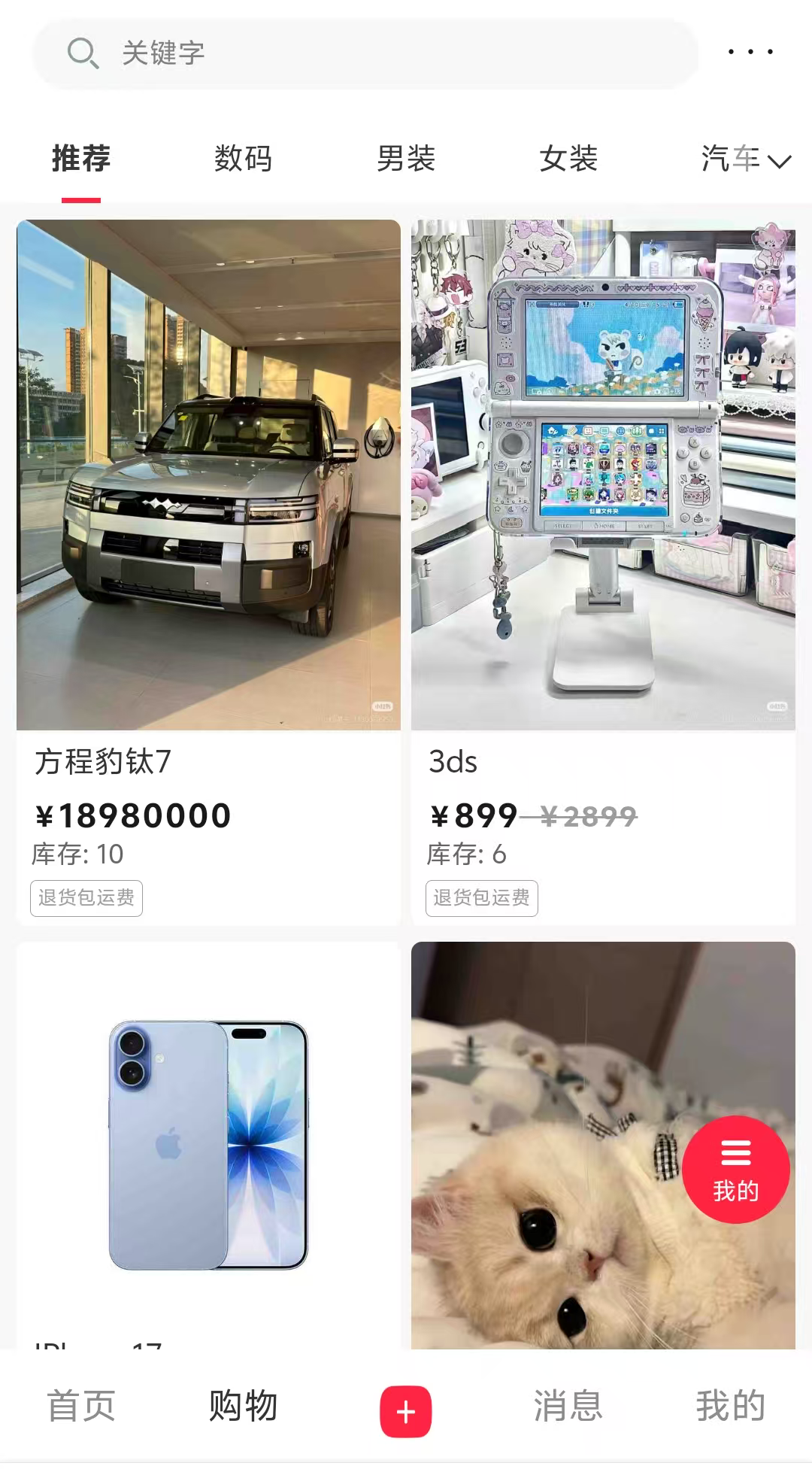
商城模块整体架构设计
业务架构分析
商城模块采用经典的电商业务架构,核心围绕"商品-订单-支付"三大主线展开:
- 商品体系:商品分类 → 商品信息 → 商品展示 → 商品搜索
- 交易体系:购物车 → 订单创建 → 支付结算 → 订单履约
- 服务体系:地址管理 → 物流跟踪 → 售后服务 → 评价反馈
技术架构选型
- 后端服务:SpringBoot + MyBatis-Plus + MySQL
- 管理端:Vue2 + Element-UI + Axios
- 移动端:UniApp + Vue2 + uView-UI
- 数据存储:MySQL(主数据) + Redis(缓存)
核心业务流程实现
1. 商品管理业务流程
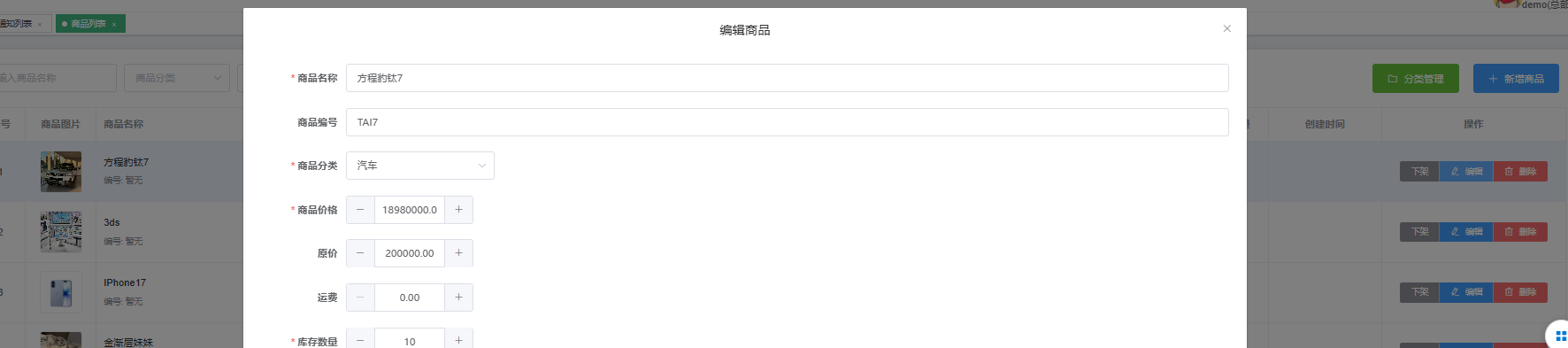
商品管理是商城的基础模块,整个流程包括:商品录入 → 分类管理 → 库存控制 → 价格策略 → 上下架管理
核心实现思路:
- 商品信息采用主表+扩展表设计,支持多规格商品
- 库存管理使用乐观锁机制,防止超卖问题
2. 订单处理业务流程
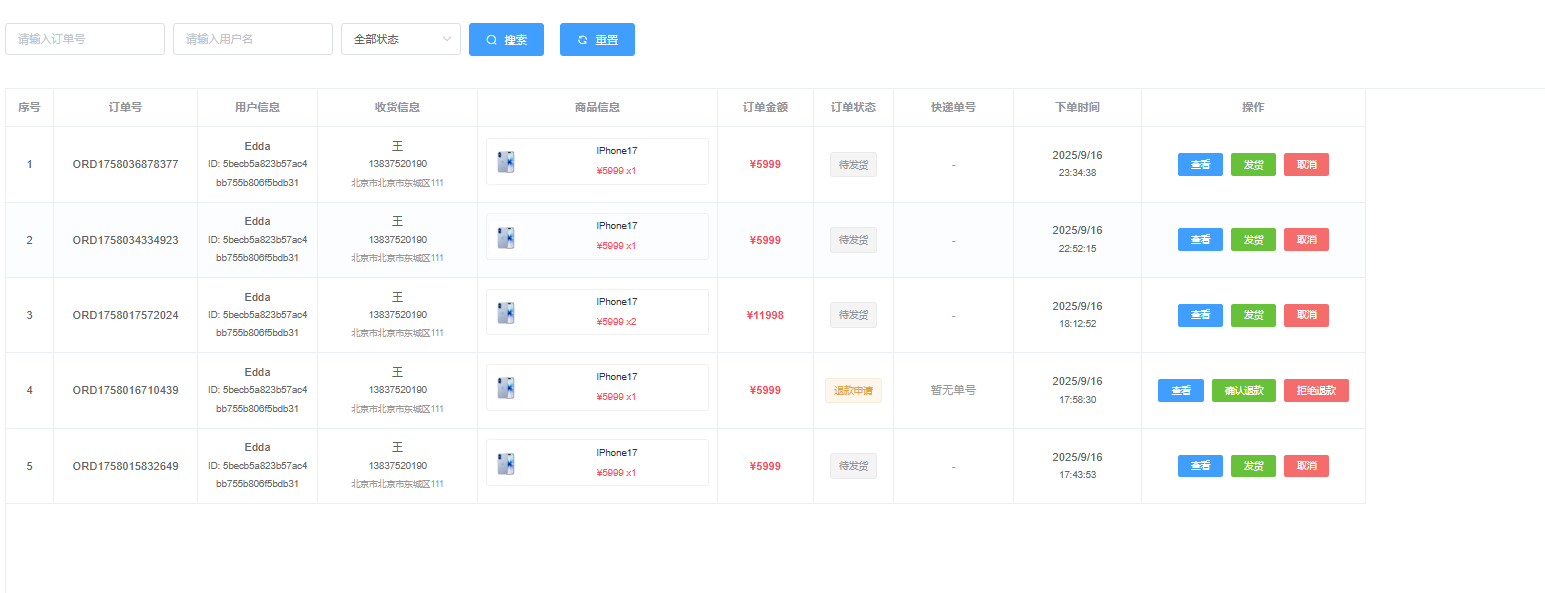
订单系统是电商核心,完整流程:购物车结算 → 订单创建 → 支付处理 → 库存扣减 → 物流发货 → 订单完成
关键业务逻辑:
- 订单创建时进行库存预占,支付成功后正式扣减
- 订单状态机管理,确保状态流转的合理性
- 分布式事务处理,保证订单和库存的数据一致性
3. 购物车交互流程
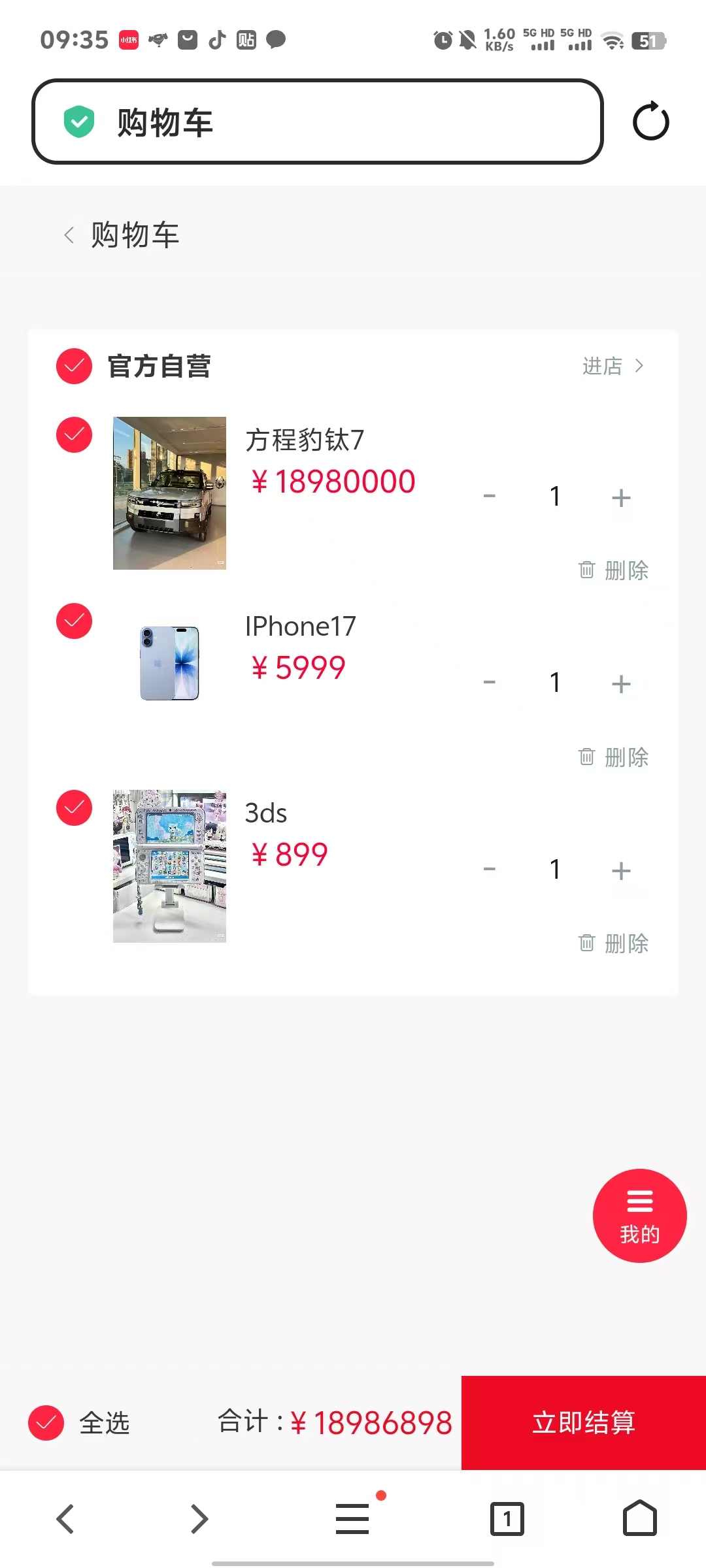
购物车作为用户购买决策的缓冲区,核心流程:商品加购 → 数量调整 → 规格选择 → 批量操作 → 结算下单
技术实现要点:
- 购物车数据存储在Redis中,提高响应速度
- 支持游客购物车和登录用户购物车的数据合并
- 实时校验商品价格和库存变化
4. 支付与钱包系统
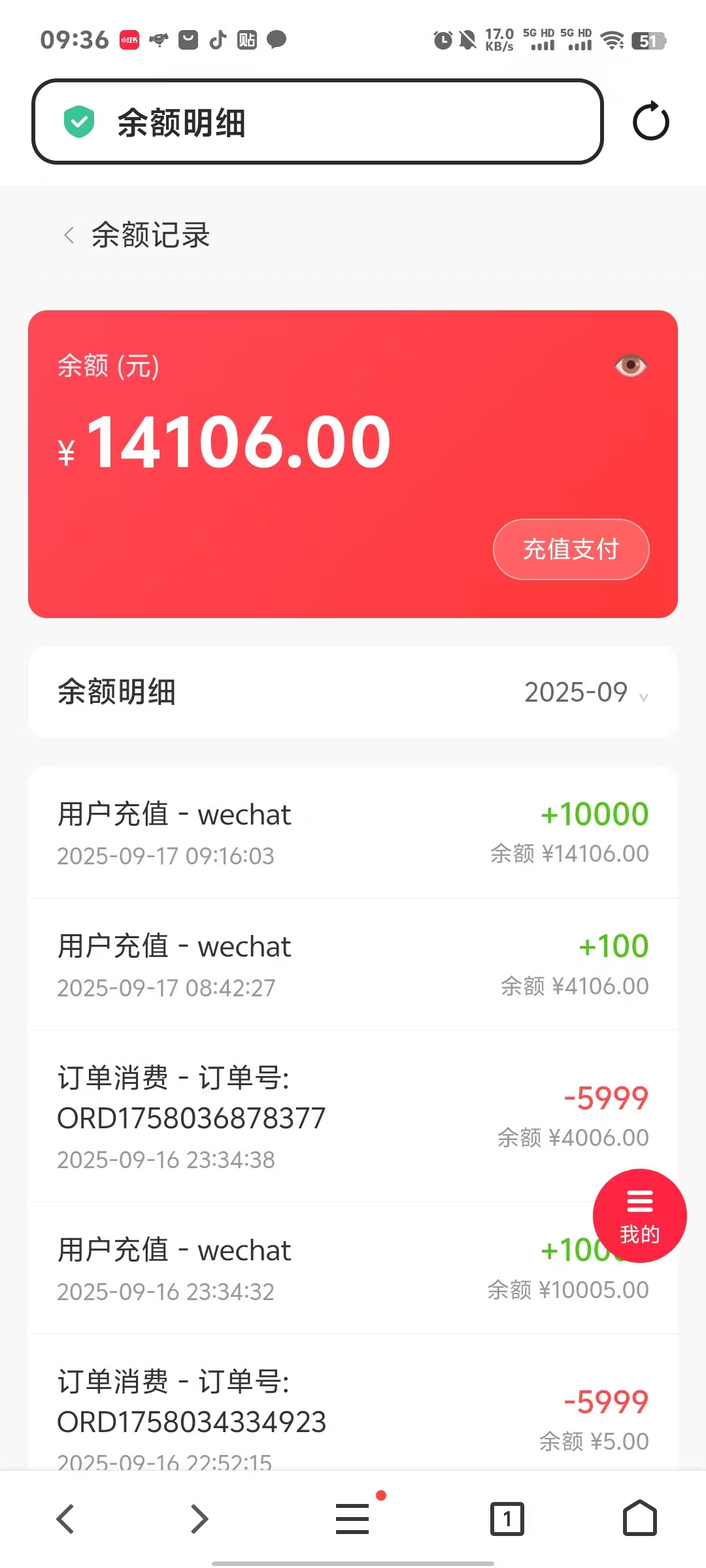
支付系统是商城的资金流转核心,业务流程:支付方式选择 → 支付密码验证 → 余额扣减 → 支付结果通知 → 订单状态更新
核心设计理念:
- 钱包余额采用分布式锁保证并发安全
- 支付流水完整记录,支持对账和退款
- 多种支付方式统一接口,便于扩展
前端交互体验设计
1. 管理端商城管理界面
管理端采用Vue2 + Element-UI构建,主要功能模块:
商品管理页面设计思路:
- 商品列表支持多条件筛选和批量操作
- 商品编辑采用分步骤表单,降低操作复杂度
- 库存预警和销量统计可视化展示
订单管理页面特色:
- 订单状态流转可视化,支持批量状态更新
- 订单详情页集成物流跟踪和客服沟通
- 数据导出功能,支持财务对账
2. 移动端购物体验
移动端使用UniApp开发,兼容微信小程序、H5、APP多端:
商品浏览体验优化:
- 商品列表采用瀑布流布局,支持无限滚动加载
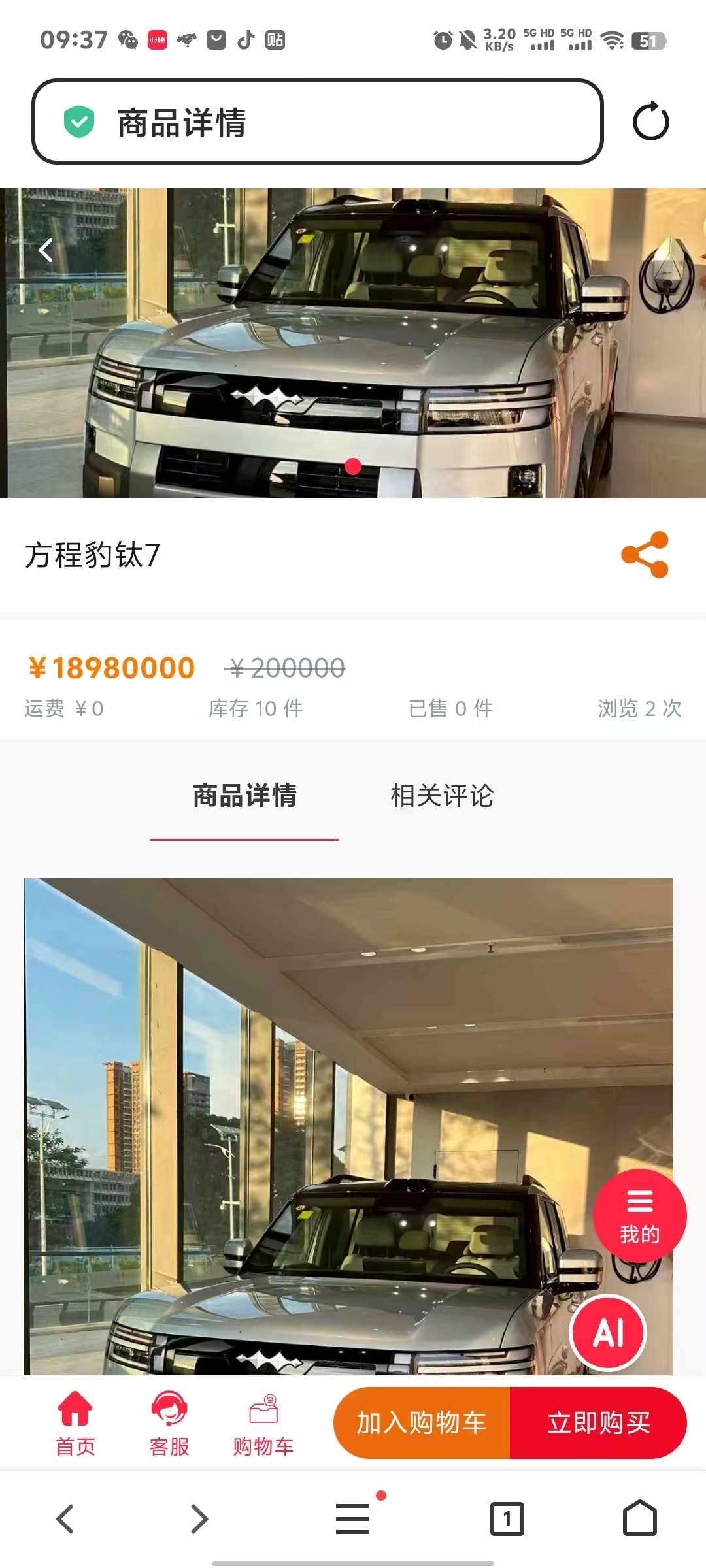
- 商品详情页采用轮播图+详情介绍的经典布局
- 商品搜索支持语音输入和图片搜索
购物流程优化:
- 购物车支持滑动删除和批量选择操作
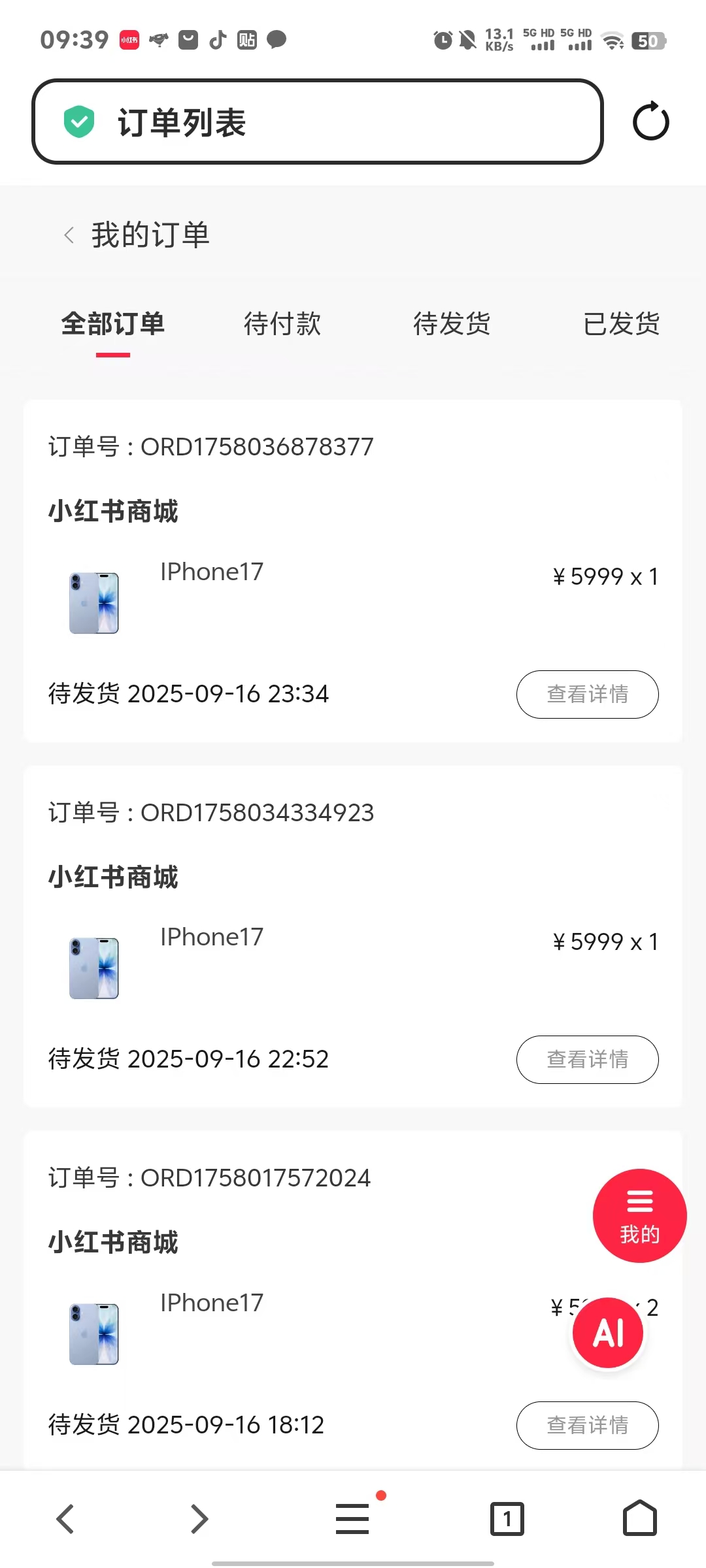
- 订单确认页面智能推荐收货地址和优惠券
- 支付页面支持多种支付方式快速切换
数据库设计要点
核心表结构设计
-- 商品主表设计
CREATE TABLE `product` (
  `id` bigint NOT NULL AUTO_INCREMENT,
  `name` varchar(200) NOT NULL COMMENT '商品名称',
  `category_id` bigint NOT NULL COMMENT '分类ID',
  `price` decimal(10,2) NOT NULL COMMENT '商品价格',
  `stock` int NOT NULL DEFAULT '0' COMMENT '库存数量',
  `status` tinyint NOT NULL DEFAULT '1' COMMENT '商品状态',
  `create_time` datetime NOT NULL DEFAULT CURRENT_TIMESTAMP,
  PRIMARY KEY (`id`),
  KEY `idx_category_id` (`category_id`),
  KEY `idx_status` (`status`)
) COMMENT='商品信息表';

-- 订单主表设计
CREATE TABLE `order_info` (
  `id` bigint NOT NULL AUTO_INCREMENT,
  `order_no` varchar(32) NOT NULL COMMENT '订单号',
  `user_id` bigint NOT NULL COMMENT '用户ID',
  `total_amount` decimal(10,2) NOT NULL COMMENT '订单总金额',
  `status` tinyint NOT NULL DEFAULT '1' COMMENT '订单状态',
  `create_time` datetime NOT NULL DEFAULT CURRENT_TIMESTAMP,
  PRIMARY KEY (`id`),
  UNIQUE KEY `uk_order_no` (`order_no`),
  KEY `idx_user_id` (`user_id`)
) COMMENT='订单信息表';
总结
通过本章的学习,我们完成了小红书商城模块的完整实现,主要包括:
技术收获
- 后端架构设计:掌握了电商系统的核心业务架构,包括商品管理、订单处理、支付结算等关键流程
- 数据库设计:学会了电商系统的数据库表结构设计,理解了订单、商品、用户等实体间的关系
- 业务流程优化:深入理解了购物车、订单状态机、库存管理等复杂业务逻辑的实现方案
- 前端交互设计:掌握了管理端和移动端的界面设计思路,提升了用户体验
业务价值
- 商业闭环:为小红书平台增加了变现能力,实现了内容+电商的完整闭环
- 用户体验:提供了完整的购物体验,从商品浏览到支付完成的全流程优化
- 运营支撑:管理端提供了完善的商城运营工具,支持商品管理、订单处理、数据分析等功能
扩展思考
- 营销系统:可以进一步扩展优惠券、拼团、秒杀等营销功能
- 推荐算法:结合用户行为数据,实现个性化商品推荐
- 数据分析:构建商城数据看板,支持销售分析和用户画像
商城模块的成功实现,标志着小红书平台从单纯的内容社区向商业化平台的重要转型。这不仅为用户提供了更丰富的购物体验,也为平台的可持续发展奠定了坚实基础。
2. 管理端界面开发
使用Vue.js和Element UI开发管理端界面,提供直观的商品、订单、评价管理功能。
商品管理页面
<!-- ProductManagement.vue -->
<template>
  <div class="product-management">
    <el-card>
      <div slot="header">
        <span>商品管理</span>
        <el-button style="float: right;" type="primary" @click="showAddDialog">添加商品</el-button>
      </div>

      <!-- 搜索区域 -->
      <el-form :inline="true" :model="searchForm" class="search-form">
        <el-form-item label="商品名称">
          <el-input v-model="searchForm.name" placeholder="请输入商品名称"></el-input>
        </el-form-item>
        <el-form-item label="商品分类">
          <el-select v-model="searchForm.categoryId" placeholder="请选择分类">
            <el-option v-for="category in categories" :key="category.id"
                      :label="category.name" :value="category.id"></el-option>
          </el-select>
        </el-form-item>
        <el-form-item>
          <el-button type="primary" @click="searchProducts">搜索</el-button>
          <el-button @click="resetSearch">重置</el-button>
        </el-form-item>
      </el-form>

      <!-- 商品列表 -->
      <el-table :data="productList" style="width: 100%">
        <el-table-column prop="name" label="商品名称"></el-table-column>
        <el-table-column prop="categoryName" label="分类"></el-table-column>
        <el-table-column prop="price" label="价格">
          <template slot-scope="scope">
            ¥{{ scope.row.price }}
          </template>
        </el-table-column>
        <el-table-column prop="stock" label="库存"></el-table-column>
        <el-table-column prop="status" label="状态">
          <template slot-scope="scope">
            <el-tag :type="scope.row.status === 1 ? 'success' : 'danger'">
              {{ scope.row.status === 1 ? '上架' : '下架' }}
            </el-tag>
          </template>
        </el-table-column>
        <el-table-column label="操作" width="200">
          <template slot-scope="scope">
            <el-button size="mini" @click="editProduct(scope.row)">编辑</el-button>
            <el-button size="mini" type="danger" @click="deleteProduct(scope.row.id)">删除</el-button>
          </template>
        </el-table-column>
      </el-table>

      <!-- 分页 -->
      <el-pagination
        @size-change="handleSizeChange"
        @current-change="handleCurrentChange"
        :current-page="pagination.current"
        :page-sizes="[10, 20, 50, 100]"
        :page-size="pagination.size"
        layout="total, sizes, prev, pager, next, jumper"
        :total="pagination.total">
      </el-pagination>
    </el-card>
  </div>
</template>

<script>
export default {
  name: 'ProductManagement',
  data() {
    return {
      searchForm: {
        name: '',
        categoryId: ''
      },
      productList: [],
      categories: [],
      pagination: {
        current: 1,
        size: 10,
        total: 0
      }
    }
  },
  mounted() {
    this.loadCategories()
    this.loadProducts()
  },
  methods: {
    async loadProducts() {
      try {
        const params = {
          ...this.searchForm,
          current: this.pagination.current,
          size: this.pagination.size
        }
        const response = await this.$api.product.getList(params)
        this.productList = response.data.records
        this.pagination.total = response.data.total
      } catch (error) {
        this.$message.error('加载商品列表失败')
      }
    },

    async loadCategories() {
      try {
        const response = await this.$api.category.getList()
        this.categories = response.data
      } catch (error) {
        this.$message.error('加载分类失败')
      }
    },

    searchProducts() {
      this.pagination.current = 1
      this.loadProducts()
    },

    resetSearch() {
      this.searchForm = {
        name: '',
        categoryId: ''
      }
      this.searchProducts()
    }
  }
}
</script>
订单管理页面
<!-- OrderManagement.vue -->
<template>
  <div class="order-management">
    <el-card>
      <div slot="header">
        <span>订单管理</span>
      </div>

      <!-- 订单状态筛选 -->
      <el-tabs v-model="activeTab" @tab-click="handleTabClick">
        <el-tab-pane label="全部订单" name="all"></el-tab-pane>
        <el-tab-pane label="待发货" name="pending"></el-tab-pane>
        <el-tab-pane label="已发货" name="shipped"></el-tab-pane>
        <el-tab-pane label="已完成" name="completed"></el-tab-pane>
        <el-tab-pane label="退款中" name="refunding"></el-tab-pane>
      </el-tabs>

      <!-- 订单列表 -->
      <el-table :data="orderList" style="width: 100%">
        <el-table-column prop="orderNo" label="订单号"></el-table-column>
        <el-table-column prop="userName" label="用户"></el-table-column>
        <el-table-column prop="totalAmount" label="订单金额">
          <template slot-scope="scope">
            ¥{{ scope.row.totalAmount }}
          </template>
        </el-table-column>
        <el-table-column prop="status" label="订单状态">
          <template slot-scope="scope">
            <el-tag :type="getStatusType(scope.row.status)">
              {{ getStatusText(scope.row.status) }}
            </el-tag>
          </template>
        </el-table-column>
        <el-table-column prop="createTime" label="下单时间"></el-table-column>
        <el-table-column label="操作" width="200">
          <template slot-scope="scope">
            <el-button size="mini" @click="viewOrder(scope.row)">查看</el-button>
            <el-button v-if="scope.row.status === 'PAID'"
                      size="mini" type="primary"
                      @click="shipOrder(scope.row)">发货</el-button>
            <el-button v-if="scope.row.status === 'REFUNDING'"
                      size="mini" type="warning"
                      @click="processRefund(scope.row)">处理退款</el-button>
          </template>
        </el-table-column>
      </el-table>
    </el-card>
  </div>
</template>

<script>
export default {
  name: 'OrderManagement',
  data() {
    return {
      activeTab: 'all',
      orderList: [],
      pagination: {
        current: 1,
        size: 10,
        total: 0
      }
    }
  },
  mounted() {
    this.loadOrders()
  },
  methods: {
    async loadOrders() {
      try {
        const params = {
          status: this.activeTab === 'all' ? '' : this.activeTab,
          current: this.pagination.current,
          size: this.pagination.size
        }
        const response = await this.$api.order.getList(params)
        this.orderList = response.data.records
        this.pagination.total = response.data.total
      } catch (error) {
        this.$message.error('加载订单列表失败')
      }
    },

    handleTabClick(tab) {
      this.activeTab = tab.name
      this.pagination.current = 1
      this.loadOrders()
    },

    async shipOrder(order) {
      this.$prompt('请输入快递单号', '订单发货', {
        confirmButtonText: '确定',
        cancelButtonText: '取消'
      }).then(async ({ value }) => {
        try {
          await this.$api.order.ship(order.id, { trackingNumber: value })
          this.$message.success('发货成功')
          this.loadOrders()
        } catch (error) {
          this.$message.error('发货失败')
        }
      })
    }
  }
}
</script>
3. 移动端购物体验
使用UniApp开发移动端购物功能,提供流畅的购物体验。
商品列表页面
<!-- shopping.vue -->
<template>
  <view class="shopping-container">
    <!-- 搜索栏 -->
    <view class="search-bar">
      <uni-search-bar
        v-model="searchKeyword"
        placeholder="搜索商品"
        @confirm="searchProducts">
      </uni-search-bar>
    </view>

    <!-- 分类筛选 -->
    <scroll-view class="category-scroll" scroll-x="true">
      <view class="category-item"
            :class="{ active: selectedCategory === 0 }"
            @click="selectCategory(0)">
        全部
      </view>
      <view class="category-item"
            v-for="category in categories"
            :key="category.id"
            :class="{ active: selectedCategory === category.id }"
            @click="selectCategory(category.id)">
        {{ category.name }}
      </view>
    </scroll-view>

    <!-- 商品瀑布流 -->
    <view class="product-waterfall">
      <view class="product-column" v-for="(column, index) in productColumns" :key="index">
        <view class="product-item"
              v-for="product in column"
              :key="product.id"
              @click="goToProductDetail(product.id)">
          <image class="product-image" :src="product.mainImage" mode="aspectFill"></image>
          <view class="product-info">
            <text class="product-name">{{ product.name }}</text>
            <view class="price-row">
              <text class="current-price">¥{{ product.price }}</text>
              <text class="original-price" v-if="product.originalPrice">¥{{ product.originalPrice }}</text>
            </view>
            <view class="product-stats">
              <text class="sales">已售{{ product.sales }}</text>
              <text class="rating">{{ product.rating }}分</text>
            </view>
          </view>
        </view>
      </view>
    </view>

    <!-- 加载更多 -->
    <uni-load-more :status="loadStatus" @clickLoadMore="loadMore"></uni-load-more>
  </view>
</template>

<script>
export default {
  data() {
    return {
      searchKeyword: '',
      selectedCategory: 0,
      categories: [],
      productList: [],
      productColumns: [[], []],
      pagination: {
        current: 1,
        size: 20,
        total: 0
      },
      loadStatus: 'more'
    }
  },

  onLoad() {
    this.loadCategories()
    this.loadProducts()
  },

  methods: {
    async loadCategories() {
      try {
        const response = await this.$api.category.getList()
        this.categories = response.data
      } catch (error) {
        uni.showToast({ title: '加载分类失败', icon: 'none' })
      }
    },

    async loadProducts(isRefresh = false) {
      if (isRefresh) {
        this.pagination.current = 1
        this.productList = []
        this.productColumns = [[], []]
      }

      this.loadStatus = 'loading'

      try {
        const params = {
          keyword: this.searchKeyword,
          categoryId: this.selectedCategory || undefined,
          current: this.pagination.current,
          size: this.pagination.size
        }

        const response = await this.$api.product.getList(params)
        const newProducts = response.data.records

        this.productList = [...this.productList, ...newProducts]
        this.pagination.total = response.data.total

        // 瀑布流布局
        this.layoutProducts(newProducts)

        if (this.productList.length >= this.pagination.total) {
          this.loadStatus = 'noMore'
        } else {
          this.loadStatus = 'more'
        }
      } catch (error) {
        this.loadStatus = 'more'
        uni.showToast({ title: '加载商品失败', icon: 'none' })
      }
    },

    layoutProducts(products) {
      products.forEach(product => {
        // 简单的瀑布流算法,将商品分配到较短的列
        const leftHeight = this.getColumnHeight(0)
        const rightHeight = this.getColumnHeight(1)

        if (leftHeight <= rightHeight) {
          this.productColumns[0].push(product)
        } else {
          this.productColumns[1].push(product)
        }
      })
    },

    getColumnHeight(columnIndex) {
      // 计算列的高度(简化版本)
      return this.productColumns[columnIndex].length * 300
    },

    selectCategory(categoryId) {
      this.selectedCategory = categoryId
      this.loadProducts(true)
    },

    searchProducts() {
      this.loadProducts(true)
    },

    loadMore() {
      if (this.loadStatus === 'more') {
        this.pagination.current++
        this.loadProducts()
      }
    },

    goToProductDetail(productId) {
      uni.navigateTo({
        url: `/pages/product/detail?id=${productId}`
      })
    }
  }
}
</script>

<style lang="scss" scoped>
.shopping-container {
  background-color: #f5f5f5;
  min-height: 100vh;
}

.search-bar {
  background-color: #fff;
  padding: 20rpx;
}

.category-scroll {
  background-color: #fff;
  white-space: nowrap;
  padding: 20rpx 0;

  .category-item {
    display: inline-block;
    padding: 10rpx 30rpx;
    margin: 0 20rpx;
    border-radius: 30rpx;
    background-color: #f0f0f0;
    color: #666;

    &.active {
      background-color: #ff6b6b;
      color: #fff;
    }
  }
}

.product-waterfall {
  display: flex;
  padding: 20rpx;
  gap: 20rpx;

  .product-column {
    flex: 1;
  }

  .product-item {
    background-color: #fff;
    border-radius: 20rpx;
    margin-bottom: 20rpx;
    overflow: hidden;

    .product-image {
      width: 100%;
      height: 400rpx;
    }

    .product-info {
      padding: 20rpx;

      .product-name {
        font-size: 28rpx;
        color: #333;
        display: -webkit-box;
        -webkit-line-clamp: 2;
        -webkit-box-orient: vertical;
        overflow: hidden;
      }

      .price-row {
        margin-top: 10rpx;

        .current-price {
          font-size: 32rpx;
          color: #ff6b6b;
          font-weight: bold;
        }

        .original-price {
          font-size: 24rpx;
          color: #999;
          text-decoration: line-through;
          margin-left: 10rpx;
        }
      }

      .product-stats {
        margin-top: 10rpx;
        display: flex;
        justify-content: space-between;

        .sales, .rating {
          font-size: 24rpx;
          color: #999;
        }
      }
    }
  }
}
</style>
购物车页面
<!-- cart.vue -->
<template>
  <view class="cart-container">
    <view class="cart-header">
      <text class="title">购物车</text>
      <text class="edit-btn" @click="toggleEditMode">{{ isEditMode ? '完成' : '编辑' }}</text>
    </view>

    <view class="cart-list" v-if="cartItems.length > 0">
      <view class="cart-item" v-for="item in cartItems" :key="item.id">
        <view class="item-checkbox">
          <uni-icons
            :type="item.selected ? 'checkbox-filled' : 'checkbox'"
            :color="item.selected ? '#ff6b6b' : '#ccc'"
            size="20"
            @click="toggleItemSelect(item)">
          </uni-icons>
        </view>

        <image class="item-image" :src="item.product.mainImage" mode="aspectFill"></image>

        <view class="item-info">
          <text class="item-name">{{ item.product.name }}</text>
          <text class="item-spec" v-if="item.spec">{{ item.spec }}</text>
          <view class="item-price-row">
            <text class="item-price">¥{{ item.product.price }}</text>
            <view class="quantity-control" v-if="!isEditMode">
              <uni-icons type="minus" size="16" @click="decreaseQuantity(item)"></uni-icons>
              <text class="quantity">{{ item.quantity }}</text>
              <uni-icons type="plus" size="16" @click="increaseQuantity(item)"></uni-icons>
            </view>
            <view class="delete-btn" v-if="isEditMode" @click="removeItem(item)">
              <uni-icons type="trash" size="16" color="#ff4757"></uni-icons>
            </view>
          </view>
        </view>
      </view>
    </view>

    <view class="empty-cart" v-else>
      <image src="/static/images/empty-cart.png" class="empty-image"></image>
      <text class="empty-text">购物车空空如也</text>
      <button class="go-shopping-btn" @click="goShopping">去逛逛</button>
    </view>

    <view class="cart-footer" v-if="cartItems.length > 0">
      <view class="select-all">
        <uni-icons
          :type="isAllSelected ? 'checkbox-filled' : 'checkbox'"
          :color="isAllSelected ? '#ff6b6b' : '#ccc'"
          size="20"
          @click="toggleSelectAll">
        </uni-icons>
        <text class="select-all-text">全选</text>
      </view>

      <view class="total-info">
        <text class="total-text">合计:</text>
        <text class="total-price">¥{{ totalPrice }}</text>
      </view>

      <button class="checkout-btn"
              :disabled="selectedItems.length === 0"
              @click="goCheckout">
        结算({{ selectedItems.length }})
      </button>
    </view>
  </view>
</template>

<script>
export default {
  data() {
    return {
      cartItems: [],
      isEditMode: false
    }
  },

  computed: {
    selectedItems() {
      return this.cartItems.filter(item => item.selected)
    },

    isAllSelected() {
      return this.cartItems.length > 0 && this.cartItems.every(item => item.selected)
    },

    totalPrice() {
      return this.selectedItems.reduce((total, item) => {
        return total + (item.product.price * item.quantity)
      }, 0).toFixed(2)
    }
  },

  onShow() {
    this.loadCartItems()
  },

  methods: {
    async loadCartItems() {
      try {
        const response = await this.$api.cart.getList()
        this.cartItems = response.data.map(item => ({
          ...item,
          selected: false
        }))
      } catch (error) {
        uni.showToast({ title: '加载购物车失败', icon: 'none' })
      }
    },

    toggleEditMode() {
      this.isEditMode = !this.isEditMode
    },

    toggleItemSelect(item) {
      item.selected = !item.selected
    },

    toggleSelectAll() {
      const selectAll = !this.isAllSelected
      this.cartItems.forEach(item => {
        item.selected = selectAll
      })
    },

    async increaseQuantity(item) {
      try {
        await this.$api.cart.updateQuantity(item.id, item.quantity + 1)
        item.quantity++
      } catch (error) {
        uni.showToast({ title: '更新失败', icon: 'none' })
      }
    },

    async decreaseQuantity(item) {
      if (item.quantity <= 1) return

      try {
        await this.$api.cart.updateQuantity(item.id, item.quantity - 1)
        item.quantity--
      } catch (error) {
        uni.showToast({ title: '更新失败', icon: 'none' })
      }
    },

    async removeItem(item) {
      uni.showModal({
        title: '确认删除',
        content: '确定要删除这个商品吗?',
        success: async (res) => {
          if (res.confirm) {
            try {
              await this.$api.cart.remove(item.id)
              const index = this.cartItems.findIndex(i => i.id === item.id)
              this.cartItems.splice(index, 1)
              uni.showToast({ title: '删除成功', icon: 'success' })
            } catch (error) {
              uni.showToast({ title: '删除失败', icon: 'none' })
            }
          }
        }
      })
    },

    goShopping() {
      uni.switchTab({
        url: '/pages/switchPages/shopping'
      })
    },

    goCheckout() {
      if (this.selectedItems.length === 0) {
        uni.showToast({ title: '请选择要结算的商品', icon: 'none' })
        return
      }

      const selectedIds = this.selectedItems.map(item => item.id)
      uni.navigateTo({
        url: `/pages/order/checkout?cartIds=${selectedIds.join(',')}`
      })
    }
  }
}
</script>
总结
通过本章的学习,我们成功实现了一个功能完整的商城模块,包括:
- 后端API系统:实现了商品管理、订单处理、购物车、地址管理、评价系统和用户钱包等核心功能
- 管理端界面:提供了直观易用的商品、订单、评价管理界面,支持完整的电商运营流程
- 移动端购物体验:实现了商品浏览、购物车、下单支付、订单管理等完整的购物流程
整个商城系统采用了现代化的技术架构,具有良好的扩展性和维护性。通过合理的模块划分和接口设计,为后续的功能扩展奠定了坚实的基础。
在下一章中,我们将继续完善系统的其他功能模块,进一步提升用户体验和系统性能。
更多推荐
 23
23 0
0- 0


 已为社区贡献1条内容

所有评论(0)