
【vue】vue中的 v-bind=“$attrs“和v-on=“$listeners“:
一、vue2中的$attrs和$listeners
1、什么是$attrs
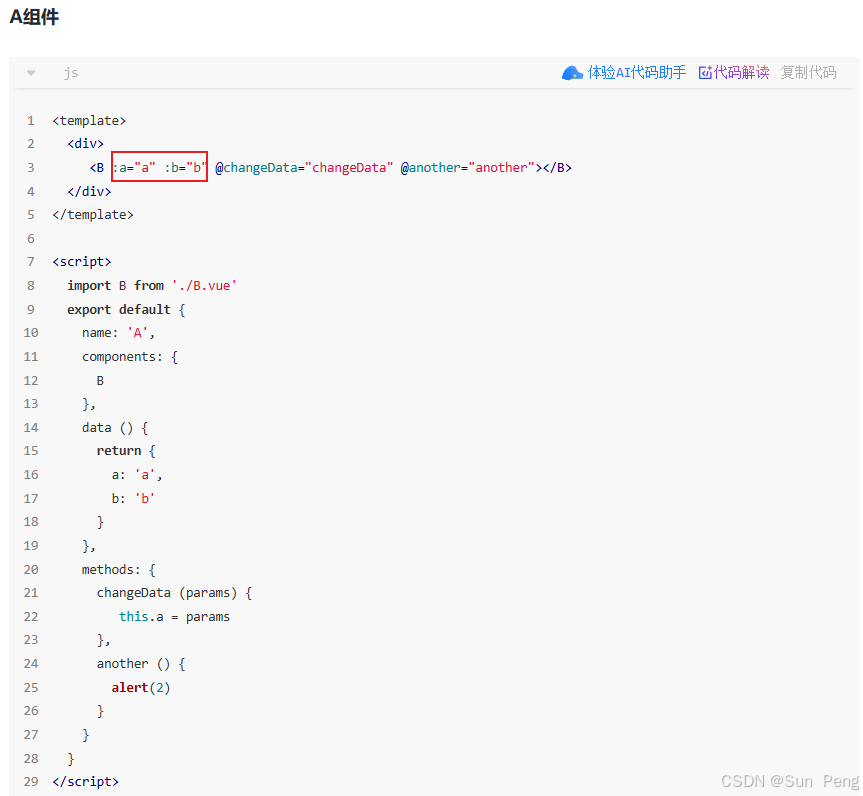
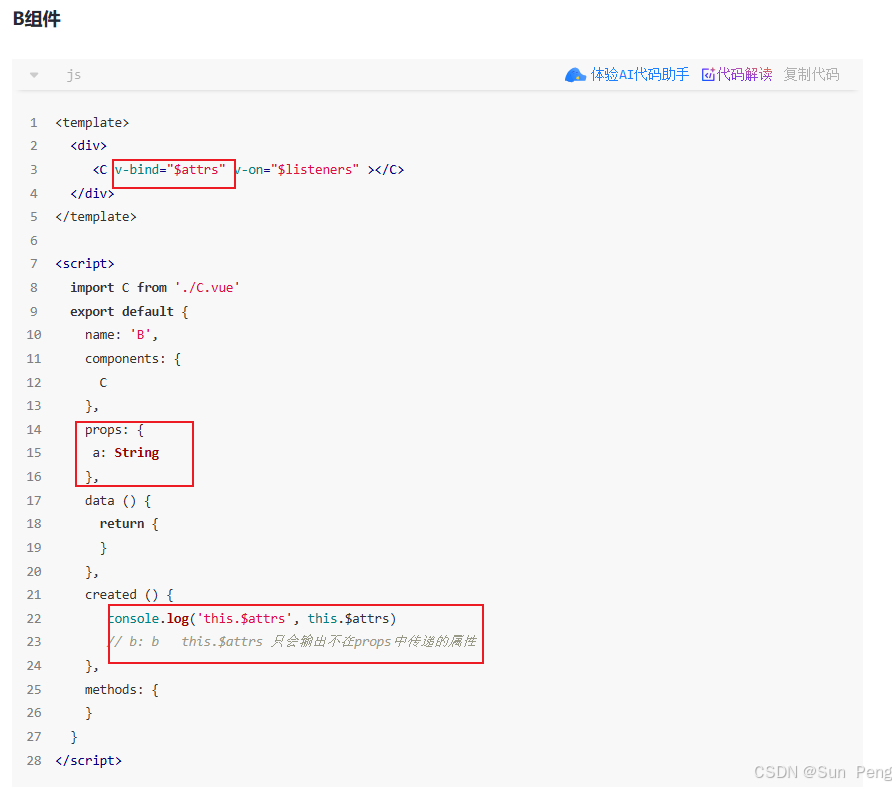
$attrs 是 Vue 实例上的一个对象,包含了父组件传递给子组件的
所有非 props 属性(即没有在 props 中声明的属性)。它包括了所有的 HTML 属性、自定义属性以及事件监听器(不包括 class 和 style,它们有专门的处理方式)。
2、$attrs使用场景
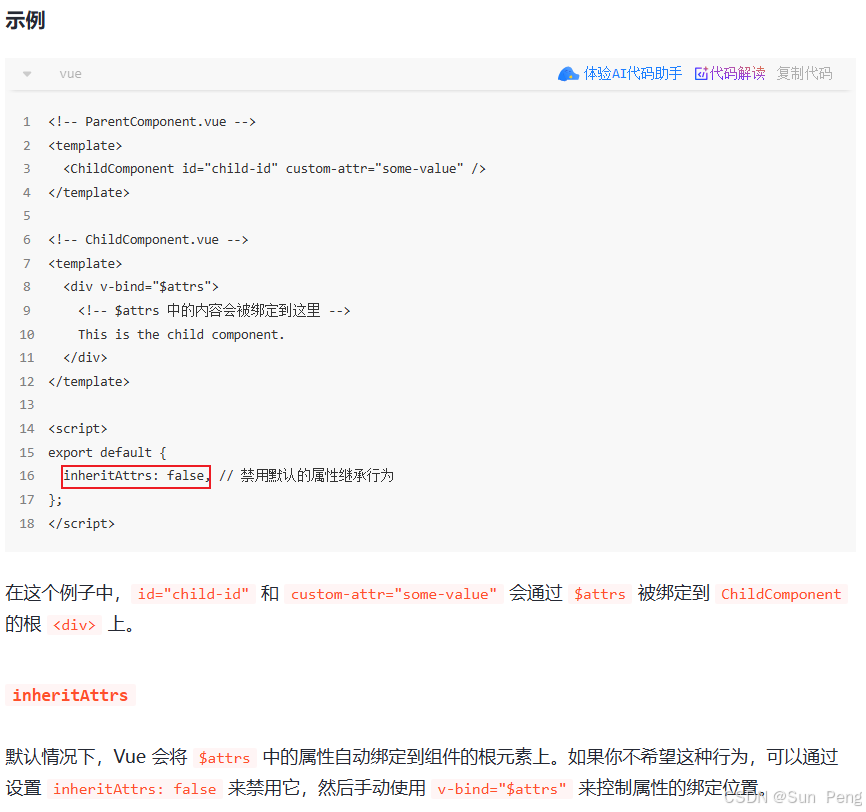
当你希望将父组件传递的属性自动绑定到子组件内部的某个元素上时,可以使用 v-bind=“$attrs”。这在创建高阶组件或封装组件时非常有用。
3、什么是$listeners
$listeners 是 Vue 实例上的一个对象,包含了父组件传递给子组件的所有事件监听器(即通过 v-on 绑定的事件)。它是一个对象,键是事件名称,值是对应的事件处理函数。
4、$listeners使用场景
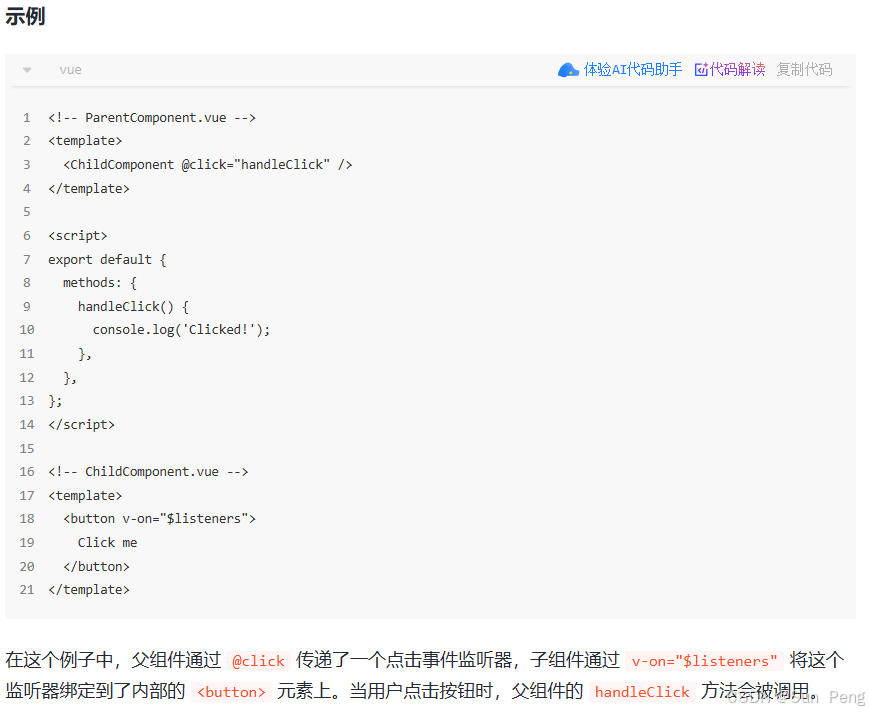
当你希望将父组件传递的事件监听器自动绑定到子组件内部的某个元素上时,可以使用 v-on=“$listeners”。这在封装组件时非常有用,尤其是当你希望子组件能够透明地传递事件给内部的 DOM 元素时。
v-on="$listeners 可在html上直接触发, 也可在js中调用触发
二、vue 3中的$attrs
在 Vue 3 中,
$listeners 已经被废弃,取而代之的是$attrs 包含了所有的属性和事件监听器。因此,在 Vue 3 中,你可以直接使用 v-bind=“ a t t r s " 来同时绑定属性和事件监听器。在 V u e 3 中, v − b i n d = " attrs" 来同时绑定属性和事件监听器。 在 Vue 3 中,v-bind=" attrs"来同时绑定属性和事件监听器。在Vue3中,v−bind="attrs” 是一个非常重要的特性,它用于处理组件间的属性透传。让我详细解释它的含义和用法:
1、使用场景详解
场景 1:创建高阶组件(属性透传)
<!-- Parent.vue -->
<template>
  <ChildComponent
    title="父组件标题"
    data-id="123"
    @custom-event="handleEvent"
    class="parent-class"
  />
</template>

<!-- ChildComponent.vue -->
<template>
  <div>
    <!-- 将未声明的属性透传给孙子组件 -->
    <GrandChild v-bind="$attrs" />
  </div>
</template>

<script setup>
// 只声明了 title 作为 prop
defineProps(['title'])
</script>

<!-- GrandChild.vue -->
<template>
  <div>
    <!-- 将接收到的属性绑定到根元素 -->
    <div v-bind="$attrs">孙子组件</div>
  </div>
</template>
结果:
1、title 被 ChildComponent 作为 prop 接收
2、data-id 和 @custom-event 透传到 GrandChild
3、GrandChild 的根元素会获得:data-id=“123” 和 custom-event 监听器
场景 2:禁用默认继承
<script setup>
defineOptions({
  inheritAttrs: false // 禁用默认的属性继承
})
</script>

<template>
  <div class="wrapper">
    <!-- 手动控制属性绑定位置 -->
    <input v-bind="$attrs" />
  </div>
</template>
默认情况下,未声明的属性会自动绑定到根元素
设置 inheritAttrs: false 后,可以通过 v-bind=“$attrs” 手动指定绑定位置
2、Vue 3 中的变化(对比 Vue 2)
| 特性 | Vue 2 | Vue 3 |
|---|---|---|
| 包含内容 | 普通属性 | 属性 + 事件监听器 |
| class/style | 不包含在 $attrs 中 | 包含在 $attrs 中 |
| 事件监听器 | 在 $listeners 中 | 合并到 $attrs 中 |
| 透传方式 | 需要同时绑定 $attrs 和 $listeners | 只需绑定 $attrs |
3、实际应用技巧
1. 组合式 API 中使用
<script setup>
import { useAttrs } from 'vue'

const attrs = useAttrs()
console.log(attrs) // 包含所有未声明属性
</script>
2. 过滤特定属性
<template>
  <div>
    <input v-bind="filteredAttrs">
  </div>
</template>

<script setup>
import { computed, useAttrs } from 'vue'

const attrs = useAttrs()

const filteredAttrs = computed(() => {
  const { class: _, style: __, ...rest } = attrs
  return rest
})
</script>
3. 多层透传
<!-- 中间层组件 -->
<template>
  <ThirdPartyComponent v-bind="$attrs" />
</template>
这样可以将父组件的属性直接透传给第三方组件,无需在中间组件中声明
4、注意事项
事件监听器:在 Vue 3 中,事件监听器会作为 onXxx 属性出现在 $attrs 中
// $attrs 内容示例
{
  "data-id": "123",
  "onCustomEvent": () => {} // 事件监听器
}
与 class/style 的分离:
<Child class="parent-class" style="color:red" />

<!-- 子组件中 -->
<div :class="$attrs.class" :style="$attrs.style">
  <!-- 其他内容 -->
</div>
但更好的做法是直接使用 class 和 style 绑定
优先级:手动绑定的属性会覆盖 $attrs 中的同名属性
<input v-bind="$attrs" placeholder="默认">
<!-- 如果 $attrs 中有 placeholder,会被覆盖为 "默认" -->
5、为什么需要这个特性
1、创建通用组件:当构建可复用的基础组件(如按钮、输入框)时
2、减少 props 声明:避免在中间组件中声明大量不必要的 props
3、与第三方库集成:将 Vue 组件作为原生 HTML 元素的包装器
4、保持组件接口灵活:允许父组件传递任意属性
总结
v-bind=“$attrs” 是 Vue 组件通信的重要机制,它:
1、实现属性自动透传
2、配合 inheritAttrs: false 可精确控制属性绑定位置
3、在 Vue 3 中统一处理属性和事件
4、特别适合创建高阶组件和通用基础组件
合理使用这个特性可以大幅提高组件的可复用性和灵活性,减少不必要的 props 声明,保持组件接口的简洁性。
6、vue3多层属性透传:
多层属性透传是 Vue 3 中强大的组件通信机制:
1、使用 v-bind=“$attrs” 传递未声明属性
2、通过 inheritAttrs: false 精确控制绑定位置
3、事件监听器自动包含在透传中
4、适合创建可复用组件和高阶组件
5、避免在中间组件中声明不必要的 props
合理使用多层透传可以:
1、简化组件接口
2、提高组件复用性
3、减少不必要的 props 声明
4、保持组件层级间的解耦
更多推荐
 19
19 0
0- 0


 已为社区贡献1条内容

所有评论(0)