
Vue3 Element-Plus el-table 表格 自定义列增强版(可拖拽更换位置 + 可操作固定列) - 附完整示例
·
Element Plus
基于 Vue 3,面向设计师和开发者的组件库
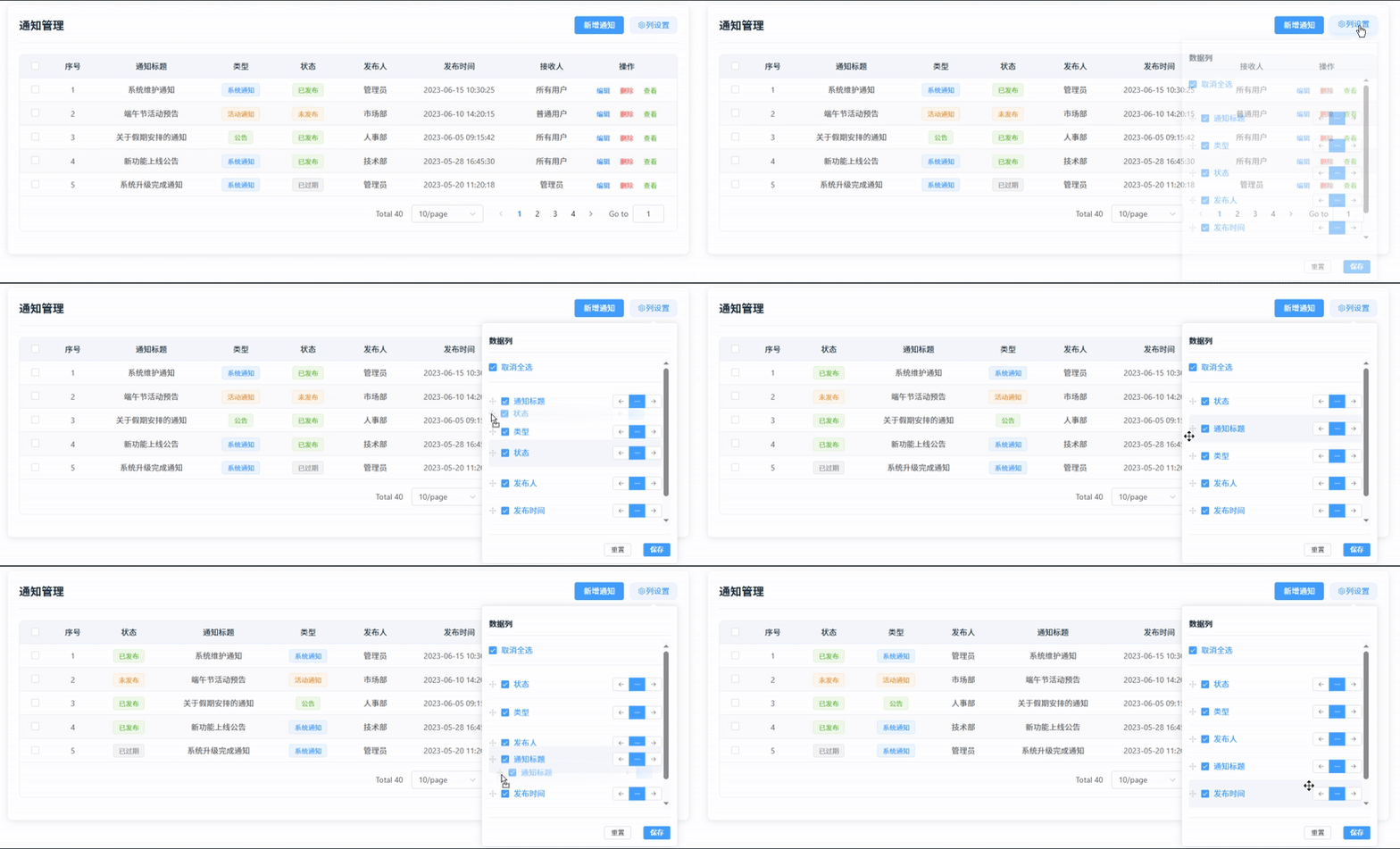
效果
目录
2、子组件(SetCol.vue)单页面导入并使用vuedraggable(包括是否固定列的相关处理)
3、父组件(TableCustomCol.vue)引用并使用子组件(SetCol.vue)
一、介绍
1、官方文档
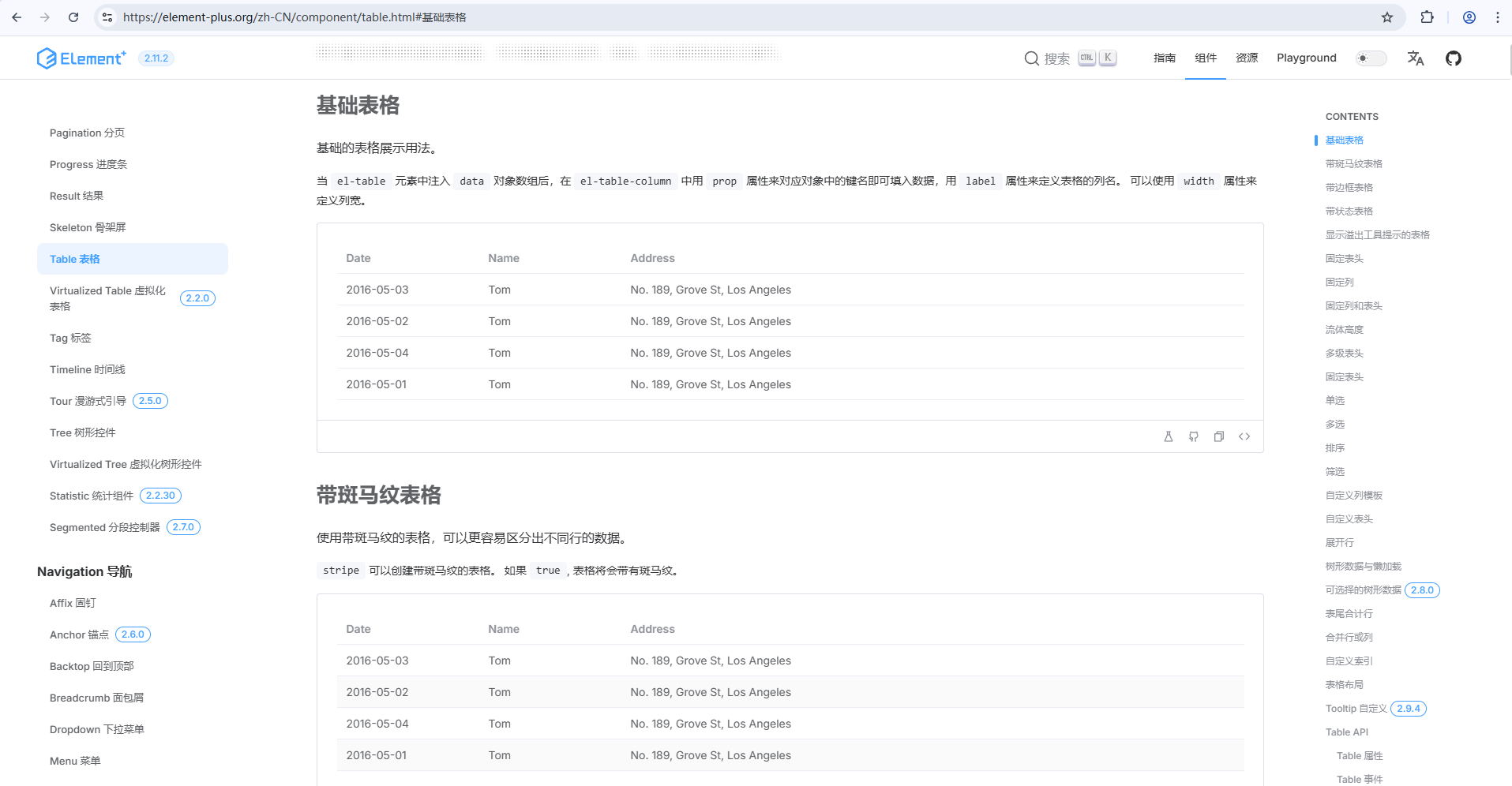
2、官方示例
二、准备工作
1、安装依赖包
1)element-plus
# NPM
$ npm install element-plus --save

# Yarn
$ yarn add element-plus

# pnpm
$ pnpm install element-plus
2) vuedraggable
npm install vuedraggable --save3)sass
npm install sass --save2、示例版本
"element-plus": "^2.4.4",
"vuedraggable": "^4.1.0",
"sass": "^1.69.5",
三、使用步骤
1、element-plus自动导入
首先你需要安装unplugin-vue-components 和 unplugin-auto-import这两款插件
npm install -D unplugin-vue-components unplugin-auto-import然后把下列代码插入到你的 Vite 或 Webpack 的配置文件中
Vite
// vite.config.ts
import { defineConfig } from 'vite'
import AutoImport from 'unplugin-auto-import/vite'
import Components from 'unplugin-vue-components/vite'
import { ElementPlusResolver } from 'unplugin-vue-components/resolvers'

export default defineConfig({
  // ...
  plugins: [
    // ...
    AutoImport({
      resolvers: [ElementPlusResolver()],
    }),
    Components({
      resolvers: [ElementPlusResolver()],
    }),
  ],
})
注:完整引入 / 按需导入 / 手动导入等方式请参照下方链接配置
2、子组件(SetCol.vue)单页面导入并使用vuedraggable(包括是否固定列的相关处理)
<template>
  <draggable
    v-model="cols"
    item-key="prop"
    animation="300"
    @end="onEnd"
    handle=".handle"
  >
    <template #item="{ element }">
      <div class="column-item">
        <el-icon class="handle"><Rank /></el-icon>
        <el-checkbox
          v-model="element.ifcolumn"
          @change="onChangeChecked"
        >{{ element.label }}</el-checkbox>
        <div class="fixed-options">
          <el-button-group class="fixed-buttons">
            <el-tooltip content="固定到左侧" placement="top">
              <el-button
                :type="element.fixed === 'left' ? 'primary' : ''"
                size="small"
                @click="setFixed(element, 'left')"
              >
                <el-icon><Back /></el-icon>
              </el-button>
            </el-tooltip>
            <el-tooltip content="取消固定" placement="top">
              <el-button
                :type="!element.fixed ? 'primary' : ''"
                size="small"
                @click="setFixed(element, undefined)"
              >
                <el-icon><Minus /></el-icon>
              </el-button>
            </el-tooltip>
            <el-tooltip content="固定到右侧" placement="top">
              <el-button
                :type="element.fixed === 'right' ? 'primary' : ''"
                size="small"
                @click="setFixed(element, 'right')"
              >
                <el-icon><Right /></el-icon>
              </el-button>
            </el-tooltip>
          </el-button-group>
        </div>
      </div>
    </template>
  </draggable>
</template>

<script setup>
import draggable from "vuedraggable";

...详见完整示例
</script>
3、父组件(TableCustomCol.vue)引用并使用子组件(SetCol.vue)
<template>
  <set-col
    :columnList="columnList"
    @getlistValue="getlistValue"
  />
<script setup lang="ts">
import SetCol from "./SetCol.vue";

...详见完整示例
</script>
四、完整示例
1、SetCol.vue
<template>
  <div>
    <el-popover
      placement="bottom-end"
      trigger="click"
      width="350"
      :visible="popoverVisible"
      @show="handlePopoverShow"
      @hide="handlePopoverHide"
    >
      <template #reference>
        <el-button class="settings-btn" @click="togglePopover">
          <el-icon><Setting /></el-icon> 列设置
        </el-button>
      </template>
      <div class="popover-header">
        <span class="popover-title">数据列</span>
      </div>
      <div class="popover-content">
        <div class="check-all-section">
          <el-checkbox
            v-model="checkAll"
            :indeterminate="isIndeterminate"
            @change="handleCheckAllChange"
          >{{ checkAll ? '取消全选' : '全选' }}</el-checkbox>
        </div>
        <draggable
          v-model="cols"
          item-key="prop"
          animation="300"
          @end="onEnd"
          handle=".handle"
        >
          <template #item="{ element }">
            <div class="column-item">
              <el-icon class="handle"><Rank /></el-icon>
              <el-checkbox
                v-model="element.ifcolumn"
                @change="onChangeChecked"
              >{{ element.label }}</el-checkbox>
              <div class="fixed-options">
                <el-button-group class="fixed-buttons">
                  <el-tooltip content="固定到左侧" placement="top">
                    <el-button
                      :type="element.fixed === 'left' ? 'primary' : ''"
                      size="small"
                      @click="setFixed(element, 'left')"
                    >
                      <el-icon><Back /></el-icon>
                    </el-button>
                  </el-tooltip>
                  <el-tooltip content="取消固定" placement="top">
                    <el-button
                      :type="!element.fixed ? 'primary' : ''"
                      size="small"
                      @click="setFixed(element, undefined)"
                    >
                      <el-icon><Minus /></el-icon>
                    </el-button>
                  </el-tooltip>
                  <el-tooltip content="固定到右侧" placement="top">
                    <el-button
                      :type="element.fixed === 'right' ? 'primary' : ''"
                      size="small"
                      @click="setFixed(element, 'right')"
                    >
                      <el-icon><Right /></el-icon>
                    </el-button>
                  </el-tooltip>
                </el-button-group>
              </div>
            </div>
          </template>
        </draggable>
      </div>
      <div class="popover-footer">
        <el-button size="small" @click="resetColumns">重置</el-button>
        <el-button type="primary" size="small" @click="saveColumns">保存</el-button>
      </div>
    </el-popover>
  </div>
</template>

<script setup lang="ts">
  import { ref, watch } from 'vue';
  import { ElMessage } from 'element-plus';
  import draggable from 'vuedraggable';
  import { Setting, Rank, Back, Minus, Right } from '@element-plus/icons-vue';

  // 接收父组件传来的值
  const props = defineProps<{
    columnList: any[]
  }>();

  // 向父组件传去的值
  const emits = defineEmits(['getlistValue']);

  // 定义变量
  const checkAll = ref(true);
  const isIndeterminate = ref(false);
  const cols = ref<any[]>([]);
  const originalCols = ref<any[]>([]); // 保存原始配置用于重置
  const popoverVisible = ref(false);

  // 更新全选状态
  const updateCheckAllState = () => {
    const allChecked = cols.value.every(item => item.ifcolumn);
    const someChecked = cols.value.some(item => item.ifcolumn);

    checkAll.value = allChecked;
    isIndeterminate.value = !allChecked && someChecked;
  };

  // 初始化数据
  const initData = () => {
    cols.value = JSON.parse(JSON.stringify(props.columnList));
    // 只在第一次初始化时保存原始配置
    if (originalCols.value.length === 0) {
      originalCols.value = JSON.parse(JSON.stringify(props.columnList));
    }
    updateCheckAllState();
  };

  // 监听父组件传来的值
  watch(
    () => props.columnList,
    (newVal) => {
      initData();
    },
    { deep: true, immediate: true },
  );

  // 切换弹框显示状态
  const togglePopover = () => {
    popoverVisible.value = !popoverVisible.value;
  };

  // 处理弹框显示
  const handlePopoverShow = () => {
    popoverVisible.value = true;
  };

  // 处理弹框隐藏
  const handlePopoverHide = () => {
    popoverVisible.value = false;
  };

  // 全选按钮
  const handleCheckAllChange = (val: boolean) => {
    cols.value.forEach((e) => (e.ifcolumn = val));
    updateCheckAllState();
    emits('getlistValue', cols.value);
    ElMessage.success(val ? '已全选所有列' : '已取消全选');
  };

  // 判断是否全选
  const onChangeChecked = () => {
    updateCheckAllState();
    emits('getlistValue', cols.value);
  };

  // 结束拖拽
  const onEnd = () => {
    emits('getlistValue', cols.value);
    ElMessage.success('列顺序已调整');
  };

  // 设置固定方式
  const setFixed = (element: any, fixedValue: any) => {
    element.fixed = fixedValue;
    emits('getlistValue', cols.value);
  };

  // 重置列设置
  const resetColumns = () => {
    cols.value = JSON.parse(JSON.stringify(originalCols.value));
    updateCheckAllState();
    emits('getlistValue', cols.value);
    ElMessage.success('已重置列设置');
  };

  // 保存列设置
  const saveColumns = () => {
    // 在实际应用中,这里可以发送API请求保存设置
    originalCols.value = JSON.parse(JSON.stringify(cols.value));
    ElMessage.success('列设置已保存');
    // 保存后关闭弹框
    popoverVisible.value = false;
  };
</script>

<style scoped lang="scss">
.settings-btn {
  border: none;
  background: #f0f5ff;
  color: #409EFF;
  border-radius: 8px;
  transition: all 0.3s;

  &:hover {
    background: #ecf5ff;
    transform: translateY(-2px);
    box-shadow: 0 4px 8px rgba(64, 158, 255, 0.2);
  }
}

.popover-header {
  padding: 10px 0;
  margin-bottom: 10px;
  border-bottom: 1px solid #ebeef5;

  .popover-title {
    font-weight: 600;
    color: #1f2f3d;
  }
}

.popover-content {
  max-height: 300px;
  overflow-y: auto;

  .check-all-section {
    margin-bottom: 10px;
    padding-bottom: 10px;
    border-bottom: 1px solid #ebeef5;
  }

  .column-item {
    display: flex;
    align-items: center;
    padding: 8px 0;
    border-bottom: 1px solid #f5f7fa;
    cursor: move;

    &:hover {
      background-color: #f5f7fa;
      border-radius: 4px;
    }

    &:last-child {
      border-bottom: none;
    }
  }

  .handle {
    margin-right: 8px;
    color: #c0c4cc;
    cursor: move;
  }

  .fixed-options {
    margin-left: auto;
    display: flex;
    align-items: center;
  }

  .fixed-buttons {
    .el-button {
      padding: 5px 8px;

      &.el-button--primary {
        background-color: #409EFF;
        border-color: #409EFF;
      }
    }
  }
}

.popover-footer {
  display: flex;
  justify-content: flex-end;
  gap: 10px;
  margin-top: 15px;
  padding-top: 15px;
  border-top: 1px solid #ebeef5;
}
</style>
2、TableCustomCol.vue
<template>
  <div class="table-custom-col-container">
    <!-- 顶部标题和操作区 -->
    <div class="header-section">
      <h2 class="page-title">通知管理</h2>
      <div class="header-actions">
        <el-button type="primary">新增通知</el-button>
        <set-col
          :columnList="columnList"
          @getlistValue="getlistValue"
        />
      </div>
    </div>

    <!-- 表格区域 -->
    <div class="table-section">
      <el-table
        stripe
        :data="tableData"
        class="custom-table"
        :cell-style="{ textAlign: 'center' }"
        :header-cell-style="{
          'text-align': 'center',
          background: '#f5f7fa',
          color: '#1f2f3d',
          'font-weight': '600'
        }"
        empty-text="暂无数据"
      >
        <el-table-column type="selection" width="55" fixed="left"></el-table-column>
        <el-table-column type="index" label="序号" width="80" fixed="left"></el-table-column>

        <template v-for="(item, index) in columnList" :key="index">
          <el-table-column
            v-if="item.ifcolumn"
            :label="item.label"
            :prop="item.prop"
            :width="item.width"
            :fixed="item.fixed"
          >
            <template #default="scope">
              <el-tag
                v-if="item.prop === 'status'"
                :type="getStatusTagType(scope.row.status)"
                effect="light"
              >
                {{ getStatusText(scope.row.status) }}
              </el-tag>
              <el-tag
                v-else-if="item.prop === 'type'"
                :type="getTypeTagType(scope.row.type)"
                effect="light"
              >
                {{ getTypeText(scope.row.type) }}
              </el-tag>
              <span v-else>{{ scope.row[item.prop] }}</span>
            </template>
          </el-table-column>
        </template>

        <el-table-column fixed="right" label="操作" width="180">
          <template #default="scope">
            <el-button link type="primary" size="small" @click="handleEdit(scope.row)">编辑</el-button>
            <el-button link type="danger" size="small" @click="handleDelete(scope.row)">删除</el-button>
            <el-button link type="success" size="small" @click="handleView(scope.row)">查看</el-button>
          </template>
        </el-table-column>
      </el-table>

      <!-- 分页 -->
      <div class="pagination-section">
        <el-pagination
          :current-page="pagination.current"
          :page-size="pagination.size"
          :total="pagination.total"
          :page-sizes="[10, 20, 50, 100]"
          layout="total, sizes, prev, pager, next, jumper"
          @size-change="handleSizeChange"
          @current-change="handleCurrentChange"
        ></el-pagination>
      </div>
    </div>
  </div>
</template>

<script setup lang="ts">
import { ref, reactive, onMounted } from "vue";
import { ElMessage, ElMessageBox } from "element-plus";
import SetCol from "./SetCol.vue";

// 筛选表单
const filterForm = reactive({
  type: '',
  status: '',
  publisher: '',
  dateRange: [],
  receiver: ''
});

// 分页配置
const pagination = reactive({
  current: 1,
  size: 10,
  total: 40
});

// 表格列配置
const columnList = ref([
  {
    prop: 'title',
    label: '通知标题',
    ifcolumn: true,
    width: '200',
    fixed: undefined
  },
  {
    prop: 'type',
    label: '类型',
    ifcolumn: true,
    width: '120',
    fixed: undefined
  },
  {
    prop: 'status',
    label: '状态',
    ifcolumn: true,
    width: '120',
    fixed: undefined
  },
  {
    prop: 'publisher',
    label: '发布人',
    ifcolumn: true,
    width: '120',
    fixed: undefined
  },
  {
    prop: 'publishTime',
    label: '发布时间',
    ifcolumn: true,
    width: '180',
    fixed: undefined
  },
  {
    prop: 'receiver',
    label: '接收人',
    ifcolumn: true,
    width: '150',
    fixed: undefined
  }
]);

// 表格数据
const tableData = ref([
  {
    id: 1,
    title: '系统维护通知',
    type: 'system',
    status: 'published',
    publisher: '管理员',
    publishTime: '2023-06-15 10:30:25',
    receiver: '所有用户'
  },
  {
    id: 2,
    title: '端午节活动预告',
    type: 'activity',
    status: 'draft',
    publisher: '市场部',
    publishTime: '2023-06-10 14:20:15',
    receiver: '普通用户'
  },
  {
    id: 3,
    title: '关于假期安排的通知',
    type: 'announcement',
    status: 'published',
    publisher: '人事部',
    publishTime: '2023-06-05 09:15:42',
    receiver: '所有用户'
  },
  {
    id: 4,
    title: '新功能上线公告',
    type: 'system',
    status: 'published',
    publisher: '技术部',
    publishTime: '2023-05-28 16:45:30',
    receiver: '所有用户'
  },
  {
    id: 5,
    title: '系统升级完成通知',
    type: 'system',
    status: 'expired',
    publisher: '管理员',
    publishTime: '2023-05-20 11:20:18',
    receiver: '管理员'
  }
]);

// 接收子组件传来的列设置
const getlistValue = (val: any) => {
  columnList.value = val;
};

// 状态标签类型
const getStatusTagType = (status: string) => {
  const statusMap: any = {
    published: 'success',
    draft: 'warning',
    expired: 'info'
  };
  return statusMap[status] || '';
};

// 状态文本
const getStatusText = (status: string) => {
  const statusMap: any = {
    published: '已发布',
    draft: '未发布',
    expired: '已过期'
  };
  return statusMap[status] || '';
};

// 类型标签类型
const getTypeTagType = (type: string) => {
  const typeMap: any = {
    system: '',
    activity: 'warning',
    announcement: 'success'
  };
  return typeMap[type] || '';
};

// 类型文本
const getTypeText = (type: string) => {
  const typeMap: any = {
    system: '系统通知',
    activity: '活动通知',
    announcement: '公告'
  };
  return typeMap[type] || '';
};

// 重置筛选
const resetFilter = () => {
  filterForm.type = '';
  filterForm.status = '';
  filterForm.publisher = '';
  filterForm.dateRange = [];
  filterForm.receiver = '';
  ElMessage.success('筛选条件已重置');
};

// 查询
const search = () => {
  ElMessage.success('查询成功');
  // 这里实际项目中应该是API调用
};

// 编辑操作
const handleEdit = (row: any) => {
  ElMessage.info(`编辑通知:${row.title}`);
};

// 删除操作
const handleDelete = (row: any) => {
  ElMessageBox.confirm(`确定删除通知"${row.title}"吗?`, '提示', {
    confirmButtonText: '确定',
    cancelButtonText: '取消',
    type: 'warning'
  }).then(() => {
    ElMessage.success('删除成功');
  }).catch(() => {
    ElMessage.info('已取消删除');
  });
};

// 查看操作
const handleView = (row: any) => {
  ElMessage.info(`查看通知:${row.title}`);
};

// 分页大小改变
const handleSizeChange = (size: number) => {
  pagination.size = size;
  pagination.current = 1;
  // 这里实际项目中应该是API调用
};

// 当前页改变
const handleCurrentChange = (current: number) => {
  pagination.current = current;
  // 这里实际项目中应该是API调用
};

onMounted(() => {
  // 初始化数据
});
</script>

<style scoped lang="scss">
.table-custom-col-container {
  padding: 20px;
  background: #fff;
  border-radius: 8px;
  box-shadow: 0 2px 12px rgba(0, 0, 0, 0.1);

  .header-section {
    display: flex;
    justify-content: space-between;
    align-items: center;
    margin-bottom: 20px;
    padding-bottom: 15px;
    border-bottom: 1px solid #ebeef5;

    .page-title {
      color: #1f2f3d;
      font-size: 20px;
      font-weight: 600;
      margin: 0;
    }

    .header-actions {
      display: flex;
      align-items: center;
      gap: 10px;
    }
  }

  .filter-section {
    margin-bottom: 20px;
    padding: 15px;
    background-color: #f5f7fa;
    border-radius: 4px;

    :deep(.el-form-item) {
      margin-bottom: 10px;
    }
  }

  .table-section {
    border: 1px solid #ebeef5;
    border-radius: 8px;
    overflow: hidden;
    margin-bottom: 20px;

    .custom-table {
      width: 100%;
    }

    .pagination-section {
      padding: 15px;
      display: flex;
      justify-content: flex-end;
    }
  }
}
</style>
欢迎关注VX公众号:前端小知识营地
更多推荐
 17
17 0
0- 0


 已为社区贡献4条内容

所有评论(0)