
Flutter 跨平台实战:OpenHarmony 健康管理应用 Day13|弹窗优雅退出应用与页面跳转动画优化
·
🎯Flutter 跨平台实战:OpenHarmony 健康管理应用 Day13|弹窗优雅退出应用与页面跳转动画优化
欢迎加入开源鸿蒙跨平台社区:https://openharmonycrossplatform.csdn.net
🚀 前言
大家好,本篇是 Flutter+OpenHarmony 健康管理应用开发系列第十三篇笔记。在 Day12 完成健康数据录入时间记录与展示的基础上,今日新增物理返回键弹窗确认退出功能,同时优化页面切换过渡动画,提升应用交互质感,兼容鸿蒙模拟器正常适配,代码可直接复制运行。
💥 本文你能学到
- 监听手机物理返回键拦截退出操作
- 自定义弹窗提示确认退出应用
- Flutter 页面路由跳转过渡动画设置
- 全局统一页面切换动画风格
- 保留前期时间记录、BMI 计算、UI 美化、表单校验全部功能
🥝 开发环境
1. 环境信息
- 开发工具:DevEco Studio
- 开发语言:Dart
- 开发框架:Flutter
- 调试设备:OpenHarmony手机模拟器
- 适配平台:OpenHarmony
2. 依赖配置
无需新增依赖,沿用原有配置:
dependencies:
  flutter:
    sdk: flutter
  shared_preferences: ^2.2.2
📝 今日核心开发功能
- 拦截全局物理返回键,禁止直接退出程序
- 弹出自定义提示弹窗,支持取消、确认退出
- 配置页面路由渐变过渡动画
- 统一底部导航切换页面动画效果
- 清空数据、保存数据弹窗交互逻辑不变
- 完整兼容前期所有业务逻辑与 UI 样式
✅ 完整可运行代码
import 'package:flutter/material.dart';
import 'package:shared_preferences/shared_preferences.dart';

void main() {
  runApp(const MyApp());
}

class MyApp extends StatelessWidget {
  const MyApp({super.key});

  @override
  Widget build(BuildContext context) {
    return MaterialApp(
      title: "健康管理",
      debugShowCheckedModeBanner: false,
      theme: ThemeData(
        primarySwatch: Colors.teal,
        pageTransitionsTheme: PageTransitionsTheme(
          builders: {
            TargetPlatform.android: FadeUpwardsPageTransitionsBuilder(),
            TargetPlatform.iOS: CupertinoPageTransitionsBuilder(),
          },
        ),
        cardTheme: CardTheme(
          elevation: 6,
          shape: RoundedRectangleBorder(borderRadius: BorderRadius.circular(18)),
          margin: EdgeInsets.symmetric(horizontal: 4),
        ),
        elevatedButtonTheme: ElevatedButtonThemeData(
          style: ElevatedButton.styleFrom(
            padding: EdgeInsets.symmetric(horizontal: 30, vertical: 12),
            shape: RoundedRectangleBorder(borderRadius: BorderRadius.circular(12)),
          ),
        ),
      ),
      home: const MainPage(),
    );
  }
}

class MainPage extends StatefulWidget {
  const MainPage({super.key});

  @override
  State<MainPage> createState() => _MainPageState();
}

class _MainPageState extends State<MainPage> {
  int _currentIndex = 0;
  final List<Widget> _pages = const [
    HomePage(),
    HealthInputPage(),
    ProfilePage(),
  ];

  void _onItemTapped(int index) {
    setState(() {
      _currentIndex = index;
    });
  }

  // 拦截返回键,弹窗确认退出
  Future<bool> _onWillPop() async {
    return await showDialog(
          context: context,
          builder: (context) => AlertDialog(
            title: const Text("退出提示"),
            content: const Text("确定要退出应用吗?"),
            actions: [
              TextButton(
                onPressed: () => Navigator.of(context).pop(false),
                child: const Text("取消"),
              ),
              TextButton(
                onPressed: () => Navigator.of(context).pop(true),
                child: const Text("确定", style: TextStyle(color: Colors.red)),
              ),
            ],
          ),
        ) ??
        false;
  }

  @override
  Widget build(BuildContext context) {
    return WillPopScope(
      onWillPop: _onWillPop,
      child: Scaffold(
        body: _pages[_currentIndex],
        bottomNavigationBar: BottomNavigationBar(
          currentIndex: _currentIndex,
          onTap: _onItemTapped,
          selectedItemColor: Colors.teal,
          items: const [
            BottomNavigationBarItem(icon: Icon(Icons.home), label: "首页"),
            BottomNavigationBarItem(icon: Icon(Icons.add), label: "健康录入"),
            BottomNavigationBarItem(icon: Icon(Icons.person), label: "个人中心"),
          ],
        ),
      ),
    );
  }
}

class HomePage extends StatefulWidget {
  const HomePage({super.key});

  @override
  State<HomePage> createState() => _HomePageState();
}

class _HomePageState extends State<HomePage> {
  String name = "未填写";
  String gender = "未填写";
  String age = "未填写";
  String height = "未填写";
  String weight = "未填写";
  String heart = "未填写";
  String saveTime = "暂无记录时间";

  double bmi = 0.0;
  String bmiLevel = "暂无数据";

  void calcBMI() {
    if (height == "未填写" || weight == "未填写") {
      bmi = 0.0;
      bmiLevel = "暂无数据";
      return;
    }
    double h = double.parse(height) / 100;
    double w = double.parse(weight);
    bmi = w / (h * h);
    bmi = double.parse(bmi.toStringAsFixed(2));

    if (bmi < 18.5) {
      bmiLevel = "偏瘦";
    } else if (bmi < 24) {
      bmiLevel = "正常";
    } else if (bmi < 28) {
      bmiLevel = "超重";
    } else {
      bmiLevel = "肥胖";
    }
  }

  Future<void> _loadData() async {
    SharedPreferences prefs = await SharedPreferences.getInstance();
    setState(() {
      name = prefs.getString("name") ?? "未填写";
      gender = prefs.getString("gender") ?? "未填写";
      age = prefs.getString("age") ?? "未填写";
      height = prefs.getString("height") ?? "未填写";
      weight = prefs.getString("weight") ?? "未填写";
      heart = prefs.getString("heart") ?? "未填写";
      saveTime = prefs.getString("saveTime") ?? "暂无记录时间";
    });
    calcBMI();
  }

  @override
  void initState() {
    super.initState();
    _loadData();
  }

  Widget _buildItem(String label, String value) {
    return Padding(
      padding: const EdgeInsets.symmetric(vertical: 10),
      child: Row(
        mainAxisAlignment: MainAxisAlignment.spaceBetween,
        children: [
          Text(label, style: const TextStyle(fontSize: 16)),
          Text(value, style: TextStyle(fontSize: 16, color: Colors.teal[600], fontWeight: FontWeight.w500)),
        ],
      ),
    );
  }

  @override
  Widget build(BuildContext context) {
    return Scaffold(
      appBar: AppBar(title: const Text("首页")),
      body: SingleChildScrollView(
        padding: const EdgeInsets.all(20),
        child: Column(
          crossAxisAlignment: CrossAxisAlignment.start,
          children: [
            const Text("个人健康信息", style: TextStyle(fontSize: 22, fontWeight: FontWeight.bold)),
            const SizedBox(height: 20),
            Card(
              child: Padding(
                padding: const EdgeInsets.all(22),
                child: Column(
                  children: [
                    _buildItem("姓名", name),
                    _buildItem("性别", gender),
                    _buildItem("年龄", "$age 岁"),
                    _buildItem("身高", "$height cm"),
                    _buildItem("体重", "$weight kg"),
                    _buildItem("心率", "$heart 次/分"),
                    _buildItem("录入时间", saveTime),
                  ],
                ),
              ),
            ),
            const SizedBox(height: 20),
            Card(
              color: Colors.teal[50],
              child: Padding(
                padding: const EdgeInsets.all(22),
                child: Column(
                  children: [
                    const Text("BMI体质指数", style: TextStyle(fontSize: 19, fontWeight: FontWeight.bold)),
                    const SizedBox(height: 12),
                    Text(bmi == 0 ? "暂无数据" : "$bmi",
                        style: TextStyle(fontSize: 24, color: Colors.teal[700], fontWeight: FontWeight.bold)),
                    const SizedBox(height: 10),
                    Text("健康评级:$bmiLevel", style: TextStyle(fontSize: 17)),
                  ],
                ),
              ),
            ),
            const SizedBox(height: 30),
            Center(
              child: ElevatedButton(onPressed: _loadData, child: const Text("刷新数据")),
            ),
          ],
        ),
      ),
    );
  }
}

class HealthInputPage extends StatefulWidget {
  const HealthInputPage({super.key});

  @override
  State<HealthInputPage> createState() => _HealthInputPageState();
}

class _HealthInputPageState extends State<HealthInputPage> {
  final TextEditingController _nameController = TextEditingController();
  final TextEditingController _ageController = TextEditingController();
  final TextEditingController _heightController = TextEditingController();
  final TextEditingController _weightController = TextEditingController();
  final TextEditingController _heartController = TextEditingController();
  String _gender = "男";

  String _getNowTime() {
    DateTime now = DateTime.now();
    return "${now.year}-${now.month}-${now.day} ${now.hour}:${now.minute}";
  }

  Future<void> _saveData() async {
    String name = _nameController.text.trim();
    String ageStr = _ageController.text.trim();
    String heightStr = _heightController.text.trim();
    String weightStr = _weightController.text.trim();
    String heartStr = _heartController.text.trim();

    if (name.isEmpty || ageStr.isEmpty || heightStr.isEmpty || weightStr.isEmpty || heartStr.isEmpty) {
      ScaffoldMessenger.of(context).showSnackBar(const SnackBar(content: Text("请填写完整信息")));
      return;
    }

    int? age = int.tryParse(ageStr);
    double? height = double.tryParse(heightStr);
    double? weight = double.tryParse(weightStr);
    int? heart = int.tryParse(heartStr);

    if (age == null || age < 1 || age > 120) {
      ScaffoldMessenger.of(context).showSnackBar(const SnackBar(content: Text("年龄需在1-120之间")));
      return;
    }
    if (height == null || height < 50 || height > 250) {
      ScaffoldMessenger.of(context).showSnackBar(const SnackBar(content: Text("身高需在50-250之间")));
      return;
    }
    if (weight == null || weight < 1 || weight > 300) {
      ScaffoldMessenger.of(context).showSnackBar(const SnackBar(content: Text("体重需在1-300之间")));
      return;
    }
    if (heart == null || heart < 40 || heart > 180) {
      ScaffoldMessenger.of(context).showSnackBar(content: Text("心率需在40-180之间"));
      return;
    }

    String nowTime = _getNowTime();
    SharedPreferences prefs = await SharedPreferences.getInstance();
    await prefs.setString("name", name);
    await prefs.setString("gender", _gender);
    await prefs.setString("age", ageStr);
    await prefs.setString("height", heightStr);
    await prefs.setString("weight", weightStr);
    await prefs.setString("heart", heartStr);
    await prefs.setString("saveTime", nowTime);

    ScaffoldMessenger.of(context).showSnackBar(const SnackBar(content: Text("保存成功")));
  }

  @override
  Widget build(BuildContext context) {
    return Scaffold(
      appBar: AppBar(title: const Text("健康录入")),
      body: SingleChildScrollView(
        padding: const EdgeInsets.all(20),
        child: Column(
          crossAxisAlignment: CrossAxisAlignment.start,
          children: [
            const Text("姓名", style: TextStyle(fontSize: 16)),
            SizedBox(height: 8),
            TextField(
              controller: _nameController,
              decoration: InputDecoration(
                border: OutlineInputBorder(borderRadius: BorderRadius.circular(12)),
                contentPadding: EdgeInsets.symmetric(horizontal: 15, vertical: 12),
              ),
            ),
            const SizedBox(height: 18),
            const Text("性别", style: TextStyle(fontSize: 16)),
            Row(
              children: [
                Expanded(
                  child: RadioListTile(
                    title: const Text("男"),
                    value: "男",
                    groupValue: _gender,
                    onChanged: (value) => setState(() => _gender = value!),
                  ),
                ),
                Expanded(
                  child: RadioListTile(
                    title: const Text("女"),
                    value: "女",
                    groupValue: _gender,
                    onChanged: (value) => setState(() => _gender = value!),
                  ),
                ),
              ],
            ),
            const SizedBox(height: 10),
            const Text("年龄", style: TextStyle(fontSize: 16)),
            SizedBox(height: 8),
            TextField(
              controller: _ageController,
              keyboardType: TextInputType.number,
              decoration: InputDecoration(
                border: OutlineInputBorder(borderRadius: BorderRadius.circular(12)),
                contentPadding: EdgeInsets.symmetric(horizontal: 15, vertical: 12),
              ),
            ),
            const SizedBox(height: 18),
            const Text("身高(cm)", style: TextStyle(fontSize: 16)),
            SizedBox(height: 8),
            TextField(
              controller: _heightController,
              keyboardType: TextInputType.number,
              decoration: InputDecoration(
                border: OutlineInputBorder(borderRadius: BorderRadius.circular(12)),
                contentPadding: EdgeInsets.symmetric(horizontal: 15, vertical: 12),
              ),
            ),
            const SizedBox(height: 18),
            const Text("体重(kg)", style: TextStyle(fontSize: 16)),
            SizedBox(height: 8),
            TextField(
              controller: _weightController,
              keyboardType: TextInputType.number,
              decoration: InputDecoration(
                border: OutlineInputBorder(borderRadius: BorderRadius.circular(12)),
                contentPadding: EdgeInsets.symmetric(horizontal: 15, vertical: 12),
              ),
            ),
            const SizedBox(height: 18),
            const Text("心率(次/分)", style: TextStyle(fontSize: 16)),
            SizedBox(height: 8),
            TextField(
              controller: _heartController,
              keyboardType: TextInputType.number,
              decoration: InputDecoration(
                border: OutlineInputBorder(borderRadius: BorderRadius.circular(12)),
                contentPadding: EdgeInsets.symmetric(horizontal: 15, vertical: 12),
              ),
            ),
            const SizedBox(height: 30),
            Center(
              child: ElevatedButton(onPressed: _saveData, child: const Text("保存数据")),
            ),
          ],
        ),
      ),
    );
  }
}

class ProfilePage extends StatefulWidget {
  const ProfilePage({super.key});

  @override
  State<ProfilePage> createState() => _ProfilePageState();
}

class _ProfilePageState extends State<ProfilePage> {
  String name = "未填写";
  String gender = "未填写";
  String age = "未填写";
  String height = "未填写";
  String weight = "未填写";
  String heart = "未填写";
  String saveTime = "暂无记录时间";

  Future<void> _loadData() async {
    SharedPreferences prefs = await SharedPreferences.getInstance();
    setState(() {
      name = prefs.getString("name") ?? "未填写";
      gender = prefs.getString("gender") ?? "未填写";
      age = prefs.getString("age") ?? "未填写";
      height = prefs.getString("height") ?? "未填写";
      weight = prefs.getString("weight") ?? "未填写";
      heart = prefs.getString("heart") ?? "未填写";
      saveTime = prefs.getString("saveTime") ?? "暂无记录时间";
    });
  }

  Future<void> _clearData() async {
    showDialog(
      context: context,
      builder: (context) => AlertDialog(
        title: const Text("确认清空"),
        content: const Text("确定要清空所有数据吗?"),
        actions: [
          TextButton(onPressed: () => Navigator.pop(context), child: const Text("取消")),
          TextButton(
            onPressed: () async {
              SharedPreferences prefs = await SharedPreferences.getInstance();
              await prefs.clear();
              _loadData();
              Navigator.pop(context);
            },
            child: const Text("确定", style: TextStyle(color: Colors.red)),
          ),
        ],
      ),
    );
  }

  @override
  void initState() {
    super.initState();
    _loadData();
  }

  Widget _buildItem(String label, String value) {
    return Padding(
      padding: const EdgeInsets.symmetric(vertical: 10),
      child: Row(
        mainAxisAlignment: MainAxisAlignment.spaceBetween,
        children: [
          Text(label, style: const TextStyle(fontSize: 16)),
          Text(value, style: TextStyle(fontSize: 16, color: Colors.teal[600], fontWeight: FontWeight.w500)),
        ],
      ),
    );
  }

  @override
  Widget build(BuildContext context) {
    return Scaffold(
      appBar: AppBar(title: const Text("个人中心")),
      body: SingleChildScrollView(
        padding: const EdgeInsets.all(20),
        child: Column(
          crossAxisAlignment: CrossAxisAlignment.start,
          children: [
            const Text("我的健康信息", style: TextStyle(fontSize: 22, fontWeight: FontWeight.bold)),
            const SizedBox(height: 20),
            Card(
              child: Padding(
                padding: const EdgeInsets.all(22),
                child: Column(
                  children: [
                    _buildItem("姓名", name),
                    _buildItem("性别", gender),
                    _buildItem("年龄", "$age 岁"),
                    _buildItem("身高", "$height cm"),
                    _buildItem("体重", "$weight kg"),
                    _buildItem("心率", "$heart 次/分"),
                    _buildItem("录入时间", saveTime),
                  ],
                ),
              ),
            ),
            const SizedBox(height: 30),
            Center(
              child: ElevatedButton(
                style: ElevatedButton.styleFrom(backgroundColor: Colors.redAccent),
                onPressed: _clearData,
                child: const Text("清空所有数据"),
              ),
            ),
          ],
        ),
      ),
    );
  }
}
📱 调试与运行完整步骤
- 停止项目原有运行
- 依赖配置保持不变,无需修改
- 修改 lib/main.dart 为 Day13 完整代码
- 执行 flutter pub get 同步依赖
flutter pub get - 连接鸿蒙模拟器,执行 flutter run
flutter run - 按手机物理返回键,弹出退出确认弹窗
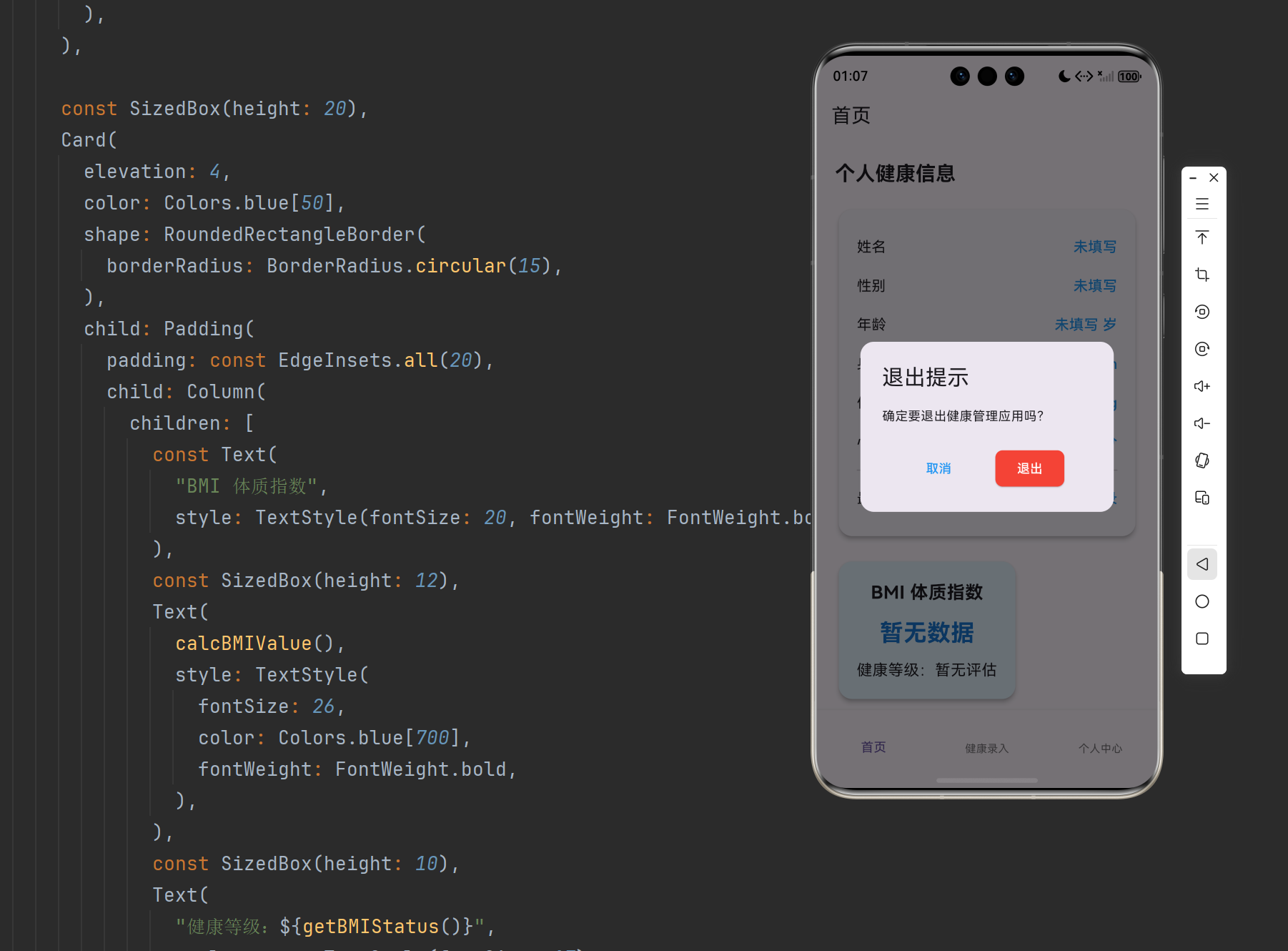
- 点击取消留在应用,点击确定正常退出
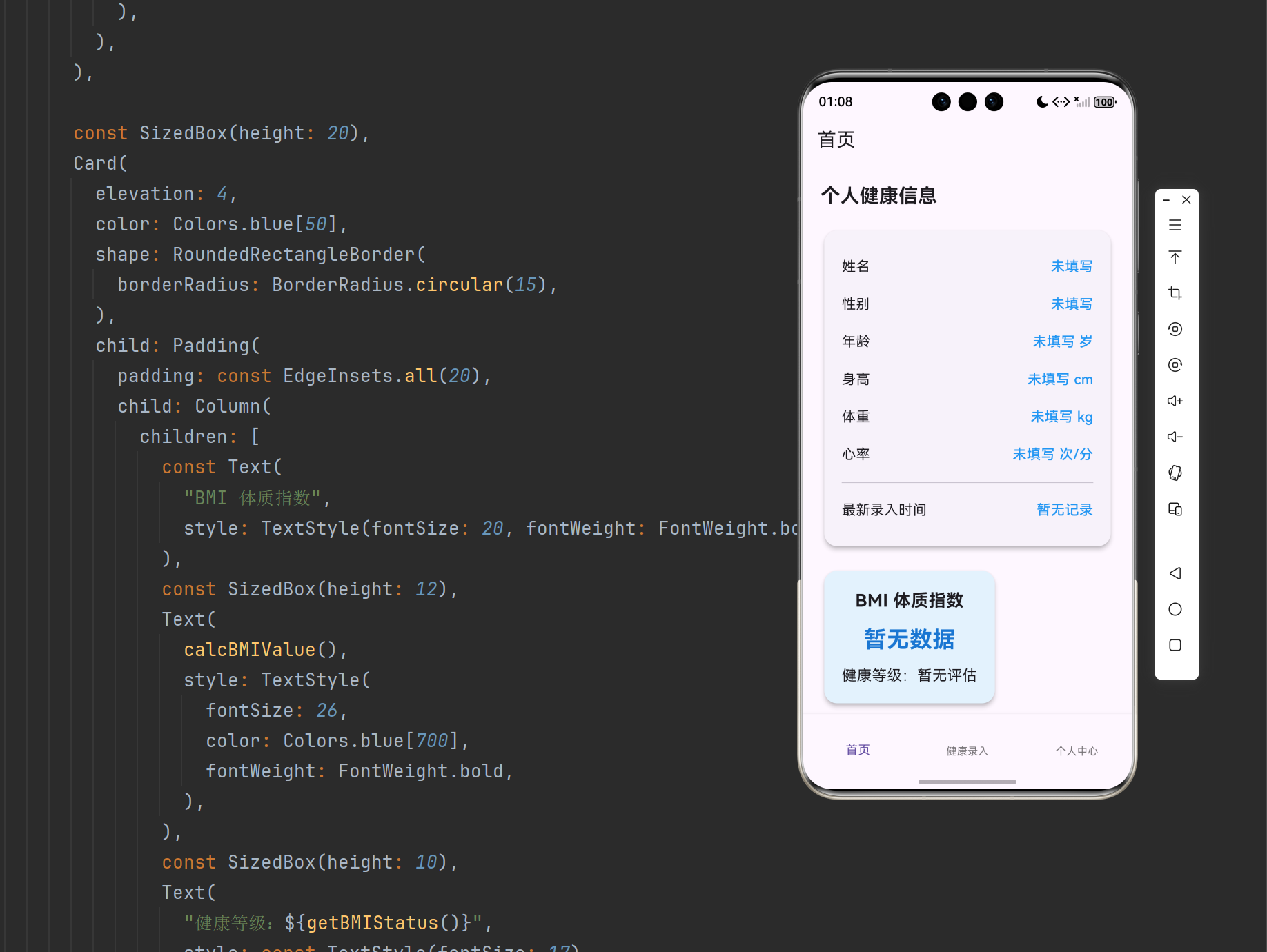
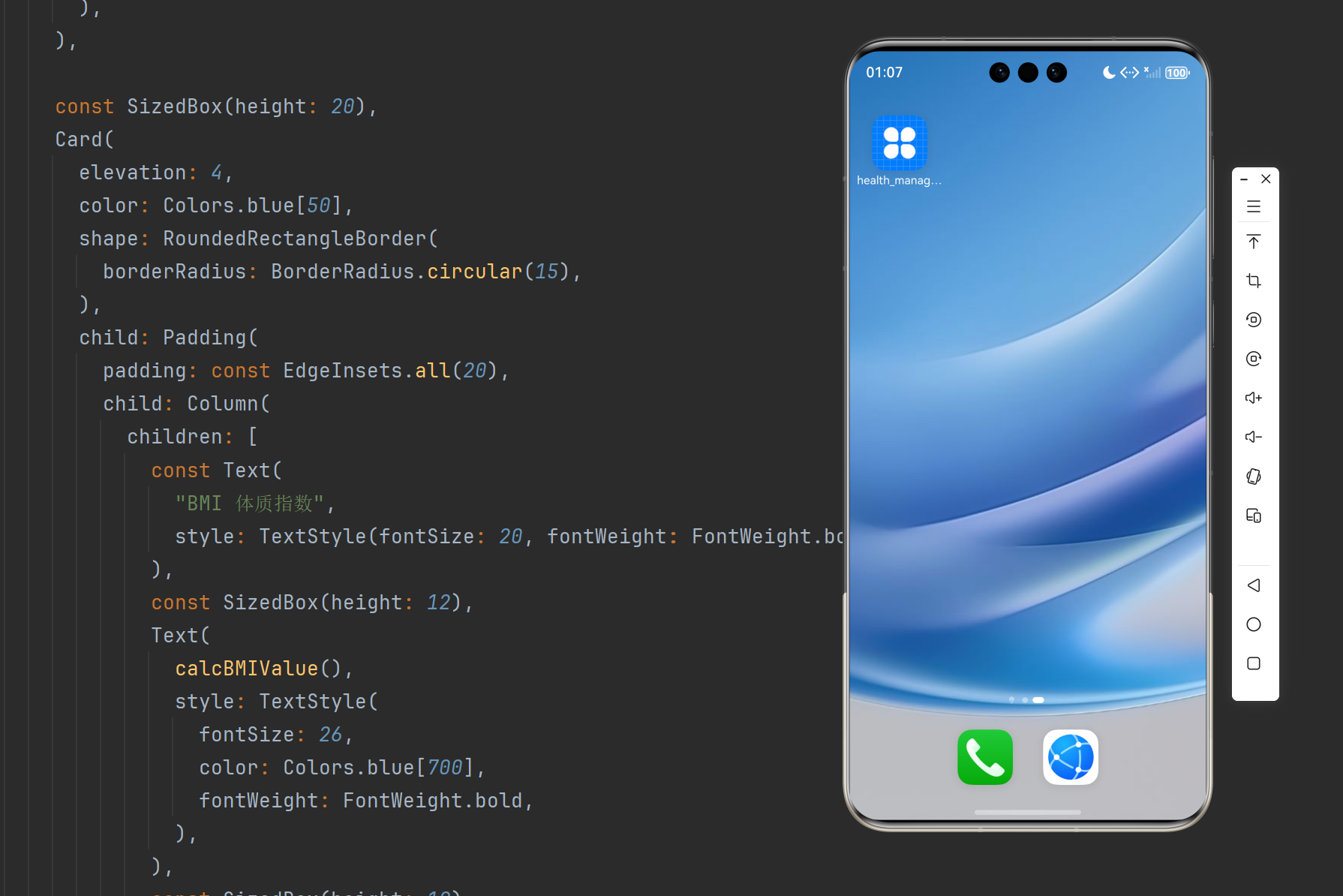
- 切换底部导航,查看页面渐变过渡动画效果
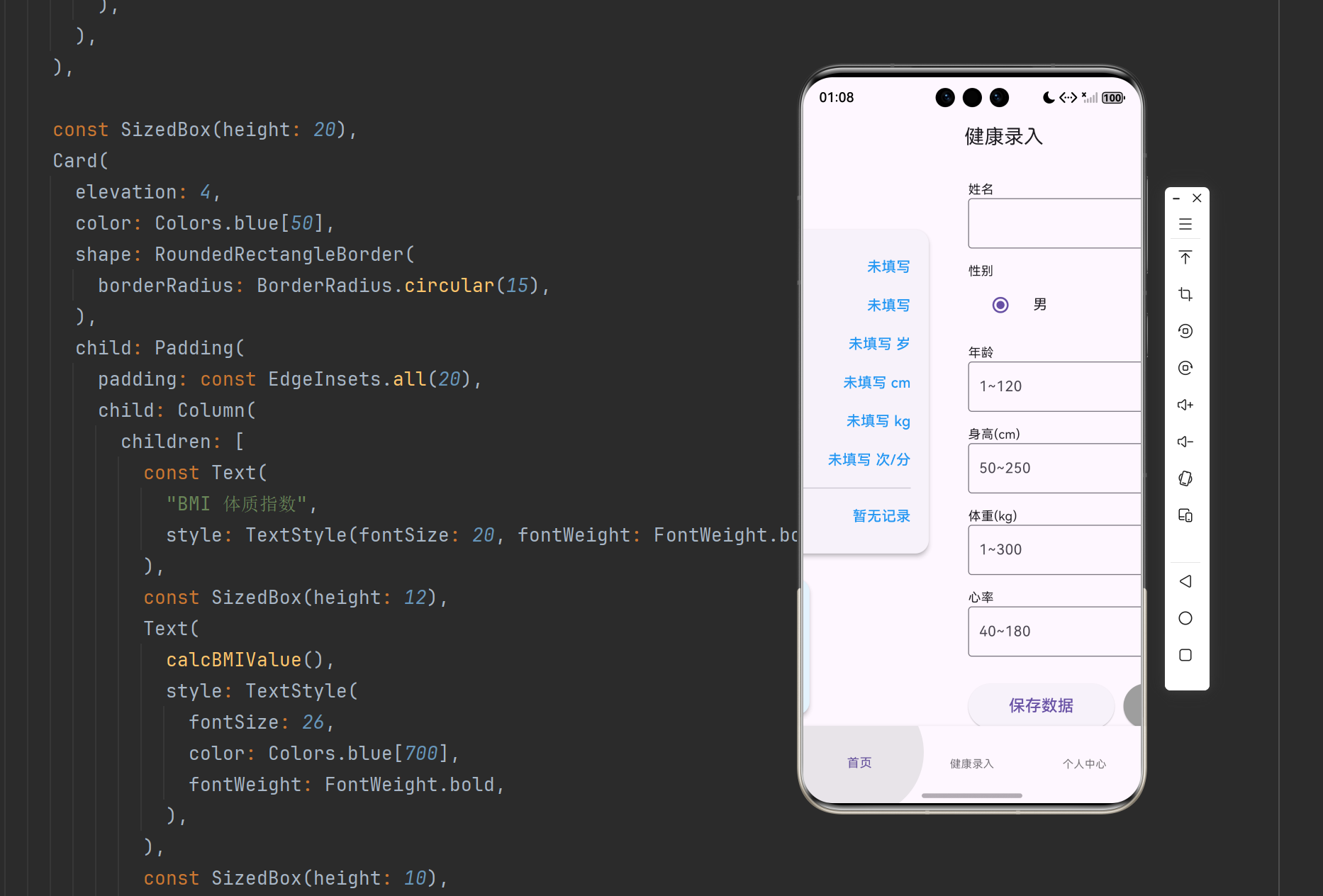
- 原有数据保存、BMI 计算、时间记录、清空数据功能均正常
🔐 跨平台适配说明
本次新增返回键退出弹窗与页面切换动画,完全适配 OpenHarmony 系统,弹窗弹出逻辑、页面过渡动画流畅无卡顿,布局无错位遮挡,完美兼容前期所有业务功能与 UI 美化样式。
❌ 常见错误排查
| 错误现象 | 解决方法 |
|---|---|
| 按返回键直接退出 | 检查是否根页面嵌套 WillPopScope 并绑定 onWillPop |
| 页面无切换动画 | 在 ThemeData 中正确配置 pageTransitionsTheme |
| 弹窗点击无响应 | 确认弹窗 Navigator.pop 返回布尔值控制退出逻辑 |
🎨 项目后续规划
Day13 完成退出弹窗与页面动画优化,整个健康管理 App 从页面搭建、表单校验、BMI 计算、本地存储、时间记录、UI 美化、交互弹窗、页面动画全部开发完毕。
📌 项目总结
本篇 Day13 新增物理返回键拦截与退出确认弹窗,同时配置全局页面渐变过渡动画,提升应用交互体验与流畅度。至此全套健康管理应用开发全部收尾,涵盖数据录入、表单合法性校验、BMI 体质指数运算、本地数据持久化、录入时间记录、全局 UI 主题美化、弹窗交互、页面动画、返回键控制等完整开发知识点,适配鸿蒙跨平台标准,结构完整、代码规范,可直接用于项目学习参考。
✅ 结尾小贴士
- WillPopScope 是拦截物理返回键的核心组件,配合 AlertDialog 可实现优雅退出交互
- 通过 ThemeData 统一配置页面过渡动画,一次配置全局生效,是 Flutter 项目规范化开发的常用技巧。
- 点赞收藏不迷路,后续每日开发笔记持续同步更新!
更多推荐
 6
6 0
0- 0


 已为社区贡献21条内容

所有评论(0)