
OpenClaw & Hermes Agent 服务管理指南
·
OpenClaw & Hermes Agent 服务管理指南
适用于通过二进制安装的 Linux 环境(systemd)
一、架构层级关系
二进制(openclaw / hermes)
├── CLI 模式          ← 终端直接交互层
│   ├── 发消息、查状态、改配置
│   └── 控制 Gateway 启停
└── Gateway 进程      ← 长驻后台服务
    └── Agent Runtime ← AI 推理 + 工具调用 + 记忆
        └── LLM Provider(Anthropic / OpenRouter / Ollama…)
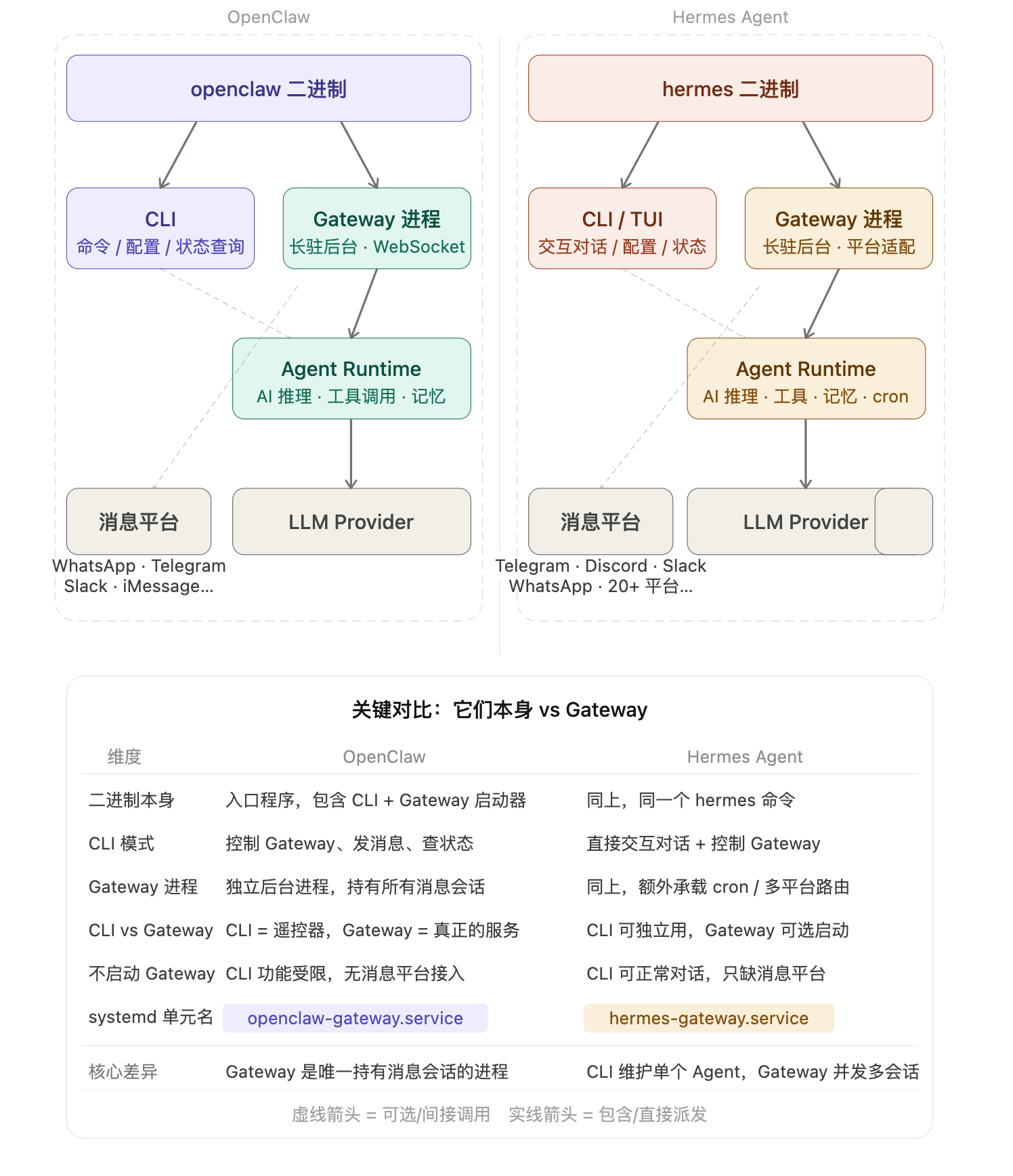
核心概念
| 层级 | 说明 |
|---|---|
| 二进制本身 | 多功能入口程序,包含 CLI 子命令 + Gateway 启动器 |
| CLI 模式 | 操控 Gateway 的"遥控器",也可直接交互对话 |
| Gateway 进程 | 真正长驻的后台服务,持有所有消息平台会话 |
| Agent Runtime | Gateway 内部调度的 AI 推理核心 |
OpenClaw vs Hermes 关键差异
| 维度 | OpenClaw | Hermes Agent |
|---|---|---|
| CLI 独立性 | 主要用于控制 Gateway,无 Gateway 时功能受限 | CLI 本身可独立完整对话,Gateway 是可选扩展 |
| Gateway 职责 | 唯一持有消息会话的进程,架构核心 | 额外承载 cron 调度、多平台并发会话路由 |
| 不启动 Gateway | 无法接入 WhatsApp/Telegram 等消息平台 | 可正常用 hermes chat 对话,只缺消息平台接入 |
| systemd 单元名 | openclaw-gateway.service | hermes-gateway.service |
二、OpenClaw 服务管理
启动与停止
# 启动
openclaw gateway start

# 停止(不卸载服务)
openclaw gateway stop

# 强制停止(进程卡死时使用)
openclaw gateway stop --timeout 30

# 安全重启(等待进行中的任务结束后重启)
openclaw gateway restart --safe

# 普通重启
openclaw gateway restart

# 查看当前状态
openclaw gateway status
安装服务(首次执行一次)
# 安装为用户级服务(适合开发机、笔记本)
openclaw gateway install

# 安装为系统级服务(适合 VPS、无头服务器)
sudo openclaw gateway install --system
开机自启 开 / 关
方式一:使用 openclaw 内置命令
# 开启自启
openclaw gateway autostart enable

# 关闭自启
openclaw gateway autostart disable
方式二:直接操作 systemctl(等效)
# 用户级
systemctl --user enable openclaw-gateway    # 开启自启
systemctl --user disable openclaw-gateway   # 关闭自启
systemctl --user status openclaw-gateway    # 查看状态
journalctl --user -u openclaw-gateway -f    # 实时查看日志

# 系统级(--system 安装时使用)
sudo systemctl enable openclaw-gateway
sudo systemctl disable openclaw-gateway
sudo systemctl status openclaw-gateway
无人登录也要保持运行
默认用户级服务在用户登出后会停止,需要额外开启 lingering:
sudo loginctl enable-linger $USER
常用排查命令
# 健康检查并自动修复约 70% 的常见问题
openclaw doctor --fix

# 彻底清理残留进程
pkill -f openclaw-gateway
三、Hermes Agent 服务管理
启动与停止
# 启动
hermes gateway start

# 停止
hermes gateway stop

# 停止所有 profile 的 gateway(更新后使用)
hermes gateway stop --all

# 重启
hermes gateway restart

# 前台运行(WSL 推荐,配合 tmux 保持)
tmux new -s hermes 'hermes gateway run'

# 查看状态
hermes gateway status
安装服务(首次执行一次)
# 安装为用户级服务(适合开发机、笔记本)
hermes gateway install

# 安装为系统级服务(适合 VPS、无头服务器,重启自动恢复)
sudo hermes gateway install --system
sudo hermes gateway start --system
开机自启 开 / 关
# 用户级
systemctl --user enable hermes-gateway     # 开启自启
systemctl --user disable hermes-gateway    # 关闭自启
systemctl --user status hermes-gateway     # 查看状态
journalctl --user -u hermes-gateway -f     # 实时查看日志

# 系统级(--system 安装时使用)
sudo systemctl enable hermes-gateway
sudo systemctl disable hermes-gateway
journalctl -u hermes-gateway -f
无人登录也要保持运行
sudo loginctl enable-linger $USER
常用排查命令
# 系统健康检查
hermes doctor

# 查看整体状态摘要
hermes status

# 查看错误日志
hermes logs errors -f
四、速查对照表
| 操作 | OpenClaw | Hermes |
|---|---|---|
| 启动 | openclaw gateway start | hermes gateway start |
| 停止 | openclaw gateway stop | hermes gateway stop |
| 重启 | openclaw gateway restart | hermes gateway restart |
| 状态 | openclaw gateway status | hermes gateway status |
| 安装服务 | openclaw gateway install | hermes gateway install |
| 系统级安装 | sudo openclaw gateway install --system | sudo hermes gateway install --system |
| 开启自启 | openclaw gateway autostart enable | systemctl --user enable hermes-gateway |
| 关闭自启 | openclaw gateway autostart disable | systemctl --user disable hermes-gateway |
| 查看日志 | journalctl --user -u openclaw-gateway -f | journalctl --user -u hermes-gateway -f |
| 健康检查 | openclaw doctor --fix | hermes doctor |
五、注意事项
- 不要同时安装用户级和系统级服务,两者同时存在会导致 start/stop/status 行为歧义,工具本身会发出警告。
- WSL 用户:systemd 支持不稳定,Hermes 推荐用
hermes gateway run+ tmux 替代gateway start;OpenClaw 同理。 - 安全建议:两个工具都具备终端执行、文件操作等能力,建议以非 root 普通用户运行,避免以 root 直接部署。
- 更新后:建议执行
openclaw doctor --fix或hermes doctor检查配置是否需要迁移。
更多推荐
 10
10 0
0- 0


 已为社区贡献2条内容

所有评论(0)