
Python 豆包AI实战:通过文字一键生成短视频
·
介绍
下面介绍火山方舟豆包AI通过文字一键生成短视频并保存到本地的完整python代码,生成短视频的逻辑是,先提交再等待生成完成再下载
准备
- 安装python3.14
- 夸克网盘:https://pan.quark.cn/s/b88e55905e7b
- 百度网盘:https://pan.baidu.com/s/1d22gCHP_qWq5_L_Ik-tvNg?pwd=f8ah
- 火山引擎注册账号,地址:https://console.volcengine.com/home
- 火山方舟创建API Key,https://console.volcengine.com/ark/region:ark+cn-beijing/apiKey
- 火山方舟开通模型:https://console.volcengine.com/ark/region:ark+cn-beijing/openManagement
开始
- 安装依赖包
- 火山方舟:pip install ‘volcengine-python-sdk[ark]’
- OpenAI:pip install openai
- 其他:pip install requests
- 项目配置,config.py 配置文件,未配置或配置错误无法运行
- api_key,刚创建的火山方舟 API Key
- 项目执行,main.py 主文件
- python main.py
代码
- 配置,config.py
# 火山方舟 API Key
api_key = ""

# 模型ID
model_id = "doubao-seedance-1-5-pro-251215"
- 模型调用,model.py
from datetime import datetime

import config as config
import uuid
import os
import requests
import time

base_url = "https://ark.cn-beijing.volces.com/api/v3"


def execute(text: str):
    try:
        response = requests.post(
            url=f"{base_url}/contents/generations/tasks",
            headers={"Authorization": f"Bearer {config.api_key}", "Content-Type": "application/json"},
            json={
                "model": config.model_id,
                "content": [{"type": "text", "text": text}],
                "resolution": "480p",
                "duration": 5,
                "watermark": False,
            },
        )

        video_id = response.json()["id"]
        if is_empty(video_id):
            return ""

        second = 1
        while True:
            print(f"正在查询视频生成状态,视频编号:{video_id},{second}秒")
            # 休眠1秒再去查
            time.sleep(1)
            second = second + 1

            video_response = get_video(video_id)
            if is_empty(video_response):
                return ""

            # 状态判断
            video_status = video_response["status"]
            if video_status == "queued" or video_status == "running":
                continue
            elif video_status == "succeeded":
                return video_response["content"]["video_url"]
            else:
                return ""

    except Exception as e:
        print(f"调用接口失败,失败原因:{str(e)}")
        return ""


def get_video(video_id: str) -> dict:
    try:
        response = requests.get(
            url=f"{base_url}/contents/generations/tasks/{video_id}",
            headers={"Authorization": f"Bearer {config.api_key}", "Content-Type": "application/json"},
        )
        return response.json()
    except Exception as e:
        print(f"调用接口失败,失败原因:{str(e)}")
        return {}


def save(video_url: str):
    try:
        # 发送请求,设置超时时间
        response = requests.get(video_url, timeout=10)
        # 请求失败直接抛异常
        response.raise_for_status()

        image_directory = os.path.join("result", datetime.now().strftime("%Y%m%d%H%M%S"))
        os.makedirs(image_directory, exist_ok=True)

        image_name = str(uuid.uuid4()).replace("-", "") + ".mp4"
        image_path = os.path.join(image_directory, image_name)

        # 写入文件(二进制模式)
        with open(image_path, "wb") as f:
            f.write(response.content)

        return image_path
    except Exception as e:
        print(f"图片视频下载失败,失败原因:{str(e)}")
        return ""


def is_empty(obj) -> bool:
    """
    判断对象是否为空(最常用)
    :return: 空 = True,非空 = False
    """
    # 为 None
    if obj is None:
        return True

    # 字符串(含全空格、空串)
    if isinstance(obj, str):
        return obj.strip() == ""

    # 列表、字典、元组、集合(长度 0)
    if isinstance(obj, (list, dict, tuple, set)):
        return len(obj) == 0

    # 其他类型(0、False 不算空)
    return False
- 主方法,main.py
import config as config
import model as model
import sys

if config.api_key == "":
    print(f"火山方舟大模型 API Key 未配置")
    sys.exit()

print("=====我能生成任何你想要的短视频,说出你想要什么吧=====\n")

prompt = ""

while True:
    prompt = input("需求:").strip()

    if prompt == "":
        print("什么也没说,说点什么吧")
        continue

    break

print("AI正在按照你的需求生成,请稍候...")

video_url = model.execute(prompt)
if video_url is None or video_url == "":
    print("视频生成失败,请重试")
    sys.exit()

video_path = model.save(video_url)
if video_path is None or video_path == "":
    print("视频生成失败,请重试")
    sys.exit()

print(f"视频生成成功,视频路径:{video_path}")
成功展示
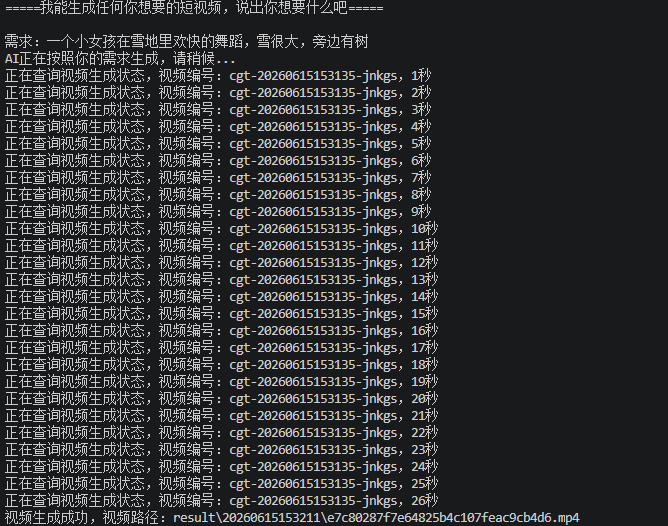
- 生成成功的视频地址,点击查看
注意
- 火山引擎注册会送很多免费的token,刚开始测试都是不需要费用的
- 完整的代码下载:https://download.csdn.net/download/lazy_uu/92983453
更多推荐
 8
8 0
0- 0


 已为社区贡献5条内容

所有评论(0)