
Flutter EventBus 架构设计:基于 Stream 的事件总线实现与实践
目录
2.3 为什么不用 Provider / Riverpod / Bloc?
一、What:这是什么?
EventBus 是一个基于 Dart Stream 实现的事件总线模块,为 App 提供了跨组件、跨层级的通信能力。它允许应用中的各个模块解耦地进行消息传递,是典型的发布-订阅模式实现。
该模块包含如下三个核心文件:
| 文件 | 职责 | 核心设计 |
| app_event.dart | 事件定义层 | 抽象基类 + 具体事件 |
| app_event_bus.dart | 事件总线核心 | 单例 + StreamController |
| event_bus_mixin.dart | Widget 集成层 | Mixin + 生命周期管理 |
二、Why:为什么需要事件总线?
2.1 问题背景:组件通信的痛点
在 Flutter 应用中,组件间通信通常有以下几种方式:
-
Widget 树传递:通过 InheritedWidget、Provider 等,但层级深时繁琐;
-
回调函数:直接传递回调,耦合度高;
-
全局状态管理:如 Bloc、Riverpod,重且复杂。
2.2 EventBus 的价值定位
场景一:Token 失效全局通知
当 API 返回 Token 无效时,需要通知登录页清除缓存、以及通知首页跳转登录等操作。
场景二:跨模块解耦
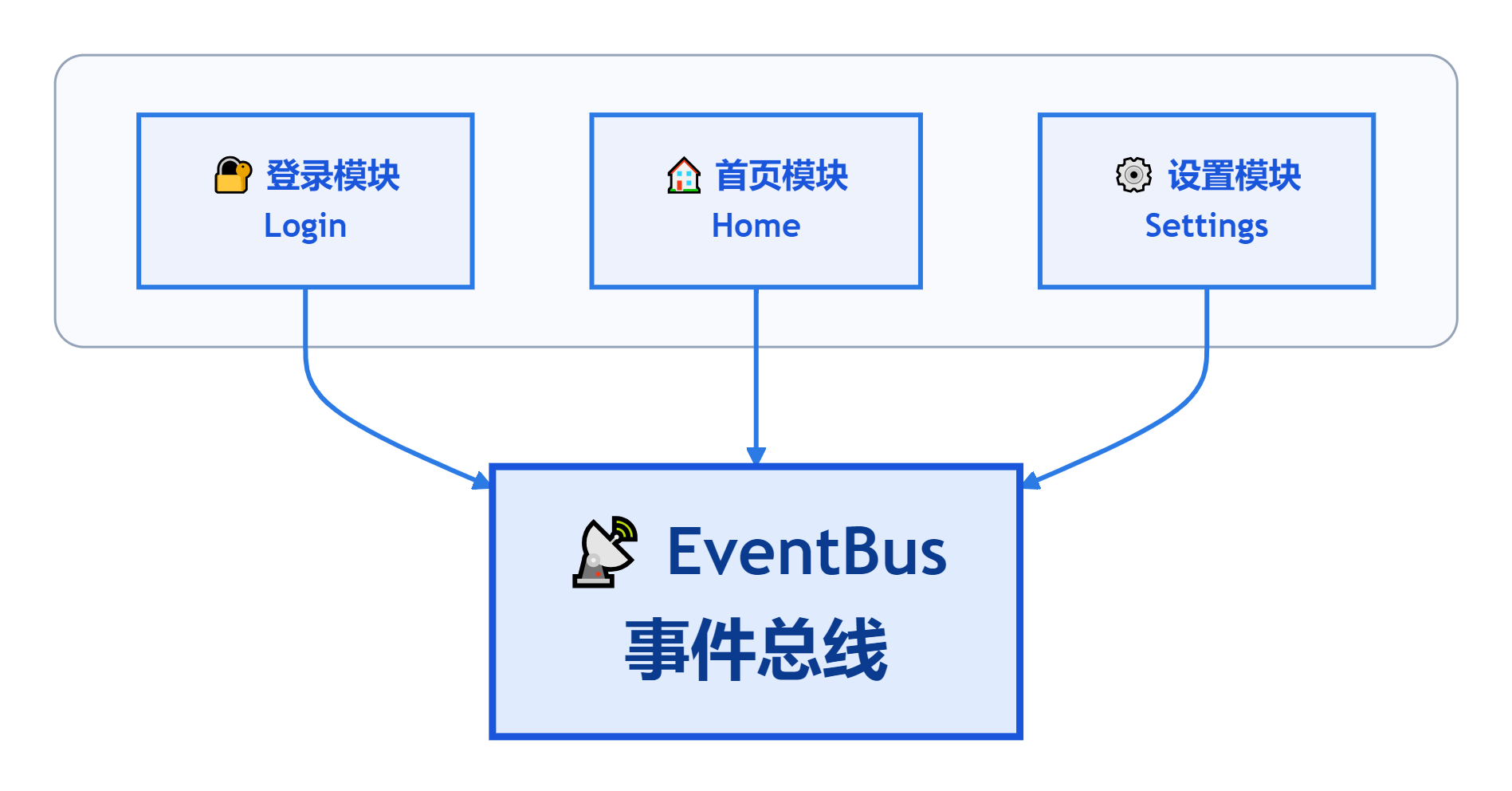
场景三:一次性事件监听
某些业务场景只需要监听一次事件(如支付回调),once() 方法可以完美解决这个需求。
2.3 为什么不用 Provider / Riverpod / Bloc?
| 方案 | 优点 | 缺点 |
| Provider | 简单 | 更适合状态共享 |
| Bloc | 强约束 | 对一次性事件较重 |
| Riverpod | 现代化 | 学习成本较高 |
| EventBus | 解耦轻量 | 不适合状态同步 |
最终选择 EventBus,是因为当前需求属于“事件通知”,而不是“状态驱动 UI”。
三、How:如何使用?
3.1 定义事件
// 事件基类
abstract class AppEvent {}

// 自定义业务事件
class TokenInvalidEvent extends AppEvent {
  TokenInvalidEvent(this.code, {this.message = ''});

  final int code;
  final String message;
}

class UserLoggedInEvent extends AppEvent {
  final User user;
  UserLoggedInEvent(this.user);
}

class PaymentResultEvent extends AppEvent {}
3.2 发送事件
// 如:在 API 拦截器中触发
if (response.code == 10104) {
  AppEventBus.instance.fire(TokenInvalidEvent(10104, message: 'Token 已过期'));
}
3.3 监听事件(UI 层推荐使用 Mixin)
方式一:逻辑层
AppEventBus.instance.on<InsertNotesEvent>().listen((event) { });方式二:UI 层
class HomePage extends StatefulWidget {
  @override
  _HomePageState createState() => _HomePageState();
}

class _HomePageState extends State<HomePage> with EventBusMixin {
  @override
  void initState() {
    super.initState();

    // 监听 Token 失效事件
    listen<TokenInvalidEvent>((event) {
      Navigator.pushReplacementNamed(context, '/login');
    });

    // 带过滤条件的监听
    listen<UserLoggedInEvent>((event) {
      _refreshUserInfo(event.user);
    }, filter: (event) => event.user.isVip);
  }

  // ...
}
3.4 一次性等待
// 在支付页面等待支付结果
final result = await AppEventBus.instance.once<PaymentResultEvent>(
  timeout: Duration(seconds: 60),
);
四、设计经验分享
从处理事件去重、错误隔离、以及一次性监听,到 Mixin 自动管理订阅,逐步调整与优化 EventBus 事件总线设计。
经验 1:单例模式的权衡
class AppEventBus {
  AppEventBus._();  // 私有构造函数
  static final AppEventBus instance = AppEventBus._();  // 饿汉式单例
}
-
饿汉式 vs 懒汉式:事件总线是应用核心组件,启动时初始化成本低,选择饿汉式更稳定;
-
私有构造函数:防止外部实例化,保证全局唯一入口;
-
风险:单例难以测试,需配合依赖注入框架使用。
经验 2:事件去重机制
final Map<String, DateTime> _lastEventTime = {};
static const Duration _dedupeDuration = Duration(milliseconds: 100);

void fire(AppEvent event) {
  final key = '${event.runtimeType}_${event.toString()}';
  final lastTime = _lastEventTime[key];
  if (lastTime != null && now.difference(lastTime) < _dedupeDuration) {
    return;  // 去重
  }
  _lastEventTime[key] = now;
  _controller.add(event);
}
-
去重时间窗口:100ms 是经验值,可根据业务调整;
-
Key 设计:类型_内容 双重标识,避免不同内容的相同事件被误判;
-
内存管理:10秒自动清理过期 key,防止内存泄漏。
经验 3:错误处理策略
listen<E extends AppEvent>(
  void Function(E event) onData, {
  void Function(Object error, StackTrace)? onError,
  bool cancelOnError = false,
}) {
  final subscription = AppEventBus.instance.on<E>().listen((event) {
    try {
      onData(event);
    } catch (error, stackTrace) {
      onError?.call(error, stackTrace);
      if (cancelOnError) cancel<E>();
    }
  });
}
-
异常隔离:单个监听器的异常不会影响其他监听器
-
灵活策略:提供 cancelOnError 参数,允许用户决定错误后的行为
经验 4:Mixin 模式的生命周期管理
mixin EventBusMixin<T extends StatefulWidget> on State<T> {
  final Map<Type, List<StreamSubscription<dynamic>>> _subscriptions = {};

  @override
  void dispose() {
    cancelAll();  // 自动清理
    super.dispose();
  }
}
-
泛型约束:T extends StatefulWidget 确保只能在有状态组件中使用
-
订阅管理:按事件类型分组存储,便于批量取消
-
自动清理:利用 dispose() 生命周期,防止内存泄漏
小结:代码设计源码已放在附录仅供参考。
五、最佳实践建议
5.1 监听时机选择
| 场景 | 推荐方法 | 原因 |
| 页面级监听 | EventBusMixin.listen() | 自动生命周期管理 |
| 全局监听 | AppEventBus.instance.on().listen() | 全局生效 |
| 一次性操作 | once() / waitFor() | 自动取消订阅 |
5.2 避免滥用
1)谨慎使用场景:
-
状态同步(推荐用状态管理)
-
高频事件(如滚动事件,性能问题)
-
需要强一致性保证的场景
2)推荐使用场景:
-
全局通知(Token 失效、网络状态)
-
跨模块解耦(登录状态、主题切换)
-
一次性事件(支付回调、页面返回)
六、总结
EventBus 通过发布-订阅模式为应用提供了轻量级、解耦的组件通信方案,其核心价值在于:
-
解耦:发布者无需知道订阅者是谁;
-
灵活:支持过滤、超时、一次性监听;
-
安全:自动生命周期管理,防止内存泄漏;
-
健壮:事件去重、异常隔离机制。
小结:在简单场景下提供轻量级方案,避免引入重量级状态管理框架的复杂性。当业务复杂度提升时,可以平滑过渡到更强大的状态管理方案。
附录
class AppEventBus {
  AppEventBus._();

  static final AppEventBus instance = AppEventBus._();

  final StreamController<AppEvent> _controller =
      StreamController<AppEvent>.broadcast();

  /// 最近一次事件时间,用于短时间去重。
  final Map<String, DateTime> _lastEventTime = {};

  /// 去重时间窗口。
  static const Duration _dedupeDuration = Duration(milliseconds: 100);

  /// 过期 key 清理时间。
  static const Duration _cacheKeepDuration = Duration(seconds: 10);

  /// 发送事件。
  void fire(AppEvent event) {
    _cleanupExpiredKeys();

    final now = DateTime.now();
    final key = '${event.runtimeType}_${event.toString()}';

    final lastTime = _lastEventTime[key];
    if (lastTime != null && now.difference(lastTime) < _dedupeDuration) {
      logE('[EventBus] Ignore duplicate event: ${event.runtimeType}, key=$key');
      return;
    }

    _lastEventTime[key] = now;
    _controller.add(event);
  }

  /// 监听事件。
  Stream<T> on<T extends AppEvent>({bool Function(T event)? filter}) {
    Stream<T> stream = _controller.stream
        .where((event) => event is T)
        .cast<T>();

    if (filter != null) {
      stream = stream.where(filter);
    }

    return stream;
  }

  /// 等待一次事件。
  Future<T> once<T extends AppEvent>({
    Duration timeout = const Duration(seconds: 30),
    bool Function(T event)? filter,
  }) {
    return on<T>(filter: filter).first.timeout(
      timeout,
      onTimeout: () {
        throw TimeoutException('No event of type $T received within $timeout');
      },
    );
  }

  void _cleanupExpiredKeys() {
    final now = DateTime.now();

    _lastEventTime.removeWhere(
      (_, time) => now.difference(time) > _cacheKeepDuration,
    );
  }

  Future<void> dispose() async {
    _lastEventTime.clear();
    await _controller.close();
  }
}
mixin EventBusMixin<T extends StatefulWidget> on State<T> {
final Map<Type, List<StreamSubscription<dynamic>>> _subscriptions = {};
/// 监听指定事件。
void listen<E extends AppEvent>(
void Function(E event) onData, {
bool Function(E event)? filter,
void Function(Object error, StackTrace stackTrace)? onError,
bool cancelOnError = false,
}) {
final subscription = AppEventBus.instance.on<E>(filter: filter).listen((
event,
) {
try {
onData(event);
} catch (error, stackTrace) {
onError?.call(error, stackTrace);
if (cancelOnError) cancel<E>();
}
});
_subscriptions.putIfAbsent(E, () => []).add(subscription);
}
/// 等待一次事件。
Future<E> waitFor<E extends AppEvent>({
Duration timeout = const Duration(seconds: 30),
bool Function(E event)? filter,
}) {
return AppEventBus.instance.once<E>(timeout: timeout, filter: filter);
}
/// 取消某一类事件监听。
void cancel<E extends AppEvent>() {
logE('[EventBus] Cancel subscriptions for ${E.toString()}');
final subscriptions = _subscriptions.remove(E);
if (subscriptions == null) return;
for (final subscription in subscriptions) {
unawaited(subscription.cancel());
}
}
/// 取消全部监听。
void cancelAll() {
for (final subscriptions in _subscriptions.values) {
for (final subscription in subscriptions) {
unawaited(subscription.cancel());
}
}
_subscriptions.clear();
}
@override
void dispose() {
cancelAll();
super.dispose();
}
}更多推荐
 7
7 0
0- 0


 已为社区贡献1条内容

所有评论(0)