
基于Qwen3-TTS搭建高颜值语音合成实战
基于Qwen3-TTS搭建高颜值语音合成WebUI:预设音色+声音克隆实战
哈喽大家好!AI语音合成如今已经融入日常各类场景,短视频配音、有声书制作、智能交互语音、个性化配音都离不开高质量TTS模型。阿里通义千问推出的 Qwen3-TTS 凭借超高自然度、多语言支持、优质音色表现力,成为开源TTS中的标杆模型。
今天我将带大家从零搭建一套完整版Qwen3-TTS语音合成Web工具,整合多风格预设音色、自定义声音克隆、多语言合成、情感语气调节功能,搭配Gradio高颜值可视化界面,本地一键部署,开箱即用。
一、项目核心亮点
本项目基于Qwen3-TTS-1.7B模型二次开发,修复推理加速问题,封装可视化交互界面,核心优势如下:
-
双模型架构:区分定制音色模型+基础克隆模型,兼顾预设音色质感与克隆精准度
-
智能加速推理:替换原生SDPA注意力机制,适配aule-flash-attention加速,兼容新旧PyTorch版本,自动异常回退
-
丰富预设音色:内置中英等多语种音色,涵盖温柔、成熟、活泼、方言等多种风格
-
高精度声音克隆:支持自定义音频上传/预定义音频调用,10秒左右短音频即可完成音色复刻
-
全语种适配:支持中、英、日、韩、德、法、俄等十余种语言语音合成
-
情感自定义:可手动输入语气指令,实现愤怒、温柔、欢快、低沉等个性化语音效果
-
多格式兼容:自动适配wav、mp3、m4a、ogg等主流音频格式,自动转单声道归一化处理
-
可视化WebUI:基于Gradio Soft主题开发,界面简洁美观,操作零门槛
二、环境依赖与准备工作
1. 基础环境要求
-
Python 3.9+
-
PyTorch 2.0+(推荐GPU环境,CUDA可用)
-
显存最低4G,推荐8G及以上(bf16精度推理)
2. 必备依赖库安装
项目requirements.txt内容如下:
aule_attention==0.5.0
gradio==6.19.0
numpy==2.5.0
pydub==0.25.1
qwen_tts==0.1.1
soundfile==0.14.0
其中 torch torchvision torchaudio 需要单独安装,因为和显卡有关,我的是A卡RX6800,使用的是:
pip install torch torchvision torchaudio --index-url https://rocm.nightlies.amd.com/v2-staging/gfx103X-dgpu/
如果是N卡的话直接使用pytorch官方地址,如(实际需要根据具体显卡驱动版本):
pip install torch torchvision --index-url https://download.pytorch.org/whl/cu126
3. 模型文件准备
项目需要两个Qwen3-TTS权重文件,自行下载后放置对应路径:
-
定制音色模型:
E:\Qwen3-TTS-12Hz-1.7B-CustomVoice -
基础克隆模型:
E:\Qwen3-TTS-12Hz-1.7B-Base
下载模型 用 huggingface.co 的镜像 hf-mirror.com,安装命令工具pip install -U huggingface_hub,设置环境变量:
Linux
export HF_ENDPOINT=https://hf-mirror.com
Windows Powershell
$env:HF_ENDPOINT = "https://hf-mirror.com"
下载模型:
hf download Qwen/Qwen3-TTS-12Hz-1.7B-CustomVoice --local-dir Qwen3-TTS-12Hz-1.7B-CustomVoice

hf download Qwen/Qwen3-TTS-12Hz-1.7B-Base --local-dir Qwen3-TTS-12Hz-1.7B-Base
三、核心代码深度解析
1. 注意力机制加速补丁(核心优化)
原生Qwen3-TTS推理速度较慢,A卡不支持 flash-attn,使用了aule_attention,代码中植入了智能FlashAttention补丁,替换PyTorch原生SDPA机制:
通过判断推理参数,无掩码、无dropout、无自定义缩放时,自动启用aule加速注意力;存在特殊参数则自动回退原生实现,兼顾推理速度和兼容性,完美解决部分环境报错、推理卡顿问题。
2. 模型加载逻辑
项目采用双模型分离加载策略:
-
CustomVoice模型:负责预设音色、情感指令合成,音色表现力更强、风格更丰富
-
Base基础模型:专门用于声音克隆,适配任意未知音色复刻,稳定性更高
自动识别GPU/CPU环境,GPU启用bf16半精度推理提速减显存,CPU自动降级为float32兼容运行。
3. 两大核心功能模块
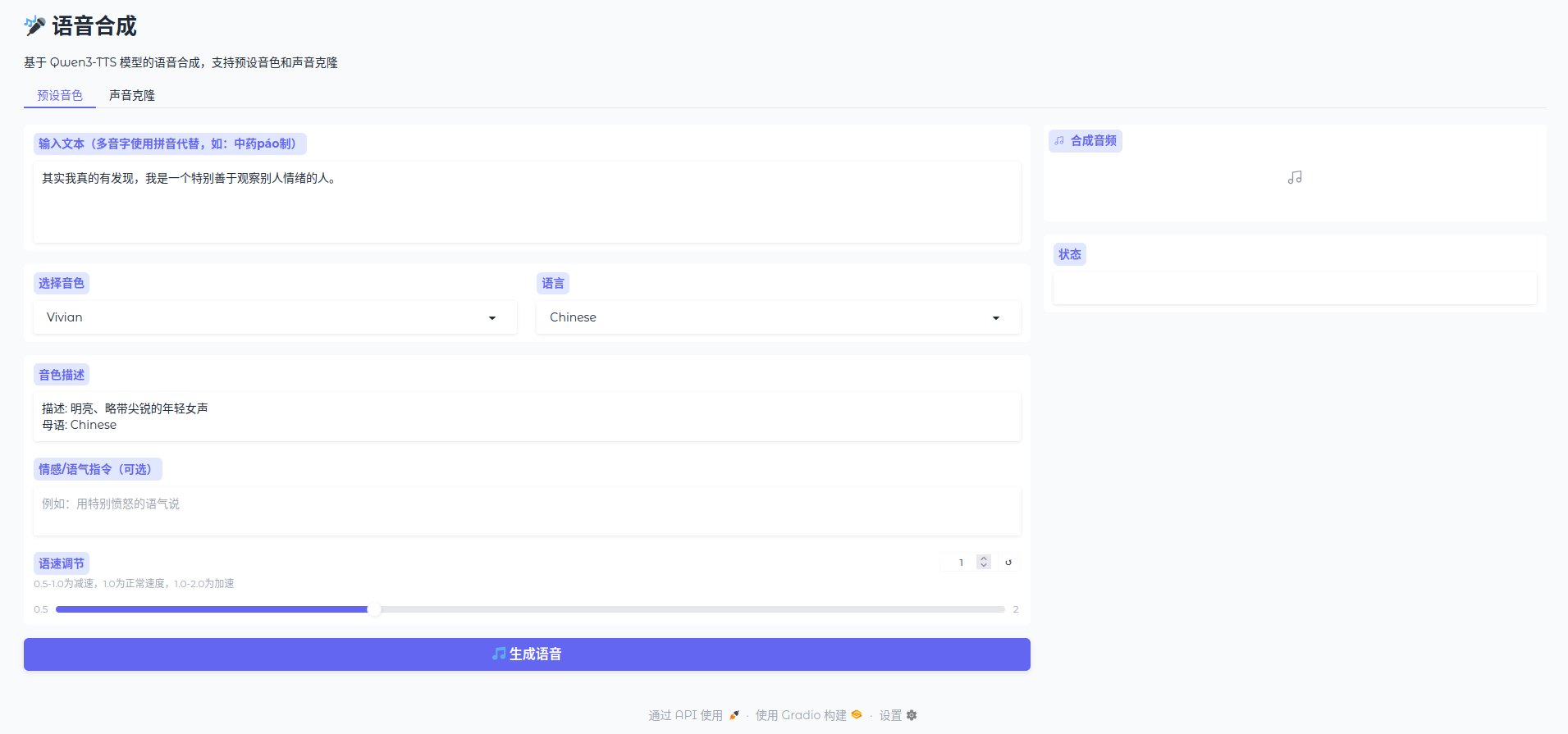
(1)预设音色合成模块
内置9款优质预设音色,覆盖多语种、多风格:中文温柔女声、成熟男声、川渝/北京方言男声、欧美英语男声、日韩特色女声等。支持自定义情感指令,可自由控制语音语速、情绪、语气。
界面实时展示音色描述,切换音色自动更新介绍,操作直观便捷。
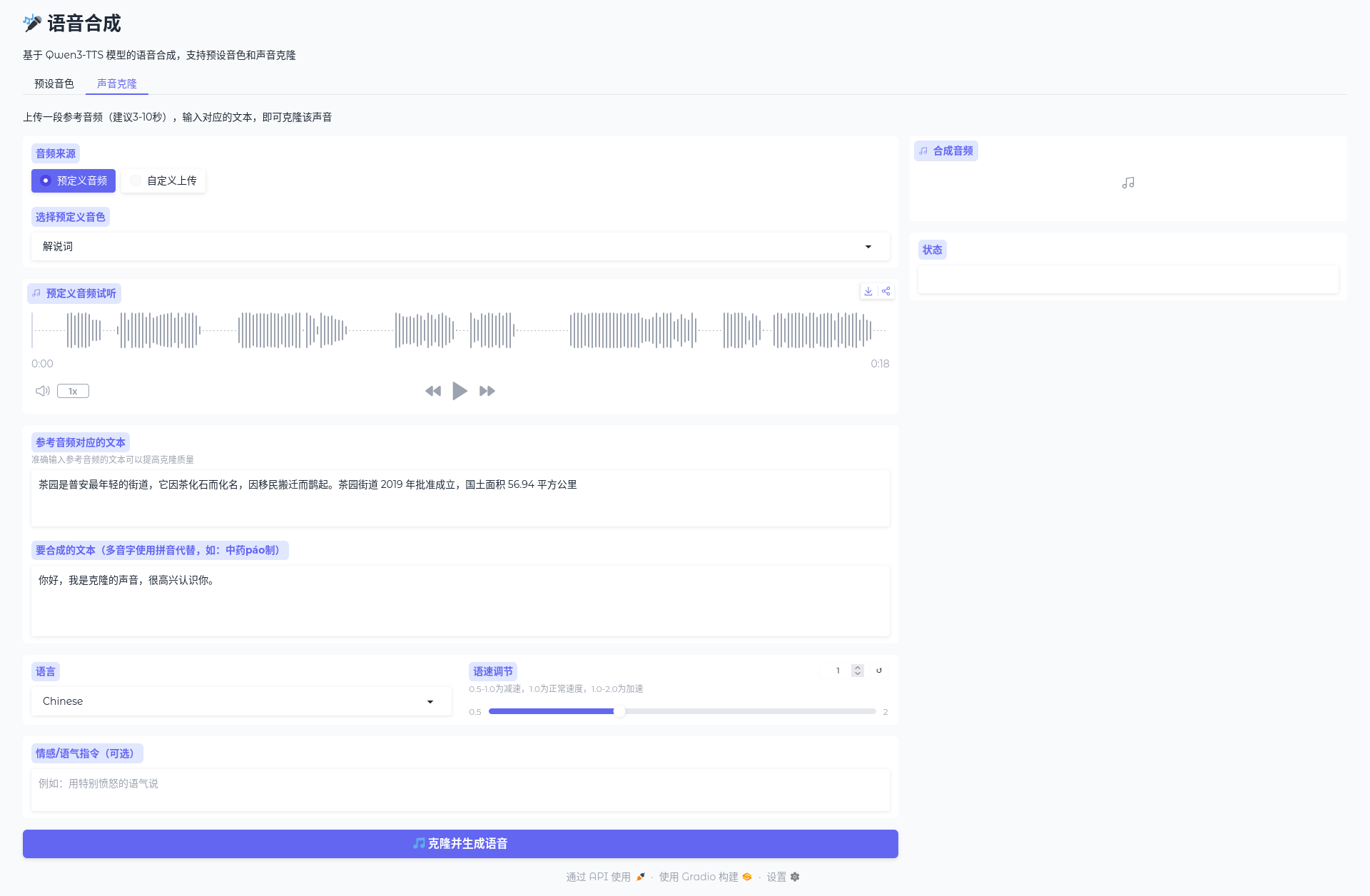
(2)高精度声音克隆模块
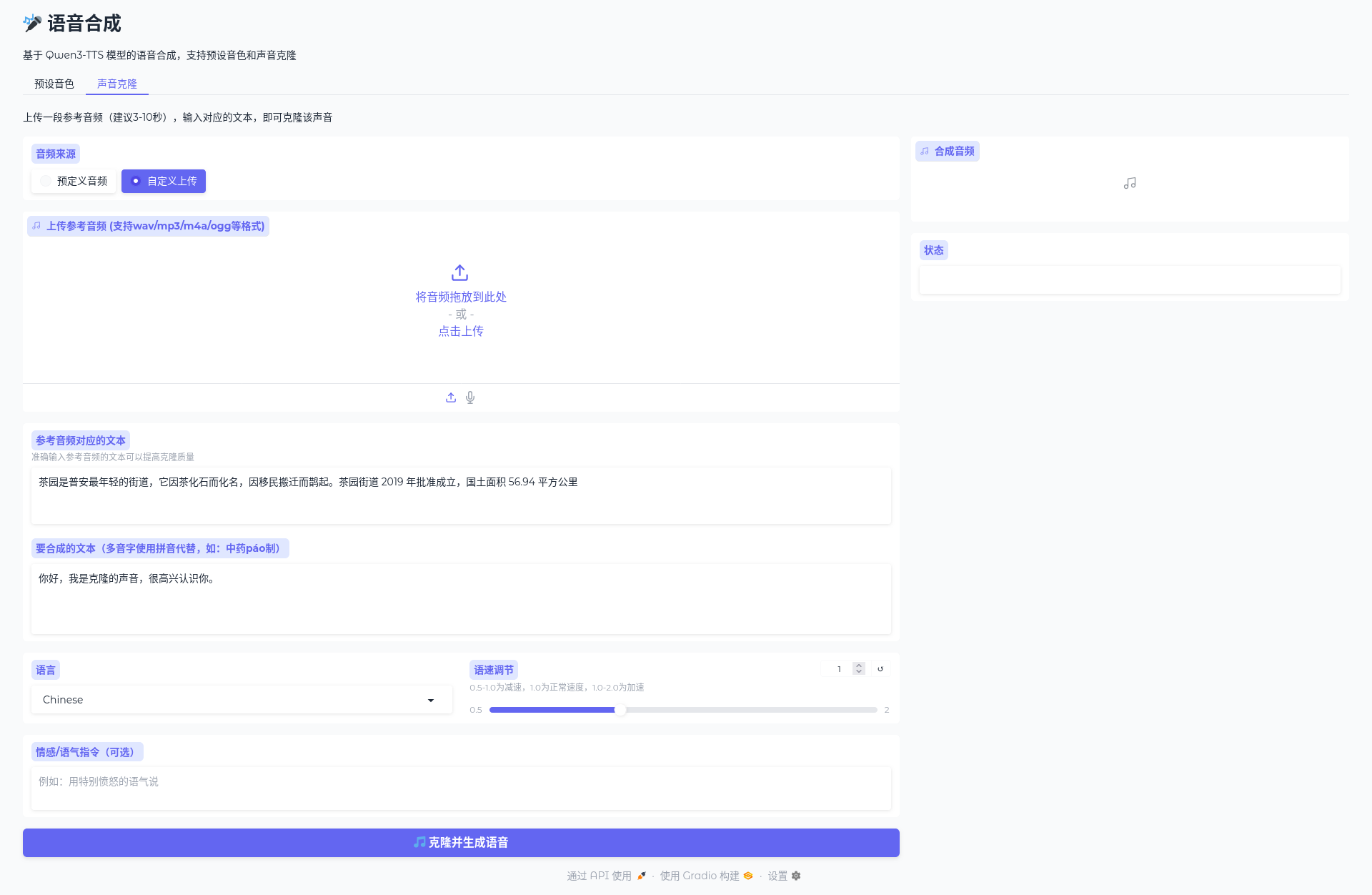
支持双参考音频来源:预定义音频库、本地自定义上传/麦克风录制。
内置音频自动处理逻辑:自动识别多格式音频、立体声转单声道、音频归一化处理,规避格式报错问题。仅需3-10秒参考音频+对应文本,即可复刻专属音色,合成效果高度还原原声特征。
4. WebUI交互逻辑
基于Gradio Tabs分页设计,将「预设音色合成」和「声音克隆」功能分离,界面分区清晰。所有功能可视化操作,无需代码干预,支持实时生成音频、展示推理耗时、状态提示,新手零门槛上手。
5.项目结构
mytts/
├── assets/
├── README.md
├── app.py
├── assets.json
├── requirements.txt
└── run.bat
文件说明:
| 文件/目录 | 说明 |
|---|---|
assets/ | 资源目录,自定义克隆的音频文件(也就是自己录的音频) |
app.py | Python 主程序文件 |
assets.json | 资源配置文件(配置预设自定义克隆音色,录音文件在assets/下) |
requirements.txt | Python 依赖包列表 |
run.bat | Windows 批处理启动脚本 |
README.md | 项目说明文档 |
assets.json示例(content是录音对应的文本):
[
    {
        "title": "我的音色",
        "file": "assets/my.m4a",
        "content": "春日山野风光清爽宜人,山泉顺着青石缓缓流淌,十棵杉树扎根山边。四组图纸分层摆放,纸张字迹清晰规整,山间薄雾吹散后视野开阔。出门散步整理随身物件,认真核对手头资料,分清前后事项有序推进,说话语速均匀,完整展现自然平稳的日常语调。"
    }
]
四、完整运行教程
1. 路径配置
修改代码中模型路径为你的本地权重存放路径:
CUSTOM_VOICE_MODEL_PATH = r"你的自定义音色模型路径"
BASE_MODEL_PATH = r"你的基础模型路径"
2. 启动程序
直接运行Python脚本,程序会自动:
-
检测GPU设备、显存信息
-
加载加速注意力补丁
-
加载双TTS模型、预设音色资源
-
启动本地Web服务
3. 访问使用
启动成功后,浏览器打开 http://localhost:7860 即可进入界面:
-
预设音色:输入文本、选择音色、填写情感指令,一键生成语音
-
声音克隆:选择参考音频、填写对应文本、输入合成内容,完成音色复刻
五、常见问题解决
-
模型加载显存不足:关闭其他占用GPU程序,默认bf16精度已优化显存占用
-
音频格式报错:代码内置双重读取方案(pydub+soundfile),兼容绝大多数音频格式
-
加速补丁报错:程序自动回退原生SDPA,不影响正常使用,仅略微降低推理速度
-
克隆音色失真:使用3-10秒清晰无杂音参考音频,准确填写参考文本,大幅提升克隆质量
六、项目总结
这套基于Qwen3-TTS搭建的语音合成工具,解决了原生模型推理慢、使用门槛高、功能单一的痛点,整合了加速推理、多风格预设音色、高精度声音克隆、多语言合成、情感调控五大核心能力,搭配极简Web界面,无论是个人配音、学习测试,还是小型项目落地都完全够用。
代码开源可二次开发,可自行拓展批量合成、音频导出、语速音调调节、音色微调等功能,可玩性极高!
七、完整开源代码
文中所有功能对应的完整可运行代码如下:
import torch
import gradio as gr
from qwen_tts import Qwen3TTSModel
import numpy as np
import time
import soundfile as sf
from pydub import AudioSegment
import json
import os
# ---------- 新增补丁代码 ----------
import torch.nn.functional as F
from aule import flash_attention
# 保存原始函数
_original_sdpa = F.scaled_dot_product_attention
def patched_sdpa(query, key, value, attn_mask=None, dropout_p=0.0,
is_causal=False, scale=None, **kwargs):
"""
如果存在非默认参数或额外参数,回退到原始 PyTorch 实现;
否则使用 aule.flash_attention 加速。
"""
# 检查是否需要回退
if (attn_mask is not None or
dropout_p > 0.0 or
scale is not None or
kwargs): # 捕获 enable_gqa 等未知参数
# 使用关键字参数调用,避免位置参数数量问题
return _original_sdpa(
query=query,
key=key,
value=value,
attn_mask=attn_mask,
dropout_p=dropout_p,
is_causal=is_causal,
scale=scale,
**kwargs
)
# 否则,使用 aule 的 flash_attention
return flash_attention(query, key, value, causal=is_causal)
# 执行替换
F.scaled_dot_product_attention = patched_sdpa
print("✅ 已启用 aule-attention(带智能回退)")
# ---------- 补丁结束 ----------
CUSTOM_VOICE_MODEL_PATH = r"E:\Qwen3-TTS-12Hz-1.7B-CustomVoice"
BASE_MODEL_PATH = r"E:\Qwen3-TTS-12Hz-1.7B-Base"
# 检查 GPU 是否可用
if not torch.cuda.is_available():
print("警告: 未检测到 GPU,将使用 CPU 训练(速度极慢,建议使用 GPU)")
else:
print(f"检测到 GPU: {torch.cuda.get_device_name(0)}")
print(f"显存总量: {torch.cuda.get_device_properties(0).total_memory / 1e9:.2f} GB")
print("Loading Qwen3-TTS CustomVoice model...")
custom_voice_model = Qwen3TTSModel.from_pretrained(
CUSTOM_VOICE_MODEL_PATH,
device_map="cuda:0" if torch.cuda.is_available() else "cpu",
dtype=torch.bfloat16 if torch.cuda.is_available() else torch.float32,
attn_implementation="sdpa" if torch.cuda.is_available() else "sdpa",
)
print("CustomVoice model loaded successfully!")
print("Loading Qwen3-TTS Base model for voice cloning...")
base_model = Qwen3TTSModel.from_pretrained(
BASE_MODEL_PATH,
device_map="cuda:0" if torch.cuda.is_available() else "cpu",
dtype=torch.bfloat16 if torch.cuda.is_available() else torch.float32,
attn_implementation="sdpa" if torch.cuda.is_available() else "sdpa",
)
print("Base model loaded successfully!")
# 加载预定义音频资源
ASSETS_FILE = os.path.join(os.path.dirname(__file__), "assets.json")
PRESET_VOICES = []
if os.path.exists(ASSETS_FILE):
with open(ASSETS_FILE, "r", encoding="utf-8") as f:
PRESET_VOICES = json.load(f)
print(f"Loaded {len(PRESET_VOICES)} preset voices from assets.json")
else:
print(f"Warning: assets.json not found at {ASSETS_FILE}")
SPEAKERS = [
("Vivian", "明亮、略带尖锐的年轻女声", "Chinese"),
("Serena", "温暖、温柔的年轻女声", "Chinese"),
("Uncle_Fu", "成熟稳重的男声,音色低沉醇厚", "Chinese"),
("Dylan", "青春北京男声,音色清晰自然", "Chinese (Beijing Dialect)"),
("Eric", "活泼成都男声,音色略带沙哑明亮", "Chinese (Sichuan Dialect)"),
("Ryan", "动感男声,节奏感强", "English"),
("Aiden", "阳光美国男声,中频清晰", "English"),
("Ono_Anna", "俏皮日本女声,音色轻盈灵动", "Japanese"),
("Sohee", "温暖韩国女声,情感丰富", "Korean"),
]
LANGUAGES = ["Auto", "Chinese", "English", "Japanese", "Korean", "German", "French", "Russian", "Portuguese", "Spanish", "Italian"]
voice_clone_prompt_cache = None
def generate_custom_voice(text, speaker, language, instruct, speed):
if not text.strip():
return None, "请输入文本"
print(f"Generating audio with speaker={speaker}, language={language}, instruct={instruct}, speed={speed}")
start_time = time.perf_counter()
wavs, sr = custom_voice_model.generate_custom_voice(
text=text,
language=language,
speaker=speaker,
instruct=instruct,
)
elapsed_time = time.perf_counter() - start_time
audio_data = wavs[0]
if isinstance(audio_data, np.ndarray):
audio_data = audio_data.astype(np.float32)
# 语速调整
if speed != 1.0:
try:
# 使用pydub调整语速
audio_segment = AudioSegment(
audio_data.tobytes(),
frame_width=audio_data.dtype.itemsize,
frame_rate=sr,
channels=1
)
# 调整播放速度
if speed > 1.0:
# 加速:通过改变采样率实现
new_sr = int(sr * speed)
audio_segment = audio_segment._spawn(audio_segment.raw_data, overrides={
"frame_rate": new_sr
})
audio_segment = audio_segment.set_frame_rate(sr)
else:
# 减速:通过改变采样率实现
new_sr = int(sr * speed)
audio_segment = audio_segment._spawn(audio_segment.raw_data, overrides={
"frame_rate": new_sr
})
audio_segment = audio_segment.set_frame_rate(sr)
# 转换回numpy数组
audio_data = np.array(audio_segment.get_array_of_samples()).astype(np.float32) / (2**15)
except Exception as e:
print(f"Speed adjustment error: {e}")
return (sr, audio_data), f"生成成功 (耗时 {elapsed_time:.2f} 秒)"
def convert_audio_to_wav(audio_path):
"""Convert audio file to wav format numpy array"""
if audio_path is None:
return None
# 使用pydub读取各种格式的音频
try:
audio = AudioSegment.from_file(audio_path)
# 转换为numpy数组
samples = np.array(audio.get_array_of_samples())
if audio.channels == 2:
samples = samples.reshape((-1, 2))
samples = samples.mean(axis=1) # 转为单声道
# 归一化到float32
samples = samples.astype(np.float32) / (2**15)
sr = audio.frame_rate
return (sr, samples)
except Exception as e:
print(f"Audio conversion error: {e}")
# 尝试使用soundfile读取
try:
audio_data, sr = sf.read(audio_path)
# 确保是单声道
if len(audio_data.shape) > 1 and audio_data.shape[1] > 1:
audio_data = audio_data.mean(axis=1)
return (sr, audio_data.astype(np.float32))
except Exception as e2:
print(f"Soundfile read error: {e2}")
return None
def generate_voice_clone(text, language, ref_audio_path, ref_text, speed, instruct):
global voice_clone_prompt_cache
if not text.strip():
return None, "请输入要合成的文本"
if ref_audio_path is None:
return None, "请上传参考音频"
if not ref_text.strip():
return None, "请输入参考音频对应的文本"
print(f"Generating cloned voice audio with language={language}, speed={speed}, instruct={instruct}")
print(f"Reference audio path: {ref_audio_path}")
# 处理音频格式转换
audio_data = convert_audio_to_wav(ref_audio_path)
if audio_data is None:
return None, "音频格式转换失败,请尝试wav或mp3格式"
sr_ref, audio_data_ref = audio_data
try:
start_time = time.perf_counter()
wavs, sr = base_model.generate_voice_clone(
text=text,
language=language,
ref_audio=(audio_data_ref, sr_ref),
ref_text=ref_text,
instruct=instruct,
)
elapsed_time = time.perf_counter() - start_time
audio_data = wavs[0]
# 语速调整
if speed != 1.0:
try:
# 使用pydub调整语速
audio_segment = AudioSegment(
audio_data.tobytes(),
frame_width=audio_data.dtype.itemsize,
frame_rate=sr,
channels=1
)
# 调整播放速度
new_sr = int(sr * speed)
audio_segment = audio_segment._spawn(audio_segment.raw_data, overrides={
"frame_rate": new_sr
})
audio_segment = audio_segment.set_frame_rate(sr)
# 转换回numpy数组
audio_data = np.array(audio_segment.get_array_of_samples()).astype(np.float32) / (2**15)
except Exception as e:
print(f"Speed adjustment error: {e}")
return (sr, audio_data), f"声音克隆生成成功 (耗时 {elapsed_time:.2f} 秒)"
except Exception as e:
return None, f"生成失败: {str(e)}"
def update_speaker_desc(speaker_name):
for name, desc, lang in SPEAKERS:
if name == speaker_name:
return f"描述: {desc}\n母语: {lang}"
return ""
with gr.Blocks(title="语音合成", theme=gr.themes.Soft()) as audioApp:
gr.Markdown("# 🎤 语音合成")
gr.Markdown("基于 Qwen3-TTS 模型的语音合成,支持预设音色和声音克隆")
with gr.Tabs():
with gr.TabItem("预设音色"):
with gr.Row():
with gr.Column(scale=2):
text_input = gr.Textbox(
label="输入文本(多音字使用拼音代替,如:中药páo制)",
placeholder="请输入要合成的文本...",
lines=4,
value="其实我真的有发现,我是一个特别善于观察别人情绪的人。"
)
with gr.Row():
speaker_dropdown = gr.Dropdown(
choices=[s[0] for s in SPEAKERS],
label="选择音色",
value="Vivian",
interactive=True
)
language_dropdown = gr.Dropdown(
choices=LANGUAGES,
label="语言",
value="Chinese",
interactive=True
)
speaker_desc = gr.Textbox(
label="音色描述",
value=update_speaker_desc("Vivian"),
interactive=False
)
instruct_input = gr.Textbox(
label="情感/语气指令(可选)",
placeholder="例如:用特别愤怒的语气说",
lines=2
)
speed_slider = gr.Slider(
minimum=0.5,
maximum=2.0,
step=0.1,
value=1.0,
label="语速调节",
info="0.5-1.0为减速,1.0为正常速度,1.0-2.0为加速"
)
generate_btn = gr.Button("🎵 生成语音", variant="primary", size="lg")
with gr.Column(scale=1):
audio_output = gr.Audio(
label="合成音频",
type="numpy",
autoplay=False
)
status_output = gr.Textbox(label="状态", interactive=False)
speaker_dropdown.change(
fn=update_speaker_desc,
inputs=speaker_dropdown,
outputs=speaker_desc
)
generate_btn.click(
fn=generate_custom_voice,
inputs=[text_input, speaker_dropdown, language_dropdown, instruct_input, speed_slider],
outputs=[audio_output, status_output]
)
with gr.TabItem("声音克隆"):
gr.Markdown("上传一段参考音频(建议3-10秒),输入对应的文本,即可克隆该声音")
with gr.Row():
with gr.Column(scale=2):
# 音频来源选择
audio_source = gr.Radio(
choices=["预定义音频", "自定义上传"],
label="音频来源",
value="预定义音频" if PRESET_VOICES else "自定义上传",
interactive=True
)
# 预定义音频选择
preset_voice_dropdown = gr.Dropdown(
choices=[v["title"] for v in PRESET_VOICES] if PRESET_VOICES else [],
label="选择预定义音色",
value=PRESET_VOICES[0]["title"] if PRESET_VOICES else None,
interactive=True,
visible=len(PRESET_VOICES) > 0
)
# 预定义音频播放器
preset_audio_player = gr.Audio(
label="预定义音频试听",
type="filepath",
interactive=False,
visible=len(PRESET_VOICES) > 0
)
# 自定义上传
ref_audio_input = gr.Audio(
label="上传参考音频 (支持wav/mp3/m4a/ogg等格式)",
type="filepath",
sources=["upload", "microphone"],
visible=len(PRESET_VOICES) == 0
)
ref_text_input = gr.Textbox(
label="参考音频对应的文本",
placeholder="请输入参考音频中说的话...",
lines=3,
info="准确输入参考音频的文本可以提高克隆质量",
value=PRESET_VOICES[0]["content"] if PRESET_VOICES else ""
)
clone_text_input = gr.Textbox(
label="要合成的文本(多音字使用拼音代替,如:中药páo制)",
placeholder="请输入要用克隆声音说的文本...",
lines=4,
value="你好,我是克隆的声音,很高兴认识你。"
)
with gr.Row():
clone_language_dropdown = gr.Dropdown(
choices=LANGUAGES,
label="语言",
value="Chinese",
interactive=True
)
clone_speed_slider = gr.Slider(
minimum=0.5,
maximum=2.0,
step=0.1,
value=1.0,
label="语速调节",
info="0.5-1.0为减速,1.0为正常速度,1.0-2.0为加速"
)
clone_instruct_input = gr.Textbox(
label="情感/语气指令(可选)",
placeholder="例如:用特别愤怒的语气说",
lines=2
)
clone_generate_btn = gr.Button("🎵 克隆并生成语音", variant="primary", size="lg")
with gr.Column(scale=1):
clone_audio_output = gr.Audio(
label="合成音频",
type="numpy",
autoplay=False
)
clone_status_output = gr.Textbox(label="状态", interactive=False)
def on_audio_source_change(source):
if source == "预定义音频":
# 更新音频播放器为第一个预设音频的路径
if PRESET_VOICES:
audio_path = os.path.join(os.path.dirname(__file__), PRESET_VOICES[0]["file"])
return gr.update(visible=True), gr.update(visible=False), gr.update(value=audio_path)
return gr.update(visible=True), gr.update(visible=False), gr.update(visible=True)
else:
return gr.update(visible=False), gr.update(visible=True), gr.update(visible=False)
def on_preset_voice_change(title):
for v in PRESET_VOICES:
if v["title"] == title:
audio_path = os.path.join(os.path.dirname(__file__), v["file"])
return v["content"], gr.update(value=audio_path)
return "", gr.update(value=None)
def generate_voice_clone_wrapper(text, language, audio_source, preset_title, ref_audio_path, ref_text, speed, instruct):
if audio_source == "预定义音频":
# 从预定义音频获取文件路径
for v in PRESET_VOICES:
if v["title"] == preset_title:
ref_audio_path = os.path.join(os.path.dirname(__file__), v["file"])
break
return generate_voice_clone(text, language, ref_audio_path, ref_text, speed, instruct)
audio_source.change(
fn=on_audio_source_change,
inputs=audio_source,
outputs=[preset_voice_dropdown, ref_audio_input, preset_audio_player]
)
preset_voice_dropdown.change(
fn=on_preset_voice_change,
inputs=preset_voice_dropdown,
outputs=[ref_text_input, preset_audio_player]
)
clone_generate_btn.click(
fn=generate_voice_clone_wrapper,
inputs=[clone_text_input, clone_language_dropdown, audio_source, preset_voice_dropdown, ref_audio_input, ref_text_input, clone_speed_slider, clone_instruct_input],
outputs=[clone_audio_output, clone_status_output]
)
if __name__ == "__main__":
audioApp.launch(
server_name="0.0.0.0",
server_port=7860,
share=False
)
八、效果
更多推荐


 6
6 0
0- 0


 已为社区贡献1条内容

所有评论(0)